
Mandatory Reaction
The 'Mandatory Response' module helps prevent missing important questions regarding tasks, deals, messages, and other entities in Bitrix24. Notifications appear only for tasks where the user is involved or mentioned in comments. The module tracks requests requiring a response or reaction and keeps them visible until addressed. The module addresses the following tasks: 1.

Planning and displaying tasks by day
The 'Task Planning and Daily Display' module by DIGIMATIX is designed for efficient workflow management within the Bitrix24 corporate portal. The tool enables users to set priorities, assign tasks to specific days of the week, and monitor overall staff workload. It integrates with the core task management system of Bitrix24 to provide a clear visual representation of tasks grouped by day.

Time tracking management in tasks
The 'Task Time Management' module simplifies time tracking and analysis within the Bitrix24 project management system. It provides tools for sorting, copying, and creating time entries to improve control efficiency. Time entries can be sorted by author and date to analyze activity and track hours spent. Entries can be copied forward by one or two days with the option to edit the data.

ALSYST: Adding companies to existing tasks from a deal or lead
The ALSYST module enables bulk association of companies with existing tasks when those tasks are linked to a deal or lead that already has a company specified. This tool is beneficial for users whose reporting and KPIs depend on the company field being populated in tasks, as well as for those utilizing company-based filtering and sorting.

ALSYST: Adding a company to a task from a group and project
The ALSYST module automatically associates companies with tasks created from groups or projects. The mapping between companies and groups is configured manually, allowing one or multiple companies to be linked to a single group. The process runs without user intervention, while mapping settings are accessible only to administrators.

ALSYST: Adding a Company to a Task from a Lead or Deal
The ALSYST: Add Company to Task from Lead or Deal module automatically links tasks created from Deal or Lead cards to the corresponding companies. The binding occurs in the background without user intervention for all task types: those created manually, via robots, or through CRM business processes.

ALSYST: Task Creation Prohibition
The ALSYST: Task Creation Restriction module limits the ability to create tasks in Bitrix24 for all users except those included in an authorized list. The list is managed manually via the site's administrative section: Services → ALSYST: Task Creation Restriction → Authorized Users List. To add a user, select them from the search field or dropdown menu and click Add.

Task Log
The Tasks Log module displays the complete history of task changes within a project or group. It provides visibility into all activity that is not shown in the main activity feed. Development of this module is currently not planned. The product is available in its current version without commitments regarding future feature additions.

Additional tabs in CRM cards
The module extends CRM card functionality by allowing the creation of additional tabs and replacement of standard ones to facilitate work with related elements. Tab visibility can be configured for different user groups. Currently supported tab types include: Tasks — displays a list of tasks linked to the CRM object.

Mail Integration Extension
This module extends email management capabilities within Bitrix24. It enables administrators to control user mailbox connection settings to the CRM system. The module also allows attaching emails from mailboxes to various system objects, including tasks, leads, contacts, companies, deals, and smart processes.

Task Module Extensions
The module extends the standard 'Tasks' component. Features: - Enhanced notification management for users with the 'Observer' role. - Ability to copy values from 'Epics', 'Story Points', and 'Sprints' fields to user rights for subsequent report generation. - Tool for controlling and merging tags within tasks.

GitLab Integration
The module simplifies collaboration for development teams using GitLab for source code storage, building, and deployment via GitLab CI, while managing changes according to the GitLab Flow model. Task intake and interaction with other company employees occur within Bitrix24. The module enables tracking of time spent on code reviews.

Extended Reports
The 'Extended Reports' module enhances the standard reporting functionality in Bitrix24. The generated report displays all tasks completed by an employee during the day, the plan for the next day, time intervals for switching between tasks, comments on all included tasks, as well as the history of all incoming and outgoing calls, meetings, and CRM deals for the reporting period.

Linked Fields in Tasks
The module allows configuring the visibility of custom fields in task creation and editing forms based on values in other fields. Conditions can be set for standard fields: Assignee, Creator, Due Date, Project, CRM, and Tags.

PUSK: Service Desk
The Service Desk module is designed to organize technical support within a corporate portal. It facilitates support for both internal employees and external clients of the company. The module supports various operational scenarios, including handling incidents and service requests for existing systems, as well as managing change requests, modifications, and improvements.

DEV-BX Custom Fields for Products in Deals and Leads on Smart Processes
The solution allows linking smart process fields to products in deals, leads, and quotes. New fields are available when editing products in deals and leads, as well as when printing documents.

5 Corners. Tasks - Custom Fields in Task Card
Custom fields in the Bitrix24 task card Issue type, priority, link to the client task, and verification mark help the employee quickly understand the task and begin work. However, in the updated Bitrix24 interface, custom fields are not always displayed immediately; some information must be found in a separate side block.

Fusion: Deferred Task Execution
When the volume of tasks is large, managing deadlines becomes critical. The "Fusion: Deferred Task Start" module allows the Assigner to reschedule both the date and specific time of a task's start for the Responsible party. This capability extends beyond simple date changes to precise time setting, ensuring all participants have an accurate view of the task timeline.

Fusion: Task Time Tracker
The Time Logging module is designed to record the duration of work on tasks. Its key function restricts the entry and editing of time spent and associated comments to the current working day only. This allows data to be recorded either as work stages are completed or as a consolidated list at the end of the day.

Fusion: Task Control by Assigner
In daily operations, employees often fail to manually manage the time tracking timer, leading to distorted data. For instance, tracking may continue during non-working hours if the timer is not stopped manually, resulting in inaccurate reports on task occupancy. The module automates time tracking for tasks and adjusts it based on specific events.

Fusion: Approval in Tasks
The 'Task Negotiation' module streamlines the approval process for changes and additions, enabling collaboration with colleagues who are not direct participants in the task. When submitting a request, the initiator can specify the reason or question, allowing the approver to focus on the core issue without reviewing the entire task history.

Prohibition of creating tasks without a deadline and/or project
The 'Prohibit Creating Tasks Without Deadline and/or Project' module addresses issues where tasks are assigned without a deadline or project link, which often leads to delays and confusion. It enforces data completeness to improve workflow efficiency. Key features: 1. Blocking task creation without a deadline.
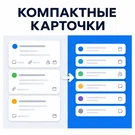
Compact cards in Kanban
The Compact Cards module for Kanban in Bitrix24 allows more tasks to be displayed on a single screen, speeding up team overview and management. Cards occupy less space, eliminating the need for constant scrolling. This simplifies the assessment of workload, statuses, and task movement across columns.