
Module
Site and portal monitoring
Website Monitoring is a service for the automatic verification of security, software versions, and configuration of websites and portals built on Bitrix: Site Management and Bitrix24 platforms.
Аккаунт в General iT
Войдите или создайте аккаунт для управления услугами в личном кабинете.
Страны не найдены. Попробуйте другое название или код.
MODULE FOR 1C-BITRIX
ITECH
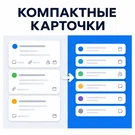
The Compact Cards module for Kanban in Bitrix24 allows more tasks to be displayed on a single screen, speeding up team overview and management. Cards occupy less space, eliminating the need for constant scrolling. This simplifies the assessment of workload, statuses, and task movement across columns.
The Compact Cards module for Kanban in Bitrix24 allows more tasks to be displayed on a single screen, speeding up team overview and management. Cards occupy less space, eliminating the need for constant scrolling. This simplifies the assessment of workload, statuses, and task movement across columns. The solution is particularly relevant for active project teams handling large volumes of tasks where standard cards become too bulky. Switching between compact and standard card views is done in one click. After installation, the module is immediately available in the Tasks interface via the 'Extensions' menu without complex setup. The tool is suitable for companies regularly using 'Tasks and Projects' in Bitrix24 and working with large volumes of tasks on boards: project offices, IT teams, implementation departments, customer service, sales, marketing, and internal services.
After installation, a Compact Cards toggle appears in the Extensions list within the Tasks and Projects section. This feature can be enabled in the My Plan, Deadlines, and Group Tasks Kanban views. Toggling it again restores the cards to the standard detailed view.
General iT can handle the implementation of “Compact cards in Kanban”, from installation to configuration and compatibility checks.
USER EXPERIENCE
How does this solution work in a real project? Share your experience and help others choose.
There are no reviews of this solution on git.ru yet. Tell us what worked well and what could be improved.
Verified purchaseAdd a key if you wish. A verified review gets a badge, priority placement and more rating weight.
Open to every clientJust sign in to your account. A key is optional; all reviews are moderated.
YOUR PROJECT INFRASTRUCTURE
FROM THE SAME DEVELOPER
ITECH
Website Monitoring is a service for the automatic verification of security, software versions, and configuration of websites and portals built on Bitrix: Site Management and Bitrix24 platforms.

The ITECH 'Notification Banners' module is designed to place prominent informational banners directly within the Bitrix24 interface. It enables the delivery of news, policy changes, deadlines, and maintenance notices to employees without relying on email campaigns or separate chats, eliminating the risk of important messages getting lost in the notification stream.
MORE FOR YOUR WEBSITE

The SMSBiz module is designed for sending SMS notifications in online stores and corporate portals built on the Bitrix platform. Installation and usage do not require programming skills. The deployment process takes a few minutes. The solution is built on the SMSInt service, which has been operating in the market for over 19 years.

The module allows you to quickly add a New Year atmosphere to your website. The package includes falling snow effects and interactive Christmas ornaments positioned at the top of the page.
Order statuses, payments, delivery, products, order properties, and abandoned carts are synchronized with the CRM without manual data transfer. The module connects an online store built on the 1C-Bitrix platform with deals in the Bitrix24 CRM system, ensuring two-way real-time data updates.
BEFORE YOU ORDER
