Flexible integration of orders and abandoned carts with Bitrix24
Order statuses, payments, delivery, products, order properties, and abandoned carts are synchronized with the CRM without manual data transfer. The module connects an online store built on the 1C-Bitrix platform with deals in the Bitrix24 CRM system, ensuring two-way real-time data updates.

ProfiCRM: Marketing Mailings - Message Personalization
The Proficrm: Marketing Mailings module provides tools for organizing email marketing on your website and within the Bitrix24 CRM system. The solution enables owners of online stores and corporate portals to increase sales and brand awareness with minimal costs. This effect is achieved through email personalization based on data from Bitrix24 and their automation.

Yookassa (Yookassa): payment acceptance, acquiring, automatic payments, marking data transfer
The Yookassa module provides integration with a popular Russian payment service for accepting payments and online acquiring. The solution supports transactions via bank cards and other payment methods available within the Yookassa ecosystem. Functionality includes automatic charging from saved cards and payment initiation based on order status.

Boxcart - Quick CRM Product Set
The Boxcart module by Gorillas is designed to accelerate work with ready-made product bundles in CRM. The application allows sales staff to quickly add items to a receipt using pre-created sets, eliminating the need for manual search and entry. The interface provides simple access to item editing and addition functions. When product parameters are changed, the order total updates automatically.

MAX: Sending Notifications
The MAX: notifications module provides a quick setup for delivering messages to specific groups in the MAX messenger based on standard 1C-Bitrix email events. The solution enables sending alerts for new orders, messages from contact forms, and other events. To operate, create a MAX chatbot and add the corresponding account to the module.
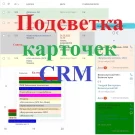
CRM Card Highlighting
The module enables color highlighting of CRM entity cards — leads, contacts, deals, companies, and smart processes — across all available views: list, pipelines (Kanban), tasks, and calendar.

Dexika: Prohibition of Changing Responsible Persons in CRM
The Dexika module allows configuring a prohibition on changing responsible persons in the CRM system for leads, deals, companies, and contacts.

Processes in CRM Cards
The module displays business process tasks directly within new CRM cards. Supported action types include requesting additional information, review, and approval. When a business process or robot awaits employee confirmation or new data, the notification appears within the card interface. Users can complete tasks without navigating to separate pages or opening new windows.

Collapsing blocks in CRM Bitrix24 and sorting form fields into two columns
Form minimizer module for CRM Bitrix24. Displays all field groups in a collapsed state. Groups can be expanded or collapsed on click. Form fields are arranged in two columns with the ability to reorder them.

Hide total deal amount in CRM Bitrix24 Kanban
This module hides the total deal amount per stage in the Bitrix24 CRM Kanban view by default. To display these figures, enable the 'Show total deal amount' checkbox in the settings dropdown menu.
User property type - "Visual Editor"
The module enables the creation of custom fields of the 'Visual Editor' type. Currently, multiple fields of this type are not supported. To add a field to a smart process, open the process card, navigate to the 'Additional Fields' section, and create a new field of type 'Visual Editor'.

ALSYST: Adding a company to a task from a group and project
The ALSYST module automatically associates companies with tasks created from groups or projects. The mapping between companies and groups is configured manually, allowing one or multiple companies to be linked to a single group. The process runs without user intervention, while mapping settings are accessible only to administrators.

ALSYST: Copying offers from lead to deal
The ALSYST module automatically transfers proposals from a Lead card to a Deal card. The transfer and linking of proposals occur in the background when a Lead with the status 'Successful' is converted into a Deal. All proposals containing added items and information are automatically copied to the new Deal.

Anmarto.DuplicationGuard
DuplicationGuard is a free module for finding fuzzy duplicates in Bitrix24 CRM. The standard duplicate control mechanism primarily identifies records based on exact value matches. This tool extends that capability by detecting similar leads, contacts, and companies even when data is entered in different formats.

Anmarto.DuplicationGuardPlus
Anmarto.DuplicationGuardPlus is a paid extension for the Anmarto.DuplicationGuard module that adds the capability to merge found CRM duplicates. Key features: - Merging duplicate leads, contacts, and companies. - Selecting a primary record to retain. - Pre-resolving conflicts between field values. - Confirmation required before executing potentially dangerous operations.

ALSYST: Adding a Company to a Task from a Lead or Deal
The ALSYST: Add Company to Task from Lead or Deal module automatically links tasks created from Deal or Lead cards to the corresponding companies. The binding occurs in the background without user intervention for all task types: those created manually, via robots, or through CRM business processes.

Auponomarev: Fixing the First and Last Interaction with the Client
The module automates the recording of the first and last contact times with a client in the CRM, enabling control over response speed and handling quality without manual data entry. The system logs completed calls via standard Bitrix24 telephony or integrated SIP phones. It also tracks sent and received emails linked to CRM records.
Custom field: Deal products
The awz.dealsproductfield module extends Bitrix CRM user field functionality by adding the awz_deals_product field type. This field enables the selection of deals from the CRM and specific products from the product sets of those deals. The field supports selecting multiple deals simultaneously.

AWZ: Case Routes
The awz.kpworks module is designed for creating and managing task routes within the Bitrix24 CRM system. It enables automatic routing of tasks between users and groups based on specific conditions and rules. Key features include route management, supporting the creation of an unlimited number of scenarios to automate task processing.

Meeting Calendar
The 'Meeting Calendar' module extends the functionality of the Bitrix24 calendar, providing tools for planning and tracking employee training activities. It supports the organization of trainings, excursions, master classes, and other educational events, either automatically or manually.

BestRank. Dependent Fields in CRM
The "Dependent Fields in CRM" module allows configuring field display and completion logic during record creation and editing. Three dependency types are supported: Dependent fields appear only after the parent field is filled. Dependent field values are filtered based on the selected value in the parent field (works for list fields, link fields, and Yes/No fields).

Additional tabs in CRM cards
The module extends CRM card functionality by allowing the creation of additional tabs and replacement of standard ones to facilitate work with related elements. Tab visibility can be configured for different user groups. Currently supported tab types include: Tasks — displays a list of tasks linked to the CRM object.

Mail Integration Extension
This module extends email management capabilities within Bitrix24. It enables administrators to control user mailbox connection settings to the CRM system. The module also allows attaching emails from mailboxes to various system objects, including tasks, leads, contacts, companies, deals, and smart processes.

Field type and property of information blocks: Extended binding to CRM elements
A new field type, 'Extended CRM Element Binding', has been added. It enables the display of additional information about a linked infoblock element. When searching for or viewing CRM elements, an extended set of fields can be shown.