
Hide task parameters
In the updated Bitrix24 interface, the task parameters panel has a fixed width. On screens with low resolution, such as laptops, it occupies nearly half of the workspace, significantly reducing the area available for communication, which is displayed as a chat. Often, task parameters do not require constant visual monitoring, yet they consume valuable screen space.
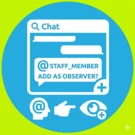
Adding an Observer to a task by tagging an employee in a comment
The module allows adding an Observer to a task by mentioning an employee in the task chat. This feature is available only in the updated Bitrix24 interface version.
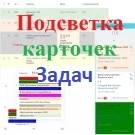
Task card highlighting
The module provides color highlighting for task cards across all available views: list, deadlines, my plan, calendar, and Gantt chart. To enable this functionality, a color code must be specified in the task field. The input method depends on the field type selected in the module settings for storing color codes.

Auto-task by template for new employees (Adaptation)
The module automatically generates tasks based on a predefined template when new employees are registered. The standard onboarding set may include reading company rules and history, reviewing the staffing schedule, and completing training on the corporate portal. The script monitors the event of a new user creation and generates the required tasks for them.

Auto-task from Email Pro
The 'Auto-Task from Email Pro' module enables creating tasks for employees by sending an email without logging into the portal system. Every task is automatically linked to a specific group. Task distribution among groups follows rules configured within the module.

NT: Task Completion Control
The Task Completion Control module enhances the efficiency of internal task monitoring. It hides task content from the assignee until they confirm the start of work, automatically enables time tracking, and requires submission of the result. The task creator sees all task information regardless of status. The assignee accesses full details only after clicking the Start button.

Scoder: Access to Bitrix24 Tasks
In Bitrix24, employees by default can view only tasks where they are assigned as executors or belong to the designated group. Managers have expanded access and can view tasks assigned to their subordinates. However, there is often a need to grant an employee access to tasks belonging to other users.

SIMAI: Smart Tasks for Bitrix24
The SIMAI: Smart Tasks for Bitrix24 module extends the functionality of standard tasks in the boxed version of Bitrix24. It addresses the issue of lost information regarding actions performed within tasks and enables smart task delegation. The system automatically creates task comments when checklist items are added, modified, or deleted.

Task Card in PDF
The module allows exporting a task card to PDF format. This is useful for offline workflows, such as preparing materials for printing and discussion during meetings or briefings. The exported document includes the following fields: General: task name and number; task creator; responsible person; co-executors; observers. Dates: creation date; deadline; actual completion date.
whatAsoft: Business Process Activity «Task Search»
whatAsoft Module: Task Search for Bitrix24 Business Processes This component is designed to search for tasks in the system based on specified criteria and generate a task list within business processes.
whatAsoft: Elapsed Time Taking Subtasks into Account
A component for on-premise Bitrix24 that displays the total time spent on a task, including all nested subtasks. Once installed on a task page, the solution immediately shows the aggregate time spent on the task and all its subtasks. This functionality is useful when a hierarchical task structure is used to break down work into smaller subtasks and a unified time tracking approach is required.

NBTech: Chat display settings in tasks
The NBTech: Task Chat Display Settings module for Bitrix24 allows flexible management of column widths in task cards and the messenger, as well as optimizing the chat list display. Employee needs vary: some require a detailed task description, while others need a wider area for active discussion. A standard ratio does not suit everyone.

NBTech: Automatically add mentioned users to task observers
The NBTech module for Bitrix24 automatically adds users to task watchers when they are mentioned in the task chat. During task discussions, employees often use @mentions to tag colleagues. While the mentioned user receives a notification for that specific message, they do not automatically become a chat participant or task watcher.

NBTech: Task Chat Messages Search
The NBTech: Task Chat Messages Search module extends full-text search capabilities in Bitrix24 by indexing the text of messages from task chats. Following the transition to the new discussion mechanism based on messengers, standard search stopped indexing task chat content, limiting results to task titles, descriptions, and standard fields.

Tasks Chats button in the messenger panel
The module adds a button to the right panel of Bitrix24 for navigating to the 'Task Chats' section. It is positioned directly below the notification bell icon and displays the count of unread messages from task chats. Typically, checking task correspondence requires opening the messenger and switching to the 'Task Chats' tab.

Group tasks by employees
The module adds a 'Group by Employees' mode to the personal task list and Gantt chart for the on-premise version of Bitrix24. In this mode, tasks for each assignee are grouped separately. The group header displays the employee's name and a link to their profile. Groups can be collapsed or expanded to focus on a specific employee.

5 Corners. Email Notifications
5 UGLOV. Email Notifications After tasks were moved to chats in Bitrix24, the system stopped sending email notifications about task changes and messages from their chats. Status changes, deadline shifts, or colleague replies in a task now require logging into the portal to check. The 'Email' checkboxes in employee notification settings remain but no longer function.