
Group Order Printing
The module allows printing selected orders directly from the list. The user marks the required items, selects the print form, and initiates the process.
Intec.Cabinet - buyer's personal cabinet for an online store (B2B and B2C)
Intec.Cabinet is a customer personal cabinet module for online stores, supporting B2B and B2C clients. The solution provides a user-friendly interface for order and profile management. The module is compatible with any ready-made solutions on the 1C-Bitrix platform, starting from the Small Business edition.

Delivery address auto-fill via KLADR
The module resolves the issue of incorrect address entry in the standard Bitrix checkout form, where the address field is an arbitrary text string. This leads to customer errors, requires manual data verification by managers, and causes integration problems with delivery services due to incompatible address formats.
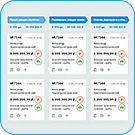
Order Board
The Order Board module provides a classic Kanban interface for managing the order list. The order card displays key properties and the product list, with support for printing order forms. Order status is updated by dragging cards between columns. Payment and shipment status can be marked directly on the board.

Quick order status switch
This module adds buttons to the order detail page for quickly changing the order status. Online stores often define many statuses, yet during manual processing, managers use only a small subset. Constantly opening the list, searching for the required option, and then clicking the 'Save' button creates unnecessary friction. The solution displays toggle buttons only for the selected statuses.

Route Sheet
The Itinerary module is designed to create individual tasks for couriers. The document contains complete delivery information: time, recipient contacts and address, order amount and composition, and comments. For suppliers, it displays working hours, contact details, payment terms and amount, and the list of goods.

Simple Order Checkout
Simple order checkout module by Tega. This is an easily customizable component provided to developers with source code in its current state. Technical support and further development of this solution are not provided. The component supports order checkout without mandatory user registration. In this case, the order is linked to the 'Anonymous Buyer' user specified in the settings.

Delivery calculation: MKAD, KAD and arbitrary zones
The module adds delivery services to an online store with cost calculation based on the customer's address. Addresses are refined using the DaData service, which provides input suggestions and determines geographic coordinates. DaData usage tariffs are published on the service's official website.

Change order status using a QR code
The module allows updating order statuses by scanning QR codes. This solution is relevant when a company uses its own delivery service. After the courier hands over the goods, they scan a QR code placed on the order form, which automatically changes the order status to 'Delivered'. The link embedded in the code directs to the store page where the status is updated.

WebKHV: Honest Mark Adjustment Module
The WebKHV module automatically corrects 'Honest Sign' (Chestny Znak) marking codes by inserting the GS separator where it is missing. This functionality addresses data received from budget or improperly configured scanners. Code correction occurs automatically upon order saving. Administrators do not need to perform any additional actions after scanning other than saving the order parameters.

Notifications in MAX: orders, forms, information blocks
The module instantly notifies managers in the MAX messenger about new online store orders, web form submissions, and new elements in selected information blocks. This solution is particularly useful for editions lacking the Web Forms module, such as Start, where submissions are often saved to information blocks.

Order Merge
The 'Order Merge' module automates the consolidation of multiple orders into a single document, accelerating processing and reducing the risk of errors. This functionality is designed for scenarios where a customer places a repeat order, adds items, or requests consolidated delivery.

AmoCRM — integration with the website. Forms, events, orders
Module for automatic integration of a website on the 1C-Bitrix platform with the amoCRM system. The solution ensures the transfer of data about potential clients and orders, connecting the web resource with the customer relationship management system. Problems solved by the module: Loss of potential clients — submissions from web forms do not reach the CRM system in a timely manner.

Customer Profiles
The module includes the component abcwww:sale.personal.profile for creating, editing, and deleting customer profiles. A customer profile is a set of data associated with a specific buyer, used to simplify the order placement process. Profiles automate and accelerate ordering by eliminating the need for customers to re-enter their information each time.

AWZ: Stock Limitation for a Single Warehouse
The module adds a delivery restriction rule that verifies whether all items in the cart are available on a single selected warehouse. If any item is missing in the required quantity at the warehouse, the delivery method becomes unavailable for the order. The module integrates with the OnSaleComponentOrderJsData and OnSaleComponentOrderDeliveriesCalculated events.

Sales Statistics
The module displays sales statistics for a selected product across three time ranges: the last 30 days, the last 365 days (1 year), and the entire period since tracking began.
BX365: Available product quantity
The BX365: Available Product Quantity module extends standard inventory management by automatically adjusting stock levels when order status changes. Details of stock deductions or returns are recorded in the 'Change History' tab of the order card. This solution is suitable if built-in inventory control features do not meet your business requirements.

BXmaker. Order Comments
The module enables operators to add comments to orders, automatically recording the date, time, and author of each entry. It supports the creation of comment templates for quick insertion; if no suitable template exists, operators can enter custom text.

Processing of Unpaid Orders
Online stores frequently encounter orders placed by customers that remain unpaid. In a high volume of transactions, such orders can easily be lost, making manual tracking difficult. The CAPYBARA digital module automates the processing of unpaid orders, allowing merchants to select a specific handling strategy. Two scenarios are available for unpaid orders: automatic deletion or status change.

Cmall: Honest Sign — Removal from Circulation
Support for the module's operation in permit mode has been added: data exchange with Trade Data Collection Terminals (TC PiOT) and retrieval of marking status occur via the API of your cash register machine (CRM). To verify compatibility with your specific cash register model, please contact technical support.

Cmall: Master Scanner (BLE)
The Master Scanner (BLE) module is designed to work in conjunction with the Honest Sign - Withdrawal from Circulation module. It provides two-way communication between a Bluetooth scanner and the order picker's workstation within the 1C-Bitrix admin panel.
Integration with Bitrix24: orders, web forms, statuses, payments, products, and stock levels
This module provides two-way integration between the 1C-Bitrix CMS and the Bitrix24 platform. Order data, products, payments, statuses, and web forms are automatically transferred to the CRM while preserving analytics, UTM parameters, and linking to existing clients. Orders and web form data are automatically sent to Bitrix24 Deals and Leads.

HamkorBank Payment Module
The HamkorBank payment module enables accepting payments via any method convenient for your customers. Simple integration and setup ensure a quick start to sales. The PHP CURL extension must be installed for the service to function correctly. Current information about the product and tariffs is available on the bank's official website.
Interland: Event Ticket Sales
The 'Event Ticket Sales' module enables organizers to sell tickets via their own website, accept card payments, and verify entry using QR codes. The system does not utilize seating charts; instead, tickets are defined as tariffs with specific quotas, covering most scenarios without unnecessary complexity.