Payments are experiencing issues due to temporary restrictions in Russia. If your payment does not go through, please submit a support request.•Our support team is available 24/7 — we are always here to help with hosting and server issues.•We are now accepting requests for dedicated server rental and colocation services in our data center.•Reminder: we recommend enabling backups for additional data protection.•A new VPS/VDS lineup with NVMe storage and improved performance is now available.•Maintenance work on some servers has been completed. All services are operating normally.•
Payments are experiencing issues due to temporary restrictions in Russia. If your payment does not go through, please submit a support request.•Our support team is available 24/7 — we are always here to help with hosting and server issues.•We are now accepting requests for dedicated server rental and colocation services in our data center.•Reminder: we recommend enabling backups for additional data protection.•A new VPS/VDS lineup with NVMe storage and improved performance is now available.•Maintenance work on some servers has been completed. All services are operating normally.•
Аккаунт в General iT
Вход / Регистрация
Войдите или создайте аккаунт для управления услугами в личном кабинете.
Страны не найдены. Попробуйте другое название или код.
MODULE FOR 1C-BITRIX
INTEC
Intec.Cabinet - buyer's personal cabinet for an online store (B2B and B2C)
Intec.Cabinet is a customer personal cabinet module for online stores, supporting B2B and B2C clients. The solution provides a user-friendly interface for order and profile management. The module is compatible with any ready-made solutions on the 1C-Bitrix platform, starting from the Small Business edition.
Intec.Cabinet is a customer personal cabinet module for online stores, supporting B2B and B2C clients. The solution provides a user-friendly interface for order and profile management. The module is compatible with any ready-made solutions on the 1C-Bitrix platform, starting from the Small Business edition.
If you encounter issues during the update process, review the instructions in the 'Installation' tab and follow the described steps before contacting technical support.
The Intec.Cabinet module provides a customer personal cabinet for online stores, supporting B2B and B2C scenarios. The solution is developed by INTEC for the 1C-Bitrix platform. This description includes details of a temporary promotion that is not part of the product's permanent functionality. The promotion applies only to solutions purchased in the current month and allows receiving one additional module for each purchased solution. Participation requires filling out a form or contacting a personal manager. Contact details and temporary offer conditions are excluded from the permanent product description.
The Intec.Cabinet module is a buyer's personal cabinet for an online store, adapted for B2B and B2C scenarios. The functionality includes managing customer accounts, viewing order history, and configuring personal data.
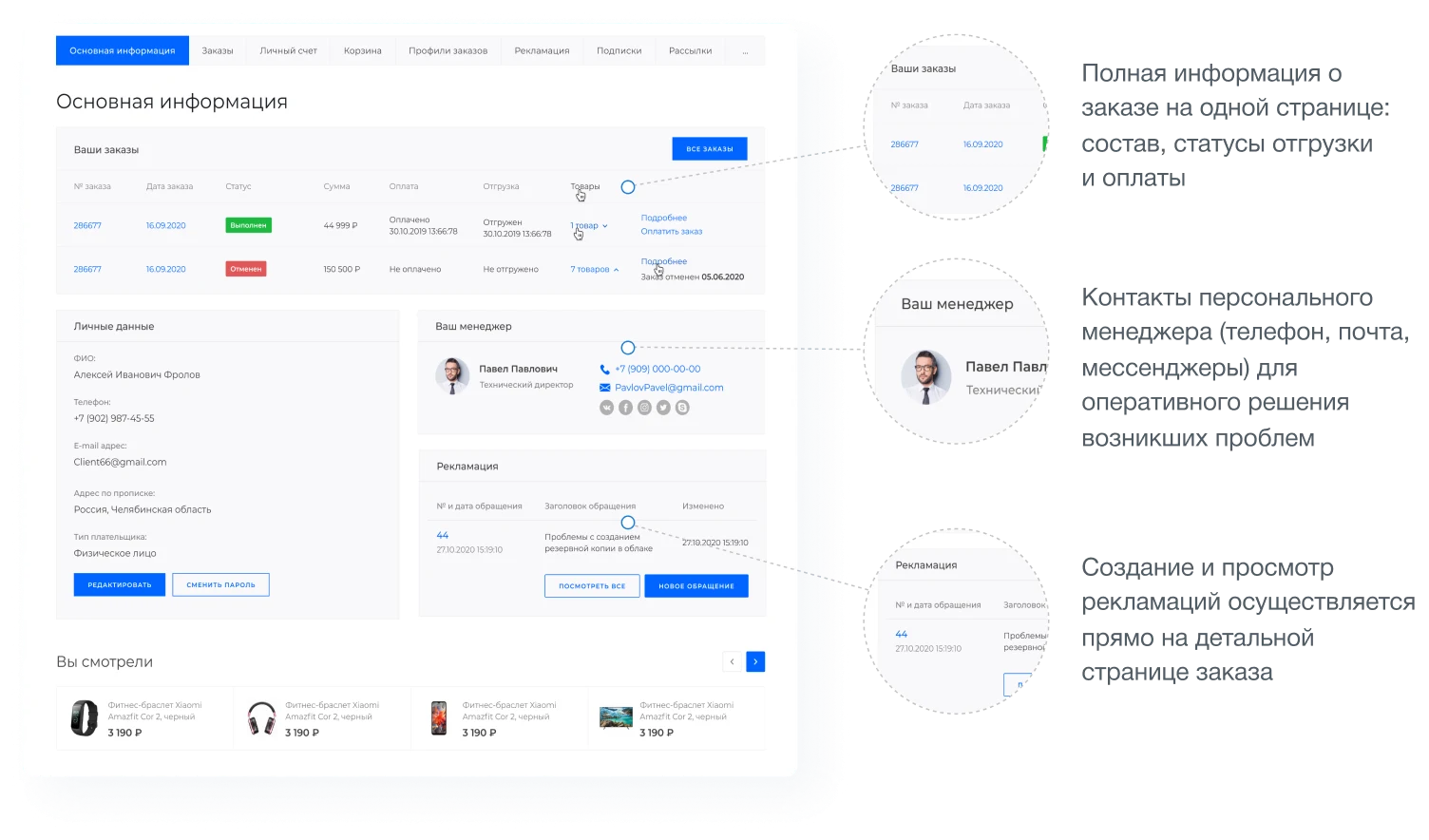
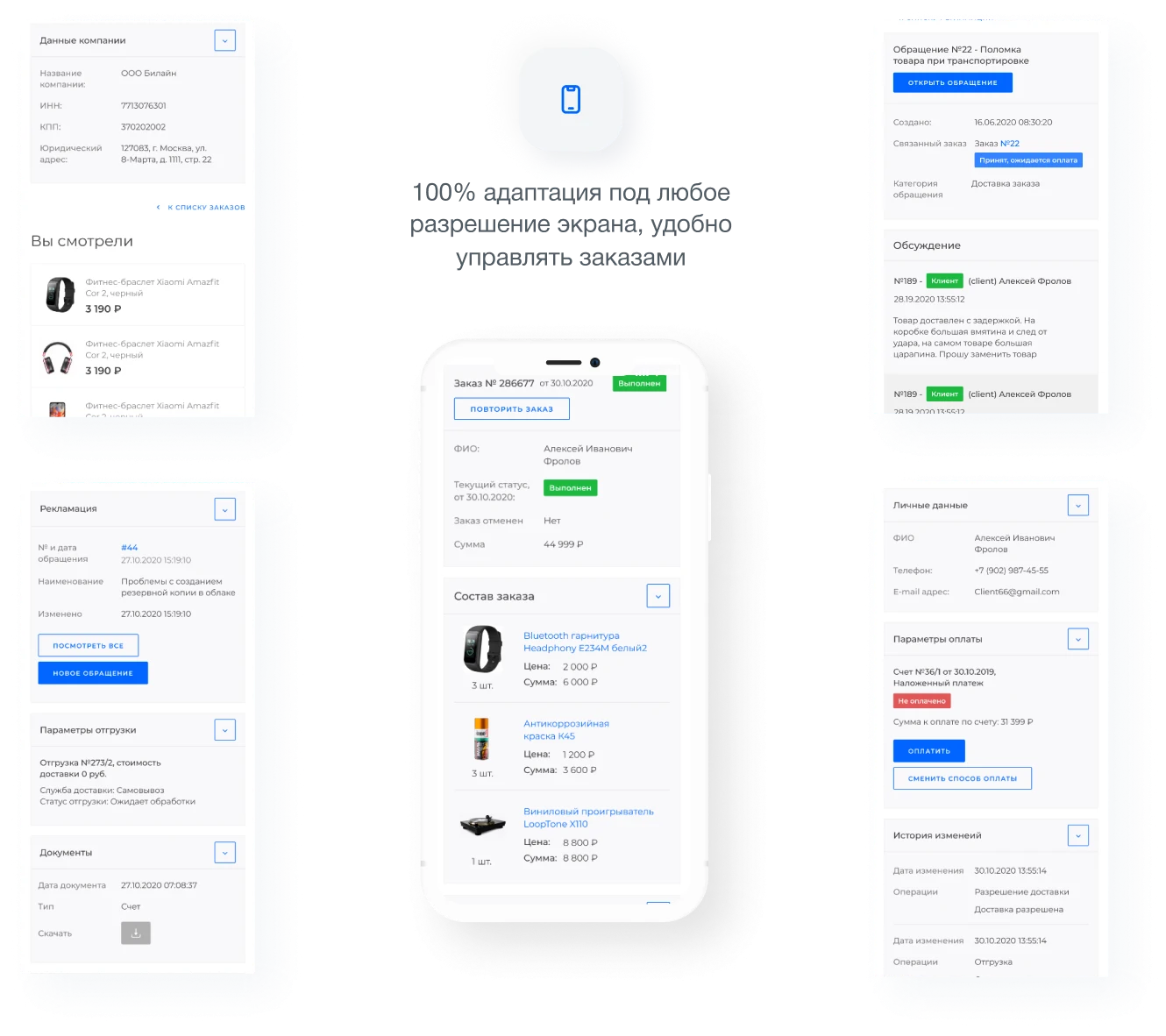
The main page of the personal cabinet displays complete order information, including item composition and shipping and payment statuses. Contact details for a personal manager, such as phone number, email, and messengers, are available to resolve issues promptly. Claims can be created and viewed directly on the order details page.
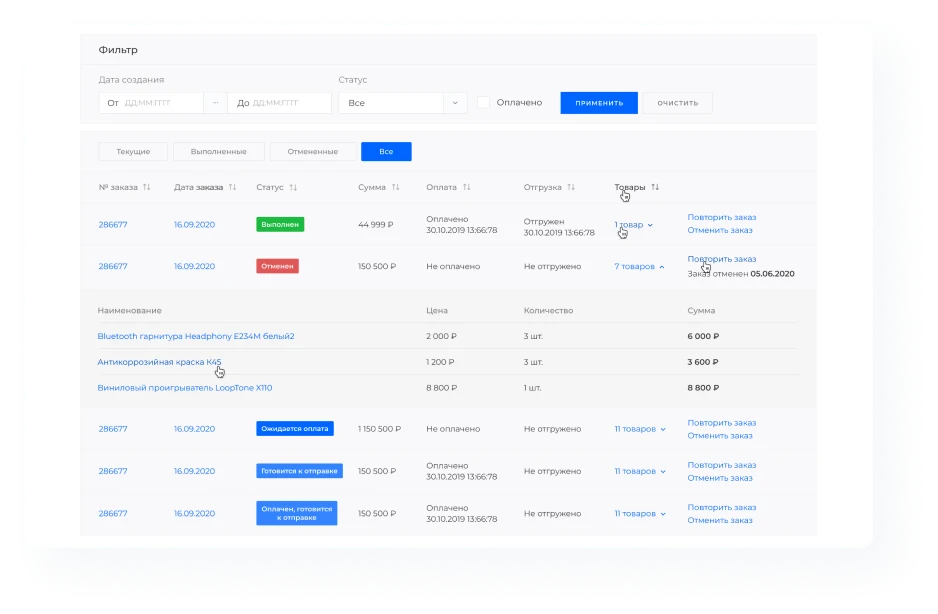
Order list
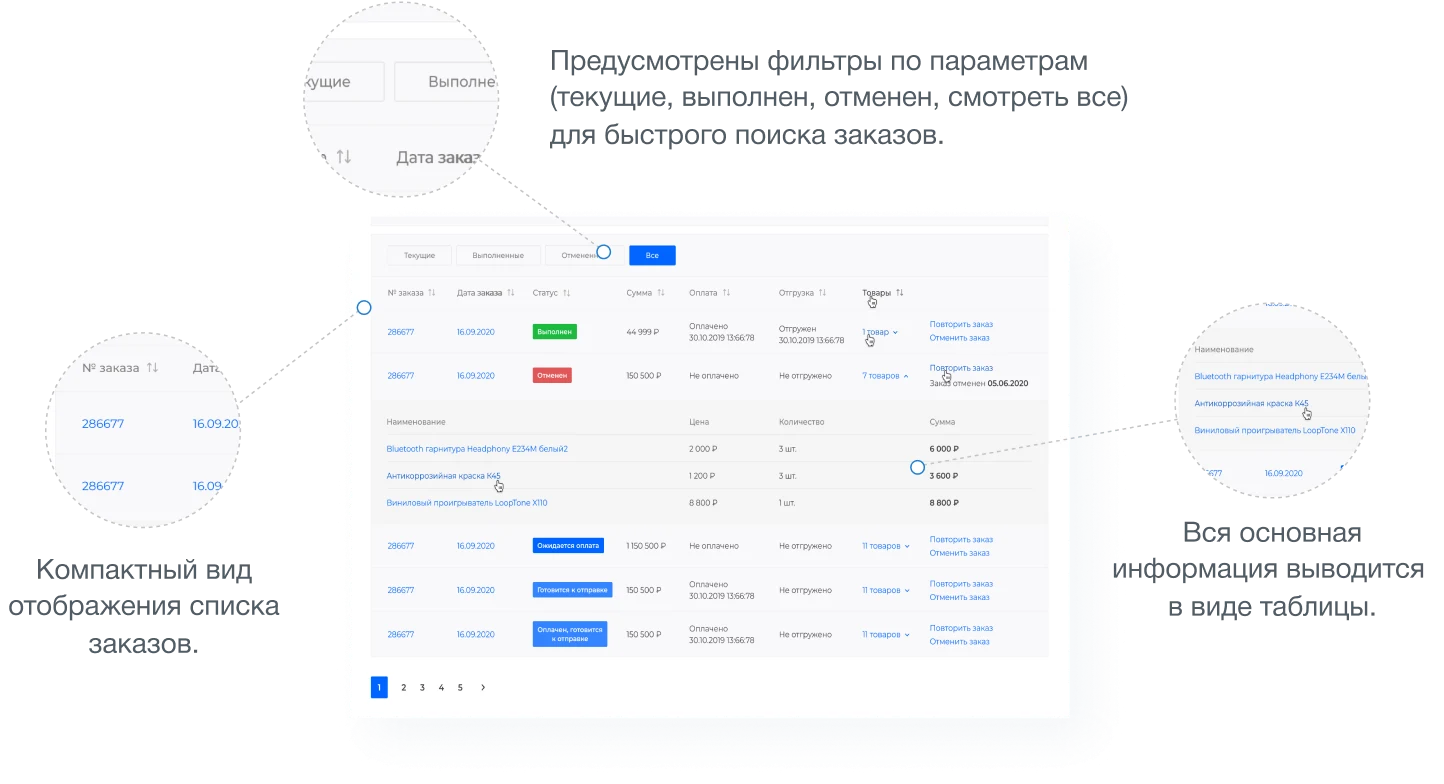
Displays the order list in a compact view. Filters by parameters are provided for quick order search. All core information is presented in a table format.
Detailed order card
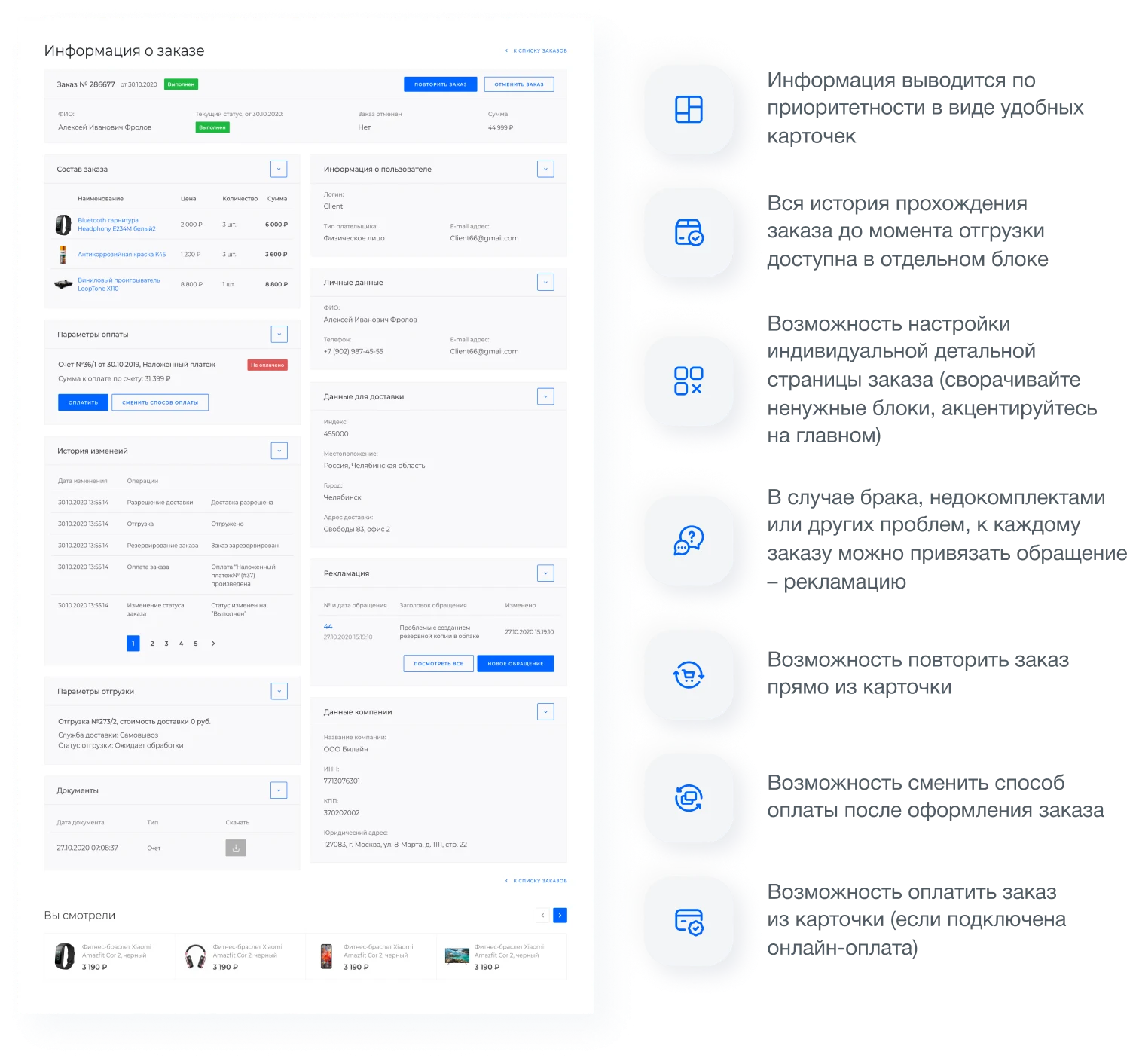
Order information is displayed in convenient blocks grouped by priority. The complete history of the order's movement up to the shipment moment is available in a separate section.
The system supports customization of the individual detailed order page. In case of defects, incomplete shipments, or other issues, a complaint (claim) can be linked to the order.
From the order card, users can repeat the order, change the payment method after the order is placed, and pay for the order directly.
Internal Account
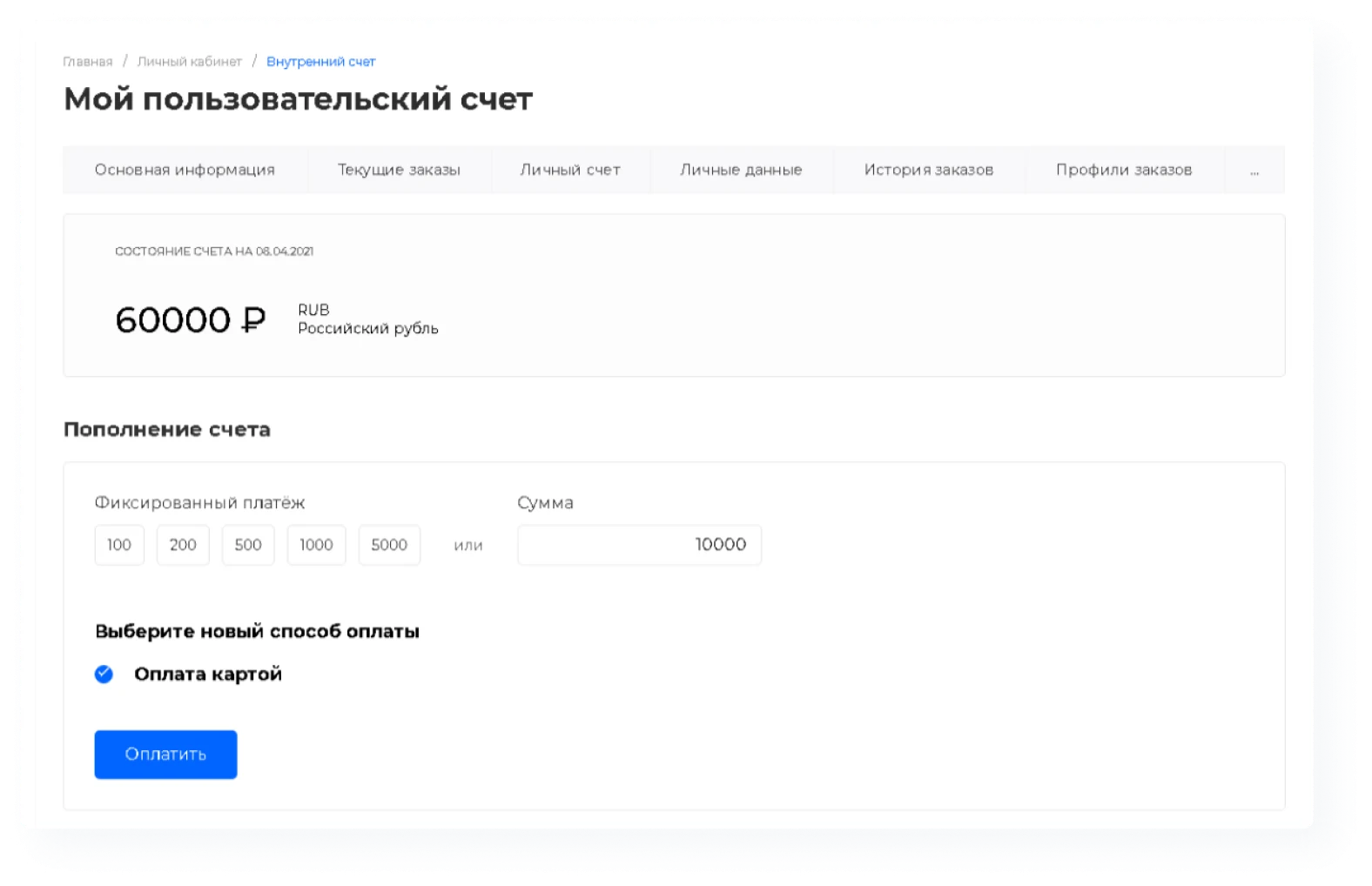
Users can top up their internal account balance and use the accumulated funds to pay for orders.
Order Profiles
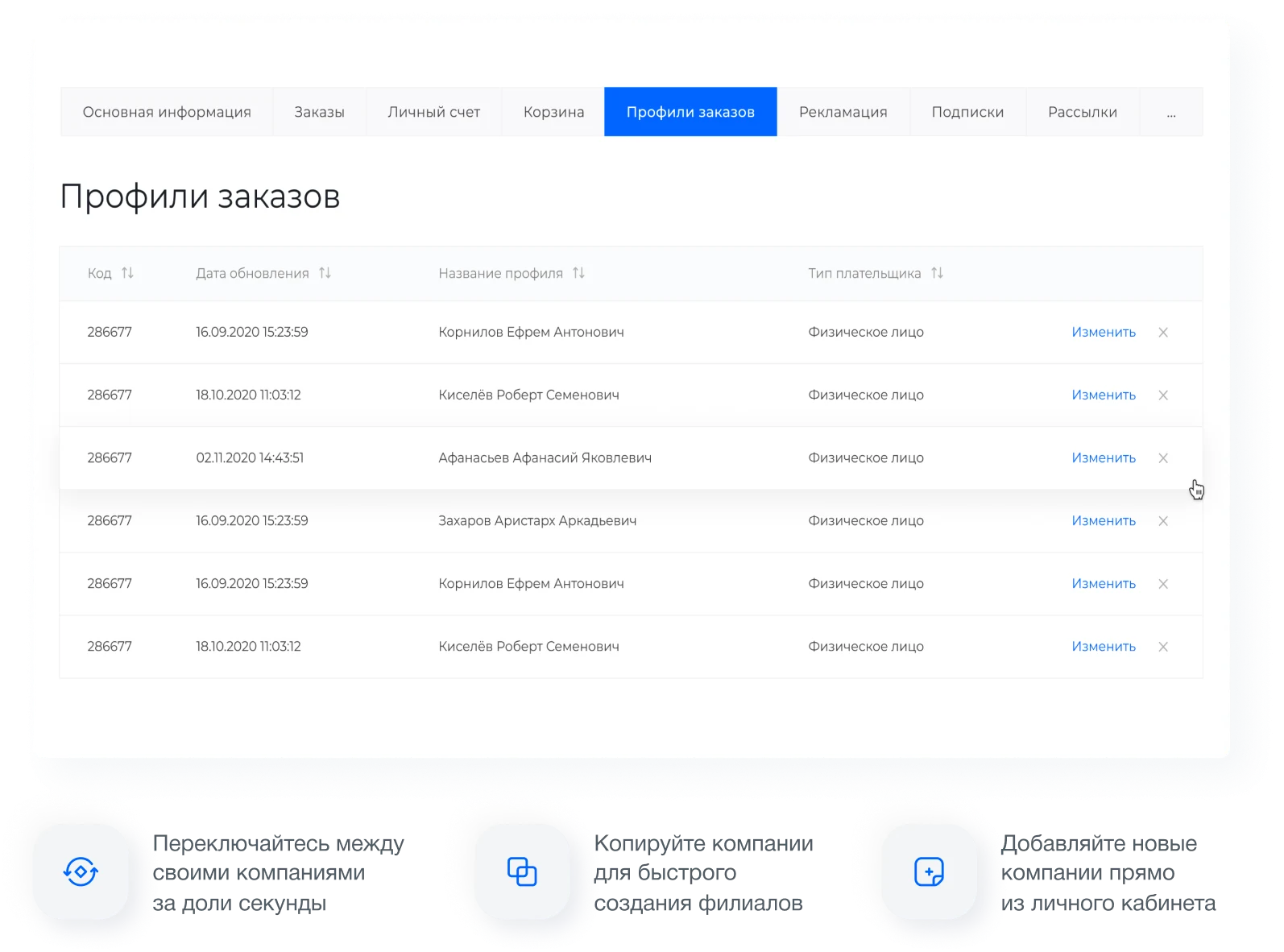
This section is designed for creating and editing buyer profiles. The functionality allows placing orders on behalf of various legal and natural persons within a single account, supporting multi-regional operations.
The mobile version provides full interface adaptation to any screen resolution, enabling convenient order management from mobile devices.
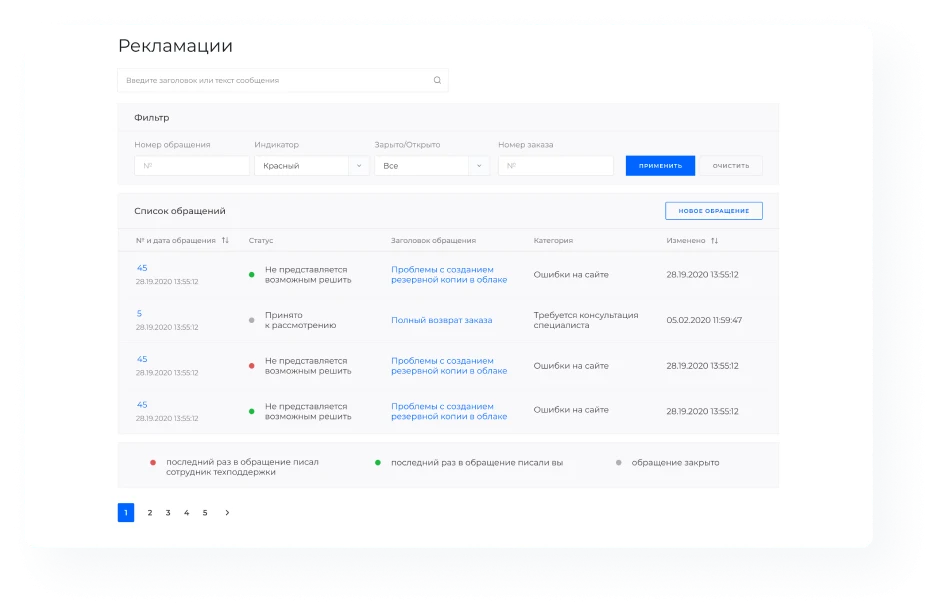
The 'Claims' section includes a convenient filter for searching requests and clear visual indicators of their statuses.
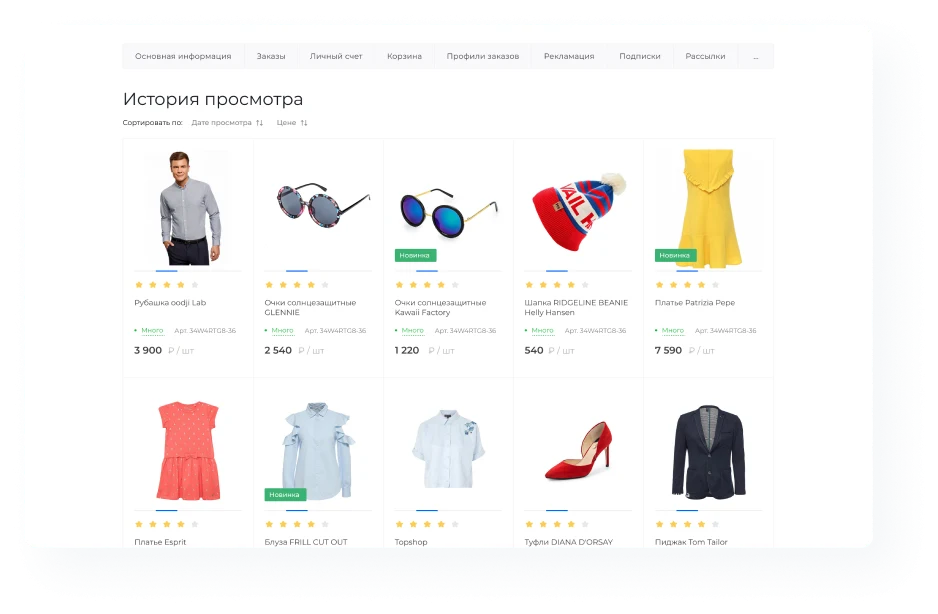
Viewed Items section
A dedicated page for quickly ordering items that were previously viewed.
Order History
This section allows viewing information about completed orders.
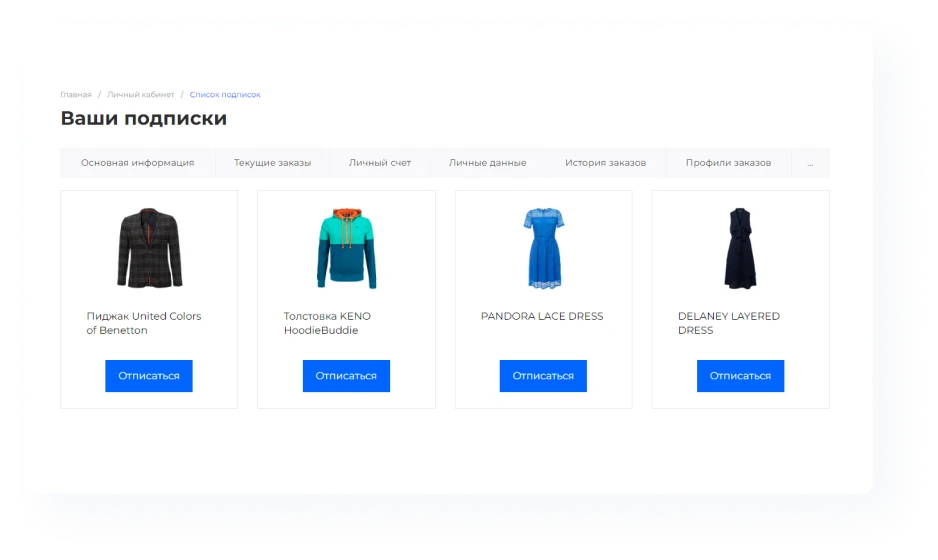
Subscription for out-of-stock items. When an item becomes available, an automatic notification is sent to the user's registered email address.
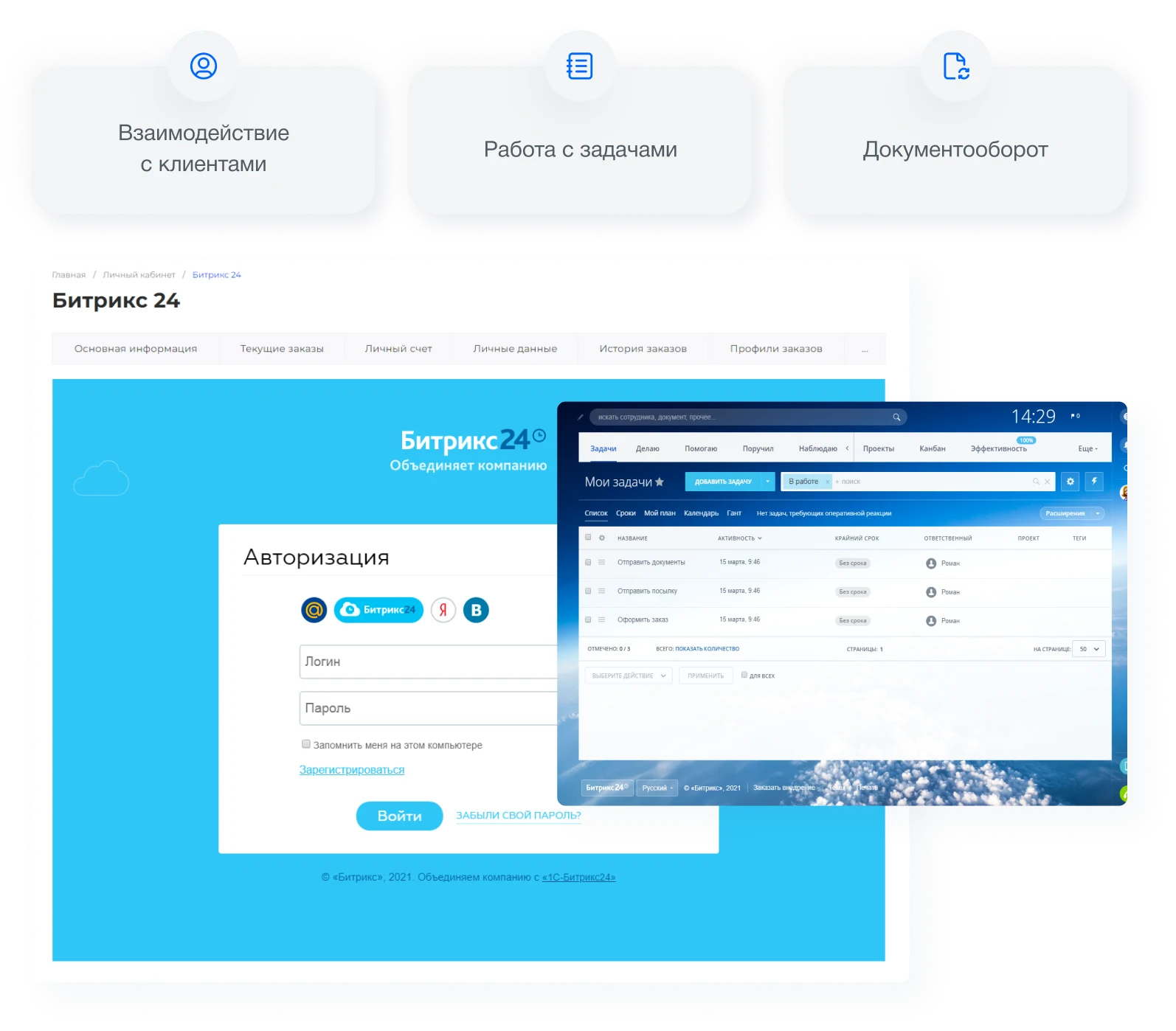
The module provides integration with the Extranet functionality in Bitrix24. This allows clients to perform operations within the Bitrix24 system directly through the buyer's personal cabinet.
The Intec.Cabinet module is a buyer's personal account designed for online stores operating in B2B and B2C formats. Its functionality includes a section with special terms for partners.
Intec.Cabinet is a buyer's personal cabinet module for online stores supporting B2B and B2C scenarios. The solution is compatible with the 1C-Bitrix platform starting from the Small Business edition and can be installed on ready-made configurations.
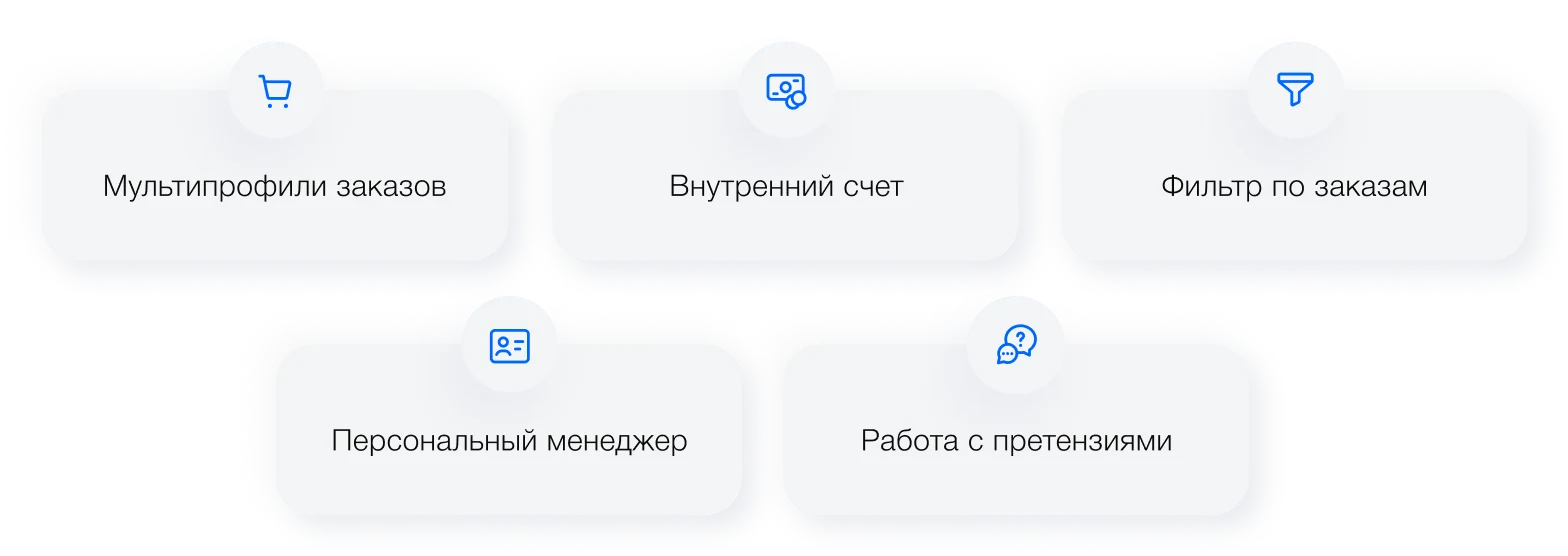
The module features include multi-profile order management, internal invoice generation, order filtering by status and personal manager, and tools for handling complaints.
The main page of the personal cabinet displays detailed statistics in chart format, allowing comparison of metrics by employees, departments, or time periods. Full order information is available on a single page, including item composition, shipping status, and payment status.
Complaints can be created and viewed directly on the detailed order page, as well as in a comprehensive list covering all orders. For quick issue resolution, the personal manager's contact details are provided, including phone number, email, and messengers.
The order list section includes filters for fast searching by parameters: current, completed, cancelled, or show all records.
The order list is displayed compactly, with all key information presented in a table format. The detailed order card is structured by priority into convenient blocks. The complete order history up to the shipment moment is available in a separate section. Users can customize the individual order page by hiding unnecessary blocks and focusing on essential data. In cases of defects, incomplete shipments, or other issues, a complaint can be linked to the order. The order can be repeated directly from the card. After order creation, the payment method can be changed. If online payment is enabled, payment can be made directly from the order card. The personal internal account allows users to top up the balance on the site and use these funds for future orders. The order profiles section is designed for creating and editing buyer profiles, including placing orders for different legal and natural persons under a single set of credentials (multi-profile capability). Switching between companies is instantaneous. Companies can be copied to quickly create branches, and new organizations can be added directly from the personal account. A mobile version of the interface is available.
Intec.Cabinet is a customer personal cabinet module for online stores supporting B2B and B2C scenarios. The interface is fully responsive to any screen resolution and displays correctly on all types of mobile devices and monitors.
The 'Complaints' section features a convenient filter for searching inquiries and clear status indicators. The 'Viewed Products' section provides a dedicated page for quickly reordering previously viewed items. The 'Order History' function allows searching for information on completed orders.
A subscription feature for out-of-stock items is implemented: users receive an email notification as soon as the product becomes available.
The module integrates with the 'Bitrix24 Extranet' module, enabling clients to interact with Bitrix24 directly from the personal cabinet. This includes task management, client interaction, and document management.
Key module capabilities:
- Complete order information in a single interface
- Responsive mobile version
- Intuitive interface
- Convenient complaint management
- Integration with 1C and CRM systems
Intec.Cabinet is a ready-made module for customer personal accounts in online stores, supporting B2B and B2C scenarios. The solution is compatible with the 1C-Bitrix platform and can be installed on any ready-made products of this platform, starting from the Small Business edition. The module is integrated into the IntecUniverse solution ecosystem and is available for deployment on third-party developments.
Intec.Cabinet is a personal cabinet module for online stores, supporting B2B and B2C customer workflows. The solution is compatible with ready-made platforms based on 1C-Bitrix, starting from the Small Business edition.
General iT can install and configure this module and check how it works on your website.
USER EXPERIENCE
Solution reviews
How does this solution work in a real project? Share your experience and help others choose.
Be the first to share your experience
There are no reviews of this solution on git.ru yet. Tell us what worked well and what could be improved.
✓
Verified purchaseAdd a key if you wish. A verified review gets a badge, priority placement and more rating weight.
↗
Open to every clientJust sign in to your account. A key is optional; all reviews are moderated.
INTEC.Universe SITE is a corporate website featuring a design constructor. The solution supports the creation of Landing Page pages and utilizes adaptive layout to ensure correct display across various devices.
IntecUniverse Lite is an e-commerce template for the 1C-Bitrix platform featuring a built-in design constructor. The solution allows rapid customization of the website appearance without requiring advanced programming skills.
INTEC.Universe is a template for an online store built on the 1C-Bitrix platform, featuring a design builder. The solution enables the creation and customization of the storefront's appearance without requiring deep programming skills.
The Sotbit Smart Filter SEO module is designed to increase online store traffic. The tool operates by generating numerous unique pages for smart filters.
SDEK integration module for 1C-Bitrix.
SDEK is one of Russia's largest logistics companies, providing courier delivery and operating a network of pickup points.
The module connects the online store with the SDEK personal account, offering the following capabilities:
Providing customers with delivery options: courier, pickup point, or postmat.
The module is designed for the «1C-Bitrix: Site Management» platform and enables importing infoblock elements, including products, from Excel files. It also supports data loading into Highload blocks.
The displayed price covers the solution itself. Platform licensing, installation and customisation are checked separately. If the page offers bundles, select the required option before submitting a request.
How do I check compatibility?
Compare the supported editions and solution version in the technical details with your project. Before installing on a live website, we recommend making a backup and checking the solution in a test environment.
Is there a trial?
The developer lists a trial of 5 days. The trial button opens the installer in your website control panel. Check the required features and compatibility before purchasing.
How much does this solution’s renewal cost?
The current renewal price is 8,950 ₽. Before you order, a manager will confirm the renewal period and whether it applies to your licence.
Can you help with implementation?
We can help install the module, check its settings and verify how it works in your project. Compatibility with other customisations and the scope of work are assessed before we begin.
Statistics and interaction recording
Public pages use basic statistics. Our recording and Yandex Webvisor require your permission. You can keep basic statistics or disable all analytics.
Operator: General IT Rus LLC, INN 2310208877. Statistics and recording help improve the website.
Basic statistics: pageviews, a random daily ID, a public URL and time. The ID lasts until Moscow midnight. Original records: up to 48 hours; totals: up to 7 years.
Campaign tags and a technical identifier are sent by our server to the existing Yandex tag. Visitor IP, User-Agent and cookies are not included in this transfer. If selected, its browser code collects technical data, cookies, actions and masked page snapshots; recordings last 15 days. Inputs, chat and account areas are hidden.
Interaction recording requires permission: clicks, scrolling, technical information and filtered public-page snapshots. Events: up to 7 years; IP and snapshots: up to 90 days.
Permission is remembered for up to 365 days; full opt-out remains until changed. Basic statistics only disables recording; Disable all analytics stops new analytics. Previously sent data is not automatically deleted. Withdrawal and requests: support@git.ru. Full terms are linked below.
Your browser requests no tracking: analytics is off.