Payments are experiencing issues due to temporary restrictions in Russia. If your payment does not go through, please submit a support request.•Our support team is available 24/7 — we are always here to help with hosting and server issues.•We are now accepting requests for dedicated server rental and colocation services in our data center.•Reminder: we recommend enabling backups for additional data protection.•A new VPS/VDS lineup with NVMe storage and improved performance is now available.•Maintenance work on some servers has been completed. All services are operating normally.•
Payments are experiencing issues due to temporary restrictions in Russia. If your payment does not go through, please submit a support request.•Our support team is available 24/7 — we are always here to help with hosting and server issues.•We are now accepting requests for dedicated server rental and colocation services in our data center.•Reminder: we recommend enabling backups for additional data protection.•A new VPS/VDS lineup with NVMe storage and improved performance is now available.•Maintenance work on some servers has been completed. All services are operating normally.•
Аккаунт в General iT
Вход / Регистрация
Войдите или создайте аккаунт для управления услугами в личном кабинете.
Страны не найдены. Попробуйте другое название или код.
MODULE FOR 1C-BITRIX
Income Media
Select outgoing number in CRM
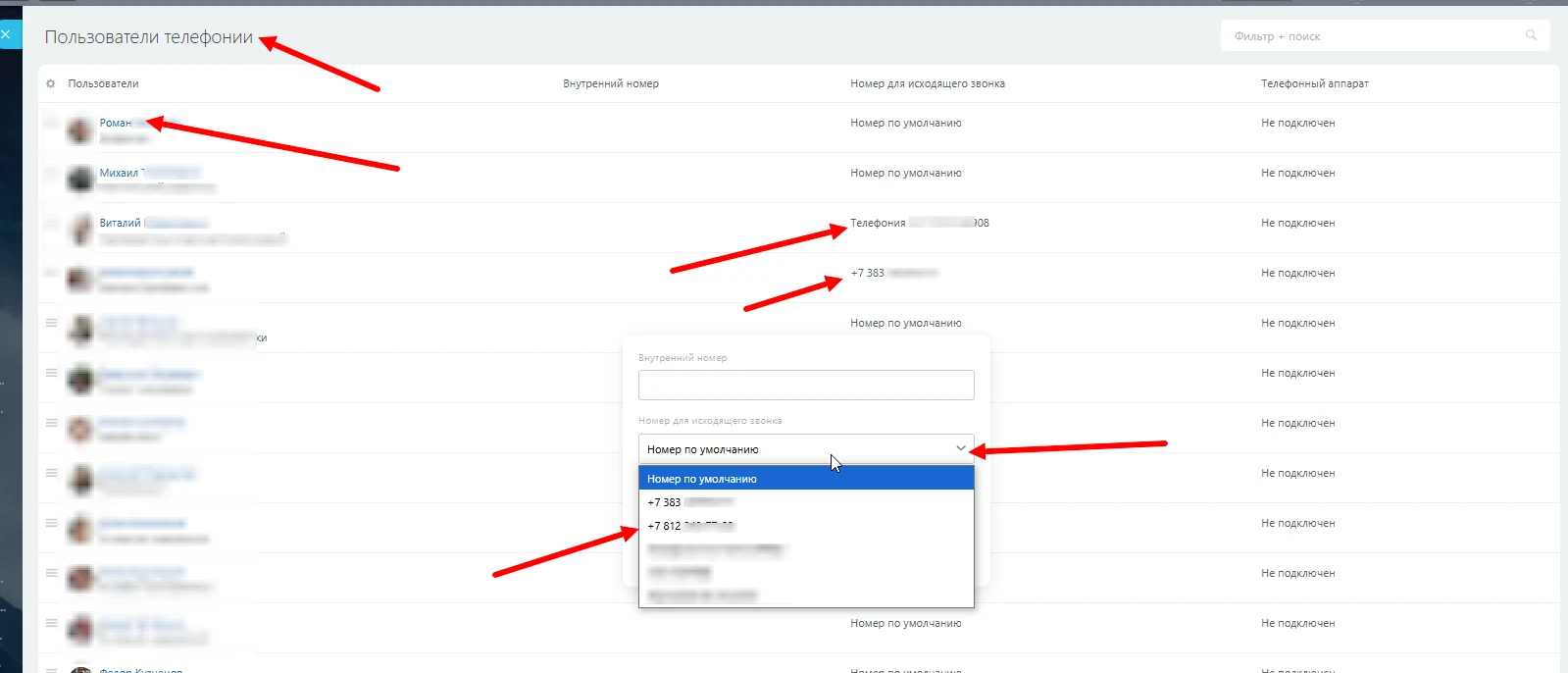
In the standard CRM workflow, employees cannot manually select a specific number for outgoing calls. Clicking a client's phone number in the entity card initiates a call using the number configured in the employee's telephony settings as the default outgoing number.
In the standard CRM workflow, employees cannot manually select a specific number for outgoing calls. Clicking a client's phone number in the entity card initiates a call using the number configured in the employee's telephony settings as the default outgoing number.
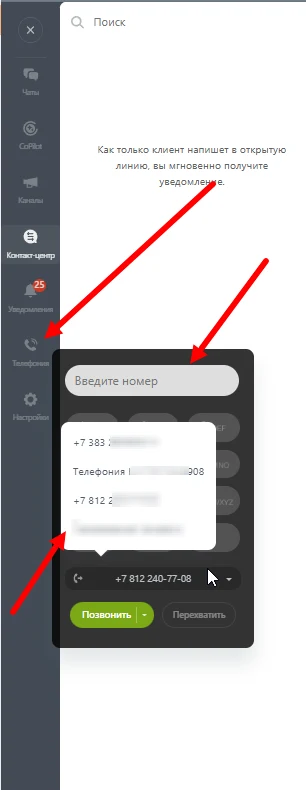
To place a call from another available number, copy the phone number and initiate the call via the dialer menu in the contact center.
The module enables an employee to select an outgoing call number directly from the CRM card. The value selected in the entity record synchronizes with the outgoing number field in the telephony settings. This ensures the number can be chosen immediately before initiating a call with a client.
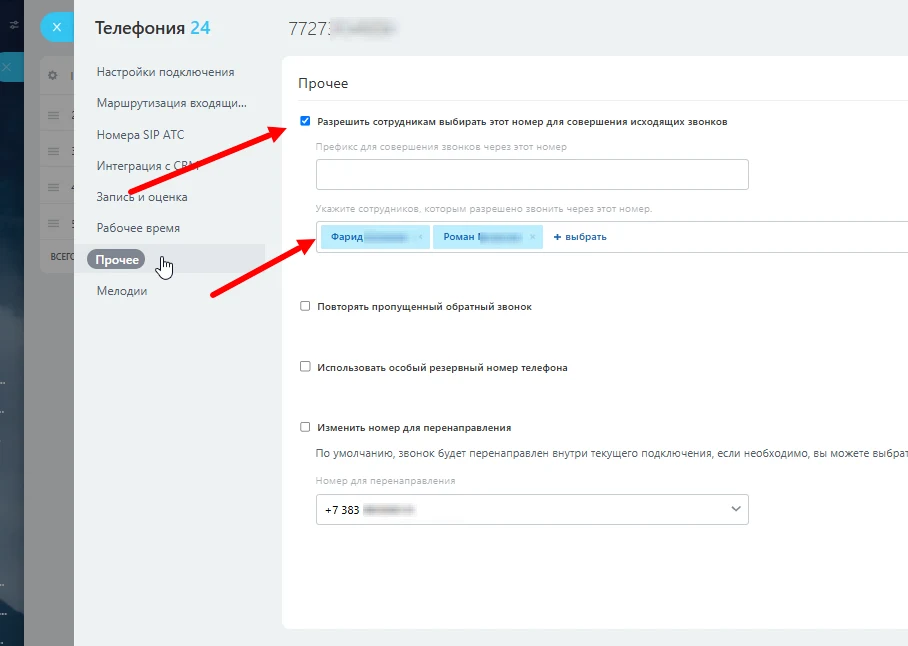
Access to view and select a number in the card is governed by permission settings. The number is available for selection only to employees with permission to make outgoing calls. This restriction does not apply to numbers connected via third-party PBX integration applications.
General iT can install and configure this module and check how it works on your website.
UPDATE HISTORY
What’s new
1 releases
1.0.2 (10.12.2025)Latest update
Fixing module operation in demo mode
USER EXPERIENCE
Solution reviews
How does this solution work in a real project? Share your experience and help others choose.
Be the first to share your experience
There are no reviews of this solution on git.ru yet. Tell us what worked well and what could be improved.
✓
Verified purchaseAdd a key if you wish. A verified review gets a badge, priority placement and more rating weight.
↗
Open to every clientJust sign in to your account. A key is optional; all reviews are moderated.
VARS is a duty AI bot for portal security monitoring. It delivers notifications about suspicious activity and security incidents to the personal messages of responsible employees in Bitrix24. The bot's messages are concise, informative, and include a brief comment on the risk level, making them easier to read than standard system alerts.
The CRM Security Log module maintains a complete audit trail of employee actions on system data, helping to detect customer base theft attempts in a timely manner.
The component records operations with contacts, deals, leads, and companies: creation, modification with logging of changed fields and their previous and new values, deletion, as well as bulk views and exports.
The Income Media: Phone Number Hiding for Bitrix24 module restricts employee access to customer contact data and reduces the risk of unauthorized database copying.
The solution masks phone numbers in the portal interface while preserving standard CRM and telephony logic.
Data masking operates across all key CRM entities: leads, deals, contacts, companies, and open line chats.
The SMSBiz module is designed for sending SMS notifications in online stores and corporate portals built on the Bitrix platform. Installation and usage do not require programming skills. The deployment process takes a few minutes.
The solution is built on the SMSInt service, which has been operating in the market for over 19 years.
The module allows you to quickly add a New Year atmosphere to your website. The package includes falling snow effects and interactive Christmas ornaments positioned at the top of the page.
Order statuses, payments, delivery, products, order properties, and abandoned carts are synchronized with the CRM without manual data transfer. The module connects an online store built on the 1C-Bitrix platform with deals in the Bitrix24 CRM system, ensuring two-way real-time data updates.
The displayed price covers the solution itself. Platform licensing, installation and customisation are checked separately. If the page offers bundles, select the required option before submitting a request.
How do I check compatibility?
Compare the supported editions and solution version in the technical details with your project. Before installing on a live website, we recommend making a backup and checking the solution in a test environment.
Is there a trial?
The developer lists a trial of 5 days. The trial button opens the installer in your website control panel. Check the required features and compatibility before purchasing.
How much does this solution’s renewal cost?
The current renewal price is 1,500 ₽. Before you order, a manager will confirm the renewal period and whether it applies to your licence.
Can you help with implementation?
We can help install the module, check its settings and verify how it works in your project. Compatibility with other customisations and the scope of work are assessed before we begin.
Statistics and interaction recording
Public pages use basic statistics. Our recording and Yandex Webvisor require your permission. You can keep basic statistics or disable all analytics.
Operator: General IT Rus LLC, INN 2310208877. Statistics and recording help improve the website.
Basic statistics: pageviews, a random daily ID, a public URL and time. The ID lasts until Moscow midnight. Original records: up to 48 hours; totals: up to 7 years.
Campaign tags and a technical identifier are sent by our server to the existing Yandex tag. Visitor IP, User-Agent and cookies are not included in this transfer. If selected, its browser code collects technical data, cookies, actions and masked page snapshots; recordings last 15 days. Inputs, chat and account areas are hidden.
Interaction recording requires permission: clicks, scrolling, technical information and filtered public-page snapshots. Events: up to 7 years; IP and snapshots: up to 90 days.
Permission is remembered for up to 365 days; full opt-out remains until changed. Basic statistics only disables recording; Disable all analytics stops new analytics. Previously sent data is not automatically deleted. Withdrawal and requests: support@git.ru. Full terms are linked below.
Your browser requests no tracking: analytics is off.