Payments are experiencing issues due to temporary restrictions in Russia. If your payment does not go through, please submit a support request.•Our support team is available 24/7 — we are always here to help with hosting and server issues.•We are now accepting requests for dedicated server rental and colocation services in our data center.•Reminder: we recommend enabling backups for additional data protection.•A new VPS/VDS lineup with NVMe storage and improved performance is now available.•Maintenance work on some servers has been completed. All services are operating normally.•
Payments are experiencing issues due to temporary restrictions in Russia. If your payment does not go through, please submit a support request.•Our support team is available 24/7 — we are always here to help with hosting and server issues.•We are now accepting requests for dedicated server rental and colocation services in our data center.•Reminder: we recommend enabling backups for additional data protection.•A new VPS/VDS lineup with NVMe storage and improved performance is now available.•Maintenance work on some servers has been completed. All services are operating normally.•
Аккаунт в General iT
Вход / Регистрация
Войдите или создайте аккаунт для управления услугами в панели.
Accessibility version with document OCR, text-to-speech, and Braille support
The module ensures website accessibility for users with visual impairments without requiring a separate site version. It dynamically adapts the current page, allowing users to adjust font size, select high-contrast color schemes, modify line spacing and image display, disable animations, switch to a single-column layout, and activate text-to-speech or Braille modes.
The module ensures website accessibility for users with visual impairments without requiring a separate site version. It dynamically adapts the current page, allowing users to adjust font size, select high-contrast color schemes, modify line spacing and image display, disable animations, switch to a single-column layout, and activate text-to-speech or Braille modes. Since the content is rendered in a unified format, administrators do not need to duplicate updates for news, service pages, contacts, or other materials.
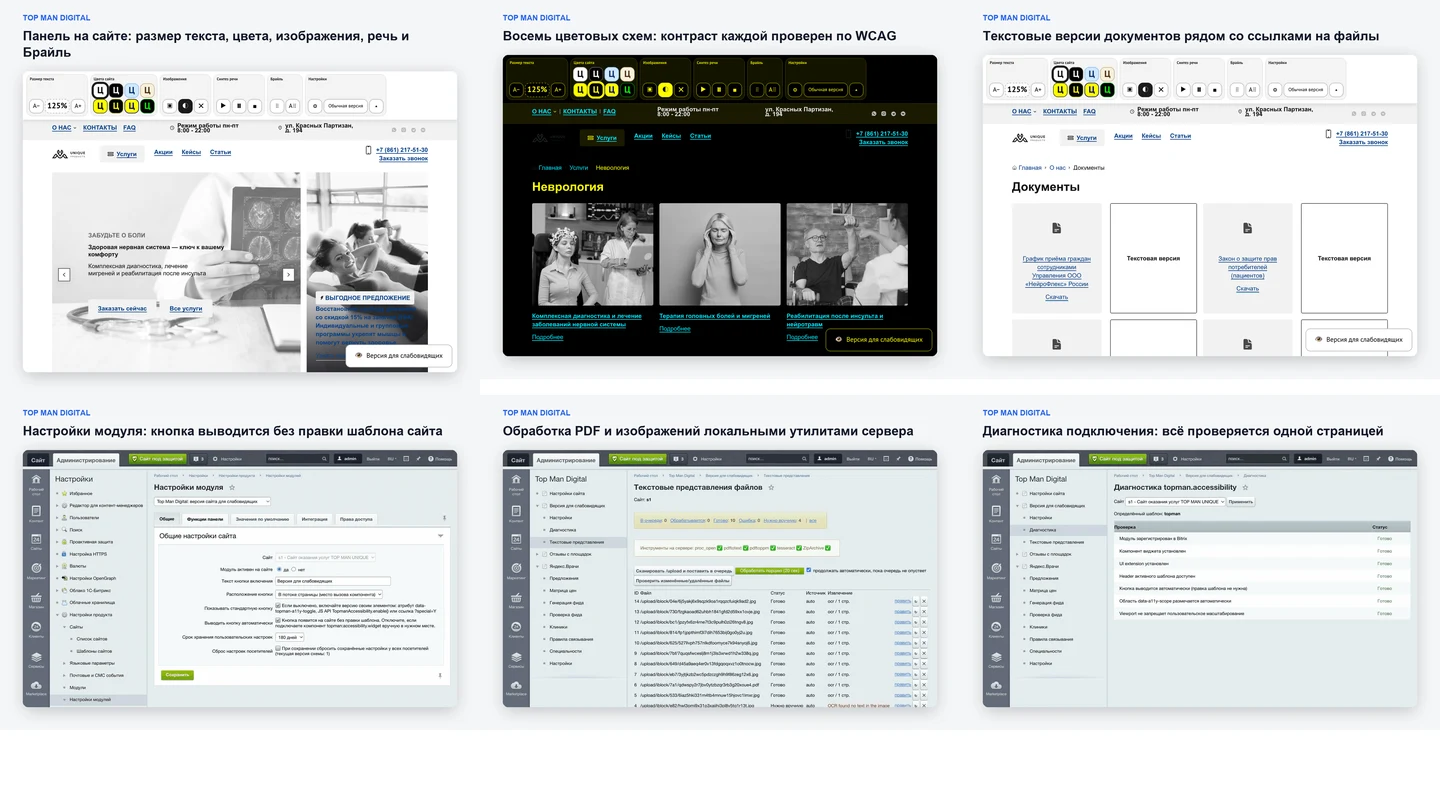
The module provides visitors with flexible interface customization tools for users with visual impairments. It offers seven text scaling levels (from 100% to 250%), eight color schemes, and the ability to switch images to color, black-and-white, or hidden modes. Users can adjust the font, line spacing, letter spacing, paragraph margins, and text area width. To improve navigation, an enlarged cursor and enhanced focus indicator are available. Animations, embedded media, and other distracting elements can be completely disabled. Administrators manage accessibility via a control panel where 16 functions can be enabled or disabled independently.
The module also ensures access to documents hosted on websites of medical institutions, schools, and government agencies. Orders, licenses, regulations, schedules, and reports are often published as PDFs, including scanned copies. The system automatically converts such files into text format, making them readable.
The module processes files in PDF, DOCX, XLSX, PPTX, TXT, RTF, JPG, JPEG, and PNG formats. If a PDF contains a text layer, the text is extracted directly. For scans and images, optical character recognition (OCR) is used. A 'Text version' button appears next to the document link. This is particularly useful for sites with large document archives, as it eliminates the need to manually create descriptions for each file. Automatic text extraction and OCR processing of scans are key differentiators of the module.
The module reads page content aloud. Users can start reading, pause, or stop playback. The current reading segment is highlighted, and progress is displayed. Users can select a specific text fragment to read only that part. The module also reads image captions. Speech synthesis is performed using the browser's Web Speech API. Data is not sent to external services, and no separate subscription or API key is required.
The module provides text-to-speech and Braille functionality without transmitting page content to external services, a critical feature for medical, educational, and government websites. It offers two operational modes: 'Braille Representation' displays Braille characters alongside standard text, while 'Braille Font Site' converts the entire page text while preserving the original markup for assistive technologies and maintaining link and button functionality. The conversion relies on standard Unicode Braille characters, eliminating the need for a separate font installation.
Beyond simple font scaling, the module can restructure the page layout to improve readability. It allows for the removal of decorative elements, conversion of multi-column layouts into a single column, disabling of animations, cursor enlargement, and enhanced focus indicators. A direct link to the main content is provided to bypass headers and menus. The solution integrates into the existing website without requiring the creation of a separate site version.
The module automatically places a button to activate the accessibility version and defines the page area for processing. Standard integration does not require modifying the site template. If full control is needed, the automatic mode can be disabled to place the component manually.
The solution is compatible with the 1C-Bitrix Composite Site technology and correctly processes the page after dynamic content loads. In a multisite environment, settings are configured separately for each site.
An integrated diagnostics section is available in the administrative panel. The system checks component connectivity, UI extension functionality, the transformation area, automatic button display settings, and scaling parameters. This provides developers with a specific list of verified checks rather than requiring blind troubleshooting.
The product was developed in compliance with GOST R 52872-2019 requirements and WCAG 2.1 Level AA guidelines. It is suitable for websites of government and municipal institutions, as well as medical and educational organizations.
The 'Accessibility Version' module with OCR, text-to-speech, and Braille support is particularly effective for resources containing extensive document archives. While compatible with standard corporate websites, its capabilities are most fully realized in organizations that regularly publish official documents: medical institutions, educational establishments, government and municipal bodies, courts, and property management companies. On such platforms, accessibility tools must operate not only with navigation and main text but also with attached files such as orders, regulations, licenses, schedules, and other documents. The module addresses both tasks: it adapts the website interface and automatically generates text representations of documents, including scanned images.
If “Accessibility version with document OCR, text-to-speech, and Braille support” fits the task, General iT can install the module, configure it and verify the result in the project.
UPDATE HISTORY
What’s new
9 releases
1.0.9 (12.09.2026)Latest update
Version 1.0.9
Cumulative update: it includes fixes from versions 1.0.6, 1.0.7, and 1.0.8.
Text representations are returned escaped.
The heading and text of the representation are now sent to the page in escaped form,
and the panel unescapes them before display. Thus, the values are safe for any
output method, even if rendered by third-party code. For the visitor, nothing
changes: they see and hear the document text as before, along with the "greater than" and "less than" signs.
Clear message when the trial period has expired
Previously, when attempting to install a solution with an expired trial period,
the installer displayed "Failed to connect the module after registration" - a technical
phrase that explained nothing. Now it directly states that the trial period on the
site has expired, cannot be extended by reinstalling, and offers to purchase the
solution.
From version 1.0.8: markup is removed from representation fields on the server.
From version 1.0.7: the button appears on any site template, and upon new installation
it is fixed in the bottom-right corner of the screen.
From version 1.0.6: installation of the paid and trial versions has been fixed; the
platform version is checked before the installer makes any changes to the site.
1.0.8 (12.09.2026)
Version 1.0.8
Cumulative update: it includes fixes from versions 1.0.6 and 1.0.7.
Text representations: markup is stripped on the server
The representation header is built from the file name, and the text from the document content; both are set by the person who uploaded the file to the site. Now the module strips HTML markup itself, before saving to the database and again when serving, and the public response additionally escapes angle brackets and quotes. Records saved by previous versions are cleaned upon serving.
The document text remains unaffected: only actual tags are removed, while comparisons like "if a d" remain as is.
From version 1.0.7: the button appears on any site template
On sites where the template does not close the tag (which is allowed in HTML5), the module connected its scripts and styles but did not output the button and panel to the page.
From version 1.0.7: button at the bottom right upon new installation
Upon first installation, the button to enable the accessibility version is fixed in the bottom right corner of the screen. On already installed sites, the button position does not change: it is stored in the module settings.
From version 1.0.6: fixed installation of paid and trial versions
Installation of the solution from the Marketplace was interrupted by the error "syntax error, unexpected token "
1.0.7 (11.09.2026)
Version 1.0.7
Cumulative update: it includes fixes from version 1.0.6.
The button appears on any website template
On sites where the template does not close the tag (which is allowed in HTML5), the module connected its scripts and styles but did not display the button and panel on the page.
Now the button is displayed on any template.
Button at the bottom right after new installation
During the first installation, the button to enable the accessibility version is now fixed in the bottom right corner of the screen so it is visible on any template without layout modifications.
On already installed sites, the button position does not change: it is stored in the module settings.
From version 1.0.6: fixed installation of paid and trial versions
When installing the solution from the Marketplace in demo mode or under a purchased license, the installation was interrupted by the error "syntax error, unexpected token "
1.0.6 (11.09.2026)
Version 1.0.6
Fixed installation of paid and trial versions from the Marketplace.
When installing the solution in demo mode or with a purchased license, the installation was interrupted by the error "syntax error, unexpected token "
1.0.5 (19.08.2026)
Version 1.0.5
It is recommended that everyone install this update: it fixes a discovered security issue in the text representations of files section. The update is cumulative and includes changes from version 1.0.4.
Text representations are provided only from authorized directories.
The text representations section converts site documents into text that the panel reads aloud. Access to it is made by visitors without authorization - this is by design; the special version is used by anonymous visitors. The path check previously verified that the file exists, is located under the site root, and has a supported extension, but did not verify that the administrator had published this directory. A visitor who knew or guessed the path could request parsing of an external file and then obtain its text.
Now, only files from the /upload directory and from additional directories that the administrator explicitly specified in the module settings on the "Text Representations of Files" page are made available. Everything else under the site root is inaccessible; the /bitrix service directory and the image resize cache are excluded separately. The check is performed both when searching for a representation and when delivering the text, so a directory removed from the list stops being provided immediately, along with already prepared representations of its files.
What remains unchanged
The workflow has not changed. Documents from /upload and from authorized directories are still automatically detected and queued for parsing upon first access; the scanner, agents, recognition, and administrative screens work as before; accumulated text representations are preserved, and settings are not affected. The restriction applies only to delivery to visitors: the administrator can still specify any directory for scanning.
From version 1.0.4: unified Braille font
The module displays Braille in two places: in a separate window with the page text and in a mode where the entire site is displayed with dots. Previously, cells were drawn using a font,
which will be found on the visitor's computer, and it differs for everyone: on macOS only raised dots were displayed, while on Windows a full six-position matrix was shown, where non-raised dots were indicated by contour circles.
Now the font is included in the module, and cells look the same everywhere - only raised dots. The font weighs about 2.4 KB, is loaded once, and is used exclusively for Braille characters. If the font file fails to load, cells will appear using the system font, as before.
From version 1.0.4: restoration of missing files
Updates only bring changed files, and if a module file was missing from the site, it could not be restored. Now, installing an update brings the module's service directories to their full composition: scripts, styles, font, component, admin pages, theme file, and public entry point are copied entirely from the installed module. Settings and accumulated text representations remain unaffected.
1.0.4 (18.08.2026)
Version 1.0.4
Braille font is now the same for everyone
The module displays Braille in two places: a separate window with the page text and a mode where dots show the entire site. Previously, drawing cells required a font found on the visitor's computer, which differed for everyone: on macOS only raised dots were shown, while on Windows a full six-position matrix was displayed, where non-raised dots were indicated by outline circles. The view could not be chosen: on Windows there is simply no other font with Braille cells.
Now the font is included in the module. Cells look the same everywhere - only raised dots, without empty circles. The font weighs about 2.4 KB, is loaded once, and is used exclusively for Braille characters: the rest of the page text continues to be displayed using the site's font or the font family selected in the panel.
If the font file fails to load for some reason, cells will appear using the system font, as before - Braille will not disappear.
Update restores missing module files
Updates bring only changed files. If a module file was missing on the site, the update did not restore it: the module remained incomplete, the panel was displayed but did not work. Now, installing an update brings the module's service directories to a complete set - scripts, styles, font, component, admin pages, theme file, and public entry point are copied entirely from the installed module. Settings and accumulated text representations are not affected.
1.0.3 (09.08.2026)
Version 1.0.3
The update is installed over version 1.0.1 and includes changes from versions 1.0.2 and 1.0.3.
The "Text version" button no longer breaks list layouts
The button is added next to the document link. If the link was a direct element of a grid or flex layout, the button became such an element and occupied an entire cell: an empty card appeared next to the document card. Now in such layouts, the link and button occupy one place together, and the button appears below the link. In regular text, everything remains as before: the button stays in the same line as the link. When the special version is turned off, the page layout returns to its original state.
Consistent Braille font in both modes
The module displays Braille in two places: in a separate window with the page text and in a mode where the entire site is displayed with dots. Previously, these two places requested different fonts from the browser, and the browser selected different replacement fonts for them, so Braille looked different on the same page: sometimes only raised dots, sometimes a full matrix with circular outlines. Now both modes use the same set of fonts.
Reading aloud a selected fragment
Previously, the speech synthesizer read the entire page. Now you can select the needed part of the text, and a "Read selected" button will appear next to the selection: only the selected part is read. The button appears only when the accessibility version is enabled and hides as soon as the selection is removed. Selection inside input fields and inside the settings panel itself does not trigger the button. This feature can be enabled separately in the module settings and is enabled by default. The speech synthesis button in the panel continues to work as before: it reads the entire page.
The read-aloud button grows with the text size
The label on the selection button was smaller than the page text, which was enlarged by the module itself. Now the button size is tied to the selected scale step: at 250% it is four times larger than the original. Margins, icon, and height are calculated based on the same size.
On a narrow screen, the settings panel does not stick to the top
Fixing the panel to the top edge on a phone worked against the user:
the expanded panel occupied up to two-thirds of the screen, and just as much space was taken by its
margin - the site became impossible to view. Now the decision is made based on measurement: if the panel occupies more than one-third of the screen height, it moves with the page and scrolls up when scrolling. On a wide screen, everything remains as before.
Speech control icons
The symbols for play, pause, and stop have been replaced with graphics: the play symbol had its centering shifted inside the button, and in black-and-white schemes it remained colored.
1.0.2 (06.08.2026)
Version 1.0.2
Reading the selected fragment
Previously, speech synthesis read the entire page from start to finish. Now you can select the needed text fragment, and a "Read selected" button will appear next to the selection: it reads exactly the selected text, not the whole page. The button appears only when the accessibility version is enabled and disappears as soon as the selection is removed. Selection inside input fields and inside the settings panel itself does not trigger the button.
The feature can be enabled separately in the module settings - "Read selected fragment" - and is enabled by default. The speech synthesis button in the panel continues to work as before: it reads the entire page.
The read button grows with the text size
The label on the selection button was smaller than the page text, which had been enlarged by the module itself. Now the button size is tied to the selected scale step: at 250% it is four times larger than the original. Margins, icon, and height are calculated based on the same size, so the button remains proportionate at all scale steps.
On a narrow screen, the settings panel is no longer fixed at the top
Fixing the panel to the top edge, introduced in version 1.0.1, worked against the user on phones: an expanded panel occupied up to two-thirds of the screen, and just as much space was taken by its margin - making the site impossible to view. Now the decision is made based on measurement: if the panel occupies more than one-third of the screen height, it moves with the page and scrolls up when scrolling. On a wide screen, where the panel occupies about one-fifth of the height, everything remains as before - the panel is fixed, and the content is pushed down below it.
Speech control icons
The symbols for play, pause, and stop have been replaced with graphics: the play symbol had misaligned centering inside the button, and in black-and-white schemes it remained colored.
1.0.1 (06.08.2026)
Version 1.0.1
The settings panel is fixed at the top
The panel no longer scrolls with the page: it remains at the top edge and pushes all content below it, including the sticky site header and search bar. Elements that had their own top margin retain that margin.
Color scheme recoloring now covers the entire page
On large showcases, some elements below the fold remained in the corporate colors: the process stopped halfway down the page. The limit has been raised with a margin - on a showcase with thirteen and a half thousand elements, everything is now recolored, and this takes about one-tenth of a second.
Menu does not break words
With increased font size, menu items on some templates were breaking apart by letter: "CATAL - G". Now words remain intact, and the entire menu row wraps to the next line.
Button icon follows the color scheme
The icon on the "Accessibility Version" button was a colored symbol and remained colored in black-and-white schemes. It has been replaced with a graphic that adopts the color of the selected scheme.
Icons in the left admin menu
Module items now have their own icons: an eye for the module itself, a gear for settings, a stethoscope for diagnostics, and a document for text representations.
Release fixes
Characters that did not survive the archive translation to cp1251 encoding have been removed: two of them appeared as question marks on the screen after installation. All library, component, and template files are now protected by a check for connection through the core. The console command for batch document processing has moved from the tools directory to the cli directory.
USER EXPERIENCE
Solution reviews
How does this solution work in a real project? Share your experience and help others choose.
Be the first to share your experience
There are no reviews of this solution on git.ru yet. Tell us what worked well and what could be improved.
✓
Verified purchaseAdd a key if you wish. A verified review gets a badge, priority placement and more rating weight.
↗
Open to every clientJust sign in to your account. A key is optional; all reviews are moderated.
Top Man Digital: Reviews module automates the transfer of reviews from external aggregator sites to your website. Simply insert a link to the organization's profile once: the system identifies the source, fetches reviews, avatars, and photos, then stores them in the 'Reviews' information block. The module then periodically checks for new reviews, requiring only your approval for publication.
An intelligent e-commerce filter generates numerous pages for real parameter combinations such as color, size, brand, price, and others. Without specific SEO configuration, these pages often inherit identical title, description, and H1 values from the parent section.
The module transforms filter pages into managed SEO landing pages.
The Ozon Delivery for Business service handles order delivery while keeping all transactions and order management within your 1C-Bitrix online store. During checkout, the customer selects a delivery method—either a pickup point or a courier—and views the final cost and delivery time.
The module automates image compression on the website in accordance with Google PageSpeed Insights recommendations. It supports integration via CDN OptiPic, allowing optimization without modifying image URLs. The main advantage of CDN integration is the automatic conversion of images to the modern WebP format to minimize file size. Browsers that support WebP receive images in that format.
The module is designed for online stores running on the 1C-Bitrix platform to automate the integration of supplier product catalogs. It is also suitable for news and city portals to facilitate content population. The solution supports data import in Excel, XML, YML, CSV, and RSS formats.
The module is designed for the «1C-Bitrix: Site Management» platform and enables importing infoblock elements, including products, from Excel files. It also supports data loading into Highload blocks.
The displayed price covers the solution itself. Platform licensing, installation and customisation are checked separately. If the page offers bundles, select the required option before submitting a request.
How do I check compatibility?
Compare the supported editions and solution version in the technical details with your project. Before installing on a live website, we recommend making a backup and checking the solution in a test environment.
Is there a trial?
The developer lists a trial of 7 days. The trial button opens the installer in your website control panel. Check the required features and compatibility before purchasing.
How much does this solution’s renewal cost?
The current renewal price is 5,000 ₽. Before you order, a manager will confirm the renewal period and whether it applies to your licence.
Can you help with implementation?
We can help install the module, check its settings and verify how it works in your project. Compatibility with other customisations and the scope of work are assessed before we begin.
Your cookie choices
Necessary cookies support sign-in, your cart and security. Optional analytics helps improve the website and starts only with your permission.
Our metrika.git.ru system: public pages, a random identifier, device and interaction events. Form contents, account and payment pages are excluded. Raw events: up to 90 days. Operator: General IT Rus LLC, INN 2310208877.
Your browser requests no tracking: analytics is off.