Payments are experiencing issues due to temporary restrictions in Russia. If your payment does not go through, please submit a support request.•Our support team is available 24/7 — we are always here to help with hosting and server issues.•We are now accepting requests for dedicated server rental and colocation services in our data center.•Reminder: we recommend enabling backups for additional data protection.•A new VPS/VDS lineup with NVMe storage and improved performance is now available.•Maintenance work on some servers has been completed. All services are operating normally.•
Payments are experiencing issues due to temporary restrictions in Russia. If your payment does not go through, please submit a support request.•Our support team is available 24/7 — we are always here to help with hosting and server issues.•We are now accepting requests for dedicated server rental and colocation services in our data center.•Reminder: we recommend enabling backups for additional data protection.•A new VPS/VDS lineup with NVMe storage and improved performance is now available.•Maintenance work on some servers has been completed. All services are operating normally.•
Аккаунт в General iT
Вход / Регистрация
Войдите или создайте аккаунт для управления услугами в панели.
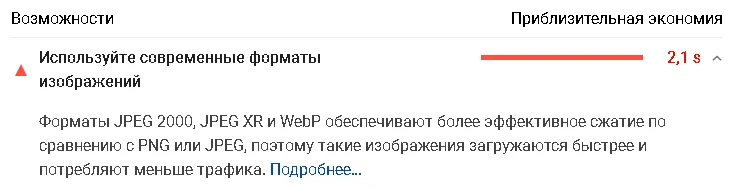
The module automates image compression on the website in accordance with Google PageSpeed Insights recommendations. It supports integration via CDN OptiPic, allowing optimization without modifying image URLs. The main advantage of CDN integration is the automatic conversion of images to the modern WebP format to minimize file size. Browsers that support WebP receive images in that format.
The module automates image compression on the website in accordance with Google PageSpeed Insights recommendations. It supports integration via CDN OptiPic, allowing optimization without modifying image URLs. The main advantage of CDN integration is the automatic conversion of images to the modern WebP format to minimize file size. Browsers that support WebP receive images in that format. Browsers without WebP support (such as iOS devices) receive the original PNG or JPEG files, but already compressed. The WebP format was developed specifically for websites and combines the advantages of both PNG and JPEG, enabling correct conversion of both image types. Using WebP helps the site meet the Google PageSpeed Insights requirement to use modern image formats.
The WebP format provides image compression, reducing page load times. This improves user experience and can positively influence search engine rankings.
Integration via CDN adds the following capabilities:
- Caching images to accelerate delivery.
- Automatic adaptation of graphics for mobile devices.
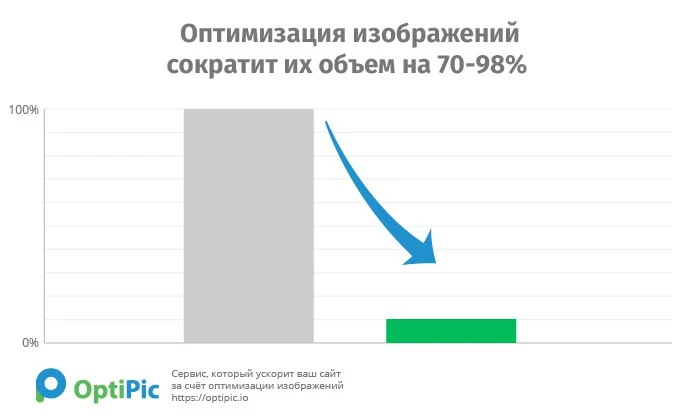
The module allows reducing image sizes on the site by up to 98%.
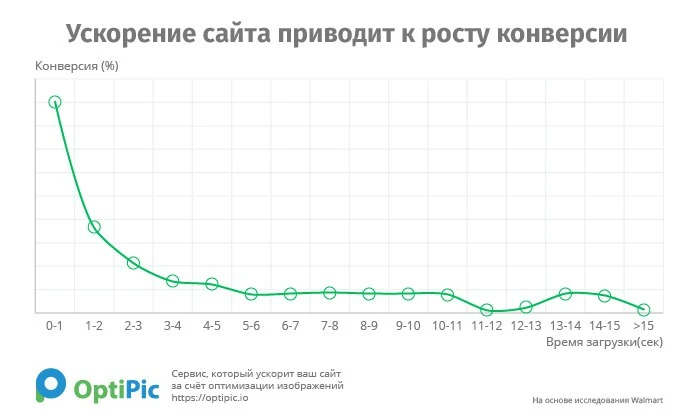
The OptiPic module provides image optimization and conversion to WebP format for content management systems based on Bitrix. The tool compresses graphic files, which accelerates web page loading and reduces the load on the server or hosting. Optimization contributes to improved Google Pagespeed Insights scores, better search engine rankings, and increased conversion rates. Additionally, it results in disk space savings.
The module scans the entire site to locate PNG and JPEG images, including those outside the upload folder, and proceeds to compress them. Two compression modes are supported: a manual mode to process all unsaved images at once, and a background mode where an agent runs every five minutes to handle a batch of unsaved images. The number of images processed per background step is configurable in the module settings. Compression quality is adjustable via the settings.
The module supports automatic image resizing if configured. Resizing triggers automatically when an image's width or height exceeds the maximum dimensions defined in the module settings. Upon installation, 10 MB of quota is provided on the OptiPic.io service for testing. To continue compressing images after the trial quota is exhausted, a paid package must be selected on the OptiPic.io platform.
The OptiPic module provides automatic image optimization and conversion to the WebP format. Upon installation, an account on the OptiPic.io platform is created automatically. If you need to link an existing account, enter your login and password during the setup process.
New users receive a free allowance of up to 200 MB for image processing. For PHP-based websites with an inactive 1C-Bitrix license, a universal module alternative is available.
Image optimization is the process of compressing a file to reduce its size in bytes while preserving visual quality. Processing algorithms remove service metadata (such as the software name used) and optimize the color palette by merging similar shades. The resulting image is visually indistinguishable from the original, yet its file size is significantly reduced. Proper processing can decrease image size by 70–98% without noticeable quality loss.
OptiPic provides automation for image optimization and conversion to WebP format. The system processes both existing images on the site and new files added in the future. All operations run automatically in the background without user intervention.
Optimized images are stored on the server while the original URL addresses remain unchanged. The module integrates easily with any PHP-based website, including custom-developed solutions.
No system administration or programming skills are required for installation and use. OptiPic operates on standard hosting environments without the need for a VPS or dedicated server. The system imposes no limits on the volume or size of processed images.
Technical support is available in Russian. Connection assistance is provided free of charge, and there are no monthly subscription fees.
If “OptiPic image optimization and WebP conversion” is required, General iT can help with installation, configuration and a technical check after integration.
- List of domains (if images are loaded via absolute URLs).
- Site pages where automatic replacement should not be enabled.
- Replace only image URLs starting with the mask (/upload/, /upload/test.png, etc.).
1.7.4 (21.06.2020)
Improved module settings interface.
1.7.3 (29.04.2020)
Added support for image URLs containing spaces.
1.7.2 (21.02.2020)
Fixed an issue with transitioning to CDN from classic integration for modules installed before 04.01.2020.
1.7.1 (17.02.2020)
CDN: Optimization of automatic image URL replacement logic.
1.7.0 (06.02.2020)
Improved module installation interface.
Improved module settings interface.
1.6.9 (30.01.2020)
CDN: Optimization of automatic image URL replacement logic.
1.6.8 (04.01.2020)
Updated URL for Classic Integration API.
A new integration mode has been added - CDN.
Advantages of CDN integration:
1. Automatic conversion to WebP (taking the visitor's browser into account). For browsers that support WebP, images are served in WebP format. Browsers without WebP support receive optimized/compressed PNG/JPEG images.
2. Adapts images for mobile phones.
3. Caches and accelerates image loading.
More details:
1.6.7 (10.07.2019)
Optimization of the reindexing logic
1.6.6 (15.04.2019)
Optimization of the information block template logic.
Improvements to the module management interface.
1.6.5 (06.04.2019)
Improvement of the original file return logic
1.6.4 (21.01.2019)
Optimization of the original file return and deletion logic
1.6.3 (28.07.2018)
Improved background compression mechanism.
Added the "Progressive JPEG" option.
Added the option to "Remove metadata from images".
Improved the module management interface.
1.6.2 (25.07.2018)
Improvement to handle folder read errors.
1.6.1 (25.07.2018)
Improvement to handle folder read errors.
1.6.0 (19.07.2018)
Performance optimization
1.5.9 (26.06.2018)
Performance optimization and statistics analysis.
1.5.8 (26.06.2018)
Reindexing optimization
1.5.7 (25.06.2018)
Reindexing optimization
1.5.6 (31.01.2018)
Typo fixed
1.5.5 (23.11.2017)
API update
1.5.4 (03.11.2017)
API update
1.5.3 (07.09.2017)
Added the ability to set the step for returning originals.
1.5.2 (07.09.2017)
Optimization of returning originals.
1.5.1 (04.09.2017)
Logic optimization.
Improved processing of infoblock templates.
Enhanced processing of resize_cache.
1.5.0 (19.08.2017)
System update
1.4.9 (18.08.2017)
Service update of the database structure
1.4.8 (16.08.2017)
Optimized output of the module's image in the administrative menu.
1.4.7 (10.08.2017)
SQL optimization
1.4.6 (07.08.2017)
Service fix
1.4.5 (03.08.2017)
Case-insensitive extension
1.4.4 (03.08.2017)
API update
1.4.3 (03.08.2017)
Improved display of compression efficiency in statistics
1.4.2 (02.08.2017)
Fixed several minor issues.
1.4.1 (14.07.2017)
Service update
1.4.0 (14.07.2017)
Service update.
Some typos and outdated texts have been corrected.
1.3.9 (10.07.2017)
Service update
1.3.8 (29.06.2017)
Service update
1.3.7 (27.06.2017)
Service update
The "Promotions" block has been updated.
An option has been added to "Send files with compression efficiency for re-compression"
1.3.6 (26.06.2017)
Service update
1.3.5 (16.06.2017)
Service update
1.3.4 (14.06.2017)
Service update regarding statistics
1.3.3 (14.06.2017)
Functionality for creating templates for processing images related to information blocks has been added.
1.3.2 (09.06.2017)
Service update
1.3.1 (31.05.2017)
Service update.
Module settings have been improved.
1.3.0 (25.05.2017)
Indexing has been optimized.
1.2.9 (23.05.2017)
The "Statistics" tab on the module settings page has been redesigned.
Minor errors in module operation have been fixed.
1.2.8 (23.05.2017)
Errors during compression have been fixed.
1.2.7 (22.05.2017)
Added a notification if the balance is insufficient to compress all images in the database
1.2.6 (22.05.2017)
Service update
1.2.5 (18.05.2017)
Service update
1.2.4 (12.05.2017)
1. Added a check for the availability of indexable files for writing
2. Added a service page "Index Table" in the site administration section (in the "Settings" menu)
1.2.3 (28.04.2017)
Service update regarding the extensions of processed files
1.2.2 (27.04.2017)
Fixed an indexing error
1.2.1 (25.04.2017)
1. Added information about the "Partner Program"
2. Added the "Delete originals" functionality
3. Added the "Index only" option
4. Service update
1.2.0 (22.04.2017)
Improved API functionality (redirect support) - important update
1.1.9 (22.04.2017)
Improved handling of corrupted images
1.1.8 (22.04.2017)
- Interface improvement
- Support for image format substitution
1.1.7 (21.04.2017)
File handling via symbolic links has been implemented.
1.1.6 (20.04.2017)
Changes have been made to promotions.
1.1.5 (17.04.2017)
Update for cases where saving originals is disabled.
1.1.4 (15.04.2017)
Fix for cases where open_basedir is set.
1.1.3 (13.04.2017)
When compressing images, we attempt to preserve the file owner (for cases where agents run as root).
1.1.2 (12.04.2017)
Optimization of work with the OptiPic.ru API.
1.1.1 (04.04.2017)
Refinement of logic for setting permissions on new files.
1.1.0 (04.04.2017)
Refinement of logic for setting permissions on new files.
1.0.10 (22.03.2017)
Optimization of index updates.
1.0.9 (22.03.2017)
Optimization of the reindexing process
1.0.8 (20.03.2017)
Optimization of image reindexing
1.0.7 (20.03.2017)
Interface improvement
1.0.6 (20.03.2017)
Interface improvements
1.0.5 (09.03.2017)
Installation system changed
1.0.4 (16.02.2017)
Handling the situation when the PHP version is below 5.3.6
1.0.3 (13.02.2017)
Do not optimize Bitrix core images
1.0.2 (13.02.2017)
Added resize functionality (reducing image size). Resize is triggered automatically if the image dimensions exceed the maximum width or height specified in the module settings.
1.0.1 (27.01.2017)
Handling the situation when curl is not available on the server
USER EXPERIENCE
Solution reviews
How does this solution work in a real project? Share your experience and help others choose.
Be the first to share your experience
There are no reviews of this solution on git.ru yet. Tell us what worked well and what could be improved.
✓
Verified purchaseAdd a key if you wish. A verified review gets a badge, priority placement and more rating weight.
↗
Open to every clientJust sign in to your account. A key is optional; all reviews are moderated.
The module checks performance metrics for each website page in real time via Google PageSpeed Insights. It provides administrators with a tool to monitor key Google PageSpeed Insights metrics for any page directly within the site interface. Access is restricted to authenticated administrators only.
The Sotbit Smart Filter SEO module is designed to increase online store traffic. The tool operates by generating numerous unique pages for smart filters.
The module is designed for online stores running on the 1C-Bitrix platform to automate the integration of supplier product catalogs. It is also suitable for news and city portals to facilitate content population. The solution supports data import in Excel, XML, YML, CSV, and RSS formats.
The module is designed for the «1C-Bitrix: Site Management» platform and enables importing infoblock elements, including products, from Excel files. It also supports data loading into Highload blocks.
The solution itself is free. Installation, configuration and customisation services are agreed separately. A compatible platform and an appropriate platform licence are required.
How do I check compatibility?
Compare the supported editions and solution version in the technical details with your project. Before installing on a live website, we recommend making a backup and checking the solution in a test environment.
Can you help with implementation?
We can help install the module, check its settings and verify how it works in your project. Compatibility with other customisations and the scope of work are assessed before we begin.
Your cookie choices
Necessary cookies support sign-in, your cart and security. Optional analytics helps improve the website and starts only with your permission.
Our metrika.git.ru system: public pages, a random identifier, device and interaction events. Form contents, account and payment pages are excluded. Raw events: up to 90 days. Operator: General IT Rus LLC, INN 2310208877.
Your browser requests no tracking: analytics is off.