Payments are experiencing issues due to temporary restrictions in Russia. If your payment does not go through, please submit a support request.•Our support team is available 24/7 — we are always here to help with hosting and server issues.•We are now accepting requests for dedicated server rental and colocation services in our data center.•Reminder: we recommend enabling backups for additional data protection.•A new VPS/VDS lineup with NVMe storage and improved performance is now available.•Maintenance work on some servers has been completed. All services are operating normally.•
Payments are experiencing issues due to temporary restrictions in Russia. If your payment does not go through, please submit a support request.•Our support team is available 24/7 — we are always here to help with hosting and server issues.•We are now accepting requests for dedicated server rental and colocation services in our data center.•Reminder: we recommend enabling backups for additional data protection.•A new VPS/VDS lineup with NVMe storage and improved performance is now available.•Maintenance work on some servers has been completed. All services are operating normally.•
Аккаунт в General iT
Вход / Регистрация
Войдите или создайте аккаунт для управления услугами в личном кабинете.
Страны не найдены. Попробуйте другое название или код.
WEBSITE TEMPLATE
Sotbit
Sotbit: B2B Portal – Wholesale Platform with a Dealer Personal Cabinet
Sotbit: B2B portal — an extended edition designed for comprehensive wholesale sales automation. The solution includes modules for order generation using artificial intelligence, regional sales management, claims processing, and a notification system. It features extended data exchange with 1C configurations.
Sotbit: B2B portal — an extended edition designed for comprehensive wholesale sales automation. The solution includes modules for order generation using artificial intelligence, regional sales management, claims processing, and a notification system. It features extended data exchange with 1C configurations.
A short video demonstrates the capabilities of the Sotbit: B2B platform, designed for wholesale trade and dealer personal account management.
If the text is too long to read quickly, you can download the B2B platform presentation in PDF format and review it at your convenience.
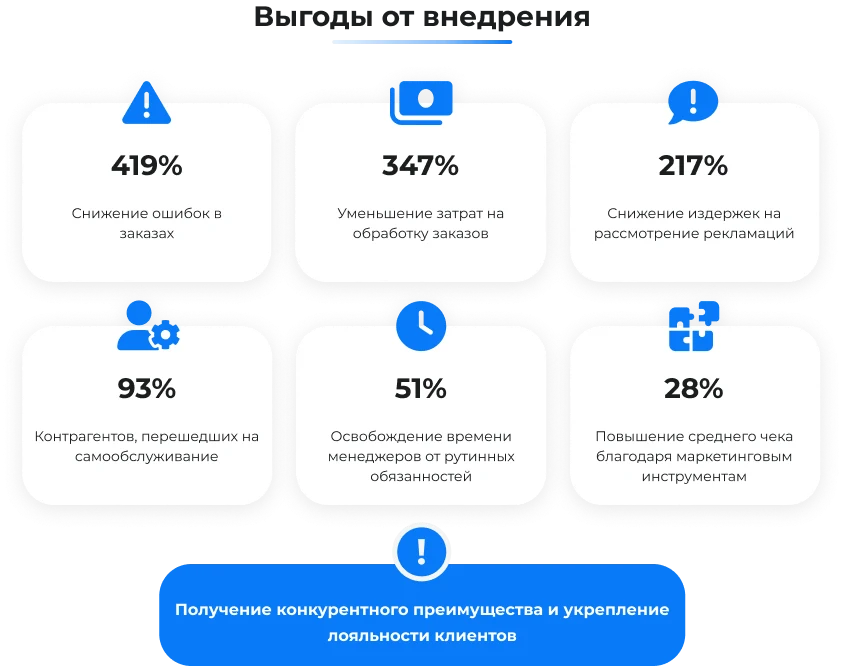
A common issue is the lack of transparency and feedback. Buyers face difficulties tracking order statuses, contacting technical support, and receiving responses from suppliers.
Manual data entry and inefficient order processing workflows often lead to errors, delivery delays, and reduced customer loyalty.
Manual processing of customer requests and problem resolution requires significant spending on personnel and resources.
Managers spend a significant portion of their work time on routine tasks: processing orders, distributing price lists, handling documentation requests, and updating order statuses. This reduces the time available for active client engagement.
The current version lacks built-in mechanisms for real-time inventory synchronization. Partners must manually request up-to-date price lists, as product availability data is updated periodically rather than automatically.
The lack of a centralized platform for exchanging documents and data with partners and suppliers complicates communication and increases the risk of operational errors.
Slow response to requests and order processing reduces customer satisfaction and increases the risk of clients switching to competitors.
The absence of personal accounts and B2B portals limits personalization capabilities. Without these tools, it is impossible to tailor offers to specific client requests or provide an individualized interaction experience.
The lack of a centralized system for collecting and analyzing customer and order data limits analytical capabilities, complicating the adoption of strategically important decisions.
Low marketing efficiency often stems from the lack of a unified platform. Disparate tools complicate the promotion of services and products, hinder engagement with the target audience, and make tracking campaign results difficult.
The platform is built on the 1C-Bitrix framework, providing access to all its capabilities and tools.
Rapid deployment. The ready-made solution allows reducing implementation time to two weeks.
Sotbit.B2B is a platform designed for wholesale trade, providing dealers with personal accounts. The solution enables B2B interactions within a single portal.
Modular architecture ensures flexible scalability. The solution allows starting with a basic version and upgrading to an extended feature set as needs grow, without data loss.
A free demo mode is available. Before purchase, the solution can be tested on the customer's infrastructure.
One-time payment for the solution with no hidden fees. Support and updates are available via an annual subscription.
The thoughtfully designed interface follows a minimalist style, ensuring high readability, a logical structure, and ease of use.
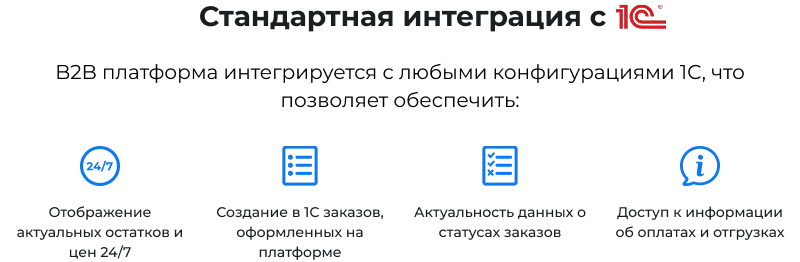
The system provides integration with the 1C platform. It includes standard functions for automatic synchronization of product catalogs, current prices, inventory levels, order details, and document management with the 1C accounting system.
A platform for creating a B2B portal with a dealer personal account. It provides seamless integration with Bitrix24 to automate sales, communication, and document management.
The module enables connecting a retail online store to the wholesale platform. It allows deploying a full-fledged wholesale-retail store by integrating any B2C template compatible with 1C-Bitrix.
The platform supports customization and extensions, allowing flexible configuration of functionality to meet specific business requirements.
Turnkey implementation is provided by the company's internal development team and partner network. The service covers the full installation and configuration cycle of the Sotbit:B2B platform for wholesale trade with a dealer personal account.
Includes free technical support, along with a consultation and basic solution setup.
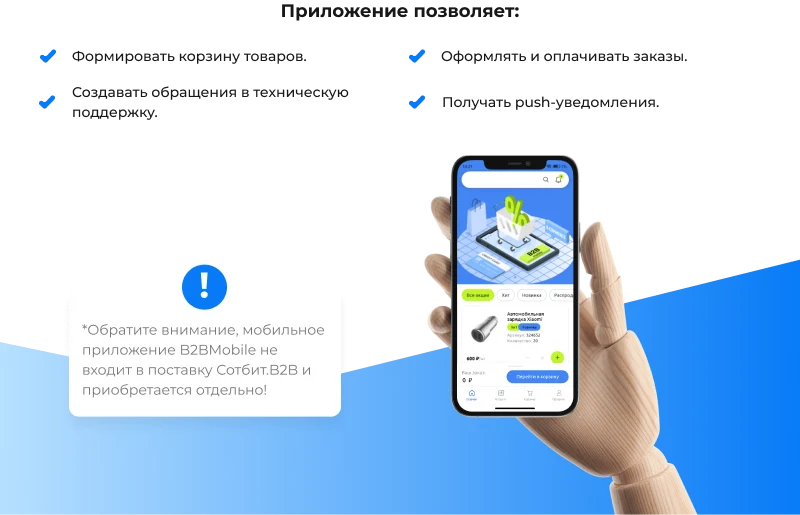
A separate mobile application is available to users, extending the functionality of the personal B2B account.
The solution is included in the Register of Domestic Software under number 20978. Registration date: December 29, 2023.
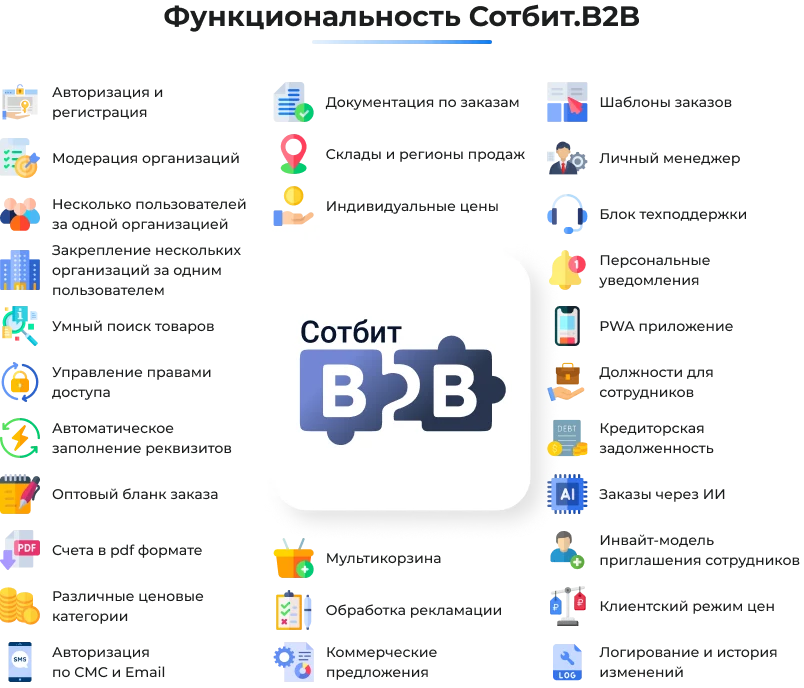
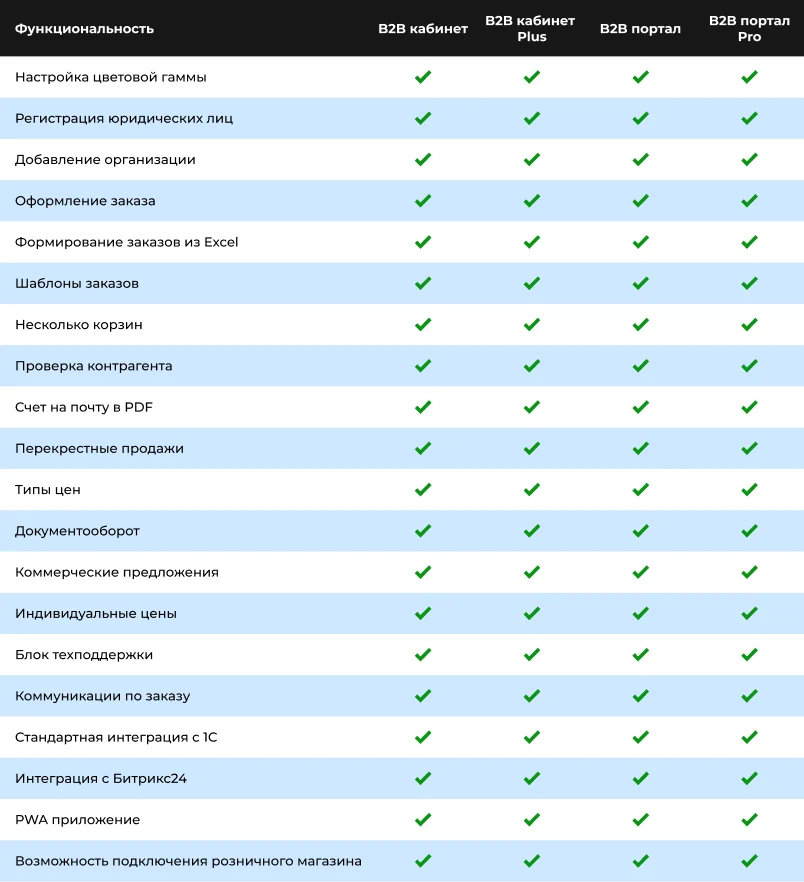
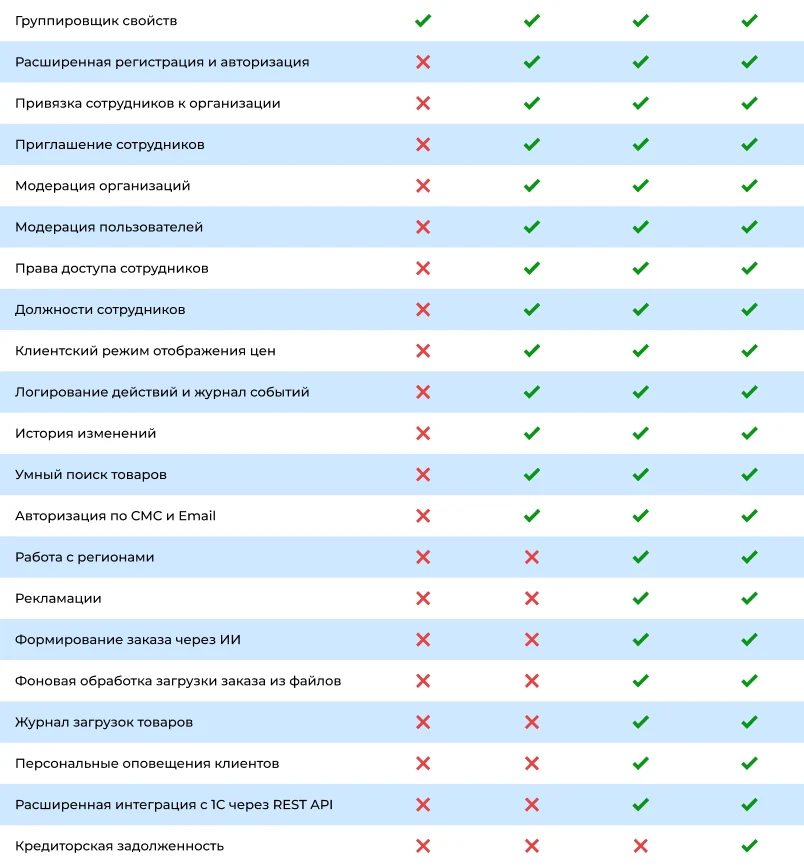
The Sotbit.B2B product line includes four editions that differ in functionality.
The video overview presents the functional capabilities of the various editions of the Sotbit.B2B platform.
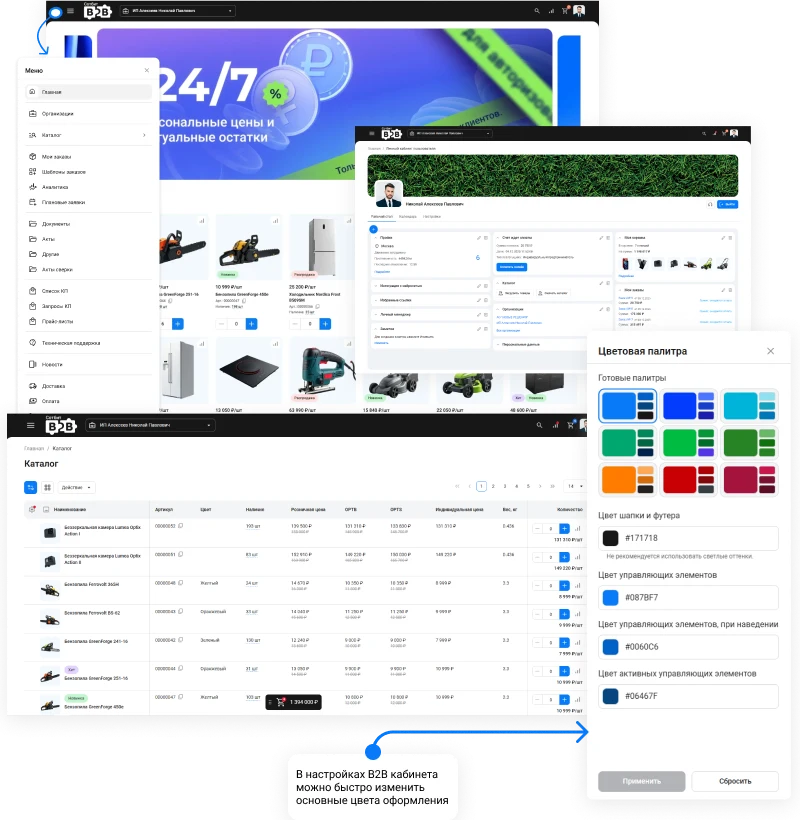
The interface follows a minimalist design: free of excessive decoration, featuring a clean grid and neutral colors. The focus is on readability, logical structure, and ease of data interaction.
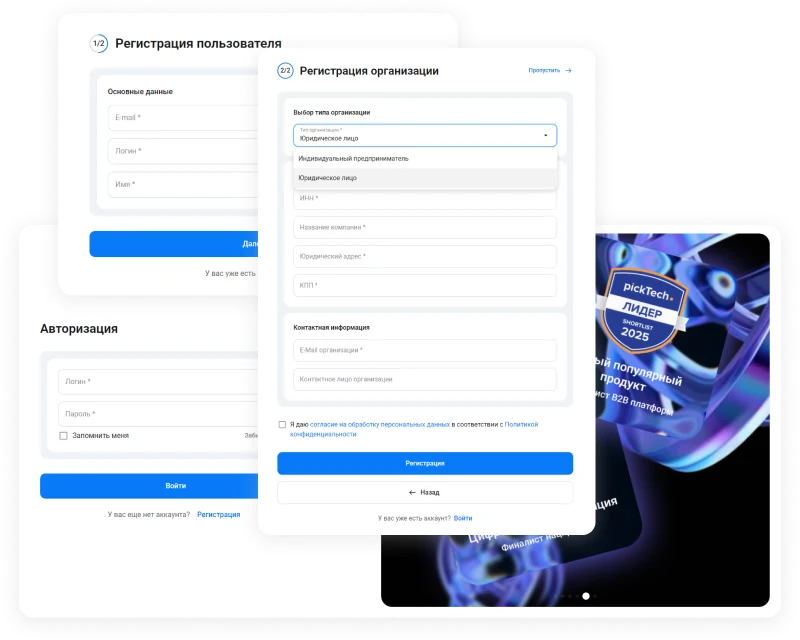
To access the personal B2B cabinet, the counterparty must complete registration. The process consists of two stages: creating a user account and registering a company. The second stage can be optionally disabled to speed up registration, allowing the counterparty to create the company later within the cabinet. Moderation of applications is also supported, granting access only after administrator approval.
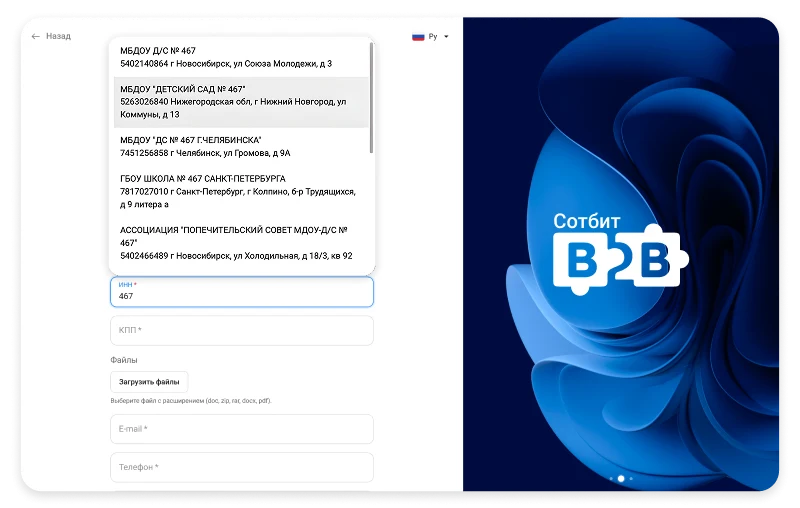
The system automatically populates organization or sole proprietorship details using the tax identification number or company name. This eliminates errors during card completion and accelerates the portal registration process.
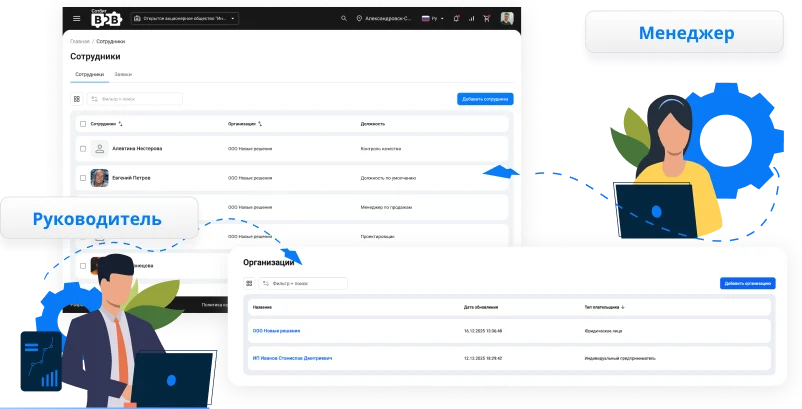
The platform allows a single user to operate on behalf of multiple organizations. Additionally, multiple employees can be added within a single organization.
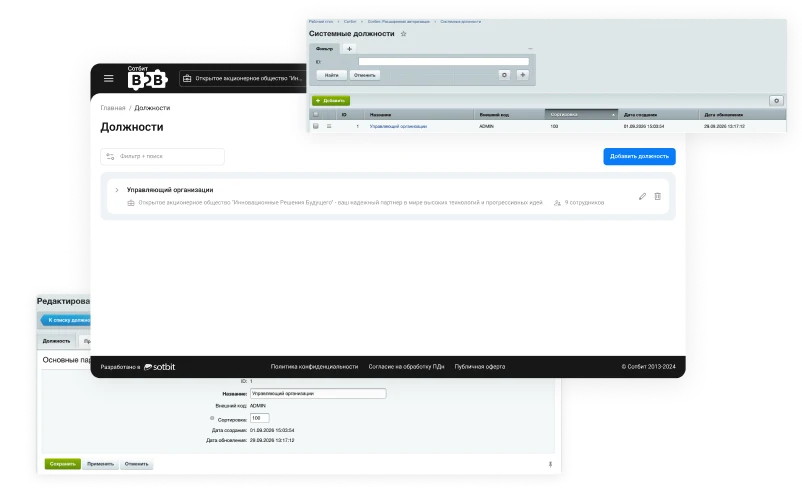
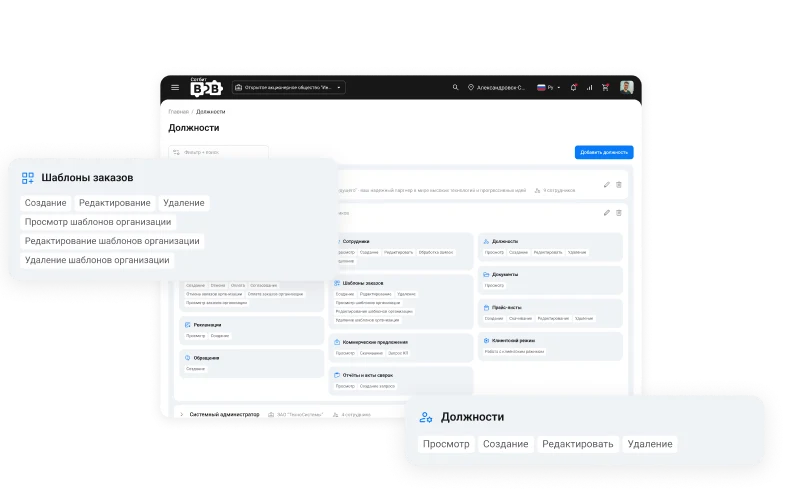
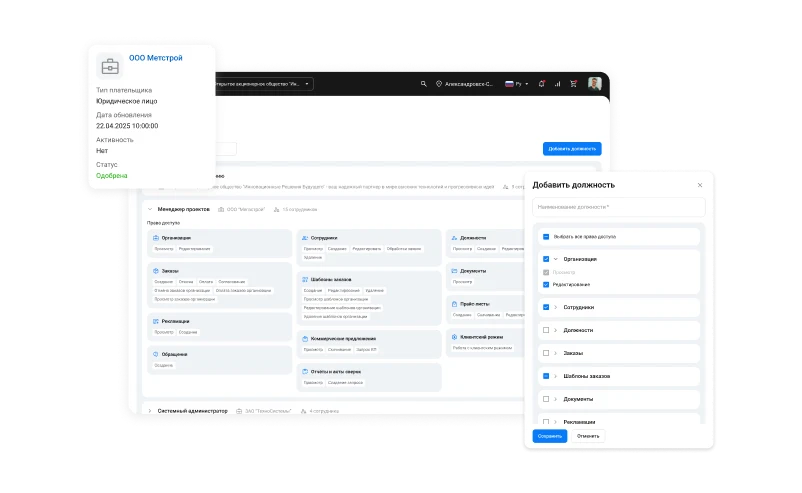
The portal administrator centrally defines job positions and their access rights. Organization managers then assign these roles to employees without needing to reconfigure permissions.
Access rights are configured separately for each entity: orders, organizations, employees, price lists, commercial offers, complaints, inquiries, reports, and documents. For each entity, you can allow viewing, creating, editing, deleting, and other actions regarding both personal data and data for the entire organization. An employee sees and performs only what is permitted by their role.
Organization administrators can create custom job titles to match their company structure and reorder them using simple drag-and-drop. System-defined titles remain unchanged and are protected from accidental modifications.
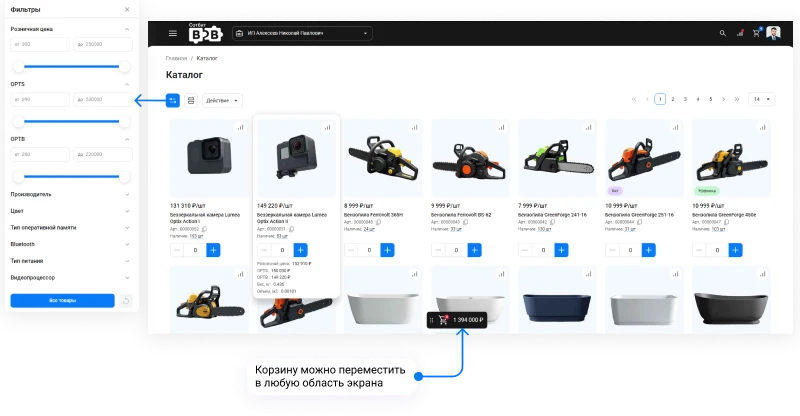
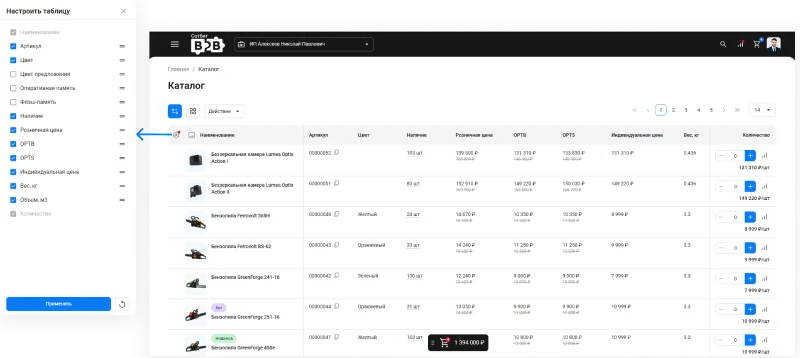
The product catalog is available in two display formats: tile and table.
The tabular display view supports configuration of the columns to be shown.
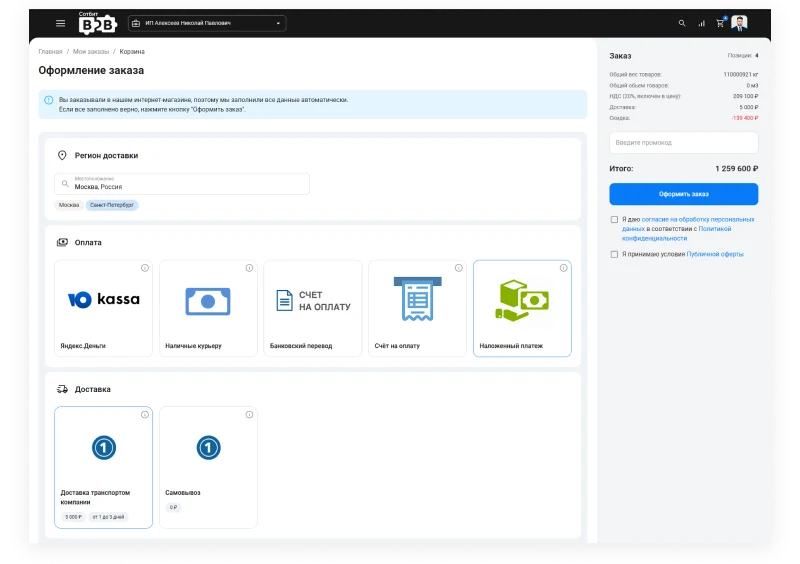
The counterparty can independently place orders at any convenient time using a simple and intuitive interface.
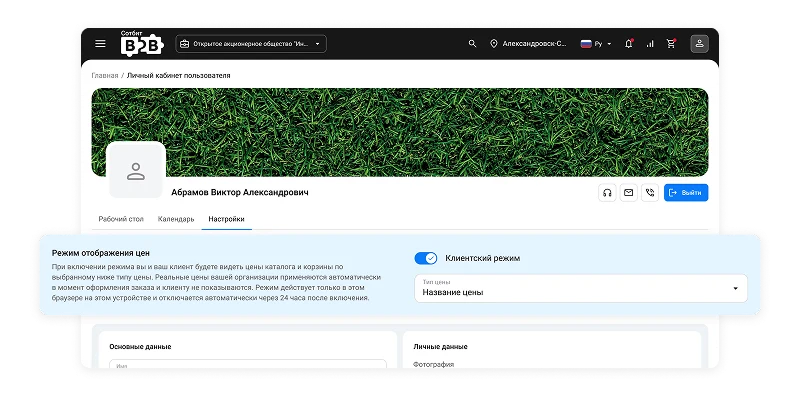
If a counterparty places an order together with their client on a single screen, they can enable client view mode and select the price type the client will see. Procurement prices remain hidden, and the order is generated using the counterparty's actual prices.
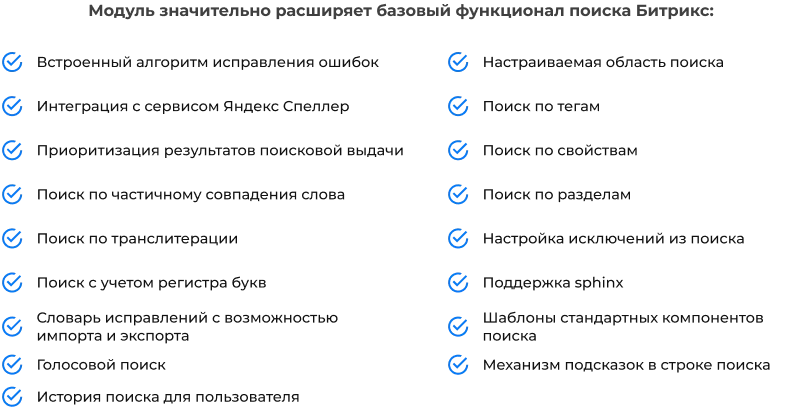
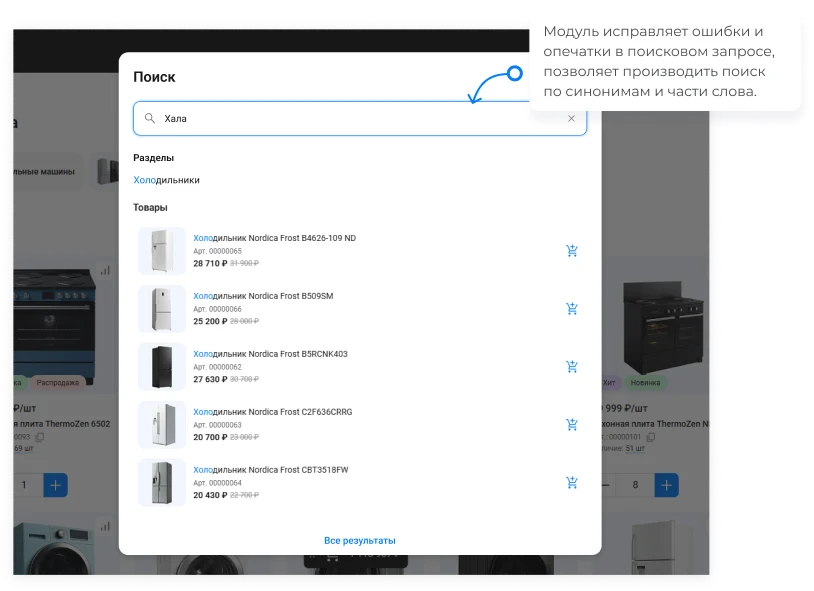
The solution includes the Sotbit Smart Search module. This tool is a standard component for online stores operating in the B2C and B2B segments. Its implementation contributes to increased conversion rates and a higher average order value.
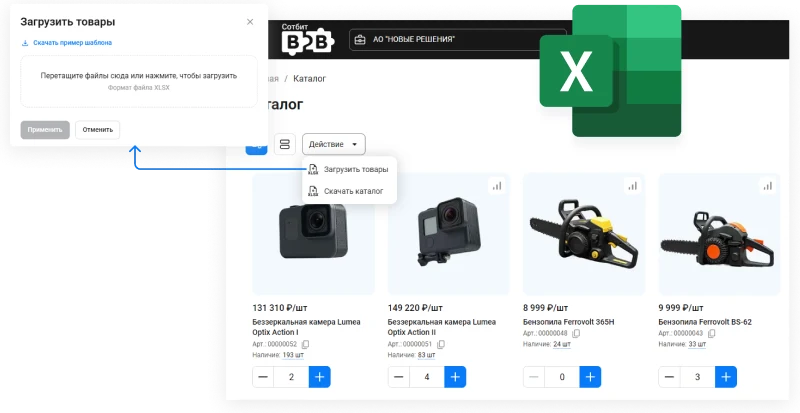
Users can download the price list in Excel format, mark the required items in the file, and upload it back to the portal. Once the file is processed, the selected items are automatically added to the cart, allowing the counterparty to place an order immediately.
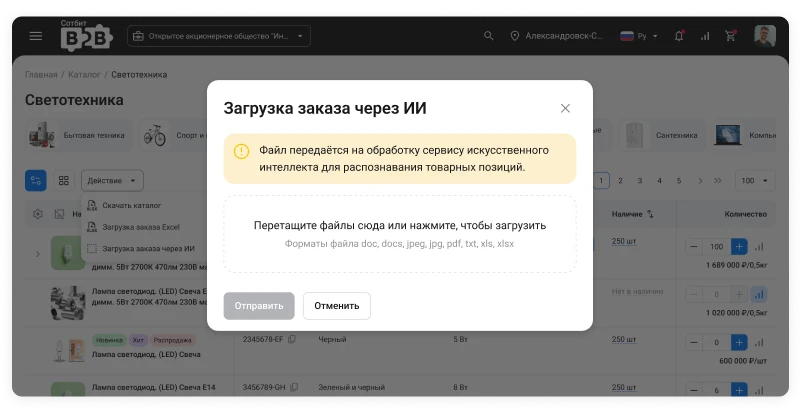
The counterparty does not need to adapt the file to a specific template. It is sufficient to upload a list of items as a PDF, image, Word document, text file, or table. Artificial intelligence recognizes the products and adds them to the cart. The order is placed according to the customer's convenience rather than the system's rigid requirements.
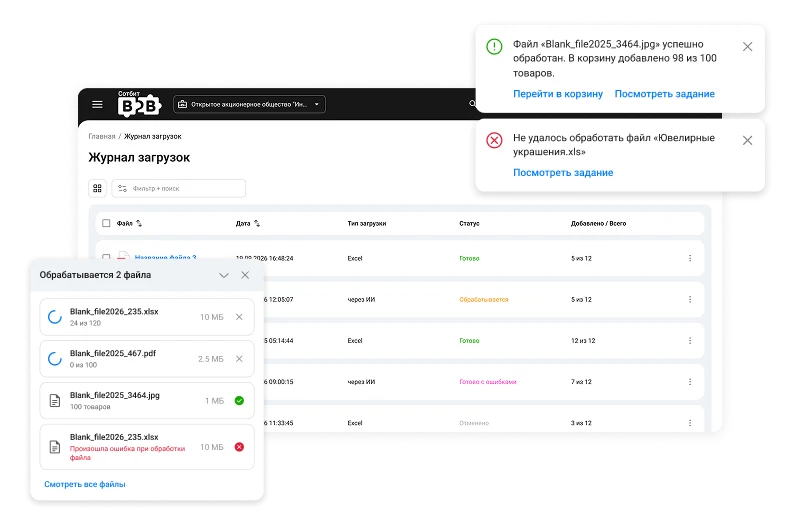
Order uploads from Excel files or via artificial intelligence run in the background, allowing the counterparty to continue working on the site without interruption. Upon completion, the user receives a notification with the operation result. All uploads are recorded in the journal.
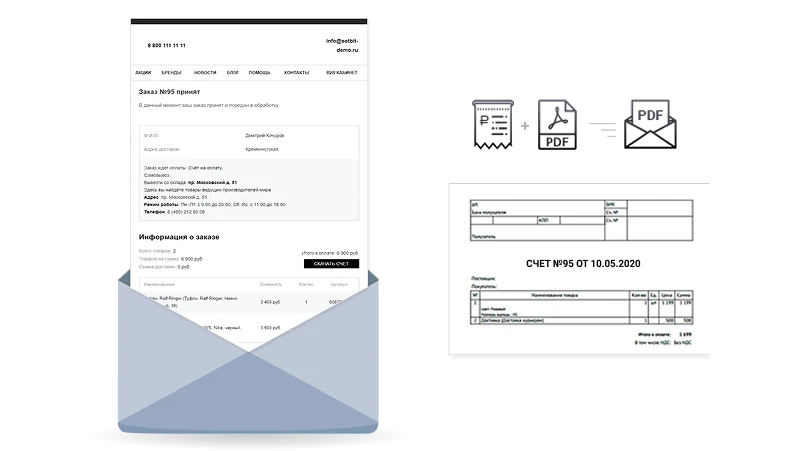
After an order is placed, the system automatically generates a PDF invoice and sends it to the counterparty's email address.
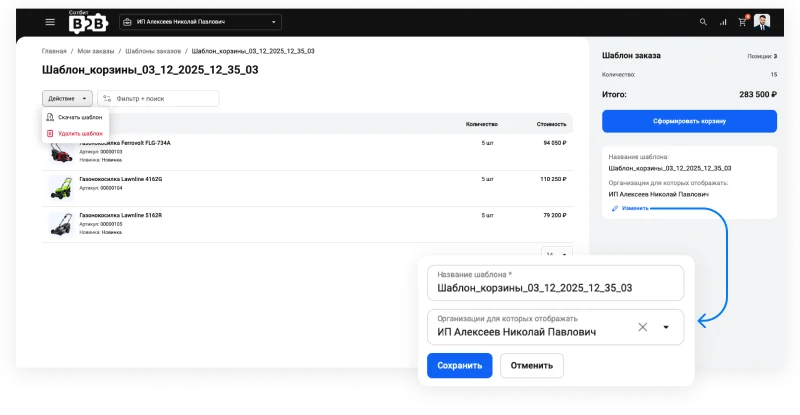
Creating order templates simplifies the process for partners to place recurring orders.
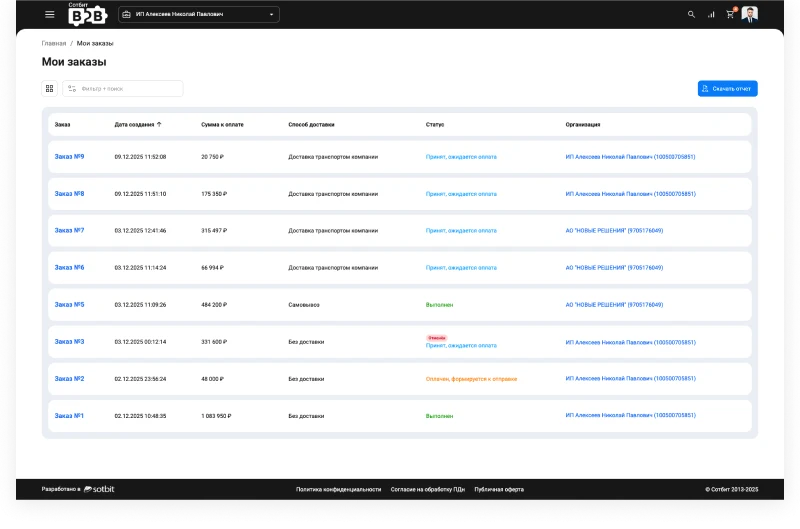
The B2B partner's personal account stores the complete history of all orders. Users can view details of previously placed orders at any time and quickly repeat a specific order.
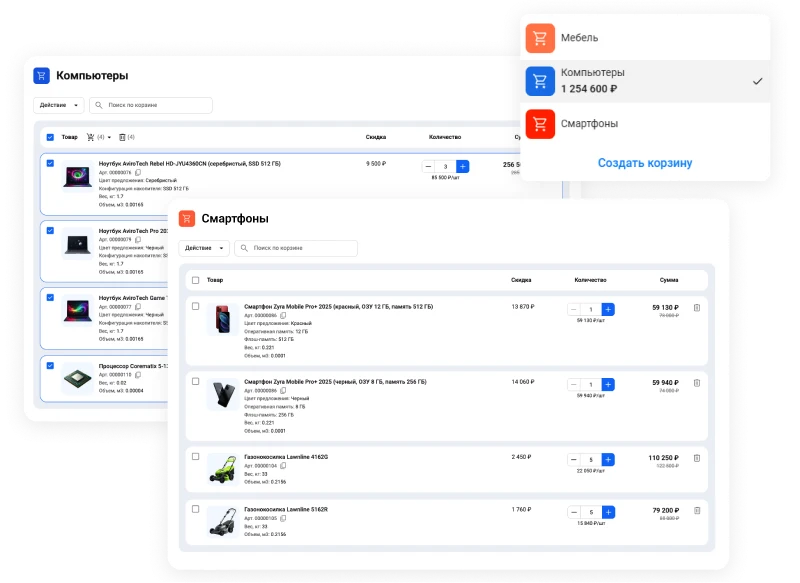
Thanks to the 'Sotbit: Multi-cart' module, the platform allows users to work with multiple carts simultaneously. Partners can add different products to separate carts and create individual orders for specific deliveries with defined nomenclature.
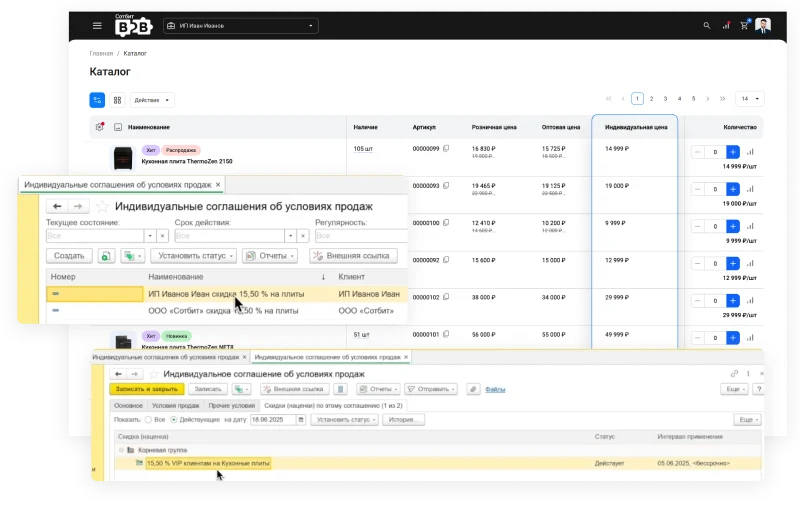
The B2B cabinet displays individual prices for each counterparty. The required cost is automatically shown in the catalog and applied in the cart during order placement.
In the basic version, prices are set manually or imported via file directly on the website. The system automatically determines and displays the correct prices for each specific client.
In the extended version with the module "Sotbit: Extended Exchange with 1C", prices are managed in 1C. Conditions are formed in the accounting system through individual agreements or separate price lists and are regularly exported to the website, ensuring that every counterparty always sees up-to-date terms.
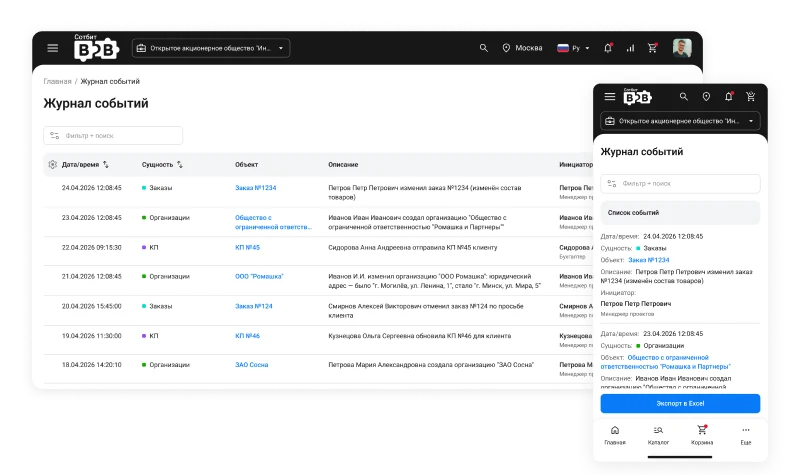
The module logs all operations on key platform objects: organizations, orders, positions, employees, commercial offers, price lists, complaints, and inquiries. The system records the specific user and the exact timestamp for each action, including creation, modification, or deletion. Organization managers view logs limited to their own employees, while the portal owner accesses the complete event history for all companies with filtering and data export to Excel capabilities.
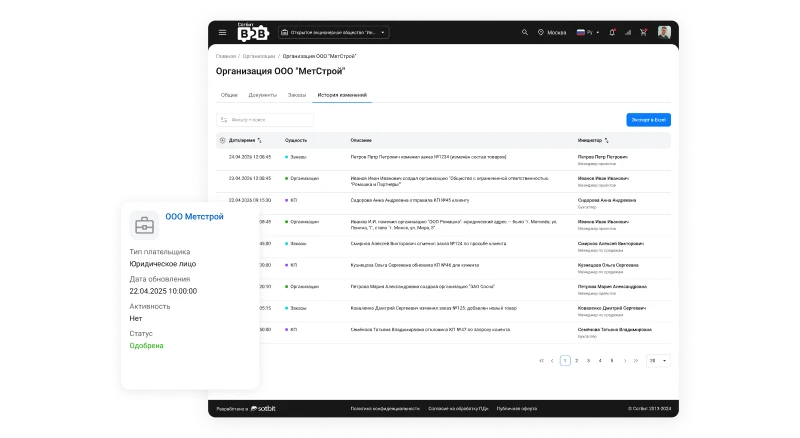
The organization or order card includes a change history. It displays what data was modified, who performed the action, and the previous value before the edit. This simplifies the analysis of disputed situations and increases transparency in data handling.
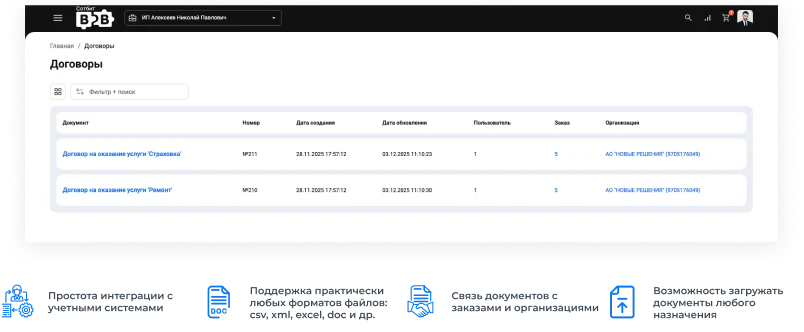
Business partners no longer need to contact managers to obtain documents. All required files are available for direct download from the B2B personal cabinet.
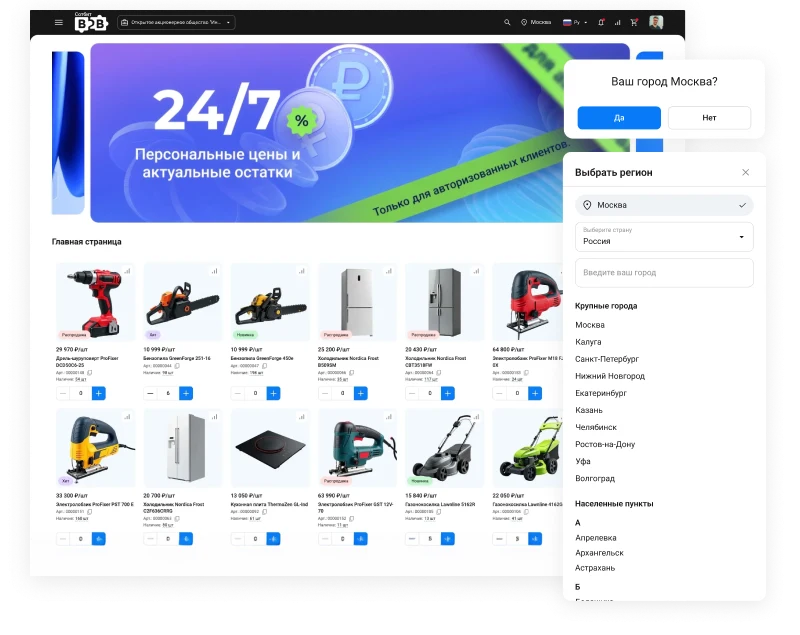
Create a multi-regional project by linking products, contacts, and content to specific regions. To promote your B2B platform in regional search engines, use the Sotbit Multi-regionalism module.
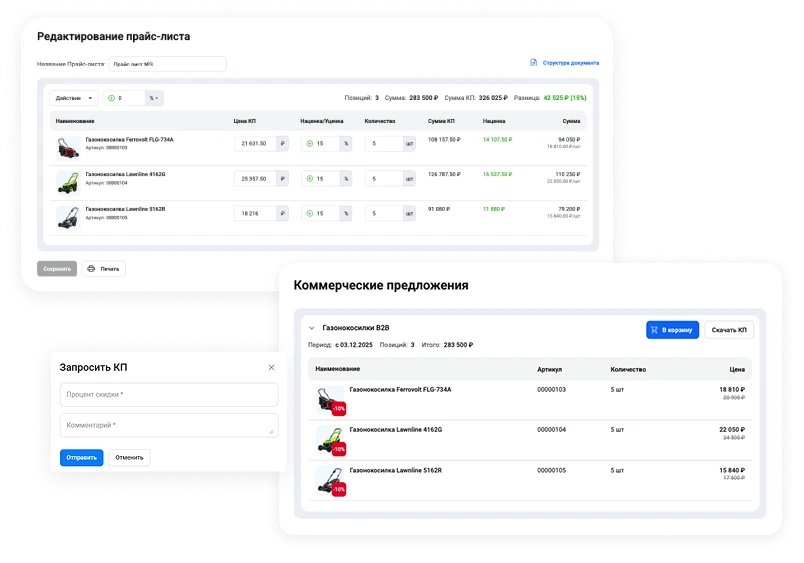
The 'Sotbit: Commercial Proposals' module provides seamless integration for creating and publishing personalized offers for counterparties. Generated documents are displayed in a dedicated section of the personal account. Buyers can download the offer as a PDF file or instantly add selected items to the shopping cart.
Counterparties can independently request commercial offers through their personal account without involving managers. A built-in editor is also available for creating and editing price lists.
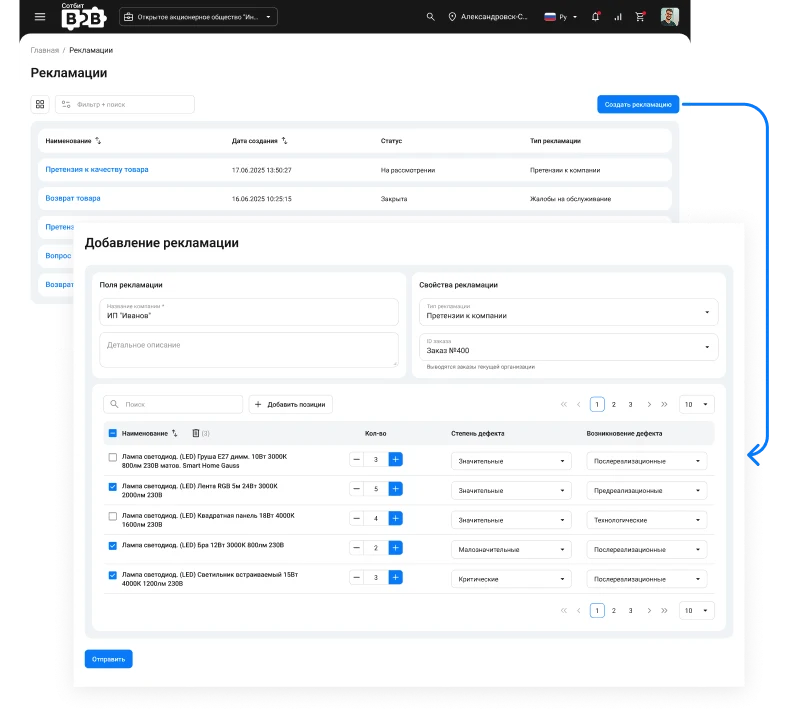
The 'Sotbit: Claims' module provides seamless integration with the B2B portal. This minimizes conflict situations between partners and managers while streamlining the claims handling process. Partners can independently submit claims via their personal account and await review without requiring manager involvement.
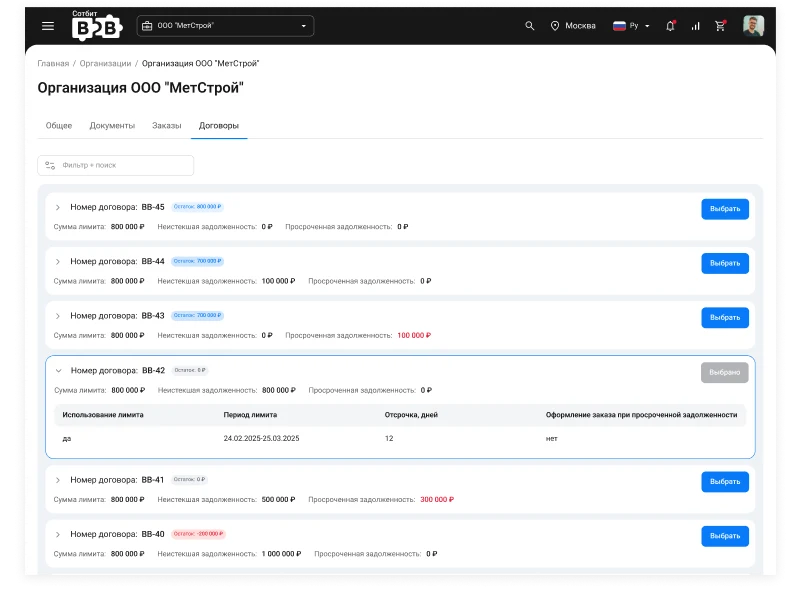
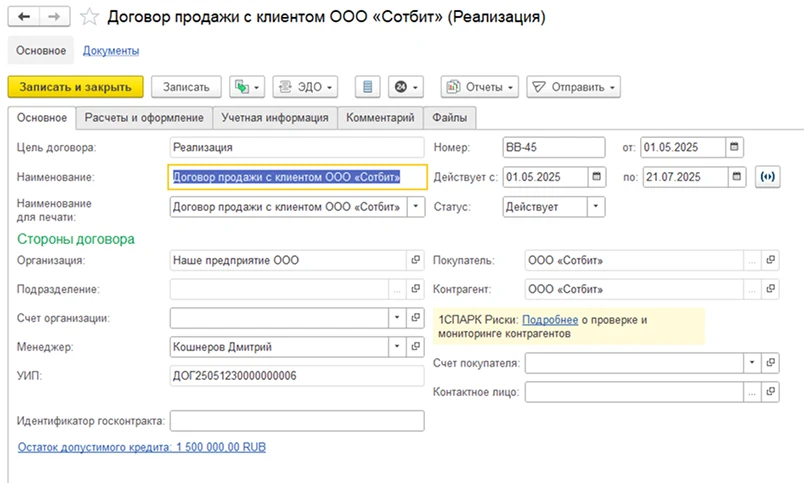
For each organization, the system allows creating one or more contracts with individual settings. Contract parameters include the validity period (fixed or with automatic renewal), payment deferral terms, and a defined debt limit. Contract details are displayed in the organization card and available as a widget on the dashboard.
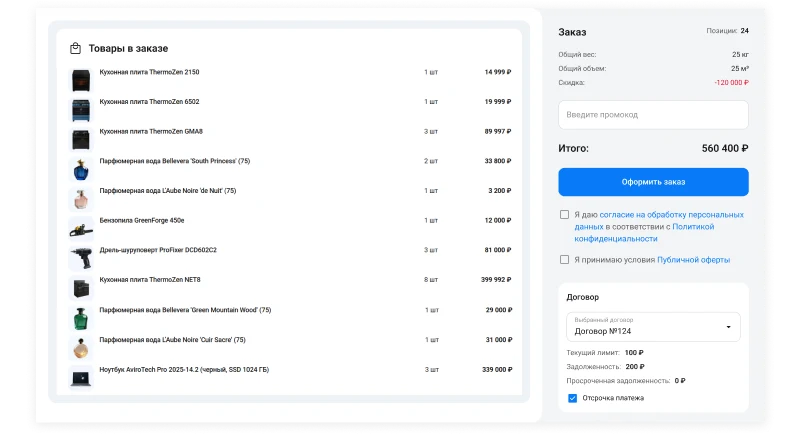
When creating an order, the counterparty selects one of the available contracts, and its details are automatically populated in the document. If the contract includes a payment deferral, the system records the outstanding debt amount and starts the term count from the date of goods shipment. After payment is received, the debt amount is recalculated.
New order placement is automatically blocked if a counterparty's current debt under an active contract exceeds the established limit. The creditor debt management functionality integrates with 1C via the module named 'Sotbit: Extended Exchange with 1C'. Data about contracts with counterparties (number, validity date, limit, and unique identifier) is transferred from 1C to the website and synchronized automatically according to a scheduled frequency. After configuring the exchange algorithms, the system uses the unique identifier to verify the contract when transferring orders from the website to 1C and automatically updates the debt data.
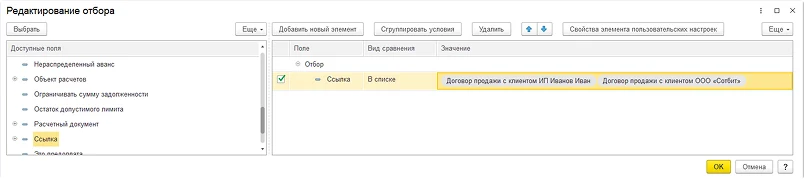
Additionally: contract filtering can be configured to export only selected contracts rather than the entire available set.
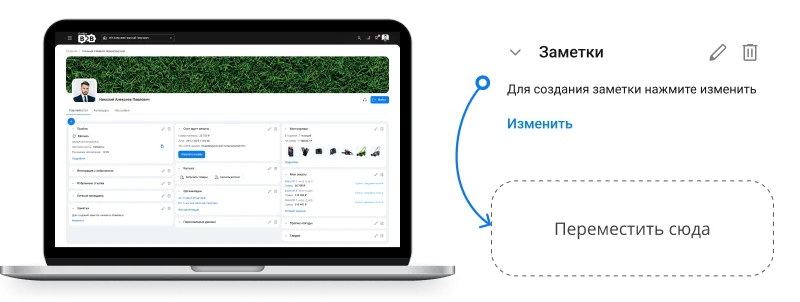
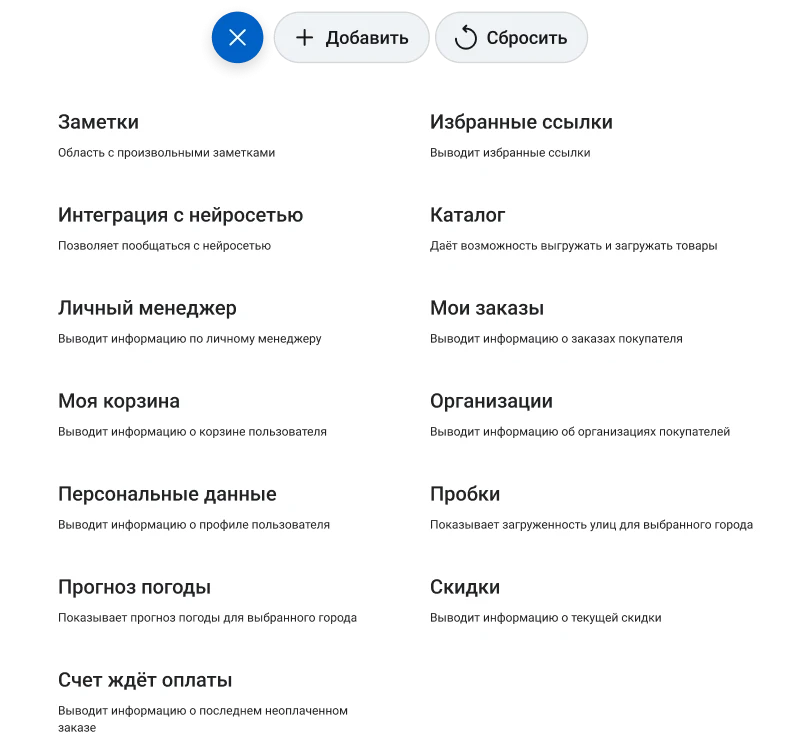
The counterparty personal account is a workspace composed of blocks and widgets that display key information such as order statuses, unpaid invoices, cart contents, subscription settings, and other parameters. Users can independently manage the panel contents by adding, removing, or renaming widgets. Elements can be rearranged using the drag-and-drop method.
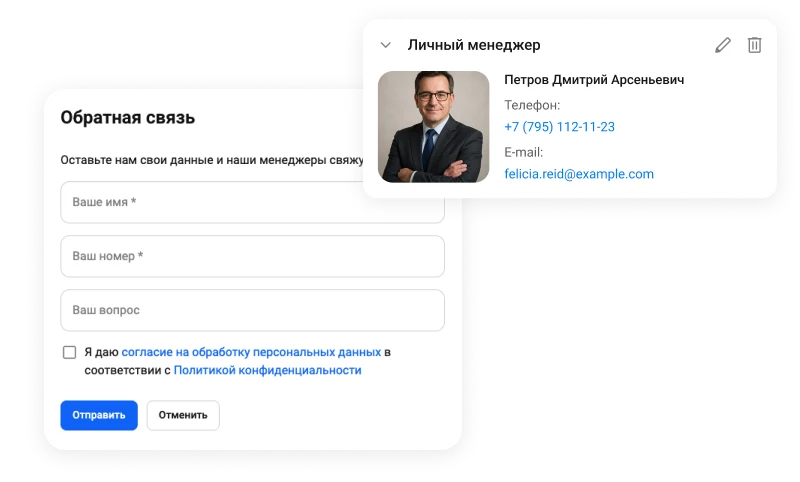
Each counterparty in the personal cabinet is assigned a dedicated manager. Users can quickly contact this manager or request a callback.
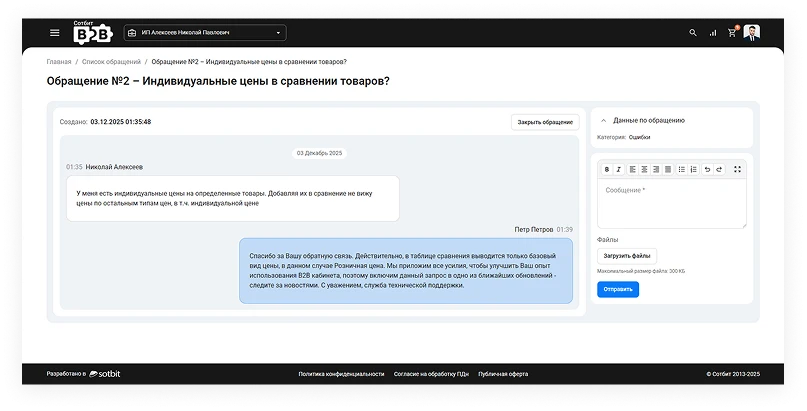
Counterparties can submit inquiries regarding orders, accounting, and other matters directly to responsible managers via the ticket system. Requests are automatically routed to the appropriate specialists.
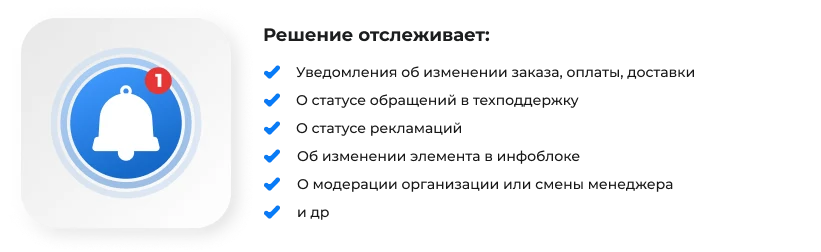
The website displays notifications in the browser window through seamless integration with the 'Sotbit: Notification Center' module.
SMS and Email authentication module for the Sotbit B2B portal. This functionality enables business partners to perform fast and secure system login by choosing between two methods: via an SMS code or an email address.
The solution operates on the Bitrix24 platform, unifying the workspaces for managers and counterparties. Counterparties interact via the B2B personal cabinet, while managers use the CRM system. Orders, documents, and other data are synchronized between interfaces automatically.
Enables two-way data exchange between the 1C accounting system and the B2B platform. The module supports uploading and downloading user and counterparty information, allowing data modifications from both the 1C system and the website interface.
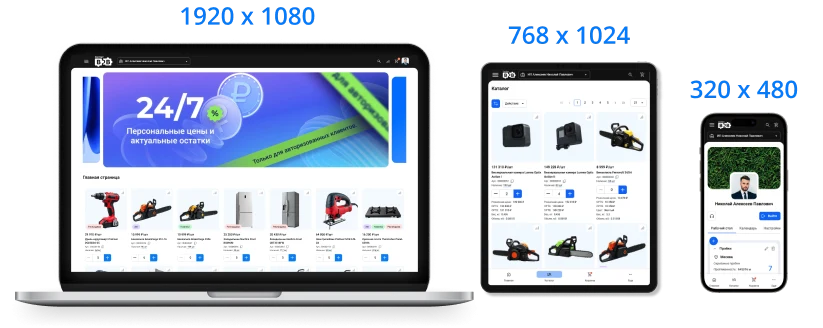
The B2B platform displays correctly on any mobile device or tablet, automatically adapting to the screen resolution.
The Sotbit B2B Portal platform supports PWA technology, enabling counterparties to add the personal account to the smartphone home screen directly from the browser.
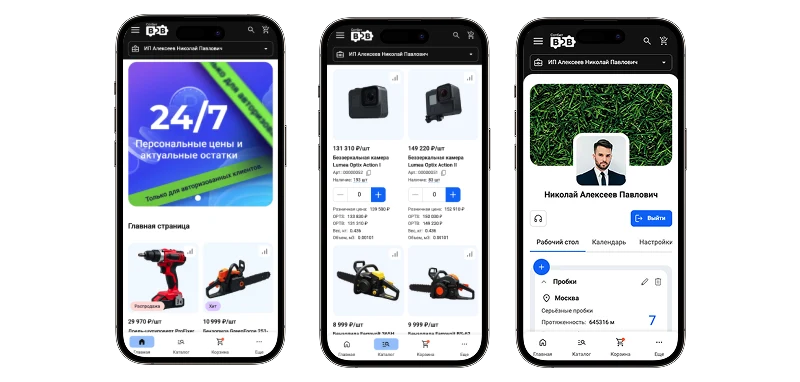
A mobile extension for the personal B2B cabinet that allows counterparties to manage orders, work with the catalog and cart, communicate with support, and receive notifications directly from their smartphone.
A demonstration of the B2B platform's functional capabilities can be conducted using Yandex.Telemost, Skype, or Zoom.
Sotbit: B2B Portal is a wholesale platform with a dealer personal cabinet. The solution automates wholesale trade processes, providing convenient access to product catalogs, prices, and order statuses. The system supports integration with external services and is adapted for operation in various network environments.
The 'Sotbit: B2B Portal' template is a wholesale platform featuring a personal account for dealers. The solution is designed to automate partner management and streamline wholesale sales operations.
If “Sotbit: B2B Portal – Wholesale Platform with a Dealer Personal Cabinet” fits the project, General iT can handle installation, initial configuration and further adaptation.
UPDATE HISTORY
What’s new
6 releases
3.2.2 (26.10.2026)Latest update
Optimization and corrections:
Adjustment of the functionality of editions.
3.2.1 (16.10.2026)
Optimization and fixes:
Adjustment of product sorting by individual prices.
3.2.0 (09.10.2026)
New functional capabilities
Client-side price display mode added;
Event log and change history added to Sotbit: B2B;
Upload log with background processing for order import via Excel and via AI added;
Ability to place an order from an arbitrary file using AI added;
Purchase via 1 click has been implemented;
Organization search by name and TIN added in the organization selector in the header of the personal cabinet;
Ability to add a new organization via the selector in the header of the personal cabinet added;
Video banners have been added for the main page and the registration page;
A setting for the location and design of banners on the authorization and registration pages has been added;
User email notification management has been added;
A tree format for displaying catalog sections has been added when exporting to Excel;
The ability to hide prices from unauthorized users with replacement by text or a form button has been added;
Linking of commercial proposals, inquiries, complaints, and price lists to the organization has been added;
Filtering of B2B cabinet sections by organization has been added;
A "Benefits" block has been added to the main page and the detailed product card;
Sorting and filtering by individual price added in the catalog;
Search and filtering by trade offers added;
Animation added on hovering over products in the catalog and over news and promotion elements;
Unit price display added for products with quantity multiples;
Optimization and fixes
Unified logic for warehouse restrictions across all catalog components;
Unified appearance and layout of authorization and registration pages: single header behavior and common page framework instead of two separate templates;
Fixed password field display logic in the registration form when both phone and e-mail login channels are simultaneously active;
Unified product sorting in the catalog in "Table" and "Tile" modes;
AI widget (GPT integration) removed from the B2B cabinet;
Legal entity ID display added in minimum order amount settings;
Field "Code (ID)" removed from filters in B2B cabinet sections;
Quantity block (+/-) stretched to full width in catalog tile view;
Other minor improvements and fixes.
Sotbit: Extended authorization and registration (sotbit.auth 2.1.0)
New functionality:
New employee registration redesigned for the invite model;
Ability to link an employee to multiple organizations of the administrator added;
System positions for organizations added in the administrative part of the module;
"Positions" tab added to the "Organization" entity for managing custom positions;
Access rights for positions expanded;
Restriction on editing and manual sorting of positions implemented in the public part.
Optimization and fixes:
Employee edit form aligned with the registration form;
Position rights display fixed considering installed modules;
Other minor improvements and fixes.
Sotbit: Invoice to email in PDF (sotbit.bill 2.2.1, 2.2.2)
Optimization and fixes:
Special character processing fixed;
Error in iframe height calculation and scroll appearance in invoice resolved;
Price display fixed according to formatting settings.
Sotbit: Commercial proposals - personalized proposals for clients (sotbit.offerlist 1.1.12)
Optimization and fixes:
Module adapted to sotbit.b2bcabinet 3.2.0;
Increased resilience to potential threats in the solution.
Sotbit: Multi-cart - multiple carts in online store (sotbit.multibasket 1.1.10)
The 'Sotbit: Extended Reviews' module is designed for the 1C:Enterprise platform. It extends standard review management capabilities, enabling the collection, analysis, and display of customer service quality data. The solution supports integration with external review services via specified addresses, ensuring automatic data synchronization.
The Smart Search module by Sotbit extends search capabilities within the system. Features include typo and spelling error correction, context-aware query understanding via GPT neural networks, configurable search scope, and result prioritization. The module also supports excluding specific items from search results.
The Sotbit Smart Filter SEO module is designed to increase online store traffic. The tool operates by generating numerous unique pages for smart filters.
Aspro: Maximum is a universal e-commerce template designed with user requirements and modern technologies in mind to ensure fast loading speeds. The solution is optimized for display on all device types and is intended to address practical business tasks.
Aspro: Next is a universal e-commerce template suitable for products of any category. The solution supports full multi-regional functionality and enables the creation of landing pages within the catalog, review sections, and search results. The template architecture is designed to meet the needs of projects focused on growth and scalability.
Deluxe is a multifunctional online store that combines platform and builder capabilities. Designed for businesses of any scale, it includes over 250 built-in features. The system ensures high performance and flexible configurability for various tasks.
The displayed price covers the solution itself. Platform licensing, installation and customisation are checked separately. If the page offers bundles, select the required option before submitting a request.
How do I check compatibility?
Compare the supported editions and solution version in the technical details with your project. Before installing on a live website, we recommend making a backup and checking the solution in a test environment.
How much does this solution’s renewal cost?
The current renewal price is 749,950 ₽. Before you order, a manager will confirm the renewal period and whether it applies to your licence.
Can you help with implementation?
We can help launch a website using the selected template, agreeing on its structure, content migration and integrations. The schedule and cost depend on the project and are quoted separately.
Statistics and interaction recording
Public pages use basic statistics. Our recording and Yandex Webvisor require your permission. You can keep basic statistics or disable all analytics.
Operator: General IT Rus LLC, INN 2310208877. Statistics and recording help improve the website.
Basic statistics: pageviews, a random daily ID, a public URL and time. The ID lasts until Moscow midnight. Original records: up to 48 hours; totals: up to 7 years.
Campaign tags and a technical identifier are sent by our server to the existing Yandex tag. Visitor IP, User-Agent and cookies are not included in this transfer. If selected, its browser code collects technical data, cookies, actions and masked page snapshots; recordings last 15 days. Inputs, chat and account areas are hidden.
Interaction recording requires permission: clicks, scrolling, technical information and filtered public-page snapshots. Events: up to 7 years; IP and snapshots: up to 90 days.
Permission is remembered for up to 365 days; full opt-out remains until changed. Basic statistics only disables recording; Disable all analytics stops new analytics. Previously sent data is not automatically deleted. Withdrawal and requests: support@git.ru. Full terms are linked below.
Your browser requests no tracking: analytics is off.