
Module
MACHAON: View Logs
MACHAON: Log Viewer A module designed for convenient viewing of logs formatted in Monolog.
Request a price
↗Аккаунт в General iT
Войдите или создайте аккаунт для управления услугами в личном кабинете.
Страны не найдены. Попробуйте другое название или код.

MODULE FOR 1C-BITRIX
MACHAON
Batch Operations in CRM is the second module in a series of tools for safe mass data processing. The first module in the series works with information blocks and catalogs, while this one is designed for on-premise Bitrix24 portals for CRM, tasks, and employees. When the need arises to modify not just one, but dozens, hundreds, or thousands of records, standard editing quickly becomes routine.
Batch Operations in CRM is the second module in a series of tools for safe mass data processing. The first module in the series works with information blocks and catalogs, while this one is designed for on-premise Bitrix24 portals for CRM, tasks, and employees.
When the need arises to modify not just one, but dozens, hundreds, or thousands of records, standard editing quickly becomes routine. The module allows you to build a selection directly in the familiar portal interface, configure changes, preview the result in advance, and start processing only after verification.
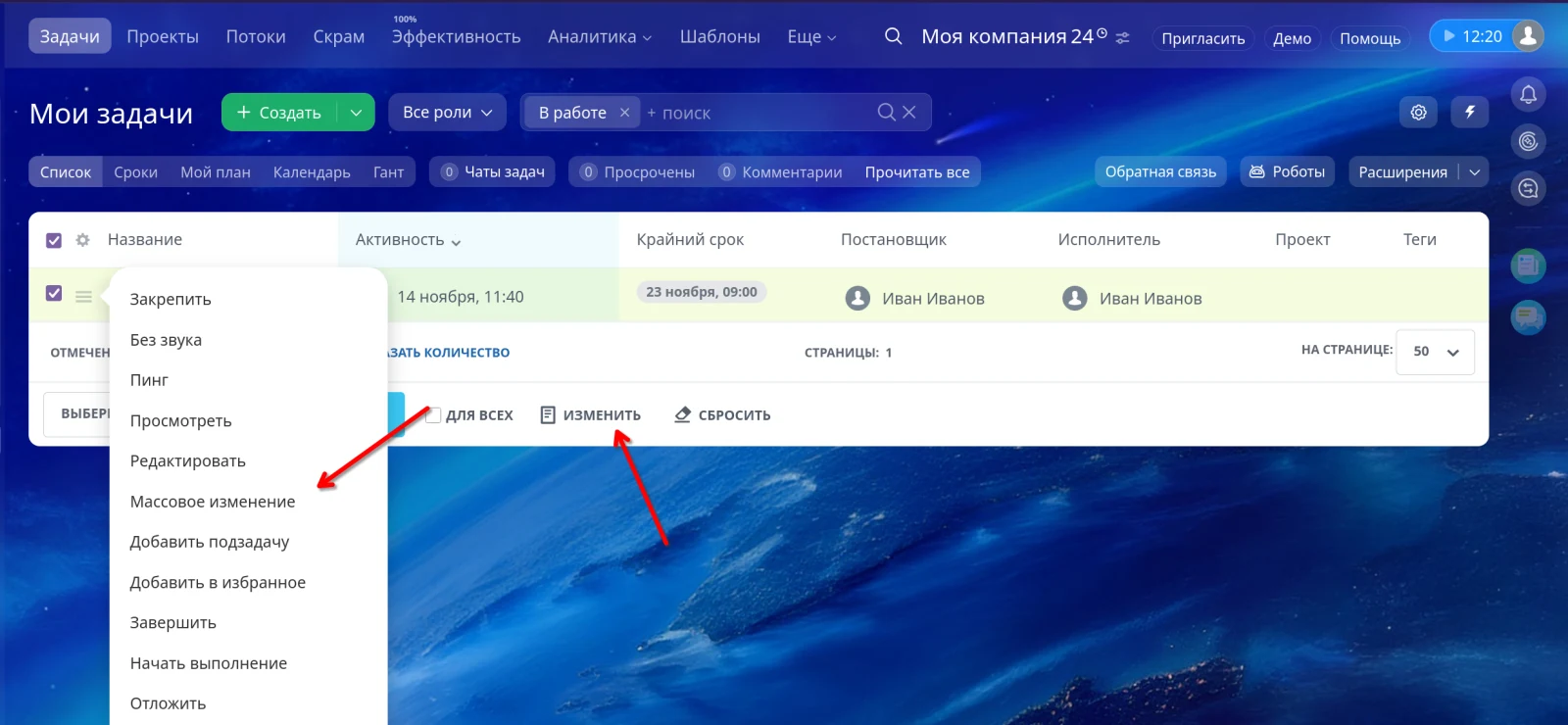
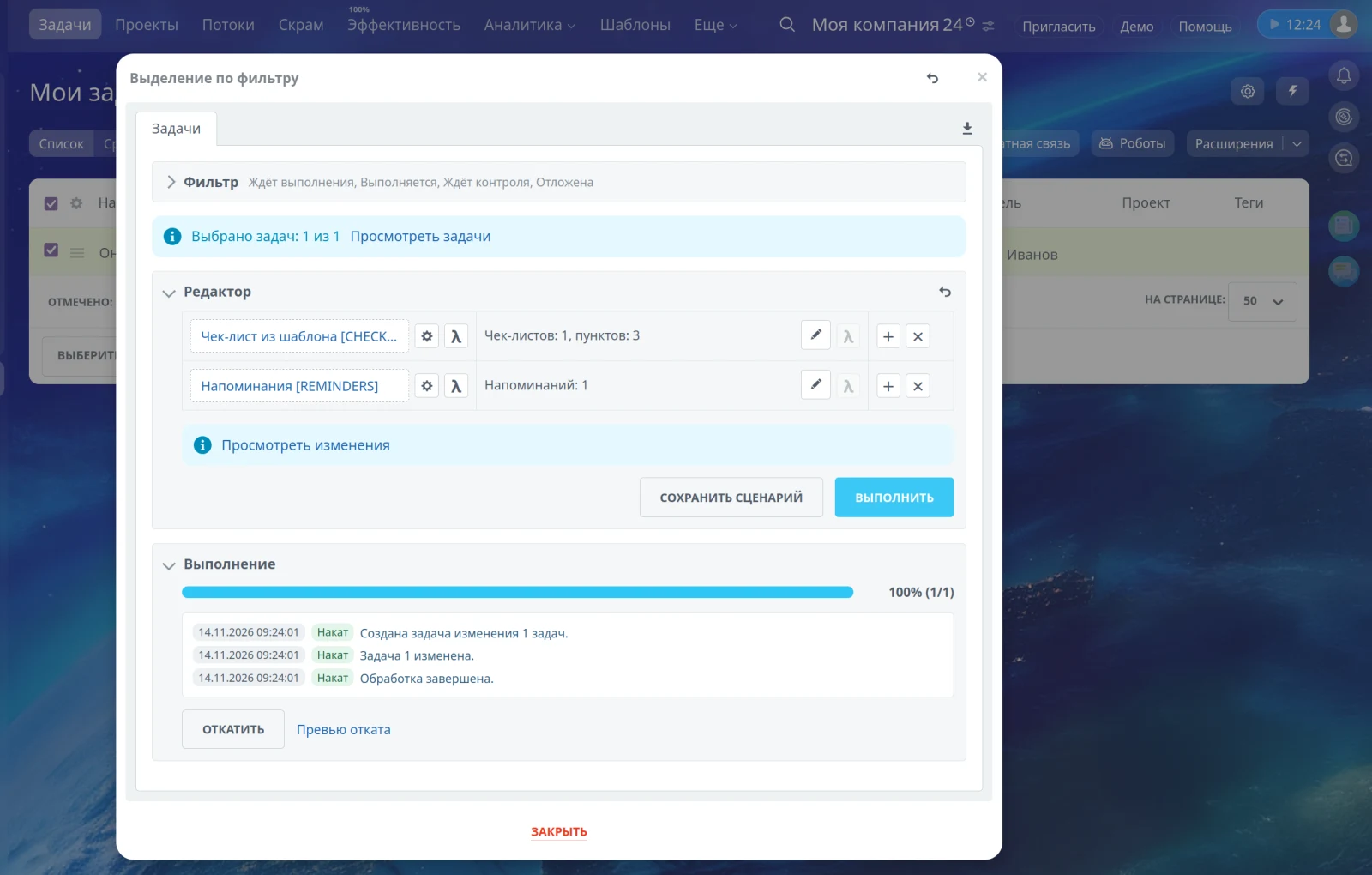
The module supports batch processing for deals, contacts, companies, leads, smart processes, invoices, commercial proposals, tasks, and employees. The mass editing tool is integrated directly into the section interface, accessible via the data grid, context menu, or CRM Kanban, eliminating the need to navigate to a separate administrative section.
Key capabilities include selecting individual records using checkboxes or applying the standard Bitrix24 filter to process the entire selection. The module supports batch modification of both standard and supported custom fields. Available operations include setting, clearing, copying, adding, removing, and transforming values while respecting field types. The system handles strings, numbers, dates, lists, users, CRM links, files, and multiple values correctly.
A detailed preview of changes is available before execution, showing the state before and after the operation. This preview includes filtering, sorting, pagination, and the ability to exclude specific records. Execution is performed in batches with progress tracking and a detailed log. The system maintains an operation history, supports reapplying and rolling back changes with a preview, and allows saving typical settings as scenarios for import and export. User permissions are automatically verified when forming the selection and executing changes.
Optional saving of selected rows after reloading the supported grid.
For batch processing of information block elements, products, trade offers, prices, and stock levels, also review the module of the same series titled "Batch Operations in Information Blocks".
New features in the portal module
The general working principle is familiar to users of the information block module: data selection, editor, preview, batch execution, operation log, and rollback. However, portal data required new tools designed for real CRM business processes and tasks.
Full support for standard UF field types
The module fully supports all standard user field types:
— string (string) and template or formatted string (string_formatted);
— integer, double, and money with currency (money);
— date (date) and date with time (datetime);
— Yes/No (boolean) and list (enumeration);
— link (url) and SNILS (snils);
— user (user) and employee (employee);
— binding to an information block element (iblock_element) and information block section (iblock_section);
— binding to a highload block (hlblock);
— binding to a CRM dictionary (crm_status) and CRM elements (crm);
— regular file (file) and Disk file (disk_file).
The module supports single and multiple values, standard selectors, and lists. It implements filtering, preview, execution, and data restoration upon rollback. Fields can accept values in the form of DSL expressions.
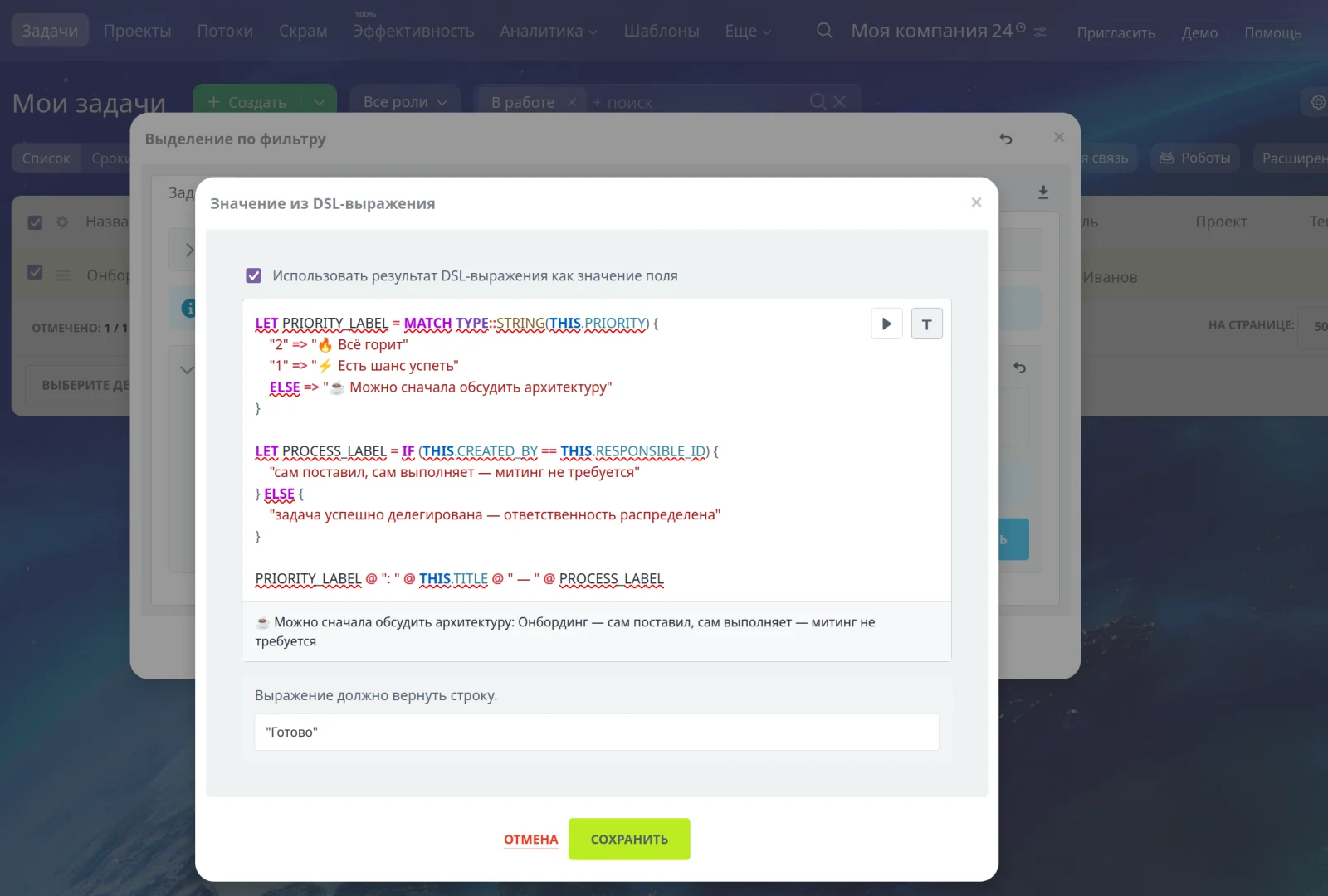
For most fields, you can specify not only ready-made values or text templates but also full DSL expressions. A code editor button is located next to the value input field. The editor provides syntax highlighting, auto-formatting, variable support, block conditions, the MATCH operator, lambda expressions, undo and redo actions, and a trial run mode with result output.
The expression is evaluated separately for each record and must return a value compatible with the target field type. A single operation can calculate new sums, select a deal stage based on conditions, generate dates, determine users, return lists of values, or create CRM binding structures.
DSL expressions can read data from related entities accessible to the current user using the functions DEAL::GET, CONTACT::GET, COMPANY::GET, TASK::GET, and SMART::GET. Both standard fields and supported custom fields are available, while current user permission checks remain strictly enforced.
Visual checklist template editor
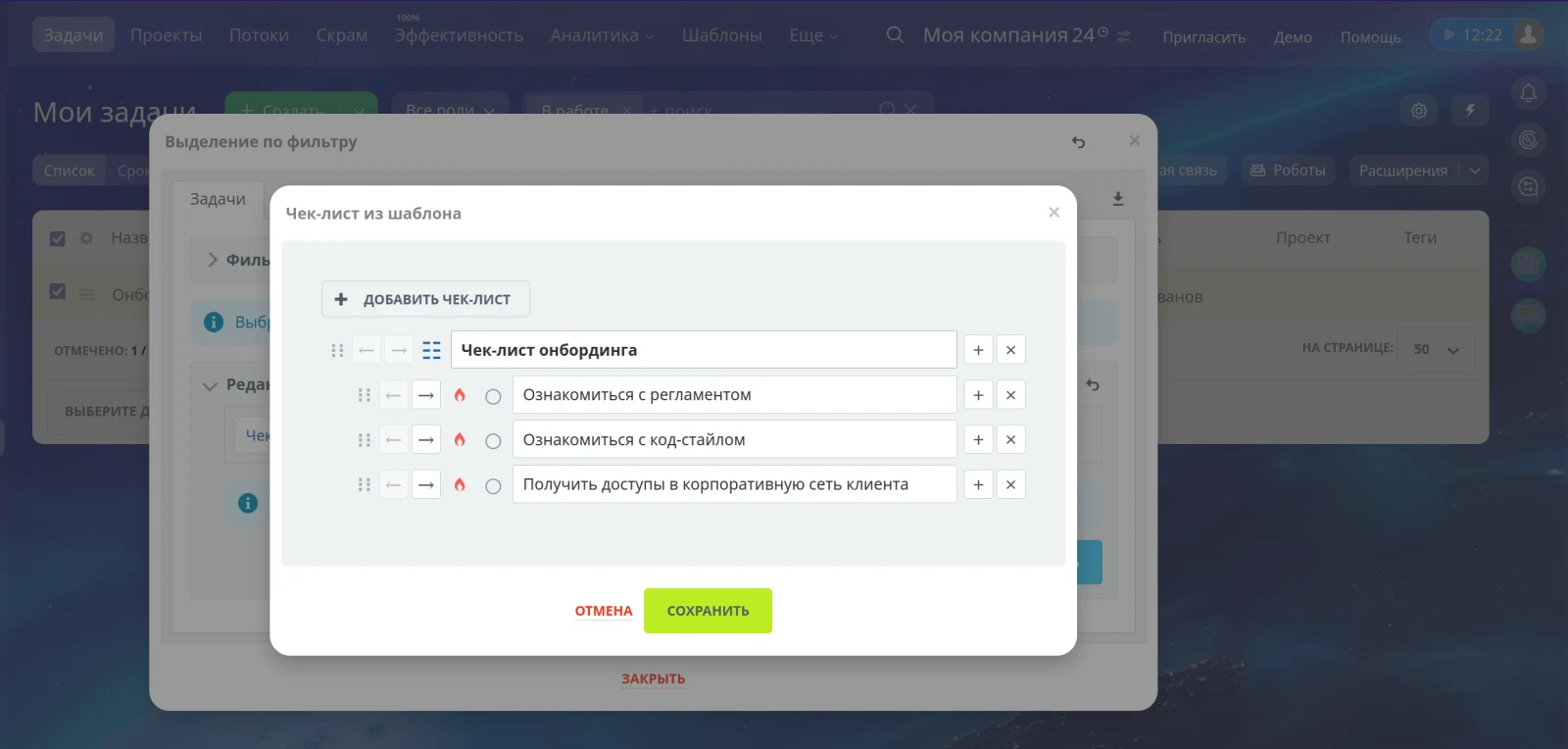
The module supports batch operations for task checklists. Users can create a complete checklist template and apply it immediately to multiple selected tasks. The editor handles multiple checklists simultaneously, supports nested items, allows reordering via drag-and-drop, enables marking of important items, and provides a clear separation between headers and content. Before execution, the structure is displayed as a diff showing the original and new states separately. This approach is suitable for standard processes such as employee onboarding, project launches, publication verification, routine maintenance, and quality control. The module also includes a reminder builder for tasks.
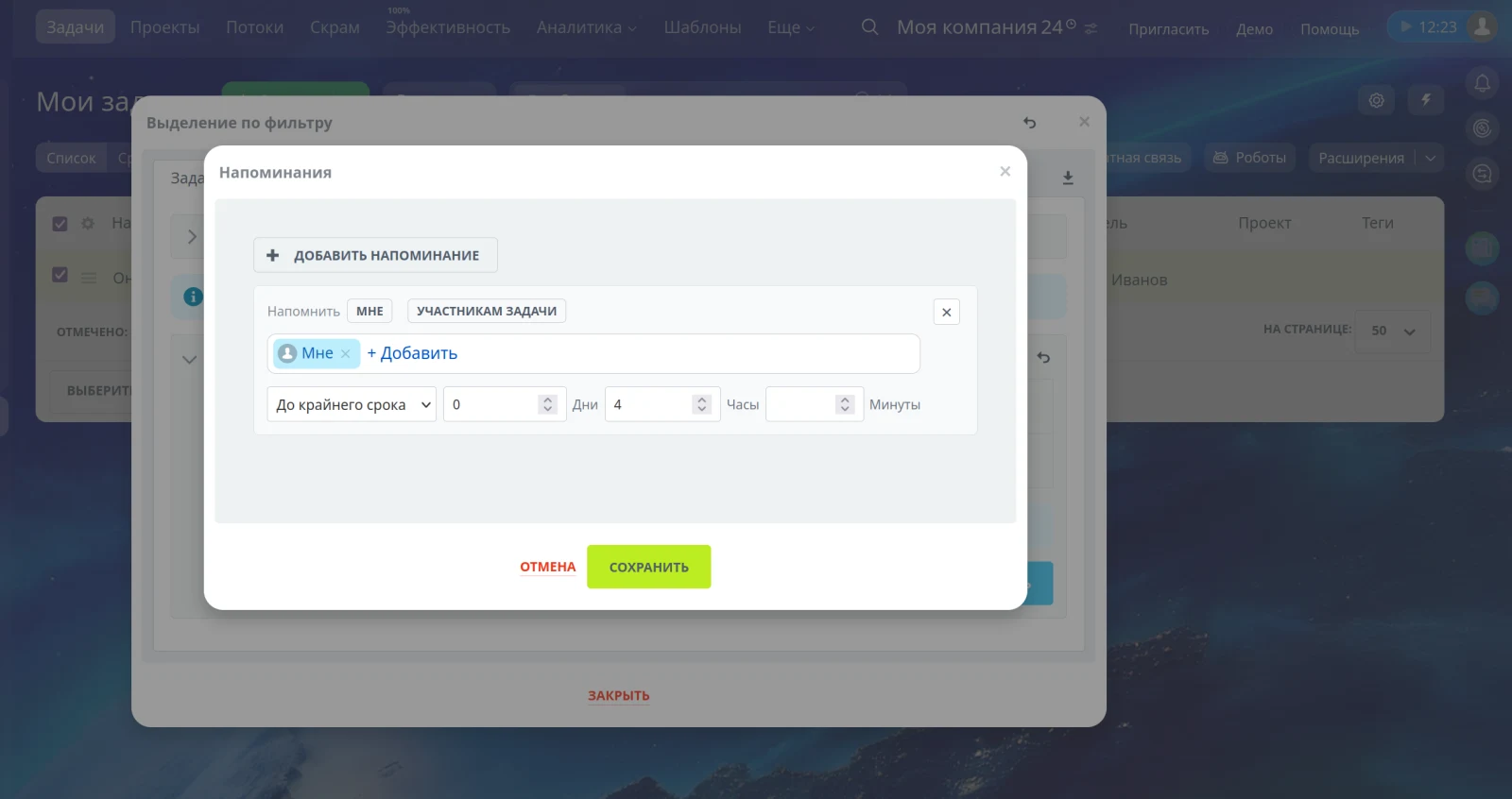
Reminders are configured using a dedicated visual builder rather than text strings or technical arrays. The builder allows selecting specific employees, quickly inserting oneself or task participants, and setting an exact date and time or a time offset relative to the deadline.
A clear strategy is available for batch operations: either add new reminders to existing ones or replace the current set entirely. When rolling back changes, the module accounts for the reminder lifecycle and avoids blindly deleting records that have already triggered, as other portal data may reference them.
Planned effort is entered in the familiar format of days, hours, and minutes, although the Bitrix24 core stores this value in seconds. The same element is used to define relative intervals for reminders.
The module supports batch changes to the assignee, work acceptance flag, parent task, CRM links, and Disk files. For the operation to make a subtask, a single parent task is selected, and the system checks for invalid cyclic relationships before execution.
CRM links and multiple attributes are managed without the need for manual ID entry.
Users, contacts, companies, deals, and other CRM entities are selected via Bitrix24 dynamic selectors. The tool accounts for the binding type, allowing records to be searched by name without manually entering technical identifiers.
Phone numbers, email addresses, websites, and messengers for contacts, companies, and leads are presented as separate virtual fields. This enables mass editing of specific communication types while preserving their type and multiplicity.
For Disk files, users can select an existing document, and the preview displays a readable file name. Complex values are shown in a human-readable format instead of technical JSON.
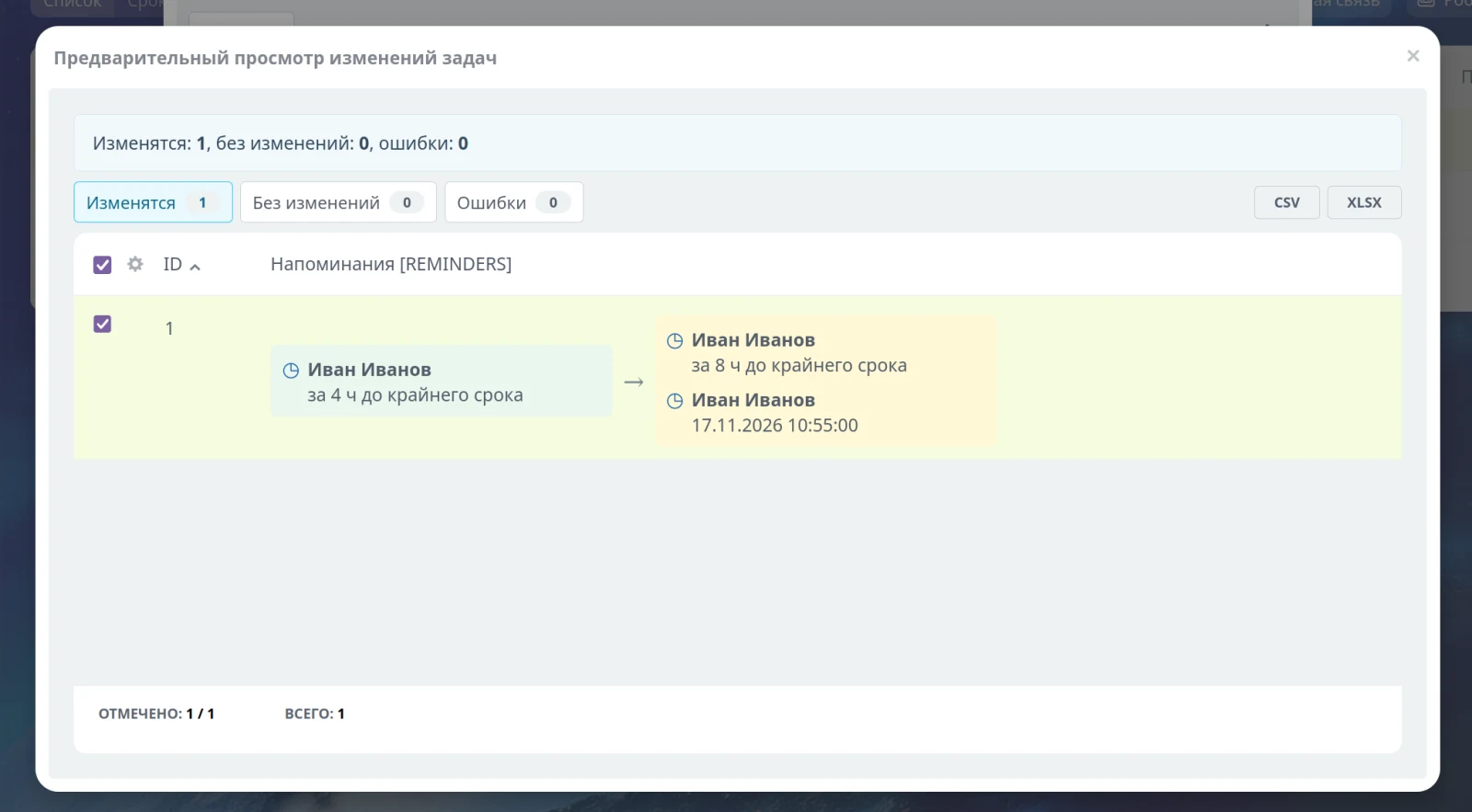
CRM and tasks operate on complex composite data. The preview feature resolves internal user and CRM entity identifiers into readable names, displays files by their names, expands multiple values into separate lines, and formats checklists and reminders as distinct blocks. The same full-featured interface is used to view the planned update, the results of an executed operation, and the preview of a rollback. Users see business values rather than internal arrays or core identifiers.
For “Batch operations in CRM”, General iT can perform integration, configuration and a final check after installation.
USER EXPERIENCE
How does this solution work in a real project? Share your experience and help others choose.
There are no reviews of this solution on git.ru yet. Tell us what worked well and what could be improved.
Verified purchaseAdd a key if you wish. A verified review gets a badge, priority placement and more rating weight.
Open to every clientJust sign in to your account. A key is optional; all reviews are moderated.
YOUR PROJECT INFRASTRUCTURE
FROM THE SAME DEVELOPER
MACHAON
MACHAON: Log Viewer A module designed for convenient viewing of logs formatted in Monolog.

Batch Operations in Information Blocks When managing catalogs with thousands of items, even routine update tasks can consume a disproportionate amount of time.

A simple cookie notice no longer guarantees protection against fines Many websites still rely on outdated formats: a pop-up window with a single 'Accept' button or a footer statement implying that continued site usage constitutes consent to cookies. While this was previously sufficient, Roskomnadzor and courts now consider such wording inadequate.
MORE FOR YOUR WEBSITE
Order statuses, payments, delivery, products, order properties, and abandoned carts are synchronized with the CRM without manual data transfer. The module connects an online store built on the 1C-Bitrix platform with deals in the Bitrix24 CRM system, ensuring two-way real-time data updates.

The Proficrm: Marketing Mailings module provides tools for organizing email marketing on your website and within the Bitrix24 CRM system. The solution enables owners of online stores and corporate portals to increase sales and brand awareness with minimal costs. This effect is achieved through email personalization based on data from Bitrix24 and their automation.

The Yookassa module provides integration with a popular Russian payment service for accepting payments and online acquiring. The solution supports transactions via bank cards and other payment methods available within the Yookassa ecosystem. Functionality includes automatic charging from saved cards and payment initiation based on order status.
BEFORE YOU ORDER