
Module
MACHAON: View Logs
MACHAON: Log Viewer A module designed for convenient viewing of logs formatted in Monolog.
Request a price
↗Аккаунт в General iT
Войдите или создайте аккаунт для управления услугами в личном кабинете.
Страны не найдены. Попробуйте другое название или код.

MODULE FOR 1C-BITRIX
MACHAON
The MACHAON data change audit module enables tracking the origin of all system modifications. It allows you to identify who changed a product price, determine why a user lost access rights, retrieve the field value prior to data import, and specify the exact actions performed by a nightly agent or a developer's one-time script.
The MACHAON data change audit module enables tracking the origin of all system modifications. It allows you to identify who changed a product price, determine why a user lost access rights, retrieve the field value prior to data import, and specify the exact actions performed by a nightly agent or a developer's one-time script.
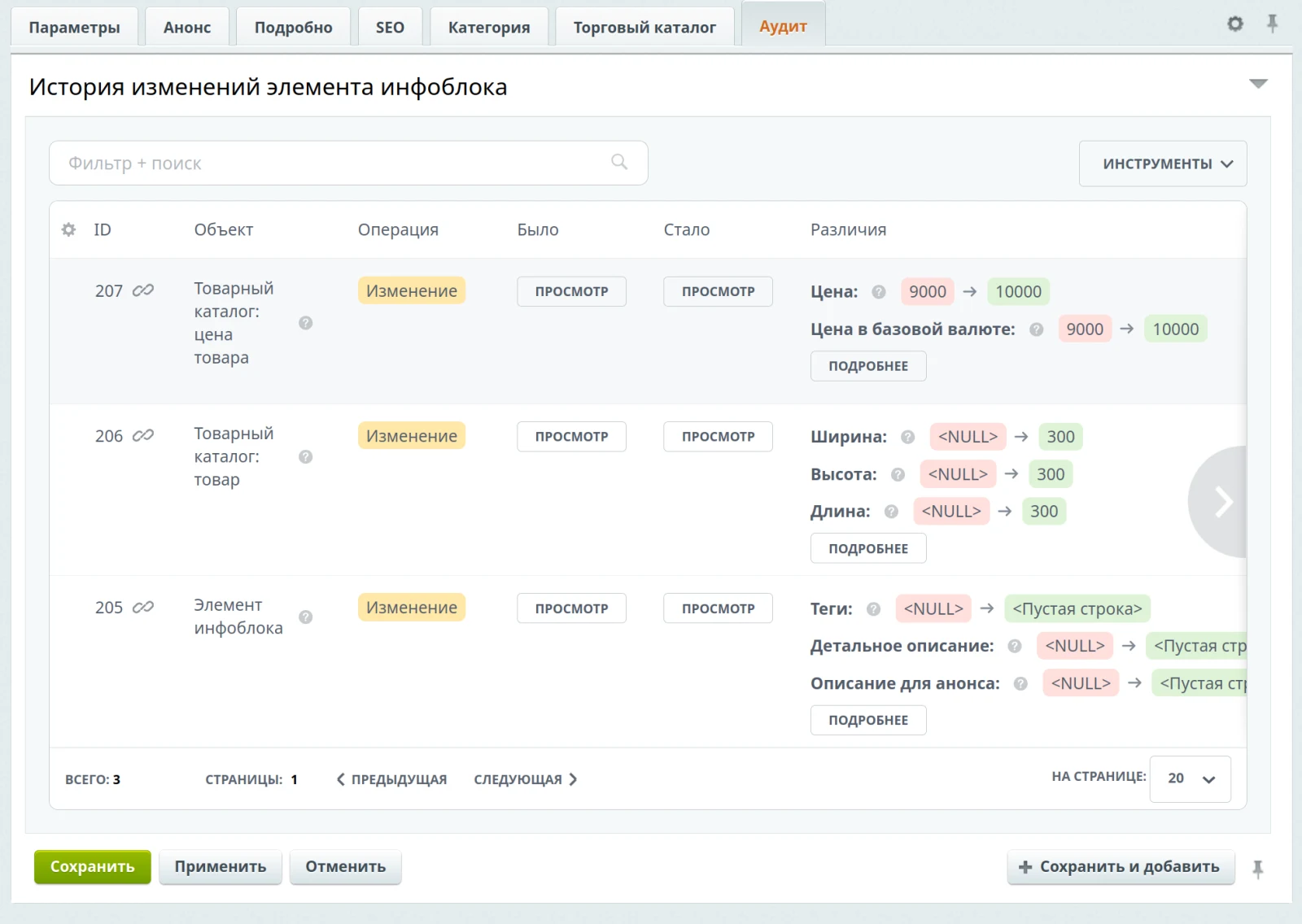
In complex projects, data changes in dozens of ways: via the administrative interface, public components, REST interfaces, data exchanges, agents, event handlers, console commands, custom integrations, and direct SQL queries. Standard event logs capture only actions that the application code explicitly reports. If a developer forgets to add logging or an operation bypasses the expected API, that history is lost.
Typical change audit solutions are built on Bitrix events. Consequently, they can track only entities and operations for which the API provides a suitable event, and only if the change was made to the database through that API. Direct SQL queries, data imports, third-party scripts bypassing the API, and operations for which the core does not send an event will remain outside such an audit.
The Data Change Audit module solves this problem at the database level. It records changes, links them to the user, the executed query, the running code, and business entities, then displays a clear history in the administrative section and object cards.
Important: hosting requirements
The data change audit module requires the database to support the creation, modification, and deletion of triggers. This is a mandatory technical requirement because only triggers ensure the reliable recording of all operations. The system also supports optional optimization via stored procedures and functions, but these are not required for basic audit functionality. Enabling advanced optimization is possible only with appropriate access privileges in the DBMS.
The availability of triggers, stored procedures, and necessary privileges is not guaranteed on all virtual hosting tariffs. Restrictions may depend on the specific provider, the selected tariff plan, the type of database management system, and server settings.
The module imposes elevated requirements on the server's RAM. Resource consumption depends on the number of tracked tables, the count of active triggers, the number of simultaneous connections, open table cache parameters, row width, and the composition of saved data (OLD, NEW, DIFF, and context). A server with 2 GB of RAM should not be considered a standard configuration for production use of a portal with audit enabled. For small installations with moderate load, 8 GB of RAM is the practical minimum; the database process or container should be allocated at least 4 GB.
16 GB of RAM is the recommended baseline for a boxed Bitrix24 installation or for monitoring a large number of tables.
32 GB of RAM and above are required for high-load portals, environments with many users, and broad entity coverage.
These figures are guidelines rather than a universal formula; the final memory requirement is determined after analyzing the specific portal and database management system configuration. When monitoring a large number of tables, it is recommended to use optional stored procedures, which reduce the size of repeated SQL code in triggers and lower memory consumption during their caching.
The module provides guaranteed logging of all changes. For tables connected to monitoring, triggers are created for INSERT, UPDATE, and DELETE operations. Consequently, audit records are generated directly within the database at the moment data changes occur, rather than solely within a specific PHP method or Bitrix24 event.
The module ensures reliable logging of all changes in tracked tables, regardless of the operation type, API used, or request source. Data capture occurs with any modification method: via D7 ORM, the legacy Bitrix API, components, agents, REST methods, or event handlers. Modifications made by arbitrary scripts (such as import_by_vasya_final_v3.php), direct queries through facades and database connections, or SQL commands from Adminer, the DBMS console, or other tools are also recorded. If a row in a tracked table is physically modified, the entry is saved to the log. This eliminates the need to embed logging code in every scenario and allows the 1C-Bitrix core files to remain untouched.
Full support is provided for MySQL, MariaDB, and PostgreSQL databases. The module architecture includes two complete adapters: one for the MySQL/MariaDB family and a separate one for PostgreSQL. Both adapters implement the full range of functionality, including trigger-based auditing for INSERT, UPDATE, and DELETE operations, recording of OLD, NEW, and DIFF versions, historical context, source identification, grouping, filtering, export, diagnostics, and automatic data storage.
Internal SQL, utility functions, and JSON handling methods are implemented separately to account for the specific features of each database management system. Consequently, PostgreSQL is supported as a fully equal platform rather than a limited compatibility mode.
Flexible trigger configuration and history composition
Guaranteed auditing does not require indiscriminate storage of all data. For each connected table, a custom level of detail can be configured:
Operation selection. Log only INSERT, UPDATE, or DELETE operations, or any combination thereof.
Field selection. Include only necessary columns in the audit; technical, large-volume, or sensitive data is excluded.
Record composition. Snapshots of OLD, NEW, and normalized DIFF can be included independently.
DIFF strategy selection. For MySQL, both standard and compact strategies are available to find the optimal balance between detail and load.
Context configuration. Snapshots of related entities are saved only for selected columns and categories, or the storage of additional context is completely disabled.
Log separation. Changes can be kept in a general audit table, or a highly active table can be moved to a separate physical storage location.
Storage configuration allows applying a general retention period, assigning a specific period to a particular table, or ensuring indefinite storage of the complete history.
For critical entities, it is recommended to retain the full history with state snapshots and context. For high-load tables or those containing sensitive data, data collection can be limited to specific operations, individual fields, and a minimal set of changes (DIFF).
Complete change overview
For every operation, the source table, row identifier, and action type are recorded. Depending on the configuration, the following data is available:
data snapshot before the change (OLD);
data snapshot after the change (NEW);
normalized list of changes restricted to affected fields;
operation date and precise timestamp;
portal user name and database user name;
related business entities and preserved value context.
The log adapts to investigation tasks, ranging from a compact list of changed values to a full reconstruction of the record state before and after the operation.
Recording not only the fact of change but also its source.
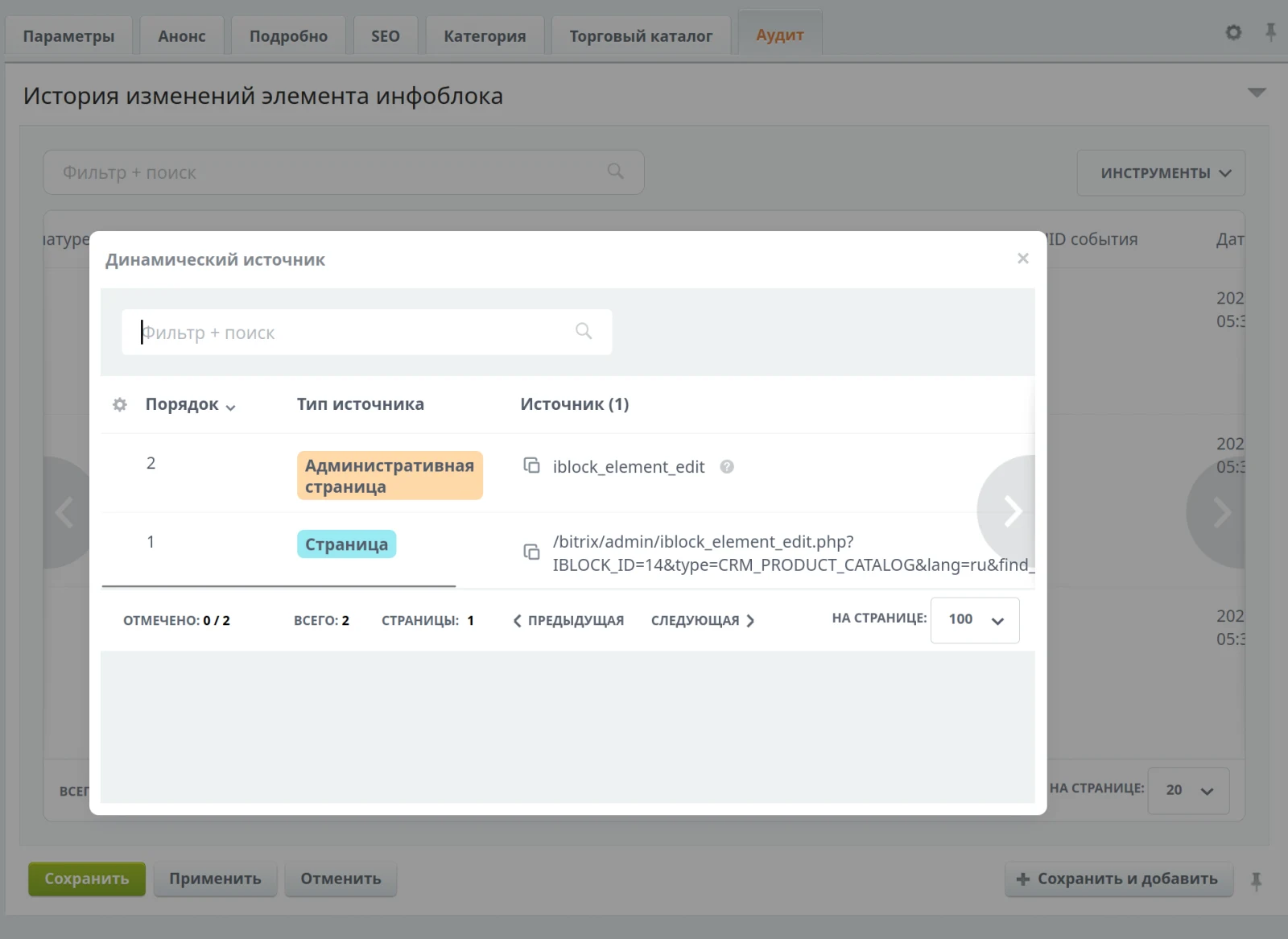
When changes are executed via PHP code, the module automatically enriches log entries with technical context. The journal displays the Bitrix user, request UUID, URI and HTTP method, SAPI type, executable file name, IP address, User-Agent and Referer headers, as well as X-Request-ID and traceparent identifiers.
The call stack analysis tool enables precise identification of the operation source: a specific component, D7 controller, REST method, cron agent, CLI script, PHP console, or administrative page. Project settings allow configuring stack trace classification rules, excluding technical requests, and preserving the full chain of sources rather than a single generic indicator.
Classification rules can be created or edited directly within the stack trace view window, with priority levels and version restrictions for installed modules. For example, the path /local/import/catalog.php with the method call CatalogImporter::updatePrices() can be displayed in the journal as a clear sequence: Catalog Import → Product Update → Price Recalculation. The environment ensures that such rules are not applied automatically after a Bitrix update that is incompatible with the current module versions.
The module records an entity event as a source only if the core actually sent a legacy or D7 entity event. Heuristics based on SQL query analysis or call stack inspection are not classified as system events. When a suitable core event is absent, the log records the honest technical source of the operation.
If data changes occur directly via Adminer or a database console, the PHP context is absent, but the trigger still reliably records the change itself along with the OLD, NEW, and DIFF values.
Public API for imports and integrations
Automatic detection can be supplemented with explicit context from application code. A specific wrapper informs the module that all changes within it belong to a specific import.
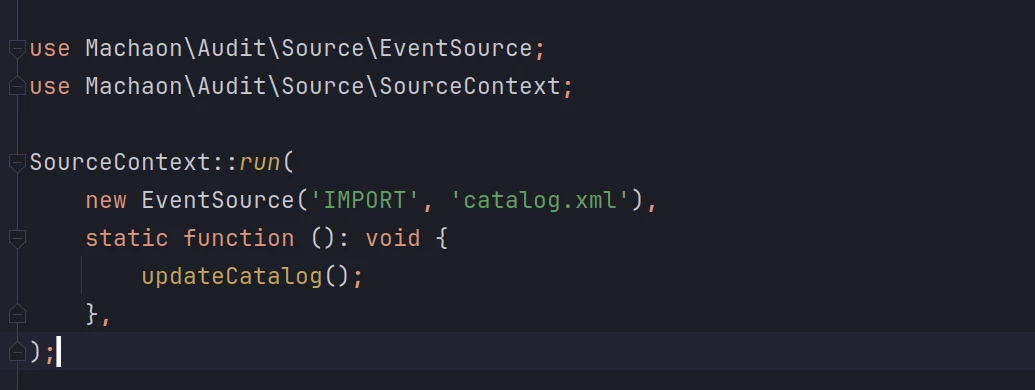
Table records receive a clear data source named IMPORT: catalog.xml. The same API allows passing custom business contexts, building nested groups, and combining changes to products, properties, prices, and stock into a single operation. Using the API is optional: audit completeness is ensured by triggers.
History remains understandable even after data deletion
Identifiers alone are insufficient because a user may be renamed, a list value deleted, a warehouse name changed, or a custom field removed entirely. Therefore, the module saves snapshots of related entities at the moment the operation occurs.
Supported entities include descriptions of custom fields and their names in various languages, list values, users, groups and access rights, elements and sections of information blocks, properties, files, warehouses, currencies, VAT rates, price types, units of measurement, HL blocks, and other domain-specific entities.
For enumeration fields, the list values are preserved. For reference types user, employee, iblock_element, iblock_section, and hlblock, the context of the target object is additionally recorded. This ensures that old audit records remain readable and logically correct even if the structure or related data has changed.
The module includes ready-made configurations for the main entities of the standard 1C-Bitrix and Bitrix24 platforms. It covers users, groups, memberships, access levels, and operations. It tracks information blocks, sections, elements, properties, list values, access rights, and SEO settings. It monitors products, prices, currencies, warehouses, stock levels, barcodes, batches, and warehouse documents. It accounts for price types, VAT, markups, units of measure, sets, and kits. It audits user fields, UTS and UTM tables, as well as HL blocks and their multiple field tables.
Arbitrary project tables can be connected. Dynamic schemas synchronize with the actual portal structure. Basic audit capabilities are available for user tables even without a specific domain adapter. The solution provides a unified audit log and precise search functionality.
All changes are recorded in a single administrative journal. The standard Bitrix grid supports column configuration, sorting, pagination, and filtering. Records can be searched by period, user, operation type, table, main and related entity, specific fields within the JSON diff, HTTP request parameters, and one or more source frames. Details such as OLD, NEW, DIFF, stack trace, source chain, and context open in separate windows, keeping the journal compact even with large volumes of technical data. The ready-made Favorites preset automatically limits the journal to users and infoblock elements added to the standard Bitrix administrative favorites. This is convenient for continuous monitoring of a small set of important objects without manually entering their IDs. The current selection can be shared with a colleague via a permanent link or exported to XLSX, CSV, and JSON formats. The export includes applied filters, sorting, grouping, all pages, and the configured column set.
Audit is available directly within entity cards.
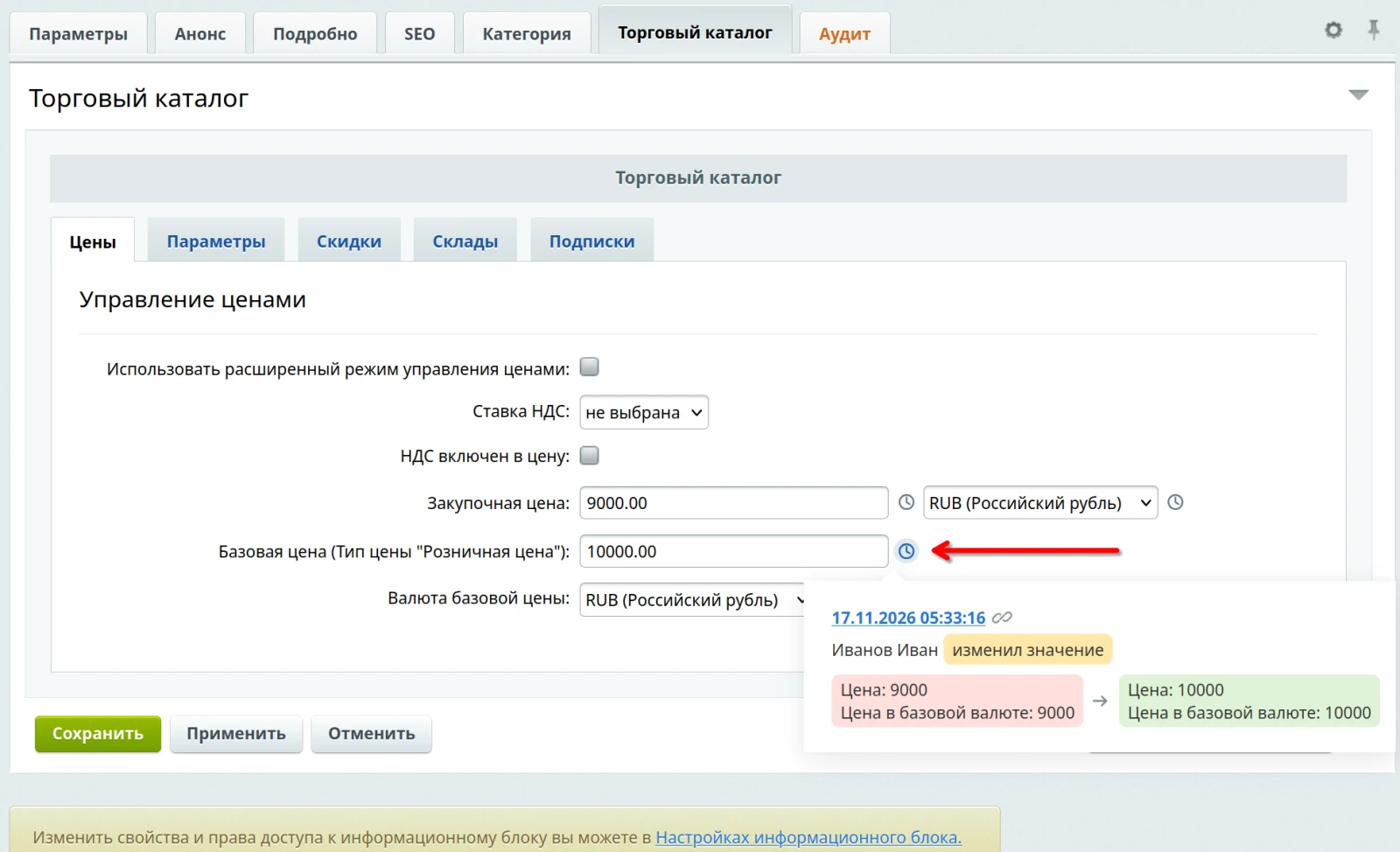
The module embeds a change history log into standard administrative forms for users, groups, information blocks, sections, elements, HL-block lines, currencies, warehouses, price types, VAT rates, and other supported objects. The Audit tab aggregates changes to the main table and associated dependent tables of a single entity. For example, in a product card, users can view not only edits to the information block element itself but also related modifications to properties, catalog parameters, prices, and stock levels. The Who Changed It? mode places a history icon next to supported fields within the information block element. Clicking the icon opens a small window displaying the date, author, action type, and a before-and-after comparison for the specific selected field. This allows users to obtain detailed information without leaving the product card.
Aggregation of complex business operations
A single user action can modify dozens of rows across different tables. For instance, importing a product simultaneously updates element data, its properties, prices, and warehouse stock levels. Analyzing such a process as a set of disconnected SQL operations is inconvenient.
The module groups records by source chains and entity contexts, forming an expandable tree. At the final level, an aggregated diff of changes is displayed. As a result, the technical log transforms into a clear summary of a single business action.
Link to Git commit
If the site is hosted in a Git repository, the module saves the full hash of the current HEAD for each operation. After configuring the link template, users can navigate from the log directly to the corresponding commit in GitLab, GitHub, or another repository.
This allows correlating data changes with the code version active on the portal at that specific moment. The method is particularly useful when investigating rare integration errors and background process failures.
Self-diagnosis and safe recovery
The Status Center displays the number of tracked tables, active triggers, the timestamp of the last write, total data volume, the age of the oldest record, the status of agents and migrations, and any detected failures. The module automatically verifies that trigger definitions match the current database schema and configuration. If the table structure changes, definitions can be recreated via the administrative interface.
The Watchdog system regularly analyzes error logs and automatically disables triggers that begin to malfunction. This prevents core business operations from being halted by failures in the auditing subsystem. For each detected incident, diagnostic tools, trigger synchronization, and a read status are available. During installation and within the Status Center, the system checks the PHP and DBMS versions, JSON support, required permissions, agent functionality, cache status, and time synchronization between PHP and the database.
When issues arise, the module displays a clear explanation of the cause, a recommended fix, and, where safe, a ready-to-execute action for automation. Trigger definitions are regenerated from the current schema and settings, while Watchdog automatically isolates the faulty monitoring to ensure auditing errors do not disrupt portal operations.
The built-in user guide is available in the Help → Instructions section. It covers the entire workflow: from initial monitoring activation and change detection to grouping, exporting, cleaning, and restoring triggers.
Managed storage and administrative access
By default, the global data retention period is 180 days. For individual tables, you can set a custom retention period or disable automatic deletion entirely. The batch cleanup function displays the number of records and the approximate volume of space to be freed before execution.
Due to the low-level architecture and the sensitivity of the log, all module features, including pages, tabs, export, diagnostics, settings, and data cleanup, are accessible only to Bitrix administrators. The module does not create additional user groups and does not delegate access rights to regular users.
Key use cases
Identify the causes of unexpected changes to prices, stock levels, properties, or access rights.
Monitor imports, data exchanges, REST integrations, agents, and background jobs.
Investigate actions performed by administrators, content managers, and developers.
Audit changes made by temporary scripts or direct SQL queries.
Correlate data with HTTP requests, stack traces, and code versions.
Restoration of history for deleted or renamed entities.
Sharing verified data samples with colleagues via a link or file.
The Data Change Audit module provides a control layer independent of application code. Changes in connected tables are preserved and do not disappear due to the selected API, a missing logging handler, or non-standard database access methods.
General iT can install “Data change audit”, configure its settings and verify its operation in the existing project.
USER EXPERIENCE
How does this solution work in a real project? Share your experience and help others choose.
There are no reviews of this solution on git.ru yet. Tell us what worked well and what could be improved.
Verified purchaseAdd a key if you wish. A verified review gets a badge, priority placement and more rating weight.
Open to every clientJust sign in to your account. A key is optional; all reviews are moderated.
YOUR PROJECT INFRASTRUCTURE
FROM THE SAME DEVELOPER
MACHAON
MACHAON: Log Viewer A module designed for convenient viewing of logs formatted in Monolog.

Batch Operations in CRM is the second module in a series of tools for safe mass data processing. The first module in the series works with information blocks and catalogs, while this one is designed for on-premise Bitrix24 portals for CRM, tasks, and employees. When the need arises to modify not just one, but dozens, hundreds, or thousands of records, standard editing quickly becomes routine.

Batch Operations in Information Blocks When managing catalogs with thousands of items, even routine update tasks can consume a disproportionate amount of time.
MORE FOR YOUR WEBSITE

The Sotbit Smart Filter SEO module is designed to increase online store traffic. The tool operates by generating numerous unique pages for smart filters.
The module automates image compression on the website in accordance with Google PageSpeed Insights recommendations. It supports integration via CDN OptiPic, allowing optimization without modifying image URLs. The main advantage of CDN integration is the automatic conversion of images to the modern WebP format to minimize file size. Browsers that support WebP receive images in that format.

The module is designed for online stores running on the 1C-Bitrix platform to automate the integration of supplier product catalogs. It is also suitable for news and city portals to facilitate content population. The solution supports data import in Excel, XML, YML, CSV, and RSS formats.
BEFORE YOU ORDER