
KRAIT Settings Panel
KRAYT Settings Panel is a tool for managing the solution's configuration. It is designed to perform installation procedures and subsequent system configuration tailored to specific user tasks.
INDUSTRY-SPECIFIC ONLINE FLOWER, BOUQUET, AND GIFT SHOP «KRAYT: FLOWERS»
Industry-specific online store template for flowers, bouquets, and gifts «Krayt: Flowers» for the 1C-Bitrix platform. The solution is tailored to the floristry business and enables partners to deploy a fully functional e-commerce portal. An online demo is available for reviewing the functionality.
INDUSTRY-SPECIFIC ONLINE LIGHTING AND LIGHTING PRODUCTS STORE «LUSTER-MARKET 2.0»
Industry-specific online store for lighting and light products, LUSTER-MARKET 2.0. This template was developed by Krayt for 1C-Bitrix partners. It is designed for online demonstration of functionality.
INDUSTRY-SPECIFIC ONLINE STORE OF CONSTRUCTION MATERIALS AND TOOLS «STROY-MARKET 2.0»
Industry-specific online store for construction materials and tools STROY-MARKET 2.0. This template is adapted for the construction industry and is designed for 1C-Bitrix partners.

Sports-themed website template
Minimum recommended Bitrix version: Standard. An update for the Start license is scheduled for the near future. A universal template for creating a dynamic and modern website tailored to sports themes. It is ideal for fitness centers and gyms to showcase services, training schedules, coaching staff, and class options.

KS Cookie — Cookie usage notification
KS Cookie is a module for 1C-Bitrix designed to display a Cookie usage notification on a website and obtain user consent. The module automatically shows a compact banner on the public part of the site and saves the user's choice in a Cookie. Once consent is given, the banner does not reappear for the specified duration.

New Mobile Order
Mobile application for receiving notifications about new orders from an online store based on the 1C-Bitrix Site Management CMS. Key features: instant alerts for new orders and a list of recent orders displaying the ID, date, amount, and currency.

Donations
The Donations module adds a button to the site for collecting contributions to the author. Payment details are configured in the module settings. Clicking the button redirects the user to the payment page of the selected payment system. Currently, only YooMoney is supported.

Message to Visitors
Module for displaying a pop-up message to website visitors upon their first visit or after a specified delay. Configurable settings include: - enabling or disabling the message display; - delay time in seconds before the window appears; - window title; - message body text; - text on the close button; - image displayed within the window.

Clearing Bitrix24 Chats
The module allows administrators to configure the display of a button for specific employees to delete all chat messages and attachments, including correspondence with former employees. The "Clear Chat" button restores the conversation to its original empty state. The functionality is available for personal, group, and project chats, as well as for BitrixGPT chats.

Search in chats (personal, group, open lines, collabs, tasks)
This module is designed for Bitrix24 users and administrators (cloud and on-premise versions) who need to locate specific messages across numerous chats, including personal, group, open lines, channels, and task chats. It is particularly valuable for companies with high internal communication volume where the built-in message search is missing or limited.

Email Preview in Mail
The 'Email Preview in Mail' module extends the functionality of the built-in 'Mail' application in Bitrix24 (cloud and on-premise versions). It is designed for employees who process large volumes of correspondence daily. The standard interface displays only the subject and sender, forcing users to open each message to read its content.

Delete messages from the Bitrix24 general chat
The module allows administrators and authorized employees to delete messages in the Bitrix24 general chat. A 'Delete' button appears in the chat interface, removing the message from the history for all users. The functionality operates within the 'General Chat' and 'Messages' sections.

Allow independent exit from observers in Bitrix24
The module allows employees to leave the observers list independently, even without rights to edit the entity item. A leave button appears on the object card if the current user lacks edit rights for that item. Clicking the button removes the employee from the observers list and refreshes the page data.

Saving UTM tags to cookies in the 1C-Bitrix CMS
The module automatically saves UTM parameters from the visitor's URL into browser cookies for later use by developers. It monitors utm_source, utm_medium, utm_campaign, utm_content, and utm_term. When detected, these parameters are stored in cookies with a specified expiration time. Features: - Saving UTM parameters in cookies with a configurable lifetime.

Hide task parameters
In the updated Bitrix24 interface, the task parameters panel has a fixed width. On screens with low resolution, such as laptops, it occupies nearly half of the workspace, significantly reducing the area available for communication, which is displayed as a chat. Often, task parameters do not require constant visual monitoring, yet they consume valuable screen space.
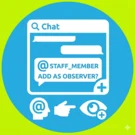
Adding an Observer to a task by tagging an employee in a comment
The module allows adding an Observer to a task by mentioning an employee in the task chat. This feature is available only in the updated Bitrix24 interface version.

Vacancies for the website
The 'Vacancies' module is designed for publishing and managing a company's open positions within a marketplace platform. It provides functionality for displaying current job listings, filtering by region, specialization, and experience level, and allows candidates to submit resumes or apply for specific roles.

Lead automation in Bitrix24 from website forms on 1C-Bitrix
The module provides integration between web forms on a 1C-Bitrix site and the Bitrix24 CRM system via webhook. It enables automatic data transfer from forms to CRM, allows detailed field mapping configuration, duplicate lead detection, and preservation of marketing information.

kvokka: Corporate Services Website
A ready-made solution for specialized companies. This practical corporate website features an adaptive layout suitable for various niches, including construction, manufacturing, beauty salons, design studios, and other sectors. The template supports two languages: Russian and English. The interface is designed in a minimalist style, offering ease of use and full functionality.

kvokka: Website for a non-profit organization and charity foundation
A ready-made solution for nonprofit organization and charity foundation websites. This is an adaptive business card template designed specifically for the NPO niche. Transparency of activities builds trust in the organization. The template includes sections for projects, partners, documents, reporting, and contacts.

Export of products to farpost.ru, drom.ru, 2GIS.
The module is designed for product export to farpost.ru, drom.ru, and 2GIS. It is compatible with Small Business and Business editions. Export files are generated automatically based on profile settings. Links to the generated files are available on the profile list management page. Core scenarios: - Export of products and offers with current prices.

Mass Price Change (Start)
This module is designed for product catalogs on the 'Start', 'Standard', and 'Expert' editions where prices are stored in infoblock properties. It enables automatic bulk price updates across several popular scenarios. To start, simply specify the required parameters. The interface displays only the settings relevant to the selected scenario, hiding unrelated options.

Price transfer to the Catalog module
This module transfers product prices from infoblock properties to price types within the Catalog module. It is designed for users who previously operated on Start, Standard, or Expert editions, where prices were stored in properties, and have since migrated to Small Business or Business editions. Price updates are performed automatically.