Payments are experiencing issues due to temporary restrictions in Russia. If your payment does not go through, please submit a support request.•Our support team is available 24/7 — we are always here to help with hosting and server issues.•We are now accepting requests for dedicated server rental and colocation services in our data center.•Reminder: we recommend enabling backups for additional data protection.•A new VPS/VDS lineup with NVMe storage and improved performance is now available.•Maintenance work on some servers has been completed. All services are operating normally.•
Payments are experiencing issues due to temporary restrictions in Russia. If your payment does not go through, please submit a support request.•Our support team is available 24/7 — we are always here to help with hosting and server issues.•We are now accepting requests for dedicated server rental and colocation services in our data center.•Reminder: we recommend enabling backups for additional data protection.•A new VPS/VDS lineup with NVMe storage and improved performance is now available.•Maintenance work on some servers has been completed. All services are operating normally.•
Аккаунт в General iT
Вход / Регистрация
Войдите или создайте аккаунт для управления услугами в личном кабинете.
Страны не найдены. Попробуйте другое название или код.
MODULE FOR 1C-BITRIX
KURATOV
Vacancies for the website
The 'Vacancies' module is designed for publishing and managing a company's open positions within a marketplace platform. It provides functionality for displaying current job listings, filtering by region, specialization, and experience level, and allows candidates to submit resumes or apply for specific roles.
The 'Vacancies' module is designed for publishing and managing a company's open positions within a marketplace platform. It provides functionality for displaying current job listings, filtering by region, specialization, and experience level, and allows candidates to submit resumes or apply for specific roles. The solution supports integration with internal systems, utilizes responsive design, and offers convenient management through an administrative panel.
Module Settings
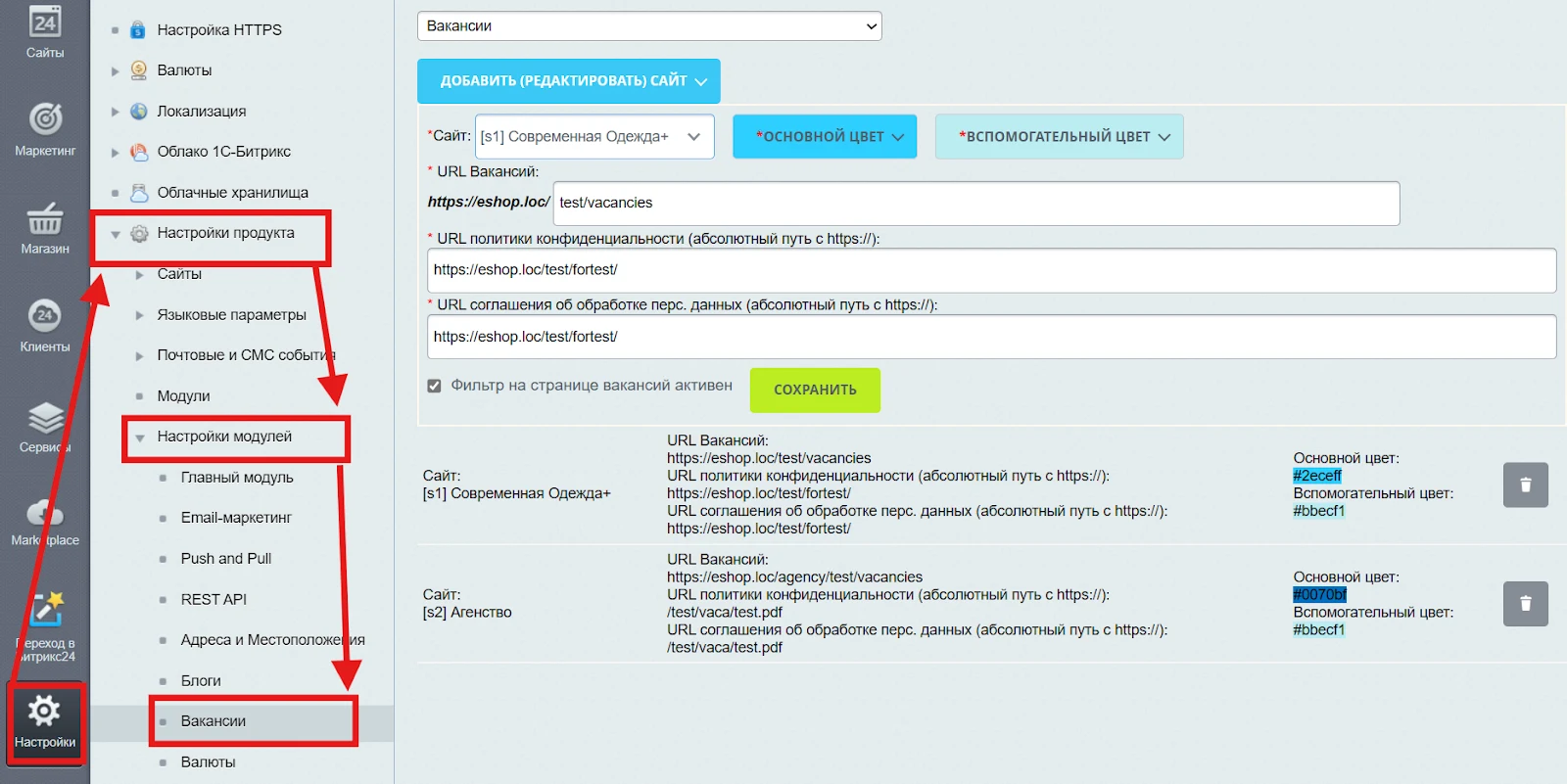
The configuration page provides an interface for managing display parameters and vacancy integration across various sites in the system. Unique URL addresses for vacancy pages, as well as links to privacy policies and consent for personal data processing, can be set for each site. Corporate color scheme settings (primary and secondary colors) are available for application in module interface templates. This allows the visual appearance of the block to be adapted to the corporate style of each site while ensuring compliance with personal data protection legislation.
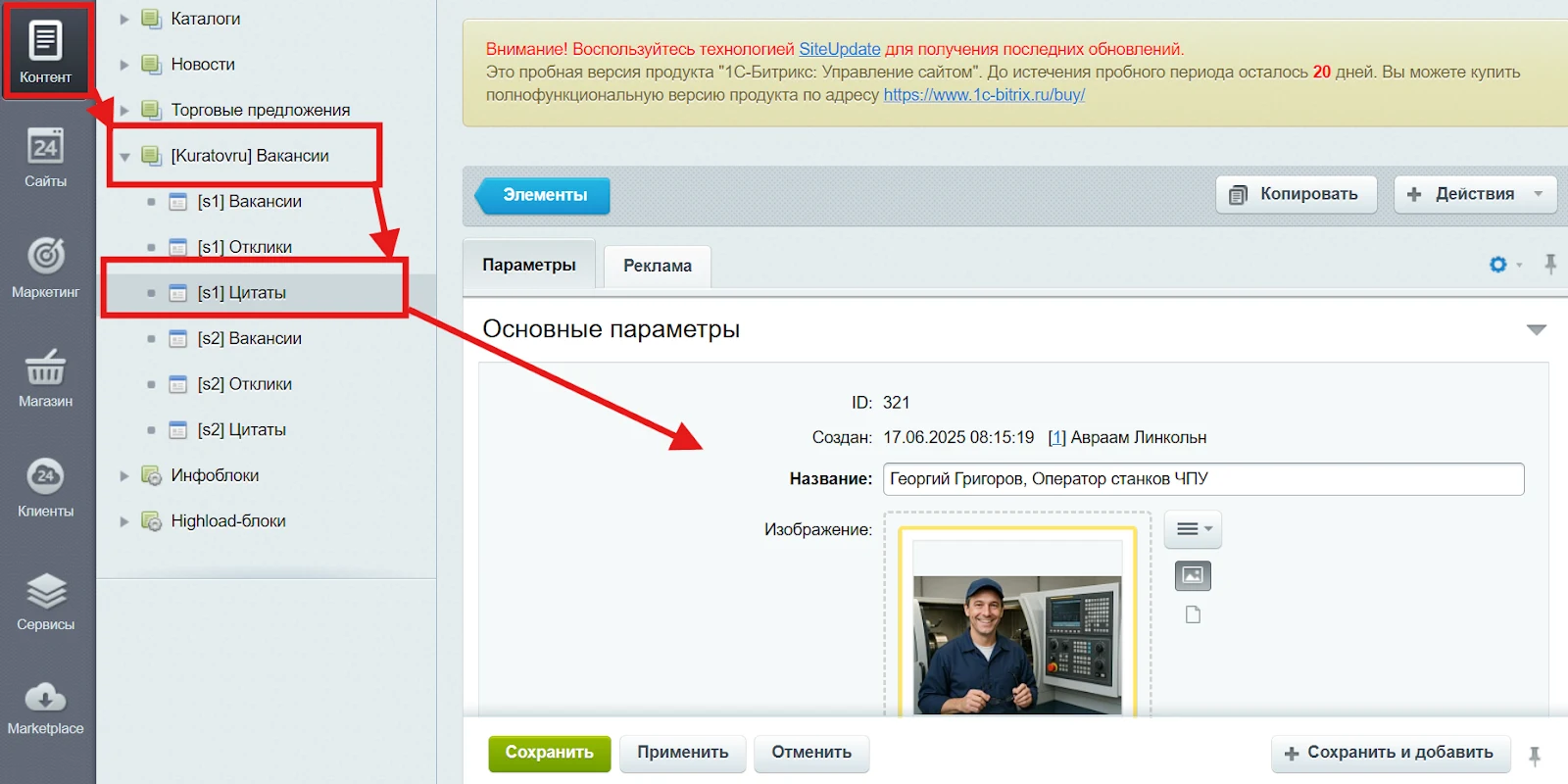
After installation, the module provides information blocks in the site administration for managing the Vacancies section. When the required parameters are saved for a site, three information blocks are automatically created: Quotes, Vacancies, and Applications.
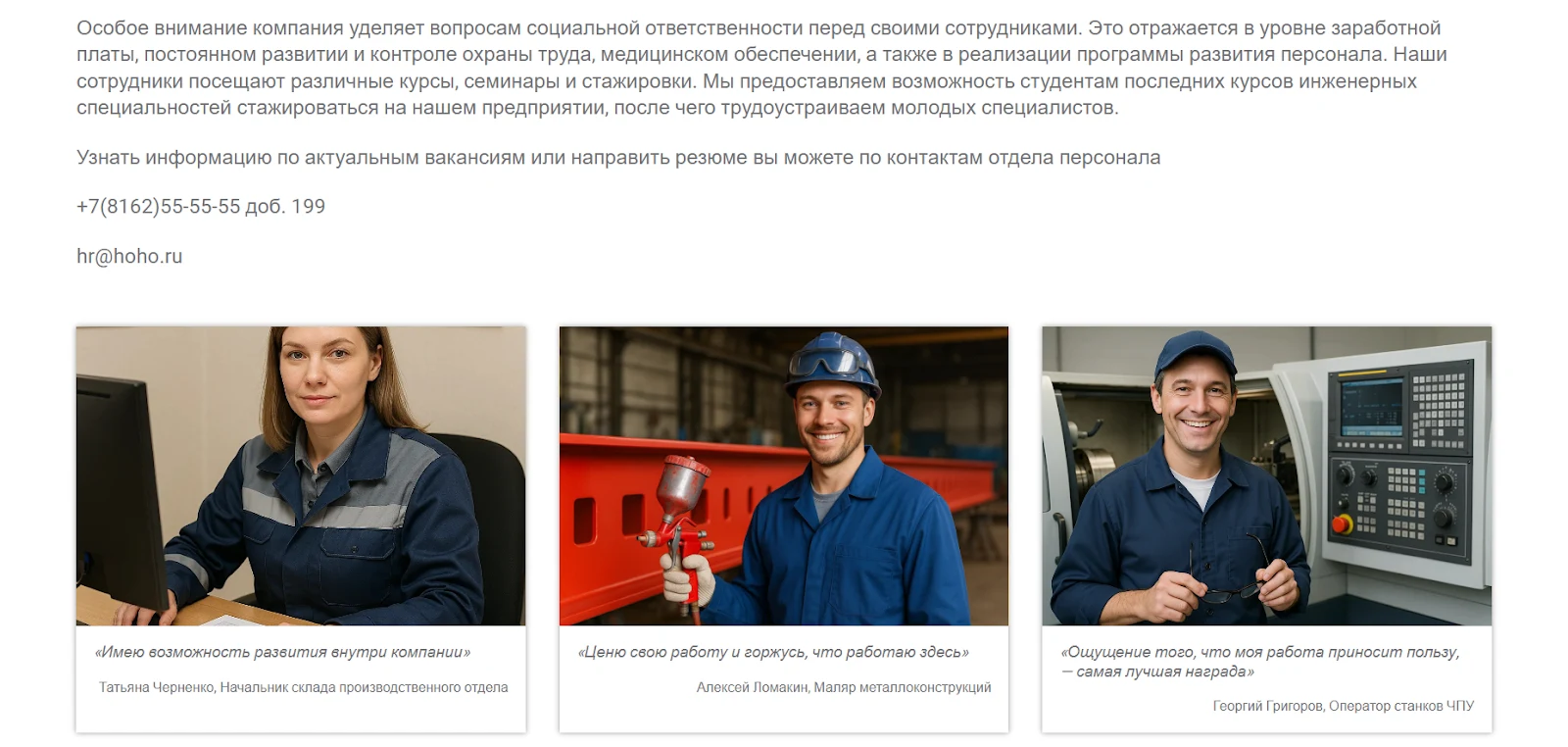
The Quotes block is designed to showcase the company's corporate culture and values through live statements from current employees. Each testimonial includes the author's name and job title, reflecting personal work experience: career growth opportunities, professional pride, and the significance of their role. This block increases candidate trust, makes the page more human-centric, and fosters a positive employer image.
The content of the 'Quotes' block is edited in the site's administrative panel by modifying elements of the corresponding information block. Detailed documentation on working with information blocks is available in the 'Information Blocks' section.
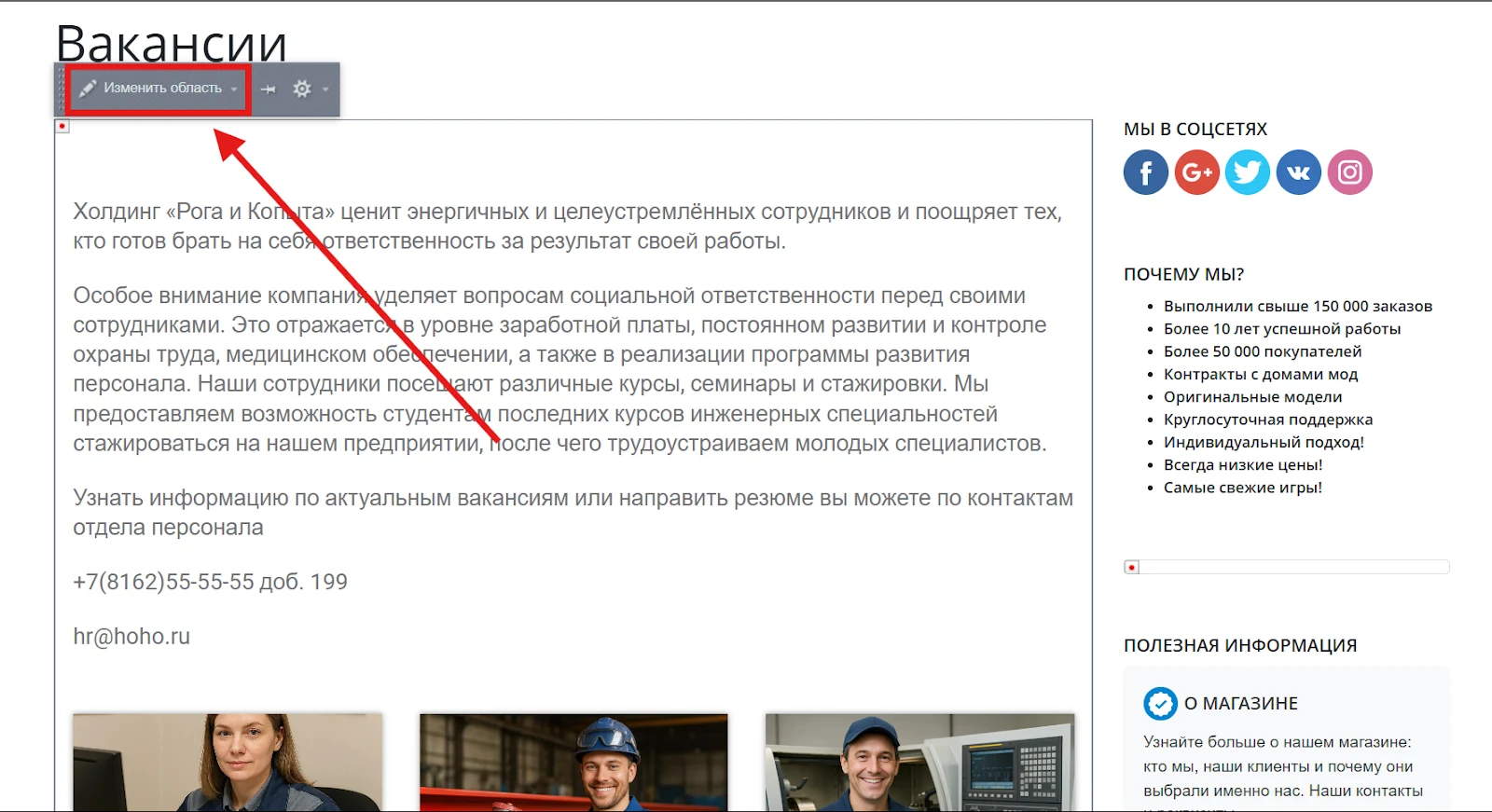
A dedicated area for a general company description is placed before the quotes block. In edit mode, this area can be configured to meet your specific business needs. Additional information on working with such areas is available in the 'Includeable Areas' documentation section.
Module for working with the 'Vacancies' information block.
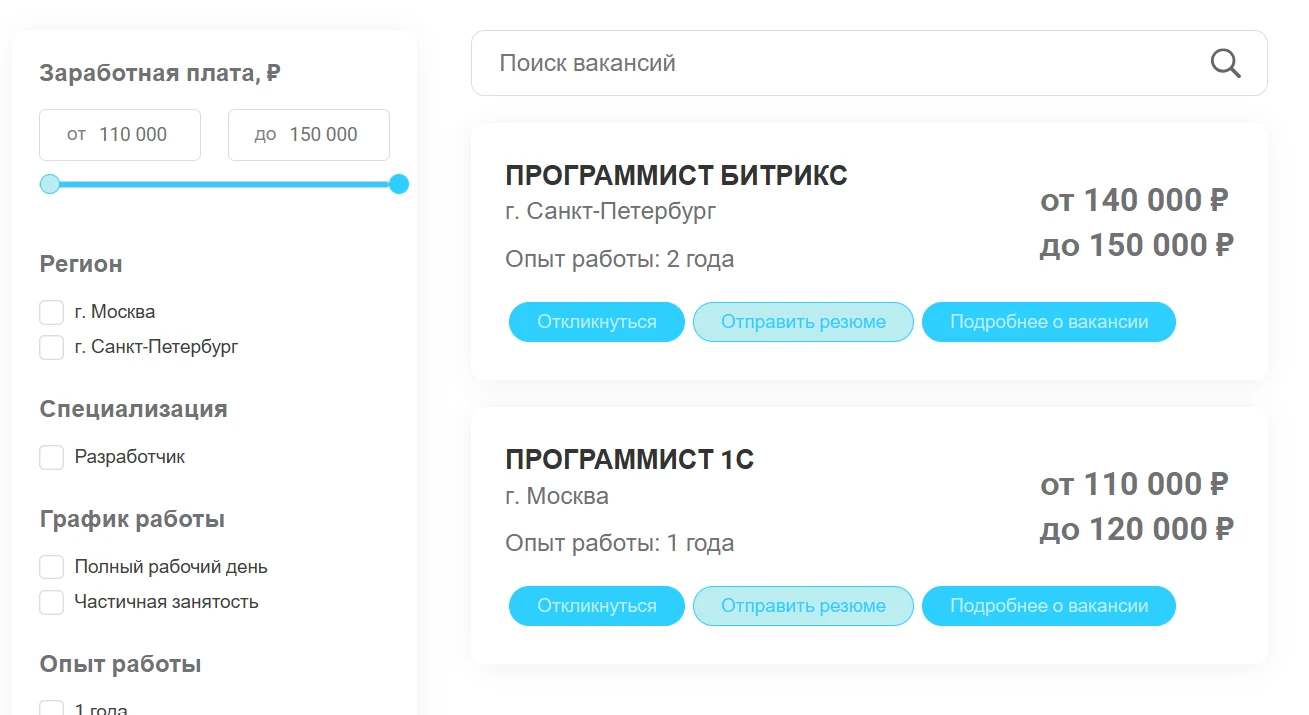
The vacancies list is a dynamic block displaying current job openings. Each vacancy card includes the job title, city, salary level, experience requirements, and buttons for applying and submitting a resume. The interface is adapted for various devices to ensure convenient navigation and readability.
The vacancies filter enables quick sorting of positions by region, specialty, employment format, and work experience. This tool helps job seekers find relevant offers and improves user engagement with the page content.
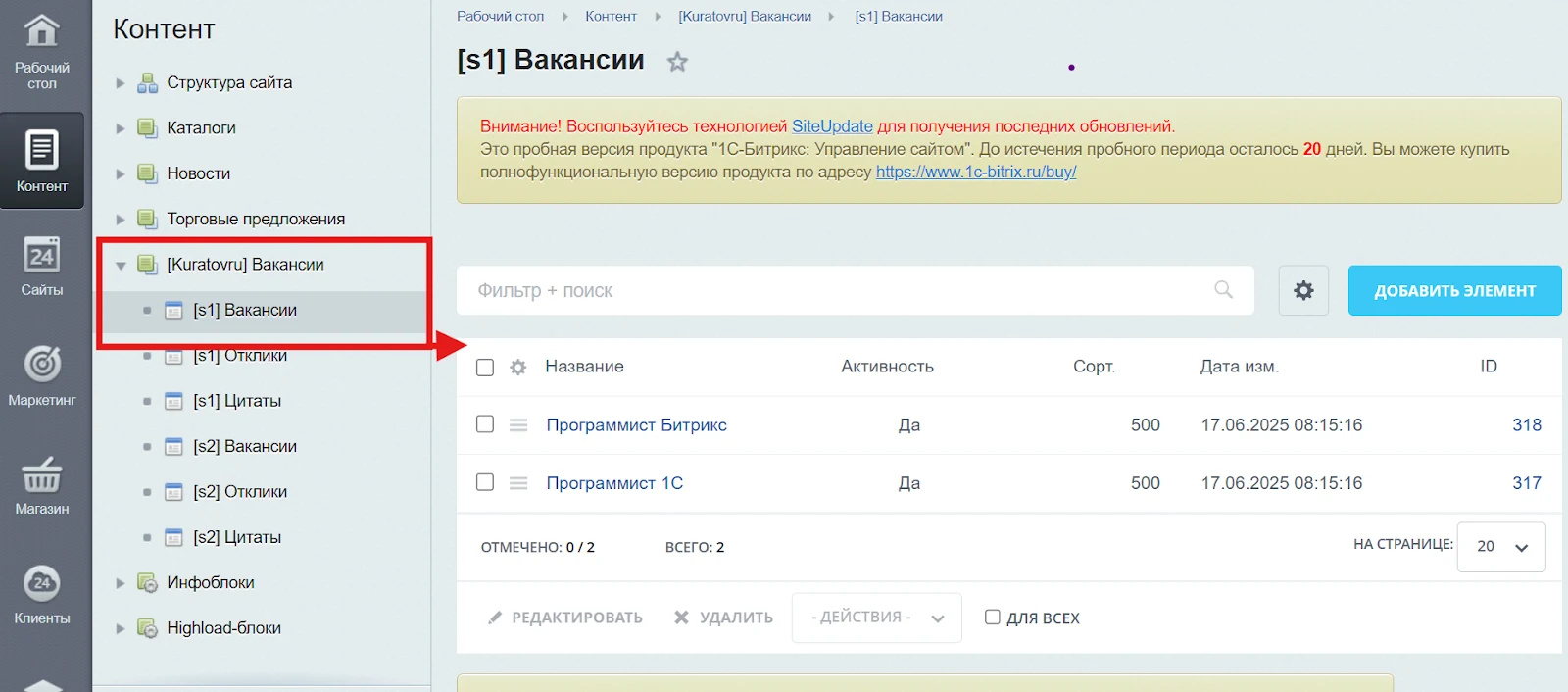
The list of vacancies on the site is managed by creating, editing, and deleting elements of the 'Vacancies' information block. This block is designed for centralized storage of data on the company's open positions. Its structure includes fields for job title, region, salary, work schedule, required experience, and duties. Each record is displayed on the site, supports filtering, detailed viewing, and candidate applications. The system allows flexible access rights configuration, integration with feedback forms and CRM systems, and provides convenient administration through standard 1C-Bitrix tools. Additional information on working with information block elements is available in the documentation under the 'Information Blocks' section.
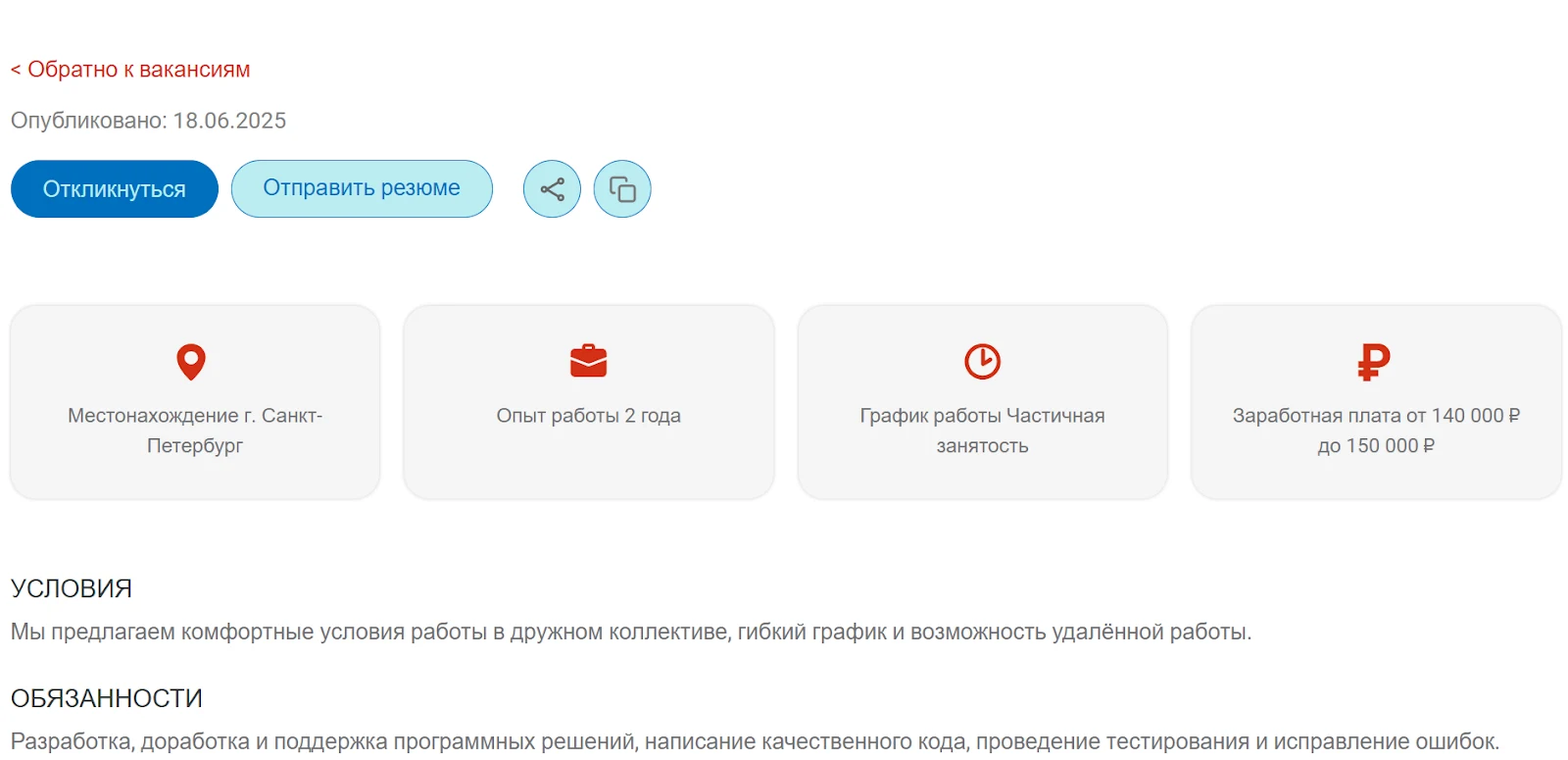
The vacancy detail page provides comprehensive information about the open position, enabling candidates to evaluate conditions and requirements before applying. Displayed details include the job title, city, employment format, salary level, publication date, and specific working conditions. Dedicated sections cover job responsibilities, candidate requirements, and HR manager contact information. The 'Apply' and 'Send Resume' buttons are positioned in key locations for user convenience. The design is adapted for mobile devices, prioritizing readability and interactivity.
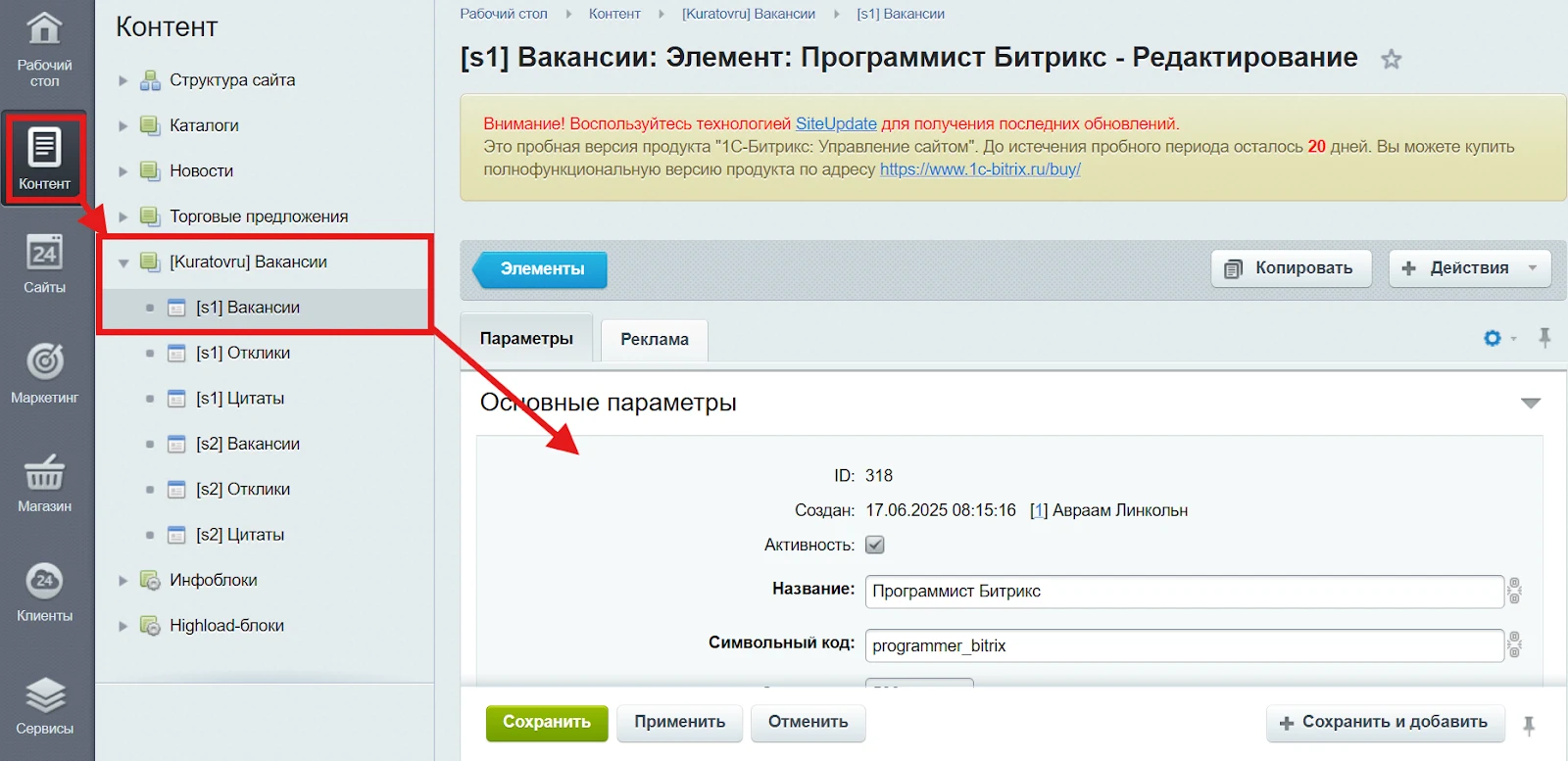
Vacancy pages are managed via elements of the 'Vacancies' information block. Each vacancy is a single record containing full details about an open position. The card includes fields for title, symbolic code, sort order, salary range, region, specialization, work schedule, and required experience. It also contains HTML blocks for describing conditions, duties, and requirements. Additional data stored includes the creation date and element activity status. Editing is performed through the administrative panel, and the structure can be extended with custom properties or links to other entities. Detailed information on editing information block elements is available in the 'Information Blocks' section.
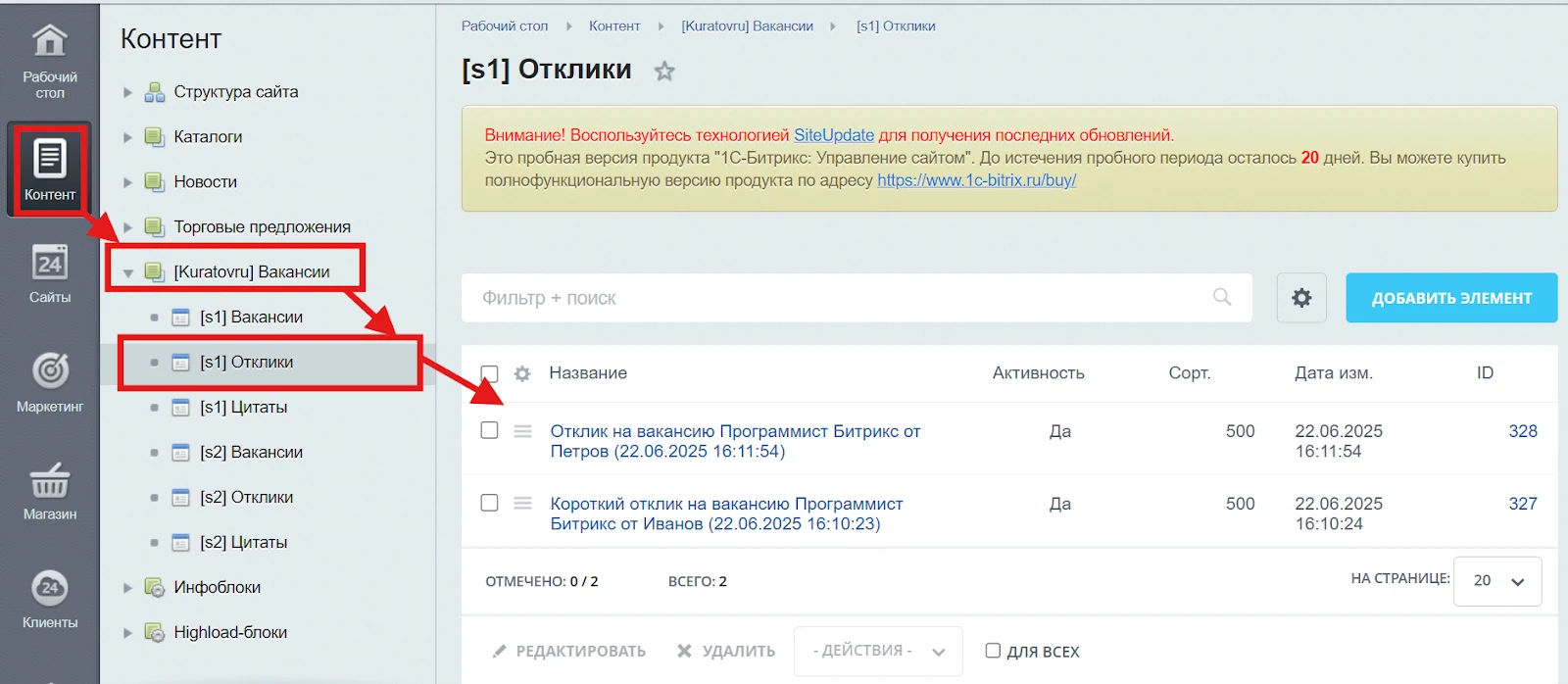
Responses Information Block
The Responses Information Block is designed to store and manage data submitted by job seekers via the Vacancies module. Each record contains information about the position applied for, the candidate's name, the submission date and time, as well as a comment or cover letter. This tool enables HR specialists to process applications efficiently and maintain a history of interactions with candidates.
For detailed information on working with information blocks, see the Information Blocks section.
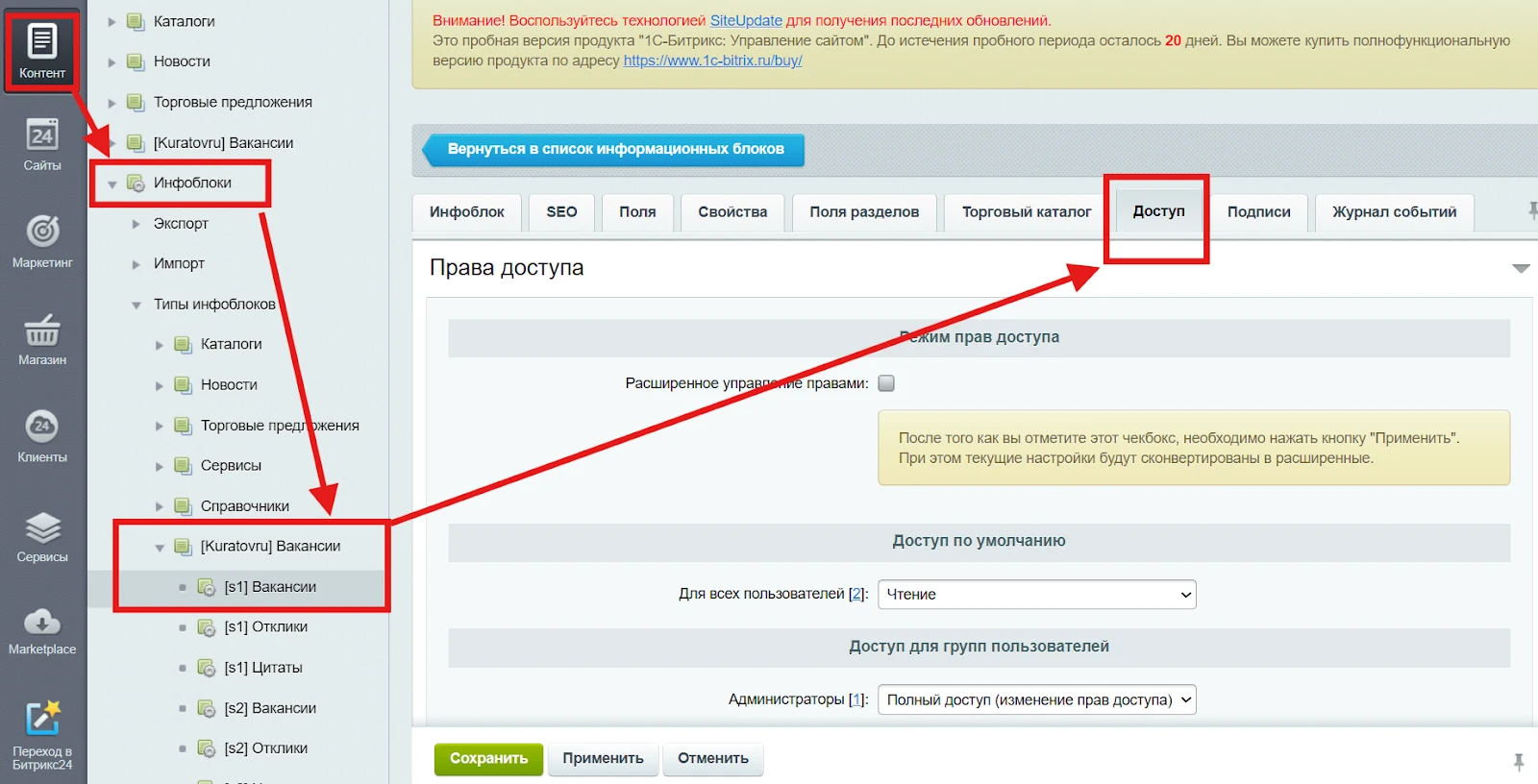
Access rights management for the Vacancies information block
The access rights mechanism for the Vacancies information block provides flexible user permission management within the system. It supports an extended management mode that allows setting different access levels for various groups, ranging from viewing to full administration. Administrators have full rights to configure and edit content, while other groups, such as registered users or content editors, can be assigned read-only or limited editing permissions. Settings are applied via the administrative panel and can be adapted to the organization's internal structure.
Additional information on working with access rights for information blocks and elements is available in the Information blocks section.
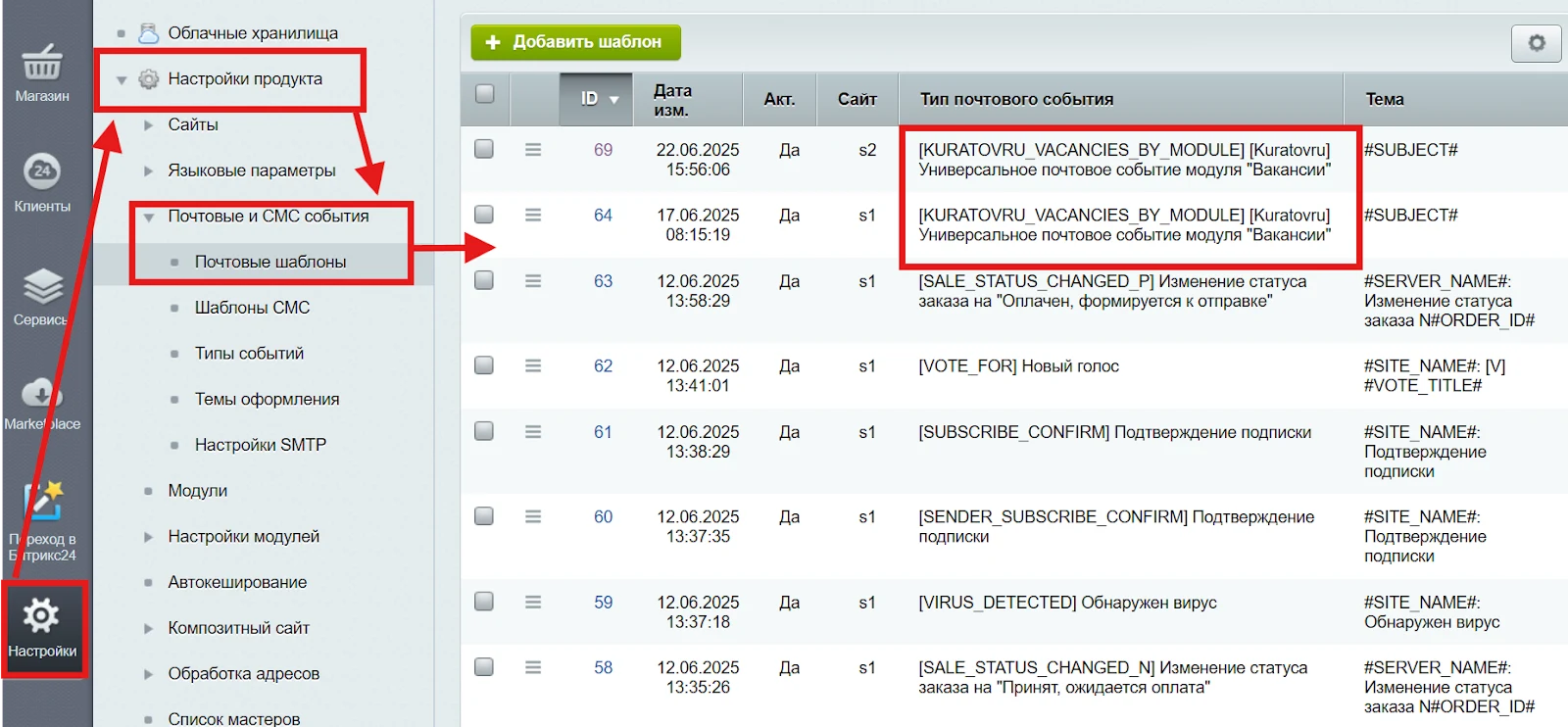
Email templates
The 'Email templates' settings section stores notification templates for job applications generated by the 'Vacancies' module. Each template triggers an automatic notification upon receipt of a new application. A template includes the email subject, message body with placeholder variables, and site parameters. The section settings allow creating, editing, and activating templates without modifying the module's source code.
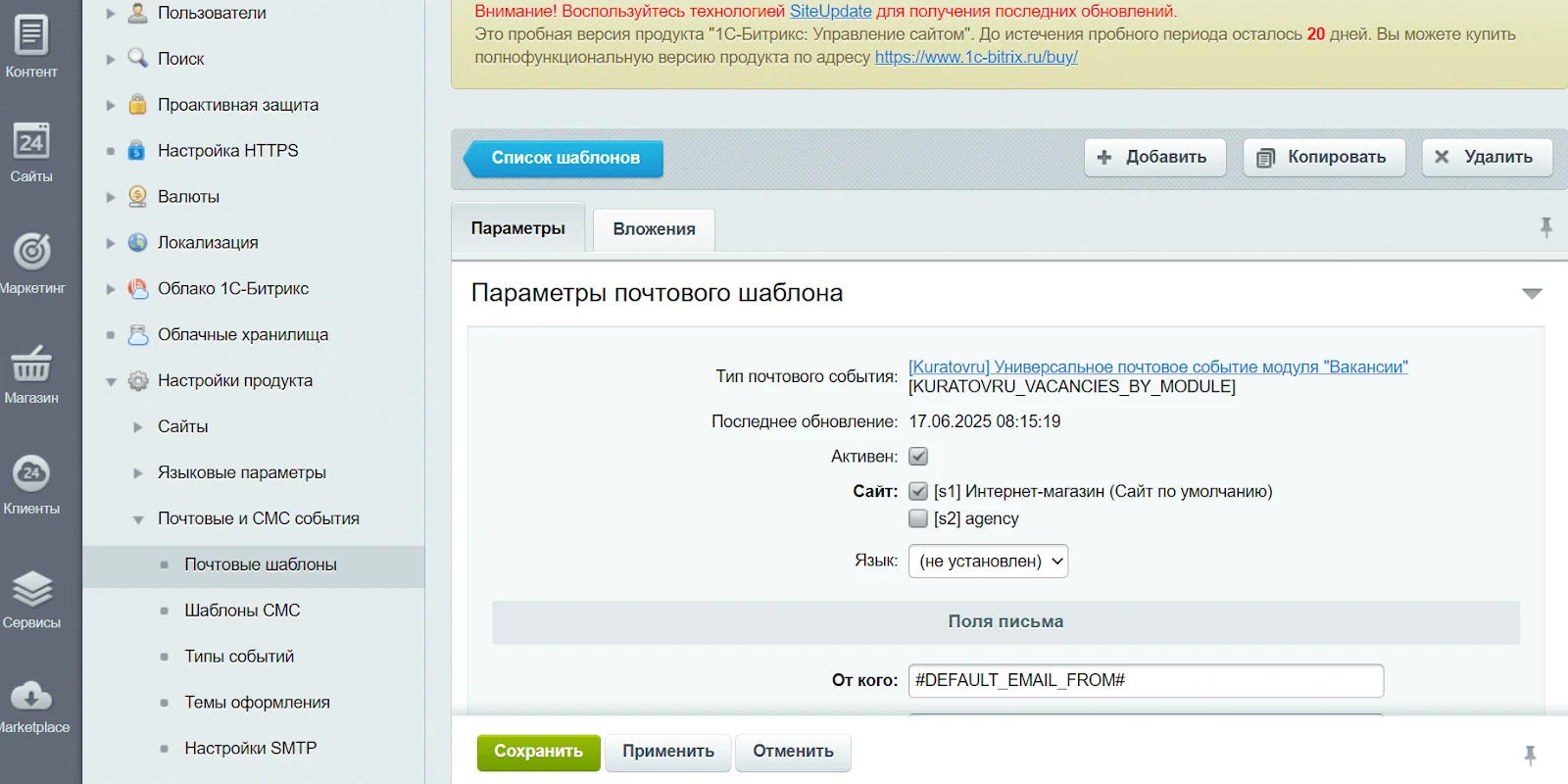
The email template detail page for the Vacancies module allows viewing and configuring notification settings associated with module events. The interface specifies the event type, template activity status, and site binding. In the email fields section, the sender and recipient, subject line, and HTML content are configured using placeholder variables such as #DEFAULT_EMAIL_FROM# and #SITE_NAME#. The template supports adaptation to corporate email styling and can include attachments.
General iT can install and configure this module and check how it works on your website.
USER EXPERIENCE
Solution reviews
How does this solution work in a real project? Share your experience and help others choose.
Be the first to share your experience
There are no reviews of this solution on git.ru yet. Tell us what worked well and what could be improved.
✓
Verified purchaseAdd a key if you wish. A verified review gets a badge, priority placement and more rating weight.
↗
Open to every clientJust sign in to your account. A key is optional; all reviews are moderated.
The module locates images on a website and replaces them with AI-generated alternatives. This solution is suitable for handling copyright claims or removing third-party photographs left over from a previous site version.
Image search covers information blocks, including element preview and detail images, images embedded in text content, as well as file-type properties and HTML attributes.
The module enables mass sending of personal messages in Bitrix24. It supports file attachments, text formatting, and sending messages on behalf of another user with a request for the required access rights. The following variables are available for message personalization: #NAME#, #LAST_NAME#, and #SECOND_NAME#.
The module provides integration between web forms on a 1C-Bitrix site and the Bitrix24 CRM system via webhook. It enables automatic data transfer from forms to CRM, allows detailed field mapping configuration, duplicate lead detection, and preservation of marketing information.
The Sotbit Smart Filter SEO module is designed to increase online store traffic. The tool operates by generating numerous unique pages for smart filters.
The module automates image compression on the website in accordance with Google PageSpeed Insights recommendations. It supports integration via CDN OptiPic, allowing optimization without modifying image URLs. The main advantage of CDN integration is the automatic conversion of images to the modern WebP format to minimize file size. Browsers that support WebP receive images in that format.
The module is designed for online stores running on the 1C-Bitrix platform to automate the integration of supplier product catalogs. It is also suitable for news and city portals to facilitate content population. The solution supports data import in Excel, XML, YML, CSV, and RSS formats.
The displayed price covers the solution itself. Platform licensing, installation and customisation are checked separately. If the page offers bundles, select the required option before submitting a request.
How do I check compatibility?
Compare the supported editions and solution version in the technical details with your project. Before installing on a live website, we recommend making a backup and checking the solution in a test environment.
Is there a trial?
The developer lists a trial of 30 days. The trial button opens the installer in your website control panel. Check the required features and compatibility before purchasing.
How much does this solution’s renewal cost?
The current renewal price is 4,995 ₽. Before you order, a manager will confirm the renewal period and whether it applies to your licence.
Can you help with implementation?
We can help install the module, check its settings and verify how it works in your project. Compatibility with other customisations and the scope of work are assessed before we begin.
Statistics and interaction recording
Public pages use basic statistics. Our recording and Yandex Webvisor require your permission. You can keep basic statistics or disable all analytics.
Operator: General IT Rus LLC, INN 2310208877. Statistics and recording help improve the website.
Basic statistics: pageviews, a random daily ID, a public URL and time. The ID lasts until Moscow midnight. Original records: up to 48 hours; totals: up to 7 years.
Campaign tags and a technical identifier are sent by our server to the existing Yandex tag. Visitor IP, User-Agent and cookies are not included in this transfer. If selected, its browser code collects technical data, cookies, actions and masked page snapshots; recordings last 15 days. Inputs, chat and account areas are hidden.
Interaction recording requires permission: clicks, scrolling, technical information and filtered public-page snapshots. Events: up to 7 years; IP and snapshots: up to 90 days.
Permission is remembered for up to 365 days; full opt-out remains until changed. Basic statistics only disables recording; Disable all analytics stops new analytics. Previously sent data is not automatically deleted. Withdrawal and requests: support@git.ru. Full terms are linked below.
Your browser requests no tracking: analytics is off.