Payments are experiencing issues due to temporary restrictions in Russia. If your payment does not go through, please submit a support request.Our support team is available 24/7 — we are always here to help with hosting and server issues.We are now accepting requests for dedicated server rental and colocation services in our data center.Reminder: we recommend enabling backups for additional data protection.A new VPS/VDS lineup with NVMe storage and improved performance is now available.Maintenance work on some servers has been completed. All services are operating normally.
Top Man Digital: Site Acceleration — WebP and PageSpeed Control

MODULE FOR 1C-BITRIX

TOP MAN DIGITAL

Top Man Digital: Site Acceleration — WebP and PageSpeed Control

Accelerate website loading and verify performance before installation. Heavy images, animations, and scripts increase page load times. Top Man Digital Optimizer reduces the volume of transferred files and ensures visitors see the main content sooner. Basic optimization is activated with a single click.

Technical details

Published
7 September 2026
Updated
12 October 2026
Version
1.1.3
Installed
Fewer than 50 times
Compatible editions
First Site, Start, Standard, Small Business, Business
Responsive design
No
Composite support
No
Compatible with Sites24
No
Developer
TOP MAN DIGITAL

What this solution does

Accelerate website loading and verify performance before installation. Heavy images, animations, and scripts increase page load times. Top Man Digital Optimizer reduces the volume of transferred files and ensures visitors see the main content sooner.

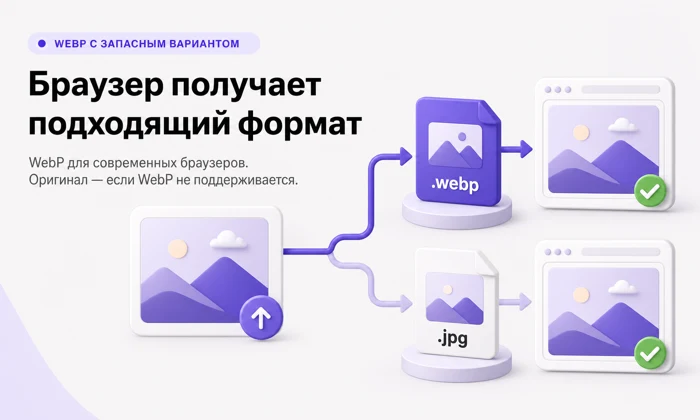
Basic optimization is activated with a single click. Features include generating WebP image copies, lazy loading on scroll, reserving space for media elements, and prioritizing the main image of the first screen.

Start with images

For the initial launch, there is no need to review all settings. Click 'Enable acceleration' on the 'Overview' screen to apply a basic set of optimizations.

Image copies are prepared gradually. To process accumulated site images, click 'Prepare image copies'. The module will perform the work in the background and begin using the ready files on the pages.

Original images remain on the server unchanged.

The Overview screen displays the number of files prepared and the total reduction in their combined size. Google PageSpeed measurements allow you to compare the homepage before and after enabling acceleration. Results are shown separately for mobile devices and desktops, including performance score, rendering time, blocking time, layout shifts, and page weight. To use the built-in measurement tool, you must configure the PageSpeed API key once in the settings. File optimization operates independently of these measurements. In a test case example, page weight decreased from 2.4 MB to 1.4 MB. Actual results depend on the initial state of the site, selected settings, and measurement conditions; compare your project's metrics during the demo period.

Additional acceleration capabilities

The module optimizes images in catalogs and product cards by generating WebP copies, applying lazy loading for graphics below the fold, and setting priority for the main image.

For GIF animations, heavy files can be replaced with lightweight WebM copies that autoplay without sound. In a test sample of 32 animations, the total size decreased from 362 MB to 30 MB.

Regarding styles and fonts, the module reduces CSS file sizes and allows delaying the loading of secondary styles and font service connections.

For scripts, counters, and widgets, the module supports JavaScript file minification and deferred execution of suitable scripts.

For embedded videos and maps, the module implements on-scroll loading to prevent the browser from downloading all page content simultaneously.

Additional features are enabled separately. Settings can be adjusted gradually, with results verified after each change.

The module supports three queue operation modes: using the built-in 1C-Bitrix agent, running on a schedule via cron, or processing in small batches after page load. If task processing is interrupted, the module automatically returns the task to the queue for continuation.

Administrative Control

The admin interface provides tools to monitor the acceleration status, view the count of generated copies, and calculate storage savings. The system allows verification of server support for WebP, Imagick, and ffmpeg, as well as tracking the background task queue. Users can initiate bulk processing of images and animations, retry or cancel tasks, locate and remove unused copies, review the change history, and generate diagnostic reports for support. Before deleting files, the module displays a preview of the items to be removed.

Preservation of Original Files

The module creates optimized copies separately from the site's original images, CSS, and JavaScript. To stop using optimized versions, simply disable the specific feature or the acceleration mechanism entirely. The admin panel offers settings for task queues, file reprocessing, server checks, and change history. For multiple sites, both global and individual configurations are supported.

Performance Testing

To evaluate effectiveness, install the demo version. When planning a PageSpeed comparison, first record baseline metrics with acceleration disabled. Then enable basic optimization, wait for the copies to be prepared, and repeat the measurement.

Verify the appearance and functionality of key pages. Assess changes in file sizes and loading metrics to determine if the module meets your requirements.

General iT can connect “Top Man Digital: Site Acceleration — WebP and PageSpeed Control”, install and configure the module, and make sure the integration works correctly.

UPDATE HISTORY

What’s new

18 releases
1.1.3 (12.10.2026)Latest update

Version 1.1.3

- Fixed the mapping of WebP copies to images whose names contain Cyrillic characters or spaces.

- Fixed the search for sizes of such images and stopped re-queuing already processed files.

1.1.2 (11.09.2026)

Version 1.1.2

- After the demo period ends, module screens open for viewing with an explanation instead of the message "Module failed to load".

- Change rejections are displayed in Russian; the save button in the module settings is unavailable until the license permits changes.

- A failed reinstallation no longer deletes tables and settings saved when the module was removed.

- Removing the module unregisters the OnGetFileSRC event handler, which previously remained on the site.

- Includes fixes from 1.1.1: administrative screen layout (margins, measurement table, PageSpeed key field).

1.1.0 (09.09.2026)

Version 1.1.0

This update is built from version 1.0.0 and includes all changes released thereafter. It can be installed on any intermediate version: if some updates did not reach the site, nothing will be missed.

ONE-CLICK MANAGEMENT

Previously, going from installation to an accelerated page required six conscious steps, one of which was a screen with fifteen checkboxes, all of which were unchecked in a fresh installation. Now, on the "Overview" tab, two buttons are placed side by side that cover everything the store needs: "Enable Acceleration" and "Prepare Image Copies".

The first button automatically selects a safe set of options: WebP via the picture tag with the original as a fallback, lazy loading on scroll, reserved space for images, and priority for the main image of the first screen. Each of these adjustments either takes effect or leaves the page unchanged—the layout will not break. The button does not touch anything that replaces the URL without a fallback, changes the tag itself, or writes to a cache that cannot respond differently to different browsers; these remain separate solutions. The set is applied on top of saved settings, so a manually configured site retains its configuration.

The settings screen opens to what the store owner has an opinion on. The fifteen checkboxes are organized into three levels: the basic level is open by default, while "Advanced Features" and "Manual Configuration" are collapsed. Numeric parameters are no longer the first thing a person sees, and the emergency stop is shown only when it is activated, not as a constant secondary question next to "acceleration enabled".

PAGESPEED MEASUREMENTS BEFORE AND AFTER

The "Overview" tab shows what the Google Lab says about the main page before enabling acceleration and after: score, Largest Contentful Paint, First Contentful Paint, Time to Interactive, Layout Shifts, and page weight—for both mobile and desktop. The PageSpeed key is specified once on the "Settings" tab; it is stored separately from site settings, does not appear in the change history, is not included in exports for support, and is never displayed.

back. The measurement is performed by a queue task because Google launches a real browser, and the response time ranges from twenty seconds to one minute. The module cannot determine which measurement to consider as 'before': each record indicates whether acceleration was active at the time of capture.

IMAGES

Animated GIFs are served as WebM video: for 32 real animations, 362 MB of source files are replaced by 30 MB of video. Animations are also converted to animated WebP where video is not suitable. A separate checkbox has been added to declare the main image in the head; it is disabled by default and helps only when the image is inserted by a script or a slider built in the browser. Site icons—favicon and the family of apple-touch-icon, android-chrome, mstile, safari-pinned-tab—are no longer converted or replaced: their addresses are read not only by browsers. The module has learned to detect the dimensions of thumbnails from upload/resize_cache, so such images now receive reserved space and lazy loading.

STABILITY

The module requires PHP 8.2—this was verified only by the installer. If the PHP version is switched to a lower version after installation, any administrative page on the site, including pages of other modules, crashes with a parse error, but only for users who have rights to the module. Now the version is also checked at runtime: if it is below 8.2, the module is not connected by the core, does not register a menu handler, and does not start tasks, while its pages display a clear message with the required and actual version. The site continues to work as if the module were not installed.

Structural page validation now accounts for elements intentionally added by the module: previously, an added link tag would reject the entire page, causing it to silently lose all substitutions. The map cache no longer opens the output buffer—previously, pages responding with a redirect would crash with a cold cache. Three administrator actions were unavailable due to a missing operation map entry; the "Overview" screen no longer requires the integrity of the entire module to generate a report.

1.0.16 (05.09.2026)

Version 1.0.16

Built from 1.0.13, published in the cabinet. The update also includes changes from 1.0.14 and

1.0.15 and installs on any of them.

PAGESPEED MEASUREMENTS ON THE OVERVIEW

The Overview tab shows what the Google laboratory says about the main page before enabling WebP and PageSpeed control.

acceleration and after: evaluation, largest element paint, first paint, time

blocks, layout shifts, page weight — for mobile and for desktop. PageSpeed key

specified once on the Settings tab; it is stored separately from site settings, not

does not appear in the change history, is never included in the export for support, and is never displayed

back. The measurement is performed by a queue task because Google launches a real browser and

responds in a time ranging from twenty seconds to one minute. The module cannot determine which measurement counts as 'before': each

record whether the acceleration was active at the time of capture. The emergency stop now skips the measurement and

continues to halt everything that modifies the site — otherwise the 'before' measurement could not be taken.

ANNOUNCEMENT OF THE MAIN IMAGE

A separate checkbox, disabled by default: the largest image on the first screen is declared

in the head with a preload directive. This helps only when the image is inserted by a script or slider,

assembled in the browser; the browser already finds an image written in standard markup using the img tag

in advance — on the demo stand, the difference between six measurements was within the margin of error.

The hint in the settings explains how to check your specific case using the PageSpeed report.

SITE ICONS ARE NOT TOUCHED

favicon and the apple-touch-icon, android-chrome, mstile, safari-pinned-tab families are not

converted or replaced: their addresses are read not only by browsers, and a WebP copy is not needed for them

by anyone.

PROTECTION AGAINST UNSUITABLE PHP VERSION

The module requires PHP 8.2 — this was checked only by the installer. If after installation the PHP version

switched below (in the hosting panel, for the cron task under the old binary, during the copy migration

of the site), any administrative page of the site, including pages of third-party modules, crashed with

parsing error — and only for those who have rights to the module. Now the version is also checked at runtime: on PHP below 8.2 the module is not connected by the core, does not register the menu handler, and does not start tasks, while its pages show a clear message with the required and actual version. The site continues to work as if the module were absent.

FIXES

The structural page check now learns to take into account elements that the module intentionally adds; previously, an added link would reject the entire page, and it would silently lose all substitutions. Messages about remote server failure specify the cause — status, size, or type — rather than "policy". The check prevents starting a long network request from the path serving the page.

1.0.15 (02.09.2026)

THE PAGE NO LONGER FAILS ON REDIRECT

The cache, which the module uses to store information about the page's images and scripts, was opening the output buffer. PHP prohibits opening a buffer inside an output buffer handler, and the module enters such a handler on certain paths—for example, when the page responds with a redirect: the buffer is flushed before the Location header is sent. There, this is not a failed cache write, but a fatal error: instead of being redirected, the visitor received an empty page with an error message.

USER EXPERIENCE

Solution reviews

How does this solution work in a real project? Share your experience and help others choose.

Be the first to share your experience

There are no reviews of this solution on git.ru yet. Tell us what worked well and what could be improved.

Verified purchaseAdd a key if you wish. A verified review gets a badge, priority placement and more rating weight.

Open to every clientJust sign in to your account. A key is optional; all reviews are moderated.

YOUR EXPERIENCE MATTERS

Your review

YOUR PROJECT INFRASTRUCTURE

A home for your website

BEFORE YOU ORDER

Let’s go through the details.

What does the price cover?
The displayed price covers the solution itself. Platform licensing, installation and customisation are checked separately. If the page offers bundles, select the required option before submitting a request.
How do I check compatibility?
Compare the supported editions and solution version in the technical details with your project. Before installing on a live website, we recommend making a backup and checking the solution in a test environment.
Is there a trial?
The developer lists a trial of 7 days. The trial button opens the installer in your website control panel. Check the required features and compatibility before purchasing.
How much does this solution’s renewal cost?
The current renewal price is 1,500 ₽. Before you order, a manager will confirm the renewal period and whether it applies to your licence.
Can you help with implementation?
We can help install the module, check its settings and verify how it works in your project. Compatibility with other customisations and the scope of work are assessed before we begin.

GENERAL iT

Let’s discuss your project

Получатель: ООО «Дженерал Ай Ти Рус»

1C-BITRIX

Install solution

Enter a domain with or without https://. The installer will open in your website control panel in a new tab.

Solution screenshots

Solution screenshot