Payments are experiencing issues due to temporary restrictions in Russia. If your payment does not go through, please submit a support request.•Our support team is available 24/7 — we are always here to help with hosting and server issues.•We are now accepting requests for dedicated server rental and colocation services in our data center.•Reminder: we recommend enabling backups for additional data protection.•A new VPS/VDS lineup with NVMe storage and improved performance is now available.•Maintenance work on some servers has been completed. All services are operating normally.•
Payments are experiencing issues due to temporary restrictions in Russia. If your payment does not go through, please submit a support request.•Our support team is available 24/7 — we are always here to help with hosting and server issues.•We are now accepting requests for dedicated server rental and colocation services in our data center.•Reminder: we recommend enabling backups for additional data protection.•A new VPS/VDS lineup with NVMe storage and improved performance is now available.•Maintenance work on some servers has been completed. All services are operating normally.•
Аккаунт в General iT
Вход / Регистрация
Войдите или создайте аккаунт для управления услугами в личном кабинете.
Страны не найдены. Попробуйте другое название или код.
MODULE FOR 1C-BITRIX
Pavel Shulaev
AmoCRM — integration with infoblocks, web forms, and email events
Version 4.0.0 introduces one-click connection to amoCRM without manual integration setup or key copying. A Getting Started page is added with three steps to the first lead and a test lead button. In simple profile mode, name, phone, and email from the form are automatically matched to the contact. Diagnostics now include a Fix button and generate a single report file for technical support.
Version 4.0.0 introduces one-click connection to amoCRM without manual integration setup or key copying. A Getting Started page is added with three steps to the first lead and a test lead button. In simple profile mode, name, phone, and email from the form are automatically matched to the contact. Diagnostics now include a Fix button and generate a single report file for technical support. The amoCRM webhook is automatically checked and repaired to ensure reliable deal stage updates reach the order.
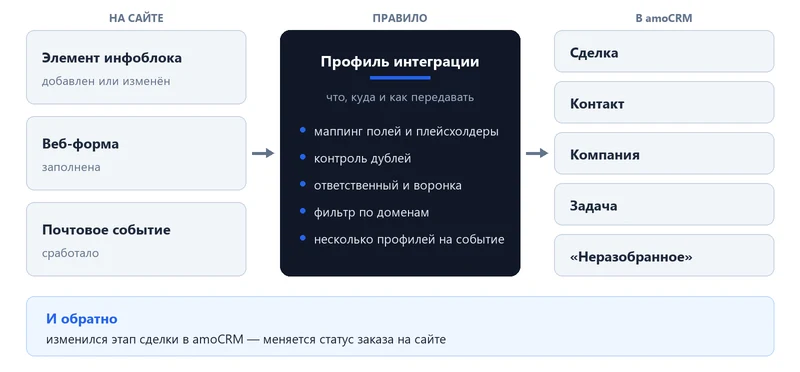
The module transmits all site events to amoCRM: submitted web forms, new or modified infoblock elements, and email events ranging from New Order to Callback. On the amoCRM side, deals, contacts, companies, or tasks are created with fields, tags, advertising labels, and assigned managers.
The module has been under development since 2017 and is installed in over 1000 projects. It is not a simple connector from form to deal, but a tool designed for your specific processes: it supports multiple profiles per form or information block, works with multiple amoCRM accounts, includes duplicate control, provides two-way synchronization of order and deal statuses, and offers system events for customization.
If issues arise, the developer is available: free assistance with the initial connection and integration profile setup, detailed documentation, and prompt technical support.
How it works
One-click connection to amoCRM
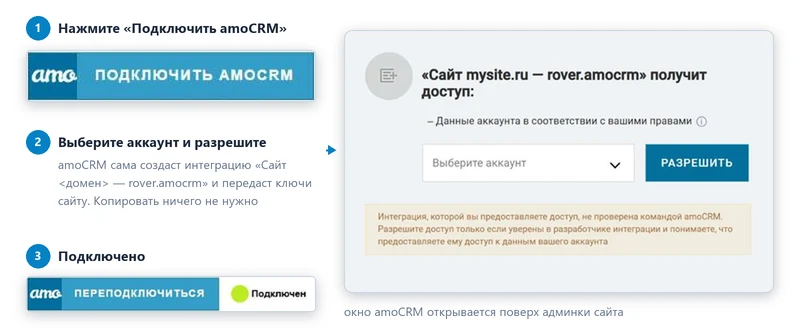
There is no need to manually create an integration in amoCRM or transfer keys. Click the Connect to amoCRM button, select the account, and grant access: the system will automatically create the integration for your site and transfer the necessary keys. Within a minute, the connection card will display the status Connected.
First lead in five minutes
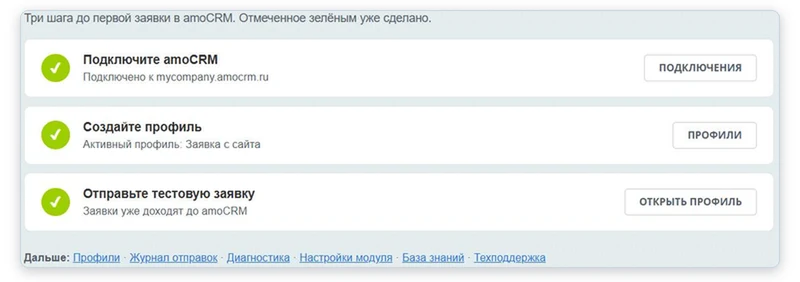
After installation, the module opens the Getting Started page, which displays three steps to create the first lead in amoCRM. Completed steps are marked automatically, and reminders about pending steps appear on connection pages and in profiles until all steps are finished. When a new profile is created, the system automatically maps the name, phone number, and email from the form to the corresponding contact fields and moves the deal to the first working stage of the main sales funnel. The user only needs to select which web form or information block will be used for data transmission.
Automatic deal creation
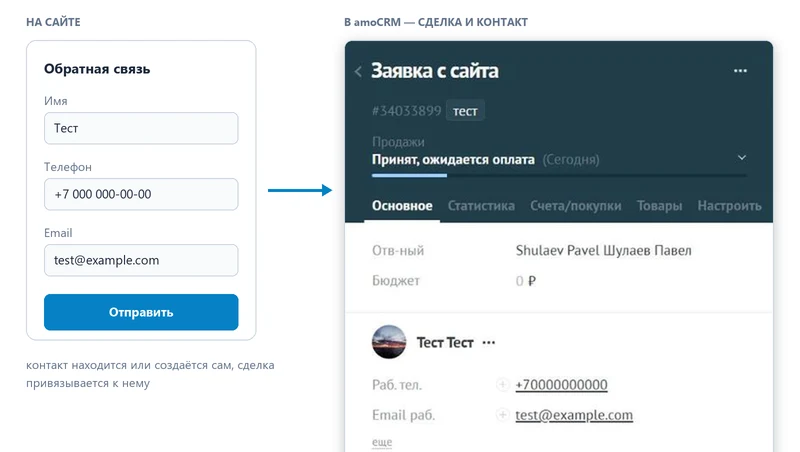
When a visitor fills out a web form, a deal is created in AmoCRM and linked to a contact. The deal name and any additional fields are generated from form values using placeholders. The budget is calculated by summing values, while tags, advertising campaign labels, and the responsible employee are assigned automatically based on a defined list. If the contact returns, the module does not create a duplicate but locates the existing record.
Integration profile: what, where, and how
The profile is a rule that defines which event on the site, which amoCRM entities, and which field mapping should be used for data transfer. The basic mode displays only the minimum data required for the first lead. Additional settings become available after switching to the Advanced mode.
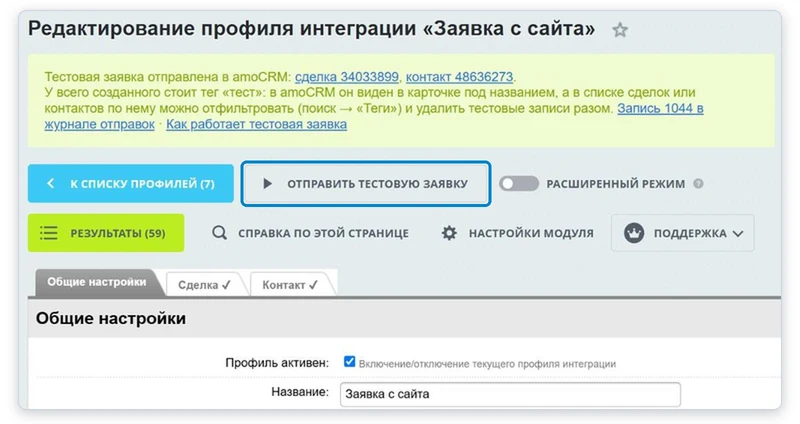
The Send test lead button allows for immediate profile validation. When clicked, a lead with dummy data and the tag test is created in amoCRM. The system then returns links to the created deal and contact, or provides a clear error message if an issue occurs.
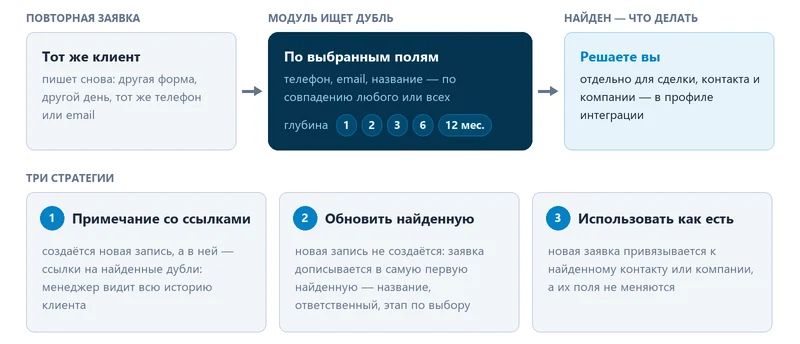
The module prevents the creation of duplicate deals when clients contact the system again. If a client writes a second time, the module searches for them in amoCRM by phone number, email address, or other specified fields. The action is determined by settings: creating a new record with links to duplicates, updating an existing one, or simply linking to it. The search depth is limited by a time period ranging from one month to one year.
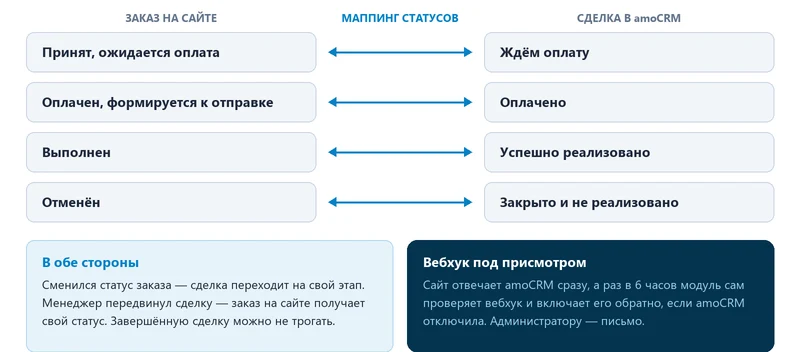
Orders and deals are synchronized. The order status in the online store and the deal stage in amoCRM are linked by bidirectional mapping: paying an order automatically moves the deal to the Paid stage, while a manager closing a deal in amoCRM marks the order on the website as completed. The module monitors the amoCRM webhook: the site responds immediately, and if the webhook is disabled, it automatically re-enables itself.
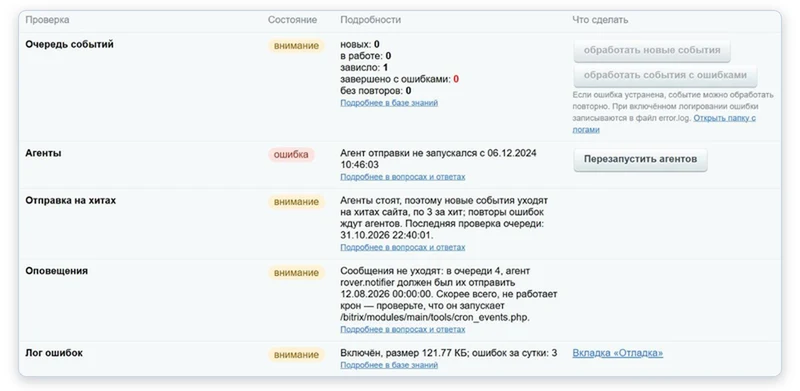
The module reports issues automatically. The Diagnostics tab in settings checks the event queue, agent status, connection state, access key validity, webhooks, profiles, and module files, providing an explanation for each detected problem. The Fix button restores lost dictionaries, event handlers, agents, and files without requiring reinstallation or losing current settings. In the sending log, every error includes a clear description of the cause and a link to the location where it can be corrected.
A diagnostic report is available as a single file for technical support. It contains configuration settings, connection details, profiles, and the latest errors. Passwords, tokens, and keys are excluded from the report, while email addresses and phone numbers mentioned in error texts are hidden. The Support menu is accessible on every page of the module.
Common use cases:
- Creating and updating deals, contacts, and companies when an information block element is added or modified.
- Creating a deal with linked products during checkout in an online store.
- Automatically changing the deal stage when an order status changes, and vice versa.
- Creating a contact or company with advertising campaign tags upon form registration submission.
- Generating a contact and a task when a feedback form is submitted.
- Creating a deal in the Unprocessed stage when a web form is filled out.
- Updating the deal stage after an order payment is completed.
- Creating a company and linking a contact with a deal after a web form is submitted.
Deal capabilities:
- Creating and updating deals based on information block elements, web form data, and any email events.
- Filling the name and any other fields using placeholders, including the custom value field for budget and numeric fields. Values in the budget field are summed, and tags are automatically applied.
The module manages responsible persons from a list with automatic round-robin assignment and access right verification in amoCRM. Users can select the sales funnel and stage for a new deal. Two-way synchronization of deal and order statuses is implemented, with an option to prevent updating the stage of a completed deal. Products extracted from order email events automatically update the order composition, while changes to products in a deal are reflected in the order. Notes are created with uniqueness control and grouped into a single message. For list-type fields, the system supports passing the actual value, its identifier, or a custom user-defined value. The duplicate control feature searches for matches by selected fields across all deals or within a specific contact, with a search depth ranging from one to twelve months. Three strategies are available for handling found duplicates. The visitor identifier visitor_uid is transmitted to support automated funnels.
Contacts and Companies
The module enables the creation and updating of contacts and companies, including the Birthday field. It supports standard and custom fields of any type via mapping and placeholders, along with tag management and grouped notes. The same responsible person assignment logic and duplicate control mechanisms used for deals apply to contacts and companies.
Tasks and Unsorted
The functionality includes automatic task creation for a contact, company, or deal, specifying the task type, text generated from event fields, and the deadline. Contacts, companies, and deals can be sent to the Unsorted section with the ability to select a funnel and specify a name.
Campaign tags and cross-channel analytics
The module automatically transfers any parameters from the query string, session, and cookies into separate fields in amoCRM. It supports preserving tags during page transitions and offers a "first visit only" setting to ensure data alignment with Yandex Metrica and Google Analytics. A built-in version filter for Google Analytics tags converts the string GA1.2.1054613344.1468150257 to the format 1054613344.1468150257.
Additional fields
For order email events, the system transmits phone number, delivery address, cost, payment system, delivery service, and comment; these details are also included in the email body. For web form results, the module records the name, ID, creation date and time, visitor ID, domain, site name and IP address, event page URL, and files as links. The solution is compatible with ASPRO products. New fields for email events can be connected dynamically during operation.
Speed and reliability
Event processing is handled asynchronously by an agent once per minute, so the website does not wait for a response from amoCRM. Events are sent immediately or retried upon error. If the server cron job is not functioning, new events are still transmitted gradually during each site visit, immediately after the page is delivered to the user.
The module provides integration between AmoCRM and information blocks, web forms, and email events. The webhook is configured so that the site immediately confirms receipt of data. Every six hours, the module checks its functionality and automatically re-enables it if it has been disabled. The connection page displays the current status and includes a button labeled "Check and fix".
If a critical error occurs, an administrator notification is sent immediately, even if the email queue is blocked. Stuck events are automatically moved to an error status, and the log is periodically cleared.
Administration
Access rights are managed using standard Bitrix tools: viewing, profiles, connections, and settings are available separately to different user groups. The built-in diagnostic system includes a "Fix" button, generates reports for technical support, and provides a "Support" menu on every page. The sending log supports filtering by record and element, contains clear descriptions of error causes, and includes links to fix them. Request and response logging has a size limit and can be cleared via settings. The update process pre-checks the PHP version, required modules, and write permissions, automatically restoring any lost permissions.
Other capabilities
The module supports creating multiple integration profiles for each site entity and working with multiple AmoCRM accounts. Profiles include a domain filter. The system allows disabling triggers when updating an existing element or a form result.
The module exports existing information block elements, web form results, and email events to amoCRM, including data accumulated prior to installation. Logic customization is achieved through module system events: before and after events for deals, contacts, and companies. The interface is fully translated into English. The application operates with both MySQL and PostgreSQL databases. Additional functionality is regularly added based on user requests submitted as tickets. Installation, configuration, customization, and usage cases are covered in the full documentation. A separate module, AmoCRM — integration with online stores, is designed for synchronizing orders, products, buyers, purchases, and online store catalogs. A bundle containing both modules is available at a discounted price, along with a comparative table of module features.
For the “AmoCRM — integration with infoblocks, web forms, and email events” module, General iT can perform installation, configuration and a functional check in your project.
USER EXPERIENCE
Solution reviews
How does this solution work in a real project? Share your experience and help others choose.
Be the first to share your experience
There are no reviews of this solution on git.ru yet. Tell us what worked well and what could be improved.
✓
Verified purchaseAdd a key if you wish. A verified review gets a badge, priority placement and more rating weight.
↗
Open to every clientJust sign in to your account. A key is optional; all reviews are moderated.
T-Bank Internet Acquiring Payment Acceptance Pro
This module connects T-Bank acquiring (formerly Tinkoff Bank) to 1C-Bitrix sites of any edition, from First Site to Enterprise. It resolves standard integration tasks including correct VAT calculation in receipts, protection against duplicate bank notifications, automatic creation of the payment system, and migration from the official module.
Starting with version 2.0.0, the module supports extension without modifying source code. The list of GeoIP services and their execution order are assembled via the onBuildServiceList event. You can connect custom services from other modules by registering an event handler and returning the full class name of your service.
The module provides an API for location determination by IP address.
The Administrative Part Builder is a framework for rapid and flexible configuration of the administration interface for Bitrix modules. The tool fully handles the rendering of the graphical interface and the management of options.
The webprostor.smtp module enables SMTP email sending configuration and DKIM signature support. The free version allows configuring SMTP for each site individually. Users can specify server parameters, port, connection security type, and authentication details including username, password, and the requirement for authentication.
The Export to Portals + API module is the premium edition of the integration suite for connecting with marketplaces. It provides centralized export of product catalogs, order processing, and stock synchronization with trading platforms through a single component on the website, eliminating the need to install separate software in each seller's personal account.
The SMSBiz module is designed for sending SMS notifications in online stores and corporate portals built on the Bitrix platform. Installation and usage do not require programming skills. The deployment process takes a few minutes.
The solution is built on the SMSInt service, which has been operating in the market for over 19 years.
The displayed price covers the solution itself. Platform licensing, installation and customisation are checked separately. If the page offers bundles, select the required option before submitting a request.
How do I check compatibility?
Compare the supported editions and solution version in the technical details with your project. Before installing on a live website, we recommend making a backup and checking the solution in a test environment.
Is there a trial?
The developer lists a trial of 7 days. The trial button opens the installer in your website control panel. Check the required features and compatibility before purchasing.
How much does this solution’s renewal cost?
The current renewal price is 13,950 ₽. Before you order, a manager will confirm the renewal period and whether it applies to your licence.
Can you help with implementation?
We can help install the module, check its settings and verify how it works in your project. Compatibility with other customisations and the scope of work are assessed before we begin.
Statistics and interaction recording
Public pages use basic statistics. Our recording and Yandex Webvisor require your permission. You can keep basic statistics or disable all analytics.
Operator: General IT Rus LLC, INN 2310208877. Statistics and recording help improve the website.
Basic statistics: pageviews, a random daily ID, a public URL and time. The ID lasts until Moscow midnight. Original records: up to 48 hours; totals: up to 7 years.
Campaign tags and a technical identifier are sent by our server to the existing Yandex tag. Visitor IP, User-Agent and cookies are not included in this transfer. If selected, its browser code collects technical data, cookies, actions and masked page snapshots; recordings last 15 days. Inputs, chat and account areas are hidden.
Interaction recording requires permission: clicks, scrolling, technical information and filtered public-page snapshots. Events: up to 7 years; IP and snapshots: up to 90 days.
Permission is remembered for up to 365 days; full opt-out remains until changed. Basic statistics only disables recording; Disable all analytics stops new analytics. Previously sent data is not automatically deleted. Withdrawal and requests: support@git.ru. Full terms are linked below.
Your browser requests no tracking: analytics is off.