Payments are experiencing issues due to temporary restrictions in Russia. If your payment does not go through, please submit a support request.•Our support team is available 24/7 — we are always here to help with hosting and server issues.•We are now accepting requests for dedicated server rental and colocation services in our data center.•Reminder: we recommend enabling backups for additional data protection.•A new VPS/VDS lineup with NVMe storage and improved performance is now available.•Maintenance work on some servers has been completed. All services are operating normally.•
Payments are experiencing issues due to temporary restrictions in Russia. If your payment does not go through, please submit a support request.•Our support team is available 24/7 — we are always here to help with hosting and server issues.•We are now accepting requests for dedicated server rental and colocation services in our data center.•Reminder: we recommend enabling backups for additional data protection.•A new VPS/VDS lineup with NVMe storage and improved performance is now available.•Maintenance work on some servers has been completed. All services are operating normally.•
Аккаунт в General iT
Вход / Регистрация
Войдите или создайте аккаунт для управления услугами в панели.
The 'Cart Price Types' module for 1C-Bitrix: Site Management allows changing product price types in the shopping cart based on predefined conditions. These conditions may include minimum order totals, product properties, sections, and other parameters.
The 'Cart Price Types' module for 1C-Bitrix: Site Management allows changing product price types in the shopping cart based on predefined conditions. These conditions may include minimum order totals, product properties, sections, and other parameters.
If multiple price types are configured for products or trade offers, such as retail and wholesale, the module determines which price to display according to established rules.
Module capabilities:
- setting a base price type;
- creating rules to switch to any other price type;
- flexible rule conditions: selection of information blocks, sections, properties, cart order total, product weight and volume, number of items, currency, product markups, and trade offer markups;
- display of warnings regarding minimum order totals;
- combination of conditions using logical operators;
- assignment of rules to user groups;
- support for various currencies, rounding, VAT, measurement unit coefficients, and discounts.
After installing the module using standard platform tools, ensure that values for different price types are defined for products or trade offers.
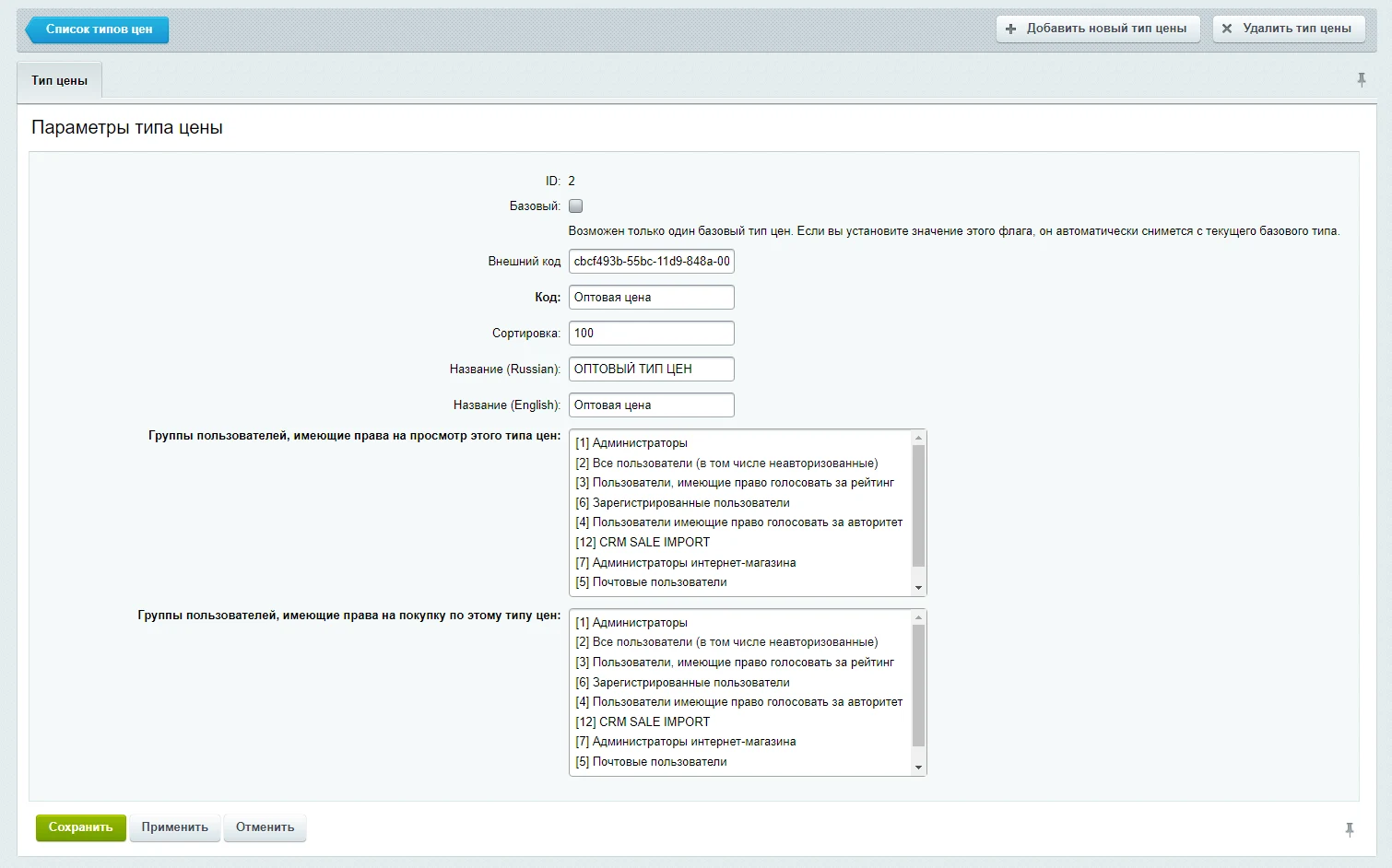
If only one base price type is configured, an additional price type must be created to support other categories (such as wholesale prices alongside retail). In the administrative panel, navigate to Store → Settings → Prices → Price Types and click the New Price Type button. On the opened page, specify the price type code, its name, and the user groups authorized to view and purchase using this price type.
If two or more price types are configured, you can create rules for their automatic switching in the shopping cart based on specified conditions. To add a new rule, go to the administrative panel: Content section, Shopping Cart Price Types subsection, select the required site, and open the Rules tab.
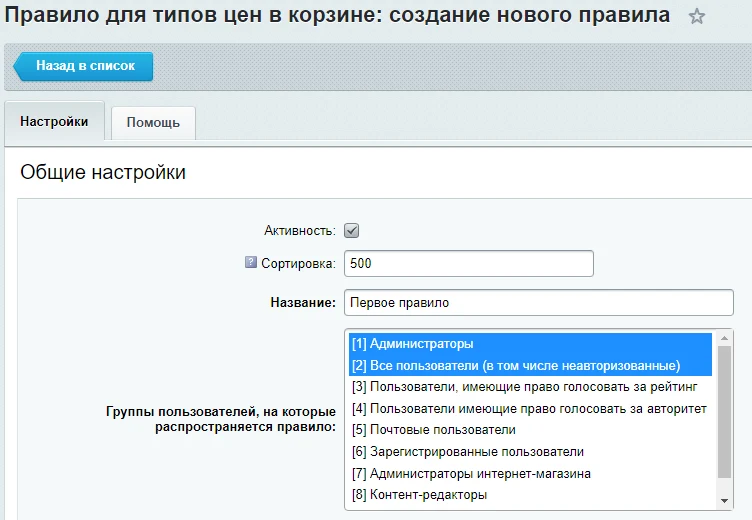
When creating a rule, specify its status, sort order, name, and the user groups for which it will apply. Then configure the triggering conditions for the rule for each price type.
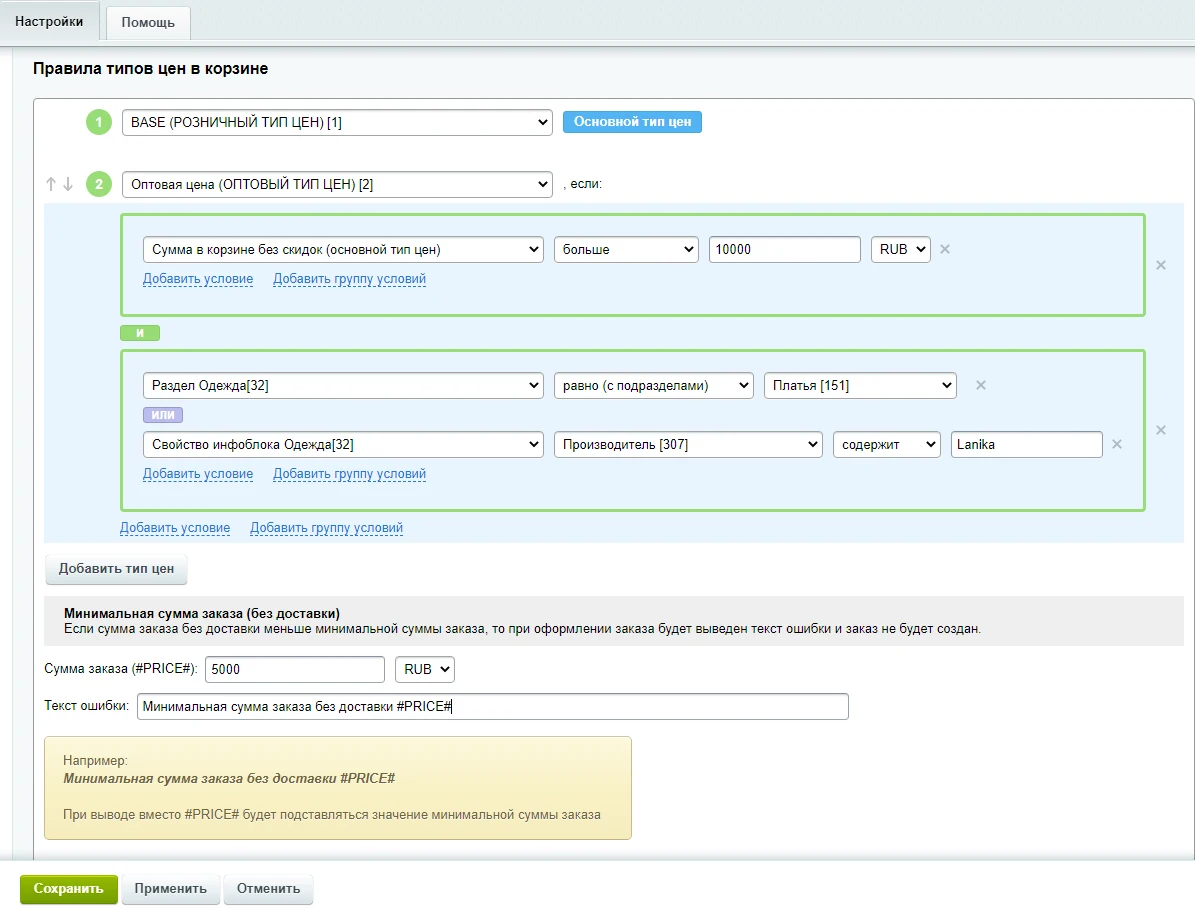
The module enables dynamic price type switching in the shopping cart based on defined conditions. The primary price type is applied by default if none of the additional conditions are met. For each additional price type, a set of conditions can be configured using logical operators AND and OR to group requirements.
For instance, a transition from retail to wholesale pricing can be triggered when the cart total exceeds 10,000 rubles, and the item belongs to the 'Dresses' category or its 'Manufacturer' property contains 'Lanika'.
Additionally, you can specify a warning message and a minimum order amount excluding delivery. If the final order total falls below this threshold, order creation will be blocked. Implementing the minimum amount check and displaying the warning requires inserting specific code into the cart component (recommended for developers).
The profistudio.basketprice module enables displaying additional price types in the shopping cart based on specific conditions. To use this functionality, the system template for the bitrix:sale.basket.basket component must be copied from the /bitrix/components/bitrix/ directory to the site template folder and selected in the component settings.
In the mutator.php file of the custom component template, insert the provided code before the line $result['TOTAL_RENDER_DATA'] = $totalData;. The code first checks if the profistudio.basketprice module is loaded. If so, it calculates the minimum order amount excluding delivery and assigns it to SUM_MIN_PRICE and SUM_MIN_PRICE_FORMATED. It also calculates the cart total without discounts using the base price type (LocalPrice). If the current order sum (allSum) is less than the calculated base sum, the code adds SUM_PRICE_MAX and SUM_PRICE_MAX_FORMATED to the output, containing the base sum formatted in the site currency.
In the user template for the bitrix:sale.basket.basket basket component, open the file js-templates/basket-total.php. To display the minimum order amount excluding delivery, insert code using the SUM_MIN_PRICE tag containing the SUM_MIN_PRICE_FORMATED variable within a div tag. To display the cart total without discounts based on the main price type, use a similar structure with the SUM_PRICE_MAX tag and the SUM_PRICE_MAX_FORMATED variable.
General iT can take care of implementing “Price types in the cart based on conditions”, including installation, configuration and result verification.
UPDATE HISTORY
What’s new
6 releases
2.0.10 (22.08.2025)Latest update
1. In the rule settings, under additional conditions, user functions have been added: profistudioBasketPrice_Additional_GetString_[site_ID](), profistudioBasketPrice_Additional_GetNumber_[site_ID]().
2. In the rules for setting the price type, under additional conditions, user functions have been added: profistudioBasketPrice_GetString_[site_ID](), profistudioBasketPrice_GetNumber_[site_ID]().
3. Minor improvements and fixes.
2.0.8 (15.05.2025)
1. In the rule settings, a selection of users to which the rule applies has been added:
1) Users: unauthorized (unregistered)
2) Users: authorized (registered)
2. Additional conditions for applying the rule have been added in the rule settings:
1) Domain (website address without the trailing slash) - can be used, for example, to select a rule on one website with different subdomains
2) PHP user function - can be used, for example, to select a rule by region on one domain
3. Additional conditions have been added in the price type installation rules:
1) Domain (website address without the trailing slash) - can be used, for example, to install a price type on one website with different subdomains
2) PHP user function - can be used, for example, to install a price type by region on one domain
4. Minor improvements and fixes.
2.0.6 (20.11.2024)
1. In the conditions "Product or trade offer in the cart (item)", the ability to select property values has been added.
2. The functionality to select infoblock elements and sections in a separate window from a list has been added to the conditions.
3. Minor improvements and fixes.
2.0.4 (19.05.2023)
1. New conditions added to rules:
1) The cart contains products or trade offers
2) The cart does not contain products or trade offers
2. Added functionality to select additional conditions for rules from the "Cart" group
2.0.2 (03.02.2023)
Fixes for module operation on PHP 8.1
2.0.1 (26.01.2023)
Attention! Before installing the update, it is recommended to perform a full backup of the site. After installing the update, be sure to verify the previously created module rules for basket price types for correct operation, as the logic of some conditions in the rules for basket price types in the module has been improved or changed.
1. New conditions have been added to the rules:
Basket
1) Total weight in the basket (grams)
2) Total volume in the basket (cubic meters)
3) Number of items in the basket
4) Total quantity in the basket
Product or trade offer in the basket (item)
1) Item sum in the basket without discounts (base price type)
2) Total weight of the item in the basket (grams)
3) Total volume of the item in the basket (cubic meters)
4) Total quantity of the item in the basket
Product or trade offer in the information block (element)
1) Element field
2) Element trade catalog parameter
3) Element price
4) Element price currency
5) Element price markup
6) Element quantity in stock
Trade offer product in the information block
1) Trade offer product information block
2) Trade offer product field
3) Trade offer product section
4) Trade offer product property
2. The logic of condition operation in the rules has been changed:
The 'Sitemap with Auto-Generation and Filters' module for '1C-Bitrix: Site Management' provides automatic creation and updating of the sitemap.xml file. It allows filtering URL elements and sections of information blocks for inclusion in the sitemap based on specified rules, parameters, and properties.
The module automatically applies individual SEO settings to smart filter pages generated based on specified conditions. It supports various templates that can include product and offer property names and values, as well as section names, section properties, and descriptions.
Planograph is a tool for creating interactive maps in minutes. The online constructor is available for websites built on WordPress, Joomla, Tilda, Wix, MODx, OpenCart, DLE, and other CMS platforms.
The software is easy to install and use.
SDEK integration module for 1C-Bitrix.
SDEK is one of Russia's largest logistics companies, providing courier delivery and operating a network of pickup points.
The module connects the online store with the SDEK personal account, offering the following capabilities:
Providing customers with delivery options: courier, pickup point, or postmat.
The module automatically determines the visitor's location based on their IP address and offers city selection in a stylish popup window. It is available in all platform editions.
Key features include automatic location detection by IP address, domain, or website, along with automatic redirection to specific domains and subdomains, including external resources.
The ipol.mailorder module extends email templates to include information about order properties, delivery options, and selected payment types. Standard platform tools do not allow transmitting critical details such as the user-specified delivery address or chosen payment system in notifications.
The displayed price covers the solution itself. Platform licensing, installation and customisation are checked separately. If the page offers bundles, select the required option before submitting a request.
How do I check compatibility?
Compare the supported editions and solution version in the technical details with your project. Before installing on a live website, we recommend making a backup and checking the solution in a test environment.
Is there a trial?
The developer lists a trial of 7 days. The trial button opens the installer in your website control panel. Check the required features and compatibility before purchasing.
How much does this solution’s renewal cost?
The current renewal price is 7,250 ₽. Before you order, a manager will confirm the renewal period and whether it applies to your licence.
Can you help with implementation?
We can help install the module, check its settings and verify how it works in your project. Compatibility with other customisations and the scope of work are assessed before we begin.
Your cookie choices
Necessary cookies support sign-in, your cart and security. Optional analytics helps improve the website and starts only with your permission.
Our metrika.git.ru system: public pages, a random identifier, device and interaction events. Form contents, account and payment pages are excluded. Raw events: up to 90 days. Operator: General IT Rus LLC, INN 2310208877.
Your browser requests no tracking: analytics is off.