Payments are experiencing issues due to temporary restrictions in Russia. If your payment does not go through, please submit a support request.•Our support team is available 24/7 — we are always here to help with hosting and server issues.•We are now accepting requests for dedicated server rental and colocation services in our data center.•Reminder: we recommend enabling backups for additional data protection.•A new VPS/VDS lineup with NVMe storage and improved performance is now available.•Maintenance work on some servers has been completed. All services are operating normally.•
Payments are experiencing issues due to temporary restrictions in Russia. If your payment does not go through, please submit a support request.•Our support team is available 24/7 — we are always here to help with hosting and server issues.•We are now accepting requests for dedicated server rental and colocation services in our data center.•Reminder: we recommend enabling backups for additional data protection.•A new VPS/VDS lineup with NVMe storage and improved performance is now available.•Maintenance work on some servers has been completed. All services are operating normally.•
Аккаунт в General iT
Вход / Регистрация
Войдите или создайте аккаунт для управления услугами в панели.
SEO Smart Filter Auto-Generator: meta, sitemap, breadcrumbs, and internal linking
The module automatically applies individual SEO settings to smart filter pages generated based on specified conditions. It supports various templates that can include product and offer property names and values, as well as section names, section properties, and descriptions.
The module automatically applies individual SEO settings to smart filter pages generated based on specified conditions. It supports various templates that can include product and offer property names and values, as well as section names, section properties, and descriptions.
The module automatically generates unique meta tags (title, description, keywords) for multiple pages using user-defined templates. It creates unique H1 headings and any other content (images, videos, forms, etc.) for smart filter landing pages, including additional custom fields. Unique meta data for OpenGraph markup (og:title, og:description) is also supported.
The functionality covers management of navigation breadcrumbs and automatic generation of sitemaps for pages created according to specific rules, with the ability to add arbitrary pages to the sitemap. Indexation of smart filter pages is controlled based on defined rules.
The module supports creating a block of quick links (tags) in catalog sections for internal linking. This feature is available either as part of the main module or as a separate component named "Quick SEO Links".
Developers can utilize the OnBeforeSetPageProperties(&$arFields, $arParams) event, which triggers before the module sets metadata and other properties for a smart filter SEO page. This allows for cancelling property installation or modifying data prior to saving.
The module automatically generates unique meta tags, sitemaps, breadcrumbs, and internal links for smart filter pages based on templates.
The OnAfterSetPageProperties($arFields, $arParams) event is triggered after the module sets the meta tags and other SEO properties of the smart filter page. This allows for additional actions to be performed after the configuration is complete.
Example usage
In a few clicks, you can configure unique meta data and generate content for all catalog sections with a filter by the 'Color' property. When a buyer applies the filter, the system creates a unique landing page with a title and content containing the selected color. This enables the generation of thousands of unique SEO pages in minutes to attract search traffic.
Advantages
Sitemap link generation is performed step-by-step, preventing script execution time limits on the server and allowing for the processing of large volumes of links.
Supports working with multiple product catalogs.
A property-based filter is available for generated sitemap links to quickly select required pages.
The module includes help, reference, and tooltip sections.
Functional limitations
In the current version, the module does not generate SEO-friendly URLs (CHPU). It is assumed that the URLs for smart filter pages are already formed as CHPU based on initially defined property symbolic codes and their values.
There is no support for automatic grammatical declension by gender, number, or case.
The module does not support the creation of 'product collections' (pages with an arbitrary set of products).
As a new module, it currently has a limited number of test cases. Feedback regarding errors, shortcomings, and potential improvements is welcome.
Alternative for manual configuration
If automation is not required, the 'SEO-Shaman. Creation of unique pages by filters, search: CHPU, meta tags, breadcrumbs' module can be used. It does not provide automation but allows for flexible SEO configuration of smart filter pages, including CHPU generation.
Installation
The module is installed using standard Bitrix tools. After installation and activation, you must add PHP code at the very end of the component_epilog.php file in the user template for the bitrix:catalog.smart.filter component:
If the specified file is missing, create it and populate it with the following content.
When using a complex catalog component, the section.php file from the bitrix:catalog component template is included for the «Section items list» page. This file or the files included in it typically contain the call to the bitrix:catalog.smart.filter component. If the system template of this component is used, it can be copied to the site template and then modified to suit your needs.
To display text from the «Detailed text» field configured in the SEO settings for each set of pages, place the component «ProfiStudio SEO Smart Filter Page Generator: Output of SEO smart filter page properties» (profistudio:seofilter.pagefiltercontent) at the desired location on the catalog page.
The module does not generate SEO-friendly URLs, so search engines must be allowed to index smart filter page URLs. To do this, verify that the robots.txt file does not contain rules blocking access to these pages (for example, Disallow: /filter/). This prevents rule conflicts and allows the module to control the indexing of smart filter pages.
Since not all smart filter URLs are needed by search engines, the module applies a global rule with the lowest priority. This rule initially blocks all smart filter URLs from indexing using the meta tag noindex, nofollow. Subsequently, new rules with higher priority are created to open specific pages for indexing.
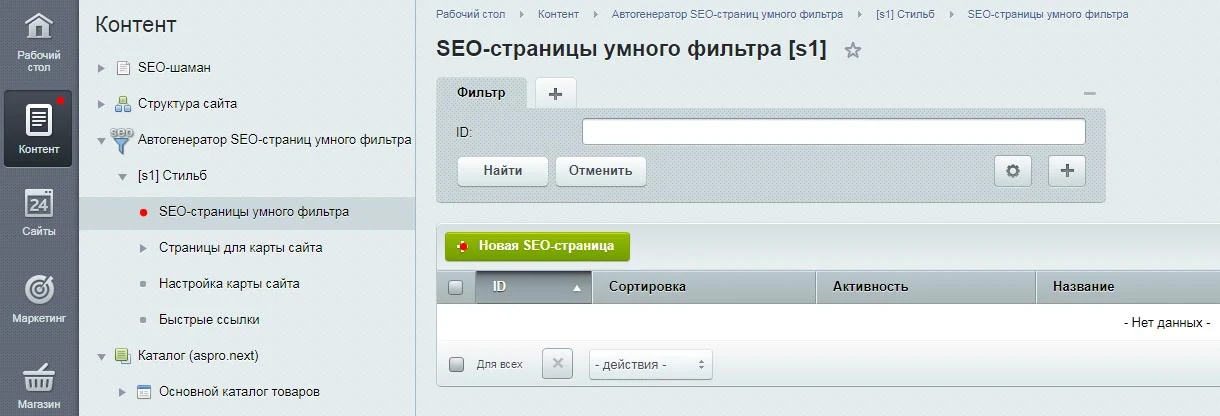
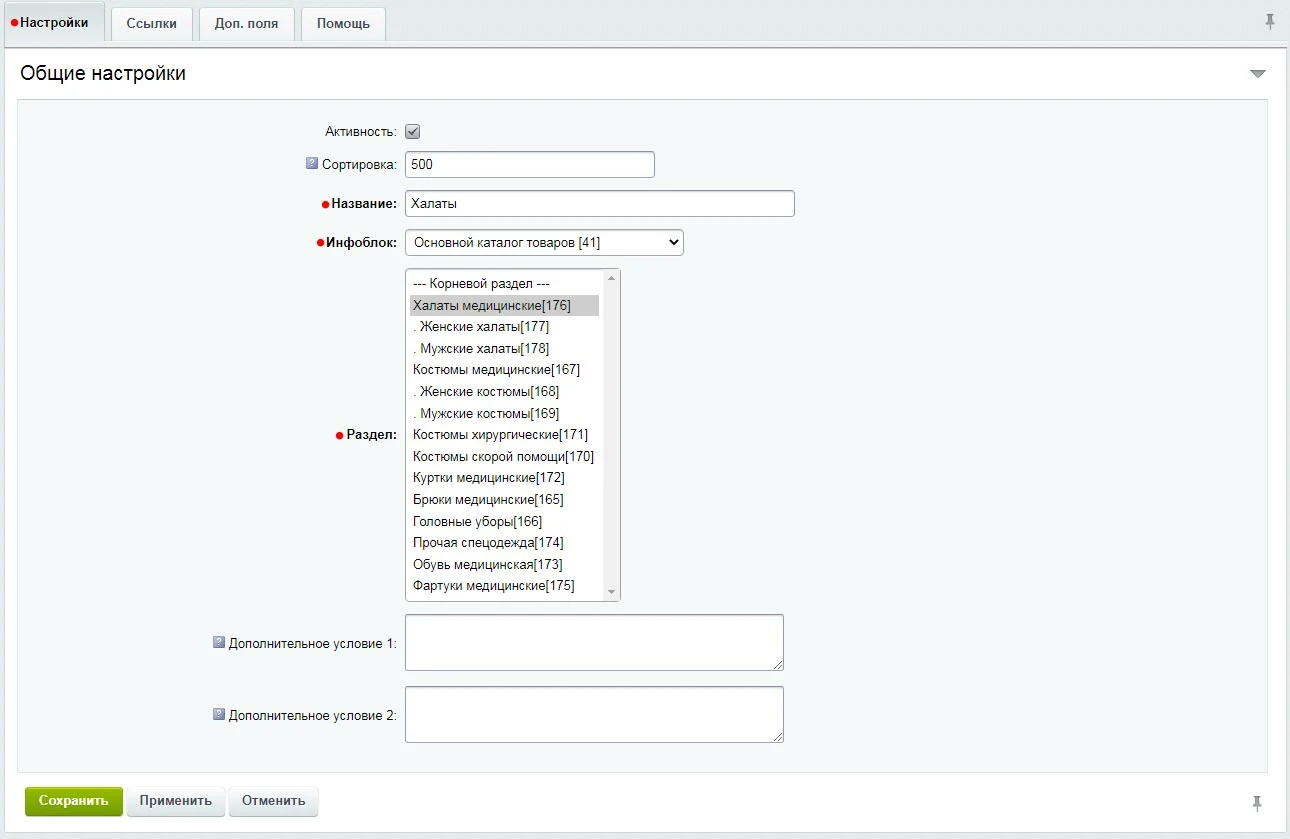
To create the first rule for auto-generating SEO pages, go to the administrative panel, open the module section under Content, select the required site, and navigate to the Smart Filter SEO Pages section. Then click the New SEO Page button.
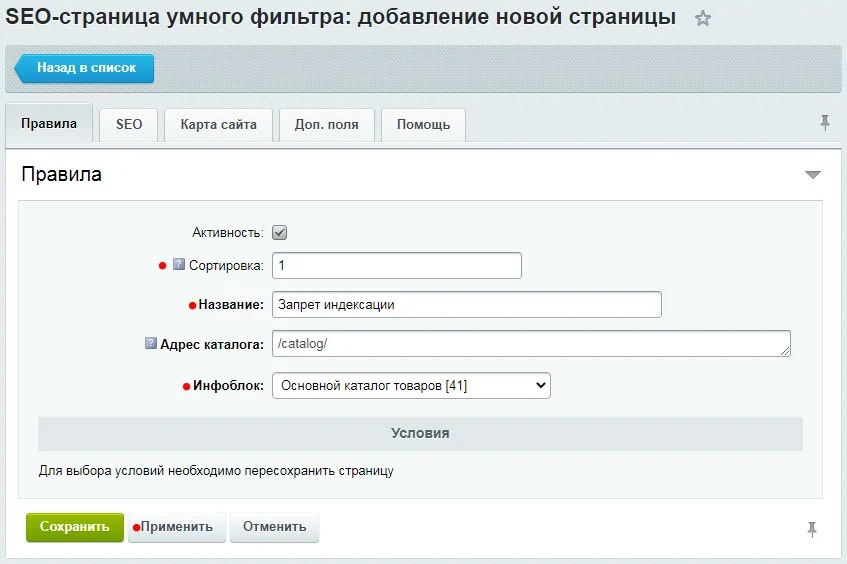
Set the sort order to «1» and enter the rule name «No Index». The catalog path is determined automatically and does not require editing. Select the main catalog information block. To save the rule and continue working with it, click the «Apply» button.
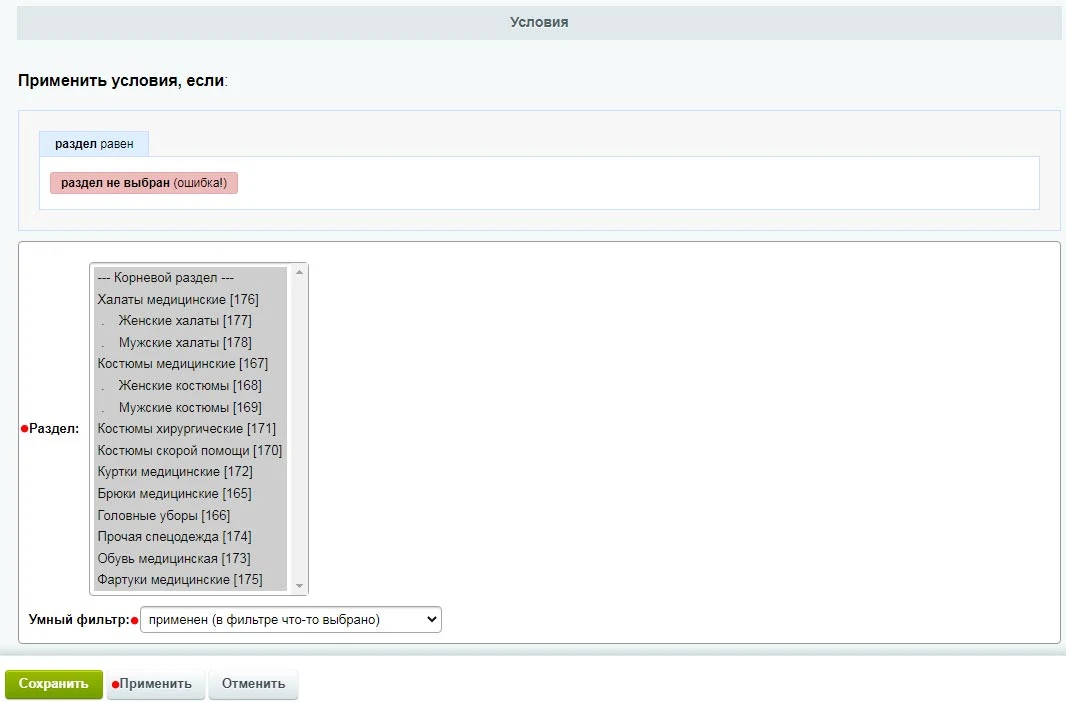
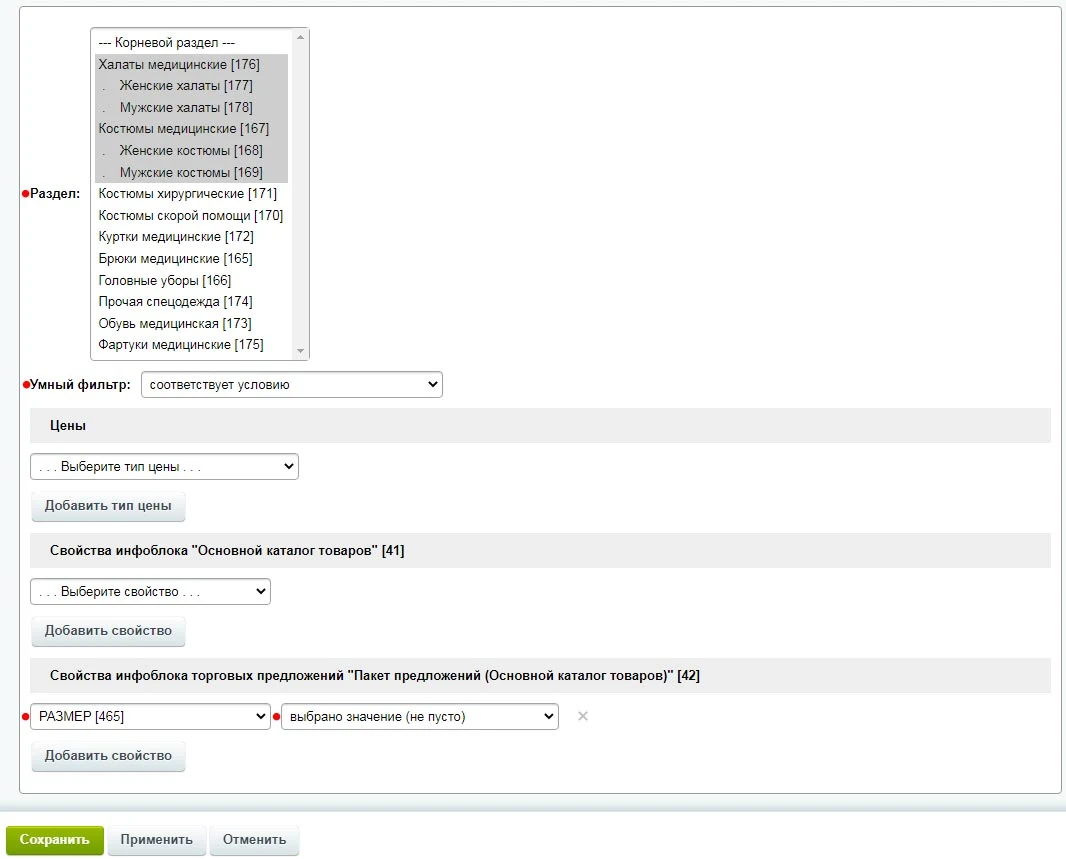
After saving the page, the rule conditions become available. To prevent indexing of all smart filter URLs, select all catalog sections. Set the Smart Filter parameter to Applied (something selected in the filter).
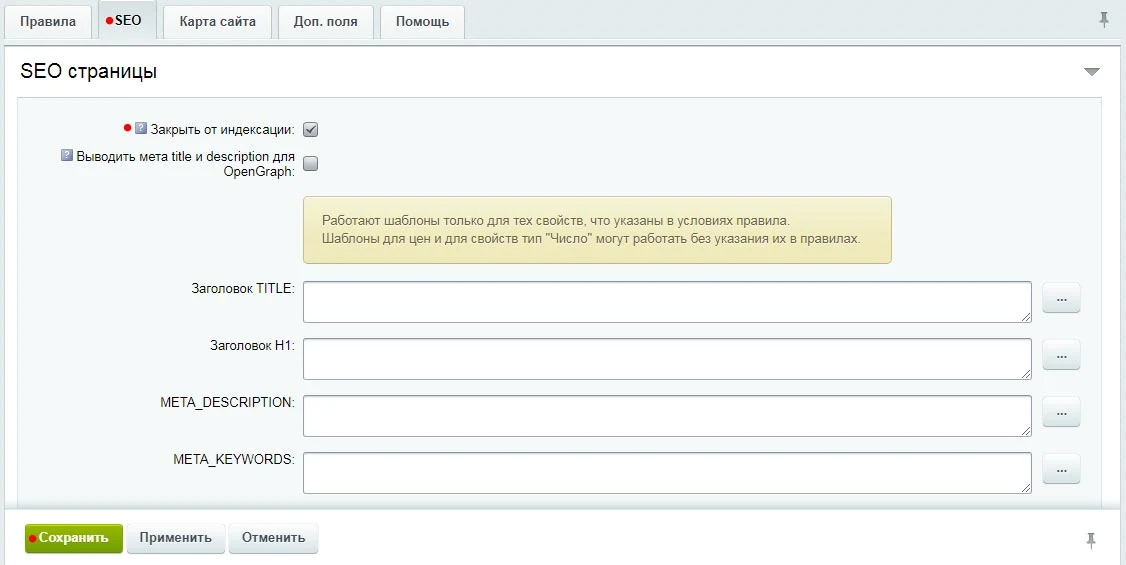
Navigate to the «SEO» tab, enable the «Block from indexing» option, and click «Save». This will prevent search engines from indexing all smart filter pages across the entire catalog.
Create a rule to generate links to smart filter pages within selected catalog sections. Configure unique meta tags by template for these pages and add them to the sitemap. When creating the rule, set its priority higher than that of the no-index rule. Select the required sections and set the Smart Filter parameter to Match condition. In the conditions, specify the necessary property: if the filter operates on product offer properties, select the corresponding information block and property. Set the property parameter to Value selected (not empty). While the Equal parameter could be used, it would require manually entering specific values; this example processes all available property values.
Navigate to the 'SEO' tab and ensure the 'Block from indexing' checkbox is cleared. In this case, the robots meta tag that would block indexing will not be output, and the page will remain accessible to search engine crawlers.
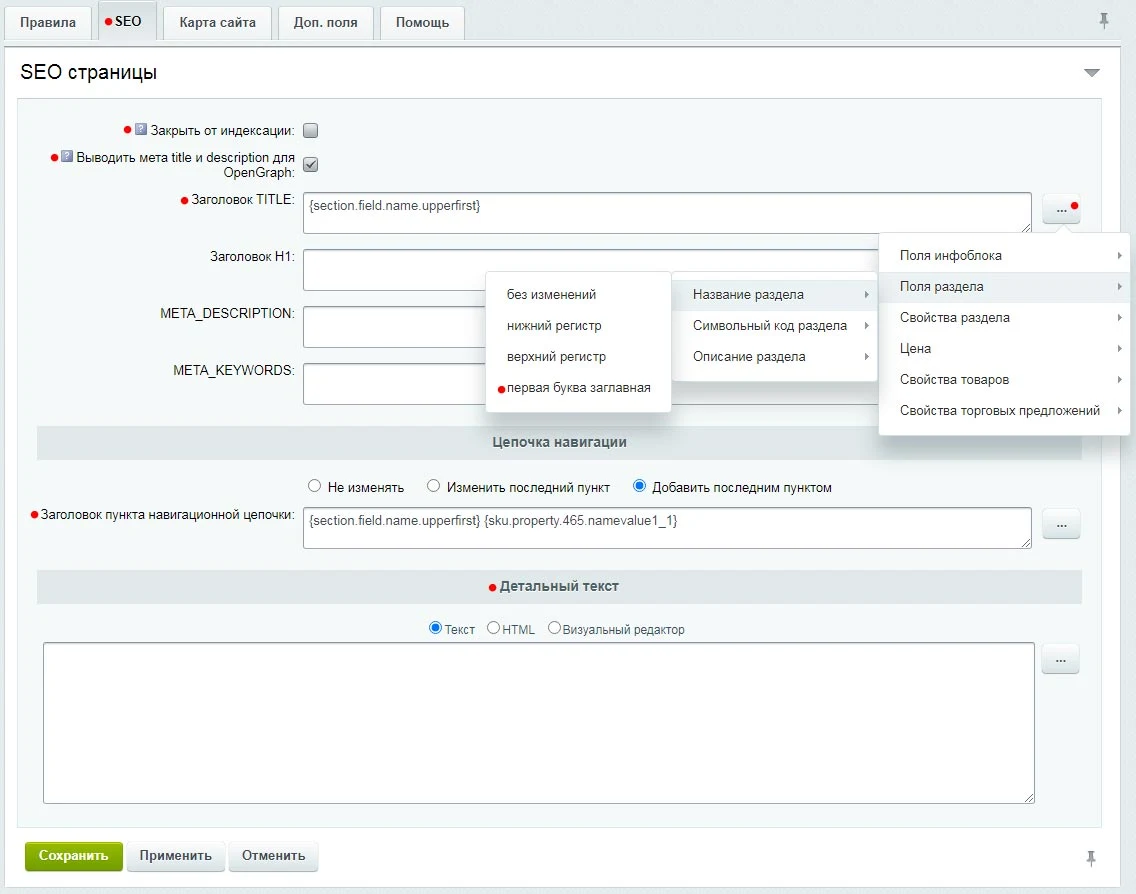
If you enable the 'Output meta title and description for OpenGraph' option, the system will generate the corresponding OpenGraph tags using content from the 'TITLE' and 'META_DESCRIPTION' fields specified below.
To set unique meta tags and content for each smart filter page, use templates. A template is a text string containing variables with values (such as section names, property names, or property values).
A button for adding variables is located next to each text field. Use it to insert available variables into the text. After saving the settings, you can verify the module's output in the public part of the site.
If standard fields are insufficient, create a custom property with a value in the 'Additional Fields' tab and display it using the module component. This task is best handled by a developer. Instructions and the component code are available in the 'Help' tab.
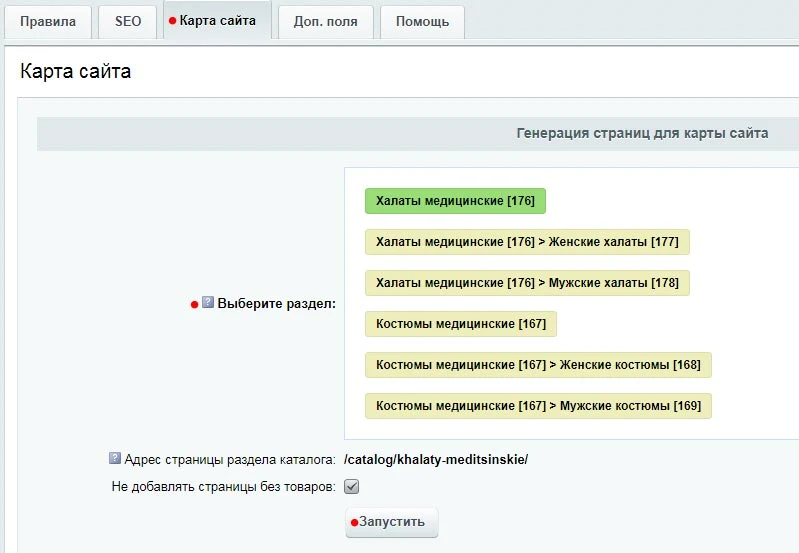
After filling in all required fields, navigate to the Sitemap tab. This section displays the list of categories selected earlier in the rule conditions. For each of these categories, you can generate links to be added to the sitemap. The generation process runs sequentially for each category to reduce the load when processing a large number of links. Select the desired catalog category and start generating pages for the sitemap.
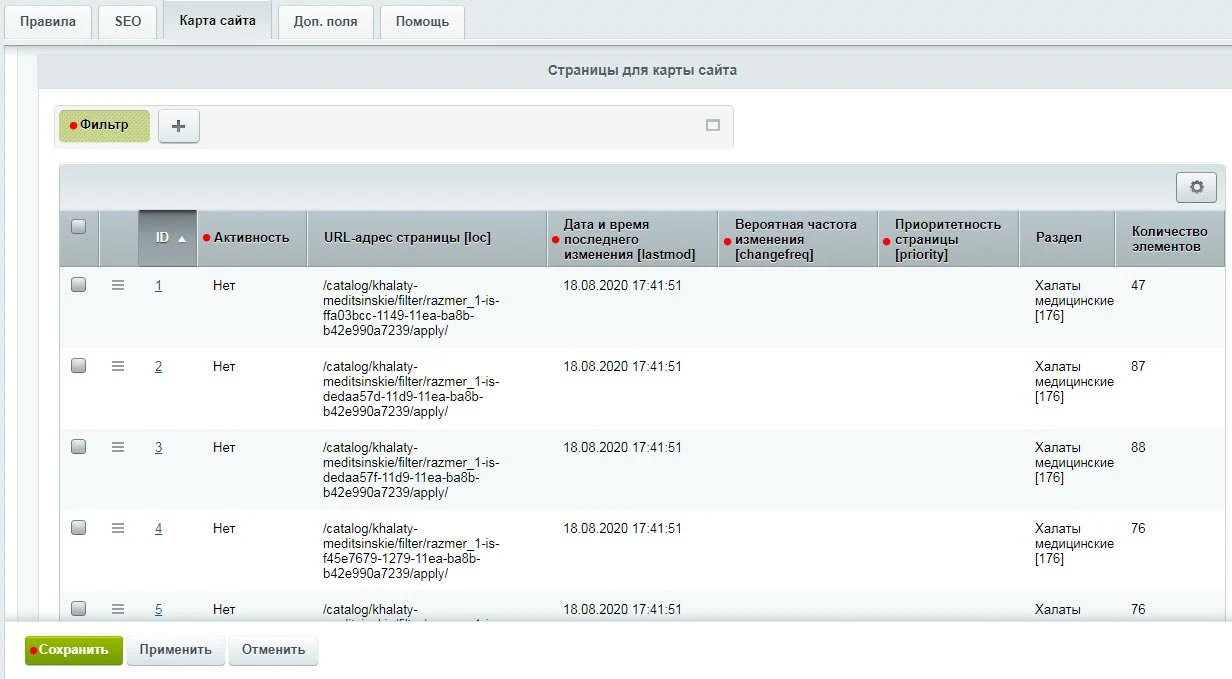
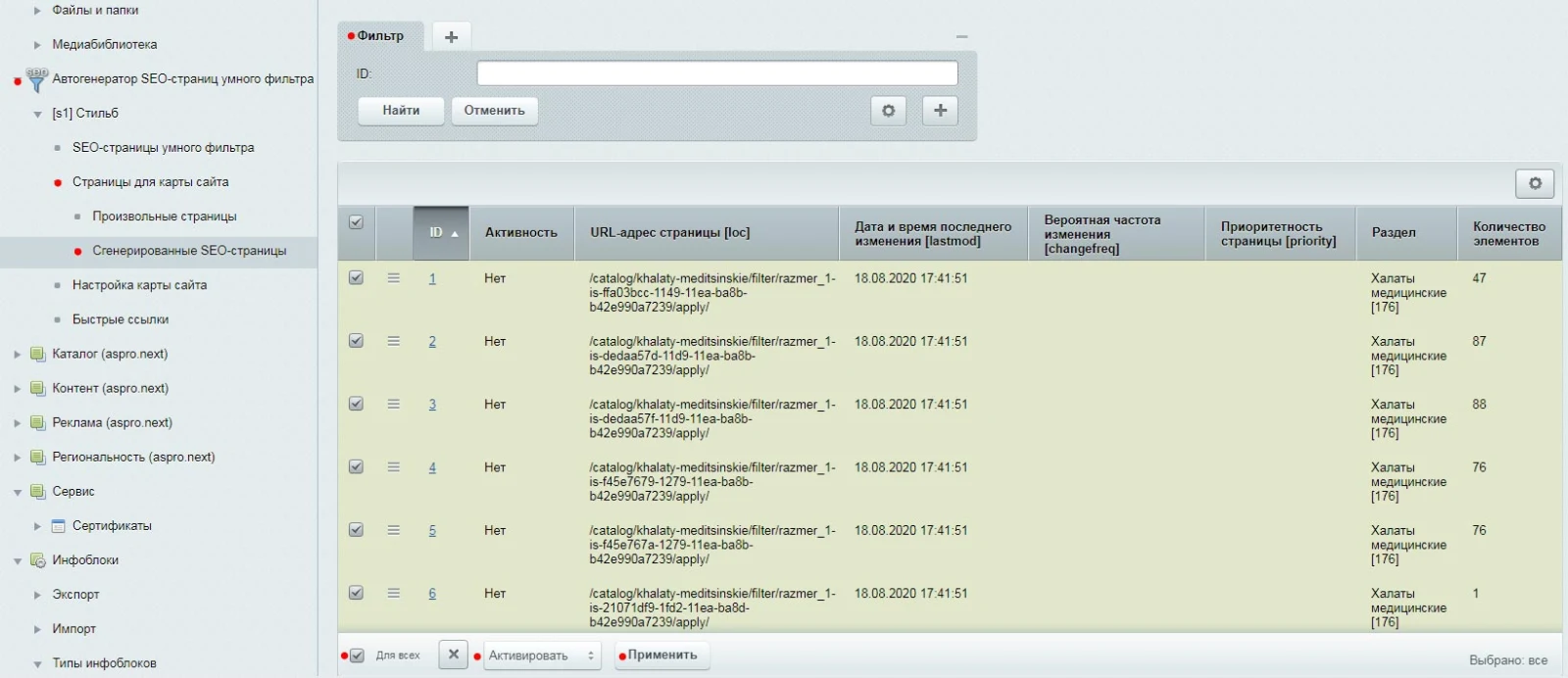
Once all links for the sitemap are generated, their list appears at the bottom. Above the list is the standard Bitrix filter, which allows filtering a large number of generated links by properties. Not all links to filter pages matching the rule are required in the sitemap. For each generated link, you can set an activity status that determines whether the page will be included in the sitemap. After filtering the necessary pages or selecting all, change their default status from 'Inactive' to 'Active'. Active links from the created rule will then be eligible for inclusion in the sitemap. You can also set individual parameters for each link here: last modification date, probable change frequency, and priority. However, for this example, these parameters will be set in bulk for all links in the next module section. Save your settings.
The module section 'Smart Filter SEO Pages' now contains two active rules with assigned sorting priorities. Within the 'Sitemap Pages' section, a new subsection 'Generated SEO Pages' displays links to all smart filter pages created according to these rules. This area facilitates batch operations on the generated links. A filter located above the page list allows selection of links based on specific properties. Using standard Bitrix tools, you can set the active status for all generated links to ensure their inclusion in the sitemap.
The 'Pages for Sitemap' section includes a 'Custom Pages' subsection where you can specify any URL and set parameters to include it in the sitemap.
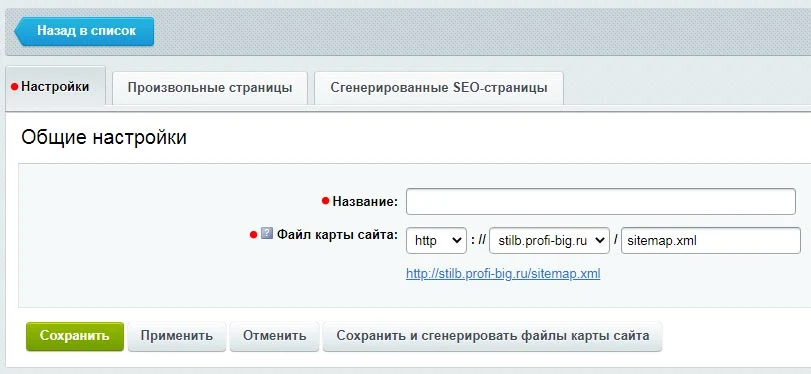
Navigate to the 'Sitemap Settings' module section and click 'Add'. On the 'Settings' tab, enter a name for the sitemap (for your convenience) and the filename. If a sitemap already exists, select it; the module will add the necessary links to smart filter pages to that existing file. If no sitemap file is present, one will be created automatically.
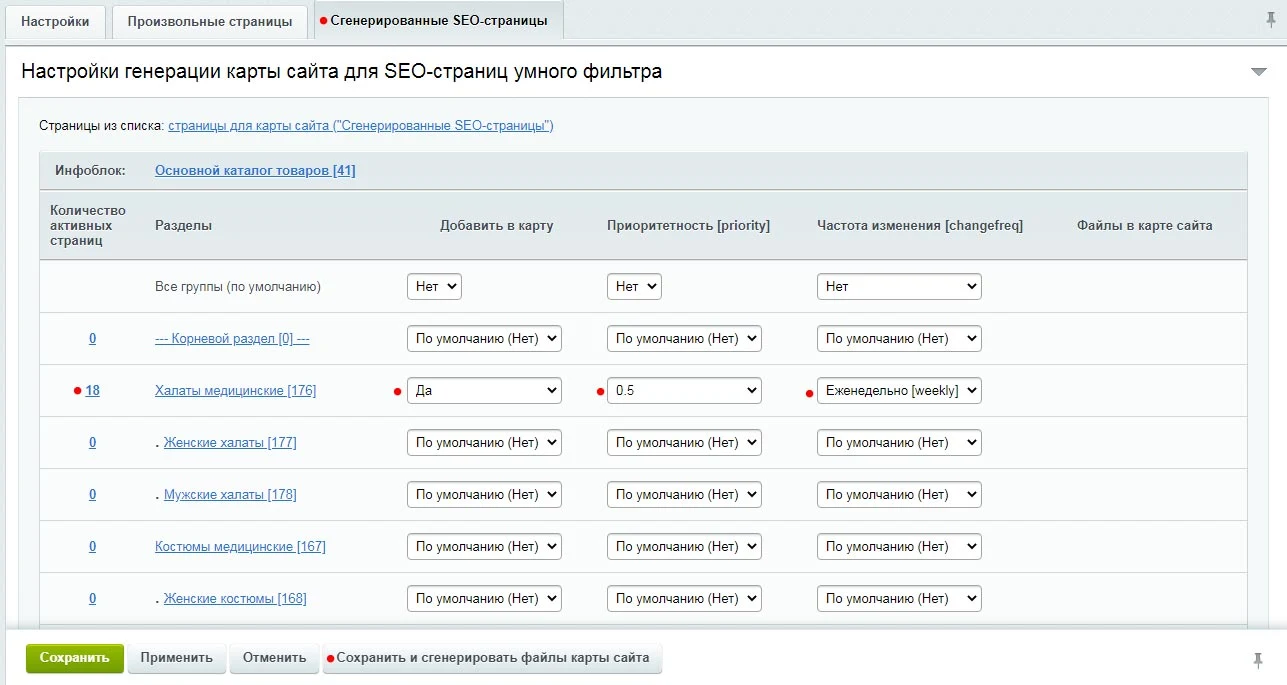
On the 'Generated SEO Pages' tab, a list of all catalog sections is displayed. To the left of each section name, the count of generated links to smart filter pages with the 'Active' status is shown. For each section, configure the options: whether to include all active links in the sitemap, along with priority and change frequency values. Once all settings are applied, click the 'Save and Generate Sitemap Files' button. The system will automatically populate the sitemap with the required links.
To enhance the effectiveness of SEO-optimized smart filter landing pages, internal linking is recommended. This functionality is implemented in the 'Quick Links' section. Navigate to 'Quick Links' and click the 'New Quick Links Block' button. On the opened page, in the 'Settings' tab, specify the block name, select the product catalog information block, and choose the sections where the block will be displayed.
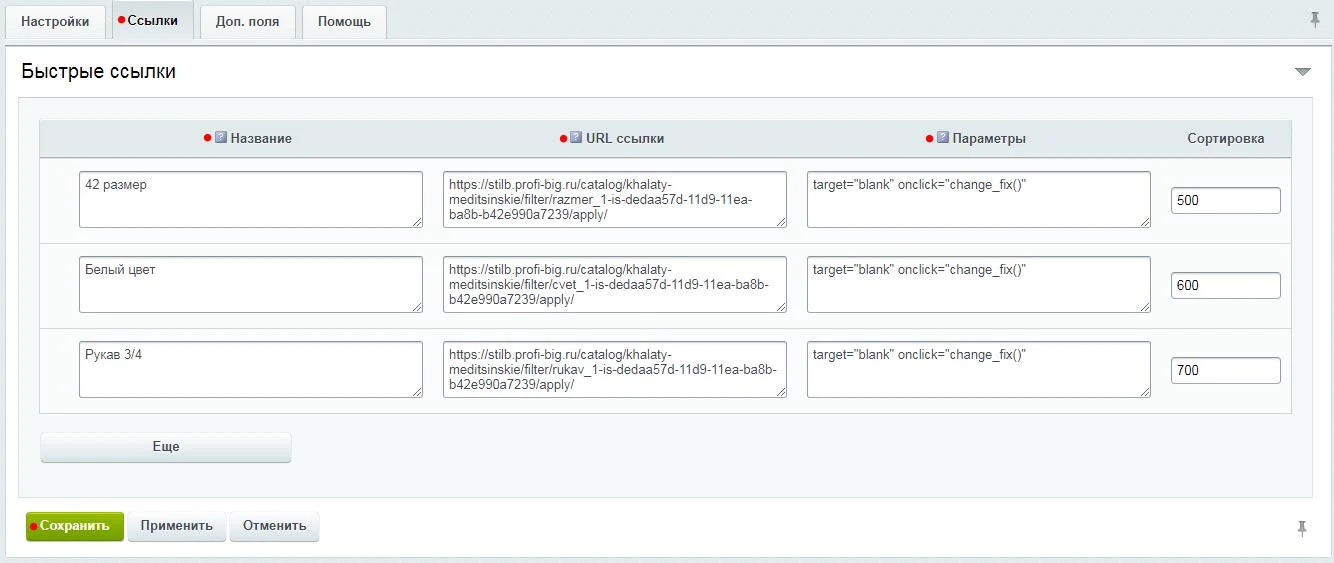
On the Links tab, quick links are configured. For each link, specify the title (anchor) and address (href attribute). Optionally, you can add extra link parameters (attributes) and define the display order.
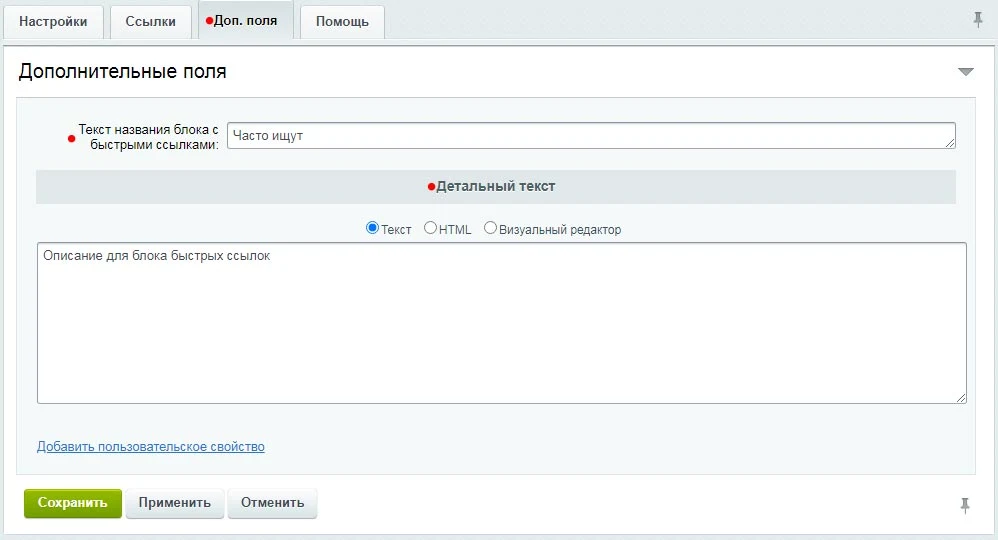
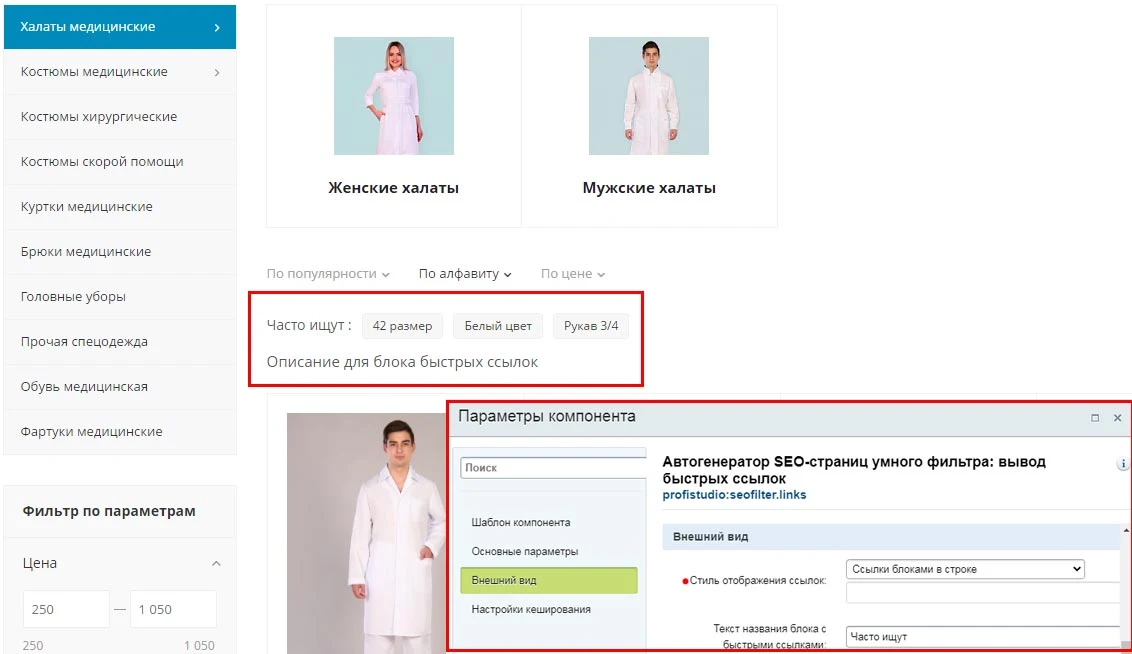
On the 'Additional Fields' tab, you can specify the title text for the quick links block displayed on the site, detailed text, or custom properties. The block is rendered using the 'Smart Filter SEO Page Auto-generator: Quick Links Output' component (profistudio:seofilter.links). It is recommended to engage a developer to install the component in the correct location on the catalog page. Step-by-step instructions are available in the 'Help' tab. After configuring all settings, save the block.
The visibility of the quick links block is controlled by component parameters. Custom styles can be applied to the links within this block.
The module automatically generates SEO elements for the smart filter: meta tags, sitemap, breadcrumbs, and internal linking. Special attention should be paid to the functionality for custom product sorting.
General iT can install “SEO Smart Filter Auto-Generator: meta, sitemap, breadcrumbs, and internal linking”, configure its settings and verify its operation in the existing project.
UPDATE HISTORY
What’s new
8 releases
1.2.6 (11.04.2025)Latest update
1. Improvements in the site administration section
2. Improved performance of generating SEO pages for the sitemap
3. Other improvements and fixes
1.2.4 (22.10.2024)
The seofilter.pagefilter component has been updated
Called after the module sets metadata and other properties of the smart filter SEO page.
Can be used for certain actions after the module sets metadata and other properties of the smart filter SEO page.
1.1.1 (30.11.2021)
Added the ability to set a canonical URL.
Added the ability to insert custom code within the page head tag.
Updated output of values from properties with types: "Section binding", "Element binding as a list", "Element binding by XML_ID", "Element binding with auto-completion".
1.0.6 (25.03.2021)
Refinement of output for property values of the 'Link to elements' type
1.0.4 (19.01.2021)
Optimization of profistudio:seofilter.links and profistudio:seofilter.pagefiltercontent component code
Refinement of the pop-up window for editing the SEO page of the smart filter in the public part of the site.
1.0.1 (30.10.2020)
Improved filter functionality for pages with element lists in the administrative part of the site.
The 'Sitemap with Auto-Generation and Filters' module for '1C-Bitrix: Site Management' provides automatic creation and updating of the sitemap.xml file. It allows filtering URL elements and sections of information blocks for inclusion in the sitemap based on specified rules, parameters, and properties.
BoostReviews is a module for 1C-Bitrix online stores designed to increase the number of product reviews without additional costs. The solution is built on the user experience of major Russian marketplaces, making the review process simple and familiar for buyers. It helps improve brand reputation, service quality, and drive sales.
The SaleMail module increases online store sales by automatically sending customers emails with product selections based on their purchase history. The system allows creating an unlimited number of flexible rules for product selection and email dispatch, with customizable time intervals for sending messages after each order.
The module generates XML and CSV feeds from 1C-Bitrix data for integration with Yandex Search, Yandex.Direct, Yandex.Business, Yandex.Real Estate, and Avto.ru. The solution is designed not only for product catalogs but also for exporting information about doctors, clinics, services, educational courses, real estate, cars, hotels, airline tickets, and other offers.
The module accelerates standard 1C-Bitrix catalog components by indexing products in OpenSearch. A facet index is created for the Smart Filter component, while product filtering and sorting in the product list are handled via the search engine.
Integration is seamless and requires no changes to component templates.
The displayed price covers the solution itself. Platform licensing, installation and customisation are checked separately. If the page offers bundles, select the required option before submitting a request.
How do I check compatibility?
Compare the supported editions and solution version in the technical details with your project. Before installing on a live website, we recommend making a backup and checking the solution in a test environment.
Is there a trial?
The developer lists a trial of 7 days. The trial button opens the installer in your website control panel. Check the required features and compatibility before purchasing.
How much does this solution’s renewal cost?
The current renewal price is 9,950 ₽. Before you order, a manager will confirm the renewal period and whether it applies to your licence.
Can you help with implementation?
We can help install the module, check its settings and verify how it works in your project. Compatibility with other customisations and the scope of work are assessed before we begin.
Your cookie choices
Necessary cookies support sign-in, your cart and security. Optional analytics helps improve the website and starts only with your permission.
Our metrika.git.ru system: public pages, a random identifier, device and interaction events. Form contents, account and payment pages are excluded. Raw events: up to 90 days. Operator: General IT Rus LLC, INN 2310208877.
Your browser requests no tracking: analytics is off.