Payments are experiencing issues due to temporary restrictions in Russia. If your payment does not go through, please submit a support request.•Our support team is available 24/7 — we are always here to help with hosting and server issues.•We are now accepting requests for dedicated server rental and colocation services in our data center.•Reminder: we recommend enabling backups for additional data protection.•A new VPS/VDS lineup with NVMe storage and improved performance is now available.•Maintenance work on some servers has been completed. All services are operating normally.•
Payments are experiencing issues due to temporary restrictions in Russia. If your payment does not go through, please submit a support request.•Our support team is available 24/7 — we are always here to help with hosting and server issues.•We are now accepting requests for dedicated server rental and colocation services in our data center.•Reminder: we recommend enabling backups for additional data protection.•A new VPS/VDS lineup with NVMe storage and improved performance is now available.•Maintenance work on some servers has been completed. All services are operating normally.•
Аккаунт в General iT
Вход / Регистрация
Войдите или создайте аккаунт для управления услугами в панели.
Страны не найдены. Попробуйте другое название или код.
MODULE FOR 1C-BITRIX
MainApp
PUSH notifications and analytics for 1C-Bitrix: segmental broadcasts to browsers and applications
The MainApp PUSH notifications module for 1C-Bitrix enables sending messages to website visitors and mobile app users on Android and iPhone directly from the system's administrative panel.
The MainApp PUSH notifications module for 1C-Bitrix enables sending messages to website visitors and mobile app users on Android and iPhone directly from the system's administrative panel. The tool supports creating campaigns, audience segmentation, automated reminders for abandoned carts, distribution of promo codes, notifications regarding order status changes and stock replenishment, as well as collecting analytics for each campaign. The solution transforms PUSH notifications from a simple communication channel into an effective tool for managing the customer base.
The module provides a direct communication channel with customers via PUSH notifications. For browser usage, users only need to allow notifications on a compatible device. Mobile applications require integration with the module. The system automatically saves recipient data upon receiving information from the website or application while tracking notification permission status. This enables the creation of audiences for mass and personalized campaigns, as well as the setup of automated scenarios. Notifications are delivered to website visitors via browser and to mobile application users on Android and iPhone.
Communication effectiveness depends on how well the offer matches customer interests. The segment builder allows creating audiences without programming, ranging from personal messages to individual clients to broadcasts for specific buyer groups. The tool supports filtering recipients based on 14 distinct criteria.
The module enables the creation of targeted audiences for sending push notifications to browsers and mobile applications within 1C-Bitrix. Segmentation is available based on the device operating system, browser or application type, specific website, status of a linked account, gender, user group, individual users, order count, order total, items in orders, presence or absence of orders within a selected period, push subscription status, application version, and the last known activity on the website or application.
These parameters allow isolating loyal customers, clients who purchased specific products, mobile app users, or audiences that have not placed an order for a long time. Individual messages can be sent personally to specific clients without affecting other recipients.
Segmentation conditions can be combined flexibly: requiring all criteria to be met simultaneously or selecting users who meet at least one condition. For complex audiences, conditions can be grouped, nested within each other, and combined with exclusions.
The module enables the creation of targeted segments for browser and mobile app PUSH notifications within 1C-Bitrix. For instance, you can select Android users with three or more orders while excluding store employees. Various comparison operators are available for different fields: greater than, less than, equal to, range, presence, or absence of a value. Order conditions can be restricted to a selected time period.
Audience verification is available before sending a campaign. The builder displays the count of found users and guest profiles along with their devices, as well as the number of devices available for PUSH delivery according to module data. The system provides a clear description of the target audience and excluded groups, distribution of devices by operating systems, browsers, and delivery channels (app or browser), and sample recipients with available data. This ensures that the offer reaches the intended buyers.
Created segments can be saved for reuse. When preparing a new campaign, the audience composition is automatically recalculated based on the saved conditions, eliminating the need to recreate the segment manually each time.
The MainApp module for 1C-Bitrix enables the creation of PUSH notifications designed to drive specific user actions. Messages can include a title, text, image, emoji, and a link to a website page. Segment-based campaigns support personalization by addressing the user by name when available, or using a predefined general greeting otherwise. Notifications can be sent immediately or scheduled for a specific date and time, transforming simple alerts into personalized offers with direct links to products, sections, or pages.
The automated abandoned cart recovery feature triggers when the user's device is registered for PUSH. The scenario supports up to 10 sequential notification steps. For instance, a reminder can be sent after one hour, a follow-up offer to complete the order after 24 hours, and a final reminder with a personal promo code after two days.
Each stage of the scenario has independently configured parameters: delivery intervals, text content, images, and promo code conditions.
Displaying items from the cart
Notifications about abandoned carts can automatically include the product name and image. This allows the buyer to immediately see what they selected and return to the purchase without needing to recall the details.
Personal promo codes
At any stage of the scenario, the module can offer the buyer a unique promo code. Based on the shopping cart rules in 1C-Bitrix, the system automatically generates a single-use code with a specified validity period. The discount amount and terms are defined within the rule settings.
To streamline the checkout process, the promo code can be applied automatically immediately after the user clicks through from the push notification. The buyer does not need to copy, memorize, or manually enter the code.
Smart reminder filtering
Before creating the next stage, the module checks the current state of the cart. If the order has already been placed or the cart has been cleared, new reminders for this scenario are not generated. Messages already queued for sending are not automatically cancelled and will be delivered.
The module automatically sends PUSH notifications regarding order status changes. This allows the technology to be used for service communication in addition to marketing campaigns. Administrators can configure alerts for specific order processing stages, such as «Accepted», «Transferred to delivery», «Ready for pickup» (if such statuses are configured in the store). Messages include the order number, current status, and a direct link to the order page. Customers receive information directly on their devices and can immediately navigate to the order details.
The feature for returning customers when stock is replenished leverages standard 1C-Bitrix notifications about product arrivals. When an item becomes available, the module generates a PUSH message for users who have subscribed via email and possess compatible devices. This helps re-engage visitors who have shown interest in specific products.
Notifications are saved in the customer's personal account and do not disappear automatically after being viewed on the device.
The module maintains a history of received PUSH notifications in the buyer's personal account. When a single campaign is sent to multiple devices linked to one account, the history creates only one record without duplicates. A notification is marked as read after the PUSH is opened or the message is viewed in the personal account. The history component is connected separately on the personal account page and is accessible only to authorized users.
An indicator for unread PUSH notifications can be placed on the site for authorized users. The indicator's color, position, margins, and display conditions for both desktop and mobile devices can be configured separately. Clicking the indicator takes the user directly to the notification history page. This ensures continued engagement even after the user returns to the site.
The module stores data for each campaign, including the subject and message text, the link, the selected segment, and the send time.
The module tracks the delivery status for each recipient: successful delivery, device exclusion from the campaign, or delivery failure with the specific reason. The system records notification opens, link clicks, and the achievement of selected goals.
Statistics include counts of sent, excluded, opened, and conversion-triggering notifications. Users can view results for each individual campaign, reasons for device exclusion or delivery failure, the full history of PUSH campaigns, and daily performance trends. This provides visibility not only into campaign launches but also into the actual outcomes: how many messages were delivered, opened, and converted.
General PUSH Channel Analytics
A dedicated analytics page offers a comprehensive overview of PUSH campaign performance. Statistics can be filtered by date and campaign type, allowing quick navigation from high-level summaries to specific message details.
The Subscriptions and Unsubscriptions section displays saved device states and their change history, including permission grants, notification disabling, and cases of technical address invalidity.
The module enables more accurate assessment of the actual audience size available for sending notifications.
Recipient Database Accuracy
The system tracks subscription status to determine which users can actually receive PUSH messages. When the website or application reports that notifications have been disabled, or when the delivery service confirms that a device address is no longer valid, the module incorporates this information for subsequent targeted sends.
Before sending, the queue re-validates the recipient status in the database. Addresses marked as disabled or deleted are skipped, and the reason for exclusion can be viewed in the campaign statistics.
Data migrated from the previous Mainapp info block uses a service import. If a device address appears again, the existing record is updated rather than duplicated.
High-Speed Processing for Large Campaigns
Queues process messages in batches with support for parallel sending, reducing the time required for large-scale campaigns. For each device, the system records the delivery time and result. Performance depends on server capacity, background processing settings, and the delivery service capabilities.
Transparent Campaign Accounting
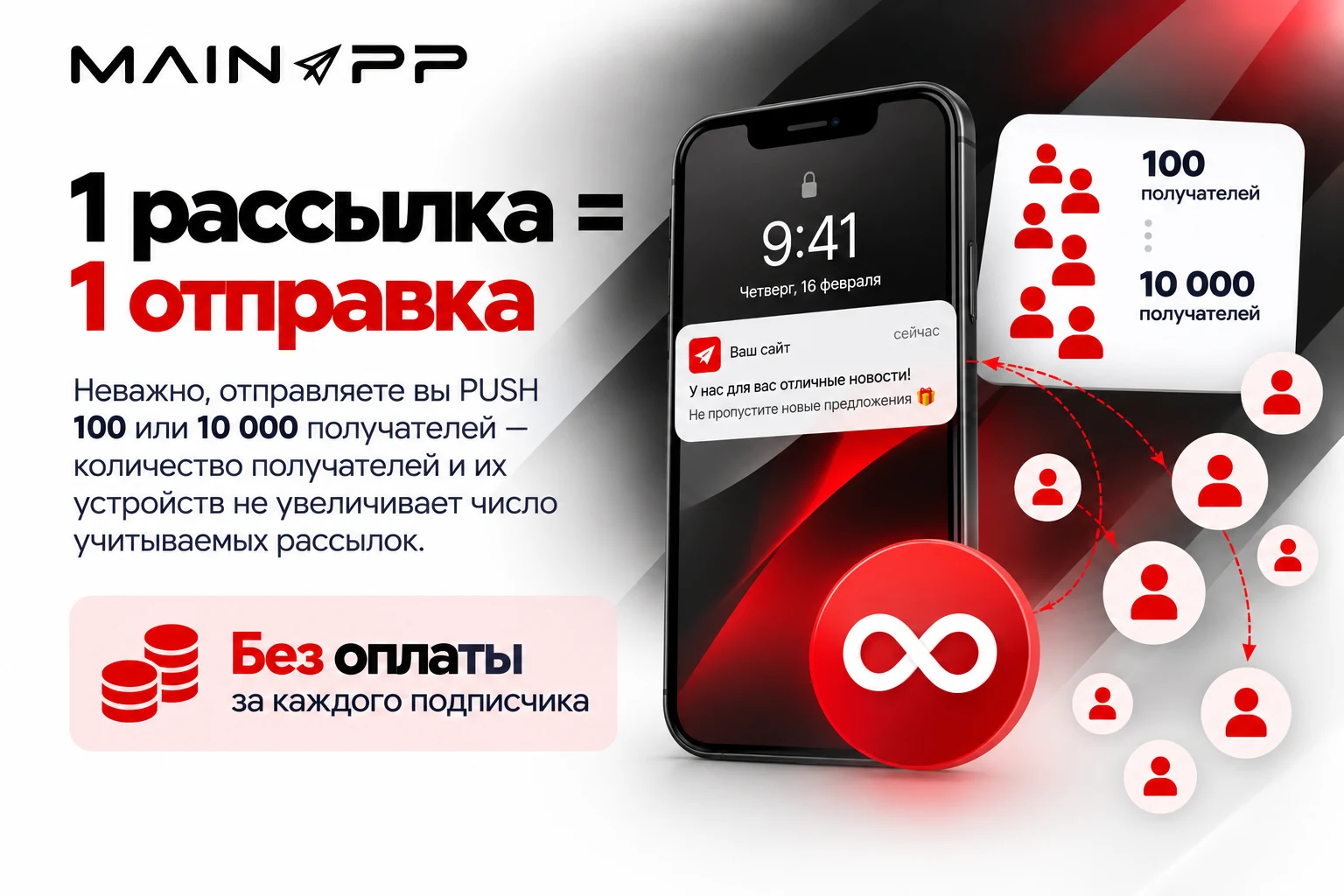
When calculating the campaign limit, the number of devices per buyer and the total number of recipients do not affect consumption. One completed campaign containing at least one successful send is counted as a single operation, regardless of the number of recipients and their devices. Campaigns with no successful sends do not consume the limit.
If the service returns an error indicating a tariff limit exceedance, the module records this in the send result. This allows users to understand in advance how the available send volume is consumed.
Employee Role Separation
Not every employee needs full access to PUSH communications. The module allows granting permissions for viewing data or managing campaigns, segments, and recipients. This enables team collaboration while distributing access based on specific tasks.
Faster Issue Resolution
Built-in error messages help identify problems during PUSH sends, automated scenario execution, and system configuration. This simplifies channel monitoring and troubleshooting when a send fails.
Module Capabilities
Attracting buyers to promotions and offers.
The MainApp module for 1C-Bitrix enables the creation of segments, preparation, and sending of PUSH notifications to browsers and mobile apps — immediately or on a schedule.
Recovering abandoned carts
Configure an automated sequence of up to 10 steps. Notifications display the item from the cart and, if needed, offer a personalized promo code.
Order status updates
The system automatically notifies the buyer of status changes and provides a direct link to the order.
Product availability notifications
Leverage the standard 1C-Bitrix subscription for product arrivals. The module sends PUSH notifications to buyers with available devices.
Audience segmentation
Use 14 segmentation criteria. Conditions and exclusions can be combined, and segments can be saved for future campaigns.
Performance analytics
Track send results, recorded opens, and goal achievement. Analyze orders linked to PUSH notifications.
Unified communication system
The module integrates recipient databases, segmentation tools, campaigns, automated scenarios, personalization, message history, and analytics. This allows building individual interaction scenarios instead of sending identical messages to the entire base.
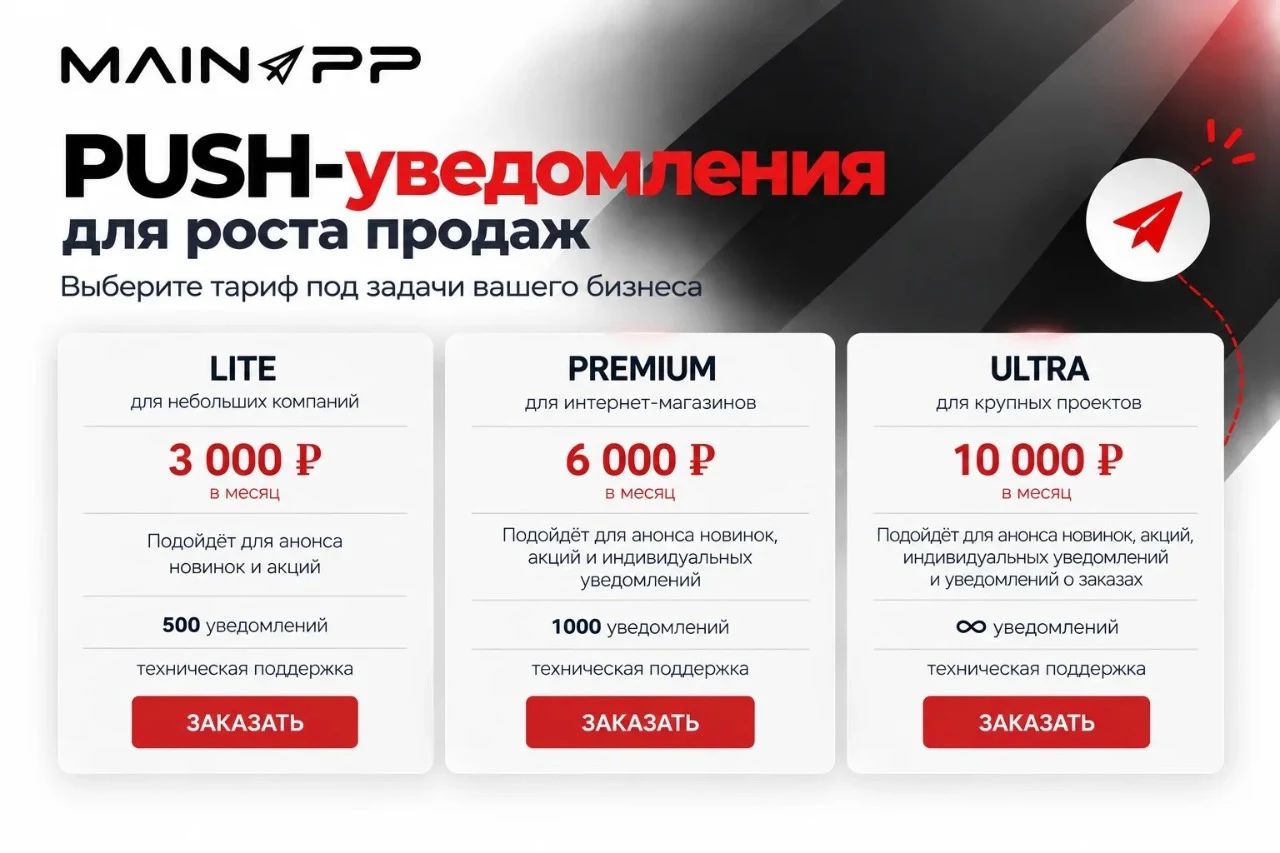
The module enables the creation of targeted audiences, sending personalized push notifications, and tracking user return to the website. It is designed for promoting special offers, facilitating repeat sales, reminding users about abandoned carts, and delivering important service messages directly from the 1C-Bitrix administration panel. The module can be installed for free, allowing the first ten notifications to be sent for testing purposes.
The number of subscribers is unlimited. One broadcast counts as a single send, regardless of the number of recipients and their devices.
General iT can connect “PUSH notifications and analytics for 1C-Bitrix: segmental broadcasts to browsers and applications”, install and configure the module, and make sure the integration works correctly.
UPDATE HISTORY
What’s new
37 releases
2.0.20 (13.10.2026) (beta)Latest update
PUSH notifications for price changes in the shopping cart and background processing for large catalogs have been added.
Notifications can be configured for price decreases, increases, or any price change. Settings include minimum change threshold, delay, sending hours, frequency, text templates, and image. The feature is disabled by default.
Prices are checked considering active discounts and cart conditions. Notifications are re-verified before sending; outdated changes and items removed from the cart are excluded.
Frequent price changes are grouped, and related carts are processed in batches. Load settings and background processing status indicators have been added.
Separate statistics for price notifications have been added. Existing site settings and history are preserved; automatic deletion of completed history is disabled by default.
2.0.19 (08.10.2026)
Fixed reading of settings for individual sites on new versions of the Bitrix core.
2.0.18 (08.10.2026)
Fixed saving of settings for individual sites on a multi-site Bitrix installation.
2.0.17 (08.10.2026)
Support for multiple sites on a single Bitrix installation with separate PUSH connections has been added.
For each site, the connection to the service, Firebase, VAPID, site address, templates, and automatic notifications are configured separately.
Recipients, segments, broadcasts, send queue, and statistics are separated by site.
In the administrative pages, site selection has been added; settings are presented as a unified block with explanations.
Settings can be copied from another site. Before replacement, the target site is displayed and confirmation is requested; after copying, PUSH is disabled until connection verification and explicit enabling.
On installations with multiple sites, the old connection and data must be linked to the original site. For a single site, the transfer is performed automatically.
Separate Firebase scripts are created for sites, taking into account the site directory and root. Background scripts use the connection of the corresponding site.
For PHP API and calls from cron on a multi-site installation, the site identifier can be explicitly passed. Remaining broadcasts to the common topic allDevices need to be rescheduled for the selected site.
2.0.16 (07.10.2026)
Fixed the loading of the segment builder on servers that block direct access to the module directory.
2.0.15 (29.09.2026)
Ready-made templates for manual PUSH notifications.
The notification form includes a library of ready-made messages by category.
You can save your own notification as a template, modify it, copy it, or disable it.
A template fills the message content but does not change the segment or send time.
The used template is saved in the notification for subsequent analytics.
2.0.14 (24.09.2026)
Additional protection of device data during import and public API operations.
Operating system and browser are retained only from the supported list.
The site identifier is validated against the 1C-Bitrix identifier format.
Unified rules apply to legacy import, token registration, and public API filters.
Older versions of Android, Chrome, and Edge are automatically mapped to current names.
2.0.13 (24.09.2026)
Security fixes and guaranteed migration of historical analytics.
The first batch of old data from mainapp_sendpush_analytics is migrated directly during the update.
Background migration continues automatically while the module is active, even if site agents are temporarily not running.
Old records without an internal device identifier are matched to the recipient by the Bitrix user.
Insecure links and HTML output of external values in administrative tables have been closed.
2.0.12 (24.09.2026)
Mobile application and Web Push audience dynamics.
Managerial statistics for visits, visitors, page views, orders, and order totals have been added.
The report includes only mobile application devices and browsers with an active PUSH token.
Metrics are segmented by operating systems and compared with the previous period.
Dynamic charts have been added, along with collapsible daily details and a top visited pages list with a selectable row count.
Old views are automatically migrated to the new statistics in the background; orders are recognized via links containing an order ID or number.
2.0.11 (18.09.2026)
Unique accounting of mobile application devices.
New versions of Android and iOS applications can transmit a stable device identifier.
During a safe PUSH token update, the recipient record, notification history, and subscription status are preserved.
The device identifier is not used as identity confirmation: to transfer the binding, user or cart matching is required.
One device with an updated token is counted once in the segment audience and send queue.
Old application versions without the new identifier continue to work via the PUSH token.
Columns and indexes for device identifiers are added automatically without loss of existing data.
2.0.10 (16.09.2026)
New segment builder and preview of the PUSH-recipient audience.
Conditions can be combined into nested groups 'All (AND)', 'Any (OR)', and exclusions 'NOT'; filters for devices, users, and orders can be repeated and combined.
Preliminary audience calculation has been added: number of people and devices, PUSH availability, and distribution by operating systems, browsers, and channels.
The 'Segment Summary' block explains conditions in simple terms; selected values and exclusions are highlighted in different colors.
Recipient examples open in a separate window showing login, ID, phone number, OS type, application version, and browser. The application version is displayed if known.
For application versions, comparisons and ranges have been added, accounting for numeric parts: 1.162 is newer than 1.54, while 2.0 and 2.0.0 are equal.
Accounting for the last device activity has been refined; tooltips have been added for all conditions, compact date and value ranges are supported, and colored icons and a unified design matching the module settings have been implemented.
Compatibility with previously created segments is preserved; new rules are used consistently in preview, recipient generation, and the module API.
Database structure updates are performed automatically and allow re-running without losing settings or existing data.
Security of the mailing list has been enhanced: special characters in segment names are displayed as text, not as HTML markup.
2.0.9 (11.09.2026)
Fixed an error in the preparation and processing of PUSH notifications.
2.0.8 (02.09.2026)
Added server-side statistics for PUSH notification opt-outs.
The module saves the history of subscription status changes, including the reason, source, date, user, and device.
Voluntary unsubscribes are separated from invalid tokens and other technical delivery failure reasons.
A report on the current subscription status, new unsubscribes, re-subscriptions, and exclusions from notifications has been added to the administrative section.
Before sending, the queue re-validates the token and does not send a notification to a user who has unsubscribed.
For Web Push, the module receives the available browser signal regarding whether notification permission has been granted or revoked.
2.0.7 (26.08.2026)
Personal buyer name substitution has been added to PUSH broadcasts.
The #NAME# template can be inserted into the broadcast title or text from the broadcast creation form.
For an authorized buyer, the name from the Bitrix user profile is substituted before sending.
A general salutation for unauthorized buyers is configured on the new "Template Settings" tab in the "Replacement Settings" block.
If the buyer is unauthorized or the name is not filled in, the general setting is used. If that setting is empty, #NAME# is replaced with an empty string.
The broadcast form includes explanations and examples for the name, salutation, and empty replacement.
2.0.6 (25.08.2026)
Browser PUSH notification functionality and link navigation upon clicking have been fixed. Attention!!! After installing the update, you must access the module settings and save them again.
Clicking a notification opens the specified page or activates an already open tab.
Local site addresses and full HTTPS links are supported.
The navigation handler now correctly processes Firebase data and is not intercepted by the Firebase SDK.
The Firebase JavaScript SDK has been updated to version 12.17.1.
The updated service worker activates immediately without waiting for old tabs to close.
Protection for registering browser PUSH tokens has been strengthened.
2.0.5 (21.08.2026)
A link to the unread PUSH informer has been added to the module settings; it can now be configured to lead to any section of the notification history.
In the "Informer Display" tab, a field for the link to the PUSH history section has been added.
The default address remains /personal/mailings/.
Local site addresses and full HTTPS links are supported.
2.0.4 (21.08.2026)
Unused Yandex.Metrica integration has been removed, as statistics and conversions are now collected using the module's built-in tools.
The Yandex.Metrica client, synchronization service, and scheduled agent have been removed.
The migration removes the old agents and deletes the counter keys and OAuth token that are no longer used.
Yandex.Metrica fields and explanations regarding external statistics sources have been removed from the settings.
The statistics screen uses neutral labels corresponding to data from the module's internal tables.
Collection of statistics for sends, deliveries, opens, and clicks within the module is preserved.
2.0.3 (20.08.2026)
Multi-stage PUSH scenarios for abandoned carts have been added, along with template names with a greeting for guests, Rich Media with product photos, and automatic one-time coupons for the selected cart rule.
Obsolete settings for service information blocks and unused history flags have been removed.
Product information blocks are now determined automatically via the 'Trade Catalog' module.
Recording of new tokens and history in legacy information blocks has been stopped; the old scheduled agent is removed by the migration.
Recipient import has been moved to a layered architecture, automatically locating the old information block and protected by permission checks, POST, CSRF, and request source validation.
The service import page now displays a warning about script assignment and includes a dedicated execution block.
General settings have been divided into logical blocks: service connection, Web Push, PUSH, analytics, and the sending agent.
Tariff information has been moved to the service connection block.
2.0.2 (07.08.2026)
Update of mobile PUSH token freshness in version 2.0.2.
If the user has not granted (or has revoked) permission to send push notifications, the user's token is marked as outdated and no sending occurs via it.
2.0.1 (05.08.2026)
Fix for new module installation in version 2.0.1.
Resolved the MySQL Duplicate column name 'attempts' error during initial installation.
The installer does not repeat ALTER TABLE for columns that were created by the base schema in the same query.
Updating from version 2.0.0 does not change data and does not require manual database migration.
2.0.0 (05.08.2026)
Major module architecture update to version 2.0.0.
Unused global classes, old agent functions, analytics ORM wrapper, and dead service endpoints have been removed.
The built-in API Mainapp\Sendpush\SendpushAPI is preserved and moved to a separate API layer without changing the public contract.
The update automatically removes old event registrations and agents and deletes remaining 1.x transition layer files.
Tables, mailings, segments, statistics, tokens, settings, and historical data are preserved.
The queue, parallel Firebase sending, abandoned carts, order statuses, goals, billing, and notification history continue to work via the namespaced architecture.
Before updating, third-party code calling the removed global classes must be migrated to the documented SendpushAPI.
1.0.32 (29.07.2026)
Sending of large PUSH campaigns has been accelerated.
Requests to Firebase are sent in controlled batches in parallel instead of sequentially to one device at a time.
The queue size per run has been increased to 500 messages, and the agent interval has been reduced to 30 seconds.
Status and send time are still recorded separately for each device.
Only temporary network and server errors from Firebase are retried.
Invalid tokens, SenderId mismatches, and non-retryable errors are completed without five retry attempts.
If the curl_multi module is unavailable, a compatible sequential mode is automatically used.
1.0.31 (29.07.2026)
Accounting for the time of sending PUSH mailings has been added.
The start time of the first actual attempt to send the mailing is recorded.
After the queue is finally completed, the end time is saved and the sending duration is calculated.
For each recipient, the time of the final delivery attempt is saved in the statistics.
The statistics window displays the start, end, duration of the mailing, and the sending time for each recipient.
Time accounting works for both the queue and synchronous sending via SendpushAPI.
An idempotent migration adds new fields and restores the available time for historical sends.
1.0.30 (28.07.2026)
Security for registering browser PUSH tokens has been enhanced.
Saving a web push token now requires a valid Bitrix CSRF token.
The component automatically passes sessid to the generated browser script.
Cached markup prior to the update remains compatible via BX.bitrix_sessid().
Strict request source verification has been retained, and the X-Requested-With header has been added.
Backup pages for mailings and segments have been removed and are not included in the update archive.
Regression checks for public endpoint protection and release composition have been added.
1.0.29 (28.07.2026)
Compatibility of the built-in PHP API with the original SendpushAPI instructions has been clarified.
Individual errors for missing tokens, incorrect users, and required PUSH fields have been restored.
Re-registering a token no longer clears untransmitted device information.
Undefined OS, browser, and segment return as null.
Extended API capabilities have been preserved: token upsert, filtering by segment, statistics, and accounting for a single API broadcast.
Documentation has been supplemented with requirements for provider tokens and current response formats.
1.0.28 (28.07.2026)
The built-in API for third-party integrations has been verified and corrected.
Saving of device segments and filtering of broadcasts by segment, OS, and browser have been restored.
The broadcast response again contains lists of successfully and unsuccessfully processed tokens with error reasons.
Deleting an unknown token and sending without active devices now return the correct error.
Broadcasts via the API are saved as API-type broadcasts and appear in the overall statistics.
Billing counts one successful API broadcast as one send regardless of the number of devices.
Documentation for the PHP API and protected HTTP endpoints of the module has been added.
1.0.27 (28.07.2026)
Fixed statistics for sent PUSH campaigns.
One successfully sent campaign is now counted exactly once, regardless of the number of recipients and devices.
Statistics are built from the local campaign log and no longer use historical recipient counters from the billing API.
Data for manual campaigns, abandoned carts, order statuses, and API calls are directed to a filtered list of corresponding campaigns.
The transition filter checks the date and campaign type and displays only records with the status 'Sent'.
The total row is no longer included in the row count and pagination.
1.0.26 (27.07.2026)
Architectural transition update without breaking backward compatibility.
The settings page no longer uses the legacy global classes GetOptions and MainappBilling.
Operations related to tariffs, PUSH credentials, statistics, and mailings accounting are consolidated into BillingService.
Reference data and the state of the settings page agent are moved to SettingsService.
Internal call chains between legacy facades have been removed.
Legacy classes are retained for external integrations, marked as a transition layer, and record actual usage.
Interception of the global GetOptions class is excluded if it is already provided by another module.
Automatic checks have been added to prohibit new dependencies of production code on legacy facades.
1.0.25 (27.07.2026)
The module has been migrated to a new layered architecture and now supports automatic, secure updates for existing installations.
HTTP handlers, events, and agents have been separated into Controller/Event/Agent, Service, Repository, Integration, and Infrastructure.
An idempotent Marketplace updater has been added: it enriches the schema without data loss, updates external admin/tools wrappers, events, and agents.
Compatibility with Bitrix DB API and DateTime types has been fixed.
Saving and applying all segment fields, including order filters, has been fixed.
Forgotten carts, status-based address sending, queues, and PUSH retry attempts have been fixed.
Billing counts the actual dispatch of a campaign once, while exceeding the limit is recorded in the dispatch log.
Goal achievement after completing an order from a PUSH triggered by a forgotten cart has been fixed.
Notification history now groups messages from a single campaign across multiple devices and synchronizes the read status.
Analytics and statistics pages have been restored, and a clear status name "Waiting for dispatch" has been added.
Emojis are now correctly saved and displayed even under constraints of an old database connection.
Security for administrative and public handlers has been strengthened: permissions, POST/CSRF, same-origin, IDOR, SQL, XSS, file uploads, and TLS.
1.0.24 (13.07.2026)
Added the ability to use the order number in push notifications about status changes. For this, a new macro #ORDER_NUMBER# is available in the header and text templates. When sending a notification, it is automatically replaced with the order number. The notification template is located in the module settings.
1.0.23 (03.07.2026)
Fixed agent operation
1.0.22 (24.06.2026)
Bug fixes
1.0.21 (18.06.2026)
Improved sending speed for mailings
Added detailed summary statistics for mailings
Attention! After installing the update, you must go to the module settings and click the "Save" button!
1.0.20 (11.03.2026)
Fixed automatic segment update when sending a mailing.
Added a button to reset the validity of user tokens
1.0.19 (20.02.2026)
Fixed saving of user token
1.0.18 (16.01.2026)
Bug fixes
1.0.17 (04.12.2025)
Improved stability of visit analytics tracking
If a user has not granted permission for push notifications, the user's token is marked as "not current" until the user grants permission for push notifications (for app versions: android > 1.47, ios > 1.130)
Filters by operating system, browser, and token current status have been added to the user list
The ability to delete a user has been added to the user list
The app version has been added to the user table (for app versions: android > 1.47, ios > 1.130)
USER EXPERIENCE
Solution reviews
How does this solution work in a real project? Share your experience and help others choose.
Be the first to share your experience
There are no reviews of this solution on git.ru yet. Tell us what worked well and what could be improved.
✓
Verified purchaseAdd a key if you wish. A verified review gets a badge, priority placement and more rating weight.
↗
Open to every clientJust sign in to your account. A key is optional; all reviews are moderated.
The PWA Button module converts a website into a mobile application by adding a dedicated installation button to the page. Clicking this button installs the site on the user's device as an app. The application runs on the mobile version of the site and allows viewing previously visited pages offline through built-in caching.
The MainApp module enables publishing a mobile version of a website as a native application in the App Store, Google Play, and RuStore. It is designed for sites built on the 1C-Bitrix platform, preserving the existing design, payment modules, personal accounts, loyalty systems, and statistics.
The Sotbit Smart Filter SEO module is designed to increase online store traffic. The tool operates by generating numerous unique pages for smart filters.
The module automates image compression on the website in accordance with Google PageSpeed Insights recommendations. It supports integration via CDN OptiPic, allowing optimization without modifying image URLs. The main advantage of CDN integration is the automatic conversion of images to the modern WebP format to minimize file size. Browsers that support WebP receive images in that format.
The module is designed for online stores running on the 1C-Bitrix platform to automate the integration of supplier product catalogs. It is also suitable for news and city portals to facilitate content population. The solution supports data import in Excel, XML, YML, CSV, and RSS formats.
The solution itself is free. Installation, configuration and customisation services are agreed separately. A compatible platform and an appropriate platform licence are required.
How do I check compatibility?
Compare the supported editions and solution version in the technical details with your project. Before installing on a live website, we recommend making a backup and checking the solution in a test environment.
Can you help with implementation?
We can help install the module, check its settings and verify how it works in your project. Compatibility with other customisations and the scope of work are assessed before we begin.
Statistics and interaction recording
Public pages use basic statistics. Our recording and Yandex Webvisor require your permission. You can keep basic statistics or disable all analytics.
Operator: General IT Rus LLC, INN 2310208877. Statistics and recording help improve the website.
Basic statistics: pageviews, a random daily ID, a public URL and time. The ID lasts until Moscow midnight. Original records: up to 48 hours; totals: up to 7 years.
Without Webvisor permission, Yandex receives server statistics without visitor IP, User-Agent or cookies. If selected, its browser code collects technical data, cookies, actions and masked page snapshots; recordings last 15 days. Inputs, chat and account areas are hidden.
Interaction recording requires permission: clicks, scrolling, technical information and filtered public-page snapshots. Events: up to 7 years; IP and snapshots: up to 90 days.
Permission is remembered for up to 365 days; full opt-out remains until changed. Basic statistics only disables recording; Disable all analytics stops new analytics. Previously sent data is not automatically deleted. Withdrawal and requests: support@git.ru. Full terms are linked below.
Your browser requests no tracking: analytics is off.