Payments are experiencing issues due to temporary restrictions in Russia. If your payment does not go through, please submit a support request.•Our support team is available 24/7 — we are always here to help with hosting and server issues.•We are now accepting requests for dedicated server rental and colocation services in our data center.•Reminder: we recommend enabling backups for additional data protection.•A new VPS/VDS lineup with NVMe storage and improved performance is now available.•Maintenance work on some servers has been completed. All services are operating normally.•
Payments are experiencing issues due to temporary restrictions in Russia. If your payment does not go through, please submit a support request.•Our support team is available 24/7 — we are always here to help with hosting and server issues.•We are now accepting requests for dedicated server rental and colocation services in our data center.•Reminder: we recommend enabling backups for additional data protection.•A new VPS/VDS lineup with NVMe storage and improved performance is now available.•Maintenance work on some servers has been completed. All services are operating normally.•
Аккаунт в General iT
Вход / Регистрация
Войдите или создайте аккаунт для управления услугами в панели.
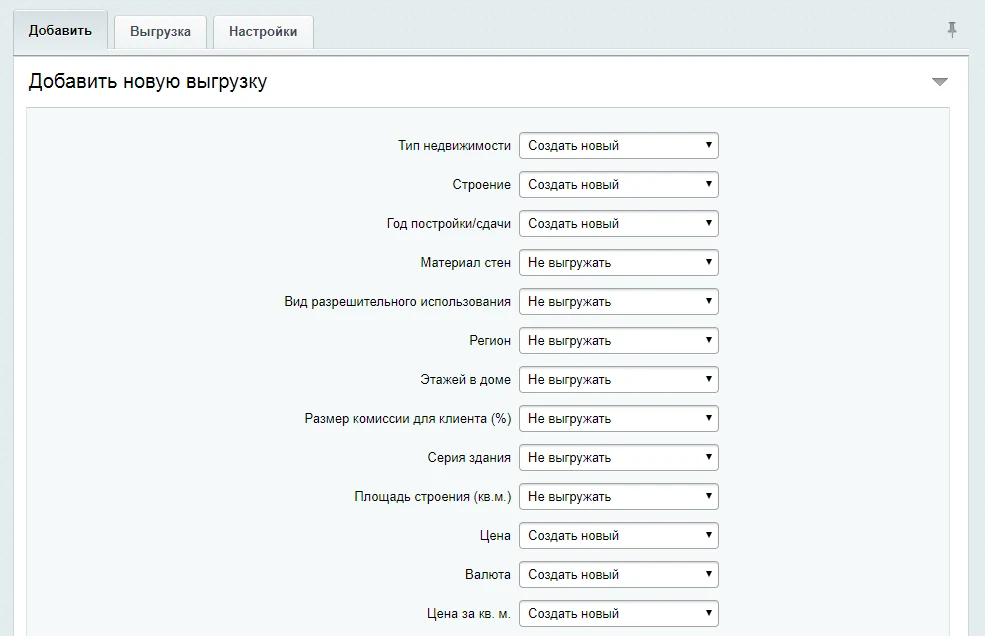
The module enables export of real estate object data from the INTRUM Realty CRM to the information block in the admin panel. The module cost includes installation and configuration for your site.
The following data can be exported:
- name
- photos
- price
- number of rooms
- address
- area
- floor count
- additional information
The module enables export of real estate object data from the INTRUM Realty CRM to the information block in the admin panel. The module cost includes installation and configuration for your site.
The following data can be exported:
- name
- photos
- price
- number of rooms
- address
- area
- floor count
- additional information
Update 1
Added the ability to export data to the website via CRON.
Added the "Check availability only" feature. In this mode, new objects from the CRM are not uploaded, but objects deleted in the CRM are automatically removed from the website.
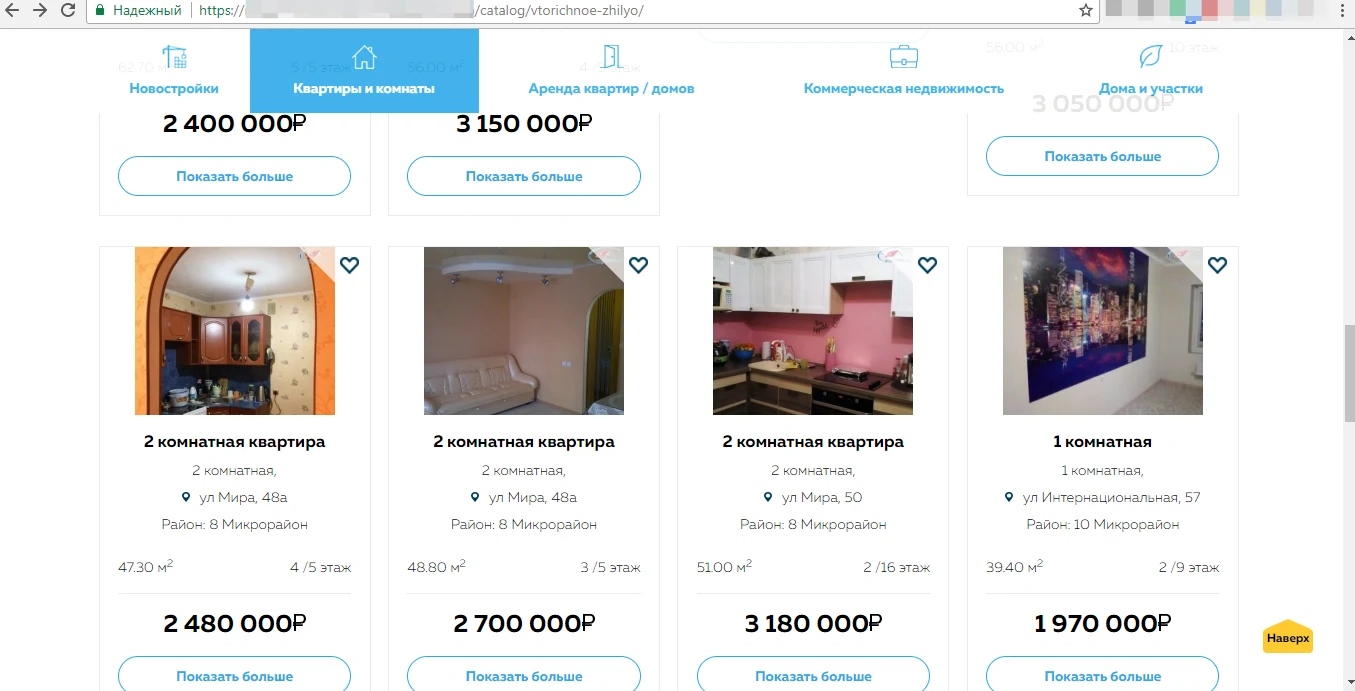
The display format of real estate objects on the website is configured individually. The module provides integration with the INTRUM Realty CRM.
The module provides integration with the INTRUM Realty CRM system to automatically export property data into the administrative panel's information block. Version UPD2 implements correct removal of outdated site elements. When exporting elements with a missing name, the system automatically substitutes the object address. Data filtering by fields before export from INTRUM has been added, along with the ability to edit parameters of existing export jobs. Errors in cache configuration within include files, UTF-8 conversion issues after installation, and several other minor bugs have been fixed.
Important: The module cost covers only the export of information to the administrative panel. Displaying this data in the catalog on the public part of the site is not included and requires configuration by a technical specialist. This work can be performed by the developer under a separate agreement or by any other programmer.
General iT can handle the implementation of “Integration with CRM INTRUM Realty”, from installation to configuration and compatibility checks.
UPDATE HISTORY
What’s new
11 releases
1.0.11 (23.07.2026)Latest update
Admin performance: the 'Exports' tab no longer returns HTML forms for all rules at once. The list is lightweight; the edit form is loaded via AJAX upon clicking 'Edit' (with sessid verification).
Request caching: repeated accesses to stock fields/categories and infoblock properties within a single request are memoized.
Security: saving a rule (V_RULE_EDIT_ID) requires a valid sessid; bitrix_sessid_post() has been added to the edit form.
1.0.10 (22.07.2026)
Admin select encoding: fixed erroneous re-encoding of INTRUM type/category/field labels (UTF-8) to UTF-8 on sites.
INTRUM API connection: unnecessary requests via cURL with port retries 81/80 have been removed from the HOST field; errors are written to the module log, not to the admin HTML.
Export rules: fixed saving of a rule for an existing infoblock; buttons on the 'Exports' tab work without jQuery (native JS / fetch).
Admin security: sessid verification for deleting rules, loading sections, and AJAX import; section names in select are escaped.
1.0.9 (14.04.2023)
Improved compatibility with PHP 8.2
1.0.8 (03.03.2020)
Added the ability to import Categories into a field
1.0.7 (31.01.2020)
Fixed filter operation
Enhanced photo import
Fixed cron job
Added ability to import the responsible person
1.0.6 (13.03.2019)
Added filter, edit rules
1.0.5 (05.04.2018)
Fixed encoding issues
1.0.4 (05.04.2018)
1. Fixed encoding error for object types. 2. Optimized module performance (by hiding the export editing option).
1.0.3 (22.03.2018)
Added ability to select a section for export. Fixed minor bugs.
1.0.2 (17.01.2018)
1. Multiple fields from CRM are imported as a JSON string
1.0.1 (09.01.2018)
1. Added ability to perform export via CRON.
2. Added "Check only availability" functionality. New products are not uploaded, but those deleted in CRM will be deleted on the site.
3. Now all images are imported in a single field.
USER EXPERIENCE
Solution reviews
How does this solution work in a real project? Share your experience and help others choose.
Be the first to share your experience
There are no reviews of this solution on git.ru yet. Tell us what worked well and what could be improved.
✓
Verified purchaseAdd a key if you wish. A verified review gets a badge, priority placement and more rating weight.
↗
Open to every clientJust sign in to your account. A key is optional; all reviews are moderated.
The module calculates the cost of plastic windows with custom dimensions, allows configuring additional parameters, and generates a request for a manager. Requests are saved to a separate information block and sent via email.
Settings include prices per linear meter of profile, per square meter of glazing, tooltip texts, and names of additional services.
The 'Phone Replacement 2.0' module dynamically substitutes phone numbers on the website based on the visitor's region, traffic source, or URL parameters. This solution enables the use of your own numbers for call tracking, functioning similarly to Yandex's 'Target Call' tool. To operate, you must acquire virtual numbers from your telecom provider or via the Zadarma IP telephony service.
The Cleaning Calculator 2.0 module by CREATIVE enables website visitors to independently calculate cleaning costs. The calculation is based on room type, cleaning service type, area size, and additional services. Update 1 adds the ability to calculate costs for services priced by work volume (per unit or per square meter).
The SMSBiz module is designed for sending SMS notifications in online stores and corporate portals built on the 1C-Bitrix platform. Installation and use do not require programming skills and take only a few minutes.
The solution is based on the SMSInt service, which has been operating in the market for over 15 years.
The 'MySklad: Extended Integration' module by Aprix.ru enables configuration of synchronization for products, orders, counterparties, payments, and shipments. Separate video tutorials are available for each area. A general overview video is also provided. Full technical documentation is available in the relevant section.
The StopSovetnik module removes the Yandex.Sovetnik widget, including the yellow bar at the top of the screen and push notifications, from your online store. The presence of this element often leads to an increased bounce rate, as it displays prices from Yandex.Market and redirects buyers to third-party resources.
The displayed price covers the solution itself. Platform licensing, installation and customisation are checked separately. If the page offers bundles, select the required option before submitting a request.
How do I check compatibility?
Compare the supported editions and solution version in the technical details with your project. Before installing on a live website, we recommend making a backup and checking the solution in a test environment.
How much does this solution’s renewal cost?
The current renewal price is 25,000 ₽. Before you order, a manager will confirm the renewal period and whether it applies to your licence.
Can you help with implementation?
We can help install the module, check its settings and verify how it works in your project. Compatibility with other customisations and the scope of work are assessed before we begin.
Your cookie choices
Necessary cookies support sign-in, your cart and security. Optional analytics helps improve the website and starts only with your permission.
Our metrika.git.ru system: public pages, a random identifier, device and interaction events. Form contents, account and payment pages are excluded. Raw events: up to 90 days. Operator: General IT Rus LLC, INN 2310208877.
Your browser requests no tracking: analytics is off.