Payments are experiencing issues due to temporary restrictions in Russia. If your payment does not go through, please submit a support request.•Our support team is available 24/7 — we are always here to help with hosting and server issues.•We are now accepting requests for dedicated server rental and colocation services in our data center.•Reminder: we recommend enabling backups for additional data protection.•A new VPS/VDS lineup with NVMe storage and improved performance is now available.•Maintenance work on some servers has been completed. All services are operating normally.•
Payments are experiencing issues due to temporary restrictions in Russia. If your payment does not go through, please submit a support request.•Our support team is available 24/7 — we are always here to help with hosting and server issues.•We are now accepting requests for dedicated server rental and colocation services in our data center.•Reminder: we recommend enabling backups for additional data protection.•A new VPS/VDS lineup with NVMe storage and improved performance is now available.•Maintenance work on some servers has been completed. All services are operating normally.•
Аккаунт в General iT
Вход / Регистрация
Войдите или создайте аккаунт для управления услугами в панели.
The 'Phone Replacement 2.0' module dynamically substitutes phone numbers on the website based on the visitor's region, traffic source, or URL parameters. This solution enables the use of your own numbers for call tracking, functioning similarly to Yandex's 'Target Call' tool. To operate, you must acquire virtual numbers from your telecom provider or via the Zadarma IP telephony service.
The 'Phone Replacement 2.0' module dynamically substitutes phone numbers on the website based on the visitor's region, traffic source, or URL parameters. This solution enables the use of your own numbers for call tracking, functioning similarly to Yandex's 'Target Call' tool. To operate, you must acquire virtual numbers from your telecom provider or via the Zadarma IP telephony service.
Rule configuration relies on sorting order: conditions are evaluated from the lowest weight to the highest. The default rule (number without conditions) must be assigned the highest weight in the 'Sorting' field.
To substitute numbers for visitors arriving from Yandex search results, enter the domain yandex.ru in the 'Site URL' field. To display different sales office numbers for residents of different regions, select the corresponding regions in the 'Region' field (holding Shift or Alt). Location detection is performed via the user's IP address, allowing the site to function as multi-regional.
To show a special number for visitors coming from contextual advertising, enter the relevant UTM parameter in the 'UTM tag' field, for example utm_source=yandex (the specific value depends on your UTM configuration).
The selected phone number is stored in the user's browser cookies. On subsequent visits to the site, even when the address is entered directly without using search engines or referral links, the originally selected number is displayed.
To verify the module's functionality, the site must be opened in incognito mode when testing each rule.
The 'Phone Replacement 2.0' module by CREATIVE allows flexible management of contact data display on a website. When users arrive directly from HTTPS sites (excluding Yandex and Google), the Referer field is not transmitted. In such cases, it is recommended to use UTM tags and leave the 'Site URL' field empty.
A new 'Phone in Link' field has been added. If a number is entered in international format without spaces or extra characters (e.g., +71234567890), it will appear on the site as a clickable link that works on smartphones.
The functionality now supports displaying different phone numbers in various site sections based on separate rules. For instance, a toll-free number like 8 800 can be shown in the header, while a regional number appears in the footer. Additionally, email addresses and any other text can be replaced by creating a dedicated section with specific replacement rules.
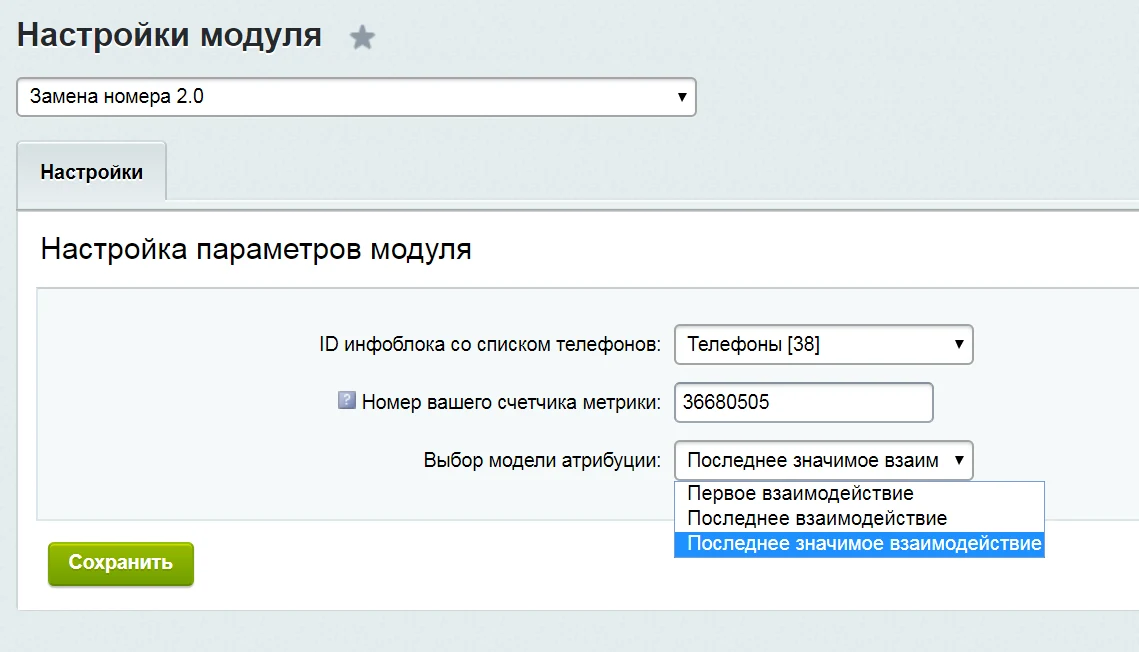
Version 2.0 of the Phone Replacement module allows configuring separate Yandex.Metrica goals for each phone number: one for view events and another for click events. To enable this feature, enter the Yandex.Metrica counter ID in the module settings. Detailed instructions are available in the video guide.
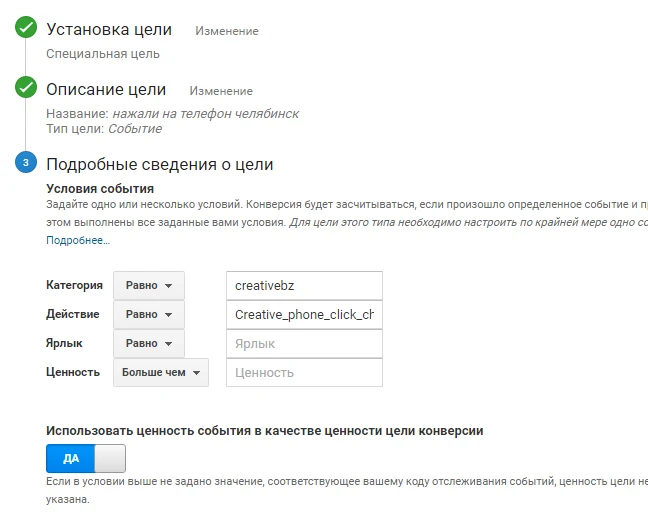
Update 5: You can now configure separate Google Analytics goals for view and click events for each phone number. When creating a goal in Google Analytics, set the Category to "creativebz" and enter the goal name (matching the name used in Yandex.Metrica) in the Action field. Other fields are optional.
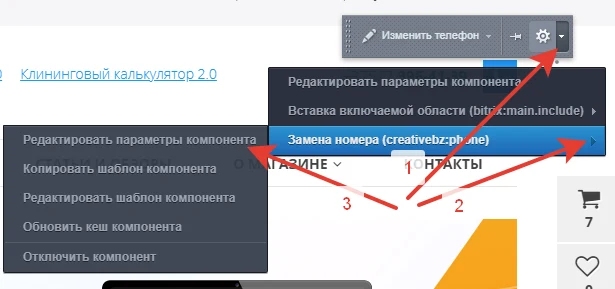
Version 2.0 adds the ability to specify a class or ID for phone number links via component parameters. To configure, hover over the phone number, click the gear icon, or select the "Phone Replacement 2.0" component from the adjacent menu.
The 'Phone Number Replacement 2.0' module by CREATIVE enables phone number replacement for users across multiple countries, not limited to Russia. Configuration settings include three attribution models: 'First Interaction' (default), 'Last Interaction,' and 'Last Significant Interaction.'
The 'First Interaction' model saves the selected phone number in the user's cookies for 30 days. On subsequent visits, whether via direct URL entry or another rule, the same number displayed initially will be shown.
The 'Last Interaction' model overwrites cookies whenever a new rule matches the user's actions, displaying the phone number specified in that new rule.
The 'Last Significant Interaction' model updates the number only if the matching rule is marked as significant in the settings. If a non-significant rule matches, cookies remain unchanged and the number stays the same. It is recommended to mark all advertising numbers as significant.
General iT can connect “Phone Number Replacement 2.0”, configure it and verify the integration with the existing website.
UPDATE HISTORY
What’s new
21 releases
2.0.23 (02.04.2021)Latest update
Update to Yandex Metrica goal code
2.0.22 (29.01.2020)
Minor changes
2.0.21 (25.12.2019)
New attribution model 'Last Significant Interaction' added
2.0.20 (03.12.2019)
Ability to select an attribution model added
2.0.19 (27.05.2019)
Minor fixes
2.0.18 (23.05.2019)
Ability to display different phone numbers for residents of different countries added
Minor fixes
2.0.15 (21.12.2018)
CLASS and ID parameters added
2.0.14 (18.12.2017)
1. Demo mode added
2.0.13 (31.05.2017)
PHP 7 support
2.0.12 (21.03.2017)
Google Analytics support added
2.0.11 (13.02.2017)
Phone selection now uses parameters from the first site visit
2.0.10 (03.02.2017)
Stability improvement
2.0.9 (03.02.2017)
Goal trigger for the phone number upon viewing
2.0.8 (01.02.2017)
Ability to set a goal name for a specific phone number; composite support
2.0.7 (19.01.2017)
Email specified as a link
2.0.6 (20.12.2016)
ability to select a section
2.0.5 (19.12.2016)
installer update
2.0.4 (21.11.2016)
ability to specify the Yandex Metrica counter ID for the "Creative_phone_click" goal
2.0.3 (12.09.2016)
ability to format the phone number as a link; default values added
The module calculates the cost of plastic windows with custom dimensions, allows configuring additional parameters, and generates a request for a manager. Requests are saved to a separate information block and sent via email.
Settings include prices per linear meter of profile, per square meter of glazing, tooltip texts, and names of additional services.
The Cleaning Calculator 2.0 module by CREATIVE enables website visitors to independently calculate cleaning costs. The calculation is based on room type, cleaning service type, area size, and additional services. Update 1 adds the ability to calculate costs for services priced by work volume (per unit or per square meter).
The module automates data exchange between the website and the WS Car Rental CRM system. Its functionality enables information synchronization to improve service efficiency.
The module manages canonical links on the website. It allows setting the current URL as canonical or specifying a custom address for a section or page. Flexible link assignment is supported via regular expressions, where the match result can be applied to the canonical link value using variables like $1, $2, and so on. All changes are logged in the event journal.
The picsel.schema module generates Schema.org microdata for products and navigation breadcrumbs within the 1C-Bitrix environment. Built using D7 ORM, strict typing, and secure output practices, it meets current search engine standards.
The module automatically creates Product markup by extracting the item name, detailed description, image, SKU, and brand from element properties.
The SeoAreas module allows placing Yandex.Metrica, Google, and other scripts in required site areas, specifically the head or body sections. Installation and management are performed via the administrative interface without modifying page source code or templates.
The displayed price covers the solution itself. Platform licensing, installation and customisation are checked separately. If the page offers bundles, select the required option before submitting a request.
How do I check compatibility?
Compare the supported editions and solution version in the technical details with your project. Before installing on a live website, we recommend making a backup and checking the solution in a test environment.
Is there a trial?
The developer lists a trial of 14 days. The trial button opens the installer in your website control panel. Check the required features and compatibility before purchasing.
How much does this solution’s renewal cost?
The current renewal price is 2,500 ₽. Before you order, a manager will confirm the renewal period and whether it applies to your licence.
Can you help with implementation?
We can help install the module, check its settings and verify how it works in your project. Compatibility with other customisations and the scope of work are assessed before we begin.
Your cookie choices
Necessary cookies support sign-in, your cart and security. Optional analytics helps improve the website and starts only with your permission.
Our metrika.git.ru system: public pages, a random identifier, device and interaction events. Form contents, account and payment pages are excluded. Raw events: up to 90 days. Operator: General IT Rus LLC, INN 2310208877.
Your browser requests no tracking: analytics is off.