Payments are experiencing issues due to temporary restrictions in Russia. If your payment does not go through, please submit a support request.•Our support team is available 24/7 — we are always here to help with hosting and server issues.•We are now accepting requests for dedicated server rental and colocation services in our data center.•Reminder: we recommend enabling backups for additional data protection.•A new VPS/VDS lineup with NVMe storage and improved performance is now available.•Maintenance work on some servers has been completed. All services are operating normally.•
Payments are experiencing issues due to temporary restrictions in Russia. If your payment does not go through, please submit a support request.•Our support team is available 24/7 — we are always here to help with hosting and server issues.•We are now accepting requests for dedicated server rental and colocation services in our data center.•Reminder: we recommend enabling backups for additional data protection.•A new VPS/VDS lineup with NVMe storage and improved performance is now available.•Maintenance work on some servers has been completed. All services are operating normally.•
Аккаунт в General iT
Вход / Регистрация
Войдите или создайте аккаунт для управления услугами в панели.
Страны не найдены. Попробуйте другое название или код.
MODULE FOR 1C-BITRIX
BXPROGER
Bitrix Multilingualism: Site InfoBlocks in Different Languages. (Translator, Multilingualism)
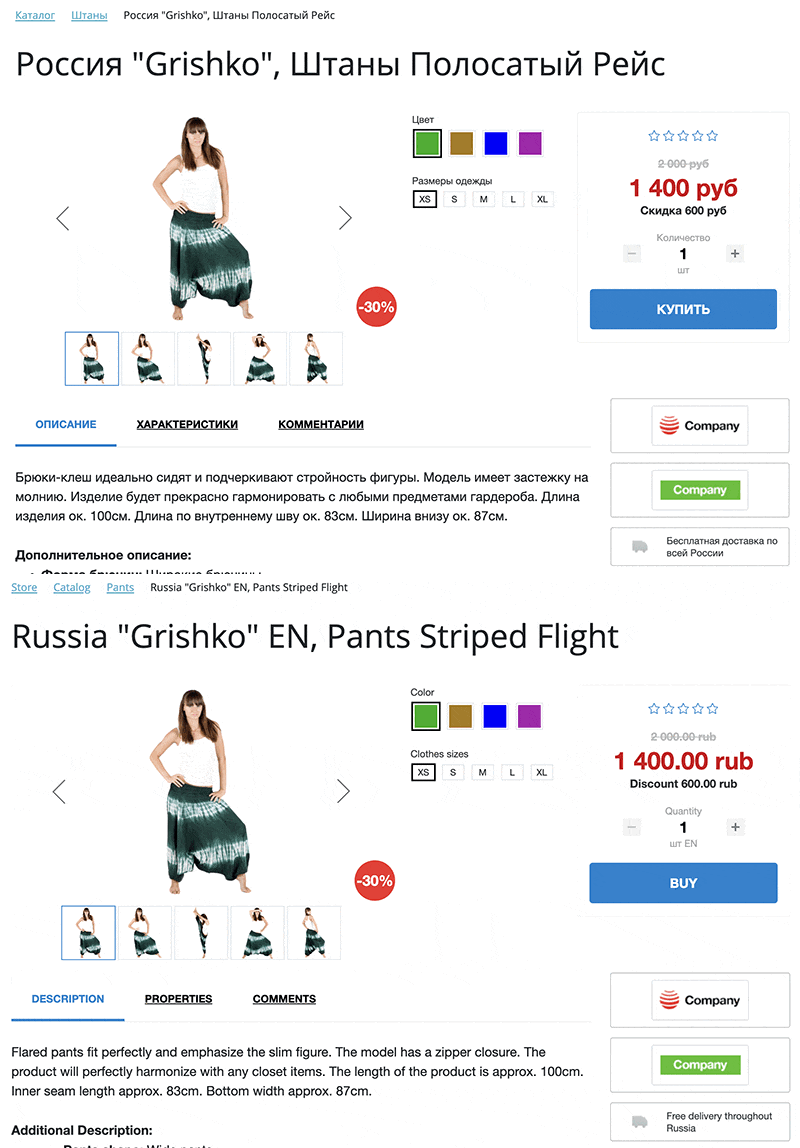
The module provides multilingual support for information blocks within the 1C-Bitrix environment. It enables storing and displaying content from a single information block in multiple languages on one website. The solution implements automatic translation and management of content language versions.
The module provides multilingual support for information blocks within the 1C-Bitrix environment. It enables storing and displaying content from a single information block in multiple languages on one website. The solution implements automatic translation and management of content language versions.
The module provides management of multilingual information blocks within the 1C-Bitrix environment. The tool enables translation of sections and elements in standard information blocks and e-commerce catalogs, including their properties and SEO fields. Support extends to Highload blocks.
Unified interface for managing multilingual information blocks
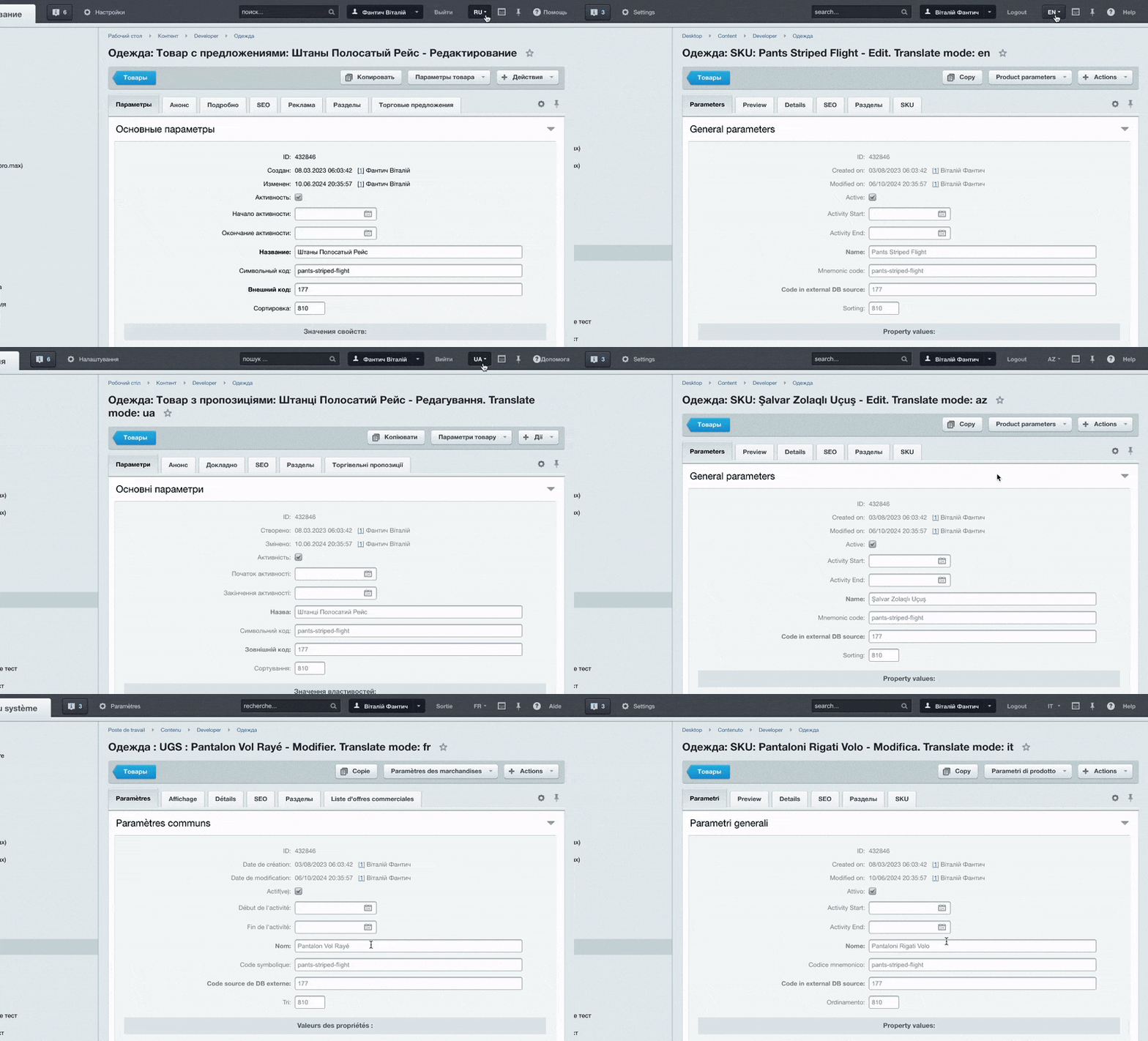
The module provides a convenient tool for working with information blocks in multiple languages. The administration panel remains clean and structured without field duplication. Switching languages allows immediate translation entry. The structure and layout of all fields remain unchanged. Users see translated text and can edit it manually. This eliminates the need to create and maintain separate information blocks for each language, as all information is edited in one place. Managing multilingual content becomes simple and efficient.
Site sections such as News or Catalog support multilingual content, enabling full localization capabilities. The module provides automatic translation and extended features for managing language versions of information blocks.
Image temporarily unavailable
The module eliminates the need to duplicate information blocks and their properties, preventing clutter in the administrative panel. All management operations are performed within a single information block. Content editing and translations are handled centrally in one interface, significantly simplifying the workflow for content managers.
The module provides multilingual management of information blocks within the Bitrix environment. Users can switch between languages to enter translations manually or rely on automatic translation. The autopilot function handles translations in real time when creating new news items or exporting goods from 1C:Enterprise. Configuring the required languages triggers an automated process; once completed, all translations are saved and can be edited by the user at any time. The system integrates with popular translation services and correctly processes HTML fields while preserving markup, styles, and other formatting elements.
The module provides full localization of information blocks within the Bitrix environment. It enables web projects to adapt effectively to different audiences and markets by simplifying multilingual content management. The tool offers an intuitive interface for managing translations, minimizing administrative effort. Users can easily translate data and maintain the currency of all versions across every language on the site.
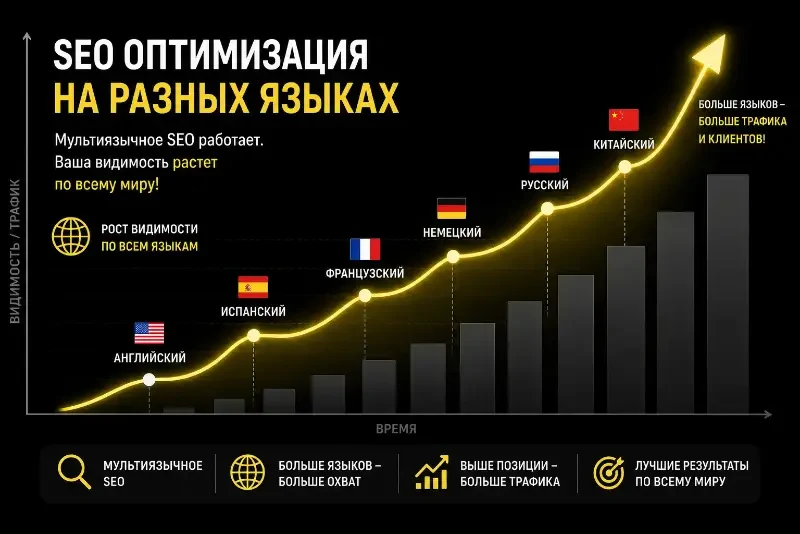
The module supports multiple languages, enabling scaling to global markets and maximum visibility.
The content creation process is automated, allowing material in one language to be easily translated into others. The system ensures control and unification, guaranteeing accuracy and consistency in translation updates.
Search engines correctly index multilingual content. Translated text is indexed just like the original because the module does not use JavaScript to swap text on the fly. Each language is stored as a full infoblock field value. Headings, texts, properties, and SEO fields (Title, Description, URL) are translated and saved separately for each language version. The search robot receives a ready HTML page with real content in the required language, equivalent to manually creating a separate infoblock for each language.
Translated catalog sections, news items, and product cards are indexed by Google and Yandex on par with the main site language, provided that separate URLs are configured for language versions. This is achieved through the Bitrix multisite mechanism or by using language prefixes. The combination of a unique URL, unique meta tags, and unique content meets the requirements of search engines for high-quality multilingual resources.
Separate SEO fields, specifically Title and Description, are available for each language version, eliminating content duplication and version cannibalization.
Standard Bitrix tools support the configuration of hreflang markup and sitemaps for each language version.
The system generates actual translated HTML content rather than using dynamic substitution, ensuring full visibility for search engine robots.
Promoting a site in new languages via this module operates on the same principle as a standard multilingual project, but removes the need for manual duplication and synchronization of information blocks.
The module provides multilingual support for information blocks in the Bitrix environment without limits on the number of languages. Installation is fast and imposes no load on the system. The solution requires no modification of component templates and integrates easily into custom solutions.
The functionality allows translation of information block fields, section fields, as well as element fields and properties, including property values. To protect intellectual property, the include.php file is obfuscated to prevent unauthorized code copying.
The module includes core components, with the list regularly expanding: catalog.element, catalog.section, catalog.section.list, catalog.smart.filter, menu.sections, news.detail, news.index, news.list, sale.basket.basket, sale.order.ajax, breadcrumb, search.page, search.title.
The module provides multilingual support for information blocks in the Bitrix system, enabling management of site content in multiple languages. The functionality includes tools for translating information block elements and synchronizing data across language versions. The solution is compatible with the Bitrix: Site Management platform and supports standard localization mechanisms.
For “Bitrix Multilingualism: Site InfoBlocks in Different Languages. (Translator, Multilingualism)”, General iT can perform integration, configuration and a final check after installation.
UPDATE HISTORY
What’s new
25 releases
3.0.4 (15.10.2026)Latest update
- Security improved
3.0.3 (15.10.2026)
Obsolete styles and the global menu image managed by bxproger.core have been removed.
3.0.2 (13.10.2026)
Fixed the creation of translation tables for user fields during installation: now products, users, and other entities with user field tables are taken into account.
Added the ability to re-run the creation of missing tables and columns for the installed module.
3.0.1 (13.10.2026)
- Minor fixes
3.0.0 (12.10.2026)
Separate images for language versions of elements and sections have been added.
If a translation image is missing or deleted, the default language image is used.
Added cleanup of translation files when deleting entities and protection of used files.
Fixed translation cleanup when deleting a section: translations of elements with other bindings are preserved.
2.8.5 (01.09.2026)
Security improved: access outside the site directory (path traversal) is blocked when connecting EDIT_FILE_BEFORE — the path is verified via realpath and must remain within the site root.
Security improved: validation of return_url before redirect is added — only local paths and addresses of the current site are allowed; javascript:, data: schemes and redirects to third-party domains are prohibited.
Security improved: protection against open redirect is applied to all copied admin pages of the infoblock.
2.8.4 (28.08.2026)
Module security improved: SQL injections, cross-site scripting, and path traversal vulnerabilities when working with files have been eliminated.
Unsafe data deserialization and arbitrary file inclusion have been removed.
2.8.3 (25.08.2026)
Fixed: Synchronization with 1C no longer loses the import step between requests — premature closure of the PHP session during import has been removed.
Improved: The consolidated translation statistics (informant and gadget) are now cached for 1 hour and are not recalculated with every change to elements and sections — database load has been reduced. Cache clearing occurs when module settings are saved.
Improved: The translation statistics informant is calculated only in the administrative section, not on the public part with the editing panel.
Changed: Automatic redirect to the translation language upon first opening a page has been removed — language switching is now manual.
2.8.2 (14.08.2026)
Added separation between the translation viewing mode in the admin panel and the mode for writing to translation tables: writing to fan_translator_* occurs only when the hidden field MM_TR_IS_TRANSLATIONS=Y is sent from the editing forms.
Fixed: programmatic updates of elements, sections, and properties (agents, API, CLI, external tools) without this field now write to the base Bitrix tables again, not to fan_translator_*.
Fixed: auto-translation after saving and cleanup of orphaned property translations when updating base content are no longer blocked due to the language in the admin panel URL; the translation record is considered, not the UI mode.
Fixed: forced auto-translation via the MM_TR_AUTO_TRANSLATE checkbox when saving main content works independently of the lang parameter in the admin panel address.
Added hidden fields MM_TR_IS_TRANSLATIONS to the editing forms for elements, sections, information blocks, properties, highload records, warehouses, and measurement units when the translation mode is active in the interface.
Fixed: partial updates of an element translation (e.g., only ACTIVE or activity dates) without the NAME field: the name field in the element translation table is no longer considered mandatory during ORM writing.
Improved: updating highload records in translation mode: non-translatable user fields in the main HL table are filtered out only during explicit translation writing, as with information blocks.
2.8.1 (10.08.2026)
Fixed: during exchange with 1C (CommerceML, mode=import), the import could be interrupted by a "Lock wait timeout exceeded (1205)" error when clearing element property translations.
Fixed: the same error occurred during cascading deletion of a section or elements in the admin panel if an exchange with 1C was running in parallel.
Improved: cleaning orphaned property translations and deleting element translations during 1C exchange are now deferred until the HTTP request completes — locks on b_iblock_element_property no longer conflict with the import transaction.
Improved: DELETE queries to property translation tables are now retried in case of short-term blocking (1205).
Added: TranslateMode class — unified translation mode logic on infoblock, section, and element edit pages.
Improved: when opening a card for the main language of an infoblock for the first time, it automatically switches to the first target translation language; manual lang switching within the same entity is now saved in the session and is no longer reset.
Improved: the page title in translation mode (Translate mode) is now rendered via TranslateMode::applyPageTitle() on infoblock, section, and element edit pages.
2.8.0 (05.08.2026)
Added: In the settings of each information block, you can specify the Main language for automatic translation. Content is written and translated from the information block's language; if not specified, the module's main language is used.
Improved: Translate mode in the admin panel (header, hiding non-translatable properties, UF) now considers the information block's main language, not just the module's language.
Improved: Automatic translation (including after exchange with 1C) takes the source language from the information block settings under the same rules: when adding, based on the automatic translation list; when updating, when Forced automatic translation is enabled.
Improved: Display of Balance and authorization via the core API (support for the new balance/quota format).
Removed: Duplicate Settings item from the module menu (settings remain in the Module Settings section).
Important during update: For information blocks with content not in the module's language, open bxproger.translator settings, select the Main language for the relevant information block, and save.
2.7.9 (30.07.2026)
Security update
Fixed the display of translator account data in the module settings: added escaping of values received from the external service.
Eliminated the possibility of executing HTML and JavaScript in the administrative section via an untrusted response from the translation service.
Added access rights verification for the Playground service page to prevent users without bxproger.translator rights from using module functions.
Conducted a repeated security check of the module according to Bitrix Marketplace requirements: remarks have been moved to the "fixed" status.
2.7.8 (27.07.2026)
- Fixed an error of forced automatic translation of properties when changing infoblock elements
2.7.7 (27.07.2026)
- Fixed compatibility with modules for custom infoblock properties and user fields HowTo and FAQ
- Improved the display of statistics for the "Site Translations" gadget
2.7.6 (23.07.2026)
Added: translation readiness statistics for active sections and infoblock elements from module settings (by language).
Added: an informer in admin panel notifications with a battery indicator and translation percentage.
Added: the ability to temporarily hide the informer (Hide button).
Added: the Site Translations gadget to the admin dashboard — a summary of sections and elements, quick access to mass translation and settings.
Improved: caching of statistics for comfortable work with large catalogs.
Clarified: upon license expiration, new translation lines are not saved, while already saved translations continue to display correctly on the site as before.
Your already translated content remains available to visitors; license renewal is required only for further work with new translations.
2.7.5 (17.07.2026)
Added: management of forced automatic translation has been moved to the module settings. Now, under the language selection for each information block, there is a checkbox 'Forced Automatic Translation' — when enabled, all element changes are re-translated upon each save.
Improved: it is no longer necessary to specify constants of the form FORCE_TRANSLATE_IB_ID_XX in the /bitrix/php_interface/init.php file — the old method via constants has been removed, and the mode is enabled directly in the Module Settings section.
Added: the 'Not included in automatic translation' flag for information block properties and user fields (UF). Marked properties and fields are excluded from automatic translation.
Improved: the exclusion checkbox is drawn directly in the standard property editing forms for information blocks and user fields, without replacing the forms themselves.
Important during update: if forced automatic translation was previously enabled via constants in init.php, mark the required information blocks with the 'Forced Automatic Translation' checkbox in the module settings — the previous constants are no longer taken into account.
Settings are located in the Module Settings section.
2.7.2 (17.07.2026)
- Minor improvements
- Compatibility with uffaq and ufhowto modules
2.7.1 (14.07.2026)
Added: support for DeepL glossary during automatic translation — when the DeepL Glossary (Translator) module is installed and a synchronized language pair is configured, the translation takes into account glossary terms.
Changed: login and authorization password are no longer set in the Multilingualism module settings — authorization is configured in the Core module (bxproger.core); the translator settings display a hint with a link.
Fixed: in the translation sandbox, service errors are correctly displayed, including authorization errors and API response errors.
2.7.0 (30.06.2026)
Added: mass automatic translation of Highload-block records — new menu item in Multilingual: Mass Automatic Translation of Highload-blocks. In module settings, you can select HL-blocks for automatic translation and specify languages for each block. Support is provided for skipping already translated records and resuming from the last processed one.
Added: search index for infoblock section translations — when saving a section and during search reindexing, SEARCHABLE_CONTENT in the translations table is updated. Section search takes into account the translated name and description.
Fixed: saving translations in element and section editing mode — correct handling of custom user fields of type customhtml (including multiple ones) and customfaq, as well as smart filter hints FILTER_HINT for section properties.
Fixed: saving multiple element properties in translation mode — values are bound to original lines, new FAQ items are correctly added to the base properties table, and deleted translations are cleared without losing original data.
Fixed: automatic translation of Highload-blocks — metadata UF and values for translation are taken from the main HL entity, not from the empty mm_ut_* table, which previously caused automatic translation to skip fields.
Improved: unified mechanism for reading UF values from the form in translation mode via the OnResolveUserFieldPostValue event — easier to connect custom field types without modifying the module core.
Improved: normalization of property and UF values before writing to translation tables — correct serialization of HTML fields, files, and composite types, without unnecessary trim on serialized data.
Recommendations after update
In Module Settings, specify Highload-blocks and automatic translation languages, then test mass translation on a sample of records.
Test editing an element with multiple properties and FAQ in translation mode.
Test section search in translation languages — if necessary, reindex search in the site administration.
2.6.46 (31.05.2026)
Important security update: vulnerabilities identified in the 1C-Bitrix Marketplace technical audit have been fixed — Authentication Bypass and Information Disclosure in the infoblocks AJAX endpoint, Stored XSS in module settings, Insecure Deserialization, and a potential RCE in dynamic compilation of HL entities. This update is mandatory for all users.
HL translation mode: fixed saving and reading of records (mm_hl_* tables, COALESCE for string UF, correct handling of multiple fields after retrieval).
Performance: reduced unnecessary database queries during compileEntity and getList (table check cache, single pass through UF, no unnecessary compilation of related HL via hlblock binding).
HL admin panel: non-translatable fields (file, HL binding, etc.) in translation mode are displayed in view-only mode without disk.scopeTokenService errors; files are shown as links via the standard upload mechanism.
Related HL blocks: it is recommended to compile reference dictionaries first, then the main block — otherwise, the PHP table class may be created by the core without translation support.
Recommendation: after updating, verify editing of an HL record in translation mode and the list of elements with multiple UF.
2.6.45 (16.05.2026)
- Improved handling of custom fields in translation mode: fields that are not translatable (number, file, HL-block binding, etc.) are displayed in the administrative section for viewing only, with an explanation that the value is common to all languages. When saving a translation, such fields are not overwritten. The tooltip is localized into 14 interface languages of the administrative panel.
- Fixed saving of Highload-block records in translation mode: values of fields of the "Binding to Highload-block" type and other non-string UF fields are no longer lost upon update.
- Optimized translation tables mm_hl_* and mm_ut_*: only string translatable UF fields are created and updated in them. This reduces table size and eliminates data duplication for fields that are common across all languages.
- Fixed SQL query formation (COALESCE) when reading UF: translation substitution is performed only for string fields; other values are taken from the main entity table.
- Fixed adding a column for the customhtml user type to the infoblock sections translation table.
- Eliminated erroneous creation of service tables mm_ut_hlblock_* when adding UF to a Highload-block (for HL, only tables mm_hl_* are used).
- Unified mechanism for determining translatable UF (BASE_TYPE = string) for infoblock sections, Highload-blocks, auto-translation, and administrative forms.
2.6.44 (27.03.2026)
- Fixed an error on the mass auto-translation page (admin panel) related to the use of the Catalog class. The module now works correctly in the Standard edition.
2.6.43 (22.12.2025)
- Fixed an error where non-translated values of the 'Item Binding' property type were displayed in the bitrix:catalog.section component.
2.6.42 (21.12.2025)
- The DataManager class has been improved.
2.6.41 (12.11.2025)
- Minor improvements.
USER EXPERIENCE
Solution reviews
How does this solution work in a real project? Share your experience and help others choose.
Be the first to share your experience
There are no reviews of this solution on git.ru yet. Tell us what worked well and what could be improved.
✓
Verified purchaseAdd a key if you wish. A verified review gets a badge, priority placement and more rating weight.
↗
Open to every clientJust sign in to your account. A key is optional; all reviews are moderated.
The 'Language Phrase Extractor' module for 1C-Bitrix automatically moves text strings from code into language files. The tool locates and organizes phrases, simplifying code maintenance and accelerating the development of multilingual sites.
Proger: Core is the core module of essential functions. It is a key component that activates additional functionality for other modules developed by PROGER and provides a range of important capabilities. The module constructs the application's main menu, ensuring convenient access to its features.
The AI Copywriting Master module provides mass generation of SEO texts for products and news using artificial intelligence. The solution is compatible with the Bitrix platform and enables the creation of descriptions, previews, and information block sections. The tool supports flexible configuration and content personalization.
The Sotbit Smart Filter SEO module is designed to increase online store traffic. The tool operates by generating numerous unique pages for smart filters.
The module automates image compression on the website in accordance with Google PageSpeed Insights recommendations. It supports integration via CDN OptiPic, allowing optimization without modifying image URLs. The main advantage of CDN integration is the automatic conversion of images to the modern WebP format to minimize file size. Browsers that support WebP receive images in that format.
The module is designed for online stores running on the 1C-Bitrix platform to automate the integration of supplier product catalogs. It is also suitable for news and city portals to facilitate content population. The solution supports data import in Excel, XML, YML, CSV, and RSS formats.
The displayed price covers the solution itself. Platform licensing, installation and customisation are checked separately. If the page offers bundles, select the required option before submitting a request.
How do I check compatibility?
Compare the supported editions and solution version in the technical details with your project. Before installing on a live website, we recommend making a backup and checking the solution in a test environment.
How much does this solution’s renewal cost?
The current renewal price is 63,000 ₽. Before you order, a manager will confirm the renewal period and whether it applies to your licence.
Can you help with implementation?
We can help install the module, check its settings and verify how it works in your project. Compatibility with other customisations and the scope of work are assessed before we begin.
Statistics and interaction recording
Public pages use basic statistics. Our recording and Yandex Webvisor require your permission. You can keep basic statistics or disable all analytics.
Operator: General IT Rus LLC, INN 2310208877. Statistics and recording help improve the website.
Basic statistics: pageviews, a random daily ID, a public URL and time. The ID lasts until Moscow midnight. Original records: up to 48 hours; totals: up to 7 years.
Without Webvisor permission, Yandex receives server statistics without visitor IP, User-Agent or cookies. If selected, its browser code collects technical data, cookies, actions and masked page snapshots; recordings last 15 days. Inputs, chat and account areas are hidden.
Interaction recording requires permission: clicks, scrolling, technical information and filtered public-page snapshots. Events: up to 7 years; IP and snapshots: up to 90 days.
Permission is remembered for up to 365 days; full opt-out remains until changed. Basic statistics only disables recording; Disable all analytics stops new analytics. Previously sent data is not automatically deleted. Withdrawal and requests: support@git.ru. Full terms are linked below.
Your browser requests no tracking: analytics is off.