Payments are experiencing issues due to temporary restrictions in Russia. If your payment does not go through, please submit a support request.•Our support team is available 24/7 — we are always here to help with hosting and server issues.•We are now accepting requests for dedicated server rental and colocation services in our data center.•Reminder: we recommend enabling backups for additional data protection.•A new VPS/VDS lineup with NVMe storage and improved performance is now available.•Maintenance work on some servers has been completed. All services are operating normally.•
Payments are experiencing issues due to temporary restrictions in Russia. If your payment does not go through, please submit a support request.•Our support team is available 24/7 — we are always here to help with hosting and server issues.•We are now accepting requests for dedicated server rental and colocation services in our data center.•Reminder: we recommend enabling backups for additional data protection.•A new VPS/VDS lineup with NVMe storage and improved performance is now available.•Maintenance work on some servers has been completed. All services are operating normally.•
Аккаунт в General iT
Вход / Регистрация
Войдите или создайте аккаунт для управления услугами в личном кабинете.
Страны не найдены. Попробуйте другое название или код.
MODULE FOR 1C-BITRIX
BestRank
User field type and information block property "Link to tasks"
The Tasks module in Bitrix24 is a core tool for project management, business processes, and production control. Tasks are frequently linked to CRM elements, yet the current display capabilities have limitations. When a task is created from a CRM object card, it is visible only in that card's timeline or on the 'My Tasks' page.
The Tasks module in Bitrix24 is a core tool for project management, business processes, and production control. Tasks are frequently linked to CRM elements, yet the current display capabilities have limitations. When a task is created from a CRM object card, it is visible only in that card's timeline or on the 'My Tasks' page. In environments with high volumes of incoming messages, assignments, and emails, tasks can easily get lost. Additionally, when working with business processes via the news feed or lists, there is no way to view the list of created tasks or their current status.
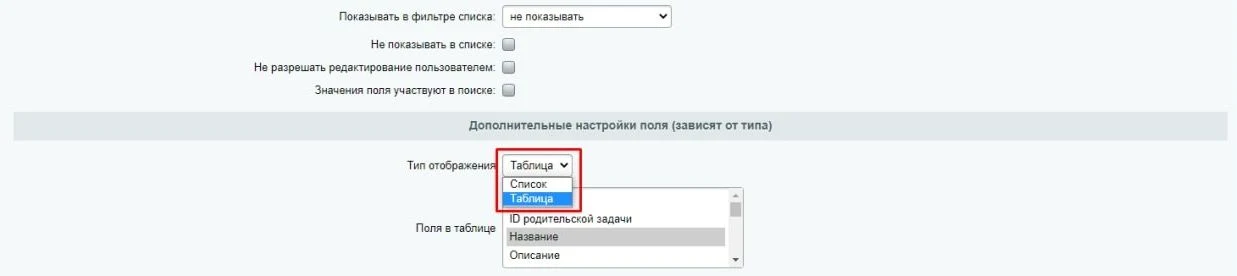
The module 'User Field Type and Information Block Property "Link to Tasks"' addresses these issues by allowing tasks to be linked to arbitrary objects and displayed in a convenient format. When configuring the created field, users can choose the display type: List or Table.
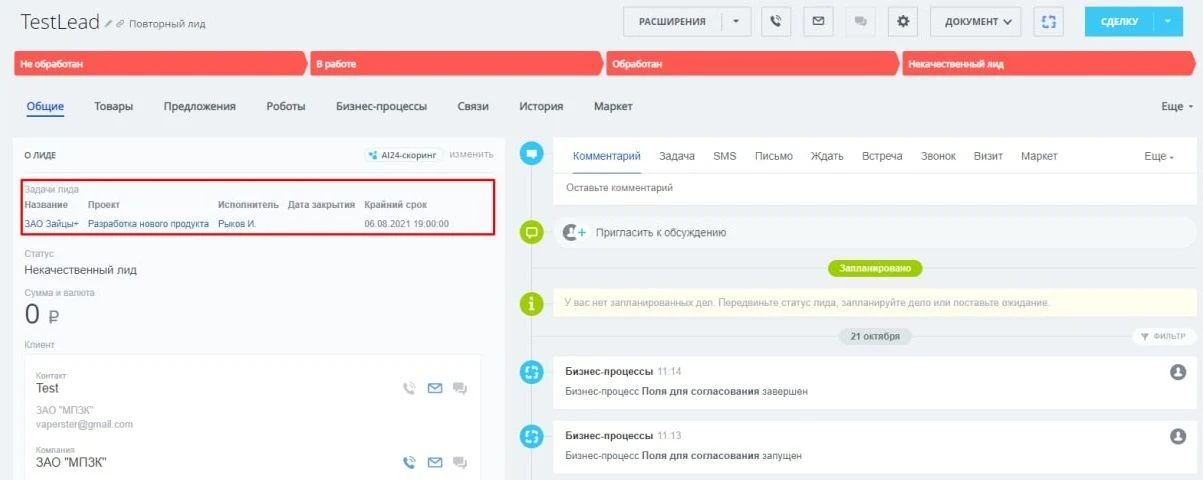
If the display type is set to 'list', the names of related tasks are shown on the object's detail page.
When the display type is set to 'table', data is rendered as a familiar grid for the user. The field settings allow you to select which task fields should be included in the table.
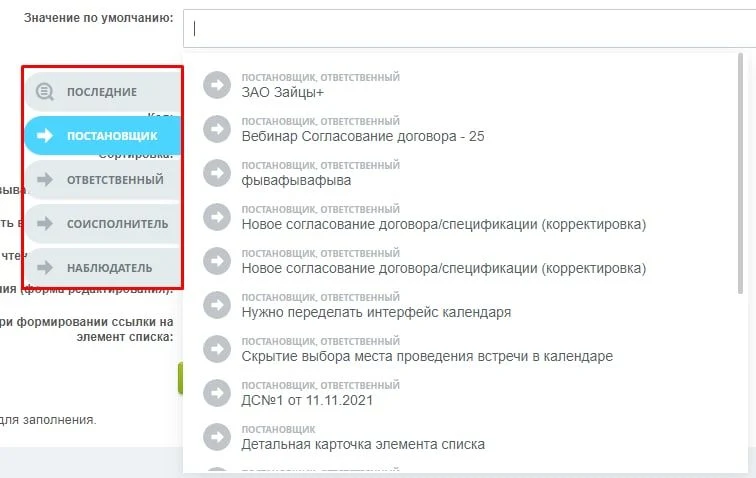
When editing an object, task search is performed via the ui.selector component: the system finds tasks by full or partial name match. Additional tabs are available to group tasks by user role: assignee, creator, co-assignee, and observer.
General iT can install and configure this module and check how it works on your website.
UPDATE HISTORY
What’s new
1 releases
1.0.10 (10.02.2026)Latest update
Fixed:
PHP error
USER EXPERIENCE
Solution reviews
How does this solution work in a real project? Share your experience and help others choose.
Be the first to share your experience
There are no reviews of this solution on git.ru yet. Tell us what worked well and what could be improved.
✓
Verified purchaseAdd a key if you wish. A verified review gets a badge, priority placement and more rating weight.
↗
Open to every clientJust sign in to your account. A key is optional; all reviews are moderated.
The module adds a button to the right panel of Bitrix24 for navigating to the 'Task Chats' section. It is positioned directly below the notification bell icon and displays the count of unread messages from task chats. Typically, checking task correspondence requires opening the messenger and switching to the 'Task Chats' tab.
The module provides configurable blocking of editing for selected CRM fields in records during both creation and modification. This functionality is available for leads, deals, contacts, companies, and smart processes. Blocking conditions can be applied to specific employees or departments as a whole, or targeted at employees specified in a field of the 'linked to employee' type within the record.
The module contains the 'Request Document Fields' activity. It creates a task to populate selected fields of an entity item, which may be a CRM object, a list, or a business process.
The SMSBiz module is designed for sending SMS notifications in online stores and corporate portals built on the Bitrix platform. Installation and usage do not require programming skills. The deployment process takes a few minutes.
The solution is built on the SMSInt service, which has been operating in the market for over 19 years.
The module allows you to quickly add a New Year atmosphere to your website. The package includes falling snow effects and interactive Christmas ornaments positioned at the top of the page.
Order statuses, payments, delivery, products, order properties, and abandoned carts are synchronized with the CRM without manual data transfer. The module connects an online store built on the 1C-Bitrix platform with deals in the Bitrix24 CRM system, ensuring two-way real-time data updates.
The displayed price covers the solution itself. Platform licensing, installation and customisation are checked separately. If the page offers bundles, select the required option before submitting a request.
How do I check compatibility?
Compare the supported editions and solution version in the technical details with your project. Before installing on a live website, we recommend making a backup and checking the solution in a test environment.
How much does this solution’s renewal cost?
The current renewal price is 9,000 ₽. Before you order, a manager will confirm the renewal period and whether it applies to your licence.
Can you help with implementation?
We can help install the module, check its settings and verify how it works in your project. Compatibility with other customisations and the scope of work are assessed before we begin.
Statistics and interaction recording
Public pages use basic statistics. Our recording and Yandex Webvisor require your permission. You can keep basic statistics or disable all analytics.
Operator: General IT Rus LLC, INN 2310208877. Statistics and recording help improve the website.
Basic statistics: pageviews, a random daily ID, a public URL and time. The ID lasts until Moscow midnight. Original records: up to 48 hours; totals: up to 7 years.
Campaign tags and a technical identifier are sent by our server to the existing Yandex tag. Visitor IP, User-Agent and cookies are not included in this transfer. If selected, its browser code collects technical data, cookies, actions and masked page snapshots; recordings last 15 days. Inputs, chat and account areas are hidden.
Interaction recording requires permission: clicks, scrolling, technical information and filtered public-page snapshots. Events: up to 7 years; IP and snapshots: up to 90 days.
Permission is remembered for up to 365 days; full opt-out remains until changed. Basic statistics only disables recording; Disable all analytics stops new analytics. Previously sent data is not automatically deleted. Withdrawal and requests: support@git.ru. Full terms are linked below.
Your browser requests no tracking: analytics is off.