Payments are experiencing issues due to temporary restrictions in Russia. If your payment does not go through, please submit a support request.•Our support team is available 24/7 — we are always here to help with hosting and server issues.•We are now accepting requests for dedicated server rental and colocation services in our data center.•Reminder: we recommend enabling backups for additional data protection.•A new VPS/VDS lineup with NVMe storage and improved performance is now available.•Maintenance work on some servers has been completed. All services are operating normally.•
Payments are experiencing issues due to temporary restrictions in Russia. If your payment does not go through, please submit a support request.•Our support team is available 24/7 — we are always here to help with hosting and server issues.•We are now accepting requests for dedicated server rental and colocation services in our data center.•Reminder: we recommend enabling backups for additional data protection.•A new VPS/VDS lineup with NVMe storage and improved performance is now available.•Maintenance work on some servers has been completed. All services are operating normally.•
Аккаунт в General iT
Вход / Регистрация
Войдите или создайте аккаунт для управления услугами в личном кабинете.
Страны не найдены. Попробуйте другое название или код.
MODULE FOR 1C-BITRIX
Automation of Business Solutions
Anmarto.Search: smart search and AI consultant
The Anmarto.Search module by Automation Business Solutions provides smart search and an AI consultant. The system helps customers find and select products by using intelligent algorithms and artificial intelligence to analyze queries. The tool integrates with existing platforms, ensuring accurate matching of user requests to the product catalog without the need for manual selection.
The Anmarto.Search module by Automation Business Solutions provides smart search and an AI consultant. The system helps customers find and select products by using intelligent algorithms and artificial intelligence to analyze queries. The tool integrates with existing platforms, ensuring accurate matching of user requests to the product catalog without the need for manual selection.
Buyers often misspell product names, forget to switch keyboard layouts, or describe a task in words instead of providing an article number. Anmarto combines catalog search with an AI consultant: the search displays suitable items, while the consultant helps clarify the assortment and store conditions.
The abr.search module connects a 1C-Bitrix website to the external Anmarto service. It transmits selected data sources and embeds a search bar and chat interface on the site. Operation requires an Anmarto account and active subscriptions to selected service products. Search and the consultant are connected separately; the module is not an autonomous search server.
The system accounts for the natural style of buyer queries.
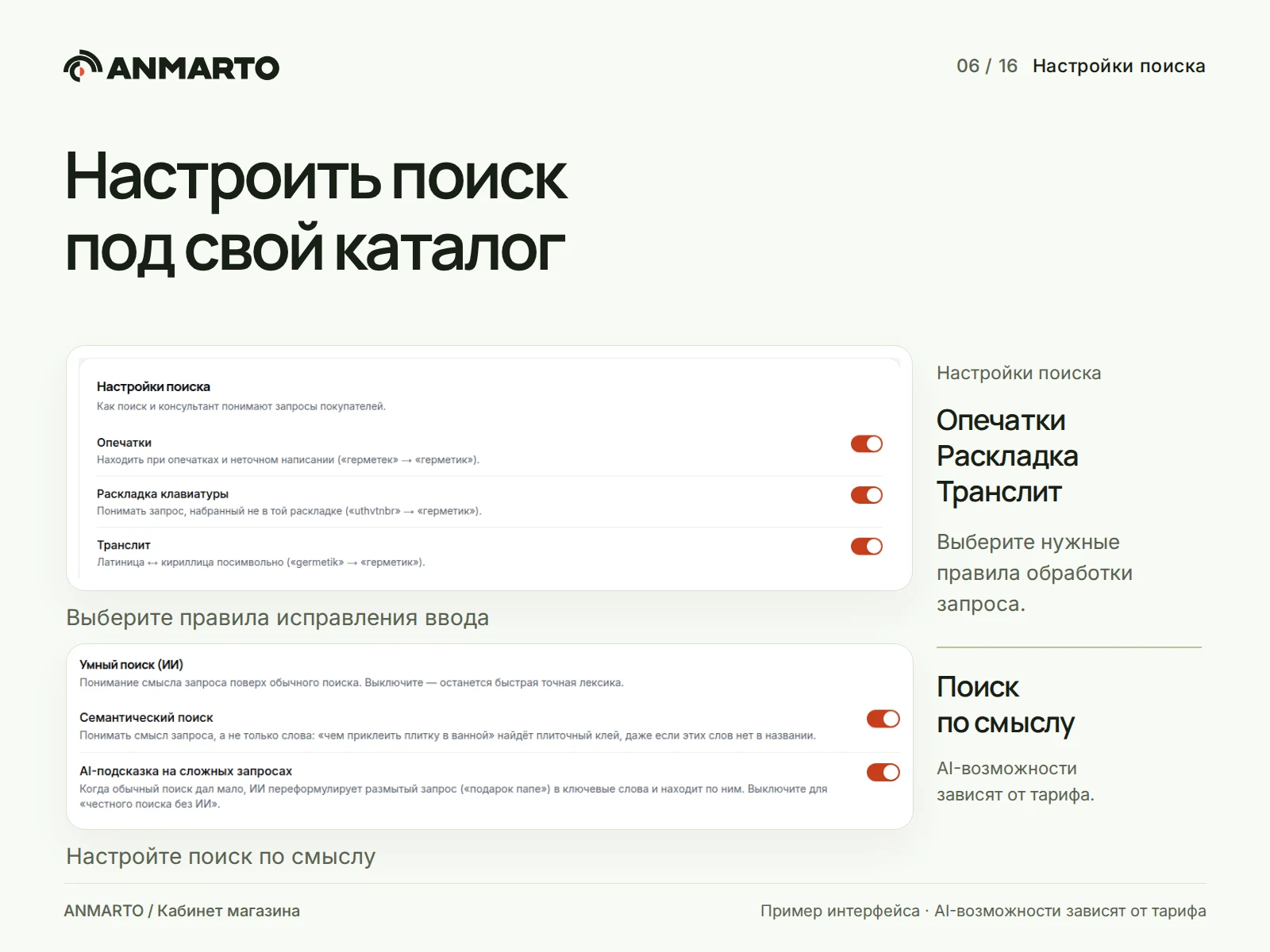
The Anmarto.Search module provides intelligent search and AI consultant functionality. The system automatically corrects typos, incorrect keyboard layouts, and transliteration. It supports synonyms for colloquial product names and terminology specific to your assortment. When enabled features and available service settings are active, semantic search operates with additional AI-based ranking.
The component displays product cards, filters, and sorting options based on the provided data. Results can be rendered on top of the current page or on a dedicated results page using the abr:search.page component. The administrative panel allows modification of query processing, configuration of redirects to specific pages, and management of product visibility: pinning, boosting, demoting, or hiding items for specific queries. Output quality depends directly on catalog completeness and selected rules; therefore, characteristic queries for your store must be verified after configuration.
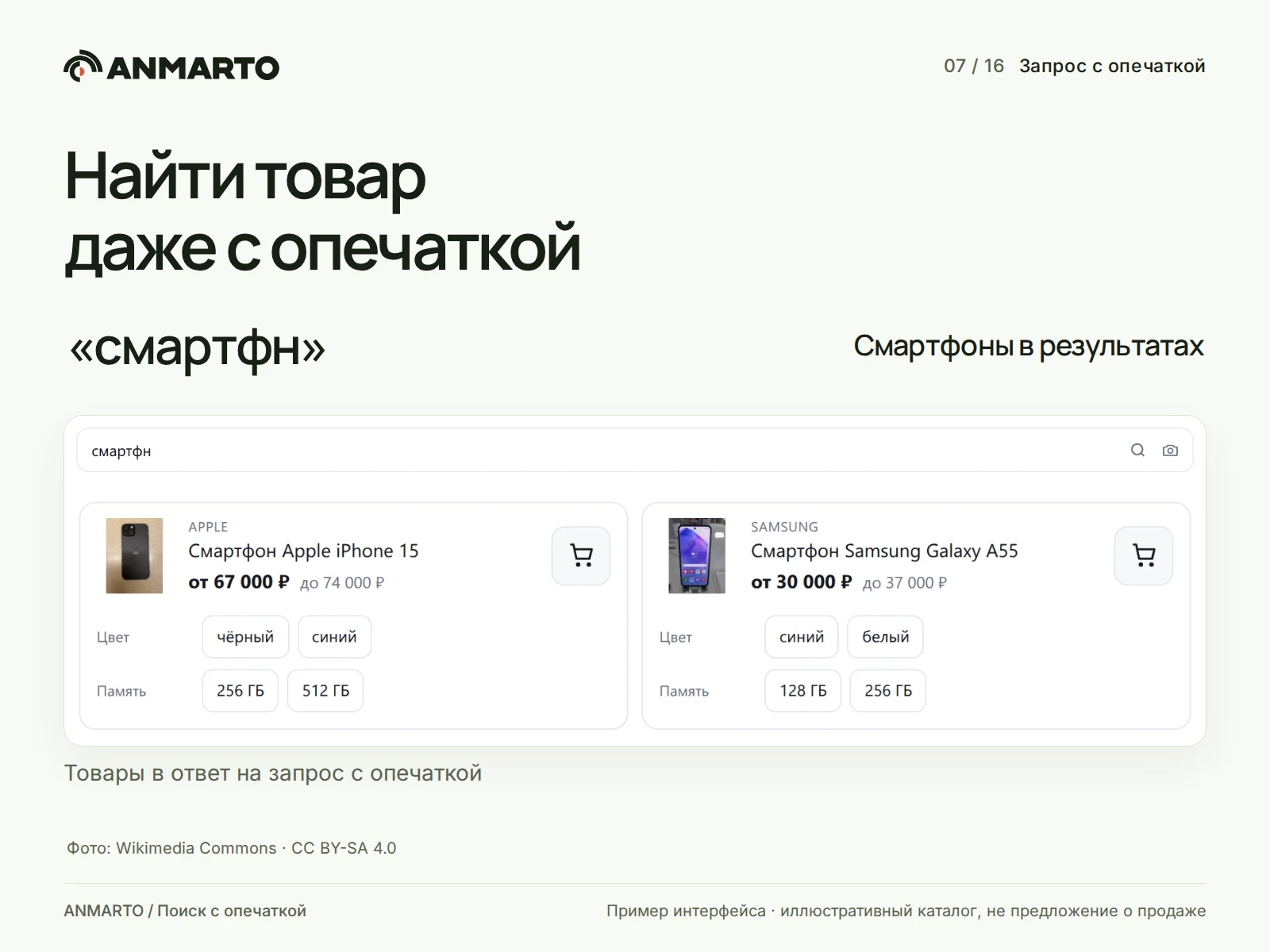
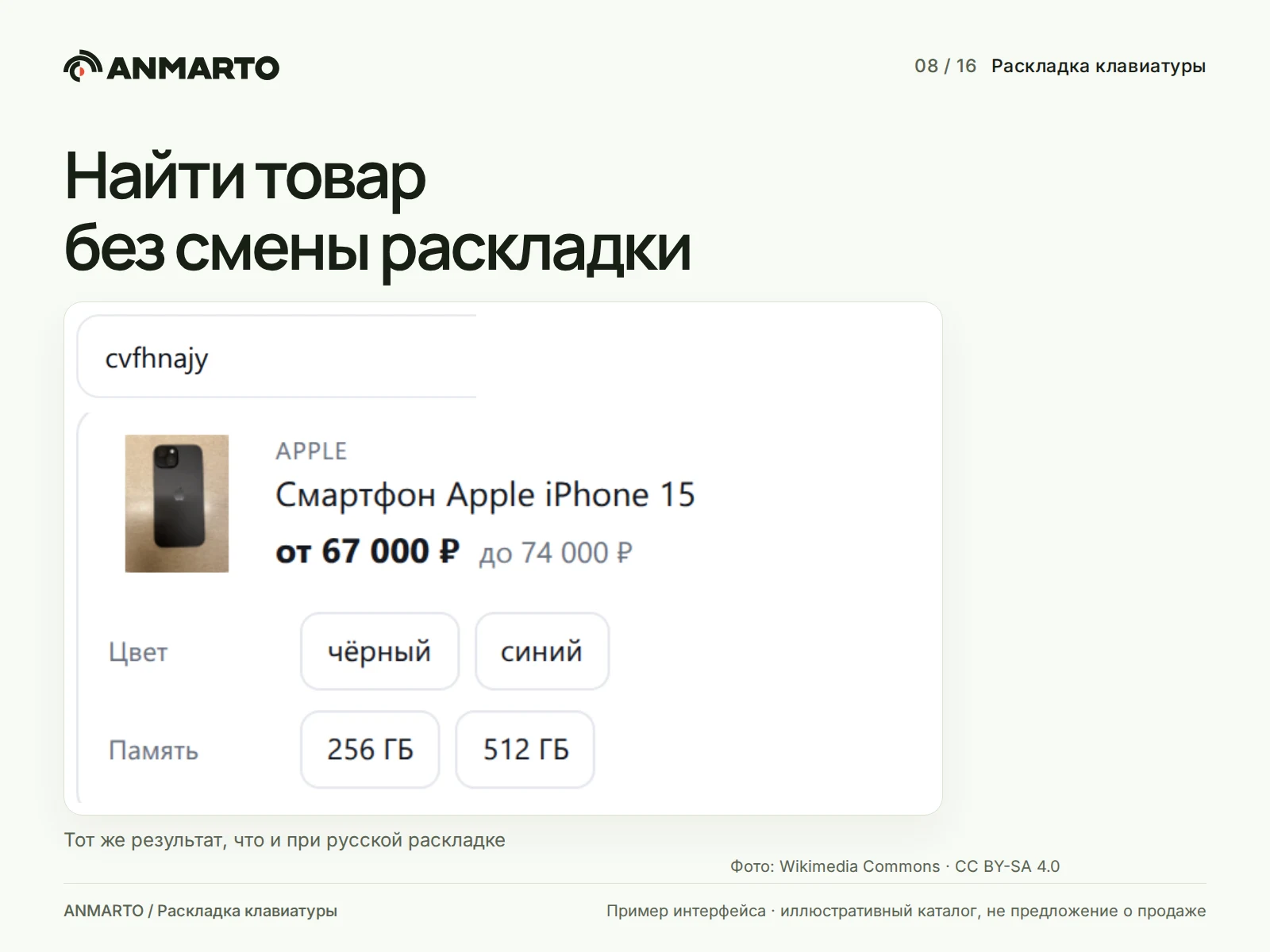
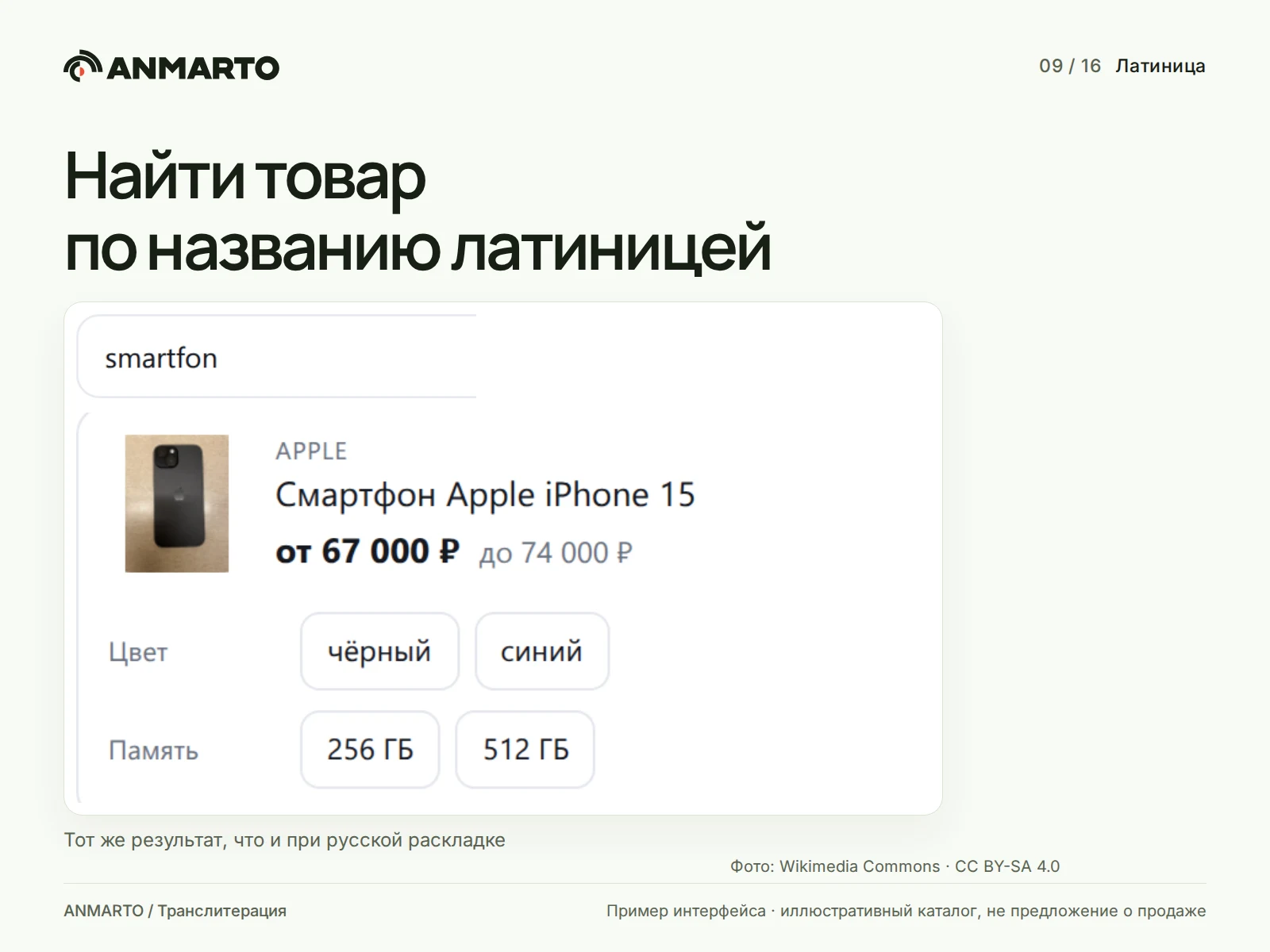
The Anmarto.Search module by Automation Business Solutions implements intelligent search and AI consultant functions. The system accounts for user input errors such as missing letters (smarfn), incorrect keyboard layouts (cvfhnajy), or Latin script spelling (smartfon). When relevant settings are enabled, the search can locate the required assortment even with such inaccurate queries.
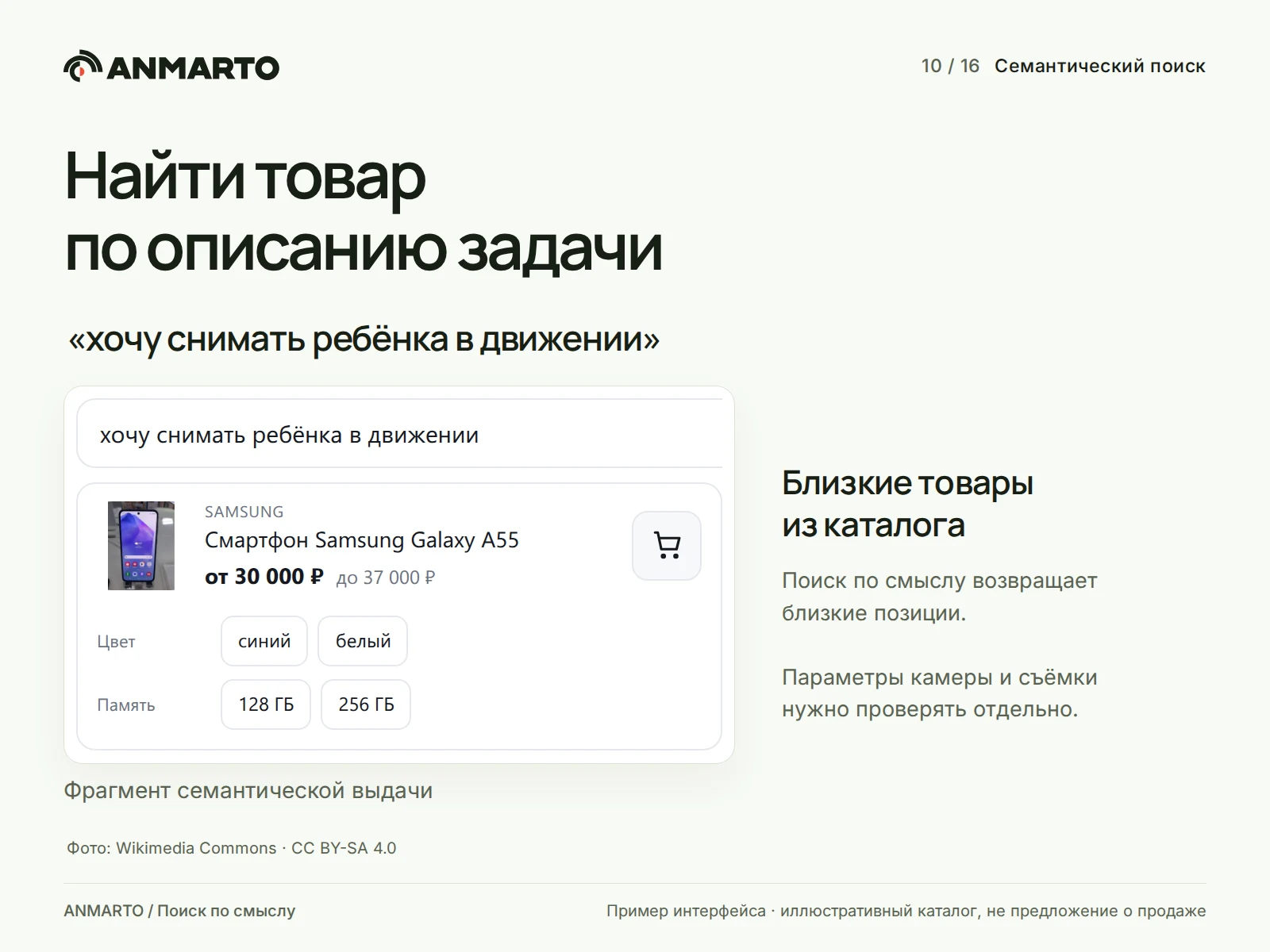
The semantic search feature matches task descriptions with catalog products. If a customer phrases a request as a task, for example "I want to film a child in motion," the system will suggest smartphones relevant to the context. It is important to note that this is not a guarantee of full compatibility: camera specifications and other technical requirements must be verified against the specific store's data.
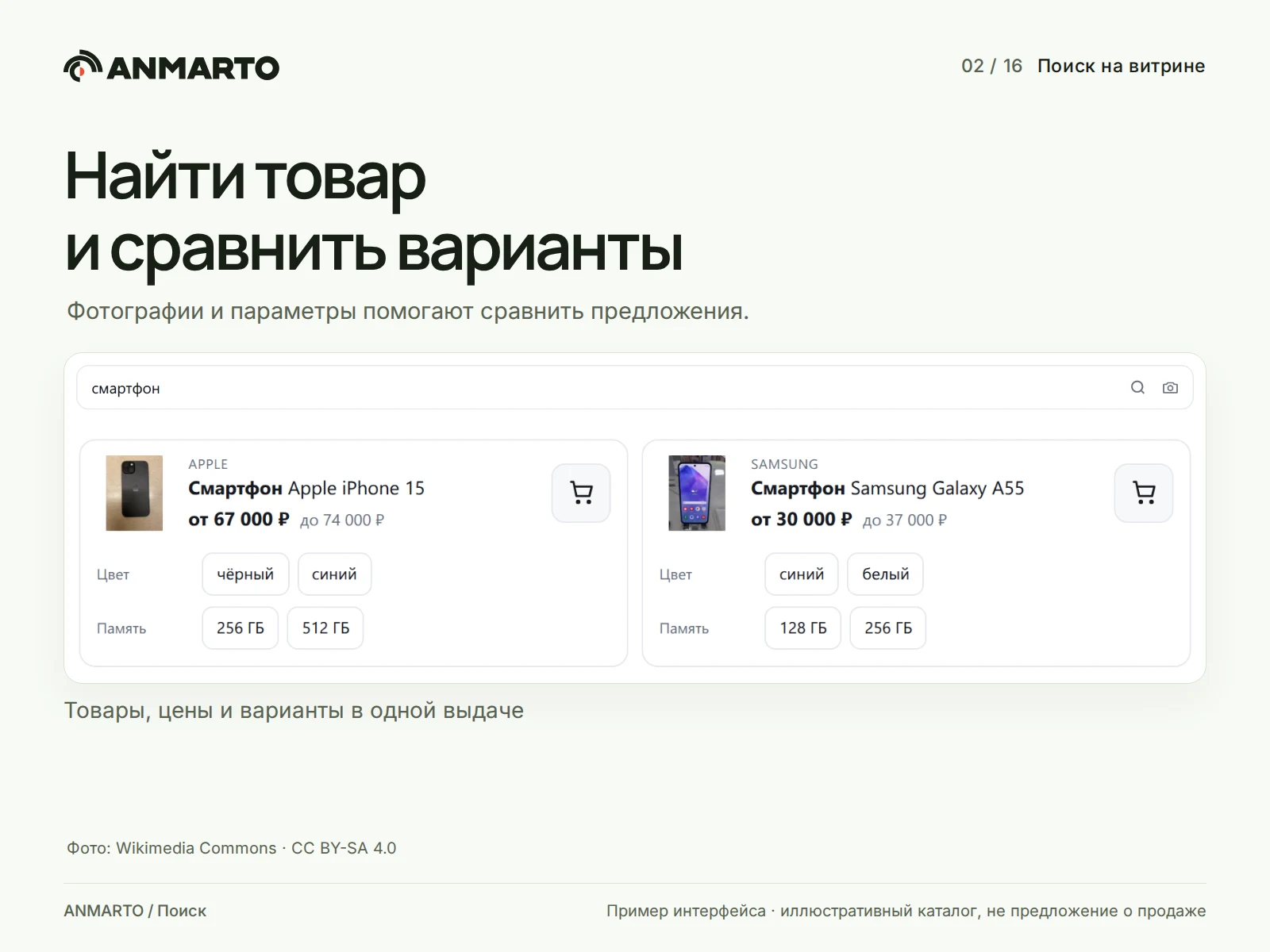
Examples of query processing on an illustrative assortment:
Query "smarfn" — the search finds smartphones while ignoring the missing letter.
Query "cvfhnajy" — the system corrects the layout error and interprets the intended word "smartphone".
Query "smartfon" — the search correctly handles the transliteration of the name.
Query "I want to film a child in motion" — the semantic algorithm links the phrase to the closest relevant catalog items.
The module demonstration is shown with settings enabled. Semantic similarity does not replace precise data: filtering by camera, size, price, or stock availability requires current information from the store. Found items must be compared against the provided parameters; do not assume any result automatically guarantees suitability for the buyer's task.
Suggestions and similar items
As the user types, the system displays suggestions including popular queries, categories, brands, and products. A suggestion can direct the user immediately to the relevant category with an applied filter, bypassing the general results list to accelerate the path to the goal. Suggestions are generated from the published store snapshot without requiring individual configuration for each query.
If an exact match is not found, the search offers similar items and explains the reason for the absence, such as noting that certain words were removed from the query, rather than displaying an empty page without explanation.
Offers, prices, and the standard cart
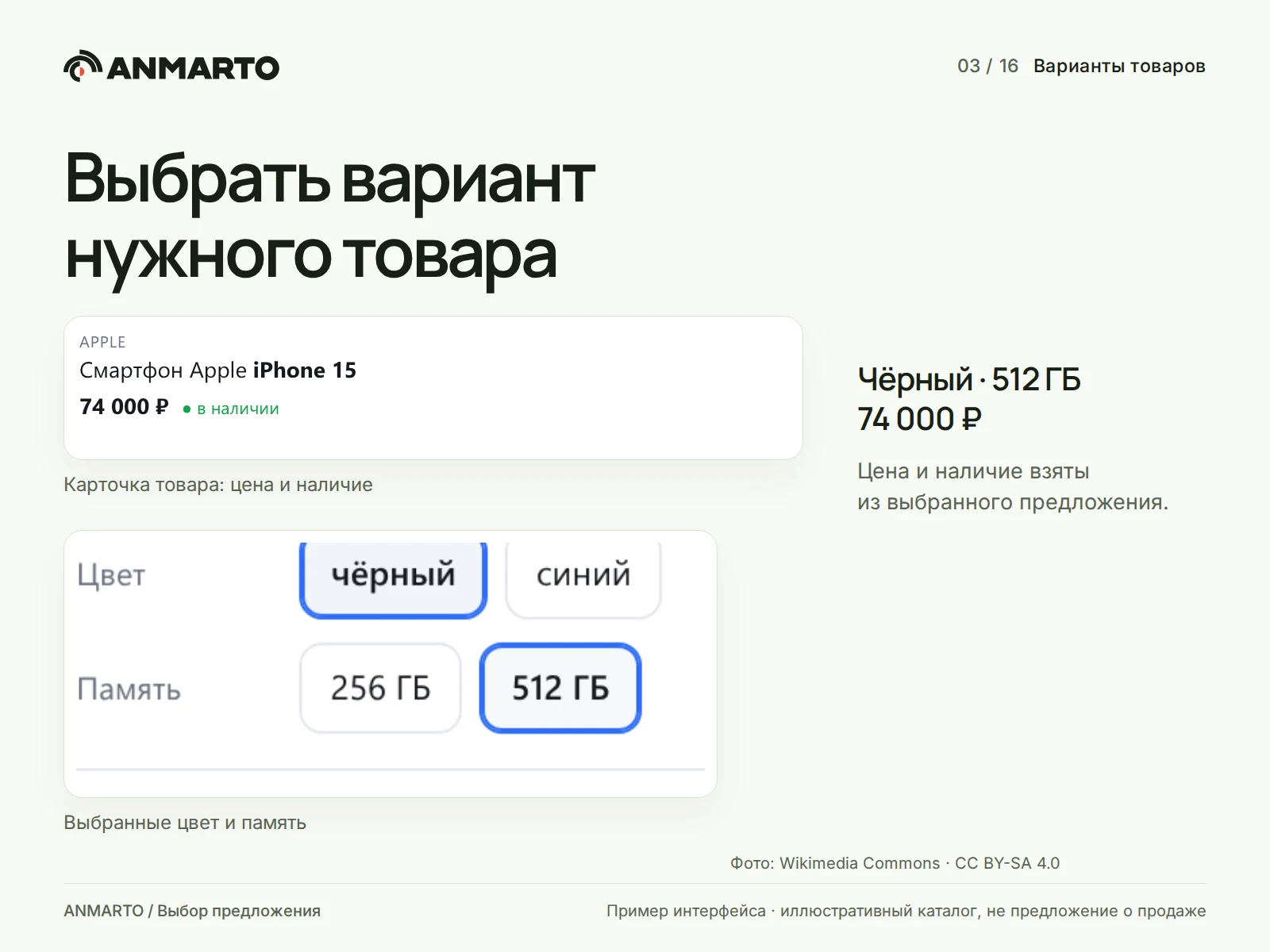
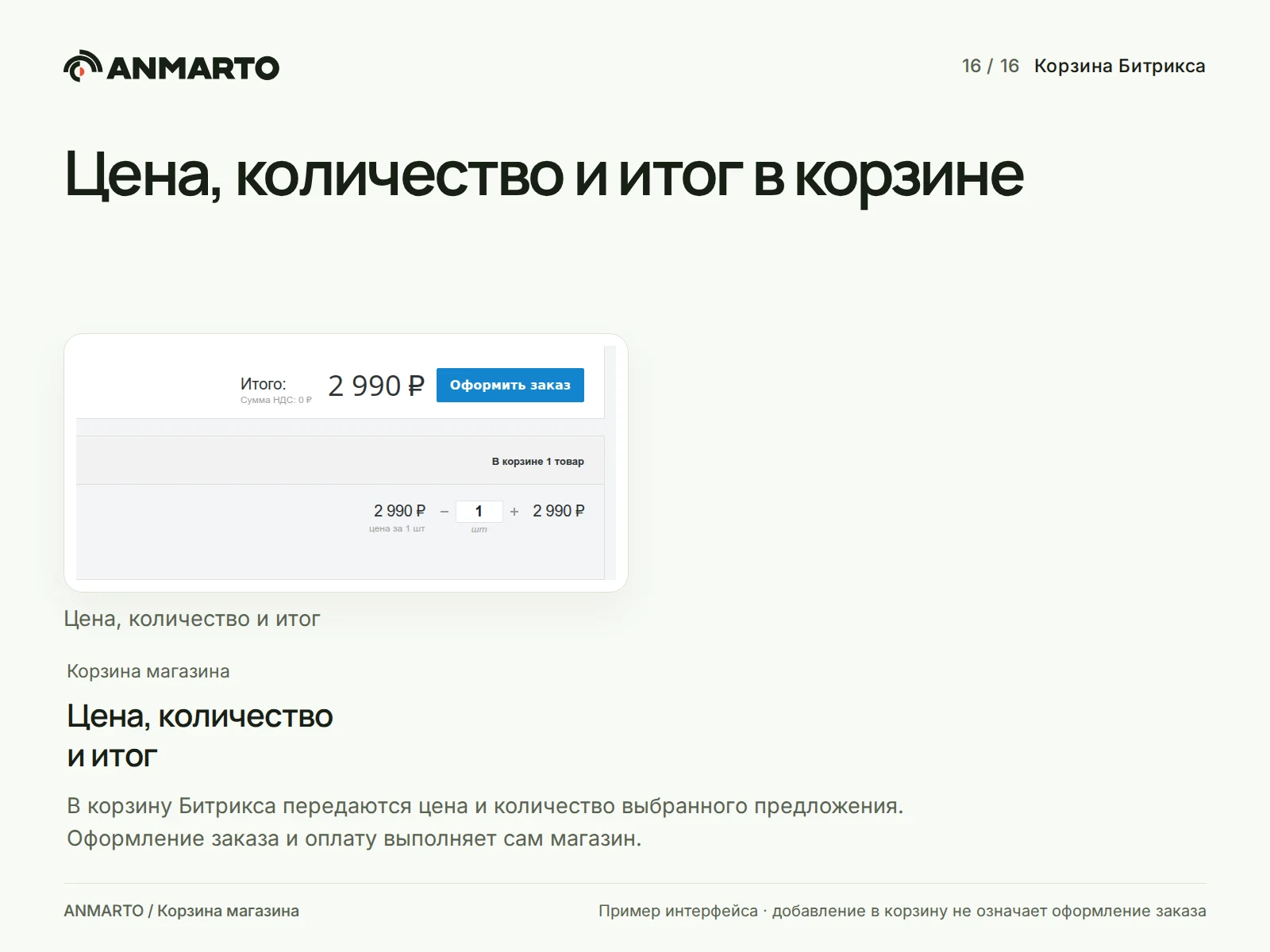
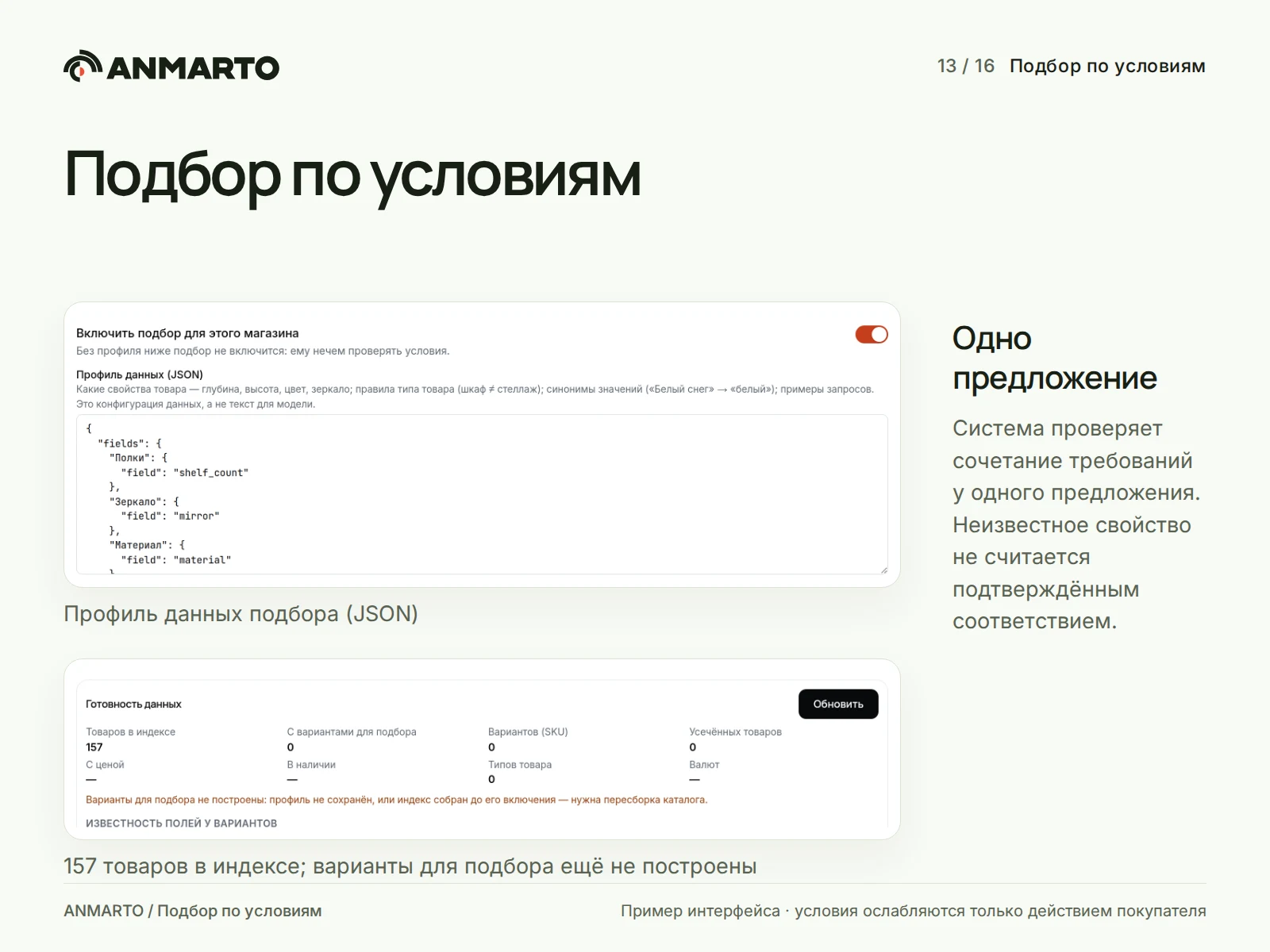
Trade offers are displayed within the parent product card. The buyer selects a specific variant, such as size or color. When integrated with the Bitrix cart, the system passes the exact selected offer rather than an arbitrary parent variant. The standard product cart requires the Trade Catalog and Online Store modules. The store verifies the final price and purchase availability. Adding an item to the cart does not constitute order placement or payment. When conditional selection is enabled, the system checks if all requirements are met within a single offer. If a characteristic value is unknown, the condition is not considered fulfilled. The availability of this function and the field profile are configured in the admin panel. The module also includes an AI consultant for catalog and store knowledge management.
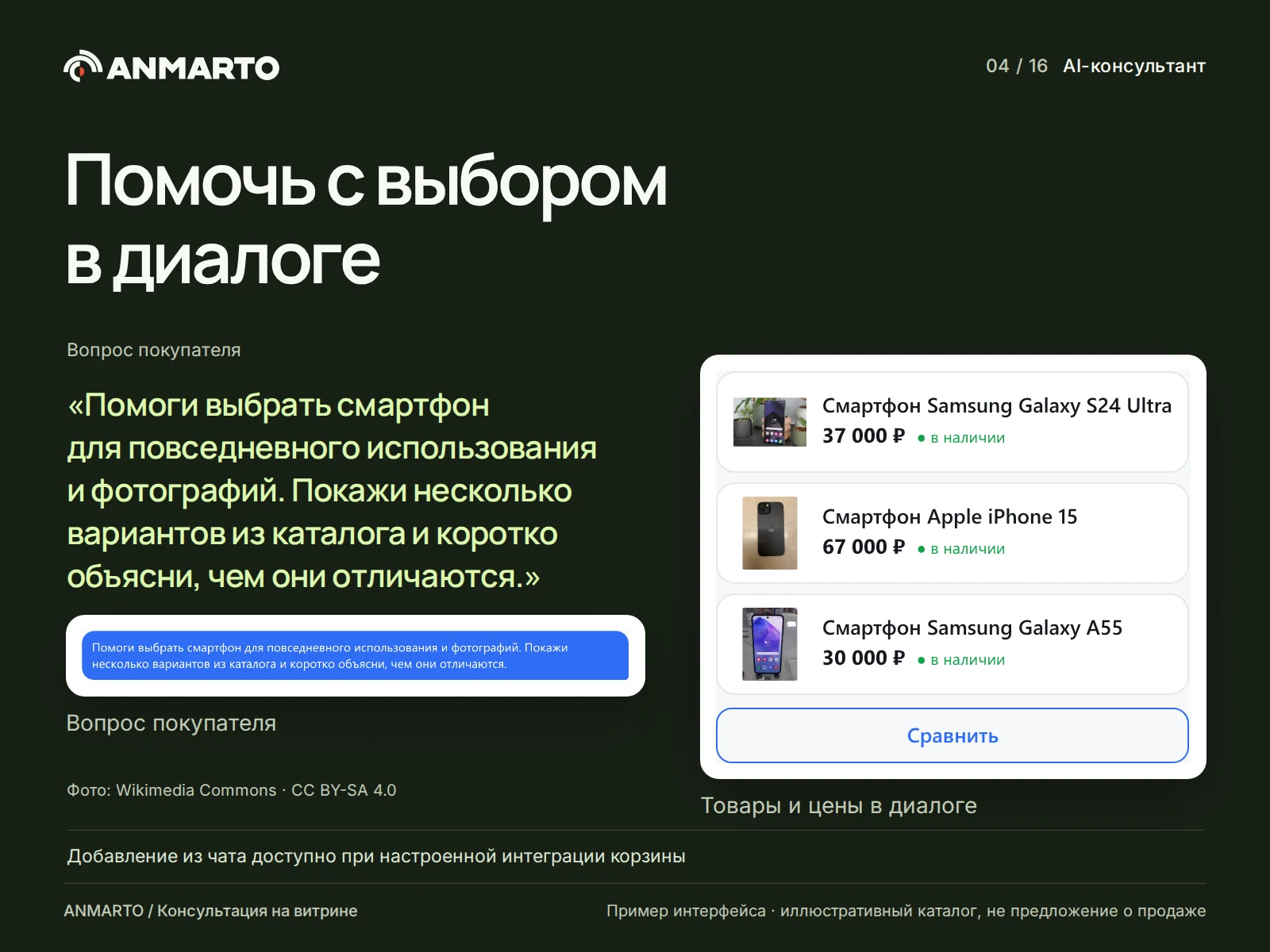
The consultant assists buyers in selecting products and answers questions based on catalog data and active store materials, including delivery, payment, warranty, and return policies. The control panel allows configuration of the conversation mode, bot name, greeting message, quick questions list, and instructions. Buyers can rate the quality of responses. When proactive mode is enabled, the bot offers assistance automatically, but no more than a specified limit per visit.
Dialogs and requests are available for manager review. To enable notifications, lead transfer to CRM, integration with buyer messengers, and connection to live operators, the corresponding channels must be configured and the required functions must be available in the account. Simply enabling the chat does not integrate with CRM or provide access to order statuses; a dedicated store handler is required to perform actions on orders.
Catalog Management
Select the product information blocks, pages, and materials that should be included in the search. Service and closed sections do not need to be included.
Configure data sources for prices, stock levels, images, categories, and properties. Values for the price before discount, public catalog discounts, warehouse stock levels, and product variants are set in the source. Brand, article number, and barcode are determined based on standard properties such as BRAND, CML2_ARTICLE, and BARCODE.
Instead of the standard module export, you can connect an external feed in YML, XML, or JSON format (the JSON format allows an items wrapper). Connecting a second feed with the same assortment without prior coordination is prohibited, as different product codes will result in duplicates.
Run the initial export and verify the product display in the live feed. For products with variants, the card price reflects the cheapest available offer, and the presence of a parent product indicates that at least one variant is available.
If needed, enable full scheduled export and process the change queue. Update speed depends on agent performance and service availability; instant synchronization is not guaranteed.
Additional features include a dictionary, redirects, and manual feed management.
The Anmarto.Search module expands the synonym dictionary using colloquial names. Mutual groups enable bidirectional search, while directed entries restrict the search to a single direction. When the AI function is available, the system suggests generating synonyms for lost queries; each suggestion is applied or rejected manually without re-indexing.
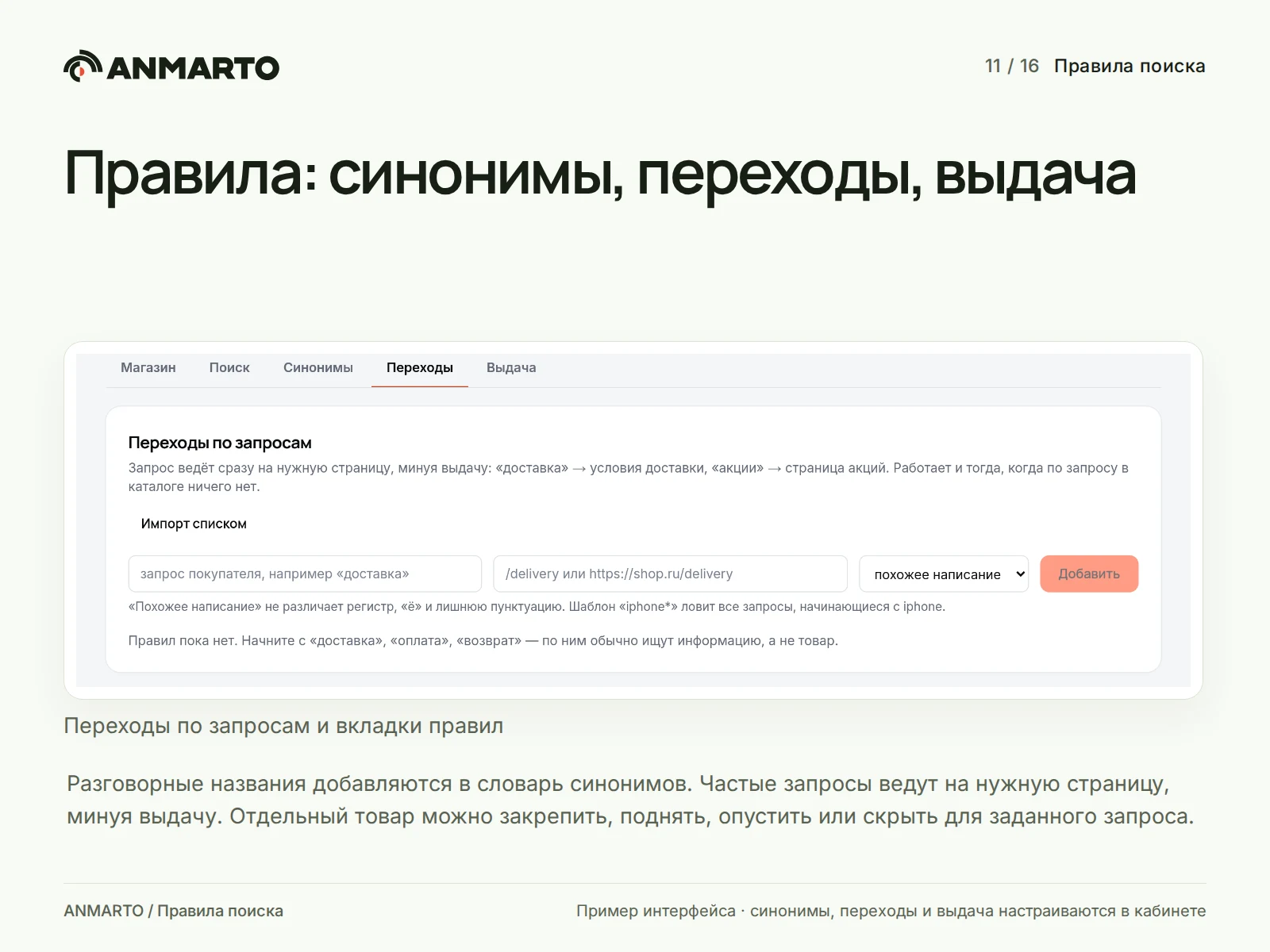
Frequent queries can be redirected to target pages, for example, the query 'delivery' leads to /delivery. Processing modes include similar spelling, exact match, or a pattern with the * wildcard. Bulk import of lists is supported. For individual queries, products can be pinned to a position, boosted, demoted, or hidden. The preview shows results both with and without active rules. Manual rules take precedence over the learned order. The 'Hide' function removes the card from results but does not delete the product from the store.
A banner is displayed above search results. For a promotion or section, settings include a title, address, images for desktop and mobile, the query, comparison conditions, priority, and display dates. A fallback banner can be assigned to appear when other rules do not trigger. Statistics for the last 30 days cover impressions, clicks, and CTR.
The module also supports the configuration of filters, sorting, and tags.
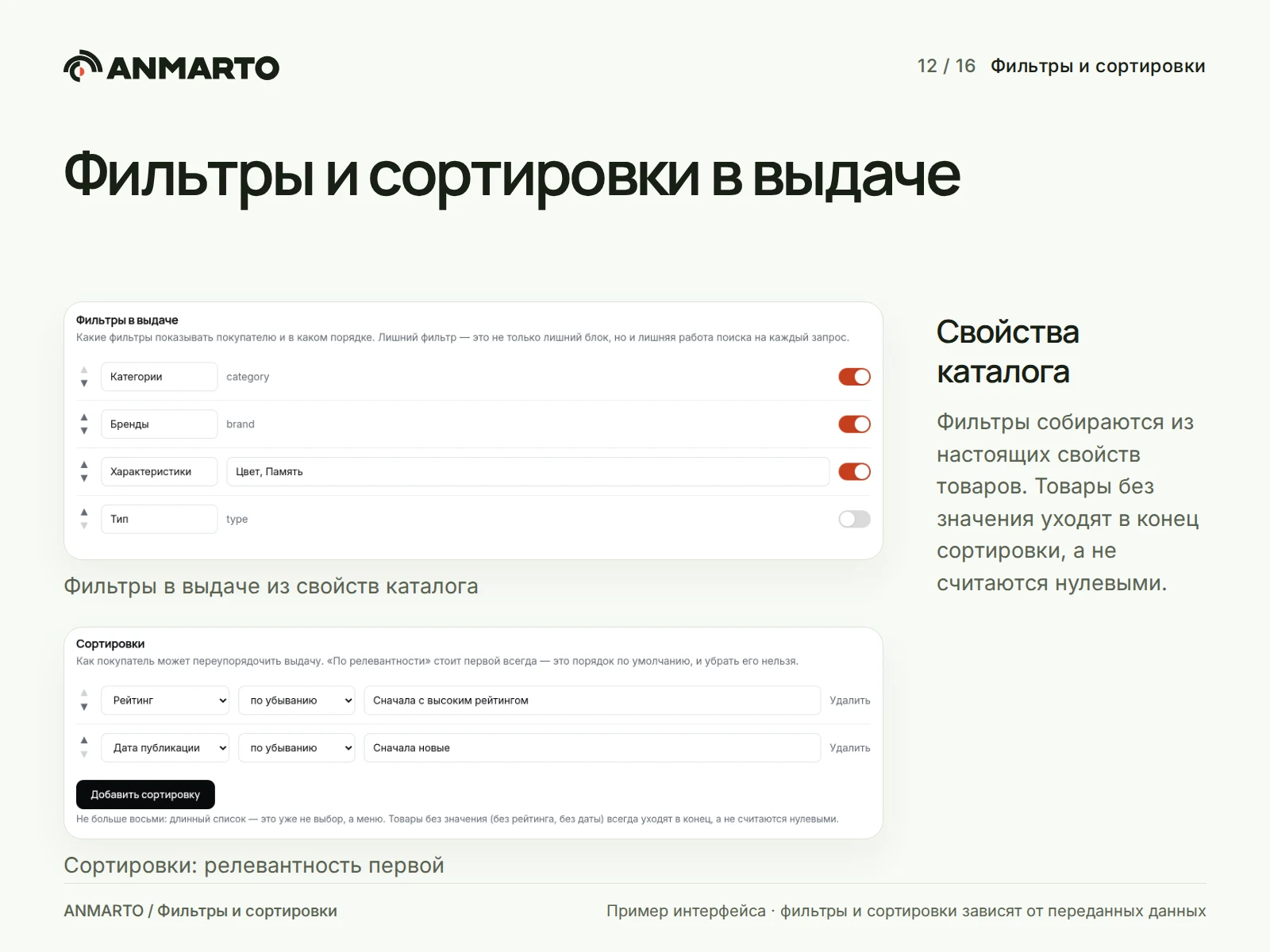
Filters are built from actual catalog properties, supporting various display modes, collapsible sections, in-category search, color indicators, and value images. Relevance remains the primary sorting option; custom sorts are selected from available fields, while items with missing values are moved to the end of the list. Product cards display the first three active tags in the specified order. The ranking algorithm may consider buyer behavior; a lack of statistics at the start is a normal state, not an error.
Catalog Retraining
If the section is available, the 'Enrichment' feature improves product search text. The control panel allows background processing for empty records only or full regeneration. This paid processing can be stopped by the user. Note that this process differs from learning ranking based on buyer clicks, and the section may be unavailable when other AI functions are enabled.
Condition-based selection and comparison
The Anmarto.Search module provides intelligent search and AI consultant capabilities. The selection feature validates the combination of requirements for a single product offer, such as a cabinet with a depth of up to 45 cm, without a mirror, priced up to 40,000. An unknown property value is not considered a confirmed match. Data is mapped against fields and units defined in the store's JSON profile; filtering conditions can only be relaxed by user action. Suitable options can be compared with each other.
The knowledge base includes instructions, web pages, and files.
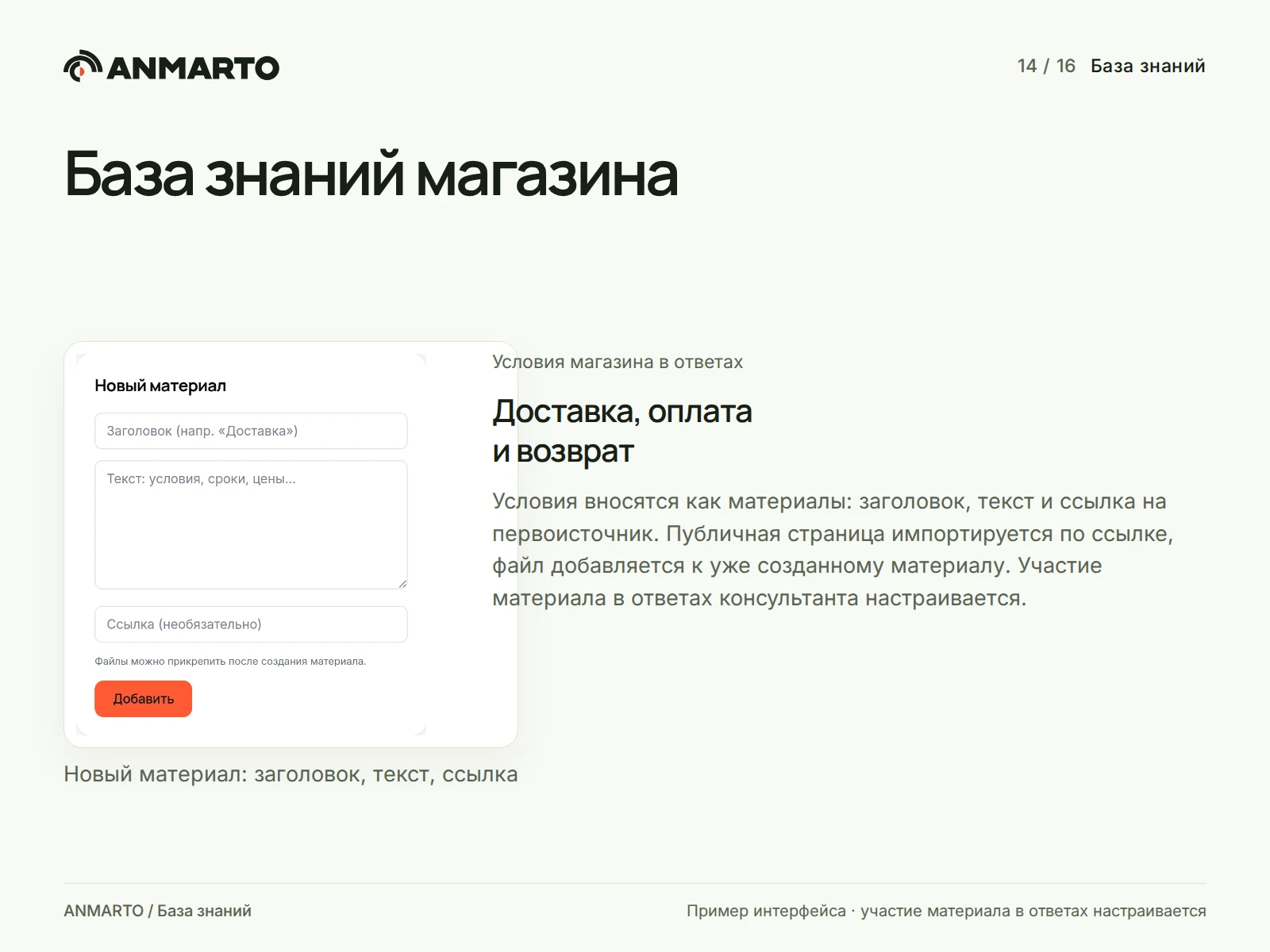
Delivery terms, payment conditions, warranties, and return policies are entered as separate materials. Each material includes a title, text, a link to the original source, and a toggle for participation in responses. The store's public page is imported via a link in the background. PDF, DOCX, TXT, or MD files up to 10 MB can be attached to an existing material. Only paragraph text is extracted from DOCX files; tables and headers/footers must be transferred manually. The total text volume of a material is limited to 35,000 characters, including previously added content, so the relevant fragment must be located after upload. Older versions of materials are disabled, while duplicates and empty records are marked.
Requests, notifications, CRM, and messengers
New dialogues and requests are visible in the dashboard with search functionality and processing status indicators. Notifications are sent via email, to a Telegram bot, or to a custom webhook. Requests are forwarded to Bitrix24, amoCRM, or a specified POST address; available destinations depend on the interface. Sales channels including Telegram, VK, MAX, and Avito are connected separately according to each channel's instructions, with availability determined by the account settings. Communication with a live operator is implemented through a separate operator line integration and is not triggered by enabling notifications.
Appearance and startup screen
The opening mode, appearance of the search bar and chat, logo, cards showing availability, discounts, and a purchase button, as well as texts and the startup screen, are configured separately for desktop computers and mobile phones. Draft previews remain invisible to buyers until changes are saved. Configuration of older widget versions is handled through a separate form. The module provides analytics tools and change verification capabilities.
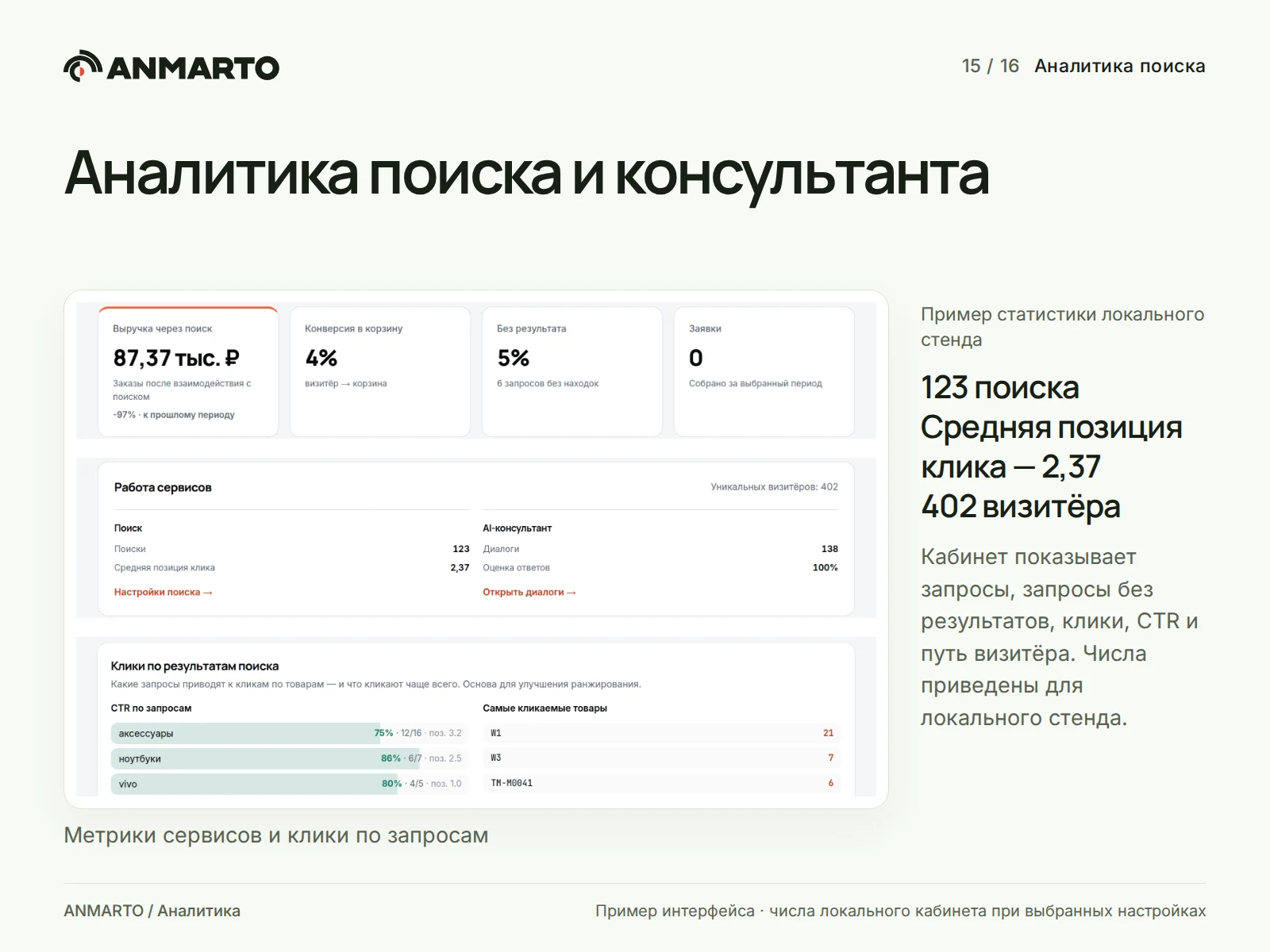
The dashboard displays statistics for search queries, including queries with no results, clicks, CTR, visitor paths, carts, orders, and dialogues. Lost queries are handled manually: they can be hidden, analyzed by an agent, or resolved by adding a synonym or product. Transferring completed orders from Bitrix is enabled separately; without this setting, revenue is shown as a dash rather than zero. Attribution accounts for interactions with search and the consultant over a week; query amounts are not summed, and the estimate for lost revenue remains calculated.
Setting changes are validated via A/B testing, comparing traffic share, search counts, clicks, carts, and empty results. A winner is not declared based on initial visitors or when data is insufficient. Collecting individual events requires an active integration and visitor consent settings.
Reliable Cart
Repeating an operation after a network failure uses the same identifier, preventing duplicate successful additions. The card price is verified against the store calculation; an unconfirmed calculation is marked as such rather than treated as a match. Stock status distinguishes between "in stock," "on order," and "out of stock"; the chat displays composition and checkout links only when store handlers are connected. Consent to an action does not constitute payment.
Catalog, keys, and security
The catalog is imported from feeds or Bitrix exports. Prices, stock levels, brands, article numbers, warehouses, and properties are automatically mapped to system fields. Manual edits made to products on top of the feed can be reverted to the original export data. The site integration key is displayed only once and is revoked if compromised. The widget public key and limited API tokens do not replace this key. Access to the cabinet is protected by a password, with an option to enable two-factor authentication. Closed sections are not exported to the public search.
Getting started
Install the abr.search module from the Marketplace.
Create or select a site in the Anmarto cabinet and paste the integration key into the module settings.
Select data sources, perform the export, and verify search functionality on a test product.
Enable the required widgets and test their operation on both desktop and mobile devices.
Pricing, available features, and catalog limitations depend on the service terms and the selected tariff. Current terms must be verified on the Anmarto website and in the cabinet before connection.
The assortment, prices, and availability shown on the illustrative display are for demonstration purposes only and do not constitute a commercial offer or reflect a real client store. Device images are provided by: ThePhotoGraphIc for iPhone 15, IPHONE 15 for iPhone 15 Pro, Captainmorlypogi1959 for Galaxy A55, and TGspot.co.il for Galaxy S24 Ultra. The photos and their adaptations are distributed under the CC BY-SA 4.0 license; the illustrations include resizing and cropping. The photo license does not apply to the software product itself. The use of names and trademarks does not imply endorsement of Anmarto by the device manufacturers.
General iT can install “Anmarto.Search: smart search and AI consultant”, configure its settings and verify its operation in the existing project.
UPDATE HISTORY
What’s new
3 releases
2.4.2 (15.09.2026)Latest update
— messages on the settings page: the server response, exception text, and field value are inserted into notifications only as plain text (with escaping and length limits); the server response text is stripped of markup already in the client;
— the widget color, chat button margins, and search bar block selector are accepted only in their specific formats (color, CSS size, CSS selector); otherwise, the default value is used.
What's new in 2.4.1:
— website ownership confirmation during account creation: the verification file returns a hash of the one-time code externally, not the code itself. Anyone who reads the file can no longer send the code to Anmarto from their email and obtain a key to someone else's store; a code without an expiration date is considered expired, and codes from previous packages are not transferred;
— the service address is checked every time it is used, not only when the form is saved: addresses using the HTTP protocol, those arrived via migration or database edits, are not used; the default address is taken instead, and the reason is visible in the event log.
What's new in 2.4:
— this is the first version of the new generation module in the Marketplace: the previous 1.x replaced Bitrix's standard search and has been discontinued. 2.x sends the catalog to Anmarto and embeds the search bar and AI consultant; after updating, you need to insert the Anmarto key once in the module settings (search.anmarto.ru → Settings); old 1.x settings are not used;
— only content readable by an anonymous visitor goes into the search: an info block closed for the "All Users" group is not exported (it is marked in the sources list), and with extended permissions, the selection is performed with anonymous rights regardless of who triggered the export — an agent, cron, or an administrator via button. Previously, a closed B2B catalog or a "for dealers" section could appear in public search results;
— the service address is accepted externally only via the HTTPS protocol: the key and catalog are sent via this protocol. For your own machine and private network (test environment), the HTTP protocol is still allowed;
— the cart handler no longer returns exception text to the visitor — only
code, details in the event log; gateway consultant debug log is written to the Bitrix event log, not to a file in the site root.
2.4.1 (15.09.2026)
— website ownership confirmation during account creation: the verification file returns the hash of a one-time code externally, not the code itself. Anyone who reads the file cannot send the code to Anmarto from their own email and obtain a key to someone else's store; a code without an expiration date is considered expired, and a code from a previous package is not transferred;
— the service address is verified every time it is used, not only when the form is saved: an address accessed via HTTP, which arrived via migration or database modification, is not used; the default address is taken instead, and the reason is visible in the event log.
What's new in 2.4:
— this is the first version of the new generation of the module in the Marketplace: the previous 1.x version replaced the standard Bitrix search and has been discontinued. Version 2.x sends the catalog to Anmarto and embeds the search bar and AI consultant; after updating, you need to insert the Anmarto key once in the module settings (search.anmarto.ru → Settings); old 1.x settings are not used;
— only content readable by an anonymous visitor goes into the search: an information block closed for the "All Users" group is not exported (it is marked in the sources list), and with extended permissions, the selection is performed with anonymous rights regardless of who triggered the export — an agent, cron, or an administrator via button. Previously, a closed B2B catalog or a "for dealers" section could appear in public search results;
— the service address is accepted externally only via HTTPS: the key and catalog are sent via this protocol. For your own machine and private network (test environment), HTTP is still allowed;
— the cart handler no longer returns an exception text to the visitor — only the code; details are in the event log; the consultant gateway debug log is written to the Bitrix event log, not to a file in the site root.
2.4.0 (14.09.2026)
— this is the first version of the new generation module in the Marketplace: the previous 1.x replaced the standard Bitrix search and has been discontinued. 2.x sends the catalog to Anmarto and embeds the search bar and AI consultant; after updating, you need to insert the Anmarto key once in the module settings (search.anmarto.ru → Settings) — old 1.x settings are not used; — only what an anonymous visitor can read goes into the search: an information block closed for the "All Users" group is not exported (it is marked in the sources list), and with extended rights, the selection is performed with anonymous rights regardless of who triggered the export — an agent, cron, or administrator via button. Previously, a closed B2B catalog or a "for dealers" section could appear in public search results; — the service address to the outside is accepted only via HTTPS: the key and catalog are sent via it. For your own machine and private network (test stand), HTTP is still allowed; — the cart handler no longer returns an exception text to the visitor — only the code, details in the event log; the consultant gateway debug log is written to the Bitrix event log, not to a file in the site root.
USER EXPERIENCE
Solution reviews
How does this solution work in a real project? Share your experience and help others choose.
Be the first to share your experience
There are no reviews of this solution on git.ru yet. Tell us what worked well and what could be improved.
✓
Verified purchaseAdd a key if you wish. A verified review gets a badge, priority placement and more rating weight.
↗
Open to every clientJust sign in to your account. A key is optional; all reviews are moderated.
The Smart Search module functions correctly only if the ElasticSearch engine is already installed on the server. If the site is hosted on a platform where the user lacks permissions to modify the operating system or apply system-level changes, neither the module nor the ElasticSearch engine can be installed.
The module adds Table and Composite Property data types for information block properties and user fields, including sections, users, CRM deals, and smart processes in the boxed version of Bitrix24.
The deal card can store the complete order composition: items, quantities, statuses, dates, comments, and documents in a single field.
The Anmarto: Bulk Edit module is designed for the safe mass modification of information block elements and product catalog items. The solution enables the creation of tasks to process large volumes of data and allows users to preview the expected result in a 'was → will be' format before applying changes.
The Sotbit Smart Filter SEO module is designed to increase online store traffic. The tool operates by generating numerous unique pages for smart filters.
SDEK integration module for 1C-Bitrix.
SDEK is one of Russia's largest logistics companies, providing courier delivery and operating a network of pickup points.
The module connects the online store with the SDEK personal account, offering the following capabilities:
Providing customers with delivery options: courier, pickup point, or postmat.
The module is designed for the «1C-Bitrix: Site Management» platform and enables importing infoblock elements, including products, from Excel files. It also supports data loading into Highload blocks.
The solution itself is free. Installation, configuration and customisation services are agreed separately. A compatible platform and an appropriate platform licence are required.
How do I check compatibility?
Compare the supported editions and solution version in the technical details with your project. Before installing on a live website, we recommend making a backup and checking the solution in a test environment.
Can you help with implementation?
We can help install the module, check its settings and verify how it works in your project. Compatibility with other customisations and the scope of work are assessed before we begin.
Statistics and interaction recording
Public pages use basic statistics. Our recording and Yandex Webvisor require your permission. You can keep basic statistics or disable all analytics.
Operator: General IT Rus LLC, INN 2310208877. Statistics and recording help improve the website.
Basic statistics: pageviews, a random daily ID, a public URL and time. The ID lasts until Moscow midnight. Original records: up to 48 hours; totals: up to 7 years.
Campaign tags and a technical identifier are sent by our server to the existing Yandex tag. Visitor IP, User-Agent and cookies are not included in this transfer. If selected, its browser code collects technical data, cookies, actions and masked page snapshots; recordings last 15 days. Inputs, chat and account areas are hidden.
Interaction recording requires permission: clicks, scrolling, technical information and filtered public-page snapshots. Events: up to 7 years; IP and snapshots: up to 90 days.
Permission is remembered for up to 365 days; full opt-out remains until changed. Basic statistics only disables recording; Disable all analytics stops new analytics. Previously sent data is not automatically deleted. Withdrawal and requests: support@git.ru. Full terms are linked below.
Your browser requests no tracking: analytics is off.