Payments are experiencing issues due to temporary restrictions in Russia. If your payment does not go through, please submit a support request.•Our support team is available 24/7 — we are always here to help with hosting and server issues.•We are now accepting requests for dedicated server rental and colocation services in our data center.•Reminder: we recommend enabling backups for additional data protection.•A new VPS/VDS lineup with NVMe storage and improved performance is now available.•Maintenance work on some servers has been completed. All services are operating normally.•
Payments are experiencing issues due to temporary restrictions in Russia. If your payment does not go through, please submit a support request.•Our support team is available 24/7 — we are always here to help with hosting and server issues.•We are now accepting requests for dedicated server rental and colocation services in our data center.•Reminder: we recommend enabling backups for additional data protection.•A new VPS/VDS lineup with NVMe storage and improved performance is now available.•Maintenance work on some servers has been completed. All services are operating normally.•
Аккаунт в General iT
Вход / Регистрация
Войдите или создайте аккаунт для управления услугами в личном кабинете.
Страны не найдены. Попробуйте другое название или код.
MODULE FOR 1C-BITRIX
Automation of Business Solutions
Smart Search
The Smart Search module functions correctly only if the ElasticSearch engine is already installed on the server. If the site is hosted on a platform where the user lacks permissions to modify the operating system or apply system-level changes, neither the module nor the ElasticSearch engine can be installed.
The Smart Search module functions correctly only if the ElasticSearch engine is already installed on the server. If the site is hosted on a platform where the user lacks permissions to modify the operating system or apply system-level changes, neither the module nor the ElasticSearch engine can be installed.
The 'Smart Search' module delivers a simpler, more accurate, and efficient search experience on your website. The system is powered by the ElasticSearch engine, ensuring fast and precise query processing. Key capabilities include automatic typo correction, handling of keyboard layout changes, support for queries in multiple languages, and an expanded search range that identifies relevant results across various word combinations and fragments.
Technical requirements
The Smart Search module requires the installation of ElasticSearch software. This version differs from the standard solution used in Bitrix.
The module cannot be installed on hosting environments where the user lacks permissions to modify the file system or server configuration.
The 'Smart Search' module replaces the site's default search without requiring code modifications. The engine delivers fast results, which is essential for high-load projects. Configuration is straightforward, and the algorithm provides more accurate matches compared to the standard Bitrix search. The system ensures high relevance of search results. Administrators can manually add custom synonym dictionaries to refine queries, for example, linking terms like 'mom' and 'dad' to the result 'wires'. The module supports multi-site environments, allowing management of all search instances from a single admin panel.
The search system automatically corrects typos. When a query with an error is entered, such as "vozduhaochistitel", the algorithm recognizes the user's intent and finds the correct term "vozduhoochistitel" without requiring the user to recall spelling rules.
Search with multi-language input support
The functionality allows finding products even when users enter brand names or terms in a different language. This is particularly useful for sites where product names include brand names: the system will find 'samsung' even if the user typed 'samsung' in Cyrillic, without requiring a keyboard layout switch or recalling the correct spelling.
Automatic keyboard layout correction
The system automatically corrects errors caused by accidental layout switches. If a user enters 'rjvgm.nth' instead of 'computer', the search will still return the correct results.
Search by product attributes
Users can find products using their characteristics and attributes, such as filtering for public production goods.
Search by synonyms and implicit queries
Thanks to the built-in replacement dictionary, the system understands implicit queries. For example, a search for 'mom-dad' will find relevant products like wires, even if these words are not directly contained in the product name.
Comparison with standard Bitrix search
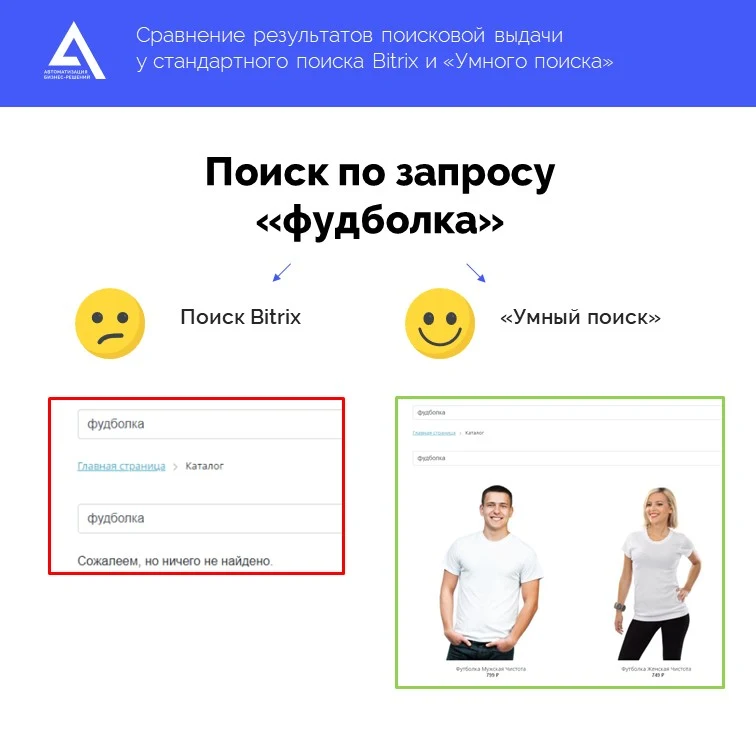
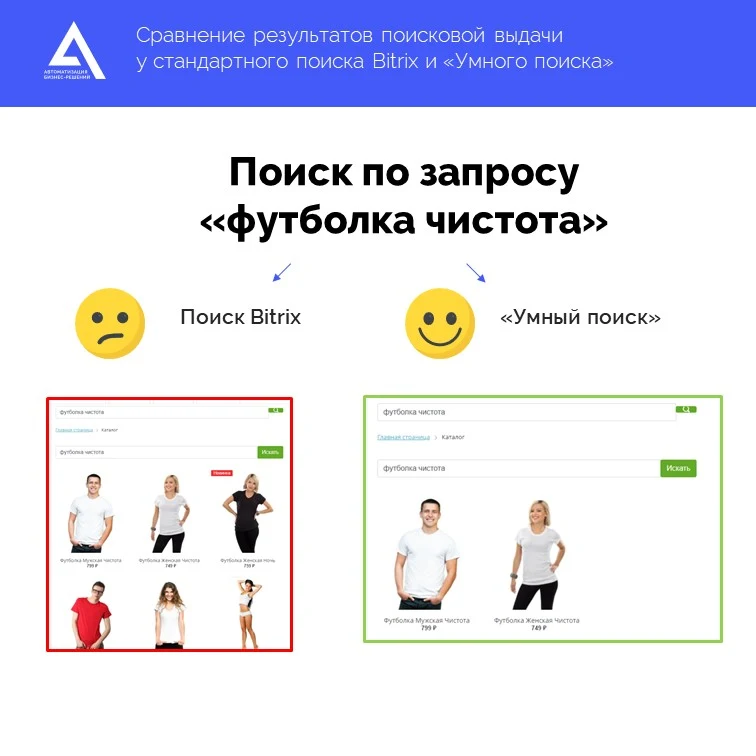
The Screenshots section visually demonstrates the difference in search result quality between the standard Bitrix mechanism and the Smart Search module. The standard search fails to return results for typos, such as the query "fudbolka", whereas Smart Search correctly processes such requests. Additionally, the standard mechanism may display incorrect results for complex phrases like "fudbolka chistota", while Smart Search handles these tasks accurately.
Example 1:
Search with errors
Example 2: Search for multiple words
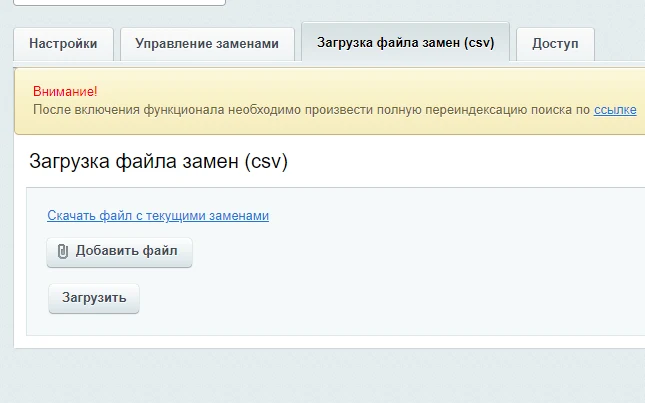
The module supports manual creation of replacement dictionaries, as well as uploading and downloading data in CSV format.
The file is available for download and matches the required format. The module installation process differs from standard Bitrix procedures as it requires prior setup of the ElasticSearch software.
General iT can install and configure this module and check how it works on your website.
USER EXPERIENCE
Solution reviews
How does this solution work in a real project? Share your experience and help others choose.
Be the first to share your experience
There are no reviews of this solution on git.ru yet. Tell us what worked well and what could be improved.
✓
Verified purchaseAdd a key if you wish. A verified review gets a badge, priority placement and more rating weight.
↗
Open to every clientJust sign in to your account. A key is optional; all reviews are moderated.
The Anmarto.Search module by Automation Business Solutions provides smart search and an AI consultant. The system helps customers find and select products by using intelligent algorithms and artificial intelligence to analyze queries. The tool integrates with existing platforms, ensuring accurate matching of user requests to the product catalog without the need for manual selection.
The module adds Table and Composite Property data types for information block properties and user fields, including sections, users, CRM deals, and smart processes in the boxed version of Bitrix24.
The deal card can store the complete order composition: items, quantities, statuses, dates, comments, and documents in a single field.
The Anmarto: Bulk Edit module is designed for the safe mass modification of information block elements and product catalog items. The solution enables the creation of tasks to process large volumes of data and allows users to preview the expected result in a 'was → will be' format before applying changes.
The Sotbit Smart Filter SEO module is designed to increase online store traffic. The tool operates by generating numerous unique pages for smart filters.
SDEK integration module for 1C-Bitrix.
SDEK is one of Russia's largest logistics companies, providing courier delivery and operating a network of pickup points.
The module connects the online store with the SDEK personal account, offering the following capabilities:
Providing customers with delivery options: courier, pickup point, or postmat.
The module is designed for the «1C-Bitrix: Site Management» platform and enables importing infoblock elements, including products, from Excel files. It also supports data loading into Highload blocks.
The displayed price covers the solution itself. Platform licensing, installation and customisation are checked separately. If the page offers bundles, select the required option before submitting a request.
How do I check compatibility?
Compare the supported editions and solution version in the technical details with your project. Before installing on a live website, we recommend making a backup and checking the solution in a test environment.
Is there a trial?
The developer lists a trial of 14 days. The trial button opens the installer in your website control panel. Check the required features and compatibility before purchasing.
How much does this solution’s renewal cost?
The current renewal price is 7,500 ₽. Before you order, a manager will confirm the renewal period and whether it applies to your licence.
Can you help with implementation?
We can help install the module, check its settings and verify how it works in your project. Compatibility with other customisations and the scope of work are assessed before we begin.
Statistics and interaction recording
Public pages use basic statistics. Our recording and Yandex Webvisor require your permission. You can keep basic statistics or disable all analytics.
Operator: General IT Rus LLC, INN 2310208877. Statistics and recording help improve the website.
Basic statistics: pageviews, a random daily ID, a public URL and time. The ID lasts until Moscow midnight. Original records: up to 48 hours; totals: up to 7 years.
Campaign tags and a technical identifier are sent by our server to the existing Yandex tag. Visitor IP, User-Agent and cookies are not included in this transfer. If selected, its browser code collects technical data, cookies, actions and masked page snapshots; recordings last 15 days. Inputs, chat and account areas are hidden.
Interaction recording requires permission: clicks, scrolling, technical information and filtered public-page snapshots. Events: up to 7 years; IP and snapshots: up to 90 days.
Permission is remembered for up to 365 days; full opt-out remains until changed. Basic statistics only disables recording; Disable all analytics stops new analytics. Previously sent data is not automatically deleted. Withdrawal and requests: support@git.ru. Full terms are linked below.
Your browser requests no tracking: analytics is off.