Payments are experiencing issues due to temporary restrictions in Russia. If your payment does not go through, please submit a support request.•Our support team is available 24/7 — we are always here to help with hosting and server issues.•We are now accepting requests for dedicated server rental and colocation services in our data center.•Reminder: we recommend enabling backups for additional data protection.•A new VPS/VDS lineup with NVMe storage and improved performance is now available.•Maintenance work on some servers has been completed. All services are operating normally.•
Payments are experiencing issues due to temporary restrictions in Russia. If your payment does not go through, please submit a support request.•Our support team is available 24/7 — we are always here to help with hosting and server issues.•We are now accepting requests for dedicated server rental and colocation services in our data center.•Reminder: we recommend enabling backups for additional data protection.•A new VPS/VDS lineup with NVMe storage and improved performance is now available.•Maintenance work on some servers has been completed. All services are operating normally.•
Аккаунт в General iT
Вход / Регистрация
Войдите или создайте аккаунт для управления услугами в панели.
Resizer of original image files, conversion to WebP format, conversion to JPG, photo optimization
The module allows batch resizing of images in the /upload/ directory based on specified parameters and updates the corresponding records in the b_file table. It is useful for freeing up server disk space, handling images uploaded without compression, and accelerating page load times by reducing the size of displayed resources.
The module allows batch resizing of images in the /upload/ directory based on specified parameters and updates the corresponding records in the b_file table. It is useful for freeing up server disk space, handling images uploaded without compression, and accelerating page load times by reducing the size of displayed resources. Filtering is available by multiple parameters: module, MIME type, modification date, file size, width, height, original name, and ID. For some parameters, a comparison type can be specified.
The sorting direction can be set based on any available parameter.
The module processes images in JPEG, PNG, GIF, BMP, and WebP formats. During processing, BMP files are automatically converted to JPG, with the content fully replaced and the extension changed. Conversion from PNG to JPG is also supported. Converting images to WebP format helps improve Google PageSpeed performance scores.
Processing options include setting new width and height, selecting the JPG compression level, and choosing the scaling type. To simplify usage, the module allows inverting preset dimensions.
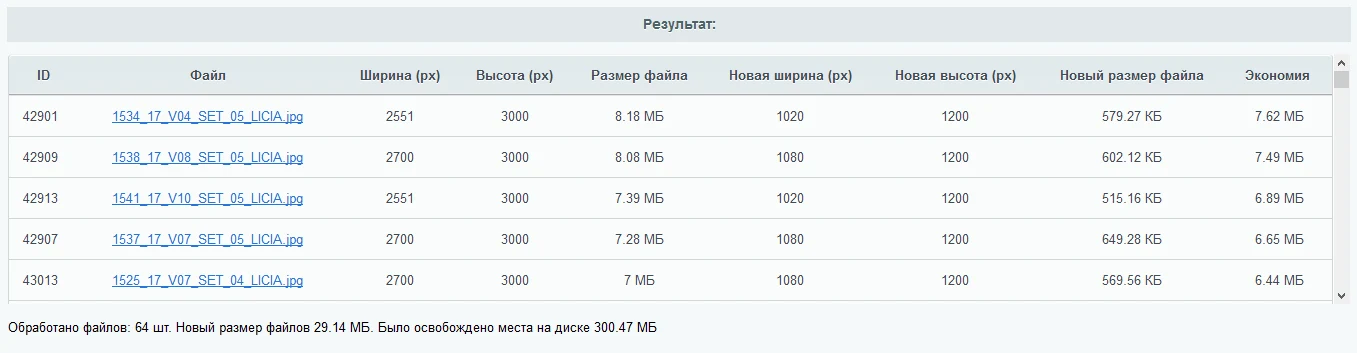
During analysis and processing, the module counts the total number of files, their original and final sizes, and the resulting disk space savings.
General iT can connect “Resizer of original image files, conversion to WebP format, conversion to JPG, photo optimization”, configure it and verify the integration with the existing website.
UPDATE HISTORY
What’s new
40 releases
1.4.0 (30.06.2026)Latest update
Scheduled update
1.3.9 (22.05.2026)
Minor changes
Comparison for ID added to the filter
1.3.8 (22.05.2026)
"Uploaded to cloud" parameter added to the filter
"MIME type" column added to the file list table
If a file is uploaded to the cloud, the corresponding mark will appear in the list
1.3.7 (22.04.2026)
Bug fixes
1.3.6 (10.10.2025)
Error output added
1.3.5 (28.02.2025)
Bug fixes
1.3.4 (12.02.2025)
Security update
Bug fixes
1.3.3 (03.02.2025)
Added the ability to save form presets
1.3.2 (22.11.2024)
Minor changes
1.3.1 (23.05.2024)
Bug fixes
1.3.0 (21.05.2024)
Minor changes
1.2.9 (17.05.2024)
Minor fixes
1.2.8 (08.12.2023)
When filtering by the iblock module, the ability to specify additional filtering by image type has been added: section image, teaser image, and detailed element image, images from element properties
Automatic cleanup of the managed cache for the b_file table has been added after processing is completed
1.2.7 (13.07.2023)
Now, when processing and deleting, file duplicates and originals are taken into account
1.2.6 (13.07.2023)
The MIME type value, by default, is now image/
Improved validation of the php max_input_vars parameter
Added the ability to set IPTC data for JPEG
1.2.5 (28.06.2023)
Scheduled update
1.2.4 (27.06.2023)
Bug fixes
1.2.3 (27.06.2023)
The module settings have been updated with the "Use resampling when processing in Square" parameter
1.2.2 (26.06.2023)
The filter has been updated with the "Limit quantity to" parameter
The module settings now allow changing the list of size presets
Added the "Square (minimum side will be adjusted to the maximum side with white fill for jpg)" scaling type
1.2.1 (11.04.2023)
Minor improvements
Access rights fix
Parameters for automatic image processing after their addition have been added to the module settings
1.2.0 (28.03.2023)
Bug fixes
1.1.9 (21.03.2023)
Bug fixes
1.1.8 (20.03.2023)
Bug fixes
Updated preset list
Module settings added
Access rights added
MIME type image/ - all images added to the filter
MIME type added to sorting
1.1.7 (18.03.2023)
MIME type image/webp added to the filter
1.1.6 (18.03.2023)
WebP conversion added
Minor improvements
1.1.5 (15.02.2023)
Filtering by SUBDIR field added
Check for Default Folder for file upload added
1.1.4 (24.01.2022)
Bug fixes
Translation
Compatibility with PHP 8.0 improved
1.1.3 (26.11.2021)
Now, to work, the module requires installation of an additional free module "Core for Modules"
The module has been moved from the Services section to the WebProstor section
1.1.2 (29.04.2021)
Minor fixes
1.1.1 (29.04.2021)
After starting processing, the page scrolls to the top
Check for php max_input_vars variable value added
1.1.0 (16.04.2021)
Added the ability to delete original image files
1.0.9 (23.11.2020)
Minor fixes
1.0.8 (14.08.2020)
Minor improvements
1.0.7 (23.05.2020)
When analyzing files, it is indicated whether a file exists at the specified path.
Now, file processing is performed step by step, one after another.
1.0.6 (29.04.2020)
Minor changes
1.0.5 (23.10.2019)
Added a link to the QIWI piggy bank
1.0.4 (13.09.2019)
Added the "Orientation" parameter to the filter with values: horizontal, vertical, square.
Added a check for the allocated memory limit.
1.0.3 (08.07.2019)
Minor fixes
1.0.2 (08.07.2019)
Image processing has been switched to AJAX to reduce server load and bypass system limitations.
1.0.1 (08.07.2019)
Added image side inversion.
Added conversion in the file size filter: bytes, kilobytes, megabytes.
Added the "Convert PNG to JPG" processing setting.
The module enables placing an online booking widget from the YCLIENTS service on a website. YCLIENTS is a platform for booking automation and business management in the service industry. Clients can book services directly via the widget on the website. The platform also supports employee payroll calculation, automated notification dispatch, as well as inventory and financial accounting.
Data in the service may be outdated; the database was last updated on May 18, 2024.
The module is designed to automatically load images, specifications, and reviews for products from an external database using their product ID. The setup process is step-by-step, and the status of image, specification, or review loading is recorded in separate product properties.
The module automates interaction with the Wildberries marketplace via API. It enables the creation and updating of products, synchronization of prices and stock levels, and import of orders. The solution is compatible with 1C-Bitrix editions: 'Start' and 'Standard' (without the Trade Catalog module), as well as 'Small Business' and 'Business' (with the Trade Catalog module).
The CleanTalk anti-spam module provides multi-level website security without the need for CAPTCHA. The system automatically blocks bot registrations, spam comments in forums and blogs, and spam in Progressive Media tree comments. Protection extends to private user messages, product reviews in 1C-Bitrix modern online stores, order forms, and any custom forms.
The module allows you to quickly add a New Year atmosphere to your website. The package includes falling snow effects and interactive Christmas ornaments positioned at the top of the page.
The Watermarks module allows placing logos on images to protect content or promote a brand. Built-in tools automatically convert files to WebP format and optimize them, speeding up page loading and improving SEO performance. Original files on the server remain unchanged.
The solution itself is free. Installation, configuration and customisation services are agreed separately. A compatible platform and an appropriate platform licence are required.
How do I check compatibility?
Compare the supported editions and solution version in the technical details with your project. Before installing on a live website, we recommend making a backup and checking the solution in a test environment.
Can you help with implementation?
We can help install the module, check its settings and verify how it works in your project. Compatibility with other customisations and the scope of work are assessed before we begin.
Your cookie choices
Necessary cookies support sign-in, your cart and security. Optional analytics helps improve the website and starts only with your permission.
Our metrika.git.ru system: public pages, a random identifier, device and interaction events. Form contents, account and payment pages are excluded. Raw events: up to 90 days. Operator: General IT Rus LLC, INN 2310208877.
Your browser requests no tracking: analytics is off.