Payments are experiencing issues due to temporary restrictions in Russia. If your payment does not go through, please submit a support request.•Our support team is available 24/7 — we are always here to help with hosting and server issues.•We are now accepting requests for dedicated server rental and colocation services in our data center.•Reminder: we recommend enabling backups for additional data protection.•A new VPS/VDS lineup with NVMe storage and improved performance is now available.•Maintenance work on some servers has been completed. All services are operating normally.•
Payments are experiencing issues due to temporary restrictions in Russia. If your payment does not go through, please submit a support request.•Our support team is available 24/7 — we are always here to help with hosting and server issues.•We are now accepting requests for dedicated server rental and colocation services in our data center.•Reminder: we recommend enabling backups for additional data protection.•A new VPS/VDS lineup with NVMe storage and improved performance is now available.•Maintenance work on some servers has been completed. All services are operating normally.•
Аккаунт в General iT
Вход / Регистрация
Войдите или создайте аккаунт для управления услугами в панели.
Страны не найдены. Попробуйте другое название или код.
WEBSITE TEMPLATE
Sotbit
Sotbit: Marketplace Start – Supplier Personal Account
Supplier personal cabinet for marketplace operations. The tool enables management of products, orders, and reports within a unified system. It supports integration with major trading platforms to automate sales processes.
Supplier personal cabinet for marketplace operations. The tool enables management of products, orders, and reports within a unified system. It supports integration with major trading platforms to automate sales processes.
Sotbit: Marketplace Start is a basic solution for implementing a supplier personal cabinet and marketplace functionality on the 1C-Bitrix platform.
A short video demonstrates the capabilities of the supplier's personal cabinet within the Sotbit Marketplace solution line.
If the text is too long to read right now, you can download the 'Sotbit Marketplace' presentation in PDF format and review it at your convenience.
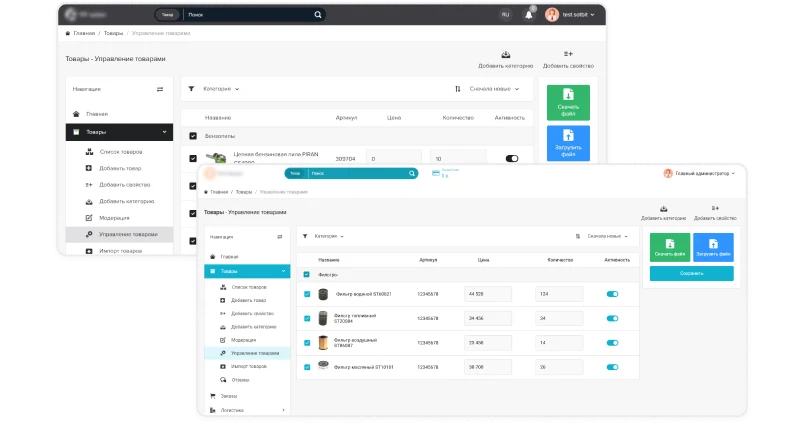
Supplier personal cabinet for the Sotbit Marketplace Start template. The tool is designed for data management and platform interaction.
Supplier personal cabinet for the 'Sotbit: Marketplace Start' template. The tool enables management of product and order data within the Sotbit platform ecosystem.
Technical support is available at cabinet.sotbit.ru/support.
Sotbit.Marketplace operates on the 1C-Bitrix platform, the most popular content management system in Russia and the CIS countries. This ensures high reliability and extensive functionality for the solution.
Quick start. Launching online projects via the Sotbit.Marketplace platform is significantly faster than building a website from scratch. This approach helps save time and resources.
Budget savings. Using a ready-made marketplace based on 1C-Bitrix reduces project costs thanks to built-in functionality. This advantage is particularly relevant for small and medium-sized enterprises.
One-time purchase model. Acquiring the solution involves no hidden fees. Annual license renewal is required solely to access technical support and updates.
The platform supports various public templates. It includes the modern Sotbit.Roznica template and allows connecting other ready-made solutions based on 1C-Bitrix. This ensures flexibility and an individual approach to website design.
The solution's scalability is ensured by its modular structure and the ability to switch between marketplace editions. This allows starting with minimal functionality and expanding it flexibly as the business grows.
The product receives regular updates several times a year. These updates ensure the functionality remains current and continuously expands.
The platform offers flexible customization, allowing adaptation to specific business requirements. This simplifies the creation of a unique and fully functional supplier website.
Turnkey implementation. The specialist team ensures the solution is fully ready for use immediately after installation is completed.
An extensive partner network ensures independence from a single developer and enables quick access to alternative solutions when needed.
Free technical support is included. It is available both before purchasing the solution and for one year after license activation, ensuring uninterrupted site operation.
The product holds accreditation from the Ministry of Digital Development of the Russian Federation. Registry entry No. 21693 dated 07.03.2024 confirms that the solution meets established standards and demonstrates high quality.
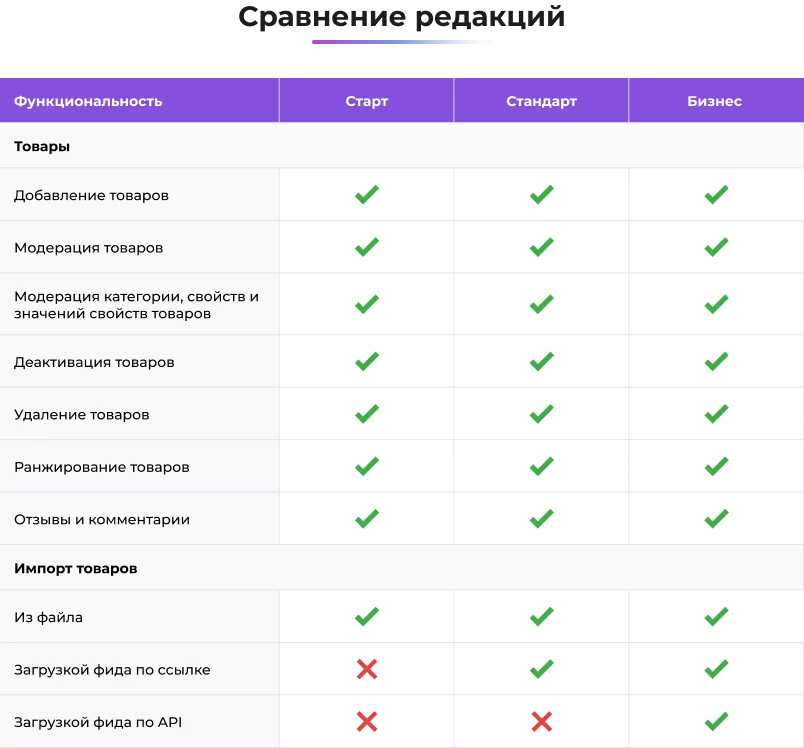
If the current capabilities are insufficient for configuring your business processes, you can upgrade to a more advanced version.
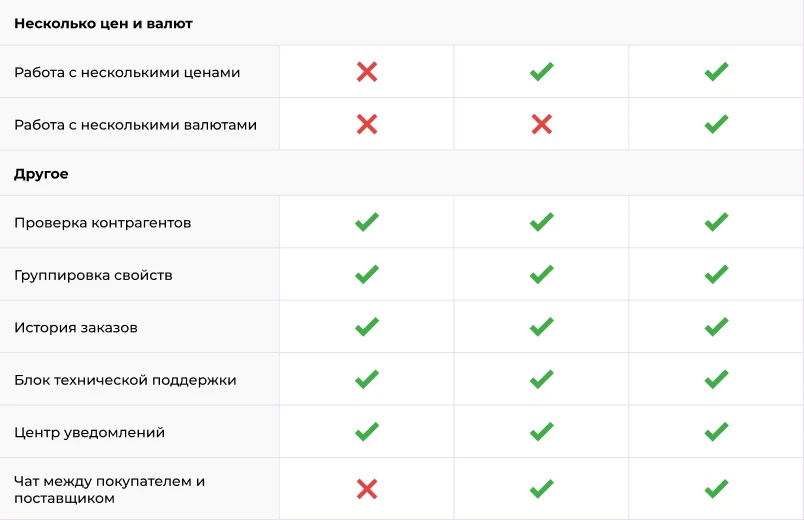
The Enterprise edition of Sotbit Marketplace enables the creation of a full-featured B2B marketplace for entering the international e-commerce market. It includes multilingual support with Russian, Chinese, English, and other languages.
Sotbit: Marketplace Start is a template that provides a supplier personal cabinet. The solution enables management of marketplace activities through a dedicated interface.
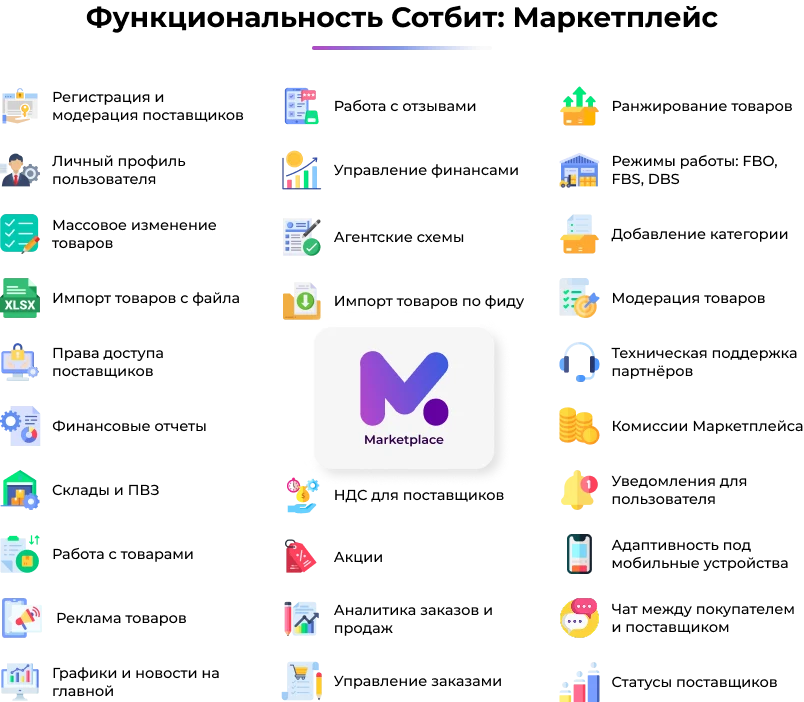
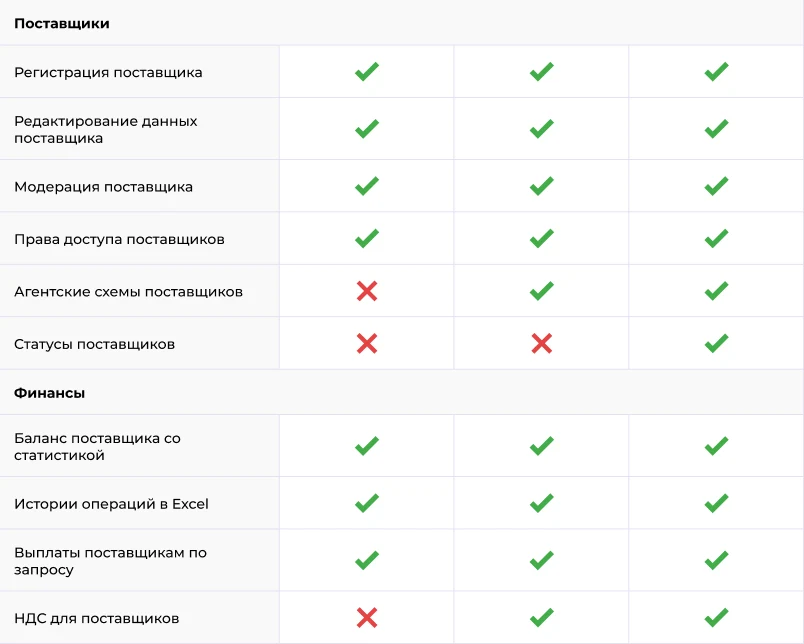
Supplier registration and moderation
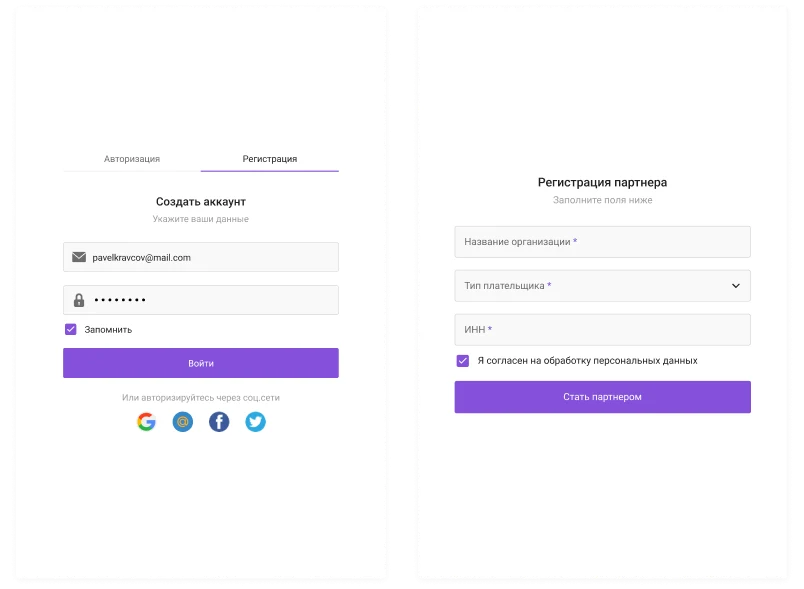
To create an account on the marketplace, a supplier must complete a two-step registration process. First, authentication data (email and password) are entered, followed by registration as a partner. The fields required for partner registration are configured by the marketplace administrator. All submitted registration applications undergo mandatory moderation.
Supplier Profile
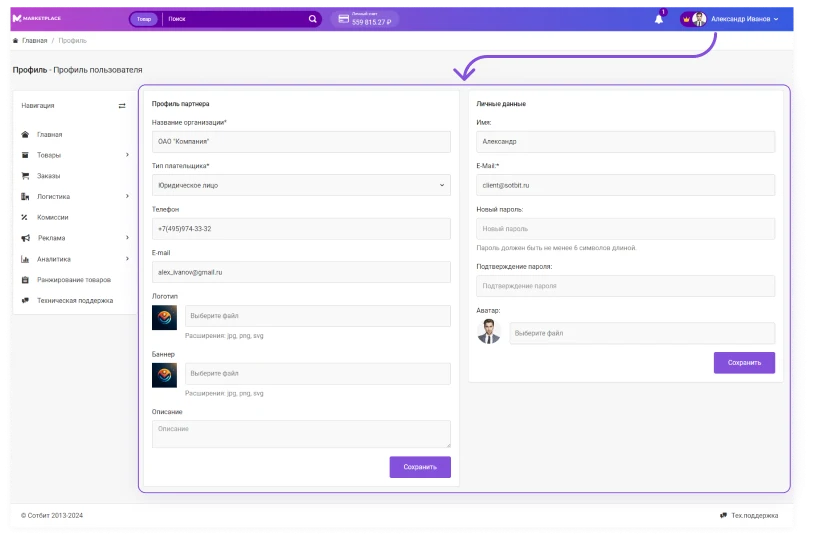
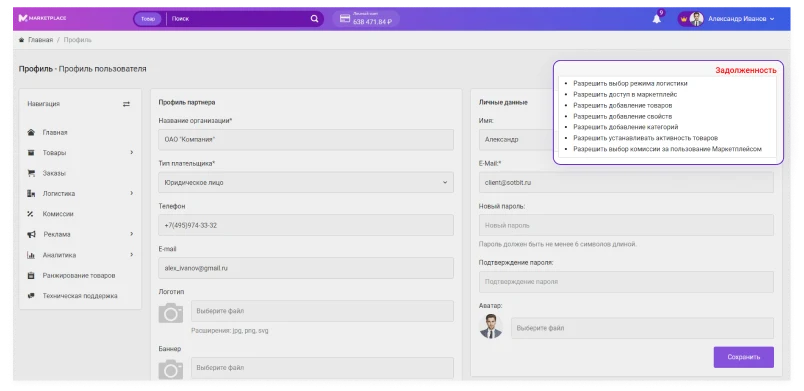
Each seller has a personal user profile. In it, they can enter and edit personal data as well as fill in partner profile information. The set of fields in the user profile is determined by the marketplace administrator settings.
Access rights
The marketplace owner can assign specific access rights to a specific supplier or a group of suppliers.
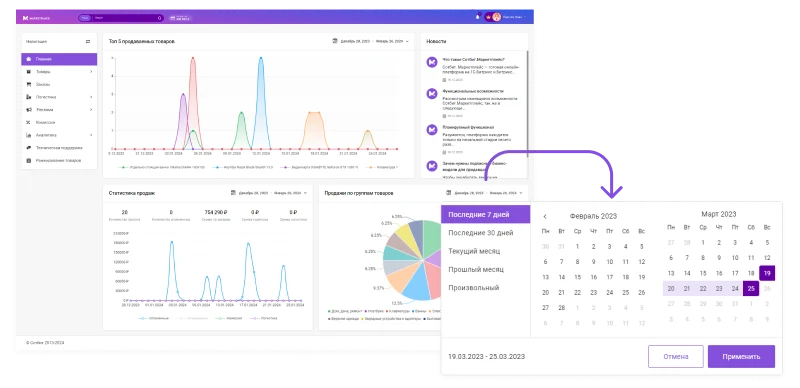
The supplier dashboard allows tracking key statistical indicators, analyzing sales trends via charts, and monitoring current marketplace news.
Products
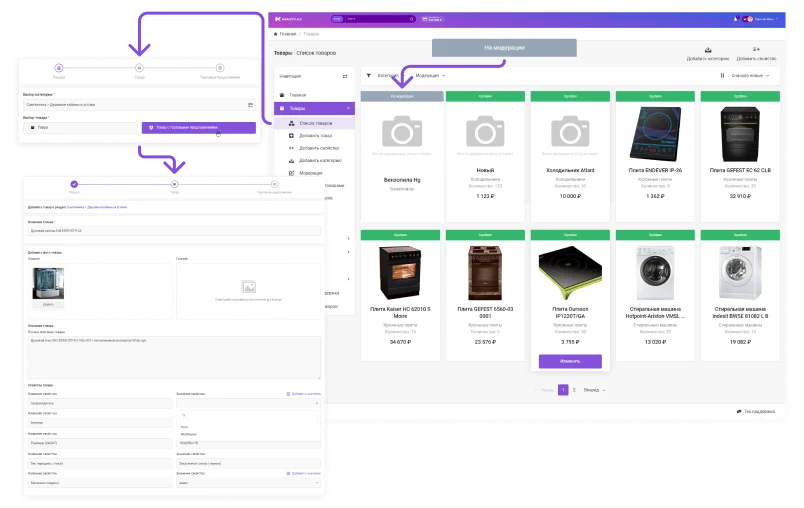
Adding and moderating products, attributes, and categories
The platform allows partners to add their own products, attributes, and categories to the portal. Marketplace owners and managers can moderate this data by approving or rejecting it.
Reviews
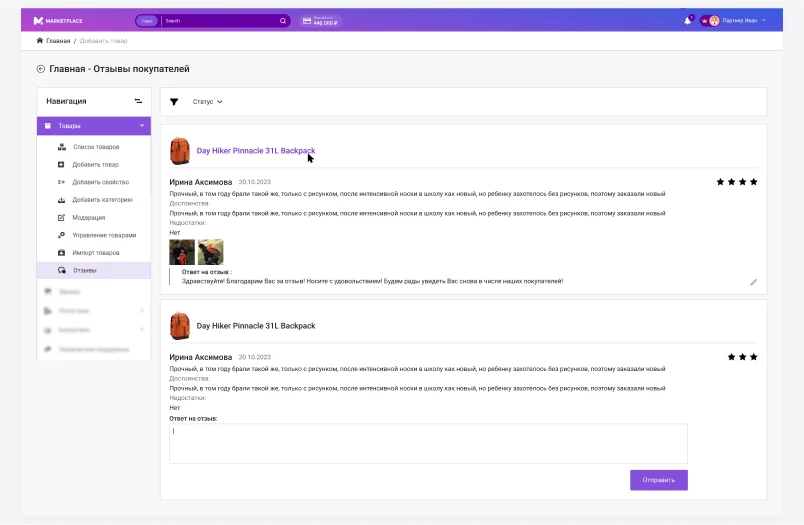
The supplier's personal cabinet allows viewing customer reviews for products posted in the public section of the Marketplace. Sellers can respond to these reviews directly within the cabinet interface.
Product Rating
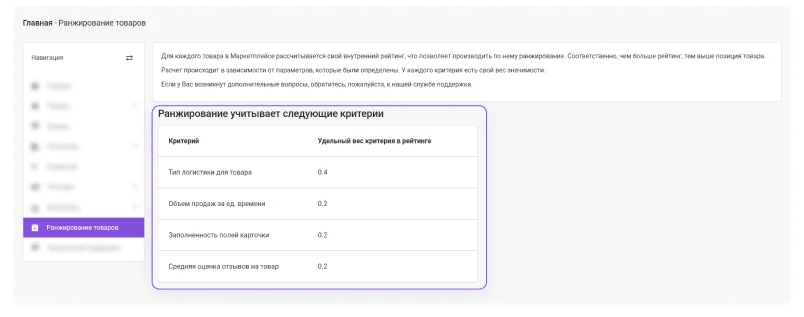
This feature calculates an individual rating for each product in the catalog based on configurable criteria. Parameters may include logistics type, sales volume, review count, and the completeness of product card fields.
Excel Import
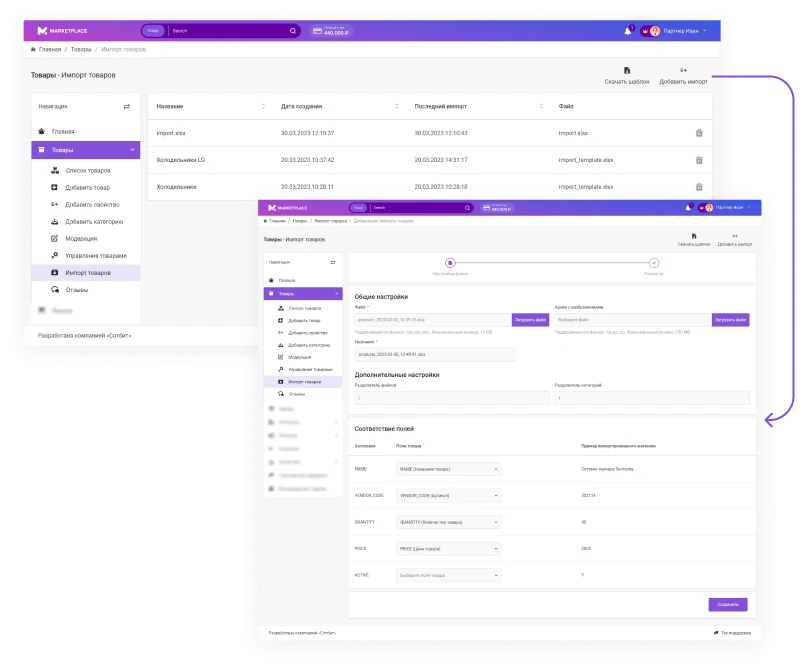
To quickly load a large number of product listings, suppliers can use import from an Excel file. Sellers may use the ready-made template from Sotbit Marketplace or add a custom template.
Operating modes
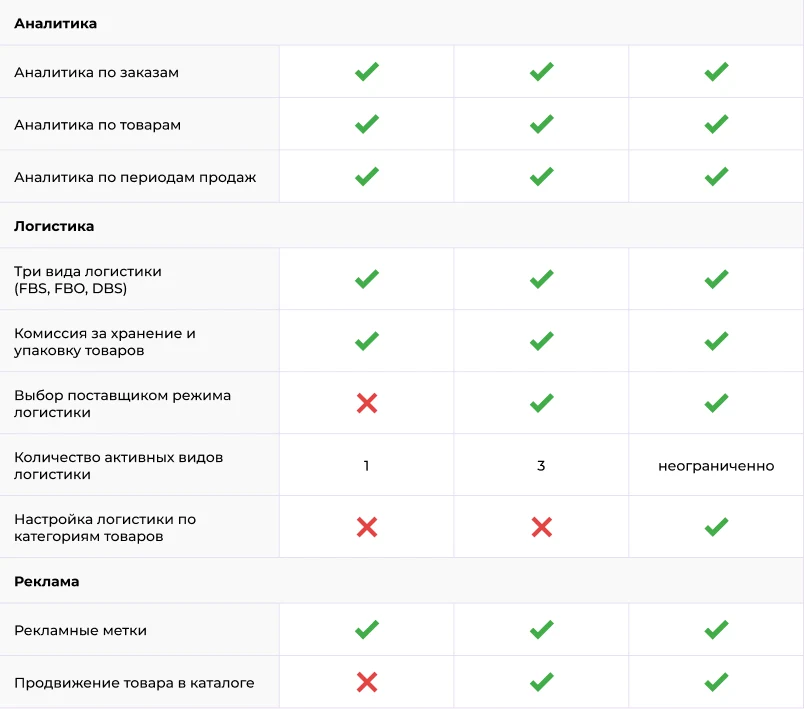
The solution supports three warehouse and logistics models:
1. FBO. Suppliers transfer goods to the marketplace warehouse. The platform handles order processing, picking, delivery, and returns.
2. FBS. Sellers store goods at their own warehouse. They pack orders themselves and hand them over to sorting centers for delivery to the end user.
3. DBS. Suppliers store goods at their own warehouse. They pack and ship orders to buyers independently.
This edition allows creating a single logistics rule that applies to all suppliers.
Marketplace warehouses
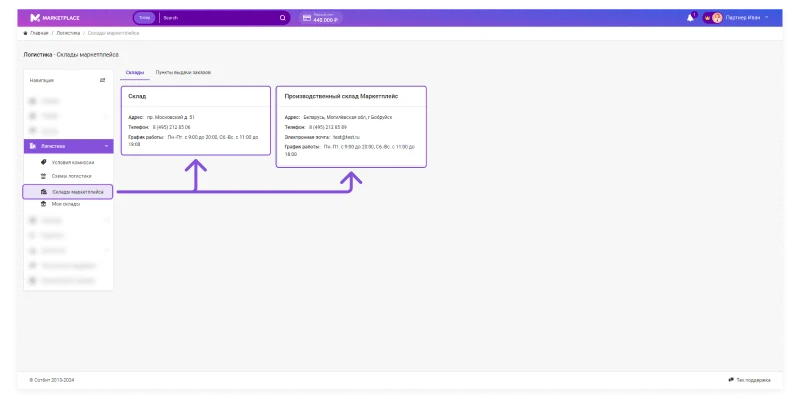
The functionality is available in FBO and FBS modes. It provides suppliers with reference information about all warehouses and order pickup points. This simplifies the process of delivering goods to the warehouse and receiving returned defective items.
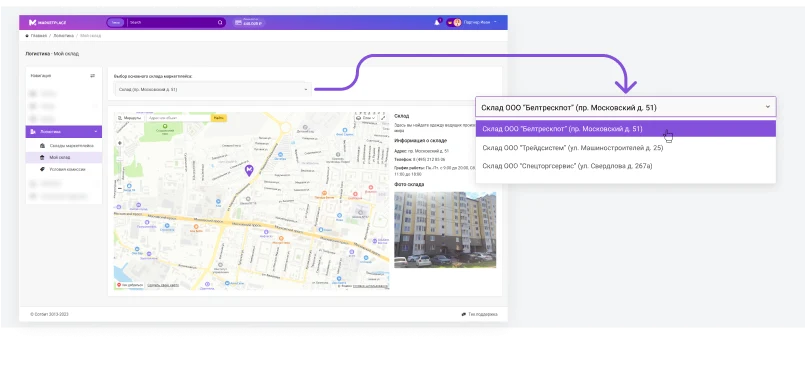
To facilitate stock tracking in FBO mode, a specific warehouse is assigned to the supplier. The option to select a primary warehouse is also available.
Own warehouse
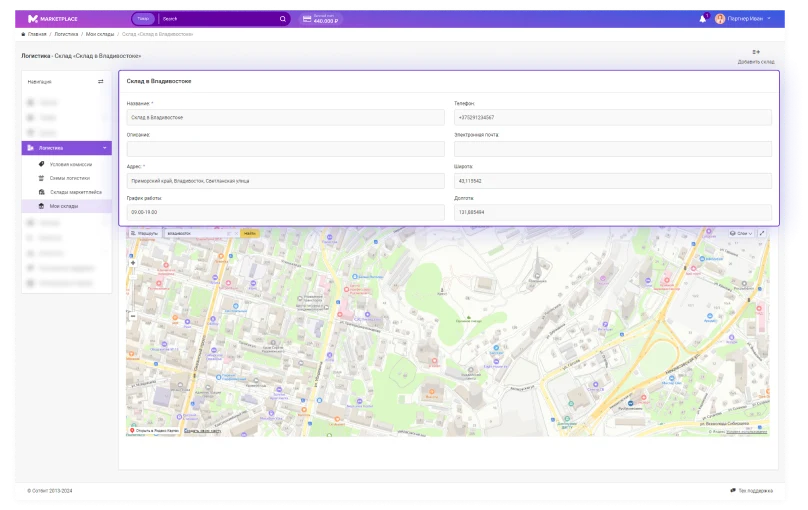
When operating in FBS and DBS modes, suppliers can create their own warehouse facilities. This provides full control over storage processes and inventory accounting. The functionality allows for flexible product placement, ensures availability, and enables prompt management of the assortment.
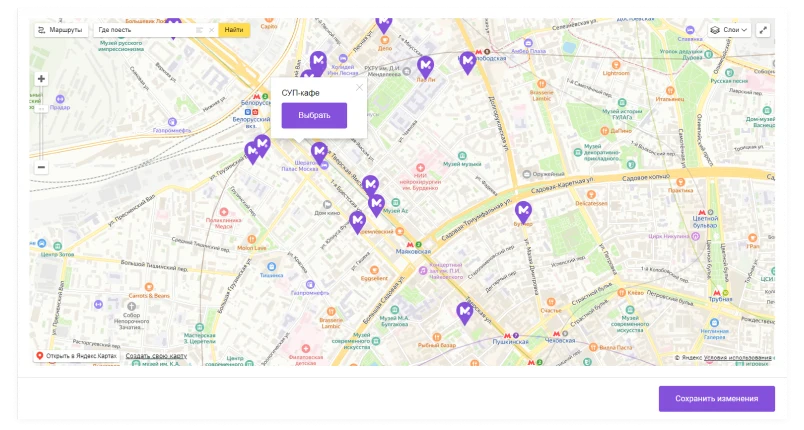
To simplify location specification, integration with Yandex Maps has been implemented. When a point is selected on the map, latitude and longitude coordinates are automatically filled into the product card.
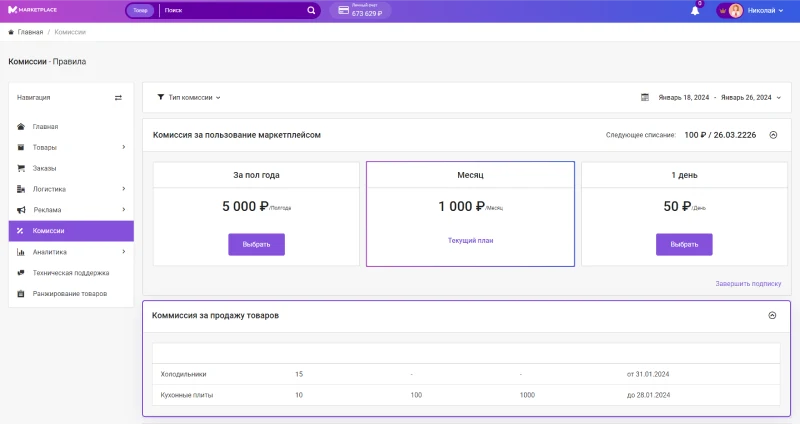
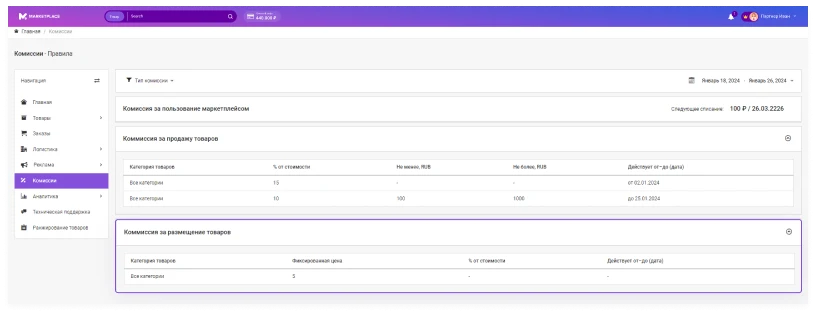
Commission terms
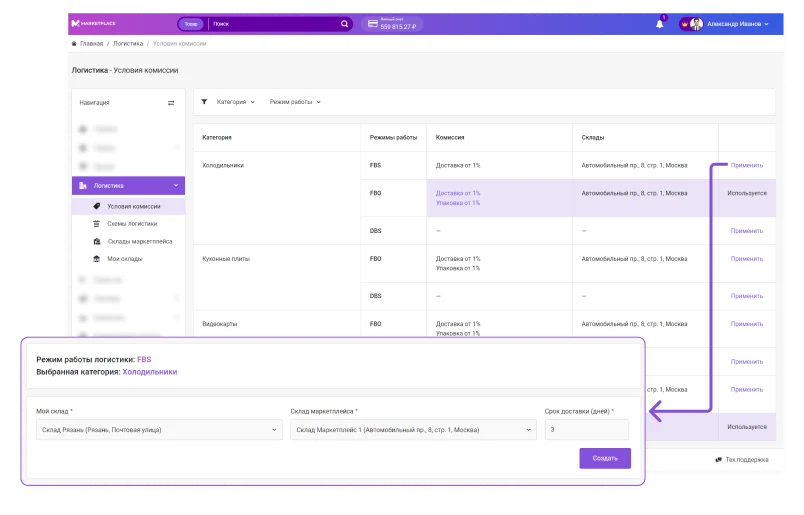
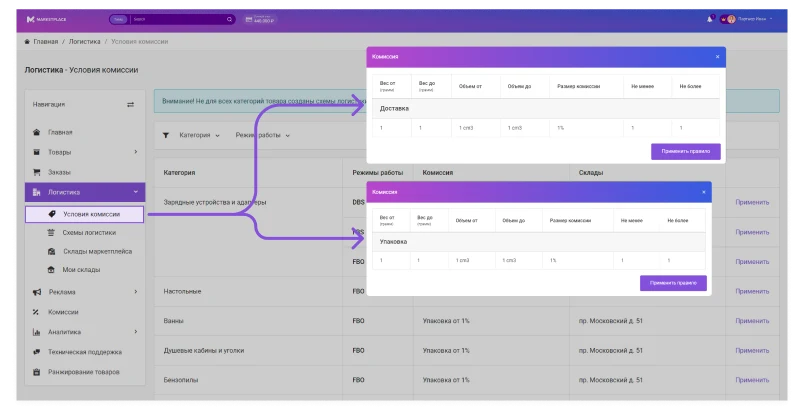
In FBO mode, two commissions are calculated: for delivery and for packaging. In FBS mode, only the delivery commission applies.
Depending on the marketplace operating mode, suppliers may be charged for storage and delivery. The Commission Terms page displays static information, but commission formation rules can be configured via the administrative panel.
The commission percentage is calculated based on product dimensions. The portal administrator can also set minimum and maximum commission values.
In DBS mode, no commissions are calculated because the supplier is responsible for storage, packaging, and delivery of goods.
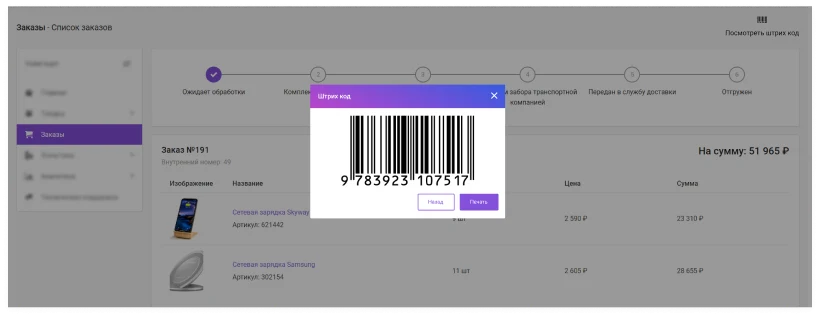
Barcodes
This feature is available only in FBS mode.
To facilitate work with processed goods, unique barcodes have been added for the convenience of both suppliers and buyers. Their activation can be configured via the administrative panel.
To improve tracking accuracy, suppliers can view an enlarged barcode image and send it for printing.
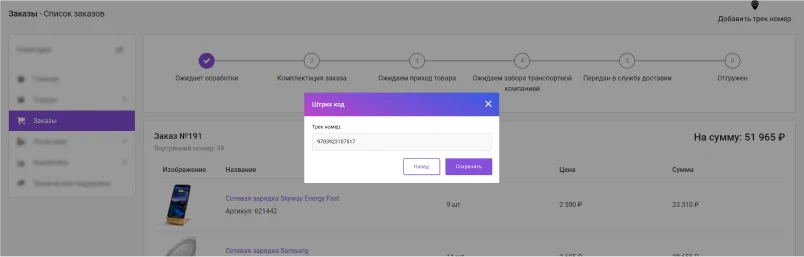
Tracking number
Available in DBS mode. Tracking numbers have been implemented similarly to barcodes in the Orders section. This functionality enables customers and suppliers to monitor order statuses using data from logistics companies.
The platform administrator can set the commission amount charged to sellers for using platform services.
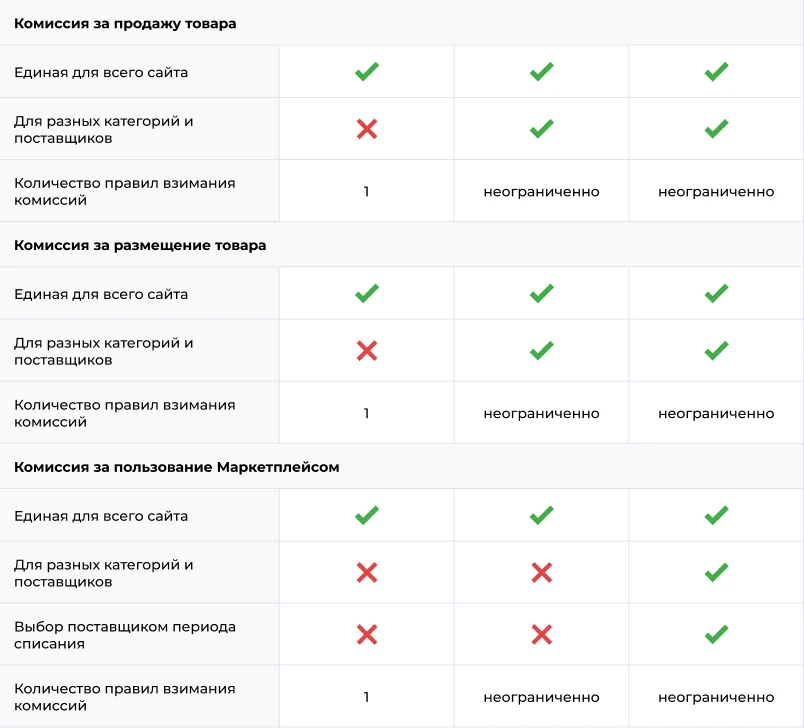
In the Personal Account section, vendors can track the history of all trade commission deductions. Payments for sold goods are made after each purchase. The commission size is set as a percentage of the sale amount. A commission rule defines the condition under which the seller pays the marketplace a specific percentage of the product or service cost. The edition allows creating a single commission rule for sales.
Listing fee
Payments for product listings are processed after the item successfully passes moderation and is added to the platform. The fee amount is set by the administrator and can be a fixed sum or a percentage of the product cost. The fee applies only to the main product.
The system supports the creation of a single listing fee rule.
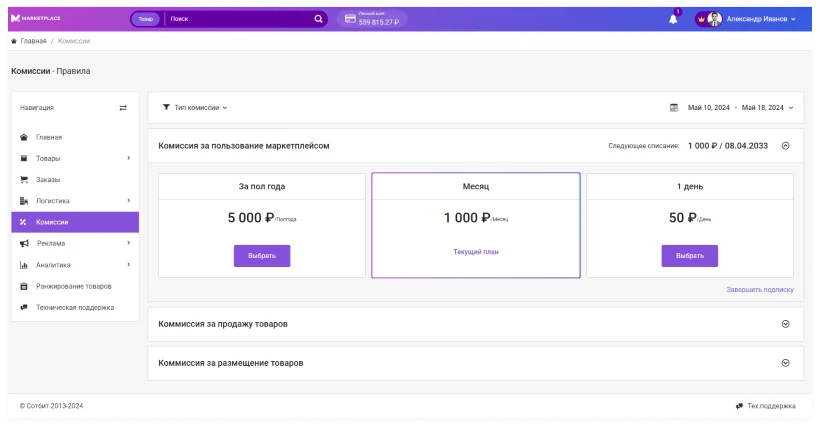
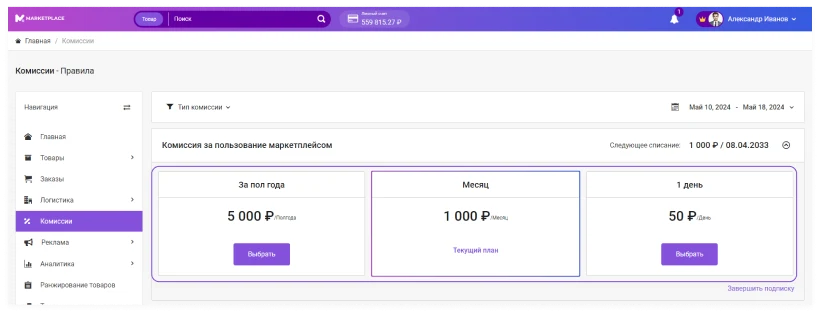
Marketplace usage fee
Payment is collected during periods established by the administrator. The fee amount is a fixed sum deducted either immediately after a partner registers on the platform or on the first day of a new reporting period. The system allows creating only one rule for marketplace usage fees.
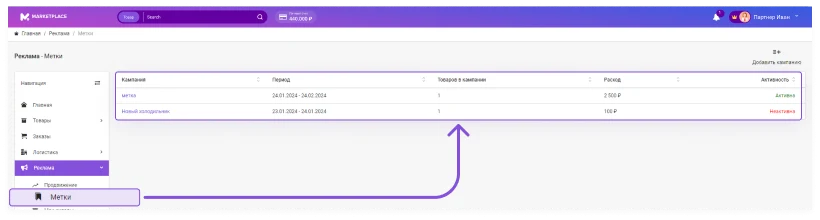
The platform allows advertising products using special tags. A tag is a colored sticker with a text label that highlights a product on the showcase. These tags allow marking items as bestsellers, new arrivals, or sale items.
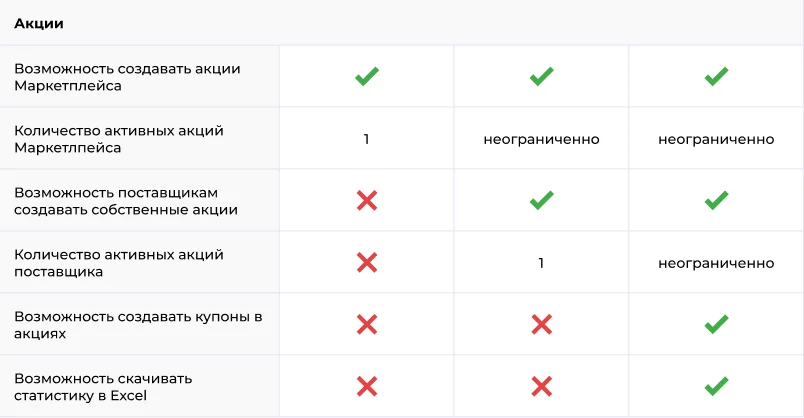
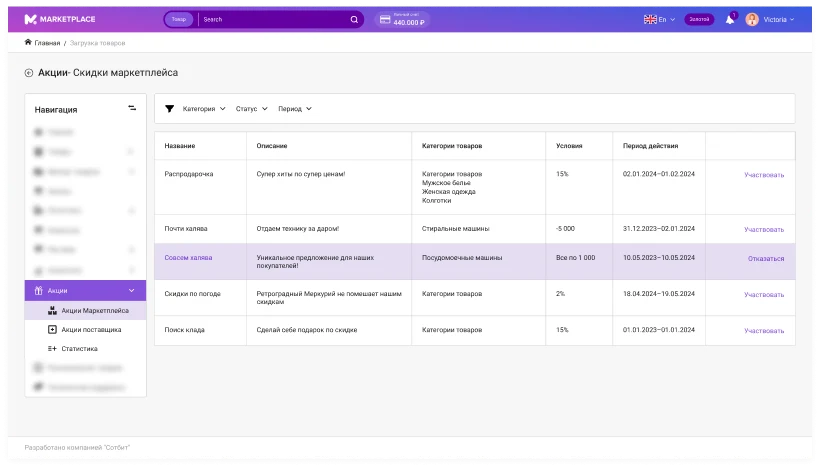
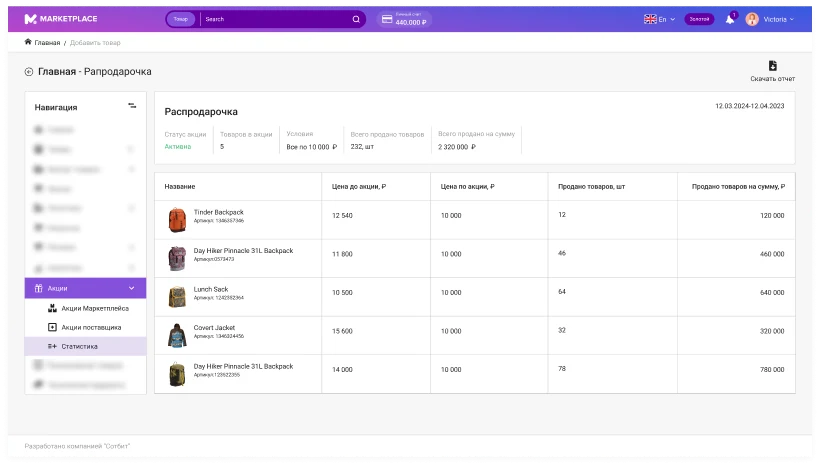
The platform allows marketplace owners and their partners to create promotional campaigns and join them. The owner can launch a promotion for specific products or categories, after which partners join. In this edition, a single partner can participate in only one promotion at a time.
Promotion statistics
Suppliers can view statistics for each of their promotions.
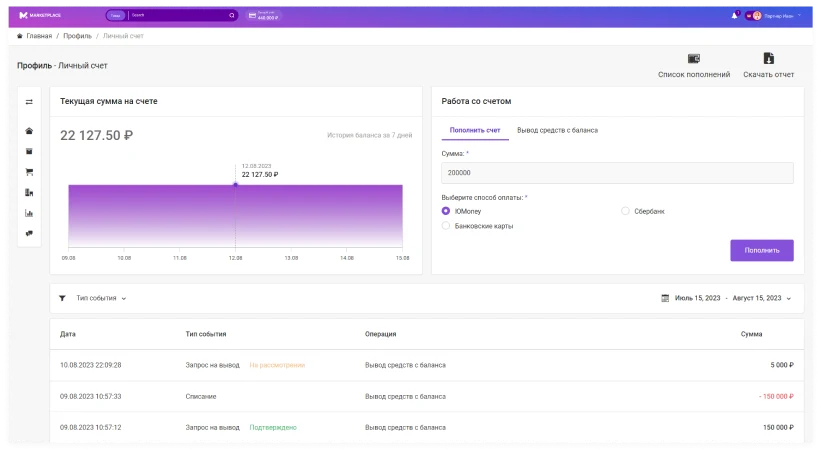
Suppliers can manage their personal account by topping it up and withdrawing funds directly through the platform. The system allows tracking the dynamics of the current balance changes and comparing these data with the financial transaction history to generate transparent reporting.
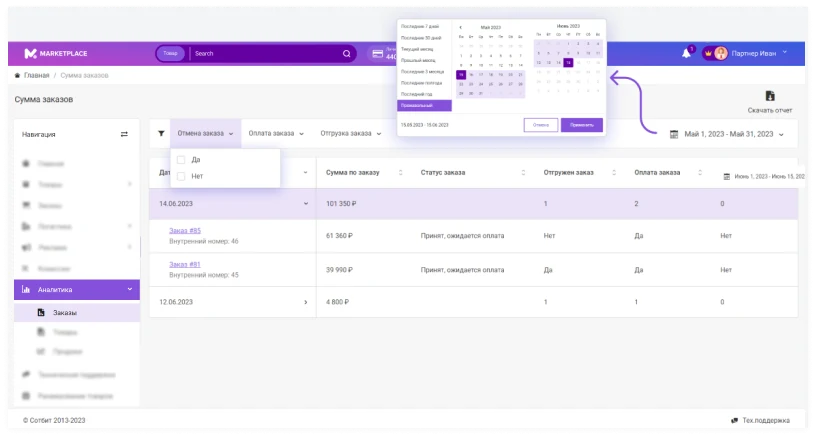
Order Statistics
The platform allows tracking order statistics for purchases made by buyers within a selected reporting period. The period can be fixed (week, month, quarter) or arbitrary.
Suppliers can view all orders placed during this period, including their total amount and status, as well as data on shipment, payment, and cancellation.
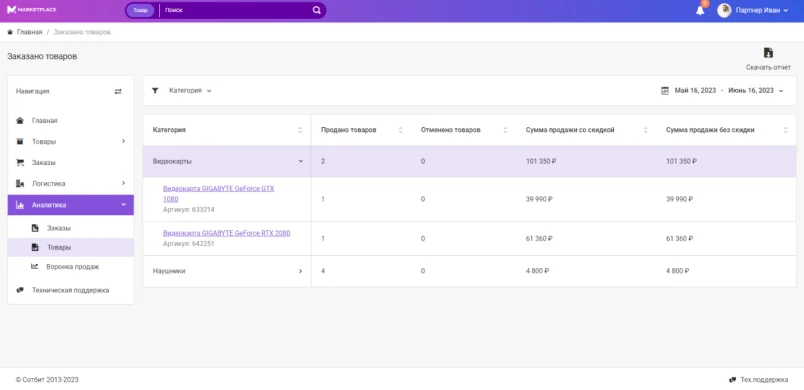
Product sales analysis
The Sotbit Marketplace module enables the collection of statistics for product items. The seller sets a reporting period and receives sales data for the specified time interval. Final data is grouped by categories: the number of sold and cancelled items, as well as the total sales amount both with and without discounts.
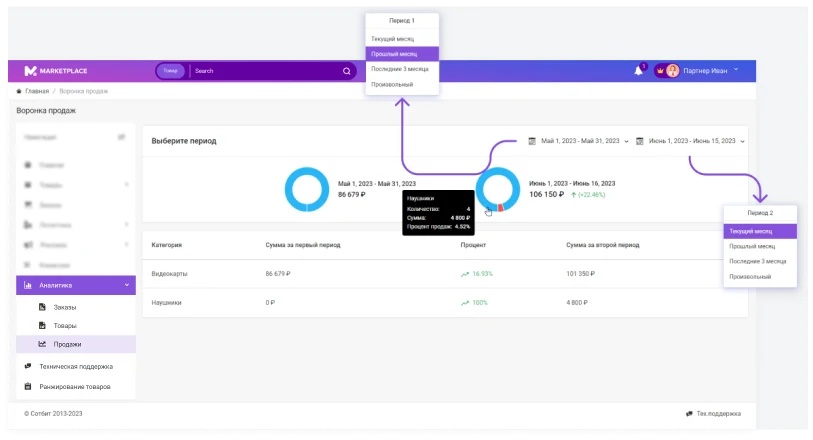
The Sales section collects data on product sales for two selected reporting periods, such as a month or a quarter, and compares them. The results are displayed as charts where each segment corresponds to a specific product category. The supplier sees the percentage change in sales amount in the second period compared to the first.
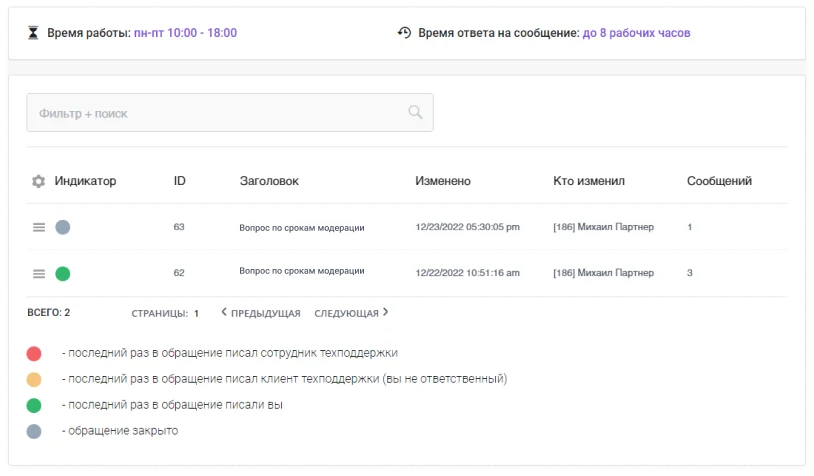
If a partner encounters any questions while working with the marketplace, they can submit a request that will be routed to the responsible specialists.
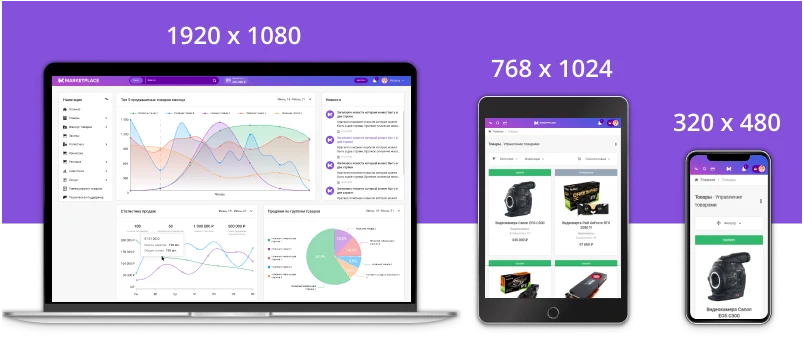
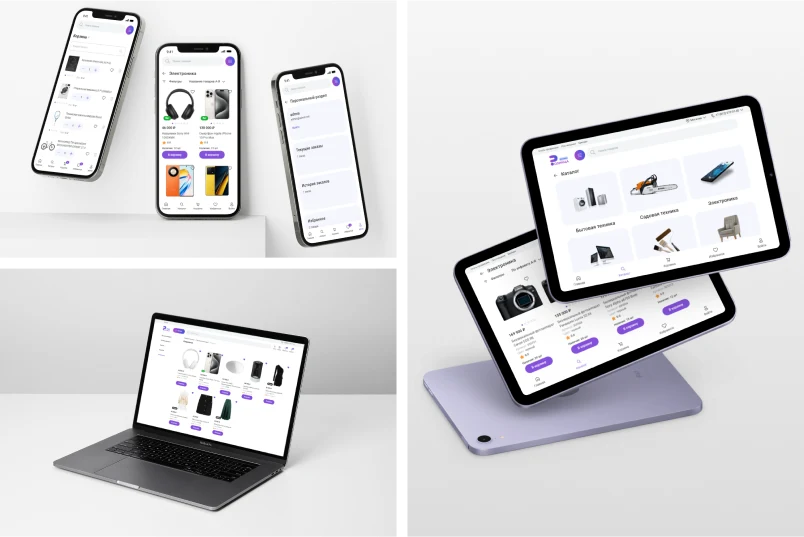
The marketplace interface automatically adapts to any mobile device or tablet, displaying correctly on screens with varying resolutions.
Public showcase
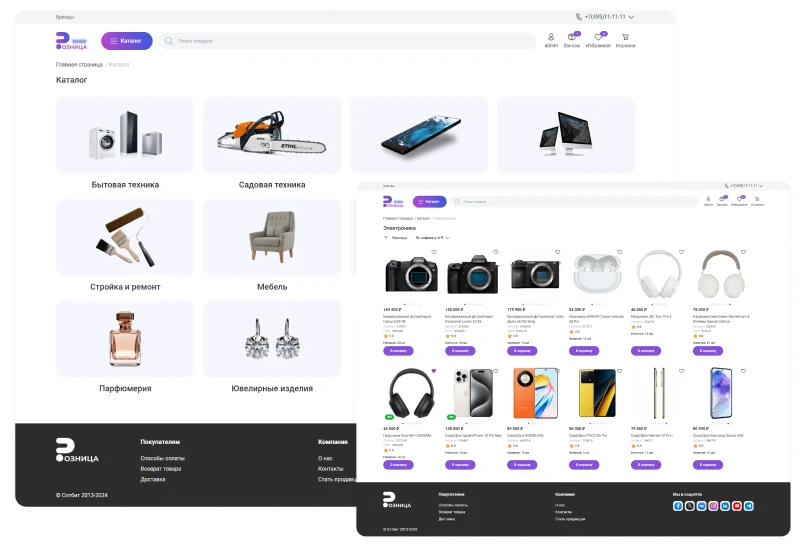
The public showcase uses the ready-made Sotbit: Retail template.
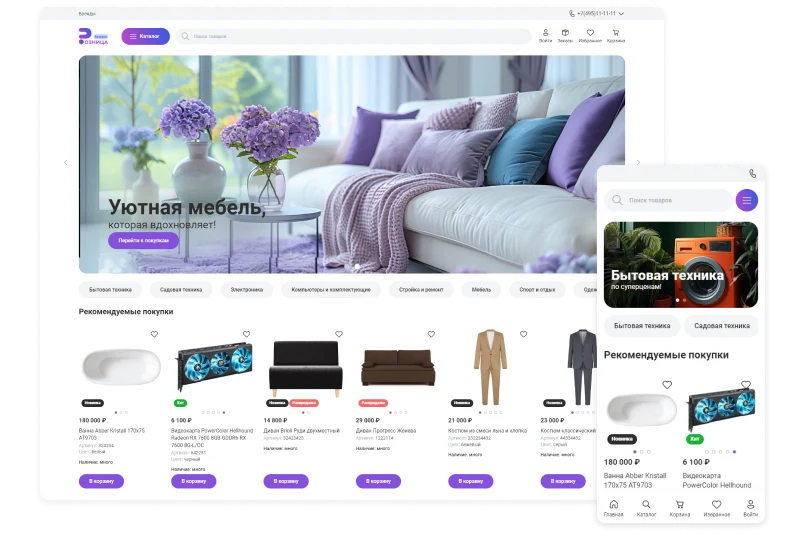
The main page of the Sotbit Marketplace Start supplier personal cabinet features a modern design that ensures user-friendly navigation and encourages shoppers to explore the assortment. A central banner is dedicated to displaying information about promotions, discounts, and company news. Below it sits the 'Recommended Products' block. Publishing specific items on the main page helps increase view counts and drive sales of the most profitable products.
The catalog is a sectioned list of products. It includes information for each item: name, description, price, availability, SKU, and other characteristics. This structure simplifies product search and selection for buyers.
The catalog serves as a tool for managing product assortment and improving the customer experience. It also helps organize and control inventory.
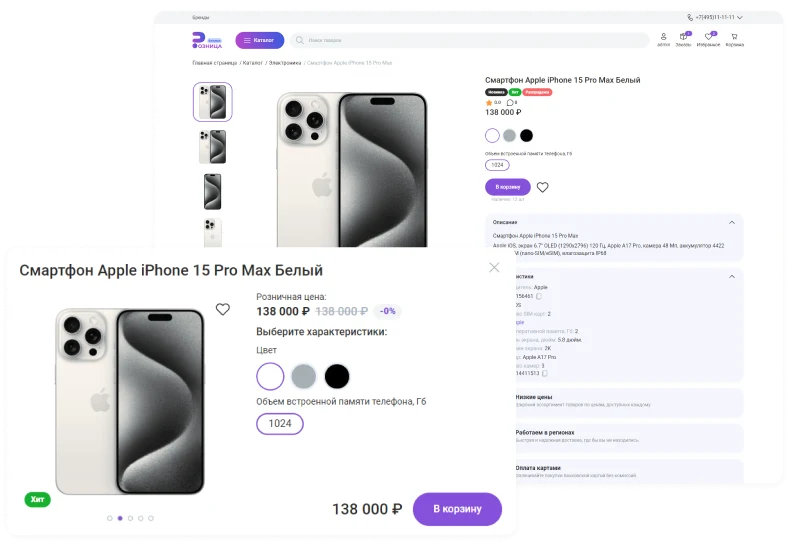
A detailed product card is an online store page that provides comprehensive information about a specific product. It includes basic data such as the name, price, images, and description. It also contains additional details: product specifications, customer reviews, and information about delivery methods and return policies.
The public showcase of Sotbit: Retail automatically adapts to screens of any size, ensuring correct display on devices with varying resolutions.
The Sotbit platform provides a comprehensive solution for deploying and launching a marketplace. The supplier personal account within the Sotbit: Marketplace Start template offers tools for managing activities on the trading platform.
Sotbit: Marketplace is a software solution for the 1C-Bitrix platform designed to manage the supplier's personal cabinet. Implementation of the product is carried out exclusively through a network of verified and qualified partners.
For clients
Review the list of verified partners.
Partner section. The supplier personal cabinet in the Sotbit: Marketplace Start system enables managing cooperation and earning revenue through the platform.
Free technical support for the installation and configuration of the Sotbit Marketplace solution is provided both before and after purchase.
Documentation for the Sotbit Marketplace Start module provides complete and up-to-date information on configuring and deploying the supplier's personal cabinet. The materials cover all integration features and technical nuances of working with the platform.
Supplier personal cabinet for the Sotbit: Marketplace Start platform. Designed for product management and account configuration.
If the text is too long to read right now, you can download the 'Sotbit Marketplace' presentation in PDF format and review it at your convenience.
Supplier personal cabinet for the Sotbit Marketplace Start template. The tool is designed for data management and platform interaction.
Supplier personal cabinet for the 'Sotbit: Marketplace Start' template. The tool enables management of product and order data within the Sotbit platform ecosystem.
Technical support is available at cabinet.sotbit.ru/support.
When implementing “Sotbit: Marketplace Start – Supplier Personal Account”, General iT can help with installation, adaptation and launch preparation.
UPDATE HISTORY
What’s new
3 releases
2.4.1 (03.06.2026)Latest update
Increased resilience to potential threats in the solution
2.4.0 (31.03.2026)
New functionality:
Seamless integration with the Sotbit: Extended Reviews module has been implemented;
Seamless integration with the Sotbit: SMS and Email Authorization module has been implemented;
The Sotbit: Finance Management module has been integrated into the solution;
Synchronization of creating promotion items when using the Retail template has been implemented;
A commission agent report has been added;
Filtering and sorting of reviews have been added.
Optimization and fixes:
A link to the product card in the retail section of the site has been added;
The product import template has been optimized;
Currency support has been implemented for the finance module;
Hints on using VAT have been added;
Other minor fixes and improvements.
2.3.1 (23.01.2026)
Optimization and fixes:
Errors after updating the main Bitrix module (main Bitrix module version 25.1150.100) have been fixed.
USER EXPERIENCE
Solution reviews
How does this solution work in a real project? Share your experience and help others choose.
Be the first to share your experience
There are no reviews of this solution on git.ru yet. Tell us what worked well and what could be improved.
✓
Verified purchaseAdd a key if you wish. A verified review gets a badge, priority placement and more rating weight.
↗
Open to every clientJust sign in to your account. A key is optional; all reviews are moderated.
The 'Sotbit: Extended Reviews' module is designed for the 1C:Enterprise platform. It extends standard review management capabilities, enabling the collection, analysis, and display of customer service quality data. The solution supports integration with external review services via specified addresses, ensuring automatic data synchronization.
The Smart Search module by Sotbit extends search capabilities within the system. Features include typo and spelling error correction, context-aware query understanding via GPT neural networks, configurable search scope, and result prioritization. The module also supports excluding specific items from search results.
The Sotbit Smart Filter SEO module is designed to increase online store traffic. The tool operates by generating numerous unique pages for smart filters.
Aspro: Maximum is a universal e-commerce template designed with user requirements and modern technologies in mind to ensure fast loading speeds. The solution is optimized for display on all device types and is intended to address practical business tasks.
Aspro: Next is a universal e-commerce template suitable for products of any category. The solution supports full multi-regional functionality and enables the creation of landing pages within the catalog, review sections, and search results. The template architecture is designed to meet the needs of projects focused on growth and scalability.
Deluxe is a multifunctional online store that combines platform and builder capabilities. Designed for businesses of any scale, it includes over 250 built-in features. The system ensures high performance and flexible configurability for various tasks.
The displayed price covers the solution itself. Platform licensing, installation and customisation are checked separately. If the page offers bundles, select the required option before submitting a request.
How do I check compatibility?
Compare the supported editions and solution version in the technical details with your project. Before installing on a live website, we recommend making a backup and checking the solution in a test environment.
How much does this solution’s renewal cost?
The current renewal price is 424,950 ₽. Before you order, a manager will confirm the renewal period and whether it applies to your licence.
Can you help with implementation?
We can help launch a website using the selected template, agreeing on its structure, content migration and integrations. The schedule and cost depend on the project and are quoted separately.
Statistics and interaction recording
Public pages use basic statistics. Our recording and Yandex Webvisor require your permission. You can keep basic statistics or disable all analytics.
Operator: General IT Rus LLC, INN 2310208877. Statistics and recording help improve the website.
Basic statistics: pageviews, a random daily ID, a public URL and time. The ID lasts until Moscow midnight. Original records: up to 48 hours; totals: up to 7 years.
Without Webvisor permission, Yandex receives server statistics without visitor IP, User-Agent or cookies. If selected, its browser code collects technical data, cookies, actions and masked page snapshots; recordings last 15 days. Inputs, chat and account areas are hidden.
Interaction recording requires permission: clicks, scrolling, technical information and filtered public-page snapshots. Events: up to 7 years; IP and snapshots: up to 90 days.
Permission is remembered for up to 365 days; full opt-out remains until changed. Basic statistics only disables recording; Disable all analytics stops new analytics. Previously sent data is not automatically deleted. Withdrawal and requests: support@git.ru. Full terms are linked below.
Your browser requests no tracking: analytics is off.