Payments are experiencing issues due to temporary restrictions in Russia. If your payment does not go through, please submit a support request.•Our support team is available 24/7 — we are always here to help with hosting and server issues.•We are now accepting requests for dedicated server rental and colocation services in our data center.•Reminder: we recommend enabling backups for additional data protection.•A new VPS/VDS lineup with NVMe storage and improved performance is now available.•Maintenance work on some servers has been completed. All services are operating normally.•
Payments are experiencing issues due to temporary restrictions in Russia. If your payment does not go through, please submit a support request.•Our support team is available 24/7 — we are always here to help with hosting and server issues.•We are now accepting requests for dedicated server rental and colocation services in our data center.•Reminder: we recommend enabling backups for additional data protection.•A new VPS/VDS lineup with NVMe storage and improved performance is now available.•Maintenance work on some servers has been completed. All services are operating normally.•
Аккаунт в General iT
Вход / Регистрация
Войдите или создайте аккаунт для управления услугами в панели.
ARAMA: Product collections in sections. SEO categories. Landing sections. Discounted products
The module enables the creation of dynamic product collections within infoblock sections based on specified conditions, parameters, and properties. This solution supports the formation of categories with a precise set of products that meet the requirements of SEO specialists and site owners.
Linking collection items to infoblock sections provides the following capabilities:
The module enables the creation of dynamic product collections within infoblock sections based on specified conditions, parameters, and properties. This solution supports the formation of categories with a precise set of products that meet the requirements of SEO specialists and site owners.
Linking collection items to infoblock sections provides the following capabilities:
The module enables the creation of sections where products are automatically assembled based on specified parameters. This solution supports the creation of categories for search engine optimization, landing pages, and discount sections.
The module contains no separate components, so no adaptation to the site design is required. The functionality works within the current layout, provided the catalog display is already configured.
The module supports the 1C-Bitrix smart filter. It enables the creation of categories for search engine optimization, the generation of landing sections, and the display of discounted items within product collections.
The module builds product collections based on information block sections, preserving all their standard functionality. This allows setting unique SEO data for each category, including descriptions, individual URLs, and canonical links, while utilizing all other standard information block field capabilities. The tool is suitable for creating seasonal product bundles for New Year, February 23, March 8, birthdays, and other holidays.
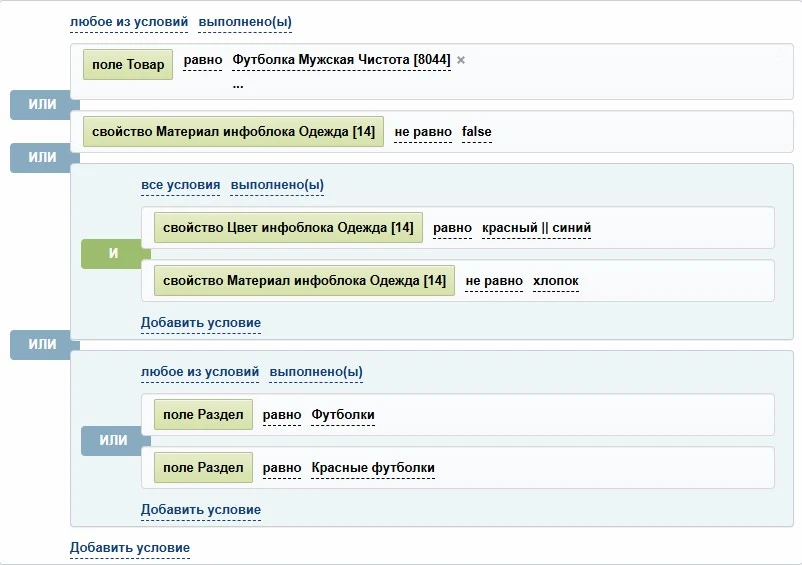
Condition Builder
Two configuration variants are available.
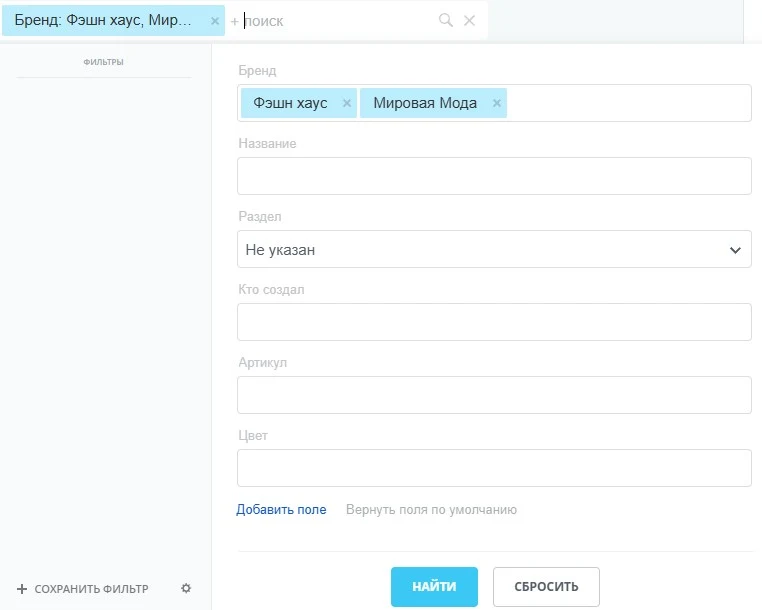
UI-based filtering interface. The tool enables the creation of product collections within site sections, generation of categories for search engine optimization (SEO), configuration of landing pages for sections, and display of discounted products.
The discount settings interface mirrors the product filter in the administrative section's product list and aligns with the standard discount conditions interface. This functionality is not available in the Start, Standard, and Expert editions.
ARA MA module: Product collections in sections. SEO categories. Landing sections. Discounted products
The ARAMA module forms product collections within site sections. The tool allows creating categories optimized for search engines and landing pages. It implements automatic display of products at promotional prices.
The condition builder creates product collections based on InfoBlock sections. To use the module, you must create a new section or select an existing one to host the products.
Important: Do not configure collections in the main website categories where products are already manually linked or imported via 1C and other accounting systems. If a product does not meet the filtering criteria, it will be automatically unlinked from the selected section.
After installing the module, a 'Product Collections' tab becomes available on the block section edit page. This tab is used to configure collection parameters, including selecting product filtering conditions via builders and setting additional options.
Important: When configuring conditions in the builders, a section can be selected. It is prohibited to specify the collection itself or another section that is already a collection as the target section.
After setting collection conditions, save the changes and perform an initial reindexing. This step must be executed once to correctly apply all rules.
Subsequent synchronization of products with information block sections occurs automatically. Items are automatically linked or unlinked from the section depending on whether they meet the collection conditions.
Automatic reindexing is triggered when a product (information block element) is added or edited via event handlers, and optionally via agents.
Creating a 'Sale' or 'Promotions' section
It is often necessary to display items in a section based on specific criteria, such as belonging to a particular brand, having a specific color, or meeting other parameters. The number of such scenarios is vast, while manually linking each item to a section is inconvenient and labor-intensive. The 'Product Collections in Sections' module automates this process, enabling flexible creation of SEO categories and landing pages based on defined conditions.
Additional: information on implementing the 'Discounted Items' section using collections.
II. Creating special categories based on product properties
The module enables the creation of dynamic sections that aggregate products from various main categories according to specific attributes. For instance, if a website already has sections such as 'Treadmills', 'Elliptical Trainers', and 'Exercise Bikes', you can establish a new structure titled 'Trainers by Type' with subsections like 'For Legs', 'For Arms', 'For Back', and 'For Abs'. Products in these categories are automatically collected from the source sections based on their properties.
Additional examples of effective catalog organization can be found in the article 'How to help customers choose a product? Proper product structure is the key to site success'.
III. Building a custom hierarchy
The module allows you to create a section structure independent of the hierarchy in your accounting system. This is relevant when products are imported from 1C or other sources where the category structure does not match your website's requirements.
Create the desired section structure once and configure rules for collection sections using the condition builder. Products will then be automatically distributed to the appropriate sections. Any unnecessary categories inherited from the source system can simply be deactivated.
Organizing sections by brand
This feature allows creating catalogs by grouping products by specific manufacturers or their combinations. Example structures include:
- Brand 1
- Brand 2
- Brand 3
- Brand 1 + Brand 3
Each created section displays only products matching the selected brand or brand set. Additional examples for navigation organization are provided in the article "Collections. How to make the site more convenient and attractive".
Discounted products
The condition builder allows you to set criteria similar to those used for discounts. Based on these criteria, products are automatically collected into the specified section.
VI. Implementation of Duplicate Subsections
By default, a subsection can have only one parent section, whereas products can be associated with multiple sections. If you need to display the same subsection in different parts of the catalog, this limitation can be bypassed using this module.
The solution involves creating a duplicate subsection in the target section and configuring a collection condition that pulls products from the original subsection into this duplicate.
Example: If the subsection 'Cases' is located within the 'Smartphones' section but needs to be visible in the 'Tablets' section, create a new subsection named 'Cases' inside 'Tablets'. Then, configure a collection to display products from the original 'Cases' subsection within this duplicate. As a result, the 'Cases' subsection will be accessible from both parent sections.
The 'Product Collections in Sections' module provides flexible control over catalog structure and enables solutions for tasks that cannot be achieved with standard functionality.
The module enables the creation of product collections within site sections based on various criteria, including technical specifications. For instance, products can be grouped by load capacity. The functionality supports generating categories for SEO, landing pages, and displaying discounted items.
The module enables the creation of product collections within online store sections, generating categories for SEO and dedicated landing pages. It supports grouping discounted items and assembling complete sets, such as suits composed of jackets, trousers, skirts, and vests.
The module enables the creation of product collections within sections, generation of categories for SEO, and display of landing sections. It allows grouping products by specified price ranges using infoblock properties. Implementing this logic requires duplicating price values into element properties beforehand, which can be achieved using auxiliary tools.
ARAMA module: Product collections in sections. SEO categories. Landing sections. Discounted products.
Installation and configuration
The process includes configuring a single example.
ARAMA Module: Product Collections in Sections. SEO Categories. Landing Sections. Discounted Products.
Documentation
Informative setup guide for the solution.
ARAMA: Product Collections in Sections. SEO Categories. Landing Sections. Discounted Products
The module enables the creation of thematic product collections within catalog sections. It supports generating SEO-optimized categories and landing pages for targeted traffic. The functionality includes displaying discounted products within selected collections.
This section contains additional articles and examples of practical module application.
ARAMA module: Product collections in sections. SEO categories. Landing sections. Discounted products.
Communication functionality enables interaction with technical support staff via popular services.
The module is supplied with a perpetual license. Free updates are available for the first year after purchase. The license itself has no expiration date and does not require renewal.
Technical support is provided directly by the module developers without intermediaries. Contact only the programmers who created this solution.
Attention
To correctly link products to information block sections acting as collections, reindexing is required. During reindexing, products are linked to information block categories while retaining their existing links to older sections where no collection is configured. Reindexing the collection needs to be performed only once after its creation or when the conditions are changed.
During reindexing, a single product may be assigned to multiple sections. To ensure search engines index only one canonical URL for the product, canonical link support must be configured. Detailed instructions are available in the documentation under the section 'Main element page among duplicates'.
It is not recommended to include sections that are themselves collections in the conditions for generating collections. In this configuration, correct operation is not guaranteed.
In the basic editions (Start, Standard, Expert), only the filter interface is available for the condition builder.
The module requires the iblock and highloadblock components to be installed.
This module is developed using the D7 API. Before installation, ensure that your core version meets the minimum technical requirements.
Before starting, carefully review the Installation and Support section on this page.
Sometimes there is a need to create section-collections as independent entities with separate pages, not displayed in the main catalog menu or section list. The module does not support this functionality by default. However, the task can be resolved through additional customization. If needed, we are ready to perform these modifications for a fee. The 'Menu Templates' module may also be useful for implementing such solutions.
The module indexes elements for a collection section within a single information block. For a trade catalog, it can verify parameters of trade offers.
To display items from a different information block, these items must be copied. This requires an additional module, Tools. The mechanism for synchronizing sections and items across different information blocks is documented separately.
During the trial period, the module operates in a limited mode, allowing no more than seven items to be linked to a single collection.
ARAMA: Product Collections in Sections. SEO Categories. Landing Sections. Discounted Products
The module enables creating product collections within sections, generating SEO-optimized categories, building landing pages, and displaying discounted items.
Free technical support is available during the module update period. Requests are handled directly by developers without intermediaries, reducing response time. Support includes assistance with installation, configuration, and usage consultation.
ARA MA module: Product collections in sections. SEO categories. Landing sections. Discounted products
ARA Module: Product Collections in Sections. SEO Categories. Landing Sections. Discounted Products
ARAMA Module: Product Collections in Sections. SEO Categories. Landing Sections. Discounted Products.
The module enables the creation of thematic product collections optimized for search engines, the formation of landing sections, and the display of discounted items. It simplifies navigation by helping customers quickly reach product pages and facilitates the work of SEO specialists and content managers through intuitive search and catalog structuring.
The module supports adding info block categories (sections, collections) to favorites or the shopping cart. It assists in preparing an online store for seasonal promotions such as Knowledge Day, Black Friday, New Year, Christmas, February 23, and March 8, making the site more user-friendly and attractive to buyers.
Custom development of the functionality to meet specific project requirements is available for an additional fee. The developer reserves the right to decline additional work without providing reasons.
Tools for organizing cross-selling. Automation of routine tasks across all editions of 1C-Bitrix.
Automatic section generation based on property values. The tool enables the creation of auxiliary categories using key product characteristics.
Additional templates for the standard [bitrix:menu] component
General iT can handle the implementation of “ARAMA: Product collections in sections. SEO categories. Landing sections. Discounted products”, from installation to configuration and compatibility checks.
UPDATE HISTORY
What’s new
100 releases
2.0.1 (05.08.2026)Latest update
Attention! The __checkElement method has been moved to the CScoderCollectionsEvents class.
2.0.0 (29.07.2026)
Fixed module issues in demo mode after previous updates.
1.9.9 (25.06.2026)
Service adjustments
1.9.8 (18.06.2026)
Vulnerability fix: operator whitelist added for eval
1.9.7 (18.06.2026)
Service adjustments
1.9.6 (18.06.2026)
Service adjustments
1.9.5 (13.05.2026)
Service adjustments
1.9.4 (29.04.2026)
Service adjustments
1.9.3 (28.04.2026)
Service adjustments
1.9.2 (26.04.2026)
Service adjustments
1.9.1 (26.04.2026)
Service adjustments
1.9.0 (17.04.2026)
Overwriting the Last Reindex Date field during full reindexing or via agent. Adjustments to language files.
1.8.9 (17.04.2026)
Adjustments to the module functionality access rights level
1.8.8 (16.04.2026)
Correction for collection deletion when removing conditions in the discount builder. Language file corrections.
1.8.7 (12.04.2026)
Changes in language files. Tooltips.
1.8.6 (10.04.2026)
Bug fix when indexing multiple collections using the filter interface.
1.8.5 (09.04.2026)
Added UF field ARAMA: Product Collection to automatically mark InfoBlock sections that are collections.
1.8.4 (08.04.2026)
Added activity display for collections.
1.8.3 (07.04.2026)
Migration of the old module API to ORM. Removal of the old module database API. The old API is no longer supported.
1.8.1 (07.03.2026)
Corrections for the previous update.
1.8.0 (07.03.2026)
Added the ability to populate a property for product collections.
1.7.9 (09.02.2026)
Code adjustments
1.7.8 (09.02.2026)
Changed encoding of language files to UTF-8; WINDOWS-1251 encoding is no longer supported.
Removed unnecessary information blocks from the "Information blocks to iterate for products" option
1.7.7 (13.01.2026)
Trial version
1.7.6 (19.12.2025)
Adjustments in language files: module name changed
1.7.5 (19.12.2025)
Adjustments in language files: module name changed
1.7.4 (02.09.2025)
Adjustments for main.ui.filter
1.7.3 (13.08.2025)
Replaced jQuery with jQuery3 in the module.
1.7.2 (23.05.2025)
Fixed a number of vulnerabilities
1.7.1 (22.05.2025)
Fixed a number of vulnerabilities
1.7.0 (28.08.2024)
For developers: added check ($GLOBALS["SCODER_COLLECTIONS_IGNOR"] == "Y") before indexing
1.6.9 (16.02.2024)
The logic for enabling the "Use Filter Interface" option has been revised for Start editions or when the filter interface is disabled in the module settings
1.6.8 (08.02.2024)
Corrections made to the "filter interface" for properties of type "Link"
1.6.7 (13.10.2023)
Added passing of "$sectionId = null" to the CIBlockElement::SetElementSection method, with the ability to change $sectionId via the OnBeforeScoderCollectionElementEdit event handler
1.6.6 (25.09.2023)
Corrections in the OnBeforeProlog event handler
1.6.5 (24.05.2023)
A new parameter "Interval between steps, sec" has been added to the module settings
1.6.4 (14.04.2023)
Changes in language files
1.6.3 (13.03.2023)
Additional corrections for PHP 8
1.6.2 (05.02.2023)
Fixed the inability to delete collections in the list: Services - Product Collections in Sections - Collections
1.6.1 (18.01.2023)
Adjustments for PHP 8
1.6.0 (07.09.2022)
Changes in caching
1.5.9 (17.08.2022)
Adjustments for general reindexing when the filter interface is disabled
1.5.8 (11.07.2022)
Correction of an oversight in the previous update.
1.5.7 (16.06.2022)
Improved compatibility with minor versions
1.5.6 (16.01.2022)
The agent function now includes the definition $USER = new CUser if the object is not defined.
1.5.5 (29.11.2021)
Correction when using multiple information blocks
1.5.4 (27.09.2021)
Correction
1.5.3 (02.09.2021)
Fixing filter display when viewed by different users
1.5.2 (01.09.2021)
Adjustments to the filter interface logic taking into account 1C-Bitrix innovations.
1.5.1 (11.08.2021)
Adjustment: unbinding from the collection section when the "Consider product availability / Available only" option is selected
1.5.0 (27.07.2021)
Interface adjustment for the filter of properties of type "Link to elements"
1.4.9 (07.10.2020)
Adjustments made when checking conditions for trade offers
1.4.8 (17.06.2020)
Bugfix: forced discount calculation when running via cron
1.4.7 (27.05.2020)
A page with a list of all collections has been added: Services -> Product Collections in Sections -> Collections
1.4.6 (23.12.2019)
Adjustment of the section list for the filter
1.4.5 (28.10.2019)
Add-on for the "Disable Filter Interface" functionality
1.4.4 (13.09.2019)
The "Disable Filter Interface" option has been added to the module settings
1.4.3 (10.09.2019)
A flaw in recent updates has been fixed
1.4.2 (10.09.2019)
The "Number of collections processed per step" parameter has been added to the module settings; collection caching has been implemented during full reindexing; a flaw when saving checkbox-type options has been fixed
1.4.1 (05.09.2019)
A flaw from the previous update has been fixed
1.4.0 (05.09.2019)
Step-by-step processing has been added for collections during full reindexing
1.3.9 (27.08.2019)
The "Start from element (ID)" parameter has been added to the module settings for general indexing
1.3.8 (19.08.2019)
A flaw for the Start edition has been fixed. A reset of the general cache has been added when editing collections.
Fixed an issue when selecting based on trade offer properties
1.3.1 (26.03.2019)
Added the ability to manage access rights to the module
1.3.0 (25.03.2019)
Fixed issues from the previous update
1.2.9 (25.03.2019)
Trial mode support added
1.2.8 (05.03.2019)
Re-indexing functionality optimized
1.2.7 (15.02.2019)
Bug fix
1.2.6 (23.01.2019)
cache_time increased (service)
1.2.5 (25.12.2018)
Added ability to save tables when removing the module
1.2.4 (21.12.2018)
Developers added an event handler OnBeforeScoderCollectionElementEdit($return, $element_id, $set_id, $arOldSections, &$arNewSections), where
$return - flag (false or true) - to unbind or bind the element to the collection,
$element_id - ID of the information block element,
$set_id - ID of the collection (ID of the information block section),
$arOldSections - array of section IDs to which the product belonged,
&$arNewSections - array of section IDs to which it will belong.
This handler is called during information block element indexing and the $arNewSections parameter can be modified.
1.2.3 (10.12.2018)
A flaw in recent updates has been fixed
1.2.2 (03.12.2018)
A flaw in recent updates has been fixed
1.2.1 (30.11.2018)
Algorithm for connecting used modules changed
1.2.0 (30.10.2018)
Resolved issues when running the Agent
1.1.9 (29.10.2018)
Fixes issues during full reindexing;
1.1.8 (25.10.2018)
Added the "Index collections using Agent" option
1.1.7 (20.10.2018)
Bug fix
1.1.6 (18.10.2018)
Added a new builder interface - the filter interface
1.1.5 (17.04.2018)
Module architecture has been revised. Script performance has been optimized.
1.1.4 (18.03.2018)
Removed the condition under which a product was automatically added to a collection upon addition or editing only if that collection had been indexed at least 1 time.
1.1.3 (07.03.2018)
Product editing - added handling for the SetPropertyValuesEx and SetPropertyValues methods.
1.1.2 (21.02.2018)
Added the ability for global reindexing
1.1.1 (10.01.2018)
Fixed an issue causing conflicts with other modules
1.1.0 (07.11.2017)
Added the "Product Collections" tab to the admin panel:
Store -> -> Sections on the Section edit page
1.0.9 (23.10.2017)
For developers: event handlers added: OnAfterScoderCollectionEdit - called after collection modification; OnAfterScoderCollectionDelete - called after collection deletion.
1.0.8 (03.09.2017)
Fixed issues with caching collections during automatic addition of elements to the set
1.0.7 (01.09.2017)
Added caching of collections during automatic addition of elements to the set
1.0.6 (12.07.2017)
Added additional option "Do not change collection activity"
1.0.5 (09.06.2017)
Added additional condition "Consider product availability / Only available"
1.0.4 (05.06.2017)
Fixed error in handling parent properties when processing trade offers
1.0.3 (03.06.2017)
Added additional option "Which infoblock products to iterate"
Fixed an error occurring when a large number of products are added to the collection.
1.0.2 (16.05.2017)
Added 'Additional Conditions'
1.0.1 (19.04.2017)
Fixed issues with the module's operation with multiple infoblock properties of type 'List'
USER EXPERIENCE
Solution reviews
How does this solution work in a real project? Share your experience and help others choose.
Be the first to share your experience
There are no reviews of this solution on git.ru yet. Tell us what worked well and what could be improved.
✓
Verified purchaseAdd a key if you wish. A verified review gets a badge, priority placement and more rating weight.
↗
Open to every clientJust sign in to your account. A key is optional; all reviews are moderated.
ARA: Subscription Discount. Subscription Popup. Coupon for Subscription
A tool designed to encourage website visitors to subscribe to a newsletter. After a specified time interval, a modal window appears offering a discount coupon in exchange for an email address.
The ARAMA module is designed to create basic online stores on starter editions of 1C-Bitrix where the standard "Online Store" (sale) module is unavailable. It serves as a developer tool for implementing simple e-commerce solutions.
The 'Sections from Properties' module automatically generates information block sections based on element property values. It supports property types: string (S), list (L), directory (S:directory), element binding (E), and section binding (G).
This solution enables the creation of unique, SEO-friendly URLs.
The Sotbit Smart Filter SEO module is designed to increase online store traffic. The tool operates by generating numerous unique pages for smart filters.
SDEK integration module for 1C-Bitrix.
SDEK is one of Russia's largest logistics companies, providing courier delivery and operating a network of pickup points.
The module connects the online store with the SDEK personal account, offering the following capabilities:
Providing customers with delivery options: courier, pickup point, or postmat.
The module is designed for the «1C-Bitrix: Site Management» platform and enables importing infoblock elements, including products, from Excel files. It also supports data loading into Highload blocks.
The displayed price covers the solution itself. Platform licensing, installation and customisation are checked separately. If the page offers bundles, select the required option before submitting a request.
How do I check compatibility?
Compare the supported editions and solution version in the technical details with your project. Before installing on a live website, we recommend making a backup and checking the solution in a test environment.
Is there a trial?
The developer lists a trial of 7 days. The trial button opens the installer in your website control panel. Check the required features and compatibility before purchasing.
How much does this solution’s renewal cost?
The current renewal price is 7,500 ₽. Before you order, a manager will confirm the renewal period and whether it applies to your licence.
Can you help with implementation?
We can help install the module, check its settings and verify how it works in your project. Compatibility with other customisations and the scope of work are assessed before we begin.
Your cookie choices
Necessary cookies support sign-in, your cart and security. Optional analytics helps improve the website and starts only with your permission.
Our metrika.git.ru system: public pages, a random identifier, device and interaction events. Form contents, account and payment pages are excluded. Raw events: up to 90 days. Operator: General IT Rus LLC, INN 2310208877.
Your browser requests no tracking: analytics is off.