Payments are experiencing issues due to temporary restrictions in Russia. If your payment does not go through, please submit a support request.•Our support team is available 24/7 — we are always here to help with hosting and server issues.•We are now accepting requests for dedicated server rental and colocation services in our data center.•Reminder: we recommend enabling backups for additional data protection.•A new VPS/VDS lineup with NVMe storage and improved performance is now available.•Maintenance work on some servers has been completed. All services are operating normally.•
Payments are experiencing issues due to temporary restrictions in Russia. If your payment does not go through, please submit a support request.•Our support team is available 24/7 — we are always here to help with hosting and server issues.•We are now accepting requests for dedicated server rental and colocation services in our data center.•Reminder: we recommend enabling backups for additional data protection.•A new VPS/VDS lineup with NVMe storage and improved performance is now available.•Maintenance work on some servers has been completed. All services are operating normally.•
Аккаунт в General iT
Вход / Регистрация
Войдите или создайте аккаунт для управления услугами в панели.
INRAISE Module: Running Line in Website Header
A tool for creating visible running lines in the website header. Use them to inform visitors about discounts, promotions, new products, services, and loyalty programs.
The module is easy to use for both experienced 1C-Bitrix content managers and beginners. Deep knowledge of HTML and CSS is not required.
A tool for creating visible running lines in the website header. Use them to inform visitors about discounts, promotions, new products, services, and loyalty programs.
The module is easy to use for both experienced 1C-Bitrix content managers and beginners. Deep knowledge of HTML and CSS is not required.
Creating a running line involves three steps:
1. Enter the text, select a separator, and choose colors for the text, separator, and background.
2. Specify the direction and movement mode of the line.
3. Click the "Save" button.
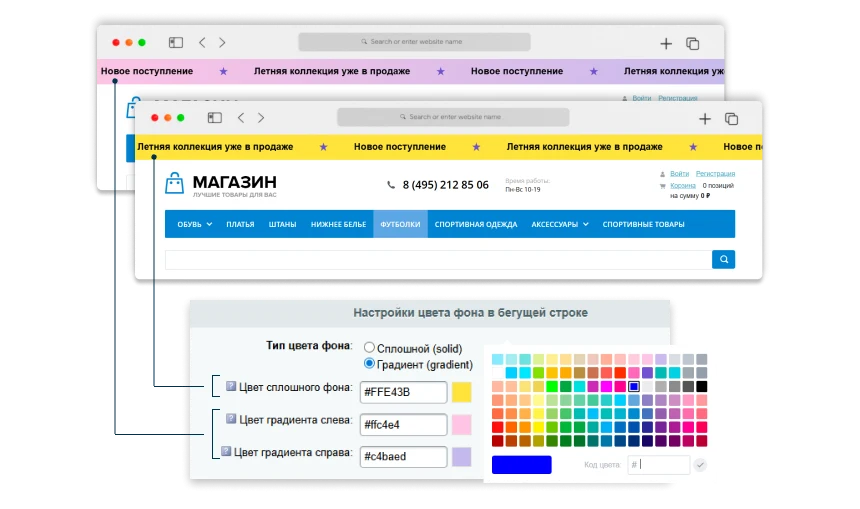
Background Color Settings
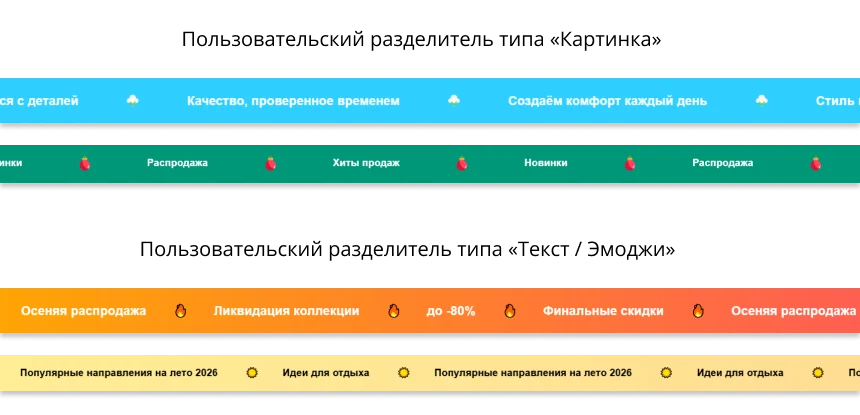
In the "Background Color Type" property, you can choose a solid (solid) or gradient (gradient) background. Set the color using the built-in palette or by entering a color code.
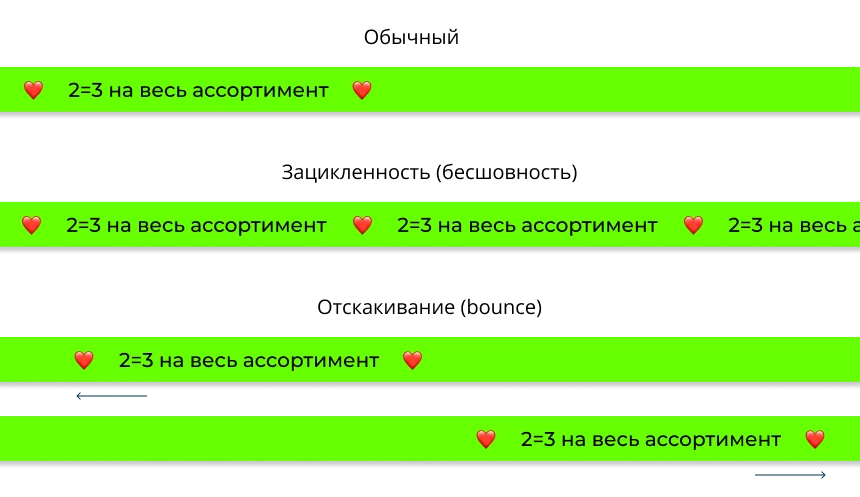
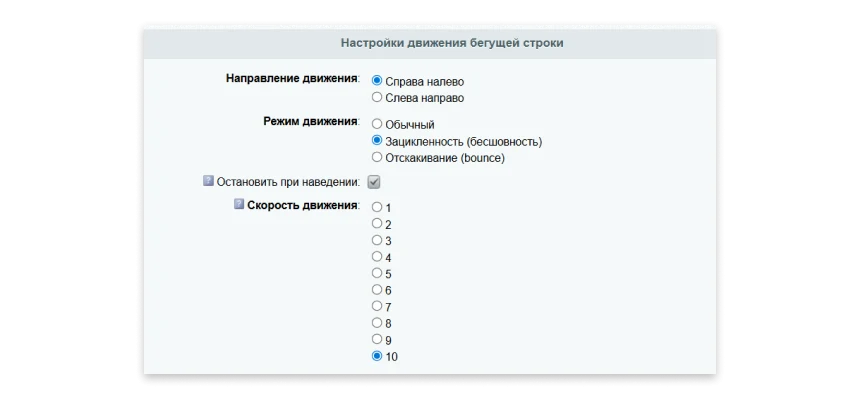
The module supports three text scrolling modes and allows selecting one of ten available speeds.
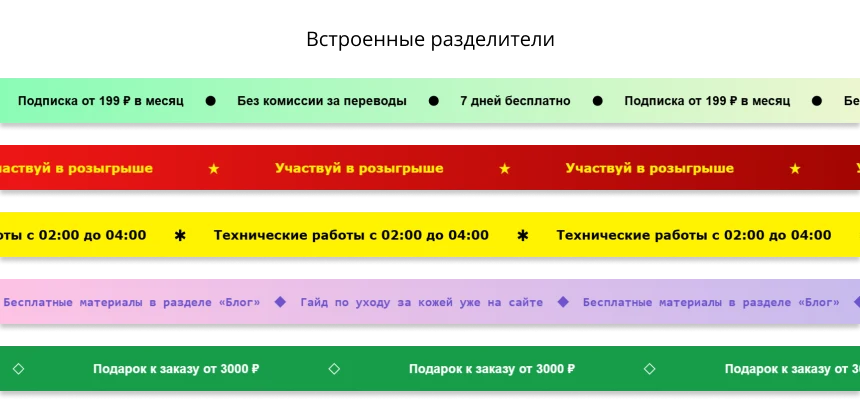
Separator configuration for running line elements
Standard symbols (dot, asterisk, black and white diamond), emojis, or custom SVG separators are supported. The separator color can be adjusted via the dedicated property.
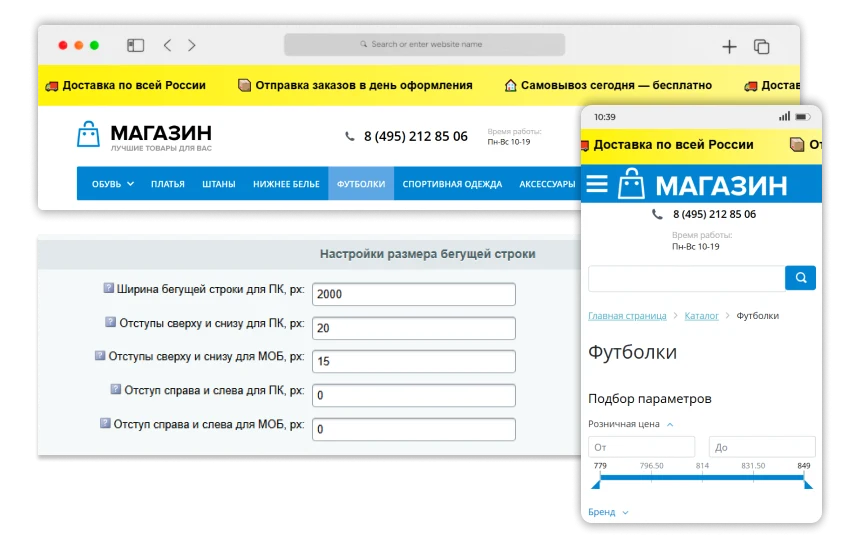
Individual sizing for mobile and desktop versions
In the 'Running line size settings' block, specify top, bottom, left, and right margins separately for mobile and desktop versions, as well as the advertisement width for desktop. If you are unsure how to adjust margins correctly, simply leave the default values: the running line will automatically adapt to both device types.
INRAISE: Running line in website header
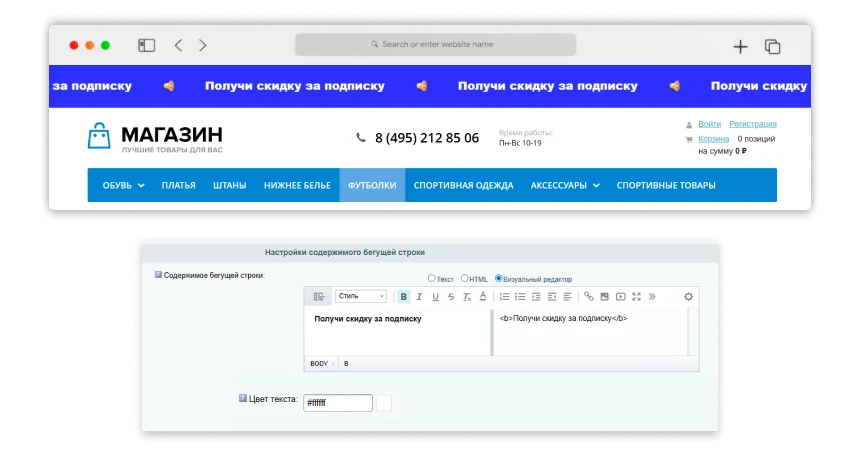
Adding content requires no HTML or CSS knowledge. Editing is performed in a familiar text editor format.
Module Additional Settings
The module provides flexible tools to adapt the running line to various usage scenarios. Parameters are available to manage activity time, including start and end times. Behavior during interaction can be configured, such as pausing the animation on mouse hover or fixing the line during page scrolling.
Integration with analytics is supported through goal setup in Yandex.Metrica and the addition of UTM tags to links. Visibility control is implemented at multiple levels: selection of specific sites, domains, and subdomains, individual pages, as well as filtering by user groups or specific accounts.
The INRAISE Running Line in Site Header module enables the placement of dynamic text at the top of a web page.
INRAISE Module: Running Line in Website Header. Enables placement of dynamic notifications, announcements, or promotional banners in the top section of a page. Compatible with popular CMS and web development platforms. Supports configuration of scroll speed, text and background colors, and responsive display on mobile devices.
General iT can connect “INRAISE: Scrolling text in the site header”, configure it and verify the integration with the existing website.
UPDATE HISTORY
What’s new
4 releases
1.1.3 (10.07.2026)Latest update
Enhanced security for outputting marquee movement settings.
Improved functionality of 'Fixed Block Selectors': invalid CSS selectors no longer interrupt script execution.
Improved compatibility with composite caching during module service requests.
Enhanced stability of marquee insertion on website pages with non-standard content encoding.
Fixed the 'INRAISE: Color' user property in edit forms.
Fixed the display of the color indicator in administrative lists.
Clarified the names of module information block elements: 'Marquee' and 'Marquees'.
Fixed text descriptions and tooltips in the module's administrative section.
1.1.2 (12.06.2026)
Enhanced module security and operational stability.
1.1.1 (07.06.2026)
Enhanced module security and operational stability.
1.1.0 (06.06.2026)
Enhanced module security and operational stability.
INRAISE: Smart Filter Acceleration is a bundle comprising two separate modules: 'Composite for Smart Filter and SEO Pages' and 'Automatic Facet Reindex'. Purchasing the bundle allows acquiring both components at a significant discount. If only one module is required, it can be purchased individually via the respective links.
The INRAISE: Schema.org/SearchAction module generates JSON-LD microdata describing the site search box. This tool enables SEO specialists to create and edit search action markup without writing code or manually integrating it into site templates.
The markup code can be placed on the homepage or across all pages, depending on individual project settings.
The INRAISE: Property and Field Decorator module adds the ability to copy symbolic codes for properties and fields within the administrative panel. In the cards for elements, sections, and high-level block records, the symbolic code for each parameter is displayed. The code can be copied to the clipboard with a single click.
The module manages canonical links on the website. It allows setting the current URL as canonical or specifying a custom address for a section or page. Flexible link assignment is supported via regular expressions, where the match result can be applied to the canonical link value using variables like $1, $2, and so on. All changes are logged in the event journal.
The module generates a YML feed to regularly update prices and stock levels for existing product cards in OZON. The solution integrates into the standard export mechanism of the 1C-Bitrix trading catalog. After installation, a new profile type named 'OZON: Prices and Stock via Feed' becomes available, which can be triggered manually, via agents, or by cron schedule.
The module allows viewing the history of sent emails. Detailed information for each message is available, including the rendered content and used templates in the #NAME# format. If needed, an email can be marked as unsent for resending. The module also supports testing email delivery via standard Bitrix mechanisms and the PHP mail function.
At the last check, the supplier reported that this solution had been unpublished. Its description remains available for reference. Licence availability and support terms need to be confirmed before use.
How can I find an alternative?
Tell us what the module or template needs to do and which platform edition you use. We will check available options, compatibility and any data migration needs, then agree on the scope of work.
Your cookie choices
Necessary cookies support sign-in, your cart and security. Optional analytics helps improve the website and starts only with your permission.
Our metrika.git.ru system: public pages, a random identifier, device and interaction events. Form contents, account and payment pages are excluded. Raw events: up to 90 days. Operator: General IT Rus LLC, INN 2310208877.
Your browser requests no tracking: analytics is off.