Payments are experiencing issues due to temporary restrictions in Russia. If your payment does not go through, please submit a support request.•Our support team is available 24/7 — we are always here to help with hosting and server issues.•We are now accepting requests for dedicated server rental and colocation services in our data center.•Reminder: we recommend enabling backups for additional data protection.•A new VPS/VDS lineup with NVMe storage and improved performance is now available.•Maintenance work on some servers has been completed. All services are operating normally.•
Payments are experiencing issues due to temporary restrictions in Russia. If your payment does not go through, please submit a support request.•Our support team is available 24/7 — we are always here to help with hosting and server issues.•We are now accepting requests for dedicated server rental and colocation services in our data center.•Reminder: we recommend enabling backups for additional data protection.•A new VPS/VDS lineup with NVMe storage and improved performance is now available.•Maintenance work on some servers has been completed. All services are operating normally.•
Аккаунт в General iT
Вход / Регистрация
Войдите или создайте аккаунт для управления услугами в панели.
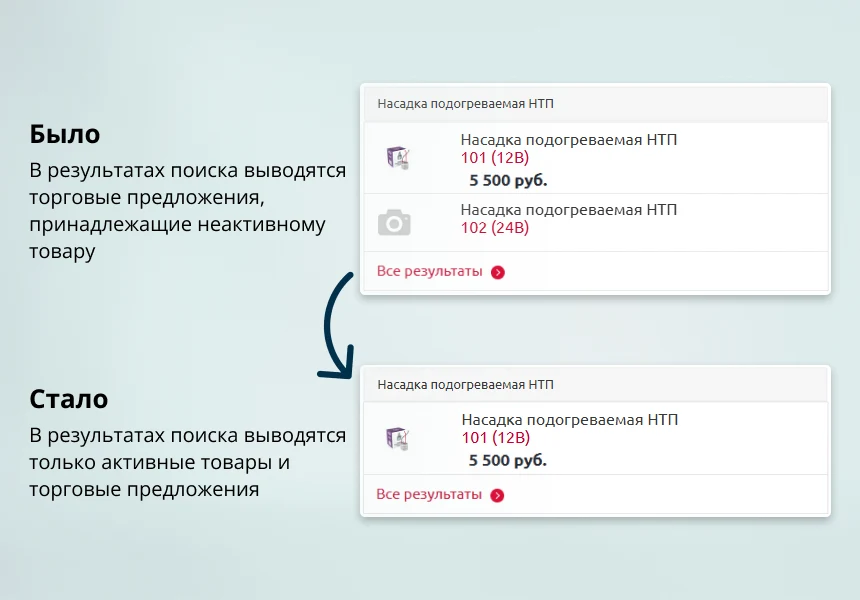
The INRAISE module resolves an issue in 1C-Bitrix catalogs where active product offers (TP/SKU) appear in search results (search.title) for items that have been deleted or deactivated. These phantom entries degrade search quality, confuse customers, and lead to 404 errors.
The INRAISE module resolves an issue in 1C-Bitrix catalogs where active product offers (TP/SKU) appear in search results (search.title) for items that have been deleted or deactivated. These phantom entries degrade search quality, confuse customers, and lead to 404 errors. The solution automatically monitors the indexing process to ensure that search results for products with offers remain accurate and up to date.
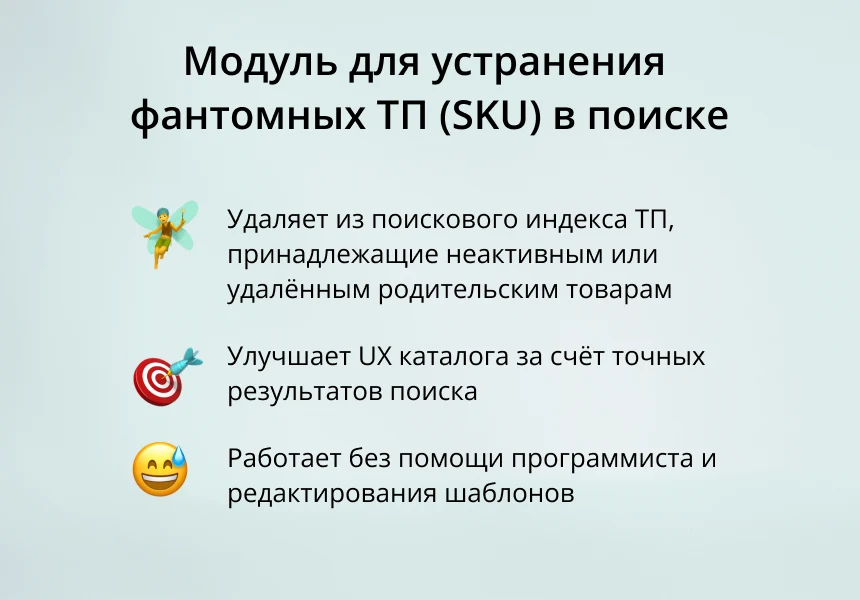
The module cleans the search index of trade offers linked to inactive or deleted parent products. It ensures that no SKU without a valid parent appears in search results. Only current and active trade offers are added to the index. This completely eliminates phantom SKUs in search suggestions and the general search index.
The module ensures correct operation of the standard 1C-Bitrix search and the search.title component. It prevents search results from displaying product offers linked to hidden or deleted parent items, thereby improving result accuracy and enhancing the catalog user experience. The solution operates automatically without requiring template modifications or core system changes.
The technical logic relies on intercepting indexing events. Before a parent product is removed from the index, the module automatically deletes all associated product offers. When a new parent is added, only active SKUs are indexed. When attempting to index a product offer, the system verifies the existence and active status of the parent product. This ensures full synchronization between the product index and its offers.
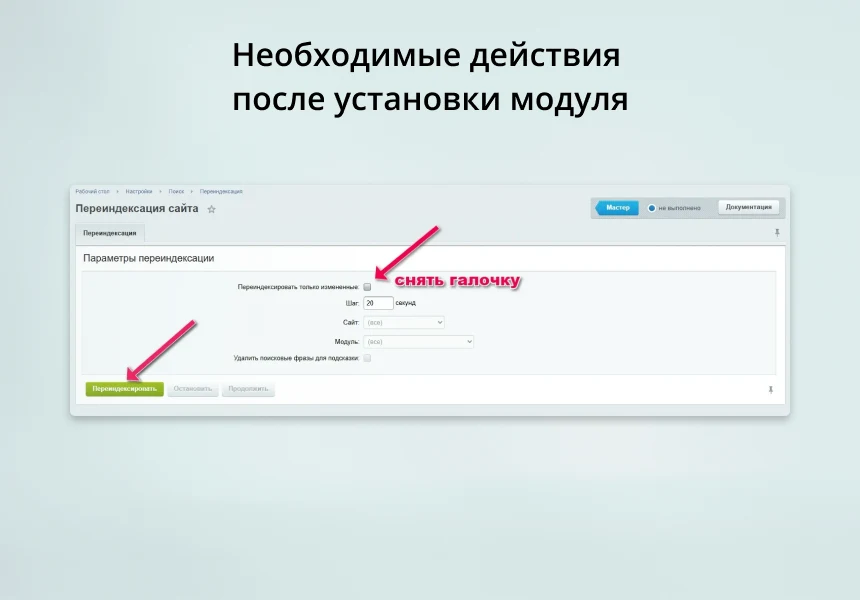
After installation, activation, or deactivation of the module, a one-time full search reindexing is required. To do this, navigate to the Site Reindexing page (/bitrix/admin/search_reindex.php), uncheck the 'Reindex only changed' option, and click the 'Reindex' button.
The INRAISE module removes phantom product items (SKU) from search results. Before installation, it is recommended to test the functionality in demo mode. If the module operates incorrectly, contact technical support.
The INRAISE module removes phantom product items (SKU) from search results.
The INRAISE: Variables module enables creating and using variables across the entire site without writing PHP code or involving a programmer. Variables can be inserted into the visual text editor, Title, Description, and Keywords meta tags, element names, HTML and PHP files, and email templates.
INRAISE: Smart Filter Acceleration is a bundle comprising two separate modules: 'Composite for Smart Filter and SEO Pages' and 'Automatic Facet Reindex'. Purchasing the bundle allows acquiring both components at a significant discount. If only one module is required, it can be purchased individually via the respective links.
The INRAISE: Schema.org/SearchAction module generates JSON-LD microdata describing the site search box. This tool enables SEO specialists to create and edit search action markup without writing code or manually integrating it into site templates.
The markup code can be placed on the homepage or across all pages, depending on individual project settings.
The Rant SEO Filter module transforms standard results from the 1C-Bitrix smart filter into managed SEO pages. The solution provides short URLs, unique H1 tags and meta tags, along with a flexible template system for sections, tags, and sitemaps. SEO data updates dynamically without page reloads.
Key capabilities:
Support for clean URLs instead of long addresses like /filter/.../apply/.
The Product Label Generator module creates PDF files containing product labels based on an administrative list of information block elements. The TCPDF library is included in the module package, which is distributed as a complete directory.
Configuration options allow selecting the information block with products and defining the field used as the source for barcode generation.
The displayed price covers the solution itself. Platform licensing, installation and customisation are checked separately. If the page offers bundles, select the required option before submitting a request.
How do I check compatibility?
Compare the supported editions and solution version in the technical details with your project. Before installing on a live website, we recommend making a backup and checking the solution in a test environment.
Is there a trial?
The developer lists a trial of 5 days. The trial button opens the installer in your website control panel. Check the required features and compatibility before purchasing.
How much does this solution’s renewal cost?
The current renewal price is 1,050 ₽. Before you order, a manager will confirm the renewal period and whether it applies to your licence.
Can you help with implementation?
We can help install the module, check its settings and verify how it works in your project. Compatibility with other customisations and the scope of work are assessed before we begin.
Your cookie choices
Necessary cookies support sign-in, your cart and security. Optional analytics helps improve the website and starts only with your permission.
Our metrika.git.ru system: public pages, a random identifier, device and interaction events. Form contents, account and payment pages are excluded. Raw events: up to 90 days. Operator: General IT Rus LLC, INN 2310208877.
Your browser requests no tracking: analytics is off.