Payments are experiencing issues due to temporary restrictions in Russia. If your payment does not go through, please submit a support request.•Our support team is available 24/7 — we are always here to help with hosting and server issues.•We are now accepting requests for dedicated server rental and colocation services in our data center.•Reminder: we recommend enabling backups for additional data protection.•A new VPS/VDS lineup with NVMe storage and improved performance is now available.•Maintenance work on some servers has been completed. All services are operating normally.•
Payments are experiencing issues due to temporary restrictions in Russia. If your payment does not go through, please submit a support request.•Our support team is available 24/7 — we are always here to help with hosting and server issues.•We are now accepting requests for dedicated server rental and colocation services in our data center.•Reminder: we recommend enabling backups for additional data protection.•A new VPS/VDS lineup with NVMe storage and improved performance is now available.•Maintenance work on some servers has been completed. All services are operating normally.•
Аккаунт в General iT
Вход / Регистрация
Войдите или создайте аккаунт для управления услугами в личном кабинете.
Страны не найдены. Попробуйте другое название или код.
WEBSITE TEMPLATE
InCode
InCode Food: food delivery online store for 1C-Bitrix
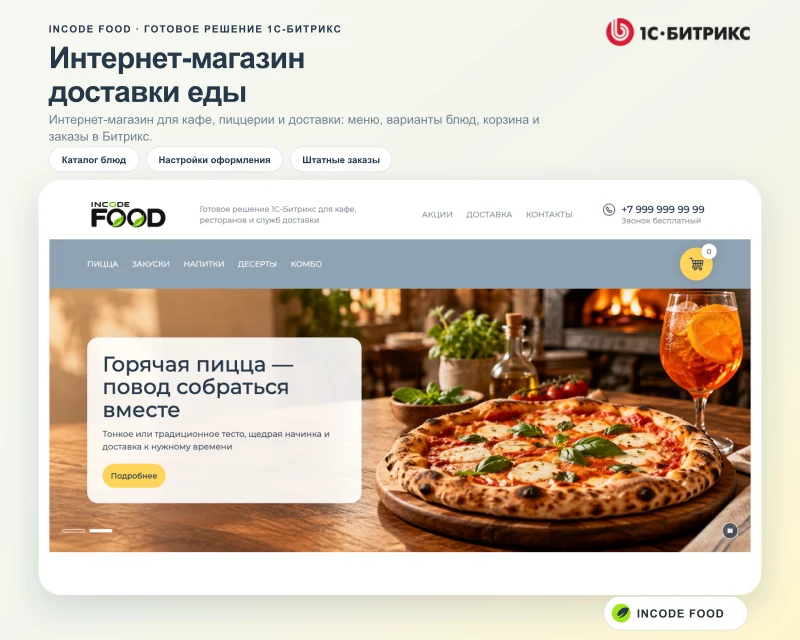
InCode Food is a ready-made solution for creating an online food delivery store on the 1C-Bitrix platform. The system integrates a delivery showcase, the standard product catalog, and the order management module with the solution's own settings. Pizzerias, cafes, or restaurants can start with a demo menu and then replace it entirely with their own dishes, design, and service terms.
InCode Food is a ready-made solution for creating an online food delivery store on the 1C-Bitrix platform. The system integrates a delivery showcase, the standard product catalog, and the order management module with the solution's own settings. Pizzerias, cafes, or restaurants can start with a demo menu and then replace it entirely with their own dishes, design, and service terms. Customers select items, preparation options, and additional ingredients, build a pizza from two halves, arrange for delivery or pickup, and track their order history in a personal account.
Configuration of the appearance and functionality is performed without modifying the template code. For each site, settings are individually adjusted for logos, color schemes, first-screen content, product card design, main page blocks, contact details, addresses, maps, minimum order amount, order acceptance schedule, and local stop-lists. Editors can preview changes in the side panel before publishing them.
Management of products, trade offers, and prices is handled in the 1C-Bitrix catalog, while the shopping cart and orders are processed in the Sale module. Payment methods and delivery services are connected using the platform's standard tools, taking into account the system edition, installed handlers, and contracts with suppliers. Integration with maps and subscription settings for promotions are configured separately.
The solution is convenient for food delivery due to a wide range of settings that allow the showcase, design, and order acceptance rules to be adapted to the format of each specific site.
The solution operates within the 1C-Bitrix ecosystem, utilizing standard catalog sections, the Sales module, delivery services, and payment systems.
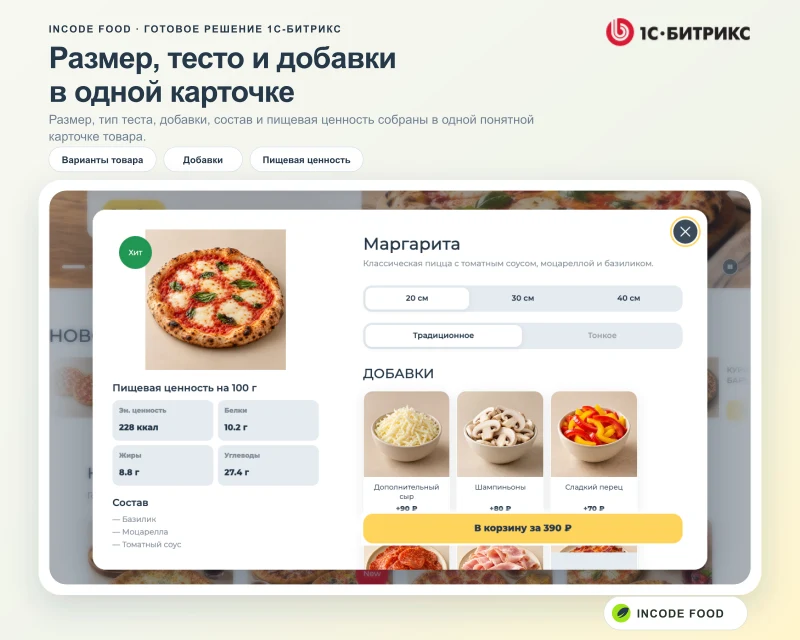
It features flexible dish configuration for customer requirements, including size selection, dough type, and additional ingredients.
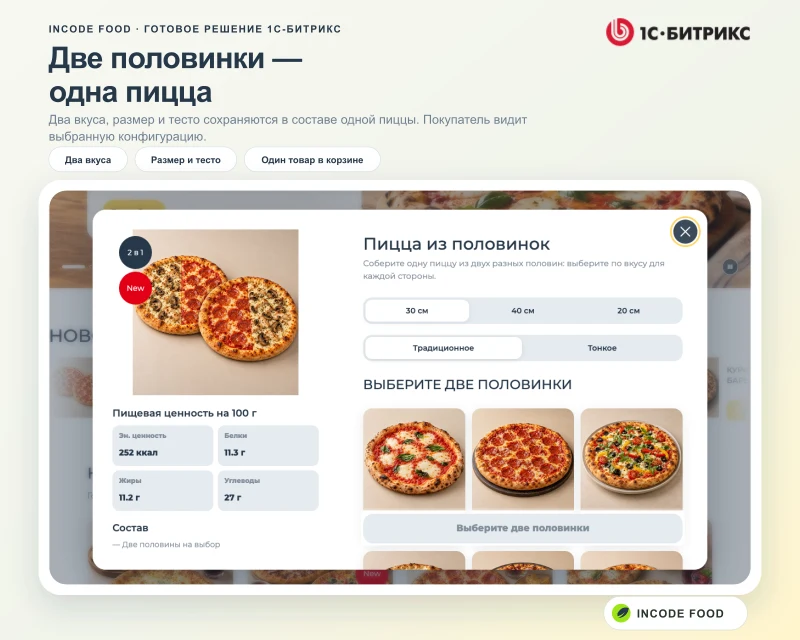
A two-half pizza builder allows combining two compatible flavors into a single order line item.
Ready-made combo sets and promotions are supported, including offer conditions, related dishes, and subscription options for special deals.
This tool is suitable for pizzerias offering size, dough, topping, and two-half options; cafes, coffee shops, and restaurants with their own menus and pickup services; food delivery services and dark kitchens; and establishments managing multiple websites within a single 1C-Bitrix installation.
The package includes a homepage with promotional banners, categories, and popular items; a catalog with subcategories, filters, and dish cards; settings for trade offers, sizes, dough types, and additional ingredients; a two-half pizza builder; combo sets, product bundles, and promotions with validity periods and related items; a shopping cart, order checkout, delivery, pickup, and payment method configuration; contact details, tax information, venue addresses, maps, and social media links; a personal cabinet with profile, addresses, and order history; and a weekly schedule with exception dates and an order pause feature for 30 or 60 minutes.
The InCode Food template for 1C-Bitrix provides a local dish stop-list feature. Users can configure the order of main page blocks, choose between standard and compact card views, and switch the first screen between large and compact formats. Settings are managed via a sidebar that supports preview, saving, and reverting changes. The template includes a promotion subscription feature with the option to store addresses in an information block or in a subscription module if installed. The main page is designed for convenient order initiation: the header contains contacts, links to promotions, delivery, and company information. Below are a promotional banner, menu categories, and the shopping cart. The template architecture is universal, suitable for both a single establishment and a delivery network with multiple points.
Catalog and food categories
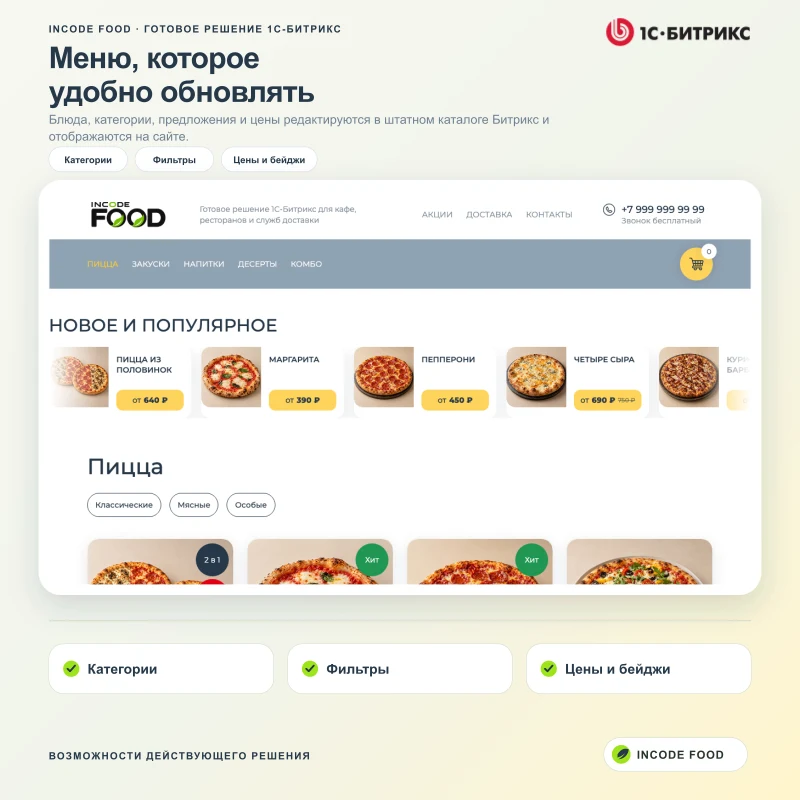
Popular items, categories, subcategories, filters, and product cards are displayed on the main page and in sections. The buyer sees the photo, title, badges, and the minimum available price, then proceeds to select a product variant.
The dish card combines an image, description, ingredient list, and nutritional information. For pizza, options include size, dough type, and additional ingredients. Pricing and availability are derived from products and trade offers configured in the 1C-Bitrix system.
Two-half pizza
The module supports a dedicated scenario that allows assembling a single pizza from two flavors. The customer selects the size, dough type, and one topping for each side. The resulting configuration is added to the cart as a single, clear item.
Promotions, combos, and sets
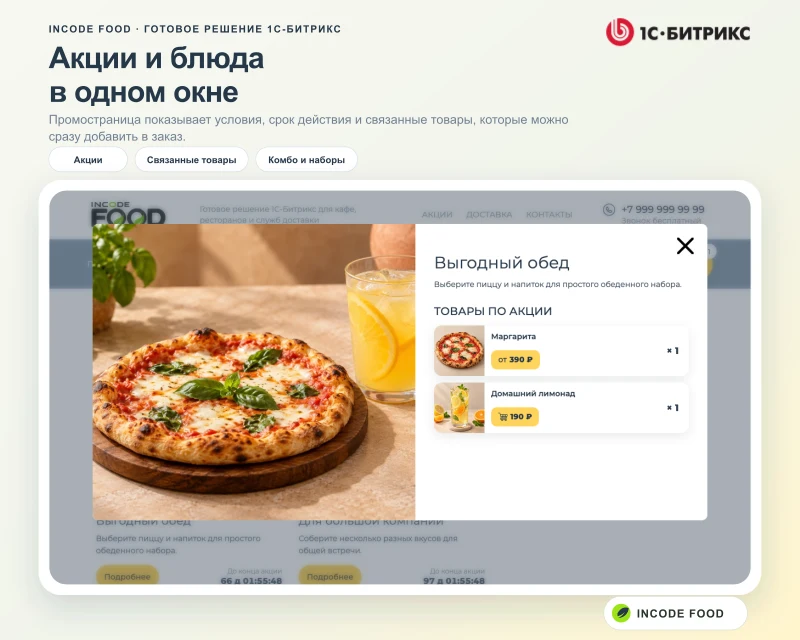
A dedicated page is provided for promotional offers, displaying the description, validity period, and associated products together. Combos are created as product sets and added to the cart as a single line item, while maintaining a clear composition for the buyer.
Cart and order checkout
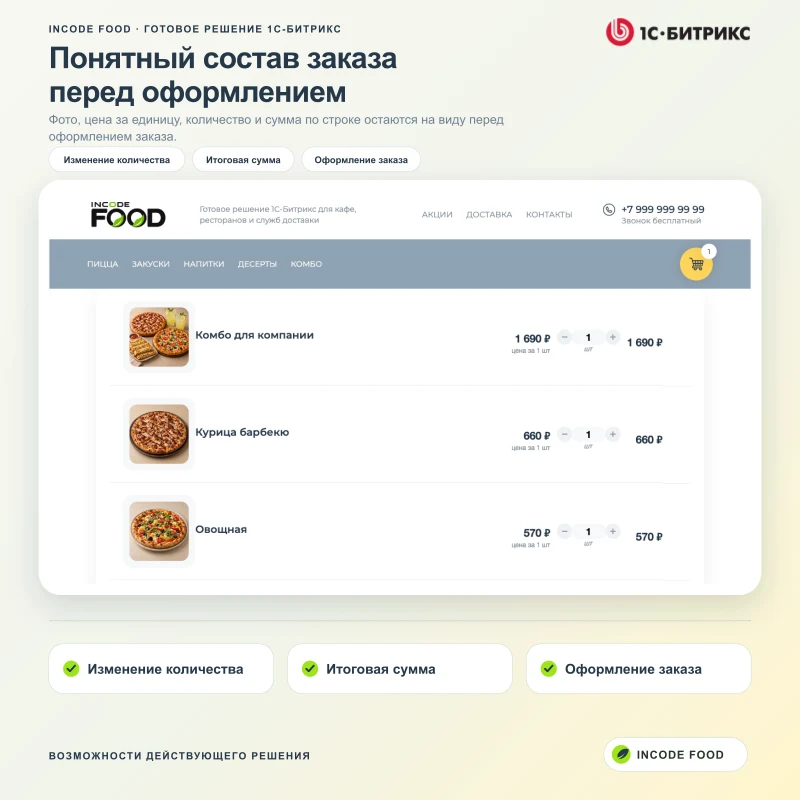
The cart displays the dish photo and name, unit price, quantity, and line total for each item. Quantity updates occur without page reload. The user then proceeds to the standard 1C-Bitrix order checkout process, selecting an available delivery service or self-pickup option, and choosing one of the configured payment methods.
Delivery and Pickup
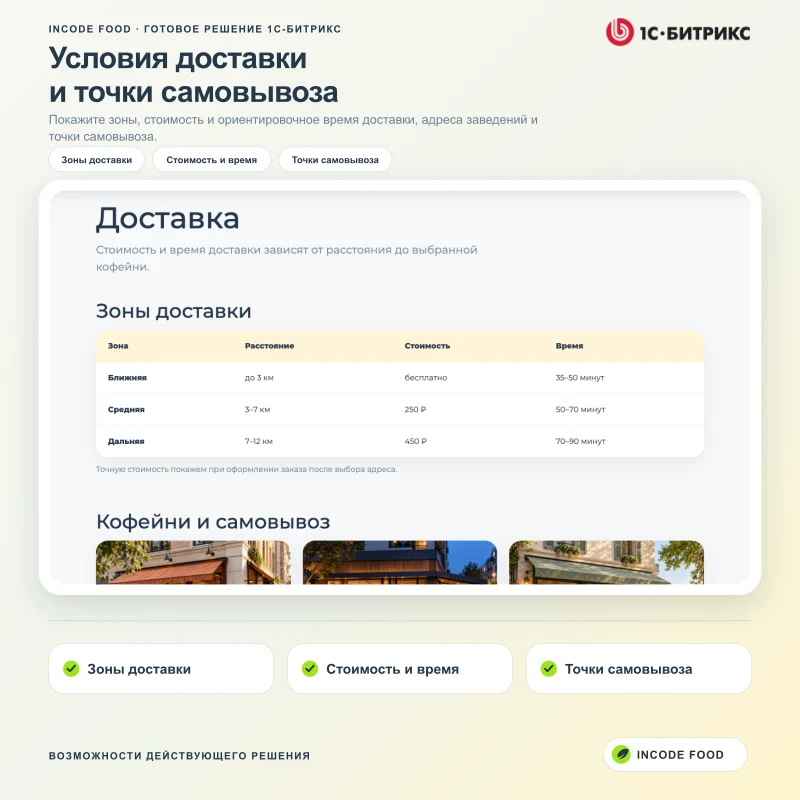
A dedicated page displays delivery terms including service zones, distance, costs, and estimated arrival times. Below are cards for establishments and pickup points showing addresses, phone numbers, operating hours, and a map.
Contacts, venues, and details
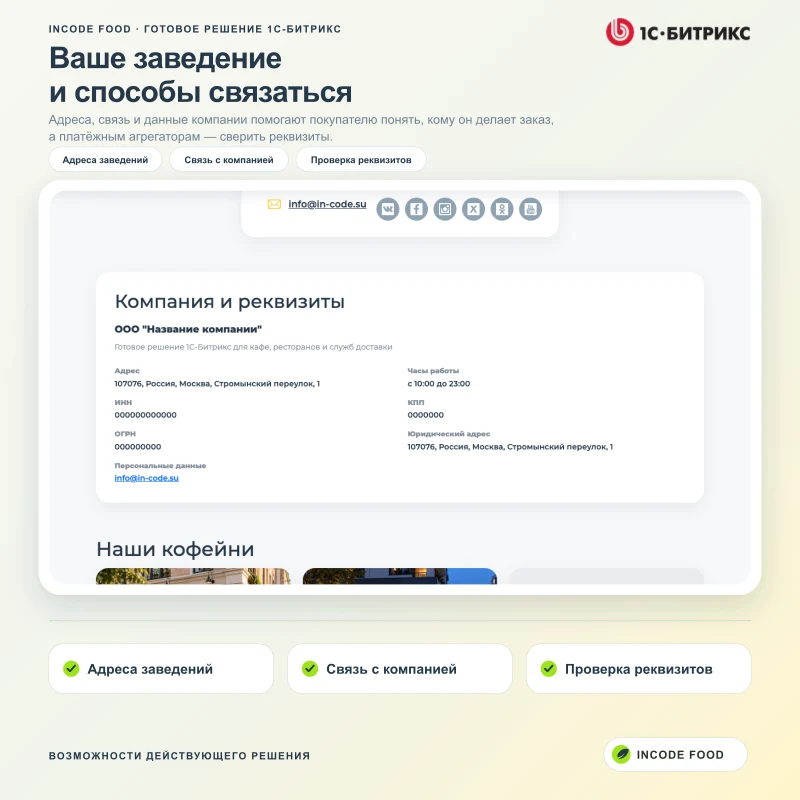
The contacts page aggregates communication channels, social media links, venue addresses, and establishment cards. A dedicated block displays the company name, operating hours, legal address, and registration details. This information helps customers verify who they are ordering from and allows payment aggregators to validate the details.
Buyer personal account
After logging in, users can view order summaries, history, and details, as well as manage address profiles and personal data. Buyers can repeat an order or proceed to payment if the configured payment system supports this.
Adaptive interface
The catalog, dish cards, configurators, shopping cart, checkout process, and personal account are adapted for desktops, tablets, and smartphones. On mobile screens, key actions remain accessible without horizontal scrolling.
Menu and order management in the Bitrix admin panel
Update dishes, categories, and prices without editing template files. Process new orders in the standard online store section: verify composition, delivery, payment, and status. InCode Food design settings apply to the selected site.
Products, categories, offers, and prices are managed using the Trade Catalog tools.
Shopping cart, orders, deliveries, payments, and statuses are handled by the Online Store module.
Logos, favicon, colors, contacts, tax details, maps, texts, and minimum order amounts are configured in InCode Food settings.
Separate settings are available for each site in a multi-site installation.
The setup tool features a step-by-step wizard and an optional demo catalog. The wizard can be safely restarted with automatic verification of existing resources.
SEO and social media
The template automatically generates canonical URLs and Open Graph meta tags. Product cards display real food images. Structured data Product/Offer describes the item and available offers, while Organization provides company details on the contact page. Cart pages and service sections are blocked from search engine indexing where required.
Technical architecture
The solution relies on standard 1C-Bitrix modules, components, and API without modifying the core. The catalog and pricing operate via the Trade Catalog module, while the cart and orders use the Online Store module. Settings are isolated per site, and user content is not included in the template files.
Pre-launch requirements
Before launch, replace demo items and company details, configure delivery services and payment systems, enter your own Yandex Maps API key, and verify email notification delivery on the server. Available payment and delivery methods depend on the 1C-Bitrix edition and installed modules.
Configuration of a weekly order acceptance schedule based on the establishment's time zone. The system supports specific dates and breaks of 30 or 60 minutes. Order acceptance can be activated before the break ends. While acceptance is closed, new orders are not saved, and the customer sees a notification. Previously saved orders remain in the store.
The quick stop-list feature allows finding a dish and temporarily removing it from sale. The product card indicates the item is unavailable, the cart warns about it, and new orders containing this item are not created. The list operates within site settings and supplements the standard catalog availability.
Main page management and design options
Allowed blocks on the main page can be shown, hidden, or rearranged. The catalog remains on the page.
Two types of product cards are available: Standard and Compact.
Two first-screen design options: Large and Compact.
Side settings panel on the site
Basic design settings are available directly on the site, including preview, save, and cancel functions. The panel is visible to users with permission to view solution settings, while only users with permission to modify settings can save changes. Guests cannot see the panel. The preview mode does not change the site for other visitors until it is saved. The panel and the administrative page use the settings of the selected site.
Owner and Administrator Guide
Version 1.4.16 is available at food.in-code.su/manual/. The documentation covers installation, menu management, orders, schedule, stop-list, homepage, control panel, and diagnostics. Guide files are not included in the Marketplace template package.
Frequently Asked Questions Before Purchase
Is an external system required to receive orders?
No. The catalog, shopping cart, and order processing are handled by 1C-Bitrix tools.
Where do orders go?
New orders are saved in the standard "Online Store" module. The team manages composition, payments, deliveries, and statuses in the Bitrix admin panel.
Where to edit the menu and design?
Dishes, categories, trade offers, and prices are configured in the standard catalog sections. Logos, colors, contacts, maps, homepage blocks, order schedules, and stop-lists are managed in the InCode Food settings for the selected site and in the sidebar on the site pages.
Is the solution suitable for the "Start" edition?
The described scenarios require the "Information Blocks", "Trade Catalog", and "Online Store" modules. Support for the "Start" edition is not declared. Compatibility with your edition and environment must be verified before purchase.
Can online payment and delivery be connected?
The template utilizes standard delivery and payment system settings provided by the 1C-Bitrix platform. The availability of specific processors depends on the selected edition, installed additional modules, and conditions set by service providers. Contracts, API keys, and the connection of external services are arranged separately from the template.
When implementing “InCode Food: food delivery online store for 1C-Bitrix”, General iT can help with installation, adaptation and launch preparation.
USER EXPERIENCE
Solution reviews
How does this solution work in a real project? Share your experience and help others choose.
Be the first to share your experience
There are no reviews of this solution on git.ru yet. Tell us what worked well and what could be improved.
✓
Verified purchaseAdd a key if you wish. A verified review gets a badge, priority placement and more rating weight.
↗
Open to every clientJust sign in to your account. A key is optional; all reviews are moderated.
Dominanta is a ready-made sales website for developers built on the 1C-Bitrix platform. The solution supports multiple residential complexes, includes a property catalog, a visual chessboard layout, and a request form for selected apartments. The product architecture allows users to independently navigate from project overview to specific object selection.
Aspro: Maximum is a universal e-commerce template designed with user requirements and modern technologies in mind to ensure fast loading speeds. The solution is optimized for display on all device types and is intended to address practical business tasks.
Aspro: Next is a universal e-commerce template suitable for products of any category. The solution supports full multi-regional functionality and enables the creation of landing pages within the catalog, review sections, and search results. The template architecture is designed to meet the needs of projects focused on growth and scalability.
Deluxe is a multifunctional online store that combines platform and builder capabilities. Designed for businesses of any scale, it includes over 250 built-in features. The system ensures high performance and flexible configurability for various tasks.
The displayed price covers the solution itself. Platform licensing, installation and customisation are checked separately. If the page offers bundles, select the required option before submitting a request.
How do I check compatibility?
Compare the supported editions and solution version in the technical details with your project. Before installing on a live website, we recommend making a backup and checking the solution in a test environment.
How much does this solution’s renewal cost?
The current renewal price is 12,450 ₽. Before you order, a manager will confirm the renewal period and whether it applies to your licence.
Can you help with implementation?
We can help launch a website using the selected template, agreeing on its structure, content migration and integrations. The schedule and cost depend on the project and are quoted separately.
Statistics and interaction recording
Public pages use basic statistics. Our recording and Yandex Webvisor require your permission. You can keep basic statistics or disable all analytics.
Operator: General IT Rus LLC, INN 2310208877. Statistics and recording help improve the website.
Basic statistics: pageviews, a random daily ID, a public URL and time. The ID lasts until Moscow midnight. Original records: up to 48 hours; totals: up to 7 years.
Campaign tags and a technical identifier are sent by our server to the existing Yandex tag. Visitor IP, User-Agent and cookies are not included in this transfer. If selected, its browser code collects technical data, cookies, actions and masked page snapshots; recordings last 15 days. Inputs, chat and account areas are hidden.
Interaction recording requires permission: clicks, scrolling, technical information and filtered public-page snapshots. Events: up to 7 years; IP and snapshots: up to 90 days.
Permission is remembered for up to 365 days; full opt-out remains until changed. Basic statistics only disables recording; Disable all analytics stops new analytics. Previously sent data is not automatically deleted. Withdrawal and requests: support@git.ru. Full terms are linked below.
Your browser requests no tracking: analytics is off.