Payments are experiencing issues due to temporary restrictions in Russia. If your payment does not go through, please submit a support request.•Our support team is available 24/7 — we are always here to help with hosting and server issues.•We are now accepting requests for dedicated server rental and colocation services in our data center.•Reminder: we recommend enabling backups for additional data protection.•A new VPS/VDS lineup with NVMe storage and improved performance is now available.•Maintenance work on some servers has been completed. All services are operating normally.•
Payments are experiencing issues due to temporary restrictions in Russia. If your payment does not go through, please submit a support request.•Our support team is available 24/7 — we are always here to help with hosting and server issues.•We are now accepting requests for dedicated server rental and colocation services in our data center.•Reminder: we recommend enabling backups for additional data protection.•A new VPS/VDS lineup with NVMe storage and improved performance is now available.•Maintenance work on some servers has been completed. All services are operating normally.•
Аккаунт в General iT
Вход / Регистрация
Войдите или создайте аккаунт для управления услугами в панели.
This module for 1C-Bitrix automates the creation and updating of SEO content for products, categories, and website pages. The base version integrates with external neural networks (ChatGPT, Deepseek, Gigachat, Claude, Openrouter) via proxy to generate text based on your prompts.
This module for 1C-Bitrix automates the creation and updating of SEO content for products, categories, and website pages. The base version integrates with external neural networks (ChatGPT, Deepseek, Gigachat, Claude, Openrouter) via proxy to generate text based on your prompts. The Pro version delivers ready-made content optimized for SEO, GEO, and AEO, featuring a professional AI editor and algorithms from Muvera, Y2, Alice, and Google AI.
The solution enables filling thousands of product cards without expanding the copywriting team. SEO specialists receive texts fully compliant with search and neural network optimization requirements. Website owners generate materials that reflect unique selling propositions and target the intended audience. Content managers reduce the burden of populating hundreds or thousands of products through background mass generation.
The module provides access to over 400 neural network models via OpenRouter, with direct integration for ChatGPT, Claude, Gemini, Deepseek, and the Russian Gigachat. The solution is adapted for the Russian infrastructure, connecting to foreign models through proxies and integrating directly with Gigachat.
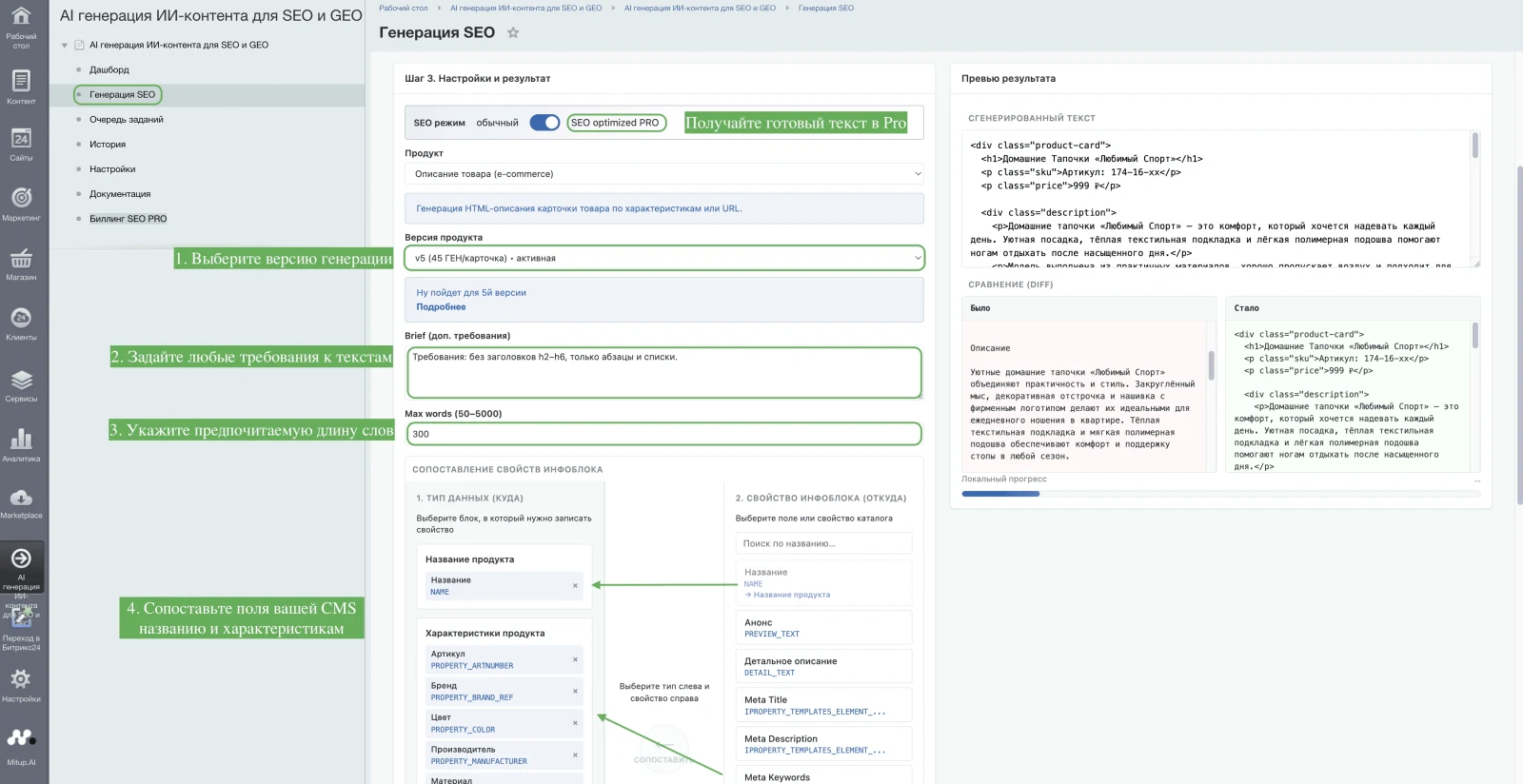
Two operational modes are available. The base version generates content based on user prompts. The Pro mode automatically produces ready-to-use SEO and GEO content without requiring manual configuration of neural network parameters.
A built-in cost monitoring system provides task cost estimates and detailed reporting within the dashboard. A 5-day trial period is available, including bonus resources for testing the Pro mode functionality.
The HARDCODE TEAM AI content generation module addresses two distinct tasks: a basic version and a service layer. The basic version provides a tool for controlled mass generation, where users connect their own neural networks and write prompts. The Pro version acts as a service layer on top of the module, eliminating the need to configure prompts or connect models; users select data for generation and receive ready-made SEO/GEO/AEO text.
A trial version is available for 5 days. It allows up to 50 product generations and includes 2 bonus Pro texts. The trial includes mass generation, background task execution, LLM settings, result preview, and the use of custom prompts. Features such as economics and reporting, access control, ready-made texts without neural network configuration, SEO/GEO-oriented texts, buyer-oriented texts, and multilingual support are not available in the trial.
The basic version costs 4,000 RUB and is designed for mass generation. It includes all trial features plus economics and reporting, as well as the ability to generate ready-made texts without configuring neural networks. The basic version still lacks access control, SEO/GEO-oriented texts, buyer-oriented texts, and multilingual support.
AI content generation module for SEO and GEO tasks. Supports mass text generation in the background with a preview feature. Provides multilingual capabilities with no limits on the number of generations. Includes an access control system, built-in economics and reporting, and the ability to use custom prompts. Enables the creation of SEO-optimized, GEO-optimized, and buyer-oriented texts without requiring manual neural network configuration. A Pro version is available for generating professional texts.
Mass generation
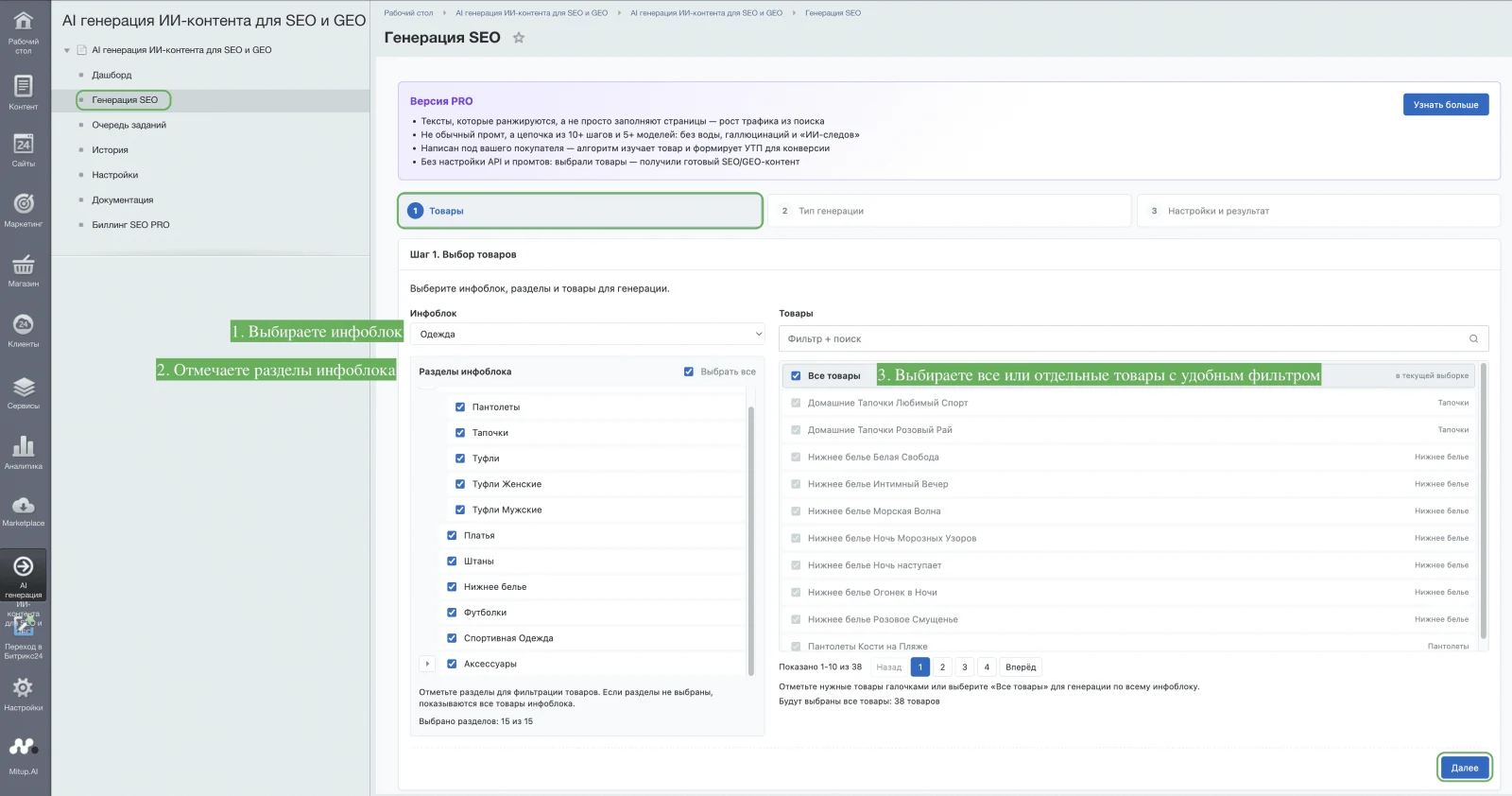
Creation of texts for individual products or for all products in selected sections and categories simultaneously.
3. Flexible configuration, transparent economics, and result preview
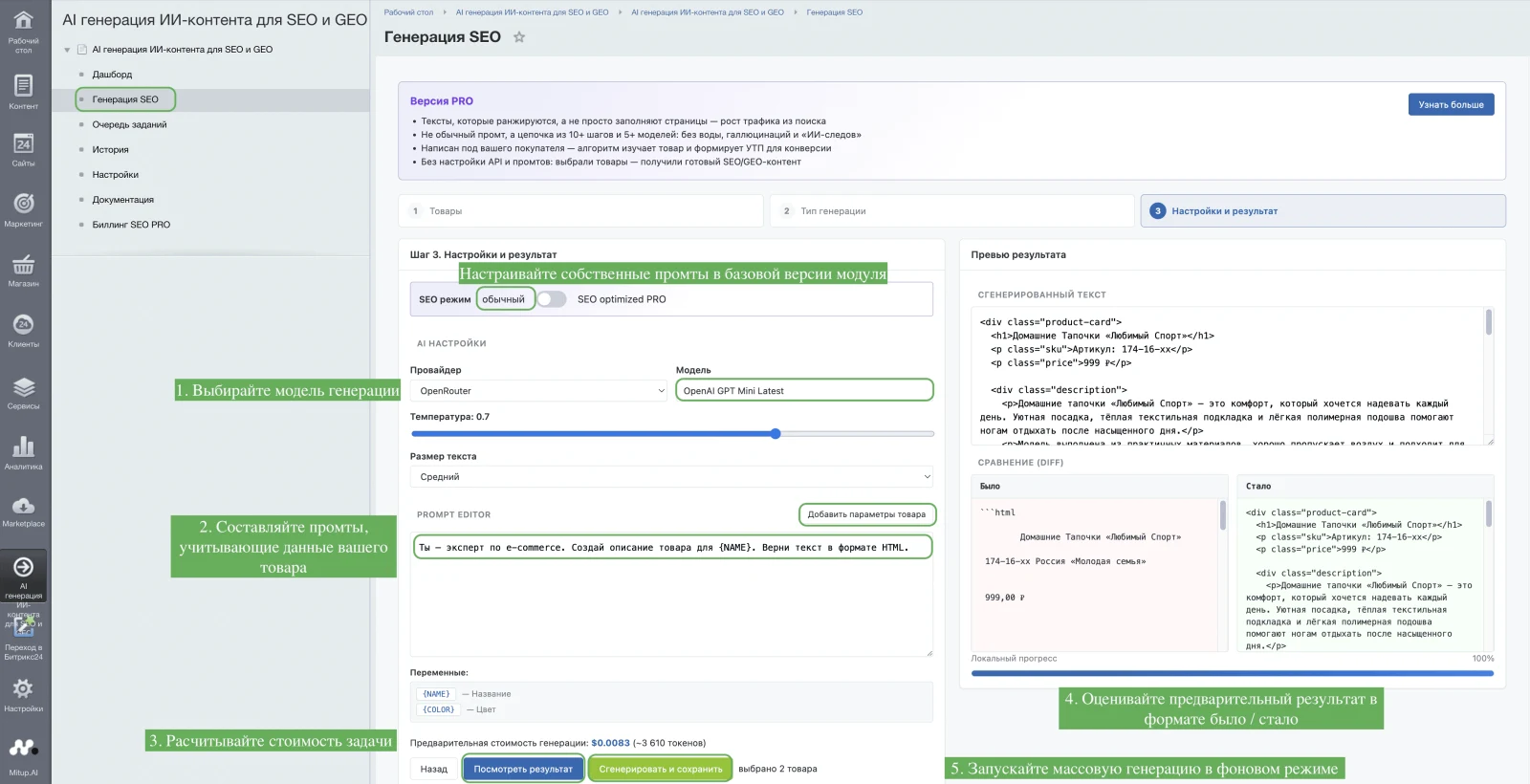
Adjust the generation temperature to control creativity levels and integrate parameters into custom prompts. The system provides preliminary cost estimates and reports for text generation based on the pricing tiers of the neural network model. Before launching mass generation, users can test prompts on a single text sample and preview the result quality.
Background operation mode
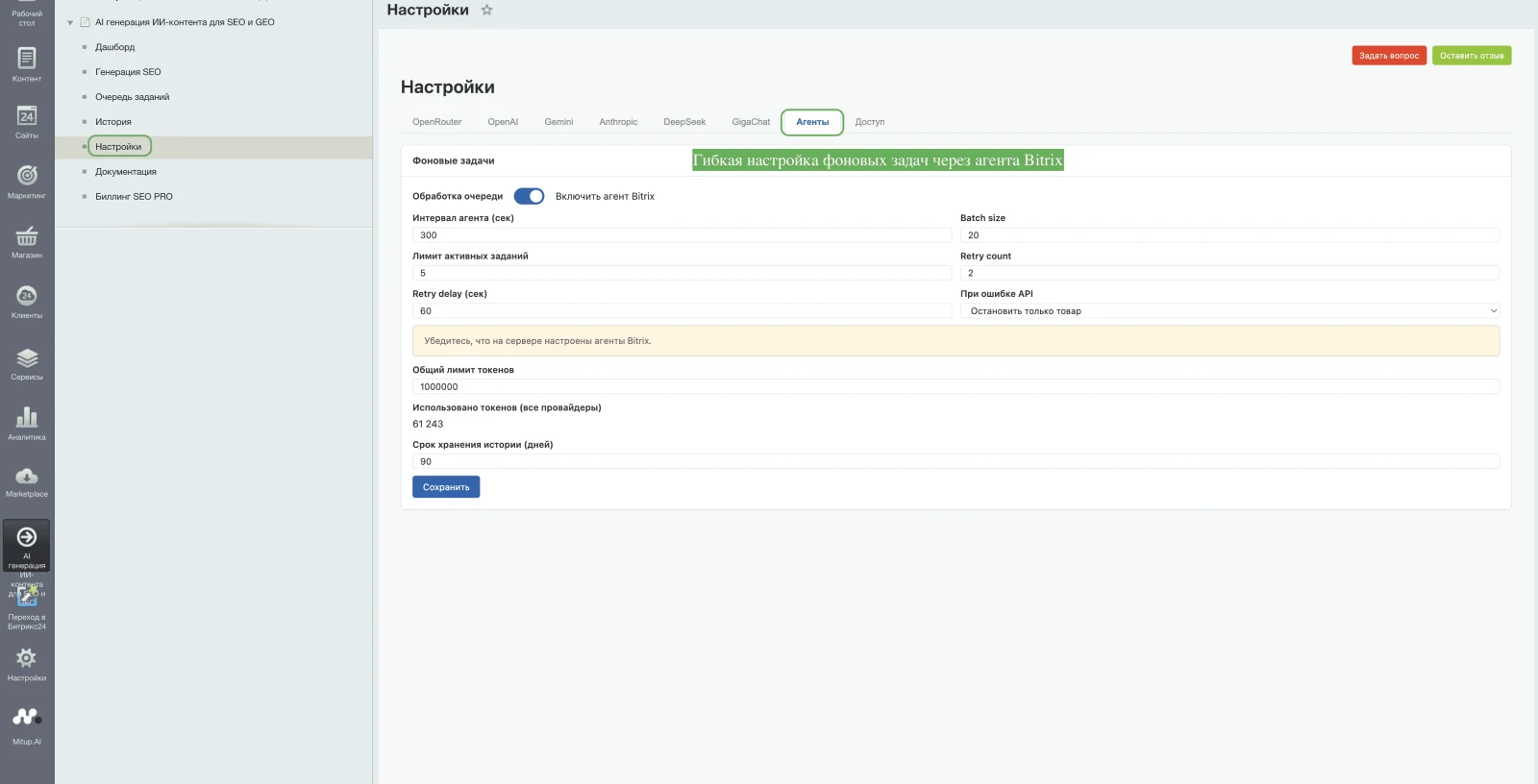
Enables launching multiple tasks simultaneously and monitoring their progress via the task queue.
5. Wide selection of LLMs configured for Russian infrastructure
The system provides access to over 400 language models. Connections are established via the OpenRouter service, directly through proprietary LLMs, or via neural network APIs. Access to foreign models is routed through a proxy server, while integration with the Russian Gigachat neural network is supported natively.
6. Module access control system
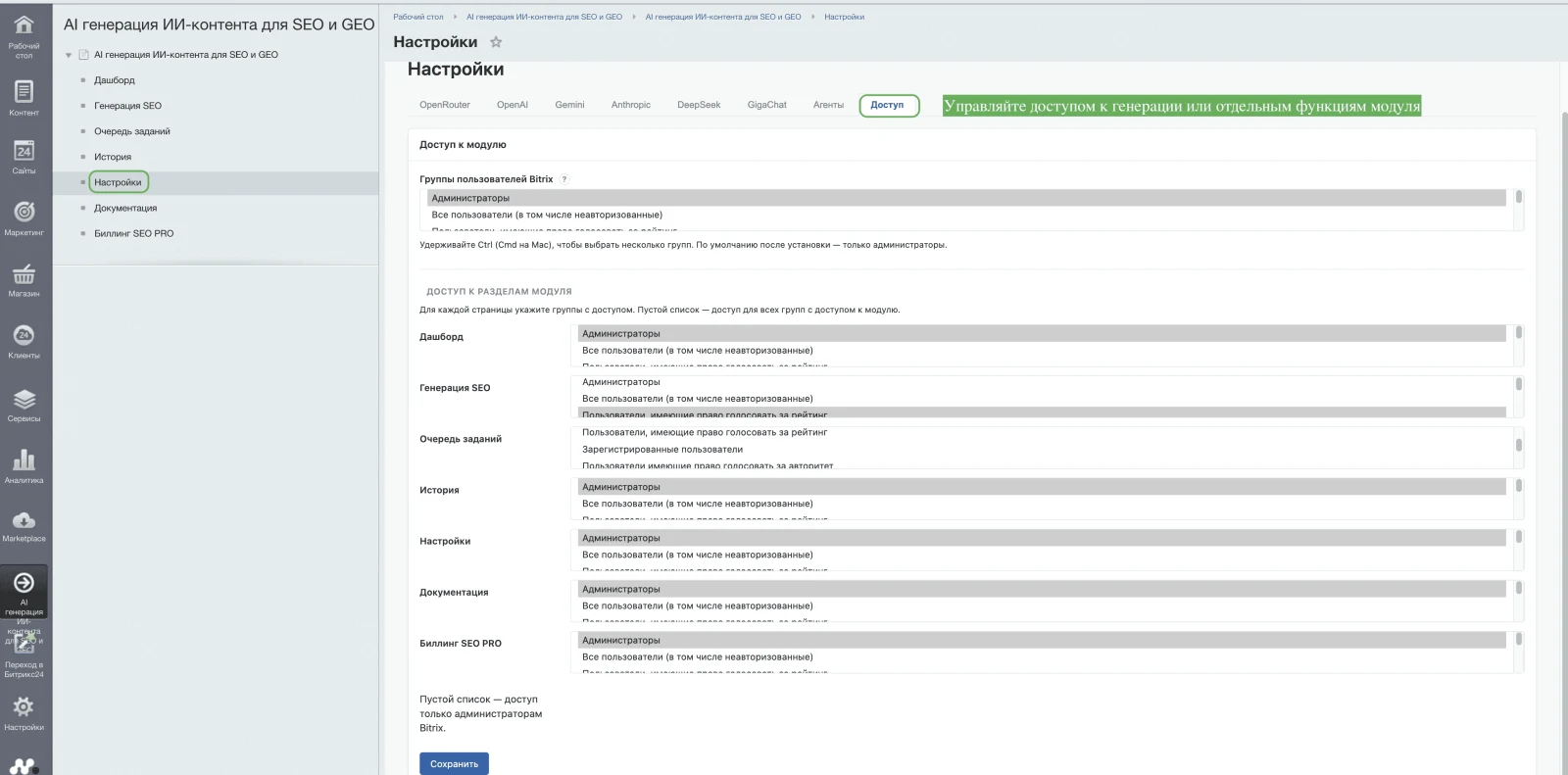
Configure role-based permissions in the admin panel to manage content generation capabilities and access to other module features for different user roles.
The AI content generation module for SEO and GEO by HARDCODE offers two versions: Basic and Pro.
The Basic version addresses mass content filling tasks. It includes key features found in modern solutions: batch generation, background task execution, integration with popular neural networks via API, and other standard functions.
The Pro version utilizes a unique multi-step technology. The text creation process involves more than 10 stages and employs more than 5 LLM models, each responsible for a specific part of the task. Agent chains analyze the product from the perspective of a potential buyer, form a unique USP structure for the page, and focus on sales-oriented elements. The system architecture accounts for the latest ranking algorithms of Yandex and Google search engines.
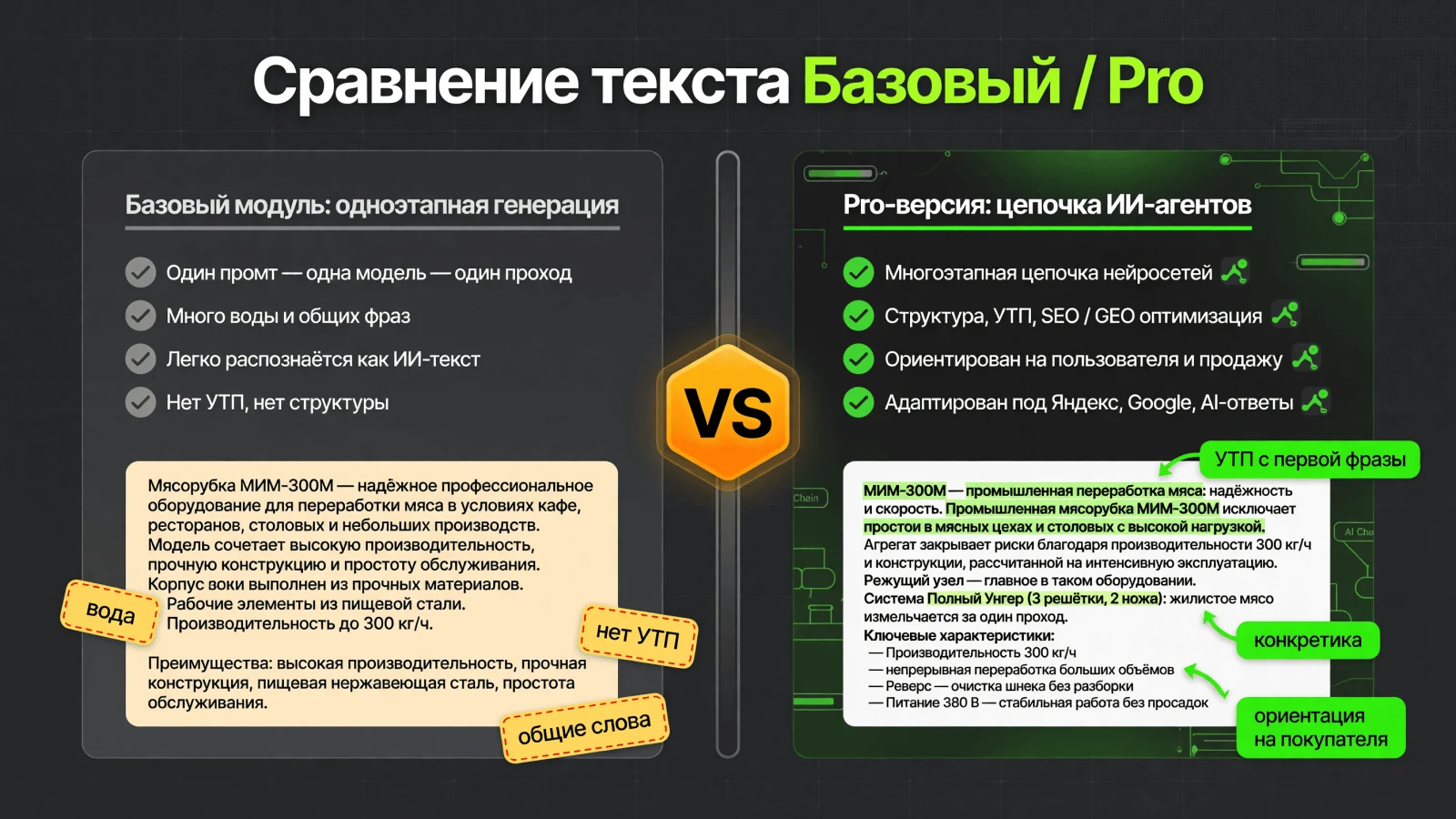
The base version of the module performs prompt-based text generation tasks, similar to other solutions for integrating neural networks into Bitrix. However, standard generations often resemble the vast amount of generic content on the internet, which search engines do not rank highly. Such text fills the site but does not drive its promotion.
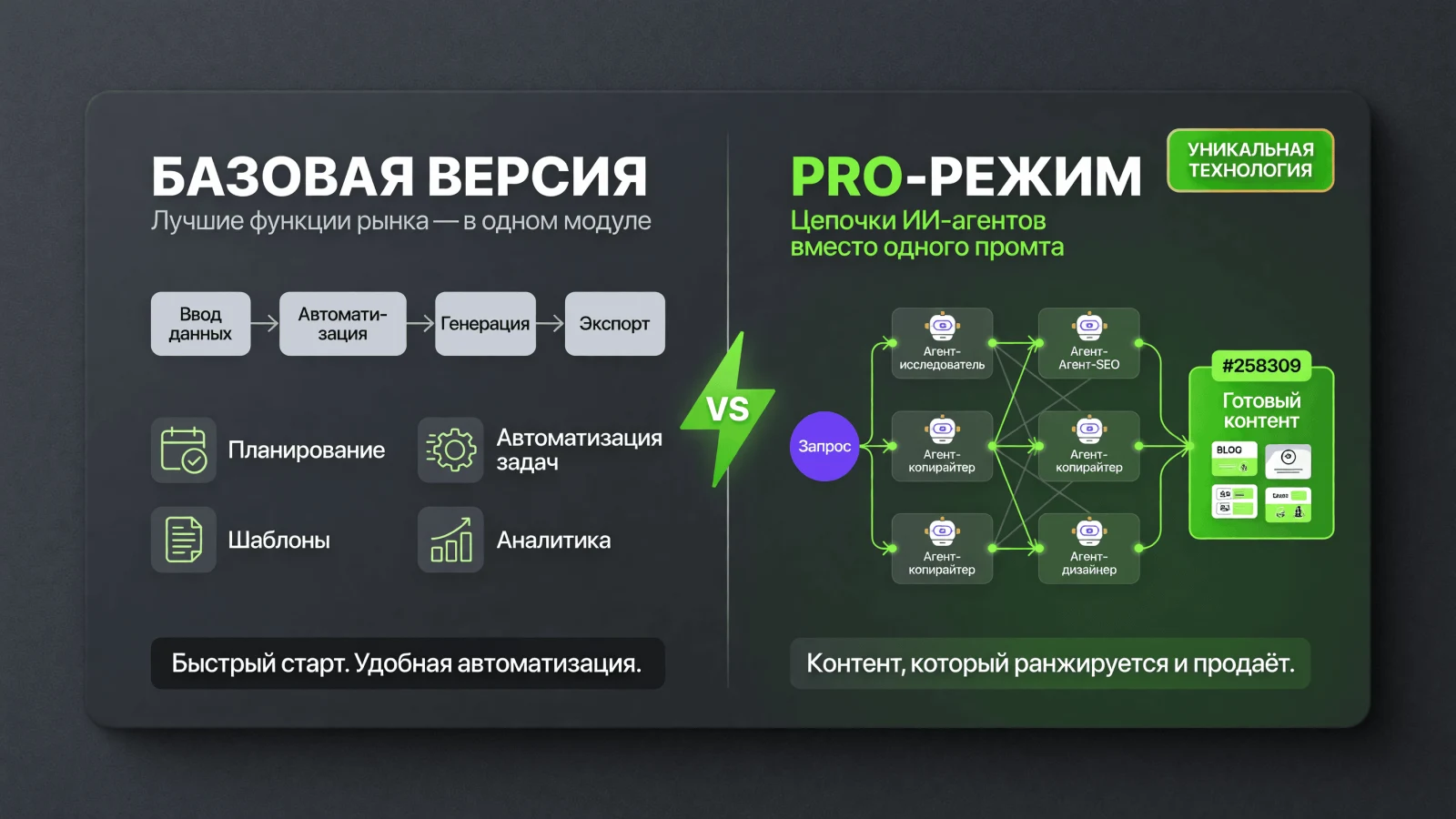
The key advantage is Pro mode. Unlike most solutions that use a single prompt and one model, this approach employs chains of AI agents. Each task is handled by the most suitable model, and the resulting content is initially optimized for search engines and generative AI responses.
The AI content generation module for SEO and GEO by HARDCODE TEAM is available in two versions: Basic and Pro.
The Basic version uses a single-step prompt and one model to generate content. It describes products and fills the site, while SEO optimization and buyer orientation depend on the prompt quality. It requires your neural network API keys and manual prompt writing. The version supports multilingual capabilities and solves the task of automatic catalog filling: mass creation or updating of descriptions for thousands of products without manual copywriting when launching new categories, receiving new suppliers, or collections.
The Pro version uses over 10 generation steps and more than 5 LLM models. It forms a unique USP page structure, promotes the site, and drives sales. Pro algorithms are natively optimized for Yandex and Google, and GEO optimization is adapted for responses from Alice, Google AI, ChatGPT, and Claude. LLM chains analyze products from the buyer's perspective. This version requires no API keys or manual prompt writing, while also supporting multilingual capabilities. The primary goal of the Pro version is to increase traffic and sales.
The HARDCODE TEAM module provides content generation optimized for search engines and neural networks. Algorithms account for current ranking criteria to create texts effective for SEO, AI-driven promotion, and user readability.
The solution suits online store owners by reducing team workload, accelerating product launches, and enabling clear tracking of implementation costs and ROI. SEO specialists and digital marketers can use it to fill large catalogs with tens of thousands of SKUs, generating SEO descriptions and meta tags without keyword stuffing or filler content, while automating regular content updates. Bitrix integrators and web studios can leverage the module to deliver projects with pre-filled catalogs quickly without expanding staff, and to replicate the solution across their client base.
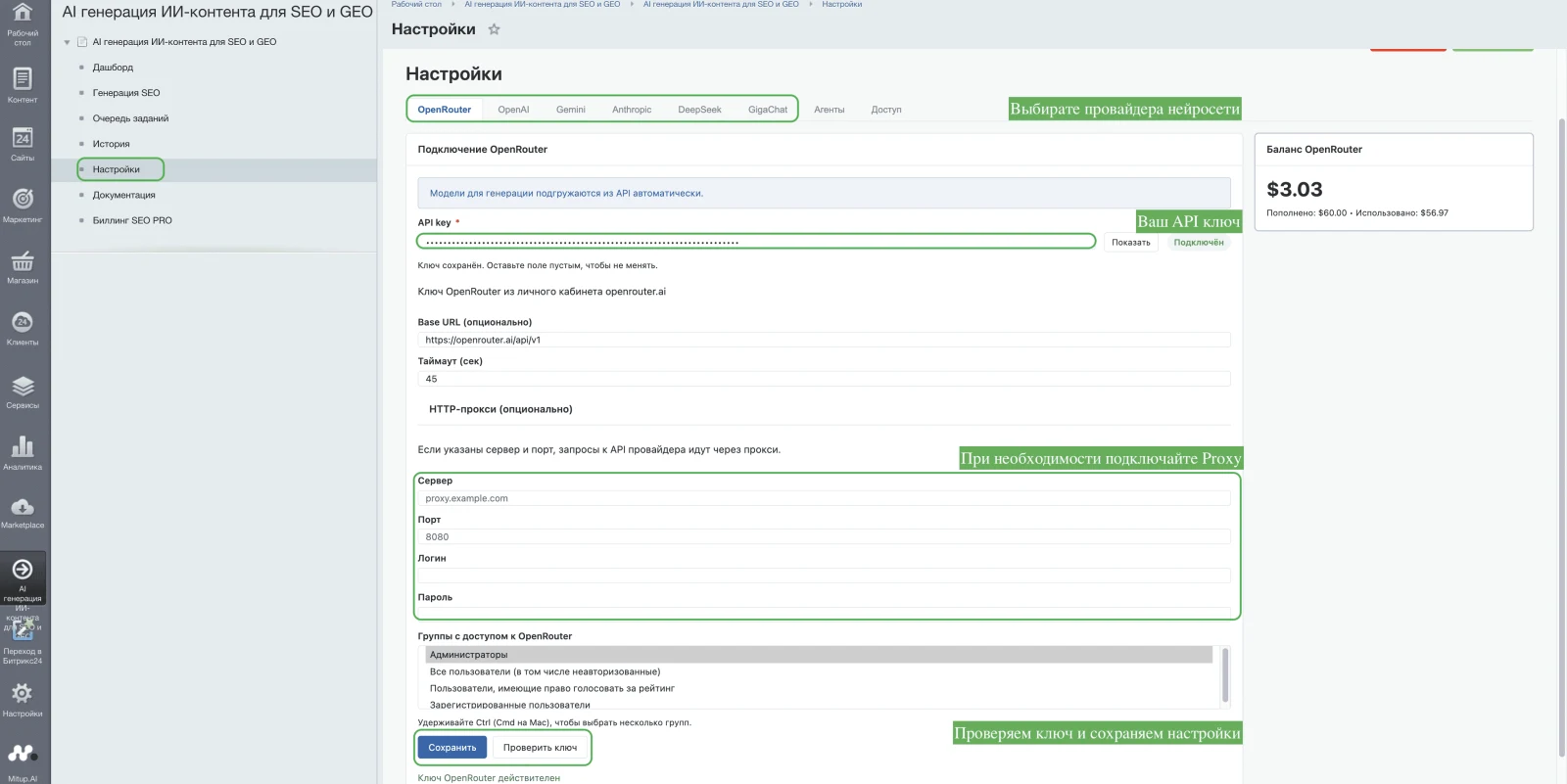
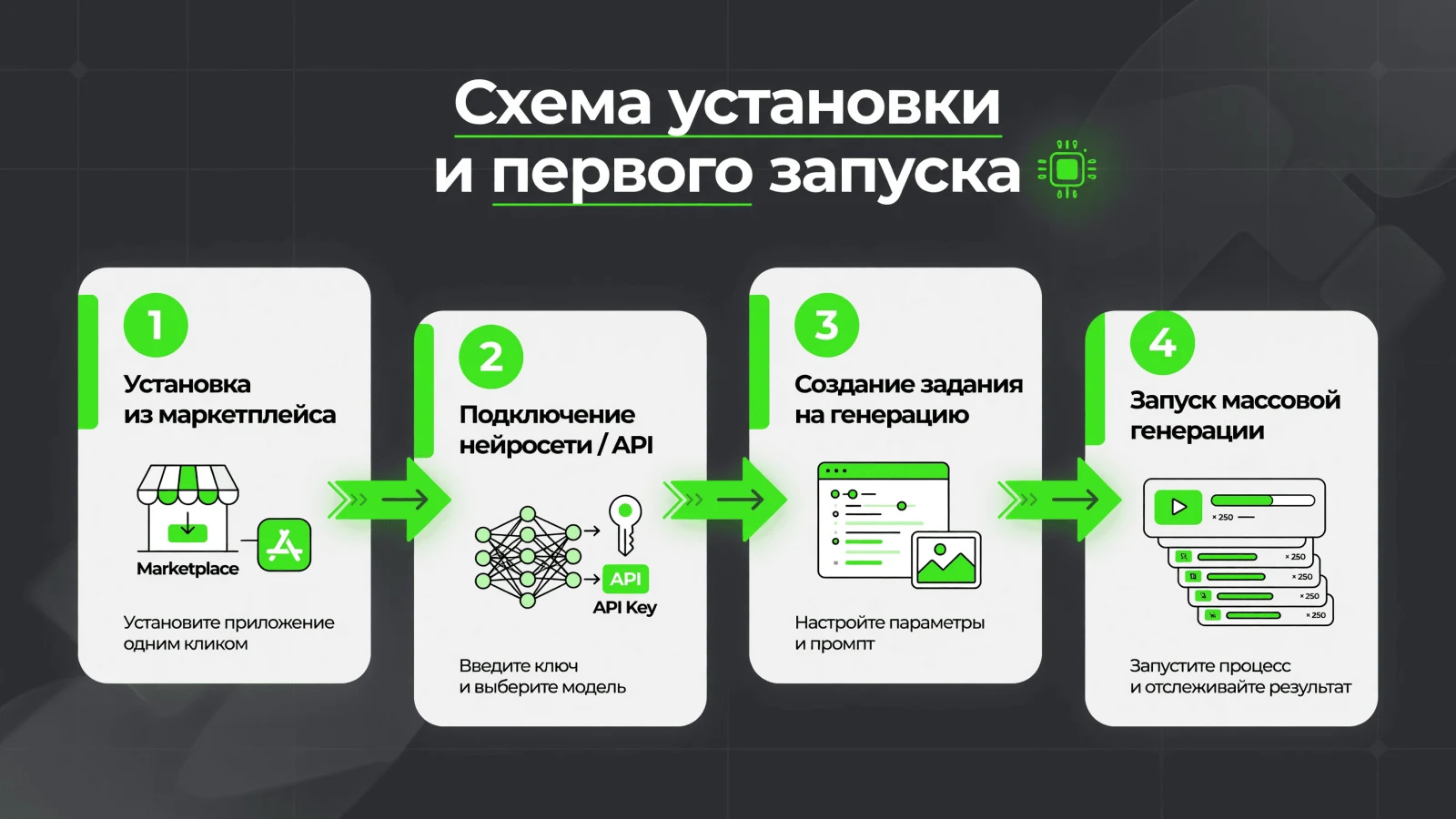
The basic version operates based on user-defined prompts. After installation, specify the neural network API key and configure a proxy if required. Select the information block, sections, and products for generation, then configure the prompt and generation parameters, passing necessary information block properties. Verify the result via a single-product preview. Launch mass generation in the background and monitor its status in the task queue.
The Pro version enables ready-made content generation. To operate, replenish the gene balance in the module interface. Select the information blocks and pages that require content. Specify input data: title, characteristics, and company information. The system generates ready-to-use texts for SEO, GEO, and AEO without requiring external neural network connections.
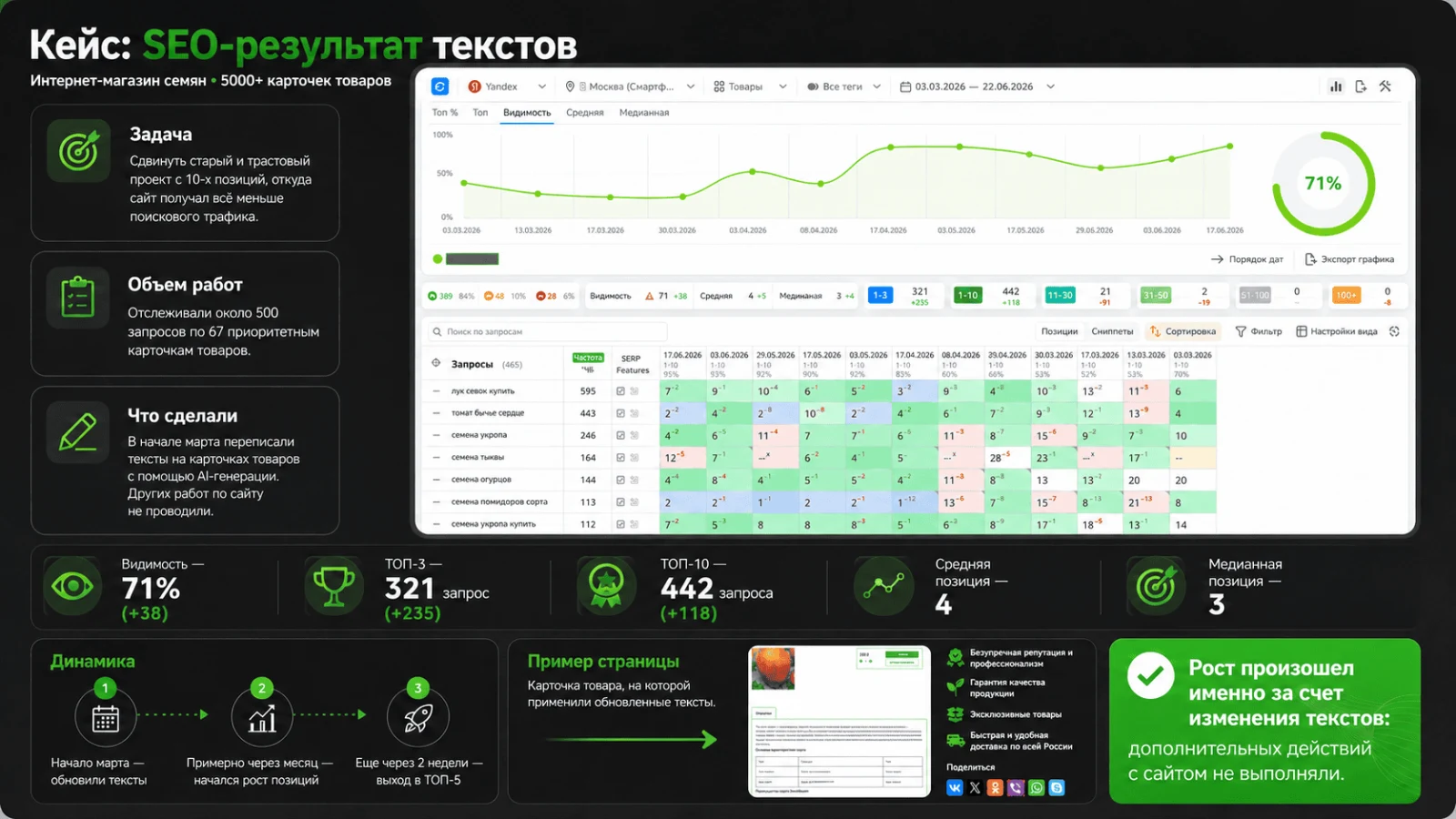
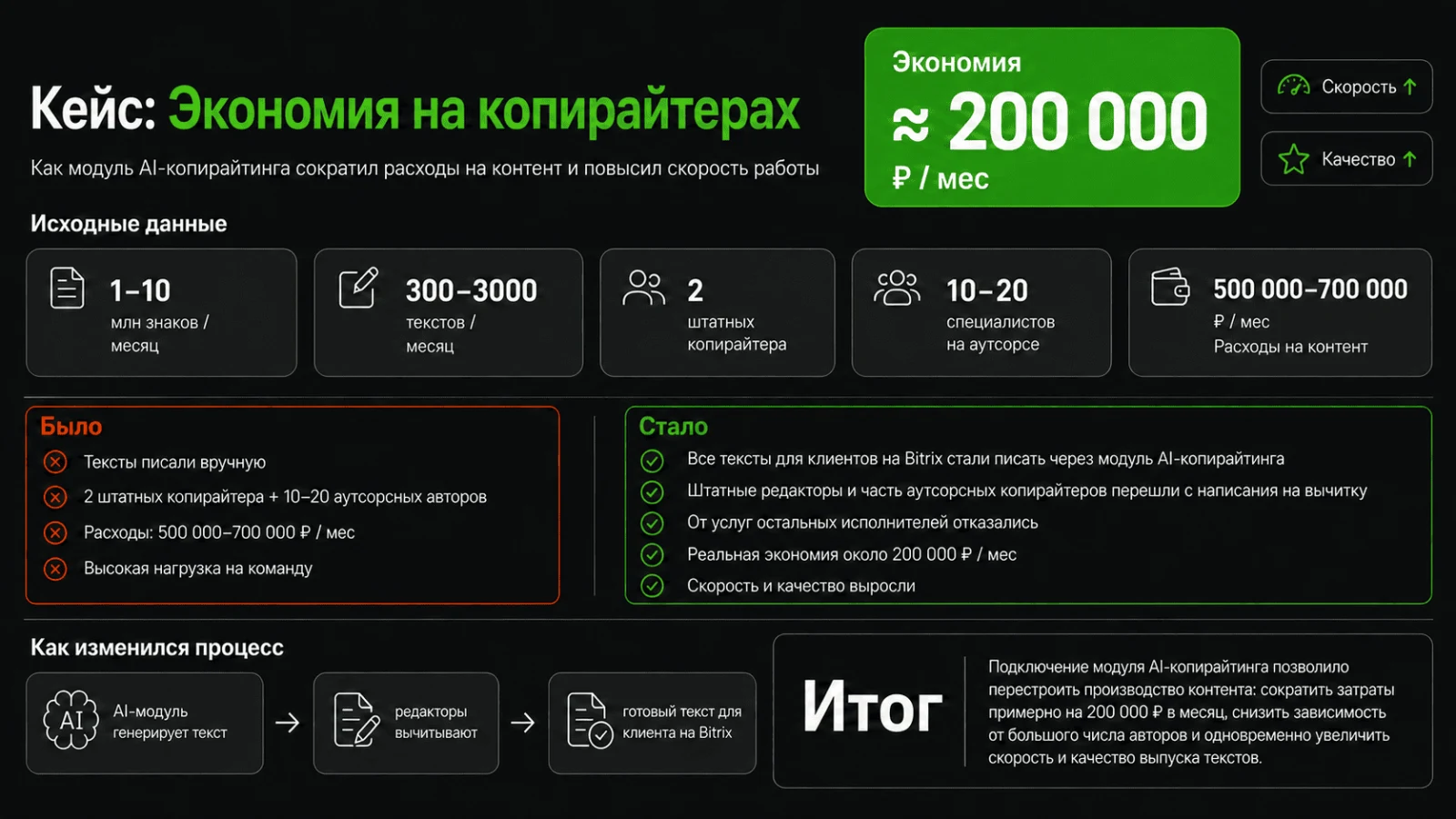
Module application examples
Example 1: SEO results for an online store
Case 2. Reducing copywriting costs
The AI content generation module for SEO and GEO by HARDCODE TEAM offers two operating modes. The Basic version is purchased for a one-time fee of 4000 RUB via the Bitrix marketplace. A purchase includes 500 bonus genes. In this mode, generation is performed using your own connections to neural networks.
The Pro version uses the module's internal currency, genes, where 1 gene equals 1 RUB. For example, generating a product card text costs 100 genes. Balances are topped up via packages that may include bonus genes: the Start package (from 300 to 10,000 RUB) offers no bonuses; the Business package (from 10,000 to 30,000 RUB) provides a +5% bonus on genes; the Enterprise package (from 30,000 RUB) provides a +10% bonus. For instance, topping up 15,000 RUB under the Business package yields 750 bonus genes, totaling 15,750 genes, which is sufficient for approximately 160 product card text generations.
Bonus genes can be used for generation but cannot be withdrawn. Unused standard genes may be refunded at a rate of 1 gene = 1 RUB under the terms specified in the user agreement. A free demo mode is available.
AI content generation module for SEO and GEO by HARDCODE TEAM. The trial version is available free of charge for 5 days with full functionality, limited to 50 products. An additional 100 bonus genes are provided to test the Pro generation mode.
Technical requirements:
PHP version 8.x
1C-Bitrix version 23 and above
Server-side cURL library
Maximum script execution time on the server — at least 180 seconds
API key to one of the neural network providers (for the base version)
Proxy — when connecting to foreign models (for the base version)
Installation
The module is installed via the standard Bitrix marketplace method. After installation, specify the neural network connection parameters (API key, Proxy if needed) and create the first generation task.
AI Content Generation Module for SEO and GEO
Development is iterative. Purchasing the module provides access to all future functional updates. The current version supports generating text for product cards.
Planned feature expansion:
- Generation of meta tags (Title, H1, Description).
- Creation and rewriting of images for product cards.
- Generation of reviews for product cards.
- Generation of text for categories.
- Generation of text for service pages.
- Generation of content for informational pages: blog, articles, and news.
Technical Support
The HARDCODE TEAM provides assistance with installation, configuration, and operation of the module. For inquiries and suggestions regarding further development, contact technical support.
General iT can connect “AI generation of AI content for SEO and GEO”, configure it and verify the integration with the existing website.
UPDATE HISTORY
What’s new
118 releases
1.2.78 (24.07.2026)Latest update
1. The empty yellow ui-alert block under 'Payer Profile' is no longer displayed if no notification is required.
2. The '?' tooltip for 'InfoBlock Property Mapping' is no longer cut off by the block border.
1.2.77 (24.07.2026)
1. SEO PRO registration: API errors (email/domain already in use) are now displayed again under the 'Send Confirmation Code' button (bug fix for status clearing).
2. '?' tooltips for 'Product Version', 'Additional Requirements', and 'InfoBlock Property Mapping'.
3. The GENE balance warning now accounts for the already paid preview: GENE is not required again for this item.
4. If no payment profiles exist, a notification with a link to the 'Payer Profiles' tab on the billing page is displayed.
1.2.76 (21.07.2026)
SOCKS5/HTTP proxy authorization has been fixed: username and password are now passed separately (via CURLOPT_PROXYUSERNAME/PROXYPASSWORD) and via URL with rawurlencode—passwords containing special characters (:, @, /) no longer break the connection.
SOCKS5: automatic retry via socks5h (DNS on proxy) and socks5 (local DNS).
1.2.75 (21.07.2026)
Support for SOCKS5 proxies for AI providers.
With a configured proxy, requests are sent via native PHP cURL (HTTP or SOCKS5) instead of Bitrix HttpClient, which only supports HTTP CONNECT.
The provider settings now include a proxy type selection: HTTP / SOCKS5.
Error messages for proxy connection failures have been improved.
1.2.74 (21.07.2026)
1. Fixed HTTP proxy functionality: with a configured proxy, requests to provider APIs now use cURL instead of sockets. This resolves the 'HTTP request error' when proxying HTTPS requests (OpenRouter, OpenAI, Anthropic, etc.).
2. Fixed dashboard chart display: when selecting the USD metric, GigaChat is no longer displayed (calculations are in rubles); when selecting ₽, only GigaChat is shown.
1.2.73 (21.07.2026)
Fixed MySQL 1054 error when updating the SEO PRO queue: the query to hcaig_job_items no longer references the non-existent DATE_CREATE column.
1.2.72 (21.07.2026)
Security hardening for Marketplace (1.2.72):
Queue and history: non-admins see only their own tasks and records; user filtering is available only for Bitrix administrators.
XSS: escape queue table; HTML preview via GeneratedHtmlSanitizer (API utility.sanitizeHtml).
Settings: change module ACL and page_access — only Bitrix administrators.
Secrets: reveal API keys only for admin, rate limit and audit log.
init.js.php: sessid only for authorized users.
GigaChat: disable SSL verify — admin only (opt-in for servers without certificates from the Ministry of Digital Development).
1.2.71 (20.07.2026)
The default API address for SEO PRO has been changed to
1.2.70 (14.07.2026)
Billing SEO PRO: QR preview — PDF/1C buttons under the signature, 20px margins.
Document management: amounts without kopecks with digit grouping (400, 1 000 RUB) in notifications and tables; dates in YYYY-MM-DD HH:mm:ss format in the server time zone.
SEO PRO: preview key is saved immediately (status in the queue is synchronized after "Update status"); by default, Pro mode is enabled for "Description"/"Short description" when the key is active; preview and GENE evaluation use the selected pipeline version.
1.2.69 (14.07.2026)
Billing SEO PRO (account for individuals): irrelevant buttons "QR SBP (acquiring)" and "Update QR/link" have been removed. After "Check Payment", the verification status is displayed below the buttons. The white text color of the "Pay with card" button has been fixed; a margin has been added to the QR label.
Document Management: the profile is displayed in the "Orders", "Payment Register", and "Return Requests" tables; for return requests, the workflow status from the API is shown. UPD documents without period_year/month are merged with the corresponding monthly report into a single row (by profile, period from date, and amount).
Document Management Snapshot is supplemented with up-to-date lists from the SEO PRO API (orders, UPD, reports, returns, invoices) — including orders created manually in the service. The date filter shift caused by UTC (local "today" and month start) has been fixed.
1.2.68 (14.07.2026)
The "SEO Generation" page, step 3 (SEO PRO mode): consent/offer render using the same method as on the "Access" tab in SEO PRO Billing (single ui-checkbox and texts from the policy API).
The notification "SEO PRO key received, but registration is not yet completed" is shown only on step 2 of the confirmation wizard (after the code request, before activation) — on the "SEO Generation" page (step 3) and on the "Access" tab in SEO PRO Billing. The notification is not displayed on the initial registration form.
1.2.67 (14.07.2026)
Dashboard: the "Successful Generations" counter counts each successful application to a product (including repeated generations of the same product). Next to it, a "Previews" counter has been added — generations without saving to a product. The metrics grid has been expanded to 5 cards.
1.2.66 (14.07.2026)
Fixed handling of empty AI responses when tokens are paid.
DeepSeek V4: thinking is disabled during generation (tokens no longer go only to reasoning_content when the final text is empty). The same applies to deepseek-v4 models via OpenRouter.
If the final text is empty but the provider returned usage, real tokens/cost are saved in the history and queue, and the error text explains the deduction. Parsing of multipart-content (OpenAI/OpenRouter/GigaChat) and thought parts of Gemini has been improved.
1.2.65 (14.07.2026)
After submitting the task to the queue, the "View Result" and "Generate and Save" buttons remain blocked on step 3 (protection against repeated clicks). When switching to another wizard step on the "SEO Generation" page, the block is removed, allowing the generation type to be changed and the task to be started again.
1.2.64 (14.07.2026)
Fixed the false message "API key not connected" on step 3 of SEO generation: the banner no longer appears if the provider key is already configured but only the model has not been selected. After selecting the model, the generation buttons are reactivated. The race condition between settings.get and generation.status, which could cause the list of available providers to become empty, has been resolved.
The preview block has been renamed: "Generation Preview (Google snippet)".
1.2.63 (10.07.2026)
Fixed model selection on step 3: the field is empty by default with the hint "Select or search for a model...", without auto-selecting the first model. During loading, it shows "Loading models..."; the message "Models unavailable" appears only if the list is truly empty.
1.2.62 (10.07.2026)
The "View Result" button in the queue is shown only for tasks of type "Preview," not for standard generation (descriptions, SEO, etc.)
1.2.61 (10.07.2026)
The ui-alert--warning block within the documentation tree has been removed. Table of contents loading errors are now displayed via a Bitrix notification instead of within data-ai-docs-tree.
1.2.60 (10.07.2026)
The demo banner (empty ui-alert--warning) is no longer displayed on the Documentation page. The banner is hidden via JavaScript and CSS.
1.2.59 (10.07.2026)
The hint text regarding the preliminary generation cost for providers other than OpenRouter has been updated: instead of 'billing in the personal account', it now reads 'preliminary cost is not calculated in the module'.
1.2.58 (10.07.2026)
The empty warning banner on the Documentation page has been removed (the shareware banner is removed upon license activation and does not remain without text). The menu item icon in the admin panel has been replaced with favicon.png.
1.2.57 (10.07.2026)
A PHP syntax error on the Job Queue page has been fixed: the reapplySkipRulesForJob method in QueueService.php was missing a closing bracket.
1.2.56 (10.07.2026)
The module icon in the Bitrix admin menu has been fixed: the CSS previously referenced a missing menu-icon.png file; it now uses menu-icon.svg (a blue tile with a star). Files are copied to /bitrix/images/ and /bitrix/themes/.
1.2.55 (10.07.2026)
Full support for the "Documentation" page has been added: a wiki.xml upload and caching service, the API docs.wikiTree, markup with a dynamic section tree, and a JS-rendered table of contents.
It is recommended to install after updating to version 1.2.54 (or ensure that the update has already been applied).
1.2.54 (09.07.2026)
Fixed saving of generated text to product fields: the record is made on behalf of the task author, the result of Update() is verified, and the actual field filling is checked. The HTML sanitizer has been improved (with a fallback on DOM failure).
Step 1: The "InfoBlock Sections" block is hidden until an InfoBlock is selected. Step 2: HTML is enabled by default for descriptions. Step 3: After "Generate and Save", the "View Result" button is disabled; SEO preview and empty model responses have been fixed.
Queue: saving the result from the preview, status "Skipped" without overwriting, link to the queue in a new window. Dashboard: balance without unnecessary requests to the OpenRouter API on every opening.
1.2.53 (07.07.2026)
Replaced strip_tags() with a secure HTML sanitizer: removal of on* handlers, dangerous URLs, and script tags when saving AI content.
1.2.52 (06.07.2026)
Styles for the stepper, danger/success buttons, prompt background blocks, and prop-map; sticky preview on step 3 SEO has been restored.
1.2.51 (05.07.2026)
Hover styles for buttons and pagination, chart height 400px, refined order button labels in SEO PRO billing.
1.2.50 (04.07.2026)
Cosmetic improvements to SEO billing and dashboard: order amount format, profile form closure, chart metric highlighting, increased chart height.
1.2.49 (04.07.2026)
Preview styles for results and the "View Result" modal window in the queue; alignment of "Provider" and "Model" fields; pagination history spacing.
1.2.48 (04.07.2026)
White text on primary buttons, form field height 38px, provider and model alignment, restored styles for the model search dropdown.
Property mapping styles on step 3 of SEO PRO, calculator and multishop card spacing, payer profile cards, yellow document management notifications. Fixed the disappearing "added to queue" message after generation.
1.2.45 (04.07.2026)
SEO PRO billing: quick selection of amounts 10,000 / 20,000 / 30,000 RUB with automatic tariff selection; right column (wallet and calculator) on all tabs; calculator and "More Details" button styles; checkbox only for individuals; fixed empty warning block; captcha min-width 200px / max-width 350px.
1.2.44 (04.07.2026)
Fixed the margin-top: 10px offset for the "SEO PRO Access" block (data-ai-seo-access-groups-card).
1.2.43 (04.07.2026)
Offset for the "SEO PRO Access" block and the badge on step 3. On step 3 of generation, display "Current API key" as on the "Access" tab. Red highlighting for required fields and error styles ui-form-field-error.
1.2.42 (04.07.2026)
Added margin-top: 10px for .ai-card. On the "Settings" page, ui-form-row offsets were removed. Fixed the infoblock list loading: incorrect fields in ORM TypeLanguageTable were breaking the API.
1.2.41 (04.07.2026)
Card offsets of 10px, copy API key button inside the field, pagination on the right, uniform button size without ui-btn--sm, account and document flow filters in one line, infoblock type names, SEO PRO switch gradient, fixed empty badge artifact.
1.2.40 (04.07.2026)
UI improvements: card and form offsets, "Show" button on the right of the API key field, email confirmation styles. In payer profiles, KPP is hidden for individual entrepreneurs, phone/email mask and validation. In SEO generation, infoblock list displays type names instead of symbolic codes.
1.2.39 (04.07.2026)
Module styles restored after CSS rebuild: unified UI kit (card and form spacing, 'Ask a question'/'Leave a review' buttons, preloader), SEO generation step 1, product filter, settings grid with provider balance on the right.
1.2.38 (04.07.2026)
Redesigned 'Tariffs and payment' tab: input amount in rubles with automatic tariff and bonus selection, new totals block and GEN wallet. Module color palette updated. Fixed display of SEO PRO verification on generation step 3 during incomplete registration.
1.2.37 (04.07.2026)
SEO generation (step 3): 'Price: {PRICE}' removed from prompt templates, 'Additional requirements' field in SEO PRO is empty by default, GEN balance displayed in cost block.
1.2.36 (11.06.2026)
Demo period: 'days remaining' counter aligned to 5 days. SMS confirmation block hidden when verification.phone=false in SEO PRO policy.
1.2.35 (11.06.2026)
UI fixes: hide SMS confirmation when channel is disabled, links to bot-gena.ru in documentation and Pro banner, prefill email/phone in payer profiles, demo period 5 days.
1.2.34 (12.06.2026)
SEO PRO billing (1.2.34): single API key input field before connection, no extra hint when key is saved.
1.2.33 (12.06.2026)
Billing SEO PRO (1.2.33): one API key field before connection, phone mask +7 (9XX) XXX-XX-XX, links in consent texts.
1.2.32 (11.06.2026)
Billing SEO PRO (1.2.32): registration consents from API, correct verification fields, access UI and profiles, tab order, contact prefill.
1.2.31 (11.06.2026)
Fix (1.2.31): View result on Queue page; preloader hides after data loads from backend and SEO PRO API, not on empty page render.
1.2.30 (11.06.2026)
Fix (1.2.30): preloader correctly hides after page loads in iframe (duplicate removed, all overlays hide).
1.2.29 (11.06.2026)
Update (1.2.29): SEO PRO Document Management tab (combined UPD and reports, filters, pagination); fixed page preloader; in demo mode, limit of 50 generated products with blocking and warning.
1.2.28 (11.06.2026)
Update (1.2.28): for SEO PRO, cost only in GEN (rubles — dash); preview without re-deduction on save; full-page preloader on all module pages.
1.2.27 (11.06.2026)
Update (1.2.27): preview in the queue in step 3 format (generated text, 'Was', HTML/Text toggle); notification about a ready preview in the status block with a link to the queue; preview cost after generation; number of items specified in the pre-calculation.
1.2.26 (11.06.2026)
Update (1.2.26): generation errors at step 3 in the queue status block with a link to the queue page; 'View Result' button fixed; Text/HTML buttons and 'Additional Requirements' field renamed; matching button styles; property name displayed instead of code in matching; pagination history margin.
1.2.25 (11.06.2026)
Update (1.2.25): 'Task' filter for the dashboard chart; SEO PRO API document management v1.16 (new metrics, advance/correction invoices, fiscal receipts); preview via task queue with 'View Result' button and unified SEO PRO error message.
1.2.24 (11.06.2026)
Update (1.2.24): task queue — label 'Task-N' and 'Update Status' button; dashboard — column and filter by task in generation history; correct display of GEN and cost for preview.
2. Online payment via T-Bank for individuals (acquiring, verification, and reissuing of QR codes/links).
3. Order payment status column, new document types, limits from the meta catalog.
4. Downloading accounting-documents, UPD, and reports via the module proxy.
1.2.15 (11.06.2026)
Task Queue (1.2.15):
1. The "Cancel Generation" button is not activated for completed tasks.
2. In the logs of running tasks — estimated time: 30 sec × items (standard providers) or 3 min × items (SEO PRO).
1.2.14 (11.06.2026)
Interface Improvements (1.2.14):
1. GENE calculator in billing — top margin 20px.
2. Settings — tooltips (?) for all fields on provider, agent, and access tabs.
3. Task Queue — "Start" and "End" columns, fixed false "No tasks" message, "Per page" selector moved to the right.
1.2.13 (11.06.2026)
Fixes (1.2.13):
1. SEO PRO — cost in RUB at an exchange rate of 1 GENE = 1 RUB (from tariffs or by default).
2. Bonus GENE are accounted separately: in history and on the graph, only paid GENE are counted in RUB; bonus GENE are displayed as "free".
1.2.12 (11.06.2026)
Changes (1.2.12):
1. History has been moved to the dashboard; the separate 'History' page has been removed from the menu.
2. A unified filter (period, provider, model, user, type) for the chart and history table.
3. In history: separate columns for 'Tokens', 'GEN', 'USD / RUB'; cost is calculated after generation.
4. Chart: metrics 'Tokens' (excluding SEO PRO), 'GEN', 'USD', 'RUB'.
5. Queue: pagination of 25/50/100 records.
6. Fixed a bug in GEN display in history (SEO PRO preview no longer confuses words with GEN).
1.2.11 (11.06.2026)
Fixes (1.2.11):
1. SEO PRO billing — on the 'Access' tab, the unnecessary two-column grid has been removed; the GEN wallet is aligned to the top of the content.
1.2.10 (12.06.2026)
Fixes (1.2.10):
1. SEO PRO billing — the GEN wallet is back in the right column on all tabs; the calculator is only on 'Plans and Payment'.
2. SEO generation — when switching from SEO PRO to standard mode, the GEN shortage block is completely hidden (no empty orange square).
1.2.9 (12.06.2026)
UX improvements (1.2.9):
1. SEO PRO Billing — preloader displayed while loading tariffs and descriptions from the API; hidden after the response.
2. GEN Wallet moved above the tabs and visible on all tabs; the calculator remains only on the "Tariffs and Payment" tab.
3. SEO Generation — warning about insufficient GEN is hidden when SEO PRO is turned off.
4. SEO Generation — progress block renamed to "Preview Generation" and shown only when clicking "View Result".
5. "Before" Preview — the original description is passed with HTML tags; the Text/HTML toggle works correctly.
1.2.8 (12.06.2026)
SEO PRO Billing (1.2.8):
The "New Order" block has been returned to the "Tariffs and Payment" tab. Only "Payer Profiles" and "Invoices and Orders" remain on separate tabs.
When navigating from the calculator ("Buy"), the "Tariffs and Payment" tab opens with scrolling to the order form.
1.2.7 (12.06.2026)
UX Fixes (1.2.7):
1. "View Result" tooltip — empty tooltips no longer appear when SEO PRO is turned off.
2. Preview: in "Text" mode, HTML tags are displayed as raw text (in "Generated Text" and "Before"); in "HTML" mode, the markup is rendered.
3. SEO PRO Billing: "Payer Profiles" and "Invoices and Orders" moved to separate top-level tabs.
1.2.6 (12.06.2026)
1.2.6 — hotfix for UX of SEO generation and admin panel.
Property mapping: the block does not collapse when adding characteristics and after saving.
Preview 'Before' and generated text: Text mode displays plain text, HTML mode renders markup.
Internal scroll removed from the 'Result Preview' card.
Breadcrumbs: duplicate module name level removed.
1.2.5 (11.06.2026)
1.2.5 — hotfix for UX of the 'SEO Generation' page and admin panel.
Preview: margin for progress, Text/HTML toggle for the 'Before' block, sticky card with body scroll, segmented switch.
SEO PRO preview: asynchronous status polling (fixed hang at ~46%), instant tooltip and info message under the button.
Duplicate h1 tags and extra breadcrumb item removed; SEO PRO banner updated.
'Add product parameters' button set to primary; padding added to section headers.
1.2.4 (11.06.2026)
1.2.4 — hotfix for the "SEO Generation" page.
Step 1: Preloader for the left block (information block, sections) and upon the first loading of the information block list.
Step 3: The hint "SEO PRO is available for types..." is hidden when "Description" / "Short Description" is selected (the display: block conflict in the alert has been fixed).
Preview: The Text/HTML switch is now a segmented toggle; internal scrolling has been removed — content now expands to full height.
1.2.3 (11.06.2026)
1.2.3 — "SEO Generation" page: UX, SEO PRO, and property mapping.
Step 1: Preloader when loading information blocks, sections, and products.
Step 3: Preview without duplicating "Became", the "Was" block spans the full width, Text/HTML switch, sticky preview column, and smooth progress on "View Result".
SEO PRO: Fixed preview (generation starts after presale), hint "up to 5 minutes", blocking repeated clicks on "Generate and Save", green notification for the queue.
Cleaning of html markers from AI provider responses during preview and saving.
SEO PRO: NAME defaults to "Product Name", hints for empty characteristics, and the "Property Mapping" block is collapsed.
The hint "SEO PRO is available for types..." is styled as an info-alert.
1.2.2 (16.06.2026)
1.2.2 — fix for demo mode detection and banner.
Demo/shareware: fallback if include.php is missing or empty after update 1.2.1 — the banner is shown again on trial portals.
Demo end date is taken from the marketplace (DATE_TO), if available.
include.php is not included in the update — installation and updates without ParseError.
1.2.1 (12.06.2026)
1.2.1 — dashboard, queue, demo mode and stability.
Dashboard: Popular model card (SEO PRO and AI providers); filters as in History; duplicate SEO PRO removed; Cost button hidden.
Queue: fast loading of task list; items loaded when row is expanded; filters as in History.
Demo mode: shareware in HCAIG_CONFIG and init.js.php; trial detection via IncludeModuleEx; banner on module pages.
include.php: empty file (0 bytes) — fix for ParseError on partner_modules and update_system_partner.
1.2.0 (11.06.2026)
1.2.0 — dashboard, queue, and demo mode.
Dashboard: 'Popular Model' card (SEO PRO and AI providers, excluding old records without a provider); chart filters match those on 'History'; 'Cost' button is hidden.
Queue: fast loading of the task list; products load upon expanding a row; filters use the same format as on 'History'.
Demo mode: license detection fixed — the banner with text now displays again in trial mode.
1.1.10 (12.06.2026)
1.1.10 — history filtering by provider fixed.
The 'Provider' filter on the 'Generation History' page is now passed in the request and applied on the server.
The provider dropdown list displays readable names (Gemini, GigaChat, etc.).
1.1.9 (12.06.2026)
1.1.9 — balance and provider cost hints.
Settings: below the '—' in the balance block, an explanation and a link to the account are shown (OpenAI, Gemini, Anthropic, GigaChat).
Generation step: if the preliminary cost is unavailable, an explanatory text is displayed (not only on hover).
1.1.8 (11.06.2026)
1.1.8 — dashboard: chart on Chart.js.
Line chart on Chart.js with legend and tooltips on hover (provider, date, value).
Zoom with mouse wheel and scroll by days (dragging); button to "Reset scale".
chartjs-plugin-zoom and Hammer.js are connected for gestures on touch devices.
1.1.7 (11.06.2026)
1.1.7 — dashboard: fixed usage chart.
Y-axis: correct label order (100% at top, 0% at bottom); erroneous "line" label removed.
For multiple providers, the axis shows relative percentages; absolute values are in the legend (max).
Data points are marked with markers — the line is more visible with sparse values.
1.1.6 (11.06.2026)
1.1.6 — GigaChat: fixed "No such model" error.
GigaChat model is normalized before the request (aliases, filtering of embedding models, selection of default model from API).
When queuing a task, it is checked that the model belongs to the selected provider.
In the generation form, the model is reset when the provider changes; the "Generate" button is blocked while the list of models is loading.
1.1.5 (18.06.2026)
1.1.5 — dashboard: chart and time savings.
Chart: separate line scaling when multiple providers are present — lines do not 'stick' to the bottom; the legend shows the maximum for each curve.
'Time saved': SEO title / description / keywords — 10 min, short description — 20 min, product description — 40 min for successful generation.
1.1.4 (11.06.2026)
1.1.4 — OAuth GigaChat fix.
Correct parsing of expires_at from the OAuth response (absolute Unix time, not 'seconds from now').
Reset of incorrect access token cache and automatic re-request on 'Token has expired' error.
GigaChat token is refreshed every ~30 minutes, as per the API documentation.
1.1.3 (11.06.2026)
1.1.3 — dashboard and generation queue.
Usage chart: separate curves for each AI provider and SEO PRO; filters by provider and generation type; metrics 'Products', 'Tokens', 'Cost' (GEN for SEO PRO).
'Generate and save': task is immediately placed in the queue without synchronous waiting for generation (10–15 sec).
History: when synchronizing from the queue, the provider is preserved.
1.1.2 (11.06.2026)
1.1.2 — Provider security and queue fixes.
Gemini: The API key is passed via the x-goog-api-key header, not in the URL (does not appear in access logs).
GigaChat: SSL verification is enabled by default; an option to "Disable SSL verification" is available for servers without certificates from the Ministry of Digital Development.
Task queue: alignment of the "Status" and "Logs" columns when expanding products; fixed width for the "Provider" column; hiding the "Updating data..." message after loading.
1.1.1 (11.06.2026)
1.1.1 — Proxy for AI providers and SEO improvements.
Settings for each provider: HTTP proxy (server, port, login, password). If specified, requests go through the proxy; otherwise, they go directly.
Key verification considers the proxy settings from the form without requiring a save.
SEO, step 3: a "No access" hint with a link to settings if no providers are connected.
1.1.0 (12.06.2026)
1.1.0 — multi-provider AI generation.
6 providers: OpenRouter, OpenAI, Gemini, Anthropic, DeepSeek, GigaChat (+ SEO PRO separately).
Settings: tab for each provider (key, base URL, groups, balance, verification).
SEO generation: provider selection, model, temperature, and max tokens.
History, queue, and dashboard: Provider column, filter by provider in history.
The module is designed for online stores running on the 1C-Bitrix platform to automate the integration of supplier product catalogs. It is also suitable for news and city portals to facilitate content population. The solution supports data import in Excel, XML, YML, CSV, and RSS formats.
The module is designed for importing products and sections from XML, YML, and JSON files. It supports loading any product fields and properties, as well as updating stock levels and prices. Product-to-section binding is supported, along with importing section structures from a file into an arbitrary site structure.
This module extends the standard functionality of information blocks. It enables copying and moving elements between different information blocks, as well as duplicating elements within a single block. Navigation between cells in new information blocks has been optimized. An option to detach an element from the current section is available.
The displayed price covers the solution itself. Platform licensing, installation and customisation are checked separately. If the page offers bundles, select the required option before submitting a request.
How do I check compatibility?
Compare the supported editions and solution version in the technical details with your project. Before installing on a live website, we recommend making a backup and checking the solution in a test environment.
Is there a trial?
The developer lists a trial of 5 days. The trial button opens the installer in your website control panel. Check the required features and compatibility before purchasing.
How much does this solution’s renewal cost?
The current renewal price is 2,000 ₽. Before you order, a manager will confirm the renewal period and whether it applies to your licence.
Can you help with implementation?
We can help install the module, check its settings and verify how it works in your project. Compatibility with other customisations and the scope of work are assessed before we begin.
Your cookie choices
Necessary cookies support sign-in, your cart and security. Optional analytics helps improve the website and starts only with your permission.
Our metrika.git.ru system: public pages, a random identifier, device and interaction events. Form contents, account and payment pages are excluded. Raw events: up to 90 days. Operator: General IT Rus LLC, INN 2310208877.
Your browser requests no tracking: analytics is off.