
Module
Dwstroy: Authorization via Telegram
The Dwstroy: Telegram Authorization module extends standard authorization parameters via the Telegram messenger.
2,900 ₽
↗Аккаунт в General iT
Войдите или создайте аккаунт для управления услугами в панели.
Страны не найдены. Попробуйте другое название или код.

MODULE FOR 1C-BITRIX
DWSTROY
The Dwstroy Cookie Notification Builder (152-FZ) module is designed for websites built on the 1C-Bitrix platform. It provides a consent banner for cookie usage and personal data processing in compliance with 152-FZ regulations. The solution includes blocking analytics counters until user consent is obtained, maintaining a consent log, and supplying a ready-made privacy policy template.
The Dwstroy Cookie Notification Builder (152-FZ) module is designed for websites built on the 1C-Bitrix platform. It provides a consent banner for cookie usage and personal data processing in compliance with 152-FZ regulations. The solution includes blocking analytics counters until user consent is obtained, maintaining a consent log, and supplying a ready-made privacy policy template. The module operates immediately after installation without requiring any template editing.
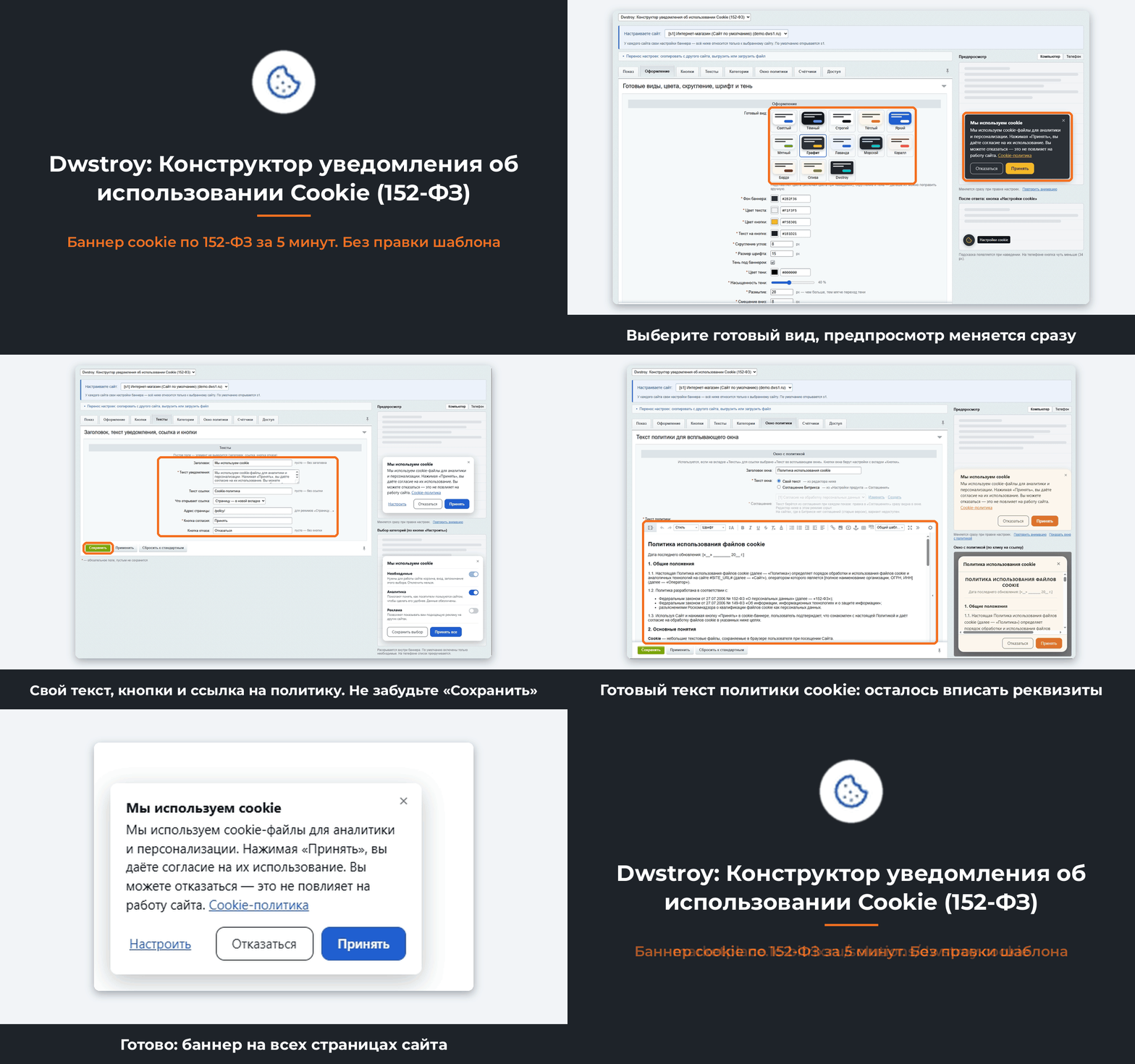
Why this module
Roskomnadzor classifies cookies and data from analytics systems, including Yandex Metrica, Google Analytics, and the VK pixel, as personal data. Processing such data requires visitor consent that is conscious, specific, informed, and provable.
The Dwstroy Cookie Notification Builder module implements the technical requirements of Federal Law No. 152-FZ. It displays a clean notification banner to visitors, records their choice, prevents analytics scripts from running until consent is obtained, and maintains a log of recorded consents.

The Dwstroy module automatically displays a consent banner on all website pages without requiring template modifications. Analytics and advertising counters remain blocked until the visitor provides explicit consent. Only strictly necessary cookies, essential for the website to function, are active. Consent is not granted by default nor inferred from continued site usage.
Visitors provide specific consent by category: Analytics and Advertising. Approval for one category does not imply approval for the other.
The banner clearly states what data is collected and why, accompanied by a link to the cookie policy.
Withdrawing consent is as simple as granting it. The Reject button is placed next to the Accept button. Closing the banner with the close icon does not constitute consent.
Consent can be revoked at any time via the Cookie Settings button, which is always visible in the screen corner. Counters are disabled for categories where consent has been withdrawn.
The system maintains a log to prove consent. The log records the date, page, user response, selected categories, and consent version. IP addresses and other unnecessary information are not stored. The log can be exported to Excel for verification.
The module includes a ready-made Cookie Policy text compliant with Federal Law 152-FZ. Users can also connect their own document from the Bitrix agreements section.
Consent is obtained through a separate action within the banner and is not combined with accepting the user agreement or offer. This approach ensures compliance with the 156-FZ revision effective from September 1, 2025.
Data retention is limited to the necessary period. The duration for which the user's response is remembered is configurable in days. Journal entries exceeding this period are automatically deleted.
Updating the policy requires obtaining new consent. The 'Ask everyone again' button forces the banner to reappear for all users who previously provided a response. The journal records the specific policy version for which consent was given.
Site-specific configuration
For multi-site projects, settings are managed separately for each site. The interface highlights the site selection at the top, with the main site identified as s1 opening by default.
A live preview is available next to the settings, featuring a toggle between 'Computer' and 'Phone' display modes.
Thirteen pre-designed layout templates are provided, including the 'Dwstroy' style adapted to the color scheme of the dwstroy.ru website. Design parameters such as colors, border radius, font, shadow, and button hover colors can be manually configured.
Dwstroy module: Cookie consent notification builder (152-FZ) by DWSTROY.
Four placement options are available: a window in the center, a bar at the bottom, the bottom-left corner, or the bottom-right corner. On mobile devices, the banner is fixed to the bottom edge of the screen.
Configuration includes appearance animation, display delay, and effects for dimming or blurring the page background behind the banner.
Text fields support automatic substitution: the consent retention period, website address, and site name update automatically when the policy changes.
Immediately after installation, a compact banner appears in the bottom-left corner with a width of 360 pixels.
A list of pages where the banner is hidden can be defined using the mask /personal/*.
A testing mode allows only a selected user to see the banner, and their response is not saved. This enables safe configuration on a live website.
Settings can be transferred between sites via direct copying, exporting to a file, or importing from a file.
The module interface is available in Russian and English. Banner text defaults to the language of the website.
Consent management features include Accept and Decline buttons, along with a close icon.
Visitors can select processing categories: Necessary (always active), Analytics, and Advertising (enabled separately).
A Cookie Settings button is located in the corner of the screen. The icon can be replaced with a custom file in SVG, PNG, or WebP format.
The policy link opens a page in the current or new tab, or displays a popup window containing text from the visual editor or from the Bitrix agreement (section "Product Settings → Agreements"). The consent retention period is configured in days.
Counters and scripts are blocked until consent is obtained: Yandex Metrica, Google Analytics, Google Tag Manager, VK pixel, Bitrix statistics, and any custom scripts do not run until the visitor grants consent for the relevant category. After consent is granted, scripts activate without reloading the page.
The consent log is maintained in an anonymized mode without storing IP addresses. Features include record filtering and data export to Excel format. Statistics are displayed as a daily chart showing the share of consents by category. Old records are automatically deleted, and the log can be cleared manually with a single button. The system includes protection against log manipulation and supports Bitrix composite mode.
Additional features include a warning about legacy banners: if a manually inserted cookie banner remains in the site template, a notification appears in settings indicating the page where it was found and providing instructions for removal. A ready-made "Cookie Usage Policy" text is provided in strict compliance with Federal Law 152-FZ, requiring only the insertion of company details and contact information.
Dwstroy: Cookie Consent Notice Builder (152-FZ) is a technical tool that does not replace a legal audit of the website. The user must independently insert the operator's details and the list of processed data into the privacy policy. It is also necessary to submit a notification to Roskomnadzor regarding the processing of personal data. If foreign services such as Google Analytics are used, a notification regarding cross-border data transfer must be submitted in accordance with Article 12 of the law.
Installation
The module is installed via the Marketplace in the standard manner. No changes to the site template are required as the banner automatically displays on all pages. Configuring the banner to suit your specific site takes approximately five minutes.
If “Dwstroy: Cookie Usage Notification Builder (152-FZ)” fits the task, General iT can install the module, configure it and verify the result in the project.
UPDATE HISTORY
Fixed an error during installation and loading of the demo version from the Marketplace: the module connects correctly after adding a check for the demo version expiration date. The demo version time limit is preserved. Website settings and the consent log remain unchanged.
The solution name has been updated to the marketing name: "Dwstroy: Cookie Usage Notification Builder (152-FZ)".
The Consent Log accepts responses only from pages of its own site: the request source is verified against the site domains from Bitrix settings.
USER EXPERIENCE
How does this solution work in a real project? Share your experience and help others choose.
There are no reviews of this solution on git.ru yet. Tell us what worked well and what could be improved.
Verified purchaseAdd a key if you wish. A verified review gets a badge, priority placement and more rating weight.
Open to every clientJust sign in to your account. A key is optional; all reviews are moderated.
YOUR PROJECT INFRASTRUCTURE
FROM THE SAME DEVELOPER
DWSTROY
The Dwstroy: Telegram Authorization module extends standard authorization parameters via the Telegram messenger.

The SEO Smart Filter Lite module by DWSTROY allows optimization of online store pages based on specified URLs and URLs generated by the smart filter. The tool enables the creation of unique meta tags and page titles for each page, simplifying indexing by search engine crawlers. This contributes to improved user behavior metrics on the site and increased organic traffic.

The SEO Fields for Sections and Elements for Multi-Site or Multi-Regionality module by DWSTROY is a tool for administrators and content managers of online stores. It enables the creation of SEO data templates for information block sections and elements, which can then be applied to other sites or language versions. The module addresses the following tasks: 1.
MORE FOR YOUR WEBSITE

The Sotbit Smart Filter SEO module is designed to increase online store traffic. The tool operates by generating numerous unique pages for smart filters.
The module automates image compression on the website in accordance with Google PageSpeed Insights recommendations. It supports integration via CDN OptiPic, allowing optimization without modifying image URLs. The main advantage of CDN integration is the automatic conversion of images to the modern WebP format to minimize file size. Browsers that support WebP receive images in that format.

The module is designed for online stores running on the 1C-Bitrix platform to automate the integration of supplier product catalogs. It is also suitable for news and city portals to facilitate content population. The solution supports data import in Excel, XML, YML, CSV, and RSS formats.
BEFORE YOU ORDER
