Payments are experiencing issues due to temporary restrictions in Russia. If your payment does not go through, please submit a support request.•Our support team is available 24/7 — we are always here to help with hosting and server issues.•We are now accepting requests for dedicated server rental and colocation services in our data center.•Reminder: we recommend enabling backups for additional data protection.•A new VPS/VDS lineup with NVMe storage and improved performance is now available.•Maintenance work on some servers has been completed. All services are operating normally.•
Payments are experiencing issues due to temporary restrictions in Russia. If your payment does not go through, please submit a support request.•Our support team is available 24/7 — we are always here to help with hosting and server issues.•We are now accepting requests for dedicated server rental and colocation services in our data center.•Reminder: we recommend enabling backups for additional data protection.•A new VPS/VDS lineup with NVMe storage and improved performance is now available.•Maintenance work on some servers has been completed. All services are operating normally.•
Аккаунт в General iT
Вход / Регистрация
Войдите или создайте аккаунт для управления услугами в личном кабинете.
Страны не найдены. Попробуйте другое название или код.
MODULE FOR 1C-BITRIX
Aprix.ru
MySklad: Extended Integration
The 'MySklad: Extended Integration' module by Aprix.ru enables configuration of synchronization for products, orders, counterparties, payments, and shipments. Separate video tutorials are available for each area. A general overview video is also provided. Full technical documentation is available in the relevant section.
The 'MySklad: Extended Integration' module by Aprix.ru enables configuration of synchronization for products, orders, counterparties, payments, and shipments. Separate video tutorials are available for each area. A general overview video is also provided. Full technical documentation is available in the relevant section.
The extended integration module synchronizes an online store on the 1C-Bitrix platform with the MySklad cloud service. Developed based on user requirements analysis, this solution replaces standard exchange tools limited to transmitting only product names, availability, and prices.
Key capabilities:
Rapid integration setup from scratch.
Extended data exchange between the warehouse and the website.
Full synchronization of products and categories while preserving the catalog structure, enabling quick population of a new store with products from MySklad without losing hierarchy.
The module provides automatic synchronization of product images from MySklad to the website. Once images are uploaded to MySklad, they appear in product cards, including support for multiple images. The solution also handles the transfer of trade offers and modifications for products utilizing the 'property' link on both platforms.
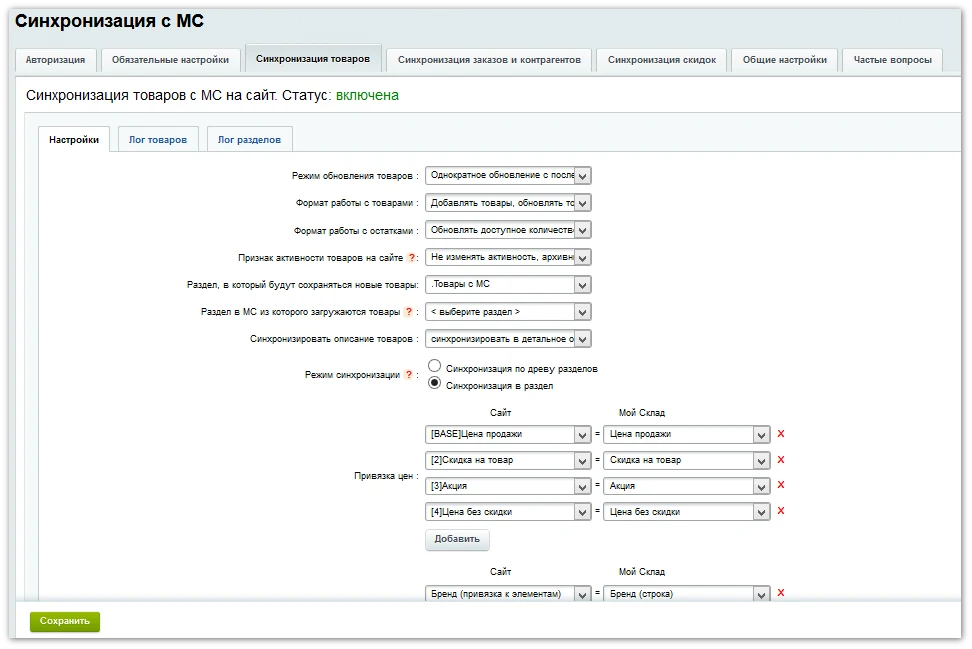
The module supports synchronization of multiple user-defined price types, enabling the transfer of not only the base retail price but also values that vary based on specific conditions to the website. This is essential for online stores with flexible pricing policies.
The product dimensions synchronization feature transfers size information specified in the product card within MySklad.
Synchronization of additional product fields allows data from user-created fields in MySklad product cards to be transferred to the website, extending beyond standard description, price, and availability.
The module includes the ability to select a specific section in MySklad from which products will be loaded to the website.
Discounts are transferred with a fixed percentage from the 'Special Price' section in MySklad.
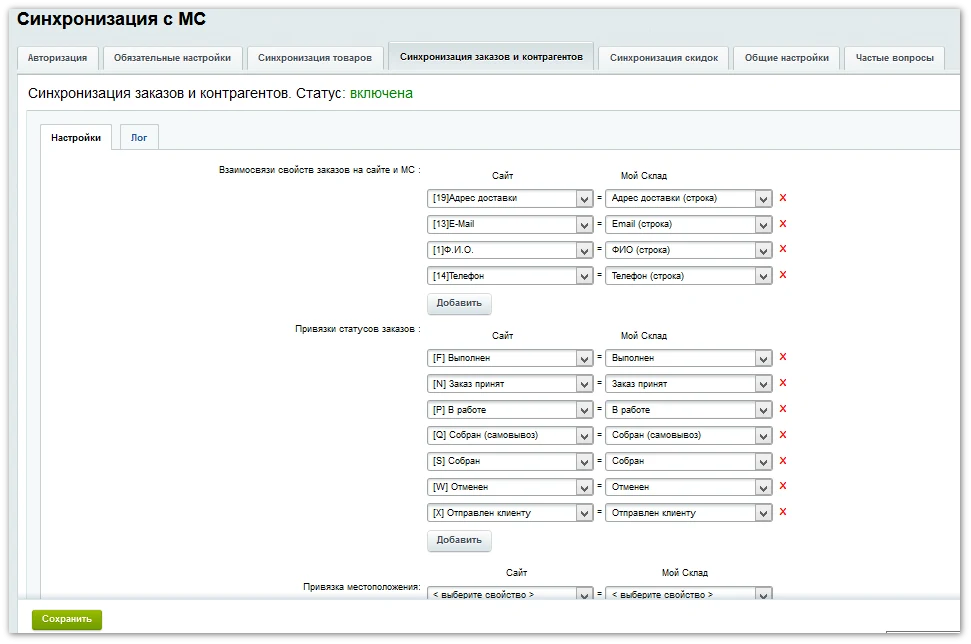
Order synchronization transfers data from order fields into additional order fields in MySklad. This includes delivery methods, payment methods, and comments, facilitating faster and more efficient order processing.
This module provides bidirectional synchronization between website users and counterparties in MySklad. When creating or updating an order, the system checks for the existence of a user on the website via an external code. If no record is found, a new user profile is automatically created using data from MySklad, including full name, phone number, and email address.
Order statuses are synchronized in both directions. When a status is updated in MySklad, the information is immediately reflected in the customer's personal account, allowing real-time tracking of the order fulfillment process. Synchronization can be filtered by specific statuses to control data flow.
Delivery details are synchronized into an additional order field in MySklad during order creation and subsequent editing. Delivery costs are calculated based on the order's line items and transmitted to the system.
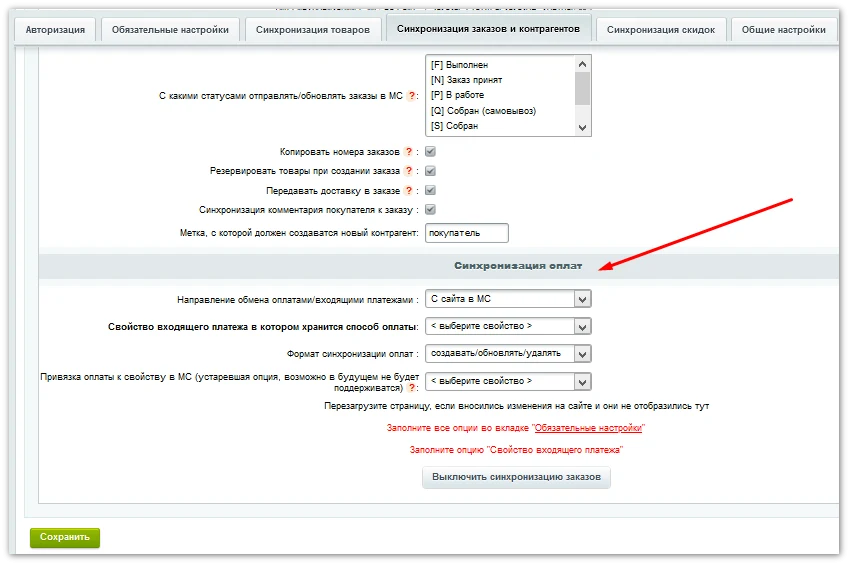
Payment information is fully synchronized bidirectionally, ensuring that payment status changes and incoming payments are reflected in both systems.
The module synchronizes order line items between the website and MySklad. When an order is updated, item details including price, quantity, and reservation value are transmitted. Data exchange occurs via webhooks, ensuring information appears on the website within seconds.
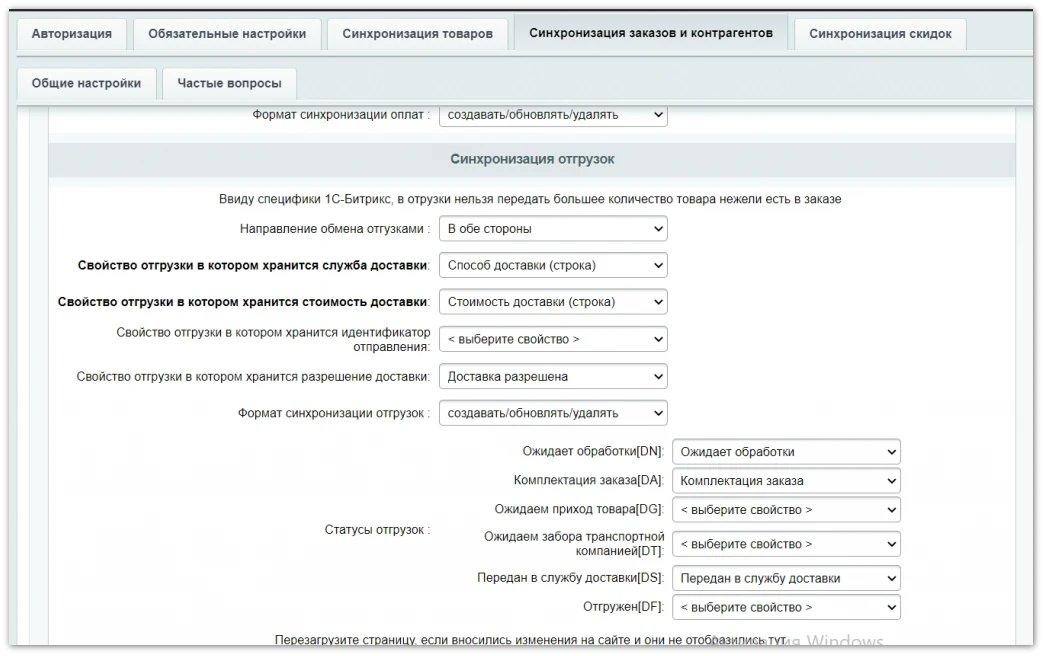
The module also supports synchronization of shipments in both directions: from the website to the system and vice versa. Shipment mapping on the website is performed using an external code.
Shipment synchronization operates via events and webhooks, ensuring immediate data updates.
Logs provide comprehensive information on the synchronization process and detailed error reports occurring during the processing of products, orders, or discounts.
Environment Requirements
For stable module operation, agents must be configured to run via cron.
A complete description of supported functionality is available in the module documentation.
General iT can handle the implementation of “MySklad: Extended Integration”, from installation to configuration and compatibility checks.
UPDATE HISTORY
What’s new
27 releases
3.8.56 (05.10.2026)Latest update
New:
Extended logging in the order export cycle from the website to MySklad.
Fixes:
Fixed an error with exporting images to the website.
Fixed an error related to blocking status updates.
Attention! Before installing the update, it is highly recommended to create a backup copy of the website.
3.8.55 (17.07.2026)
Fixes:
Fixed individual logging errors during stock processing.
Adjusted agent operation when catalog synchronization is disabled.
Attention! Before installing the update, it is strongly recommended to create a backup of the site.
3.8.54 (06.06.2026)
Fixes:
Fixed an error saving synchronization settings for orders when no location-based connection was configured.
Adjusted certain access permission settings for controllers.
Improved validation of agents when they are recreated in the module's administrative section.
Added validation for the existence of an order during delayed loading of new orders via an agent.
Attention! Before installing the update, it is highly recommended to create a backup of the site.
3.8.53 (02.06.2026)
Fixes:
Added additional access permission checks when processing webhooks and working with controllers.
Fixed identified vulnerabilities and increased module security.
Attention! Before installing the update, it is highly recommended to create a backup of the site.
3.8.52 (27.05.2026)
New:
Expanded logging for processing all webhooks from MySklad.
Fixes:
Adjusted certain texts in the module's administrative section.
Fixed an error synchronizing a user-defined order property of type "Yes/No" on the site with a user-defined field of type "Checkbox" in the MySklad order.
Attention! Before installing the update, it is highly recommended to create a backup of the site.
3.8.51 (12.05.2026)
New:
Expanded logging for processing and exporting documents with stock balances.
Fixes:
Fixed an error saving available quantities during a loop of exporting stock balances in asynchronous mode.
Fixed an error creating orders when catalog synchronization is disabled.
Attention! Before installing the update, it is highly recommended to create a backup of the site.
3.8.50 (05.05.2026)
Fixes:
Additional logging has been added to the order export cycle from the website to MySklad.
Interface texts in the module's administrative settings have been corrected.
Errors in calculating and displaying log sizes (settings and services) have been fixed.
Attention! Before installing the update, it is highly recommended to create a backup of the website.
3.8.49 (30.04.2026)
Fixes:
An error in processing a group of orders during delayed export of new orders from the website to MySklad has been fixed.
Error output when making requests to MySklad has been improved: the error code is now displayed.
Attention! Before installing the update, it is highly recommended to create a backup of the website.
3.8.48 (20.04.2026)
Fixes:
The module has been optimized and improved.
The appearance of modules in the administrative section has been corrected.
All direct database queries have been converted to use the 1C-Bitrix ORM.
An error causing duplicate orders when exporting from MySklad to the website has been fixed.
An error causing image deletion in the temporary directory during image upload cycles, as well as order and product processing, has been fixed.
The use of deprecated 1C-Bitrix core classes previously used in the module has been removed.
Attention! Before installing the update, it is highly recommended to create a backup of the website.
3.8.47 (15.04.2026)
Fixes:
Log output for image processing and stock cycles has been fixed.
Attention! Before installing the update, it is highly recommended to create a backup of the website.
3.8.46 (13.04.2026)
Fixes:
An error in uploading images during their export cycle to the website has been fixed.
An error in exporting stock in 'create products only' mode has been fixed.
The functionality for exporting services to the website has been corrected.
Attention! Before installing the update, it is highly recommended to create a backup of the website.
3.8.45 (08.04.2026)
Fixes:
Fixed an error in processing service attributes during export to the website.
Fixed an error in launching service synchronization.
Fixed an error in saving service export settings.
Minor adjustments have been made to the module's administrative section.
Attention! Before installing the update, it is highly recommended to create a backup of the website.
3.8.44 (07.04.2026)
Fixes:
Fixed an error in launching synchronization via cron.
Fixed errors in the loop for loading services to the website.
Adjusted error output when performing synchronization via cron.
Attention! Before installing the update, it is highly recommended to create a backup of the website.
3.8.43 (06.04.2026)
Fixes:
Fixed errors in service synchronization.
Individual improvements have been made to the module's administrative interface.
Fixed product processing when exporting items to MySklad.
Adjusted certain queries to MySklad for proper webhook operation.
Attention! Before installing the update, it is highly recommended to create a backup of the website.
3.8.42 (01.04.2026)
New:
Added full synchronization of services from MySklad to the website with the ability to configure field and price mappings.
Fixes:
Fixed the exchange launch mechanism via cron: now all functionality can be executed via cron instead of agents.
Service settings have been removed from the 'Order Synchronization' section.
Attention! Before installing the update, it is highly recommended to create a backup of the website.
3.8.41 (16.03.2026)
Fixes:
Fixed an error when processing the addition and removal of payments on the website.
Optimized code and event handling related to payments on the website.
Attention! Before installing the update, it is highly recommended to create a backup of the website.
3.8.40 (12.03.2026)
New:
Added asynchronous inventory export using the asynchronous requests and tasks mechanism in MySklad.
Added analytics for requests to MySklad: statistics are collected for all methods and saved in logs.
Added asynchronous order export mode from the website to MySklad.
Fixes:
Refactored code responsible for launching and processing agents.
Corrected strings and descriptions in the administrative part of the module interface.
Attention! Before installing the update, it is highly recommended to create a backup of the site.
3.8.39 (17.02.2026)
Fixes:
Fixed a critical error when processing kits webhooks.
Attention! Before installing the update, it is highly recommended to create a backup of the site.
3.8.38 (17.02.2026)
New:
Added a test to check if warehouse accounting is enabled on the website.
Added a test for the correct selection of the administrative group for new users in orders exported to the website.
Fixes:
Optimized certain queries to the module settings.
Fixed an error processing products located in the root of the catalog.
Made individual improvements to the module's administrative interface.
Attention! Before installing the update, it is highly recommended to create a backup of the site.
3.8.37 (12.02.2026)
New:
Added the ability to specify a project for an order being exported to MySklad.
Added the ability to automatically set the department, sales channel, and project in shipments created when transferring an order to MySklad.
Fixes:
Improved descriptions and display of fields in the sections settings interface.
Attention! Before installing the update, it is highly recommended to create a backup of the site.
3.8.36 (09.02.2026)
New:
Automatic log reset added when total log size exceeds 1GB.
Fixes:
Fixed error exporting products to a separate site section when synchronizing only selected sections from MySklad.
Attention! Before installing the update, it is highly recommended to create a backup of the site.
3.8.35 (03.02.2026)
Fixes:
Fixed adding VAT in shipment items when exporting data to MySklad.
Attention! Before installing the update, it is highly recommended to create a backup of the site.
3.8.34 (01.02.2026)
New:
Added reset of exchange flags when enabling full catalog synchronization if it was previously disabled.
Fixes:
Fixed filtering of products and sections by sections selected in the administrative part.
Fixed error loading products in the mode of processing only selected sections.
Attention! Before installing the update, it is highly recommended to create a backup of the site.
3.8.33 (21.01.2026)
Fixes:
Adjustments made to logging functionality.
Attention! Before installing the update, it is highly recommended to create a backup of the site.
3.8.32 (20.01.2026)
New:
Extended logs have been added for exporting and processing sections.
Fixes:
Fixed the export and processing of section hierarchy.
Fixed the sorting of sections in the module's administrative part settings.
Optimized queries to MySklad during cyclic processing of sections.
Attention! Before installing the update, it is highly recommended to create a backup of the site.
3.8.31 (18.12.2025)
Fixes:
Fixed some tooltips in the administrative interface.
Added additional information output in logs when skipping the processing of individual entities.
Adjusted the format and structure of log output.
Fixed an error loading images in trade offers on the site.
Fixed individual errors when adding new trade offers.
Fixed a synchronization error for stock levels when performing synchronization only for selected sections.
Attention! Before installing the update, it is highly recommended to create a backup of the site.
3.8.30 (28.11.2025)
New:
Logs are now displayed in different colors depending on the type of event being recorded
A column with the webhook UUID has been added to the Webhook Manager
Column headers have been added in the blocks for configuring field mapping between the site and MySklad
The "Overwrite property and price from MS on the site with empty values" setting is now enabled by default
A new calendar component has been added to the module settings interface
Fixes:
Extended logging has been added for cases of skipped entity processing or deferred processing
Fixed an error when exporting an order when using the mapping of standard MySklad fields with site fields
Fixed an error loading the section tree when exporting only to specific sections in MySklad
Fixed an error processing a product when exporting it to MySklad within the order export cycle
Fixed an error processing modifications/offers for which no parent product was found
Fixed an error in the control and automatic cleanup of outdated logs
Fixed errors in the synchronization of counterparties
Refactoring and API optimization
Attention! Before installing the update, it is highly recommended to create a backup of the site.
USER EXPERIENCE
Solution reviews
How does this solution work in a real project? Share your experience and help others choose.
Be the first to share your experience
There are no reviews of this solution on git.ru yet. Tell us what worked well and what could be improved.
✓
Verified purchaseAdd a key if you wish. A verified review gets a badge, priority placement and more rating weight.
↗
Open to every clientJust sign in to your account. A key is optional; all reviews are moderated.
The webprostor.smtp module enables SMTP email sending configuration and DKIM signature support. The free version allows configuring SMTP for each site individually. Users can specify server parameters, port, connection security type, and authentication details including username, password, and the requirement for authentication.
The Export to Portals + API module is the premium edition of the integration suite for connecting with marketplaces. It provides centralized export of product catalogs, order processing, and stock synchronization with trading platforms through a single component on the website, eliminating the need to install separate software in each seller's personal account.
The SMSBiz module is designed for sending SMS notifications in online stores and corporate portals built on the Bitrix platform. Installation and usage do not require programming skills. The deployment process takes a few minutes.
The solution is built on the SMSInt service, which has been operating in the market for over 19 years.
The displayed price covers the solution itself. Platform licensing, installation and customisation are checked separately. If the page offers bundles, select the required option before submitting a request.
How do I check compatibility?
Compare the supported editions and solution version in the technical details with your project. Before installing on a live website, we recommend making a backup and checking the solution in a test environment.
Is there a trial?
The developer lists a trial of 25 days. The trial button opens the installer in your website control panel. Check the required features and compatibility before purchasing.
How much does this solution’s renewal cost?
The current renewal price is 9,495 ₽. Before you order, a manager will confirm the renewal period and whether it applies to your licence.
Can you help with implementation?
We can help install the module, check its settings and verify how it works in your project. Compatibility with other customisations and the scope of work are assessed before we begin.
Statistics and interaction recording
Public pages use basic statistics. Our recording and Yandex Webvisor require your permission. You can keep basic statistics or disable all analytics.
Operator: General IT Rus LLC, INN 2310208877. Statistics and recording help improve the website.
Basic statistics: pageviews, a random daily ID, a public URL and time. The ID lasts until Moscow midnight. Original records: up to 48 hours; totals: up to 7 years.
Campaign tags and a technical identifier are sent by our server to the existing Yandex tag. Visitor IP, User-Agent and cookies are not included in this transfer. If selected, its browser code collects technical data, cookies, actions and masked page snapshots; recordings last 15 days. Inputs, chat and account areas are hidden.
Interaction recording requires permission: clicks, scrolling, technical information and filtered public-page snapshots. Events: up to 7 years; IP and snapshots: up to 90 days.
Permission is remembered for up to 365 days; full opt-out remains until changed. Basic statistics only disables recording; Disable all analytics stops new analytics. Previously sent data is not automatically deleted. Withdrawal and requests: support@git.ru. Full terms are linked below.
Your browser requests no tracking: analytics is off.