Payments are experiencing issues due to temporary restrictions in Russia. If your payment does not go through, please submit a support request.•Our support team is available 24/7 — we are always here to help with hosting and server issues.•We are now accepting requests for dedicated server rental and colocation services in our data center.•Reminder: we recommend enabling backups for additional data protection.•A new VPS/VDS lineup with NVMe storage and improved performance is now available.•Maintenance work on some servers has been completed. All services are operating normally.•
Payments are experiencing issues due to temporary restrictions in Russia. If your payment does not go through, please submit a support request.•Our support team is available 24/7 — we are always here to help with hosting and server issues.•We are now accepting requests for dedicated server rental and colocation services in our data center.•Reminder: we recommend enabling backups for additional data protection.•A new VPS/VDS lineup with NVMe storage and improved performance is now available.•Maintenance work on some servers has been completed. All services are operating normally.•
Аккаунт в General iT
Вход / Регистрация
Войдите или создайте аккаунт для управления услугами в личном кабинете.
Страны не найдены. Попробуйте другое название или код.
MODULE FOR 1C-BITRIX
Darneo — creation and support of online stores
Helpdesk for Bitrix24 — tracking employee requests (Darneo HD)
Darneo HD is an internal request tracking system designed for the boxed version of Bitrix24. Through the Help Desk interface, employees can submit requests to the IT department for program access, to HR for employment certificates, or to the facilities team for lighting repairs. Requesters track the status of their tickets and receive responses directly within the ticket card.
Darneo HD is an internal request tracking system designed for the boxed version of Bitrix24. Through the Help Desk interface, employees can submit requests to the IT department for program access, to HR for employment certificates, or to the facilities team for lighting repairs. Requesters track the status of their tickets and receive responses directly within the ticket card. Department managers view the queue to see which requests remain unassigned, who is awaiting a response, and which tickets are approaching their resolution deadline.
Administrators select which departments to connect and define the services they offer to employees in the service catalog. For each department, administrators configure required applicant data, workflow stages, visibility permissions, and time limits for task completion. In IT support, a responsible person can be pre-assigned to handle requests for access to shared folders. If connectivity is lost at a branch office, the on-duty staff member investigates the cause and engages a network engineer if necessary. In both scenarios, the employee creates a single unified ticket, allowing management to monitor the entire process from the initial message to the final verification of results.
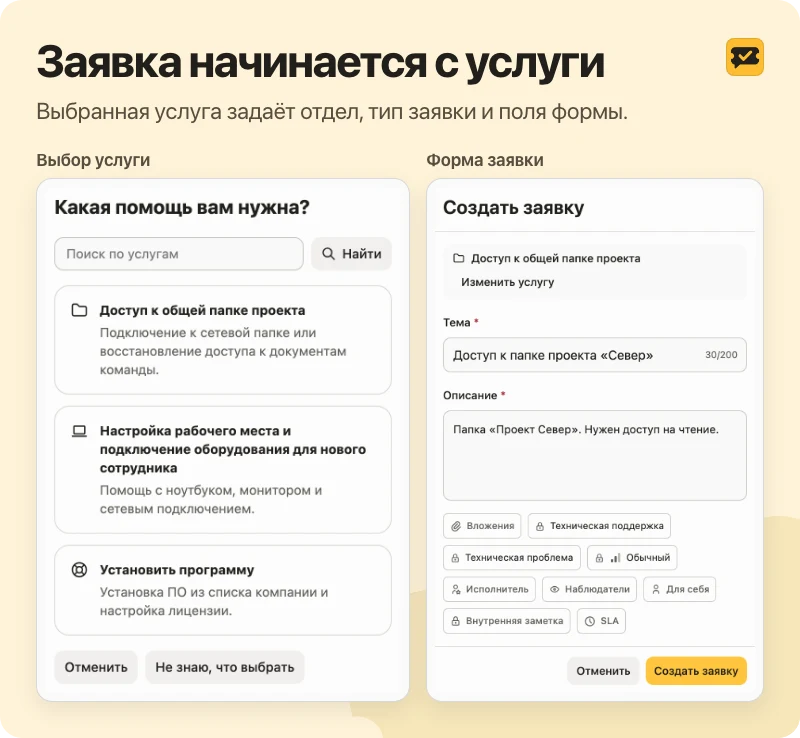
The Darneo HD module for Bitrix24 enables employees to submit technical support requests by selecting a service from the catalog and completing the associated form. When requesting access to a shared folder, the user specifies the folder name and required permissions. For computer failure scenarios, the form includes fields for the office location and workstation number, allowing engineers to prepare in advance. Administrators can link specific services to departments and request types, configure additional form fields, and mark them as mandatory. This ensures that assigned engineers receive all necessary information immediately upon task assignment.
If an employee finds it difficult to select a service from the list, they can describe the issue in their own words and attach a screenshot. In the event of a phone call, a duty officer can create a request on behalf of the caller. Integration with a support email inbox is also available: emails from verified employee addresses automatically generate new requests, while replies to notifications extend the correspondence of existing tickets.
Request queue management and assignee distribution
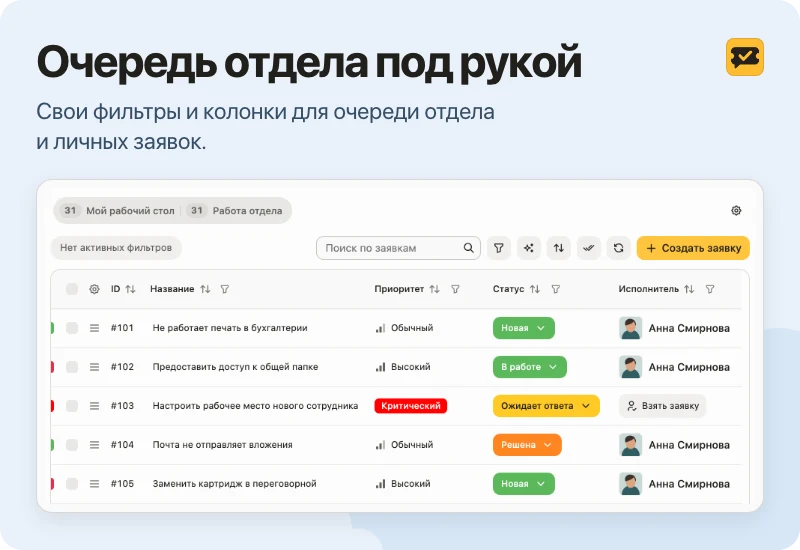
At the start of a shift, the duty officer can open a list of requests without an assigned assignee and take the next request into work. A separate list displays employees who have already answered clarifying questions and are waiting for further interaction. Both lists support saving custom filters and sets of displayed columns. Engineers find it convenient to work with their personal list of assigned tasks, while managers can monitor the department's overall queue and distribute the workload among staff.
The system supports automatic assignee assignment based on rules. For example, repair requests originating from a specific office are automatically routed to a local engineer. Rules can take into account the department, request type, priority, status, and values of custom fields. For critical incidents, a rule can automatically add the shift manager to the observers list. Requests remaining unassigned are picked up by the duty officer from the general queue.
When multiple rules match a request, the first rule in the list is triggered. The settings include a test function that shows which conditions matched and who the system would assign as the handler. This allows managers to identify cases where critical requests from a branch fall under general office rules and adjust the rule order to prioritize emergency incidents.
Employee request processing
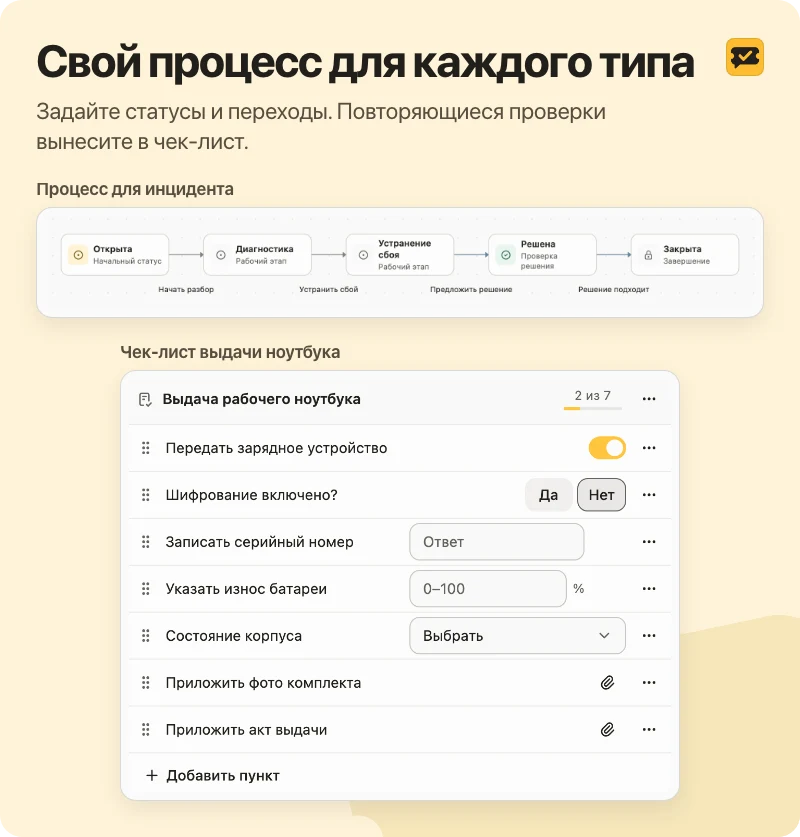
For each department and request type, you define the status workflow and the specific actions a specialist must perform when transitioning between statuses. For equipment repair scenarios, you can define stages such as diagnostics, repair work, and final verification. When handing over equipment for repair, the system can require the engineer to leave a mandatory comment confirming the check was performed. For access requests, the same department can restrict the workflow to only intake, rights issuance, and result verification.
Checklist templates for recurring tasks
Templates are available for standard repetitive operations. For example, a workstation preparation checklist can include items for email client configuration and a test print. When a template is linked to a specific service, this list automatically appears in every new request for workstation preparation. The engineer marks completed items, and the manager can view the full list of verified operations when reviewing the request.
Escalation to the second line and ticket return
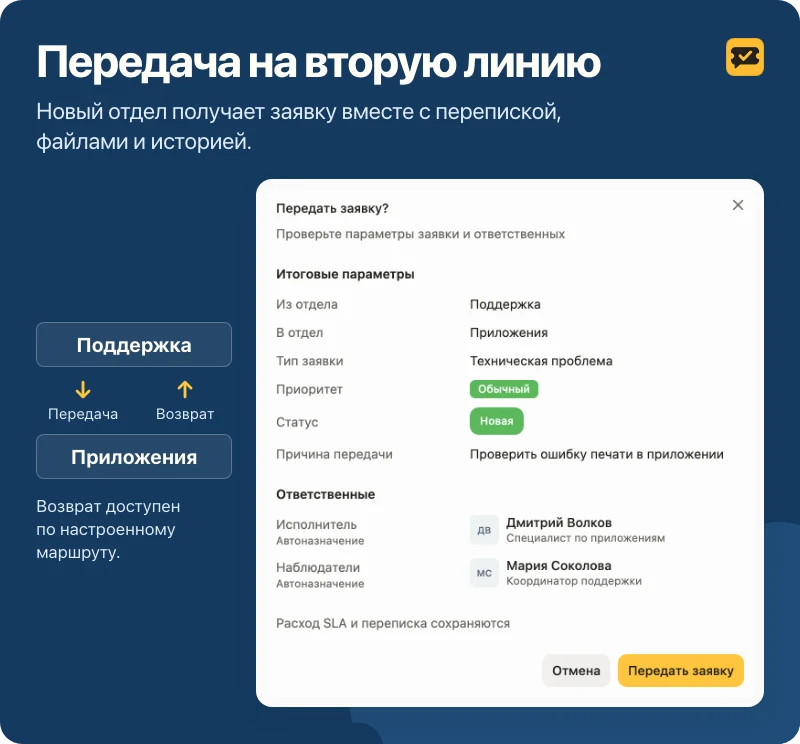
If an employee's VPN is not working, the duty officer checks the settings, captures the error, and involves a network engineer. The officer selects the action "Transfer to another department" and specifies the reason. The ticket moves to the second line with the full history, correspondence, and attachments. The engineer sees the results of the initial diagnostics, while the employee continues the conversation in the familiar card.
The administrator configures which departments accept requests directly, where the first line can transfer a task, and which routes allow returns. For example, network engineers may receive requests only from the support department. After restoring the connection, the engineer returns the ticket via the same route. The duty officer verifies the VPN together with the user. The history records who, when, and for what reason the request was transferred.
The process diagram displays routes between departments and transitions between statuses. When connecting a new department, the diagram conveniently shows from whom it can receive requests and where it can forward them.
Access rights management for employees, engineers, and managers
The module provides different access levels based on user roles. Employees can view their own requests, see responses, and clarify details. Engineers work with requests assigned to them. Managers control the department queue and assign responsible personnel. A role for a duty officer can be configured with a shared workspace and a first-line queue.
Granular field-level permissions
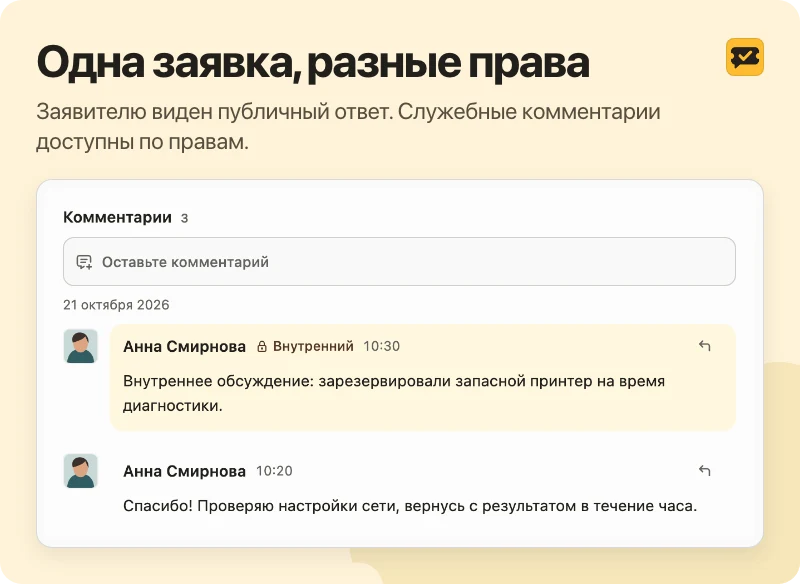
Engineers can send connection instructions to employees while keeping internal diagnostic results in a service comment. Access rights can be set for individual fields. For example, a network engineer fills in a field with the check result, the duty officer views it, and the employee sees only the public response. For additional fields, you can separately define who can view the field, who fills it when creating a request, and who can modify it later.
SLA configuration for response and resolution deadlines
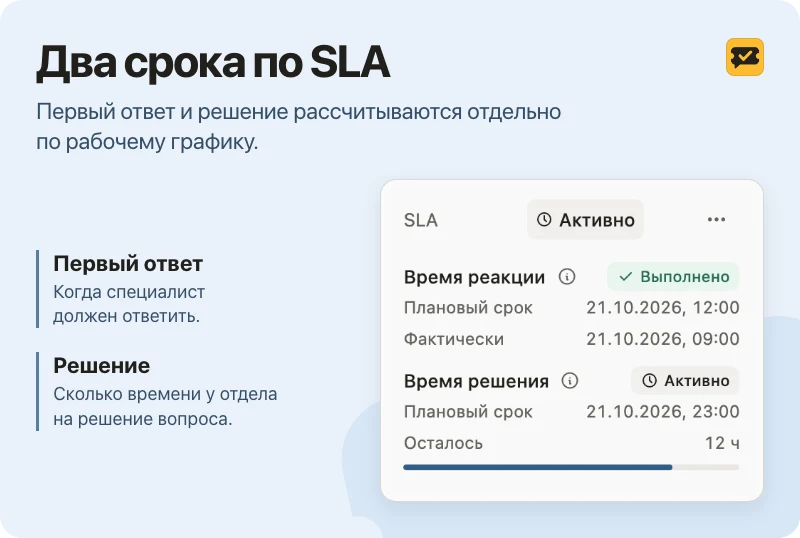
The module allows setting two time limits for each ticket: the time allowed for the first response and the time allowed for full resolution. Separate rules can be created for different incident types, such as an office-wide email outage or scheduled software installation. Time counting follows the support service's working schedule strictly.
If the service operates from 9:00 to 18:00 on weekdays and 30 minutes are allocated for the first response, a ticket received on Friday at 17:45 will have a first response deadline on Monday at 9:15. When a task is transferred to another team, the elapsed time is preserved rather than reset.
The system supports notifications for approaching deadlines. If additional information is required to resolve an issue, a specialist can request it from the employee. During this waiting period, the countdown to resolution can be paused. Management can see task statuses, identifying where an engineer needs assistance and where the next step depends on the requester.
Verification of problem resolution
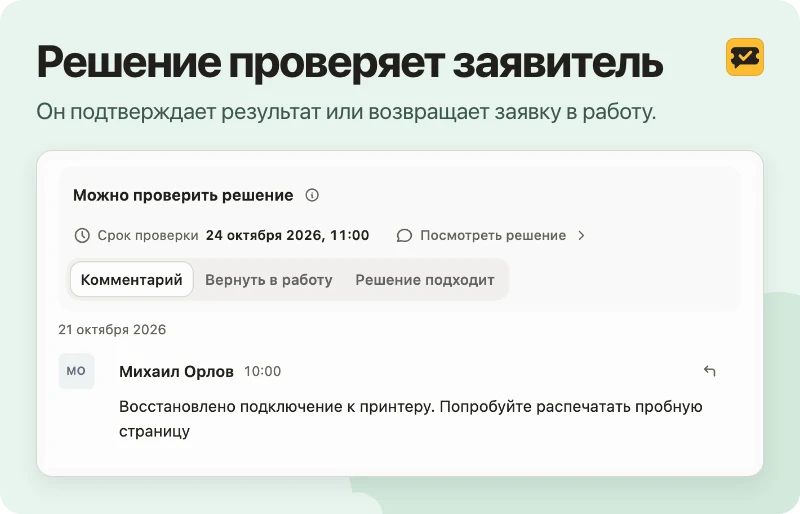
After resolving the issue, the specialist documents the actions taken and proposes a solution. The employee checks the VPN connection from their computer. If the connection is restored, they confirm the result. If the error persists, the ticket is returned to work with an explanation. The engineer has access to both the new response and the full correspondence from the first attempt.
For tickets without a response from the employee, a reminder and an automatic closure deadline can be configured. The history indicates whether the result was confirmed by the employee or triggered by an automated rule. If the service rating feature is enabled, the employee can assign a score and leave a comment. A manager can access tickets with low ratings to investigate the specific reasons for dissatisfaction.
The team configures which events to notify applicants and specialists about. For example, an employee may receive an email regarding a support response, while an engineer receives a Bitrix24 notification about task assignment. Message templates are available for various events and channels. The sending log allows tracking the status of each specific notification.
Support Request and Workload Reports
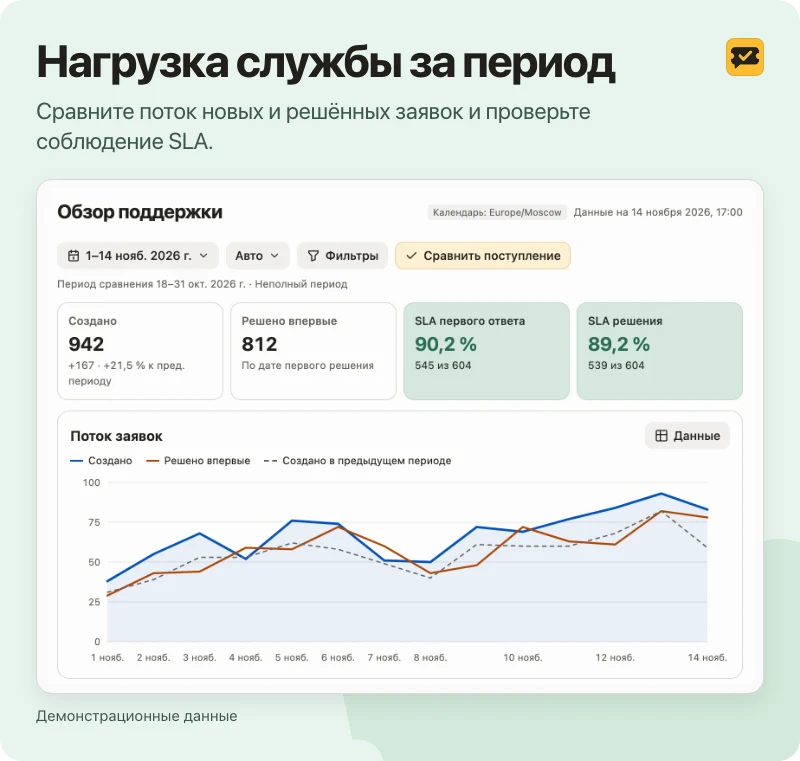
When planning shifts, the current queue is critical, while data spanning several weeks is needed to assess team size. If the number of requests has increased, compare the count of incoming tickets with the number resolved in the same period. The list of open requests shows which departments and specific agents have accumulated work.
Analyzing the first response and the final resolution separately is useful. The support team may respond quickly to access requests but regularly delay the actual granting of rights. The SLA report allows opening tickets with missed deadlines and tracking the specific stage where delays occurred. Reports on returns and ratings help analyze situations where engineers meet deadlines but employees still return tickets for rework.
The number of requests does not always reflect costs. A dozen short consultations may take less time than a single site visit to a branch office. To track labor costs, engineers record the duration and type of work in each ticket. Based on these records, you can compare hours spent on remote support versus site visits, justify additional staffing, or revise the duty schedule. Report data can be exported to CSV format.
Connecting internal departments
The module allows connecting other internal departments, such as facilities management, to receive requests through the portal. To organize lighting repairs, create a corresponding service, specify fields for building and office number in the form, and assign a building technician. The dispatcher sees routing information, while the employee views the repair completion date in the request status.
The team composition can be defined manually or imported automatically from Bitrix24 subdivisions. The facilities manager is granted access to their department's request queue. Deadlines for repair tasks are configured according to the specific department's working schedule.
How Darneo HD differs from standard Bitrix24 tasks
In Bitrix24, it is convenient to create tasks when the assignee and deadline are already known, such as for a laptop replacement. Such assignments use Flows and robots for automation.
When an employee reports a laptop that will not turn on, but it is unclear if a replacement is needed, Darneo HD routes the request directly to the support queue. The request form includes data required by the duty officer for diagnostics. Assignment rules allow the request to be sent immediately to the appropriate engineer. You define which department is authorized to handle repairs, who can view service fields, and whether the repair service can return the request to the duty officer. The service has standards for first response time and resolution time. The employee verifies the result, while the manager receives data on deadline compliance and service quality.
Getting started
Darneo HD is installed as a module for the boxed version of Bitrix24. Employees log in using their portal accounts. Requests, correspondence, and attachments are stored on the company server. Upon initial installation, the IT Support department, basic services, and SLA rules are created automatically.
To verify the module, create two test requests. For a standard access request, configure the form and assignment rule. For a complex case requiring transfer, set up a route to the second line and enable returns. Test both scenarios together with the on-duty staff member and the employee who submitted the request. By observing the queue, deadlines, and transfer history, you can evaluate the application's functionality in your environment.
Darneo HD Request System Features
The support service accepts employee requests via the service catalog and a general form on the portal. The on-duty staff member can register a request on behalf of a colleague.
The service catalog and request forms allow linking a service to a department and request type, adding custom fields, and setting conditions for their display and mandatory completion.
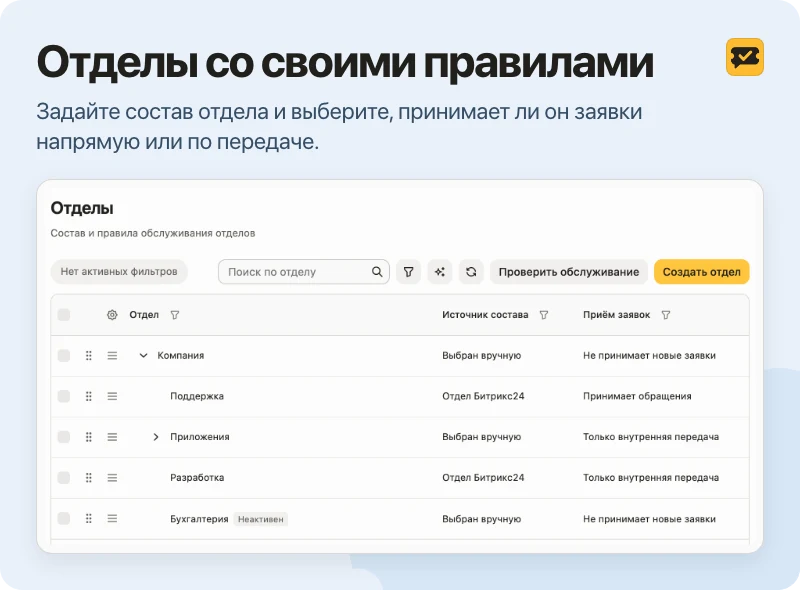
Departments and support lines can be combined into a hierarchy. The composition is defined manually or automatically based on Bitrix24 subdivisions. Configuration allows for direct request intake or operation solely through internal transfers.
Processing workflows include request types and priorities, custom statuses, allowed transitions, mandatory comments, and the request movement scheme.
Routing rules automatically assign executors and observers based on ticket parameters and additional field values. Settings include a rule validation feature using a test request.
Escalating a ticket to another department follows an approved workflow. The system allows configuring a return to the previous line, verifying transfer parameters, and viewing the transfer history.
Checklists record verification results within the ticket. Checklist templates can be linked to specific services.
Sub-tickets are managed separately from the parent ticket. Each sub-ticket has its own number, status, correspondence history, and deadlines. A closed request can be resumed by creating a new linked ticket.
All correspondence and files are stored in the ticket card. Public and internal comments, internal notes, attachments, and a full change history are available.
Workspaces and queues support searching by ticket number, subject, and description, as well as filtering, counters, column configuration, and creating lists for specific employees or roles.
Roles and access permissions control the visibility of tickets, fields, comments, and attachments. Permissions can be set separately for viewing, filling, and editing fields, and the rights of a specific employee can be verified.
SLA deadline control accounts for work schedules and calendar exceptions. Deadlines and violations for the first response and resolution are visible; alerts can be configured and the countdown paused.
Waiting and completion stages cover requests for clarification, reminders, employee confirmation of resolution, return to work, auto-closure, and service evaluation.
Email integration allows connecting an IMAP mailbox, defining rules for ticket creation, and receiving replies within the correspondence thread. Outgoing messages can be sent via Bitrix24 or SMTP.
Notifications are delivered within Bitrix24, by email, and via Push. When channels are connected, SMS, Telegram, and MAX are also available. Features include personal subscriptions, templates, and a sending log.
Planning and time tracking cover planned and actual work dates, with time entries recorded by employee and work type.
Reports display the source and volume of incoming tickets, demand for services, and workload for departments and performers. Separate analysis is available for open requests, fulfillment deadlines, returns, ratings, and time spent. Results can be exported to CSV.
Administration includes selecting the application language, viewing the history of setting changes, performing diagnostics, as well as creating backups and restoring data.
Darneo HD is a Service Desk solution for the boxed version of Bitrix24 designed for tracking internal requests. Through the Help Desk interface on the Bitrix24 portal, an employee can request program access from the IT department, obtain an employment certificate from the HR department, or request lighting repairs from the maintenance service. The employee tracks the request status and receives responses directly within the request card. Department managers view the queue to see which inquiries lack an assignee, which are awaiting a response, and which requests are approaching their resolution deadline.
Administrators select which departments to connect and what services they will offer to employees in the service catalog. For each department, it is possible to define the required information from the requester, the stages the request will go through, who can view it, and the time allocated for its resolution.
The Darneo HD module for Bitrix24 streamlines IT support operations by allowing administrators to preassign responsible parties for specific request types, such as access to shared folders. When issues arise, such as a loss of connectivity in a branch office, the on-duty staff member identifies the cause and engages a network engineer if necessary. In both scenarios, a single ticket is created, enabling managers to track the entire workflow from the initial message to the final result verification.
Employees submit requests by selecting a service from the catalog and completing the support form. For shared folder access requests, the user must specify the folder name and required permissions. In cases of computer malfunction, it is beneficial to provide the office location and workstation number in advance so the engineer has all necessary details. Administrators can associate a service with a specific department and ticket type, customize form fields, and mark certain fields as mandatory.
If an employee finds it difficult to select a service from the catalog, they can describe the issue in their own words and attach a screenshot. If an employee calls, the on-duty staff can create a ticket on their behalf. Support email integration is also available: emails from verified employee addresses can automatically generate new tickets, while replies to notifications can extend the correspondence of existing open requests.
Request queue management and assignee distribution
At the start of a shift, the duty officer can open a list of requests without an assigned assignee and take the next request into work. A separate list displays employees who have already answered clarifying questions and are waiting for further interaction. Both lists support saving custom filters and sets of displayed columns. Engineers find it convenient to work with their personal list of assigned tasks, while managers can monitor the department's overall queue and distribute the workload among staff.
The system supports automatic assignee assignment based on rules. For example, repair requests originating from a specific office are automatically routed to a local engineer. Rules can take into account the department, request type, priority, status, and values of custom fields. For critical incidents, a rule can automatically add the shift manager to the observers list. Requests remaining unassigned are picked up by the duty officer from the general queue.
When multiple rules match a request, the first rule in the list is triggered. The settings include a test function that shows which conditions matched and who the system would assign as the handler. This allows managers to identify cases where critical requests from a branch fall under general office rules and adjust the rule order to prioritize emergency incidents.
Employee request processing
For each department and request type, you define the status workflow and the specific actions a specialist must perform when transitioning between statuses. For equipment repair scenarios, you can define stages such as diagnostics, repair work, and final verification. When handing over equipment for repair, the system can require the engineer to leave a mandatory comment confirming the check was performed. For access requests, the same department can restrict the workflow to only intake, rights issuance, and result verification.
Checklist templates for recurring tasks
Templates are available for standard repetitive operations. For example, a workstation preparation checklist can include items for email client configuration and a test print. When a template is linked to a specific service, this list automatically appears in every new request for workstation preparation. The engineer marks completed items, and the manager can view the full list of verified operations when reviewing the request.
Escalation to the second line and ticket return
If an employee's VPN is not working, the duty officer checks the settings, captures the error, and involves a network engineer. The officer selects the action "Transfer to another department" and specifies the reason. The ticket moves to the second line with the full history, correspondence, and attachments. The engineer sees the results of the initial diagnostics, while the employee continues the conversation in the familiar card.
The administrator configures which departments accept requests directly, where the first line can transfer a task, and which routes allow returns. For example, network engineers may receive requests only from the support department. After restoring the connection, the engineer returns the ticket via the same route. The duty officer verifies the VPN together with the user. The history records who, when, and for what reason the request was transferred.
The process diagram displays routes between departments and transitions between statuses. When connecting a new department, the diagram conveniently shows from whom it can receive requests and where it can forward them.
Access rights management for employees, engineers, and managers
The module provides different access levels based on user roles. Employees can view their own requests, see responses, and clarify details. Engineers work with requests assigned to them. Managers control the department queue and assign responsible personnel. A role for a duty officer can be configured with a shared workspace and a first-line queue.
Granular field-level permissions
Engineers can send connection instructions to employees while keeping internal diagnostic results in a service comment. Access rights can be set for individual fields. For example, a network engineer fills in a field with the check result, the duty officer views it, and the employee sees only the public response. For additional fields, you can separately define who can view the field, who fills it when creating a request, and who can modify it later.
SLA configuration for response and resolution deadlines
The module allows setting two time limits for each ticket: the time allowed for the first response and the time allowed for full resolution. Separate rules can be created for different incident types, such as an office-wide email outage or scheduled software installation. Time counting follows the support service's working schedule strictly.
If the service operates from 9:00 to 18:00 on weekdays and 30 minutes are allocated for the first response, a ticket received on Friday at 17:45 will have a first response deadline on Monday at 9:15. When a task is transferred to another team, the elapsed time is preserved rather than reset.
The system supports notifications for approaching deadlines. If additional information is required to resolve an issue, a specialist can request it from the employee. During this waiting period, the countdown to resolution can be paused. Management can see task statuses, identifying where an engineer needs assistance and where the next step depends on the requester.
Verification of problem resolution
After resolving the issue, the specialist documents the actions taken and proposes a solution. The employee checks the VPN connection from their computer. If the connection is restored, they confirm the result. If the error persists, the ticket is returned to work with an explanation. The engineer has access to both the new response and the full correspondence from the first attempt.
For tickets without a response from the employee, a reminder and an automatic closure deadline can be configured. The history indicates whether the result was confirmed by the employee or triggered by an automated rule. If the service rating feature is enabled, the employee can assign a score and leave a comment. A manager can access tickets with low ratings to investigate the specific reasons for dissatisfaction.
The team configures which events to notify applicants and specialists about. For example, an employee may receive an email regarding a support response, while an engineer receives a Bitrix24 notification about task assignment. Message templates are available for various events and channels. The sending log allows tracking the status of each specific notification.
Support Request and Workload Reports
When planning shifts, the current queue is critical, while data spanning several weeks is needed to assess team size. If the number of requests has increased, compare the count of incoming tickets with the number resolved in the same period. The list of open requests shows which departments and specific agents have accumulated work.
Analyzing the first response and the final resolution separately is useful. The support team may respond quickly to access requests but regularly delay the actual granting of rights. The SLA report allows opening tickets with missed deadlines and tracking the specific stage where delays occurred. Reports on returns and ratings help analyze situations where engineers meet deadlines but employees still return tickets for rework.
The number of requests does not always reflect costs. A dozen short consultations may take less time than a single site visit to a branch office. To track labor costs, engineers record the duration and type of work in each ticket. Based on these records, you can compare hours spent on remote support versus site visits, justify additional staffing, or revise the duty schedule. Report data can be exported to CSV format.
Connecting internal departments
The module allows connecting other internal departments, such as facilities management, to receive requests through the portal. To organize lighting repairs, create a corresponding service, specify fields for building and office number in the form, and assign a building technician. The dispatcher sees routing information, while the employee views the repair completion date in the request status.
The team composition can be defined manually or imported automatically from Bitrix24 subdivisions. The facilities manager is granted access to their department's request queue. Deadlines for repair tasks are configured according to the specific department's working schedule.
How Darneo HD differs from standard Bitrix24 tasks
In Bitrix24, it is convenient to create tasks when the assignee and deadline are already known, such as for a laptop replacement. Such assignments use Flows and robots for automation.
When an employee reports a laptop that will not turn on, but it is unclear if a replacement is needed, Darneo HD routes the request directly to the support queue. The request form includes data required by the duty officer for diagnostics. Assignment rules allow the request to be sent immediately to the appropriate engineer. You define which department is authorized to handle repairs, who can view service fields, and whether the repair service can return the request to the duty officer. The service has standards for first response time and resolution time. The employee verifies the result, while the manager receives data on deadline compliance and service quality.
Getting started
Darneo HD is installed as a module for the boxed version of Bitrix24. Employees log in using their portal accounts. Requests, correspondence, and attachments are stored on the company server. Upon initial installation, the IT Support department, basic services, and SLA rules are created automatically.
To verify the module, create two test requests. For a standard access request, configure the form and assignment rule. For a complex case requiring transfer, set up a route to the second line and enable returns. Test both scenarios together with the on-duty staff member and the employee who submitted the request. By observing the queue, deadlines, and transfer history, you can evaluate the application's functionality in your environment.
Darneo HD Request System Features
The support service accepts employee requests via the service catalog and a general form on the portal. The on-duty staff member can register a request on behalf of a colleague.
The service catalog and request forms allow linking a service to a department and request type, adding custom fields, and setting conditions for their display and mandatory completion.
Departments and support lines can be combined into a hierarchy. The composition is defined manually or automatically based on Bitrix24 subdivisions. Configuration allows for direct request intake or operation solely through internal transfers.
Processing workflows include request types and priorities, custom statuses, allowed transitions, mandatory comments, and the request movement scheme.
Routing rules automatically assign executors and observers based on ticket parameters and additional field values. Settings include a rule validation feature using a test request.
Escalating a ticket to another department follows an approved workflow. The system allows configuring a return to the previous line, verifying transfer parameters, and viewing the transfer history.
Checklists record verification results within the ticket. Checklist templates can be linked to specific services.
Sub-tickets are managed separately from the parent ticket. Each sub-ticket has its own number, status, correspondence history, and deadlines. A closed request can be resumed by creating a new linked ticket.
All correspondence and files are stored in the ticket card. Public and internal comments, internal notes, attachments, and a full change history are available.
Workspaces and queues support searching by ticket number, subject, and description, as well as filtering, counters, column configuration, and creating lists for specific employees or roles.
Roles and access permissions control the visibility of tickets, fields, comments, and attachments. Permissions can be set separately for viewing, filling, and editing fields, and the rights of a specific employee can be verified.
SLA deadline control accounts for work schedules and calendar exceptions. Deadlines and violations for the first response and resolution are visible; alerts can be configured and the countdown paused.
Waiting and completion stages cover requests for clarification, reminders, employee confirmation of resolution, return to work, auto-closure, and service evaluation.
Email integration allows connecting an IMAP mailbox, defining rules for ticket creation, and receiving replies within the correspondence thread. Outgoing messages can be sent via Bitrix24 or SMTP.
Notifications are delivered within Bitrix24, by email, and via Push. When channels are connected, SMS, Telegram, and MAX are also available. Features include personal subscriptions, templates, and a sending log.
Planning and time tracking cover planned and actual work dates, with time entries recorded by employee and work type.
Reports display the source and volume of incoming tickets, demand for services, and workload for departments and performers. Separate analysis is available for open requests, fulfillment deadlines, returns, ratings, and time spent. Results can be exported to CSV.
The Darneo HD module for Bitrix24 administration panel provides functions for selecting the application language, viewing the configuration change history, performing diagnostics, and creating data backups as well as restoring them.
General iT can connect “Helpdesk for Bitrix24 — tracking employee requests (Darneo HD)”, install and configure the module, and make sure the integration works correctly.
USER EXPERIENCE
Solution reviews
How does this solution work in a real project? Share your experience and help others choose.
Be the first to share your experience
There are no reviews of this solution on git.ru yet. Tell us what worked well and what could be improved.
✓
Verified purchaseAdd a key if you wish. A verified review gets a badge, priority placement and more rating weight.
↗
Open to every clientJust sign in to your account. A key is optional; all reviews are moderated.
The Help Desk ticketing system for Bitrix24 streamlines customer support operations. For businesses, it is crucial to resolve client issues quickly and efficiently to maintain trust and loyalty. However, tracking inquiries across multiple channels can be a complex and labor-intensive process.
A consent management module for 1C-Bitrix ensuring compliance with Federal Law No. 152-FZ regarding cookie usage. The tool enables the execution of analytics and advertising scripts only after obtaining explicit visitor consent and records this choice in an activity log. Users retain the ability to modify their previously made selection at any time.
Darneo: Market is a ready-made website template for the 1C-Bitrix platform. Designed for retail, this solution enables displaying products with large images, assisting customers in selecting colors and sizes, comparing specifications, and placing orders from any device. The template supports customization of the logo, brand colors, and the main page.
The Help Desk ticketing system for Bitrix24 streamlines customer support operations. For businesses, it is crucial to resolve client issues quickly and efficiently to maintain trust and loyalty. However, tracking inquiries across multiple channels can be a complex and labor-intensive process.
Corporate Portal
This module is designed to centralize internal communications, services, and company workflows. The solution consolidates key information, employee requests, and corporate activities into a single space, simplifying interdepartmental interaction and reducing the volume of routine work.
Single entry point
The platform creates a familiar environment for resolving daily tasks.
The module enables sending emails from the on-premise version of 1C-Bitrix24 without manual SMTP server configuration. Users simply connect mailboxes in the CRM 'Mail' section, after which email sending operates automatically. The solution supports multiple mailboxes and functions within the CRM email client, as well as in contact, lead, and deal cards.
The displayed price covers the solution itself. Platform licensing, installation and customisation are checked separately. If the page offers bundles, select the required option before submitting a request.
How do I check compatibility?
Compare the supported editions and solution version in the technical details with your project. Before installing on a live website, we recommend making a backup and checking the solution in a test environment.
Is there a trial?
The developer lists a trial of 30 days. The trial button opens the installer in your website control panel. Check the required features and compatibility before purchasing.
How much does this solution’s renewal cost?
The current renewal price is 48,000 ₽. Before you order, a manager will confirm the renewal period and whether it applies to your licence.
Can you help with implementation?
We can help install the module, check its settings and verify how it works in your project. Compatibility with other customisations and the scope of work are assessed before we begin.
Statistics and interaction recording
Public pages use basic statistics. Our recording and Yandex Webvisor require your permission. You can keep basic statistics or disable all analytics.
Operator: General IT Rus LLC, INN 2310208877. Statistics and recording help improve the website.
Basic statistics: pageviews, a random daily ID, a public URL and time. The ID lasts until Moscow midnight. Original records: up to 48 hours; totals: up to 7 years.
Campaign tags and a technical identifier are sent by our server to the existing Yandex tag. Visitor IP, User-Agent and cookies are not included in this transfer. If selected, its browser code collects technical data, cookies, actions and masked page snapshots; recordings last 15 days. Inputs, chat and account areas are hidden.
Interaction recording requires permission: clicks, scrolling, technical information and filtered public-page snapshots. Events: up to 7 years; IP and snapshots: up to 90 days.
Permission is remembered for up to 365 days; full opt-out remains until changed. Basic statistics only disables recording; Disable all analytics stops new analytics. Previously sent data is not automatically deleted. Withdrawal and requests: support@git.ru. Full terms are linked below.
Your browser requests no tracking: analytics is off.