Payments are experiencing issues due to temporary restrictions in Russia. If your payment does not go through, please submit a support request.•Our support team is available 24/7 — we are always here to help with hosting and server issues.•We are now accepting requests for dedicated server rental and colocation services in our data center.•Reminder: we recommend enabling backups for additional data protection.•A new VPS/VDS lineup with NVMe storage and improved performance is now available.•Maintenance work on some servers has been completed. All services are operating normally.•
Payments are experiencing issues due to temporary restrictions in Russia. If your payment does not go through, please submit a support request.•Our support team is available 24/7 — we are always here to help with hosting and server issues.•We are now accepting requests for dedicated server rental and colocation services in our data center.•Reminder: we recommend enabling backups for additional data protection.•A new VPS/VDS lineup with NVMe storage and improved performance is now available.•Maintenance work on some servers has been completed. All services are operating normally.•
Аккаунт в General iT
Вход / Регистрация
Войдите или создайте аккаунт для управления услугами в панели.
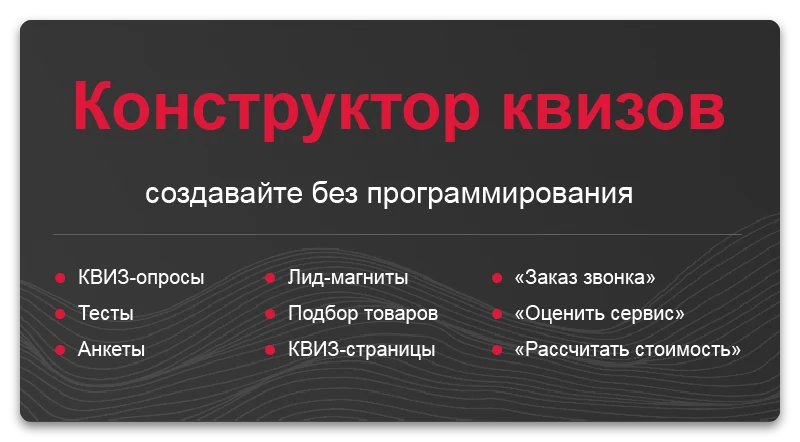
Module for creating quiz surveys, tests, and forms. Allows customization of quiz page elements. The tool is designed for building interactive data collection forms.
Module for creating quiz surveys, tests, and forms. Allows customization of quiz page elements. The tool is designed for building interactive data collection forms.
Interactive quizzes engage audiences three times more effectively than static pages. The builder enables the creation of tests, quizzes, and calculators that not only entertain but also drive business results. The solution is compatible with all editions of the Bitrix platform, ranging from Start to Business.
Marketers and content managers can create quizzes in 10 minutes without writing a single line of code by selecting a template, configuring questions, and publishing the result.
Developers can flexibly adapt the appearance and functionality by editing templates, adding custom logic, and integrating external services within their familiar development environment.
The ATUM Quiz module enables the creation of tests, forms, and quiz pages with full configuration of all elements. The documentation provides detailed instructions for using the functionality.
The ATUM Quiz module enables the creation of tests, forms, and quiz pages with full customization of all elements. The tool supports building surveys and feedback forms tailored to specific business tasks.
The Atum Quiz module is designed for creating tests, forms, and quiz pages. It features a modern and concise interface that allows flexible configuration of all construction elements.
Quiz surveys, tests, forms, and quiz pages module by developer Atum. The quiz builder allows flexible configuration of all interface elements and logic. Installation and initial setup are performed quickly with a single click.
The Atum Quiz module enables the creation of tests, forms, and quiz pages with full customization of all elements. The program interface is designed to be intuitive for the user.
The ATUM Quiz module enables the creation of tests, forms, and quiz pages with full configuration of all elements. The tool offers a wide variety of question types, each with its own configuration parameters.
The ATUM Quiz module enables rapid creation of lead forms, interactive surveys, tests, questionnaires, and quizzes without requiring programming knowledge. The quiz builder allows full customization of all quiz page elements.
The 'Quiz surveys, tests, forms, quiz pages' module by the developer Atum. The builder allows flexible configuration of all elements. An unlimited number of quizzes can be created on a single 1C-Bitrix platform.
Ability to customize the quiz window appearance.
Module for creating quiz surveys, tests, forms, and quiz pages. The quiz builder allows flexible configuration of all interface elements.
The Quiz Surveys module by Atum is designed for creating and editing quiz, test, form, and quiz page templates. The builder allows full configuration of all interface elements and survey logic.
The Atum Quiz module provides quizzes, tests, forms, and quiz pages. Its builder allows flexible customization of all elements. It features a fast method for adding products from information blocks directly into quiz questions and results.
The ATUM Quiz module is designed for creating surveys, tests, forms, and quiz pages. The builder allows full configuration of all interface elements. The functionality includes an integrated Yandex Map for displaying questions that require geographic location.
The ATUM Quiz module is designed for creating customizable quizzes, surveys, tests, forms, and quiz pages. The question interface integrates a 2GIS map for displaying geographic locations.
The ATUM Quiz module enables the creation of surveys, tests, forms, and quiz pages. Its builder allows full customization of all interface elements. The functionality includes integration with the Telegram messenger to automatically send notifications about new responses.
Image temporarily unavailable
Quiz surveys, tests, forms, and quiz pages module by Atum. The builder allows flexible configuration of all interface elements. Integration with the Max service is implemented to automatically receive event notifications.
The Atum Quiz module provides quizzes, tests, forms, and quiz pages. The quiz builder allows flexible configuration of all elements. The functionality includes integration with Bitrix24 for lead creation.
A third-party visual editor, TinyMCE, is used for text entry. Examples of ready-made quizzes follow.
Demonstration examples are provided to evaluate the capabilities of the Quiz module, which handles quizzes, tests, forms, and quiz pages. The quiz builder allows configuration of all interface elements.
The ATUM Quiz module enables the creation of tests, forms, and quiz pages with full customization of all elements. Its functionality includes selecting house projects that match specific user criteria.
The 'QUIZ' module by Atum is designed for creating surveys, tests, forms, and quiz pages. The builder allows flexible configuration of all interface elements and survey logic.
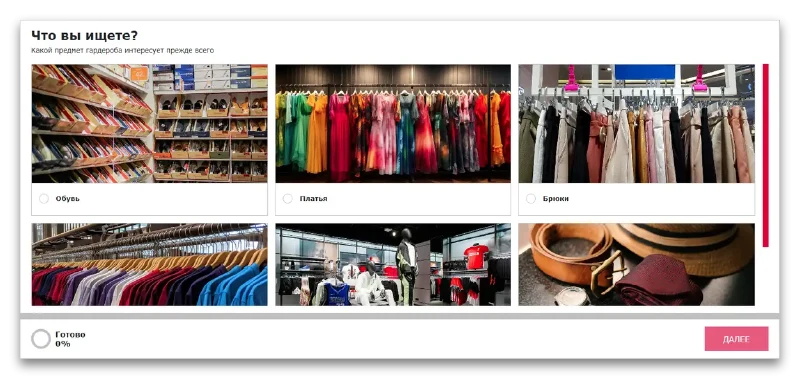
The Atum Quiz module enables the creation of tests, forms, and quiz pages with full customization of all elements. Users answer questions to select their dream dress.
The Atum Quiz module enables the creation of tests, forms, and quiz pages with full customization of all elements. The workflow scenario includes a series of five questions designed to select a bed suitable for a child.
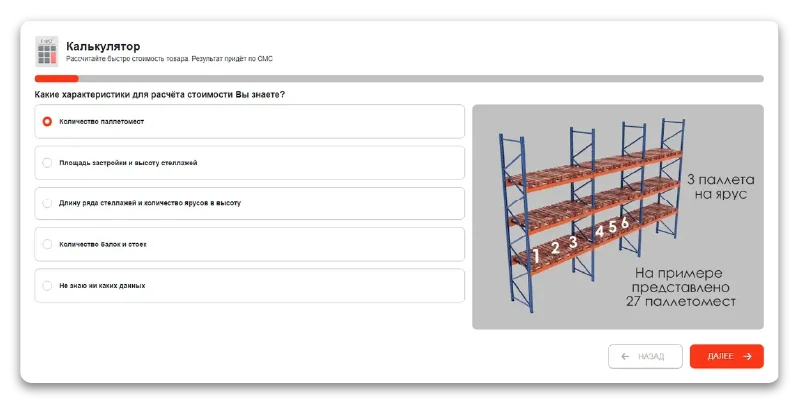
The ATUM Quiz module enables the creation of tests, forms, and quiz pages with full customization of all elements. Its functionality includes a rapid calculation of shelving unit costs.
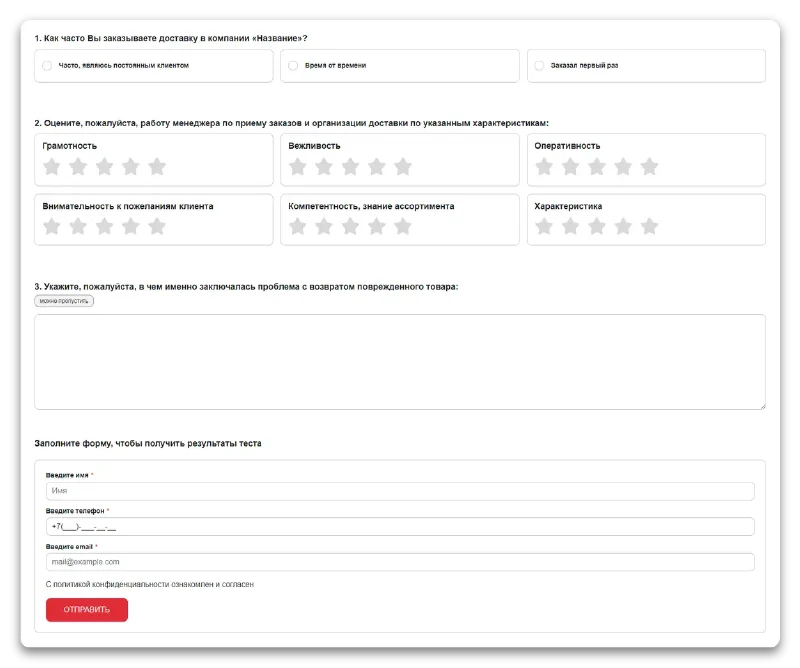
The Atum Quiz module enables the creation of tests, forms, and quiz pages with full customization of all elements. It allows collecting feedback, such as evaluating store delivery, and offering discounts to customers for participation.
The quiz module for the 1C-Bitrix platform enables the creation of surveys, tests, contact forms, and specialized quiz pages. The builder provides flexible configuration of all interface elements and operational logic.
The Quiz module by Atum enables the creation of tests, forms, and quiz pages with full customization of all elements. The tool provides flexible capabilities for configuring content and survey logic without requiring programming.
The Atum Quiz module enables the creation of tests, forms, and quiz pages with full customization of all elements. The solution includes ready-made templates for quick deployment.
Three ready-made templates are provided to accelerate the deployment of quizzes on your website. They enable quick integration of surveys, tests, forms, and quiz pages. The builder offers flexible configuration for all elements.
The ATUM Quiz module enables the creation of tests, forms, and quiz pages with full customization of all elements. It includes a standard template for quick setup. The tool is designed for building interactive surveys without requiring programming skills.
The Atum quiz module, identified by the code atum.quiz, supports quizzes, tests, forms, and quiz pages with full configurability. Its functionality aligns with popular quiz services, and the module's settings allow for easy integration into a website.
The ATUM Quiz module enables users to create tests, forms, and quiz pages using a builder where all elements and logic are configurable. The module includes a media template for content formatting.
This template is a modification of the Standard template. To ensure more harmonious quiz display, it includes increased spacing and adjusted styling.
The ATUM Quiz module enables the creation of tests, forms, and quiz pages with full configuration of all elements. It includes the ability to create questionnaires based on templates, functioning similarly to standard forms.
This template lacks step transitions, progress bars, and on-screen result displays, except for sending results via email. The module allows creating any forms, embedding them either in modal windows or directly on website pages.
The ATUM Quiz module is designed for creating tests, forms, and quiz pages with full customization of all elements. The Start page provides access to the main constructor functions.
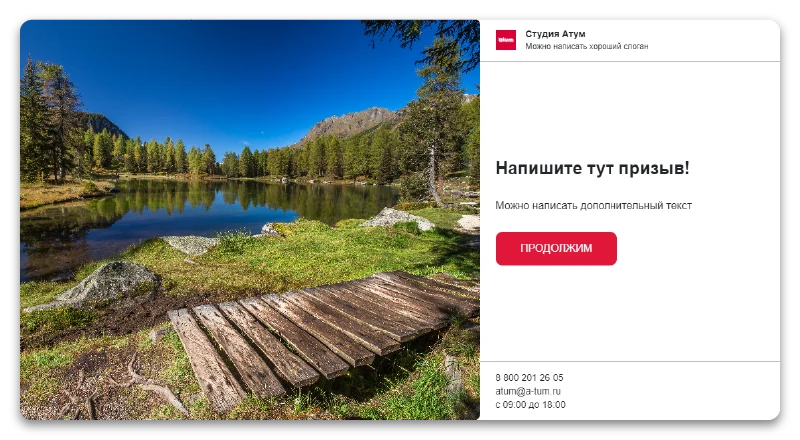
Before starting the survey, you can provide the client with necessary information or greet them. When creating this page, you can choose one of three design options.
The Atum Quiz module enables the creation of tests, forms, and quiz pages with full customization of all elements. It includes a standard design for quick integration.
Ready-made landing page templates help attract an audience to quizzes and increase user engagement in completing surveys.
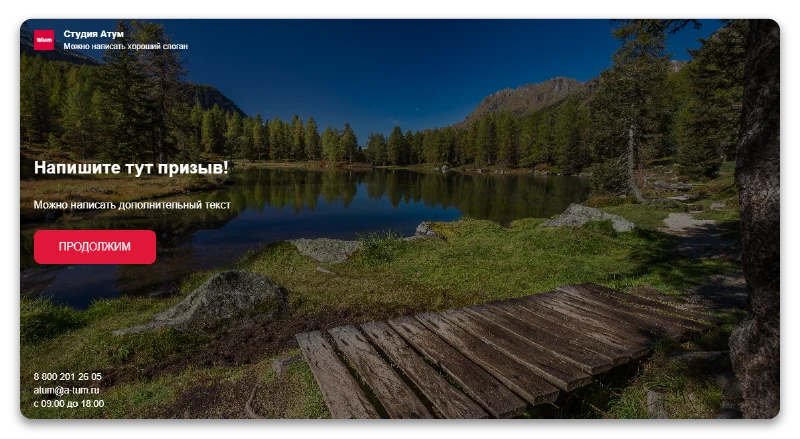
The ATUM Quiz module enables the creation of tests, forms, and quiz pages with full customization of all elements. It includes a background design configuration feature for visual page styling.
This starting page is identical to the first version but features a full-width background image. This design is highly effective for visually distinguishing the quiz from surrounding content while seamlessly integrating it into the overall site style.
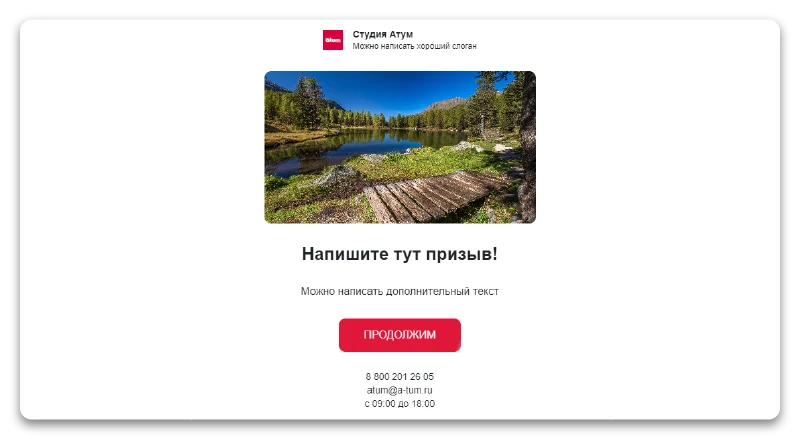
The Atum Quiz module enables the creation of tests, forms, and quiz pages with a fully configurable builder. The functionality includes the implementation of centered design for interface elements.
A minimalist landing page that retains functional value. This design is optimal for consolidating content on a single platform.
The landing page supports background video in MP4 format. Integration with external video hosting services is also available.
The Quiz module by Atum enables the creation of tests, forms, and quiz pages with full customization of all elements. The solution supports integration with the RuTube platform for video content placement.
Quiz module by developer Atum. The tool enables the creation of tests, forms, and quiz pages with full customization of all elements. It includes integration with the VKontakte platform for working with video content.
The Atum Quiz module provides tools for creating quizzes, tests, forms, and quiz landing pages. The builder allows flexible customization of interface elements and logic. This tool is designed for generating interactive data collection forms and conducting surveys.
The Atum Quiz module provides tools for creating quizzes, tests, forms, and quiz pages. The quiz builder allows flexible customization of all interface elements and logic. It is designed for generating interactive surveys and test forms.
The Atum Quiz module provides quizzes, tests, forms, and quiz pages. Its builder allows flexible customization of interface elements and logic. The solution supports integration with the Vimeo platform for video content hosting.
Quiz module by Atum. Enables creation of tests, forms, and quiz pages with full customization of all elements. Supports embedding links to external video files in MP4 format. Includes functionality for creating question pages.
The Atum Quiz module supports 18 question formats. These include nine standard types, two rating-based questions, three questions integrated with InfoBlocks, two questions connected to the Media Library, and two questions utilizing Yandex and 2GIS maps. Built-in branching logic displays the next question based on the user's selected answer, enabling potential clients to quickly and easily reach the desired result.
The module enables configuration of answer options for quizzes, tests, forms, and quiz pages. All configuration elements are available for modification.
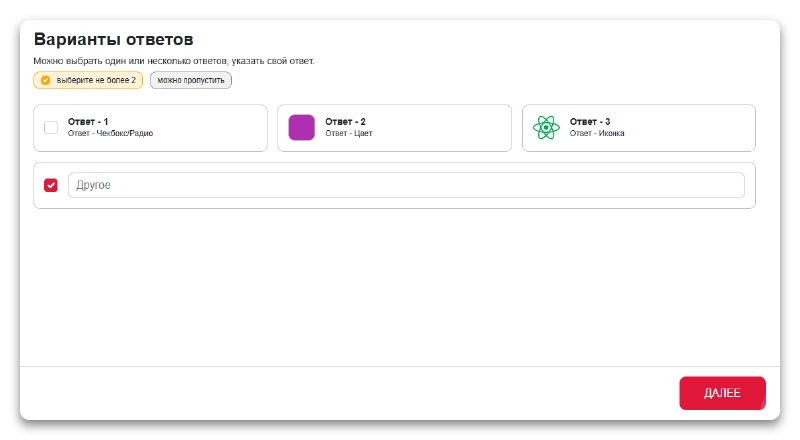
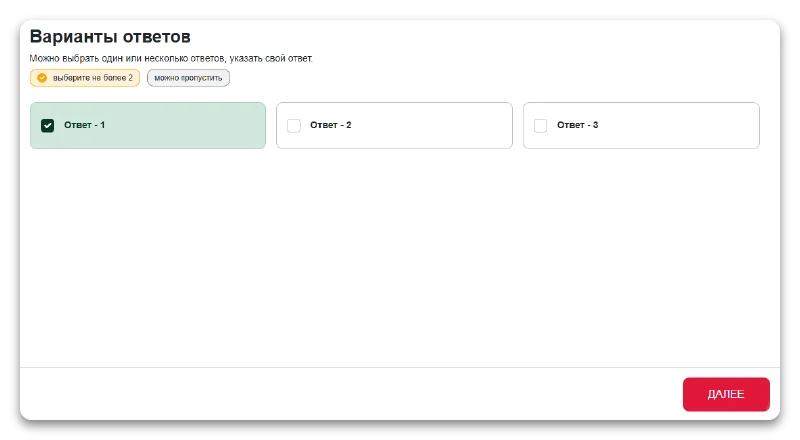
Quiz questions support selecting one or multiple answer options, as well as entering a custom response. This question type is optimal when the number of options is large and using images does not simplify the selection process.
Answer options can be marked with icons, colors, or checkboxes. An optional subtitle field is provided for each option to add supplementary details.
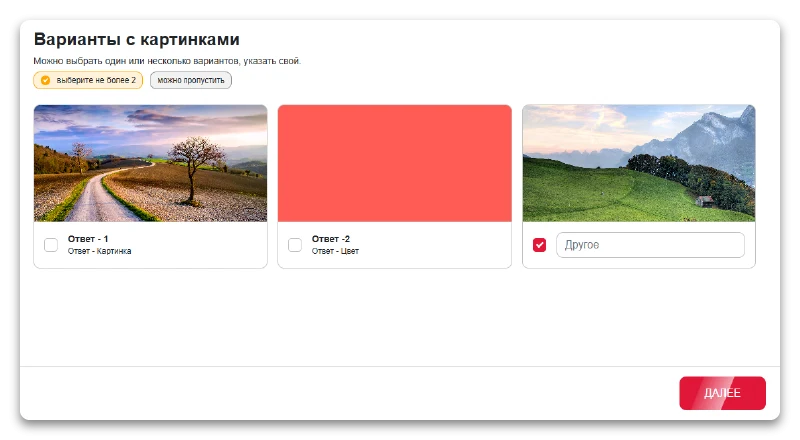
The module enables the creation of answer variants that include images. The quiz page builder allows configuring image display for each selection option, making tests and surveys more visual.
In quiz surveys, users can select one or multiple answer options or enter their own. Each option is accompanied by an illustration, which is convenient when the number of options is limited and suitable images are easy to find.
Answer options can be displayed with a background image or with a colored fill. An optional field for a subtitle is provided for each option.
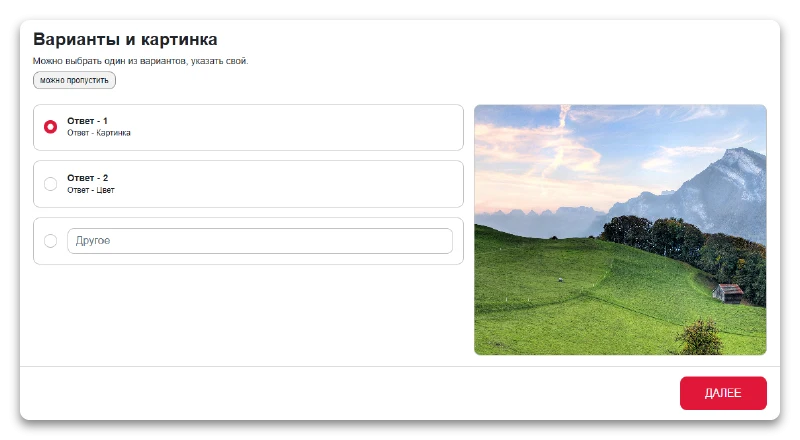
Configuration of answer options and accompanying images. The quiz builder allows flexible customization of the appearance of each element, including text options and associated graphic files.
Users can select one of the provided options or enter a custom answer. An image corresponding to the current selection is displayed next to the options; the image updates when the option is switched. Answer options can be styled with images or background colors. An optional field for an answer subtitle is also available.
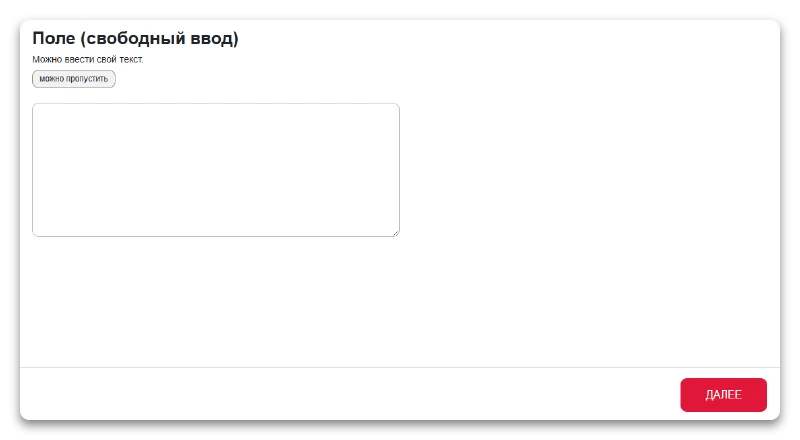
The free input field allows users to enter arbitrary text without format restrictions. This element is used in quiz surveys, tests, and forms to collect unstructured responses. The quiz builder provides full configuration of this field, including its display and behavior within quiz pages.
Users can enter custom text. This is a standard input field, similar to the comment field found in feedback forms.
The field type can be numeric, single-line text, or multi-line text. The input mask feature is available to format data entry.
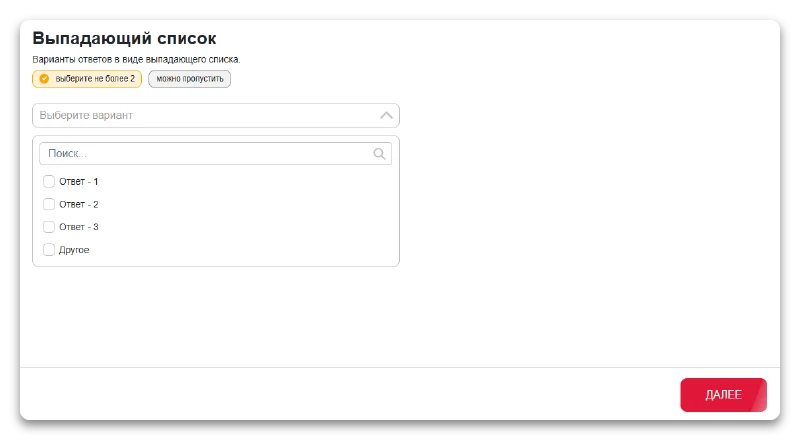
Dropdown list — a user interface element for selecting one option from a closed set of choices. In the quiz, test, and form builder by Atum, this component is configurable for specific tasks: you can manage the list of values, their order, and display settings. The element supports integration with external services and is used on quiz pages to collect user data.
Answer options are presented as a drop-down list. When the number of options is large, a search by initial letters is available, for example when selecting a delivery city.
Search for answers within the drop-down list.
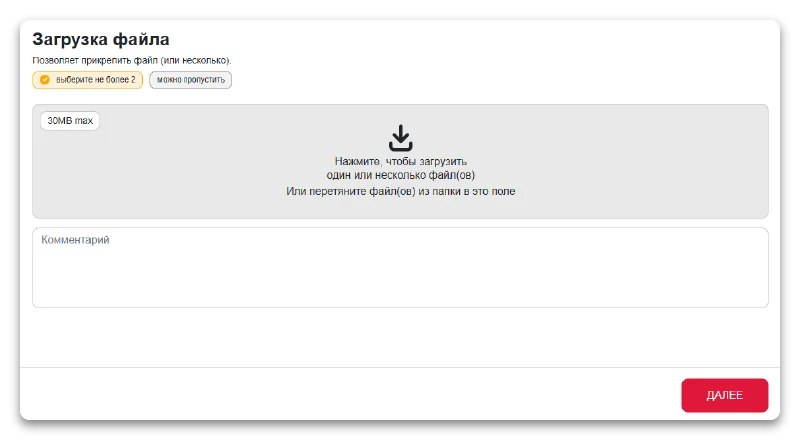
The ATUM Quiz module enables the creation of tests, forms, and quiz pages with full customization of all elements. The functionality includes file upload capabilities for data processing within the module.
The module enables attaching one or multiple files to quiz surveys, tests, and forms. Element settings allow restricting the file size, allowed formats, and the maximum number of files that can be uploaded.
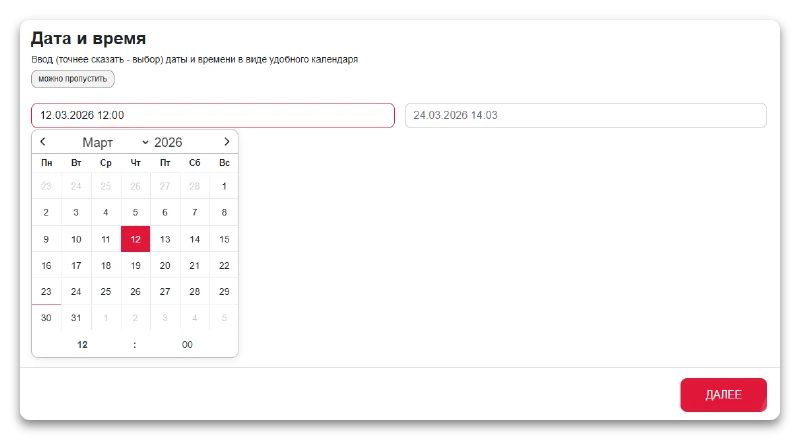
The ATUM Quiz module is designed for creating surveys, tests, forms, and quiz pages. Its builder allows flexible configuration of all interface elements and logic. The functionality includes support for displaying and processing date and time.
A component for selecting dates and times via a user-friendly calendar interface. A typical use case is scheduling an appointment by specifying a particular date and time.
The system supports manual date entry via keyboard using a defined mask or selection from a dropdown calendar. Users can specify either a single date or a date range. When needed, a specific time can be attached to the selected date.
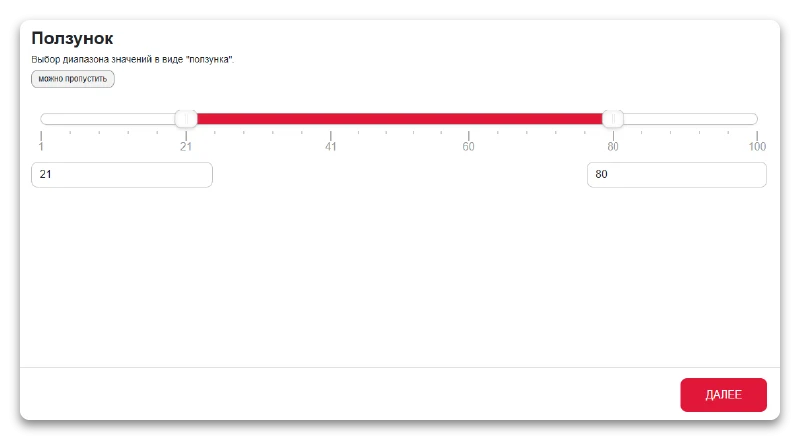
The ATUM Quiz module enables the creation of tests, forms, and quiz pages with full customization of all elements. The interface includes a Slider component for parameter adjustment. The solution supports integration with external services and requires proper configuration of file paths and subdirectories, which are represented in documentation by specific identifiers. The system operates using HTTP and HTTPS protocols, maintaining a distinction in security levels during data transmission.
Configuration for selecting a value range using a slider, such as specifying a house area within a minimum to maximum interval. Users can set the scale division value, the slider step size, and add labels to the scale. The interface supports both range selection and the specification of a single fixed value.
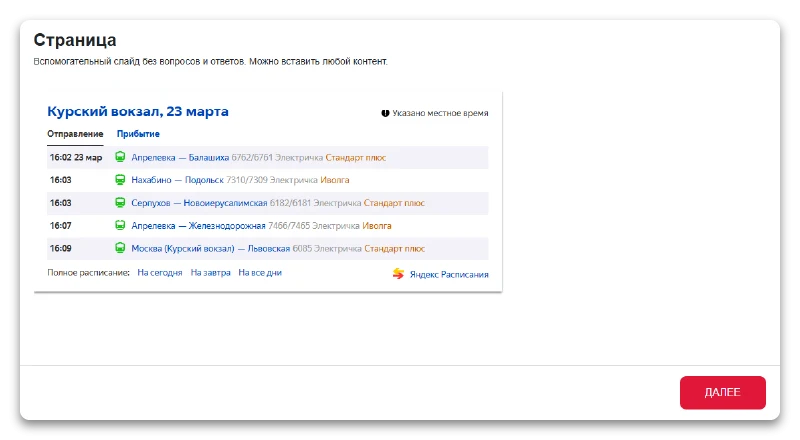
The ATUM QUIZ module from developer Atum is designed for creating surveys, tests, forms, and quiz pages. The builder allows flexible configuration of all interface elements and logic. The tool provides full customization without requiring programming.
An auxiliary slide without questions or answer options. You can insert any content, including text, images, tables, and other elements, using the visual editor. This slide is suitable for separating groups of questions.
The Atum Quiz module, developed by Atum, is designed for creating tests, forms, and quiz pages. The builder provides full customization capabilities for all interface elements and survey logic.
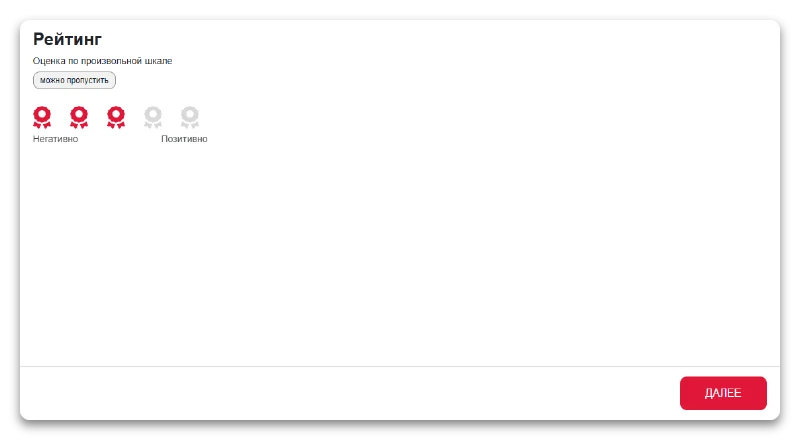
Support for rating on an arbitrary scale, such as 3, 5, or 10 points. Users can select a visual symbol for the rating, such as a star or a heart. It is also possible to add text labels for each rating level as tooltips.
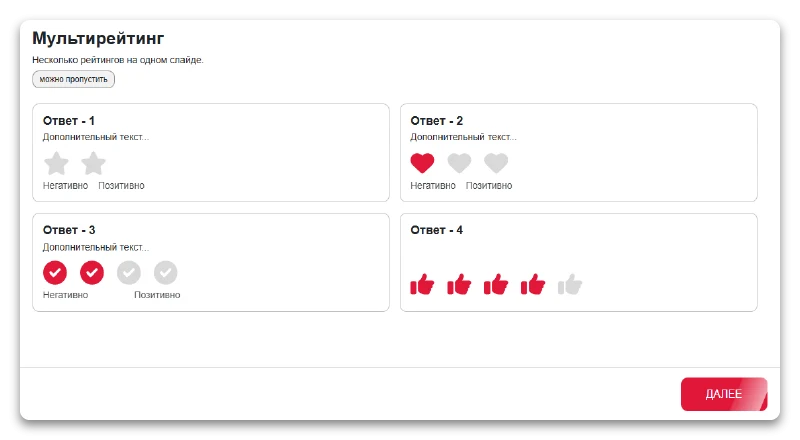
The ATUM Quiz module enables the creation of tests, forms, and quiz pages with full customization of all elements. The functionality includes a multi-rating system for processing results. The tool is designed for flexible construction of interactive surveys without requiring programming skills.
Display multiple rating scales on a single slide. This is convenient for evaluating a group of characteristics simultaneously. All settings of a standard rating are available.
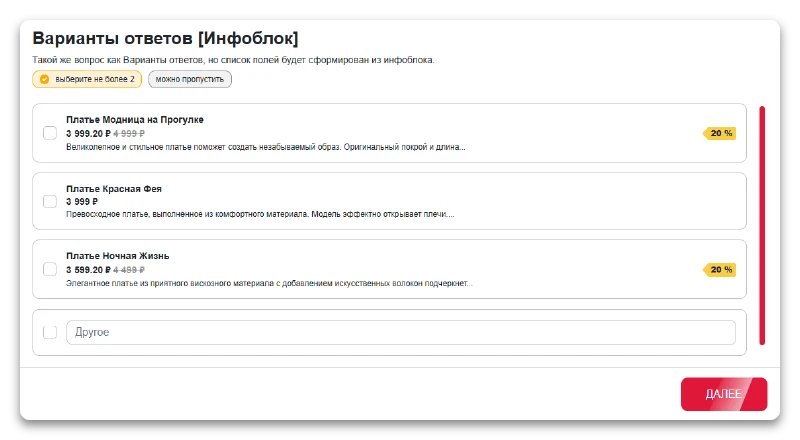
The Quiz module by Atum is designed for creating tests, forms, and quiz pages with full configuration of all elements. The documentation covers the functionality of answer options integrated with information blocks.
This question type is similar to the 'Answer Options' element, but the list of available choices is generated automatically from the fields of elements in the selected information block. Data such as price and discount amount can be used as answer options.
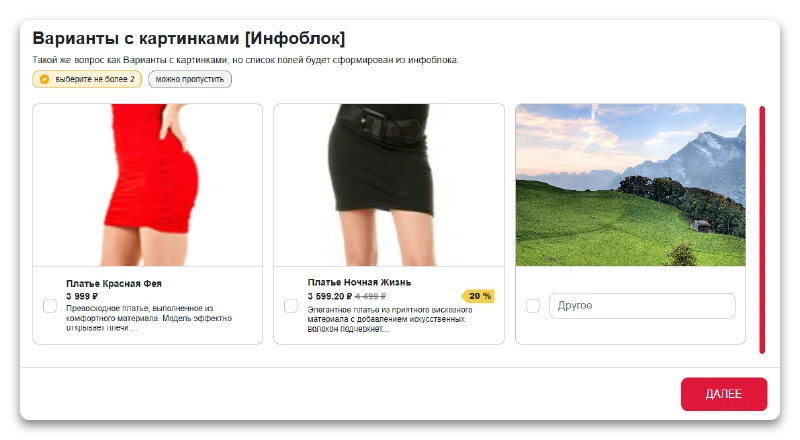
The ATUM Quiz module enables the creation of tests, forms, and quiz pages with full configuration of all elements. The functionality includes the ability to display answer options using images via information blocks.
This question type is similar to the 'Options with images' variant, but the list of answer options is generated from the fields of elements in the selected information block. The output can include price and discount values.
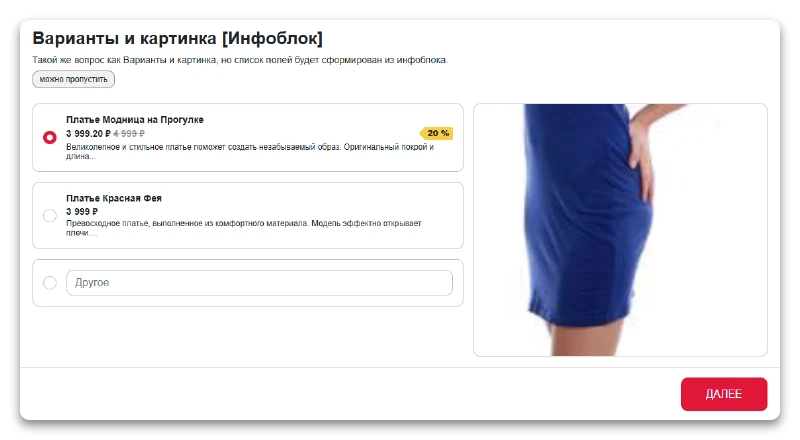
Configuration of answer options and images for the information block. The quiz builder allows flexible customization of these elements.
This question type is similar to the 'Options and Image' variant, but the list of answer choices is generated from the fields of elements in a selected information block. The output can include product price and discount values.
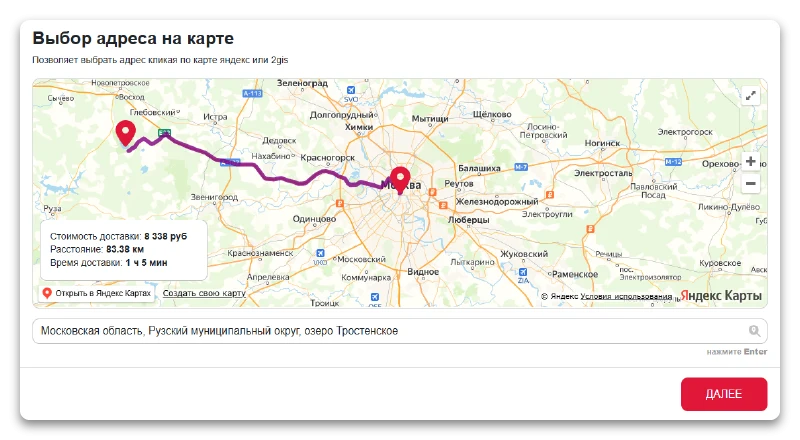
The ATUM Quiz module enables the creation of tests, forms, and quiz pages with full customization of all elements. Its functionality includes the ability to select an address on an interactive map.
The Atum Quiz module is designed for creating quizzes, tests, forms, and quiz pages. The builder allows full configuration of all interface elements. The feature set includes address selection via map clicks. The system can display delivery cost, distance, and estimated time. Users can add labels for gradations with tooltips. The cost is calculated as a price per kilometer within a specified radius.
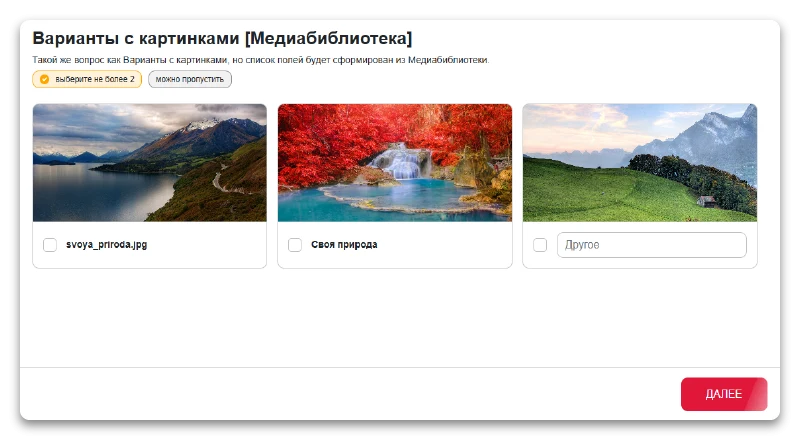
Ability to add answer options using images from the built-in media library.
This question type is similar to the 'Options with images' variant, but the list of answer fields is generated from elements selected in the Media Library.
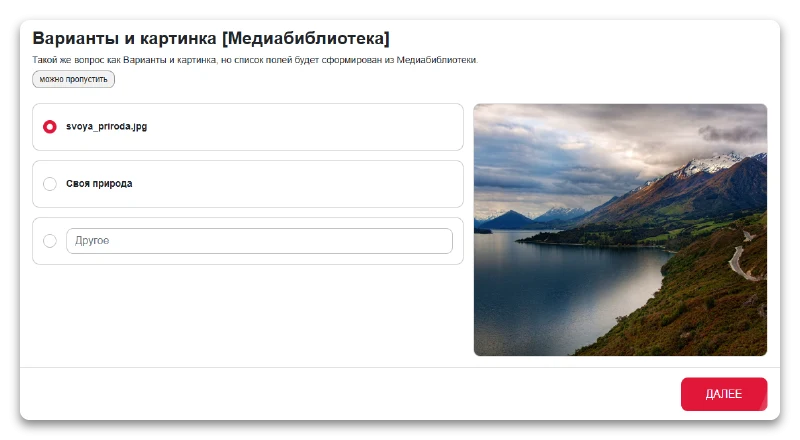
Answer options and images are configured via the built-in media library.
This question type is similar to the 'Options and Image' variant, but the list of answer fields is generated from elements selected in the Media Library.
The module allows configuring address variants for quiz surveys, tests, forms, and quiz pages. Users can define file paths by specifying exact subdirectory identifiers and file names in text descriptions. The system supports HTTP and HTTPS protocols while maintaining their security distinction. All technical parameters and paths are integrated without using service symbols or direct links.
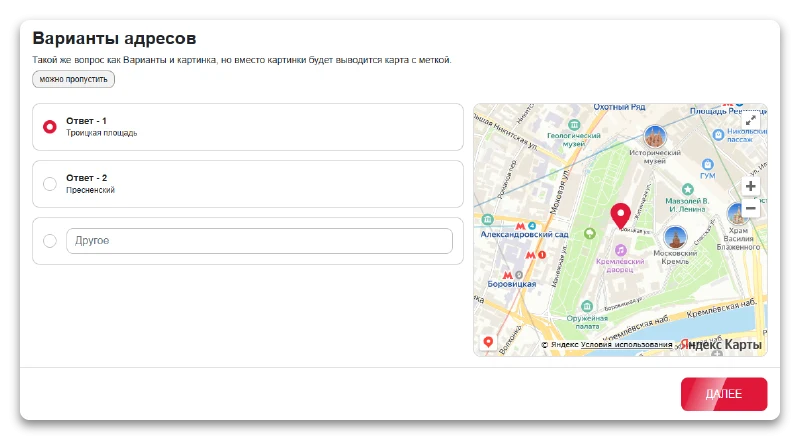
This question type is similar to the 'Options and Image' variant, but instead of an image, a map with a marker is displayed.
Additional settings and functions are also available for questions.
The ATUM Quiz module from developer Atum is designed to create tests, quizzes, and forms on dedicated pages. The builder provides full customization of all interface elements and survey logic.
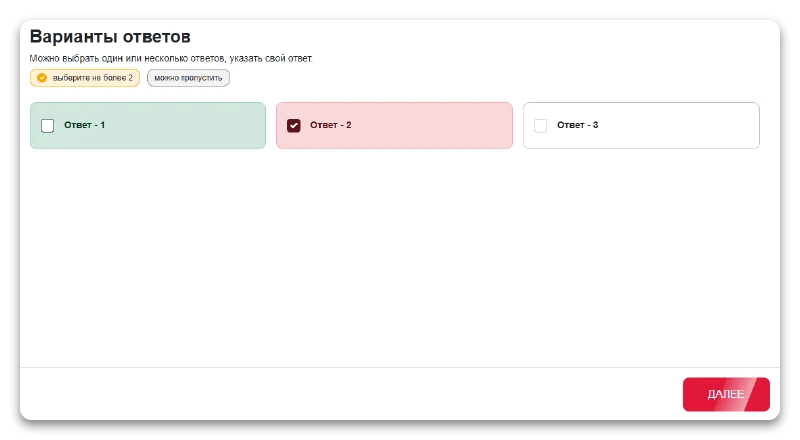
Knowledge verification module with correct and incorrect answer identification. This format is useful for testing students. When a correct option is selected, it is highlighted in green.
If an incorrect answer is selected, the chosen option turns red and the correct answers are displayed.
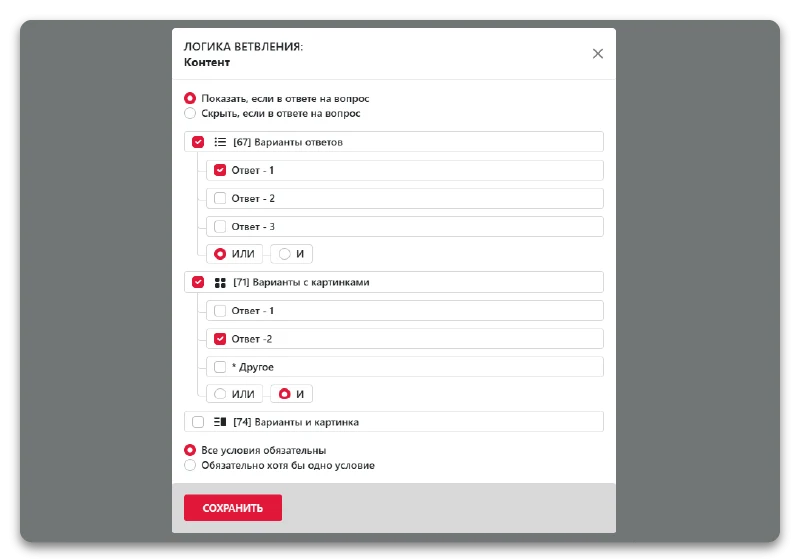
The ATUM Quiz module, developed by Atum, is designed for creating tests, forms, and quiz pages with full customization of all elements. Its core feature is question branching logic, which dynamically adjusts the subsequent survey path based on user responses. This enables flexible management of test scenarios without requiring programming.
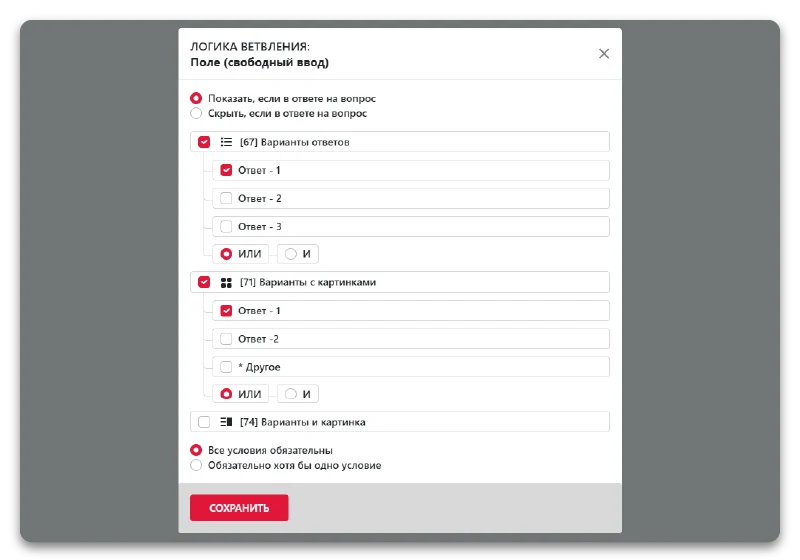
The quiz builder allows configuring display logic for questions, enabling them to be hidden or shown based on answers to previous items. Conditions trigger when selecting various input field types. Supported options include standard answer choices, image-based choices, combined text and image choices, free text fields, dropdown lists, sliders, rating scales, and address selection options.
The results page displays the outcomes of a completed quiz. The builder provides configuration options to customize the appearance and logic for displaying data after the survey is finished.
The Atum Quiz module enables the creation of customizable quizzes, tests, forms, and quiz pages featuring dynamic logic. Questions adapt directly to the user's previous answers, eliminating unnecessary items and improving the accuracy of collected information. When specific logic conditions are met, the system supports automatic delivery of required files to the client.
The ATUM Quiz module enables the creation of tests, forms, and quiz pages with full customization of all elements. The system includes functionality for collecting and displaying quiz completion results.
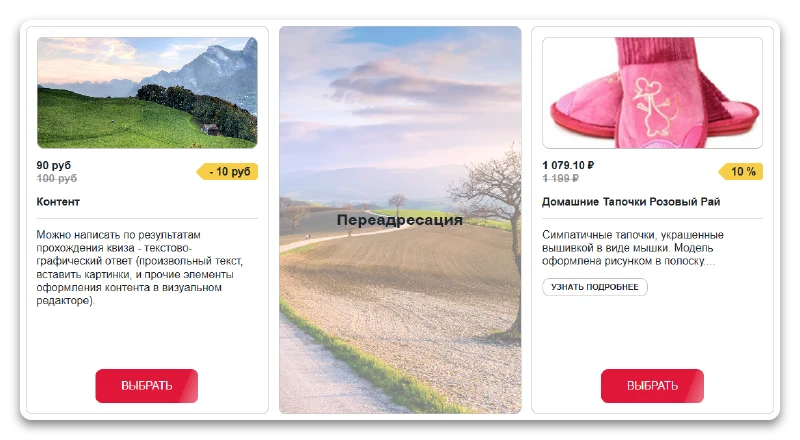
The Quiz module by Atum enables the creation of tests, forms, and quiz pages with flexible configuration of all elements. Upon completion of a quiz, the system generates a text-and-graphic response containing arbitrary text, images, and other content formatting elements available in the visual editor. Each logic branch of the quiz supports redirection to a specific page via URL, allowing any link to be used. Every logic branch can be linked to relevant products or categories from an information block, as well as other information block types such as services or collections.
The ATUM Quiz module, developed by Atum, is designed for creating surveys, tests, forms, and quiz pages with full customization of all elements. Its core feature is result branching logic, which dynamically adapts content display based on user responses.
After completing the quiz, clients receive a personalized solution. This helps attract new customers, increase conversion rates, and strengthen loyalty.
The Atum Quiz module enables the creation of tests, forms, and quiz pages with full customization of all elements. The included result calculator feature automatically computes final values based on user responses.
The 'Quiz Surveys' module by developer Atum is designed for creating quiz surveys, tests, forms, and quiz pages. The builder allows flexible customization of all interface elements and logic.
The ATUM Quiz module enables the creation of tests, forms, and quiz pages with full customization of all elements. The functionality includes calculating the final cost of survey results.
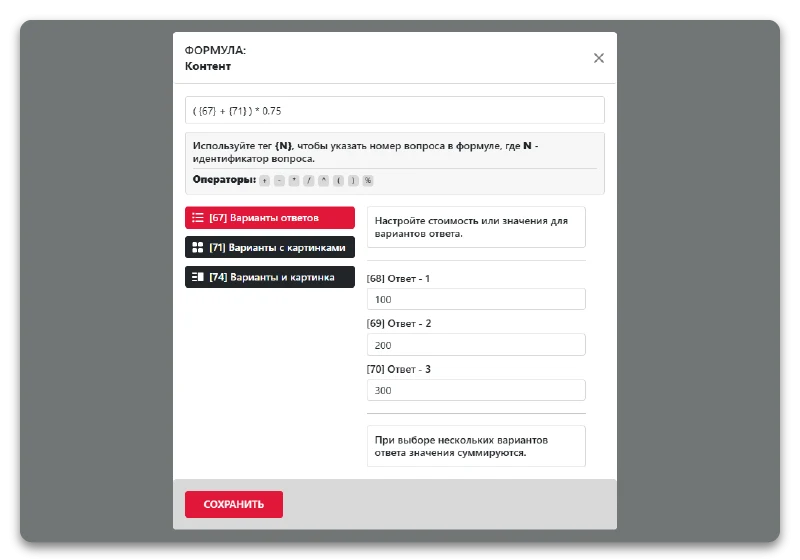
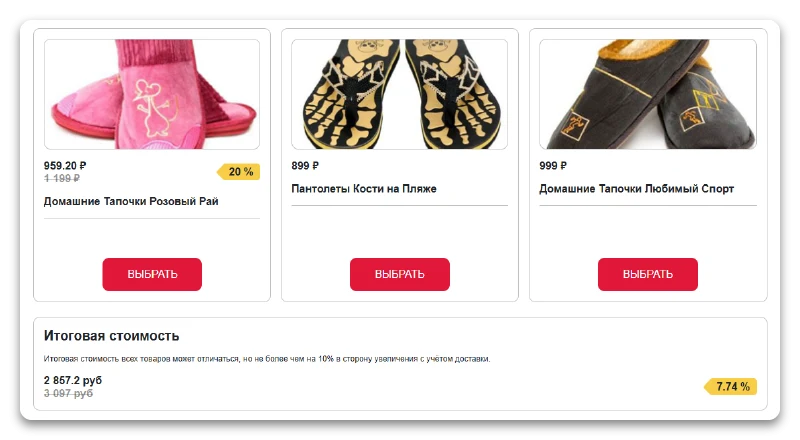
A feature for calculating total cost is available for the final result. It allows you to compute a sum based on a formula using selected questions or by aggregating all obtained answers.
The Atum Quiz module enables the creation of tests, forms, and quiz pages. Its builder allows full configuration of all form page elements.
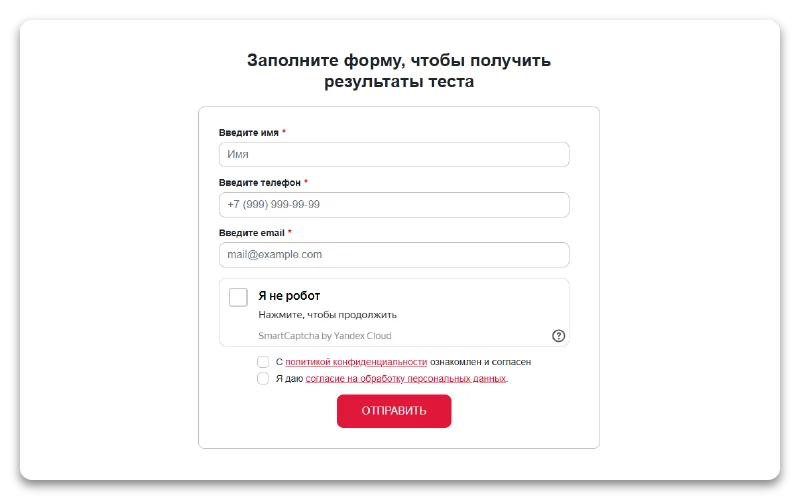
The Atum Quiz module for quizzes, tests, forms, and quiz pages allows flexible customization of all builder elements. To protect against spam and automated bots, the module includes integrated CAPTCHA functionality.
The ATUM Quiz module enables the creation of tests, forms, and quiz pages with full customization of all elements. Built-in bot protection is implemented via integration with the Yandex SmartCaptcha service.
The Atum Quiz module provides quiz surveys, tests, forms, and quiz pages. The quiz builder allows full customization of all interface elements and logic. Integration with the Google ReCaptcha service is implemented to protect against spam and automated attacks.
The form includes a setting to show or hide an additional checkbox confirming the privacy policy, positioned below the main checkbox. You can enable or disable this element as needed.
Leads:
After a client submits a quiz, the module provides three methods for receiving a lead. These options can be used together or independently.
The Quiz module for surveys, tests, forms, and quiz pages by Atum enables saving survey results directly within the system. The builder provides full configuration of all interface elements and operational logic.
The function enables sending survey or test results to a specified email address. This is a core capability of the quiz page builder that ensures automatic delivery of completed form data.
Quiz results can be automatically saved to the Web Forms module of the 1C-Bitrix platform. This ensures centralized data storage and simplifies further lead processing.
The module enables saving quiz, test, and form results directly into Bitrix information blocks. This ensures centralized storage of survey data and its subsequent processing within the platform ecosystem.
Quiz results are automatically sent to the Telegram messenger.
Image temporarily unavailable
Quiz results are sent to the Max system.
The Quiz surveys, tests, forms, and quiz pages module by Atum. The quiz builder allows flexible configuration of all elements. The functionality includes automatic lead creation in the Bitrix24 system.
Send Webhooks requests
The system supports sending quiz results before the contact form is submitted. This is useful when creating anonymous quizzes where contact details are not required, or when it is important to capture responses even if the user does not complete the form submission. This scenario is analogous to the abandoned cart mechanism, but for quizzes it can be referred to as an abandoned quiz.
Quiz output
Button is an interface element used in quiz surveys, tests, forms, and quiz pages. The builder of the Atum Quiz module allows configuring the button's appearance and behavior.
Quiz surveys, tests, forms, and quiz pages module by developer Atum. The feature displays a floating button on the side of the screen with vertically oriented text. Clicking the button opens a pop-up quiz window.
The Atum Quiz module enables the creation of tests, forms, and quiz pages. Its builder allows full customization of all interface elements, including banners. The tool is designed for flexible generation of survey materials without requiring programming skills.
Allows setting a short motivational text displayed before launching the quiz. Clicking this text opens a pop-up window containing the quiz.
The ATUM QUIZ module is designed for creating surveys, tests, forms, and quiz pages. Its builder allows flexible configuration of all interface elements and widget logic.
Display the quiz in a compact widget window. Questions and answers appear directly within this window without obscuring the main page content. This format is optimized for short surveys.
The Quiz module by Atum enables the creation of customizable tests, forms, and quiz pages. The functionality includes embeddable quizzes that can be integrated into existing projects. All constructor elements are fully configurable to meet specific requirements.
The quiz is rendered directly within the page body. Flexible settings allow the form to be seamlessly integrated into almost any website design. Using an empty template enables the creation of a dedicated landing page in quiz format.
A modal window opens when a button is clicked. This is a basic interaction mechanism that allows users to launch a quiz, test, or form without navigating to a separate page. The builder allows flexible configuration of the window's appearance and behavior.
The module enables opening a quiz modal window over the page content when clicking any button or link. This allows creating feedback forms of arbitrary structure without the involvement of a programmer.
The ATUM Quiz module is designed for creating quizzes, tests, forms, and quiz pages with full customization of all elements. The auto-open feature ensures the automatic launch of required actions.
The module enables automatically opening a quiz modal window over the page content when a specified event occurs. The initiation method is configured in the module parameters.
The Atum Quiz module enables the creation of quiz pages, tests, forms, and dedicated quiz landing pages. The builder allows full configuration of all interface elements and quiz logic.
A quiz page functions as a standalone website element without standard design components like headers or footers. This format is ideal for creating high-conversion landing pages.
A unique feature of the builder is the ability to set the quiz window height and add a sidebar (positioned on the left or right). This panel supports arbitrary content, including text, images, and video, utilizing the capabilities of the visual editor. This flexibility allows for the implementation of complex user interaction scenarios.
Analytics and metrics:
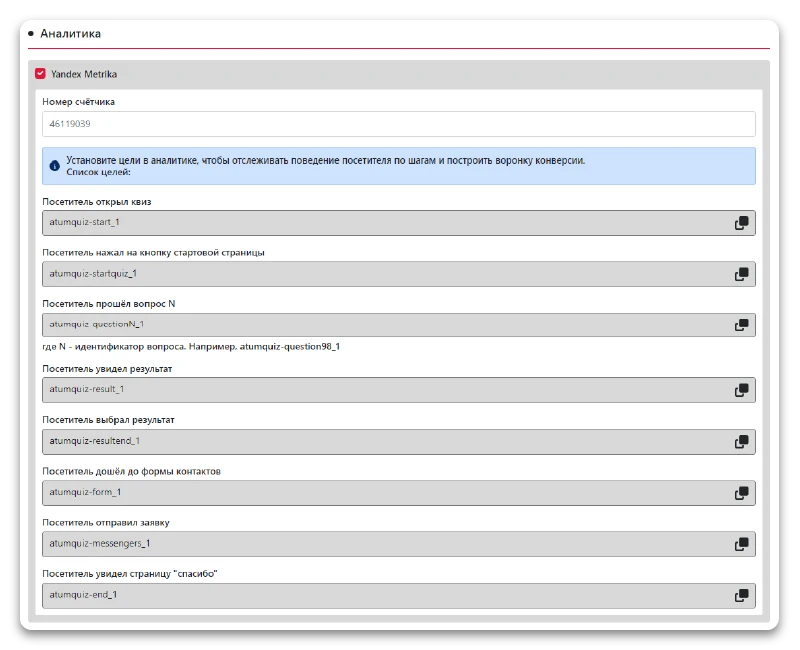
The Quiz module by developer Atum enables the creation of tests, forms, and quiz pages with full customization of all elements. Integration with the Metric service is included for data collection.
The Atum Quiz module enables the creation of customizable tests, forms, and quiz pages. The system tracks the complete user journey: from opening the quiz and clicking the start page button to answering question N. The user views results, selects an option, reaches the contact form, submits a request, and finally lands on the thank you page.
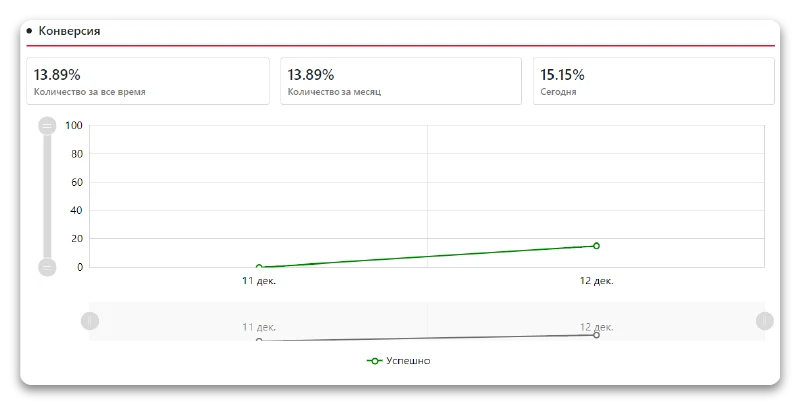
The built-in analytics module tracks the effectiveness of quiz surveys, tests, and forms without requiring external services. It collects data on user interactions with the constructor elements, providing basic statistics on completion and conversion rates. This functionality is available within the Atum.quiz module and does not require additional integration setup.
The Atum Quiz module enables the creation of customizable tests, forms, and quiz pages. The system tracks the complete user journey: from opening the quiz and clicking the start page button to viewing and selecting a result. The functionality records reaching the contact form, submitting a request, and finally displaying the "Thank you" page, providing detailed conversion analytics.
The Atum Quiz module for quizzes, tests, forms, and quiz pages. The builder allows flexible configuration of all interface elements and operational logic.
Module for creating quiz surveys, tests, forms, and quiz pages. The quiz builder allows full customization of all interface elements. For detailed information, navigate to the Installation tab or review the full instruction.
General iT can connect “QUIZ surveys, tests, forms, QUIZ pages. Quiz builder - everything is customizable!”, install and configure the module, and make sure the integration works correctly.
UPDATE HISTORY
What’s new
6 releases
1.0.23 (03.07.2026)Latest update
Enhanced security
1.0.22 (28.04.2026)
Attention.
The following files in the quiz template have been modified: style.min.css, question_5.php, question.php, form.php, and manager.php.
A new parameter for CAPTCHA has been added: Connect service.
New parameters for results have been added: Content, Redirection, and Info block product.
New parameters for questions and results have been added: Sorting settings for the info block.
A new result type has been added: Info block products.
A bug that caused applications to malfunction has been fixed.
The branching logic in the result has been fixed when the option "Show multiple results" is enabled.
Minor bugs have been fixed.
1.0.21 (23.03.2026)
Attention.
A Max notification template has been added to the quiz template.
The following files have been modified in the quiz template: style.min.css, question_5.php, question.php, form.php, and manager.php.
The quiz builder has been moved to the parent menu.
Added: Testing format [Correct/Incorrect].
Added the ability to select multiple sites for a quiz.
Added the ability to send notifications to the Max messenger.
Added captcha: Yandex SmartCaptcha and Google reCAPTCHA 2.
Added additional information to the notification.
Added the ability to add UTM tags as tags in Bitrix24 and in the Information Block.
Added the ability to send a request via link - [Webhooks] Send request.
Added a new parameter - Maximum selection allowed.
Leads have been improved; sorting by date has been added.
UTM tags are received in Bitrix24.
Modified question - Dropdown list.
Added a new parameter - Search for the question - Dropdown list.
Fixed incorrect display of the page link in notifications.
Fixed an error that caused the quiz to display incorrectly when using the "Show quiz on specific pages" option.
Fixed an error that caused an incorrect link to be sent.
Fixed minor errors.
1.0.19 (01.02.2026)
Attention.
Templates and emails have been rewritten.
The link to the Quiz Builder has changed from /bitrix/admin/atumquiz.php to /bitrix/admin/atum.quiz.php.
The value in the question "File Upload" has been changed.
Changes:
A new field has been added: Maximum number of uploaded files;
The ability to specify file types has been added.
Validation for the question "File Upload" has been expanded.
A new parameter has been added: Enable built-in analytics (Yandex Metrica);
Styles for the fixed button have been fixed;
Sorting in the web form has been fixed;
A problem with Yandex Metrica has been fixed;
A bug has been fixed that prevented notifications from being sent when using a multi-line field;
Minor bugs have been fixed.
1.0.18 (04.12.2025)
Attention. All templates and emails have been rewritten.
Search has been added for the list of answers;
New events have been added, as well as the output of additional information;
A new parameter has been added: Disable CSRF check;
The ability to display an additional field for the question "File Upload" has been added;
A problem with CSRF in AJAX has been fixed;
Minor bugs have been fixed.
1.0.17 (12.11.2025)
Attention. All templates and emails have been rewritten.
Caching has been added for quiz infoblock elements;
A calculator for results has been added;
The "Final Result" section has been added to the results page;
The ability to display infoblock elements in a question via a filter has been added;
An additional checkbox for the privacy policy has been added;
A new field "Results List Appearance" has been added;
A search field for quizzes and applications has been added;
HTTP_USER_AGENT has been added to the email;
New tags have been added to the Infoblock and Bitrix24: {FIELD_PRICE_VALUE}, {FIELD_PRICE_FORMATED}, {RESULT_ID}, {RESULT_URL}, {RESULT_NAME}, {RESULT_VALUE}, {RESULT_PRICE_VALUE}, {RESULT_PRICE_FORMATED}, {TOTAL_PRICE_VALUE}, and {TOTAL_PRICE_FORMATED};
A new tag has been added to the infoblock: {TEMPLATE};
Documentation has been improved;
A bug preventing CSV export has been fixed;
Minor bugs have been fixed.
USER EXPERIENCE
Solution reviews
How does this solution work in a real project? Share your experience and help others choose.
Be the first to share your experience
There are no reviews of this solution on git.ru yet. Tell us what worked well and what could be improved.
✓
Verified purchaseAdd a key if you wish. A verified review gets a badge, priority placement and more rating weight.
↗
Open to every clientJust sign in to your account. A key is optional; all reviews are moderated.
The set includes more than 22 ready-made icons for popular messengers and social networks, such as WhatsApp, Viber, VKontakte, and Telegram. All elements are available for instant integration.
Smart instant product search module for Bitrix featuring dropdown suggestions that display images, prices, and other data. It supports keyboard layout recognition during query entry, filtering by sections (info blocks), and selection of specific fields (properties) for searching.
This is an extended paid version of the free 'Quick Catalog Search' module.
A module for automatic SCSS to CSS compilation. The component processes multiple source files and allows specifying multiple paths for imported dependencies. Connection options for the compiled result include: no connection, using a link tag, or the method Asset::getInstance()->addCss(). Compilation occurs only when the user is logged in as an administrator.
The Sotbit Smart Filter SEO module is designed to increase online store traffic. The tool operates by generating numerous unique pages for smart filters.
The module automates image compression on the website in accordance with Google PageSpeed Insights recommendations. It supports integration via CDN OptiPic, allowing optimization without modifying image URLs. The main advantage of CDN integration is the automatic conversion of images to the modern WebP format to minimize file size. Browsers that support WebP receive images in that format.
The module is designed for online stores running on the 1C-Bitrix platform to automate the integration of supplier product catalogs. It is also suitable for news and city portals to facilitate content population. The solution supports data import in Excel, XML, YML, CSV, and RSS formats.
The displayed price covers the solution itself. Platform licensing, installation and customisation are checked separately. If the page offers bundles, select the required option before submitting a request.
How do I check compatibility?
Compare the supported editions and solution version in the technical details with your project. Before installing on a live website, we recommend making a backup and checking the solution in a test environment.
Is there a trial?
The developer lists a trial of 30 days. The trial button opens the installer in your website control panel. Check the required features and compatibility before purchasing.
How much does this solution’s renewal cost?
The current renewal price is 5,000 ₽. Before you order, a manager will confirm the renewal period and whether it applies to your licence.
Can you help with implementation?
We can help install the module, check its settings and verify how it works in your project. Compatibility with other customisations and the scope of work are assessed before we begin.
Statistics and interaction recording
Public pages use basic statistics. Our recording and Yandex Webvisor require your permission. You can keep basic statistics or disable all analytics.
Operator: General IT Rus LLC, INN 2310208877. Statistics and recording help improve the website.
Basic statistics: pageviews, a random daily ID, a public URL and time. The ID lasts until Moscow midnight. Original records: up to 48 hours; totals: up to 7 years.
Without Webvisor permission, Yandex receives server statistics without visitor IP, User-Agent or cookies. If selected, its browser code collects technical data, cookies, actions and masked page snapshots; recordings last 15 days. Inputs, chat and account areas are hidden.
Interaction recording requires permission: clicks, scrolling, technical information and filtered public-page snapshots. Events: up to 7 years; IP and snapshots: up to 90 days.
Permission is remembered for up to 365 days; full opt-out remains until changed. Basic statistics only disables recording; Disable all analytics stops new analytics. Previously sent data is not automatically deleted. Withdrawal and requests: support@git.ru. Full terms are linked below.
Your browser requests no tracking: analytics is off.