Payments are experiencing issues due to temporary restrictions in Russia. If your payment does not go through, please submit a support request.•Our support team is available 24/7 — we are always here to help with hosting and server issues.•We are now accepting requests for dedicated server rental and colocation services in our data center.•Reminder: we recommend enabling backups for additional data protection.•A new VPS/VDS lineup with NVMe storage and improved performance is now available.•Maintenance work on some servers has been completed. All services are operating normally.•
Payments are experiencing issues due to temporary restrictions in Russia. If your payment does not go through, please submit a support request.•Our support team is available 24/7 — we are always here to help with hosting and server issues.•We are now accepting requests for dedicated server rental and colocation services in our data center.•Reminder: we recommend enabling backups for additional data protection.•A new VPS/VDS lineup with NVMe storage and improved performance is now available.•Maintenance work on some servers has been completed. All services are operating normally.•
Аккаунт в General iT
Вход / Регистрация
Войдите или создайте аккаунт для управления услугами в панели.
Aspro: Construction 2.0 - Corporate website for a construction company
Aspro: Stroyka 2.0 is a ready-made website solution for construction companies. It is a specialized edition of the Aspro: Corporate Site 3.0 platform, tailored for enterprises in the construction industry. The template enables offering services for foundation laying, building construction, as well as finishing and repair work.
Aspro: Stroyka 2.0 is a ready-made website solution for construction companies. It is a specialized edition of the Aspro: Corporate Site 3.0 platform, tailored for enterprises in the construction industry. The template enables offering services for foundation laying, building construction, as well as finishing and repair work. The tool facilitates lead generation, helps build a corporate image, increases visitor trust, and allows for the clear presentation of completed projects.
The website functions as a 24/7 virtual office, remaining accessible without interruption on holidays or weekends. It serves as a tool for generating more leads, expanding business reach, and building a professional corporate image.
Key capabilities included for developing a construction company are:
project panoramic cards;
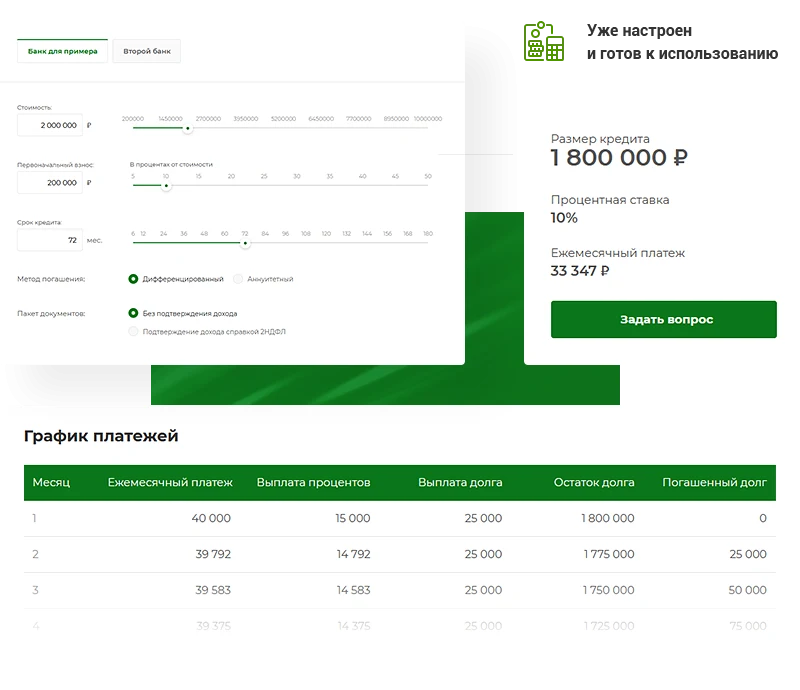
mortgage calculator;
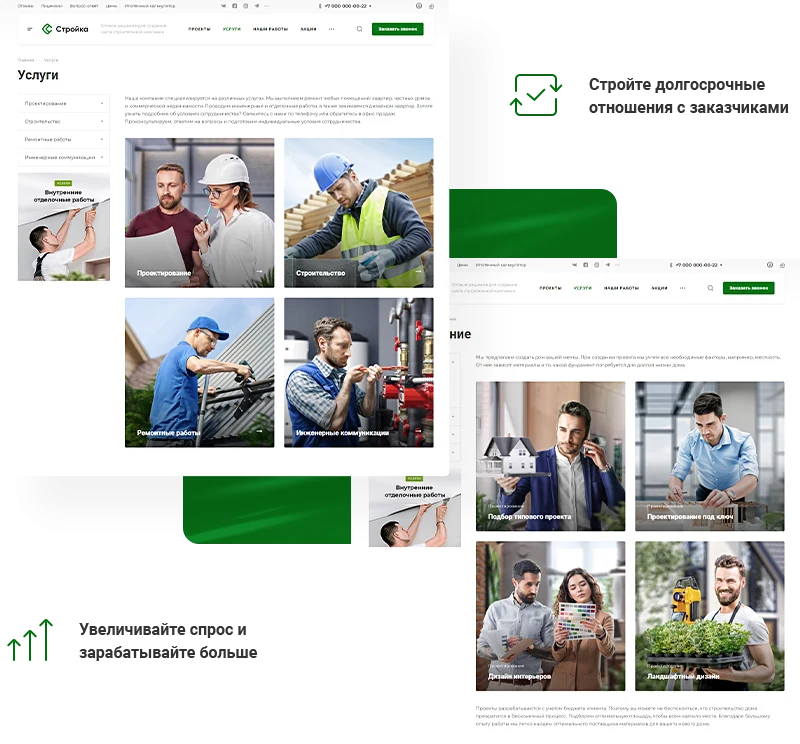
services section;
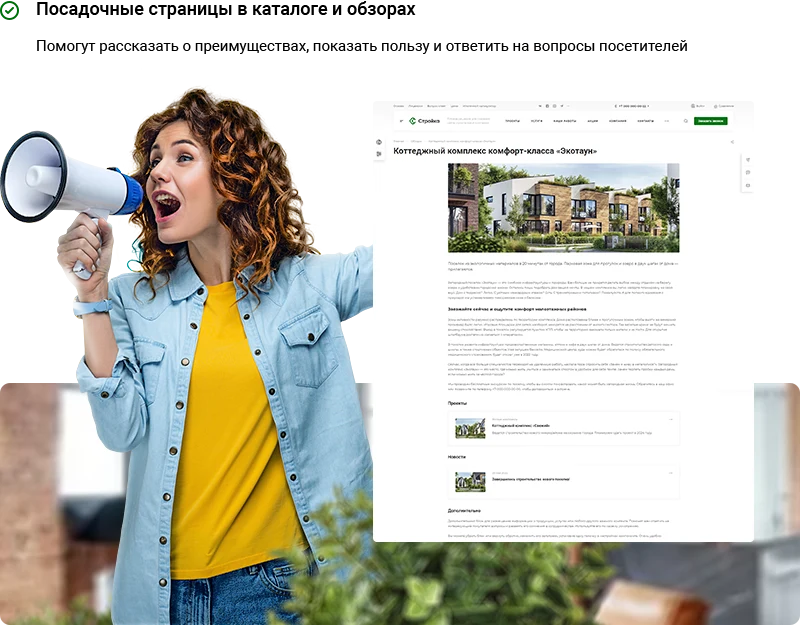
landing pages;
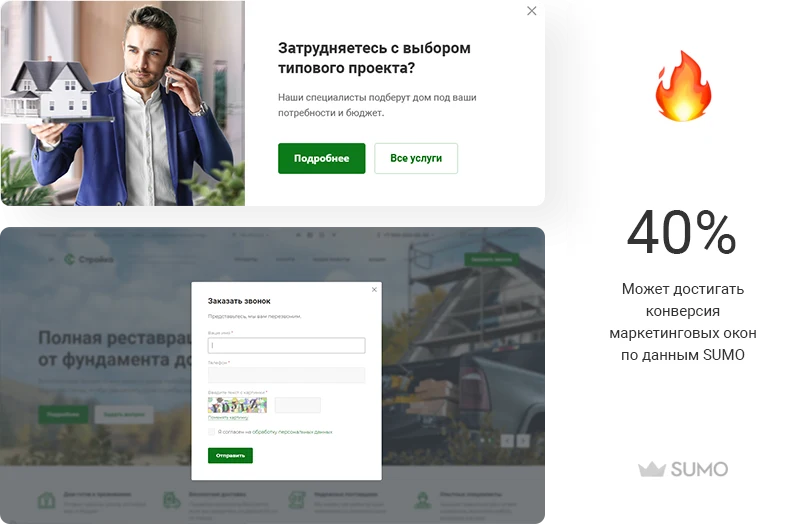
marketing blocks;
multi-region support;
modern design;
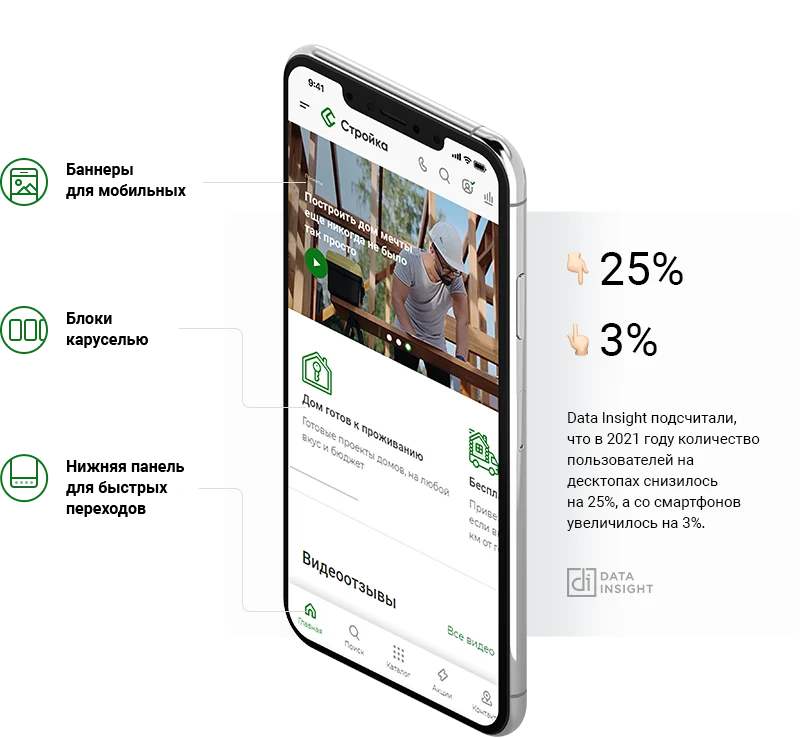
responsive layout for all devices.
Aspro: Stroyka 2.0 is a template for a corporate website of a construction company. The solution accounts for industry specifics and enables rapid launch of a resource with modern design and necessary functionality.
Aspro: Stroyka 2.0 is a ready-made template for a corporate website of a construction company. The solution is designed to create a professional online presence for construction businesses.
Aspro: Stroyka 2.0 is a ready-made template for corporate websites of construction companies. The solution provides basic functionality for presenting services and projects. Compatibility with the platform is limited to versions specified in the technical documentation. For setup and troubleshooting, contact official support channels.
Aspro: Stroyka 2.0 is a ready-made configuration for building a corporate website for a construction company. Template elements are tailored to industry specifics. Three configuration options are available for rapid deployment.
The Universal configuration suits any company in the construction sector. Large banners are used to build brand image and announce current offers. The system allows linking projects with services to increase revenue. Applications are collected via specialized forms.
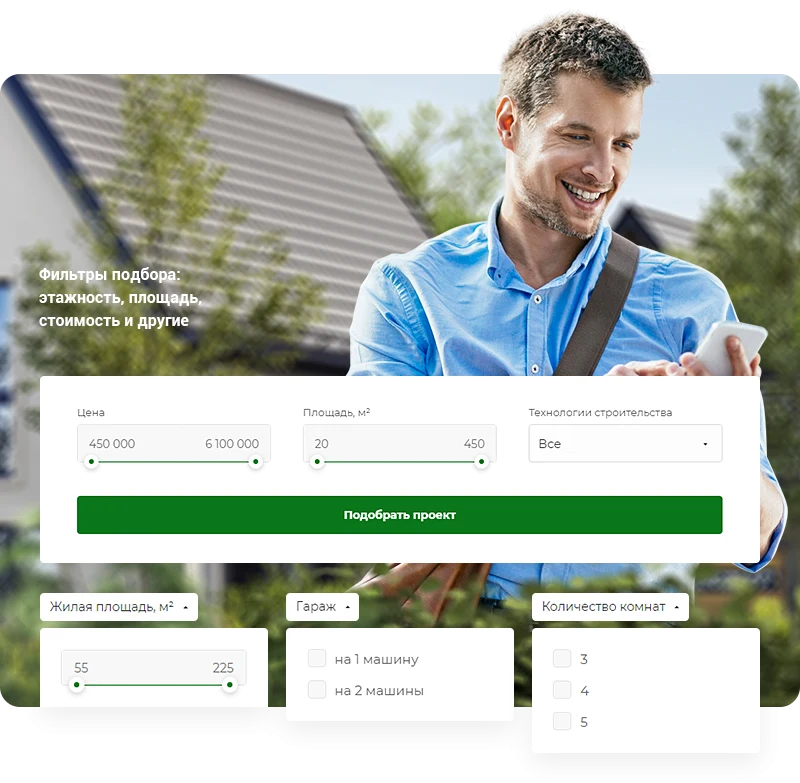
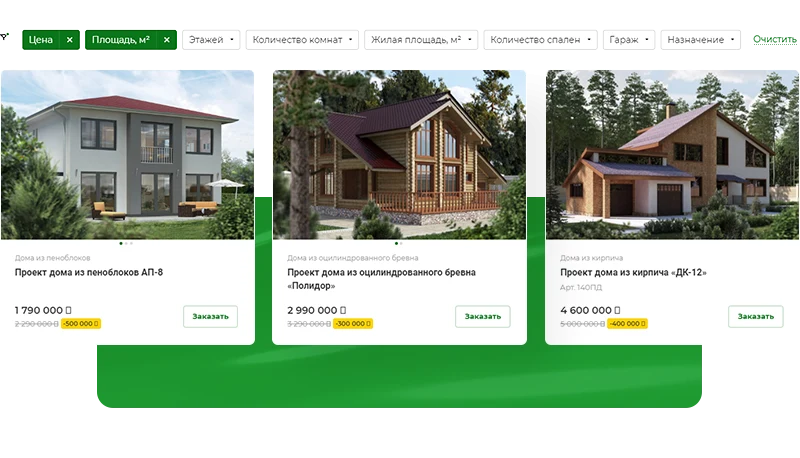
The Builders-Designers configuration targets firms specializing in standard projects such as private homes, saunas, and commercial real estate. The homepage displays project categories and a parameter-based project selection tool. An interactive map is integrated into the 'Our Projects' section to showcase completed houses and other structures.
The Contracting Organizations configuration is designed for technology-focused construction companies, including renovation, finishing, design, and engineering communications. A dedicated services section on the homepage enables quick access to the work list and specific service cards. A staff information block is also present on the homepage to enhance user trust. Applications and advance payments are accepted directly through the website.
The system shortens the user path to the target action and reduces the bounce rate through intelligent project selection.
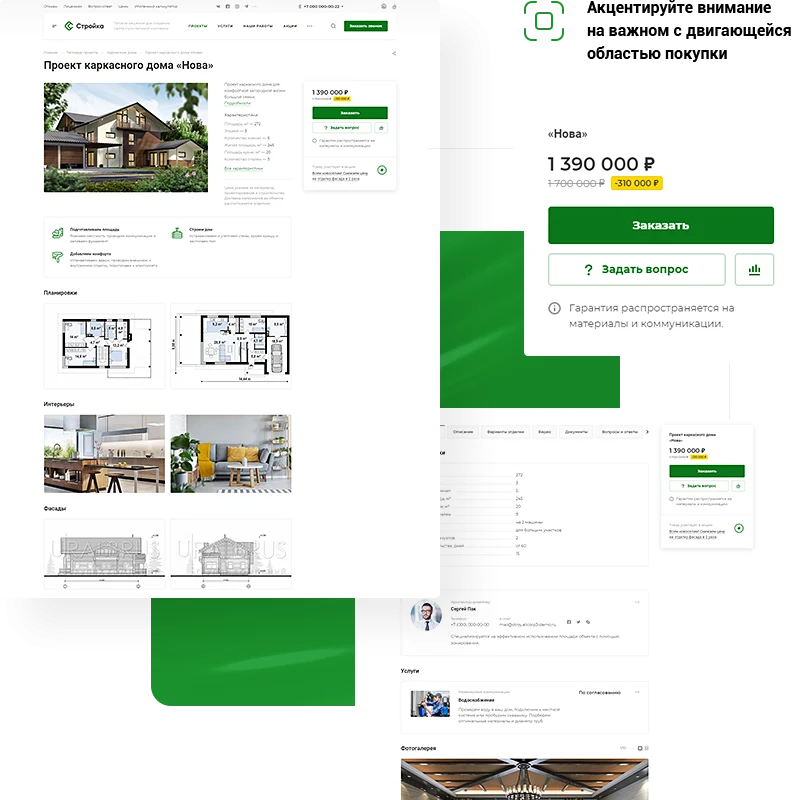
The project card is implemented as a single-page landing with panoramic images for detailed demonstration of all elements. The page presents materials covering the exterior and interior, as well as facade plans and internal layouts.
Home purchases and major renovations are infrequent events. To increase demand, add your company's services to the catalog. Describe the specifics of your activities and collect leads. Services can be placed in the product card, shopping cart, and a dedicated section.
The mortgage calculator helps users plan their budget by calculating the monthly payment based on property cost, initial down payment, and loan term.
Reputation is a key factor in the success of a construction company. The Aspro: Construction 2.0 template includes tools to build client trust.
The Completed Projects section confirms contractor reliability. It allows publishing photos of finished objects, describing work stages, and detailing the specifics of each project.
Video testimonials on the homepage help leverage the opinions of others. This feature allows confirming expertise and clearly showing the advantages of cooperation.
The Documents section supports uploading files in PDF, XLS, DOC, and other formats. This enables verification of legal compliance and the quality of work performed.
The Partners and Suppliers block displays the circle of cooperation. It allows describing major clients and suppliers, as well as demonstrating the quality of raw materials and tools used.
The 'Aspro: Construction 2.0' template is designed for corporate websites of construction companies. The solution enables collecting leads and accepting advance payments via the website. It includes a free payment processing component that is an integral part of the template. Additionally, the system supports integration with the 'Tinkoff Internet Acquiring Payment Processing' module, which is available for separate purchase.
Describe construction stages or new services, manage customer attention, and collect contacts using marketing windows.
The template enables the creation of landing pages for catalogs and reviews. This helps present solution advantages, increase audience loyalty, and promptly answer visitor questions.
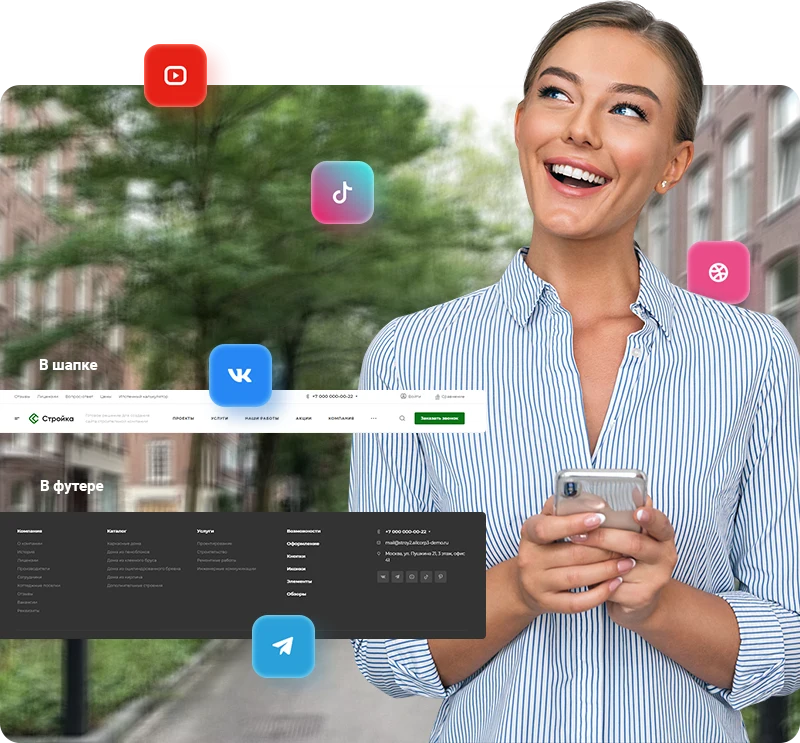
The Aspro: Construction 2.0 template provides tools to expand contact points with potential clients and increase website traffic. The functionality includes the ability to add an Instagram block to the homepage and place links to social networks in the header and footer.
The design of the Aspro: Construction 2.0 template allows you to form a strong first impression and retain visitor attention. You can configure the corporate color scheme, add bright banners, select fonts for emphasis, and enable dark mode to improve usability.
The template includes ready-made content sections that require only your information and images to be added.
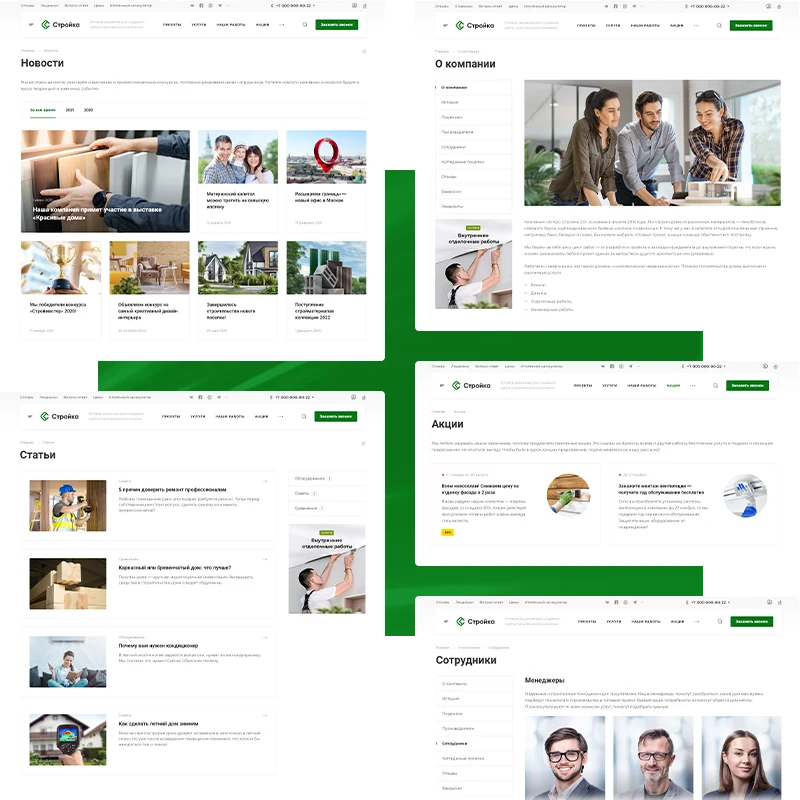
The 'About Us' section helps alleviate potential client concerns, highlight advantages, and demonstrate readiness to deliver a high-quality project.
The 'Promotions' block allows showcasing value to buyers by configuring discount sizes, adding countdown timers, and specifying the promotion period.
The 'Blog' section serves to demonstrate used technologies, provide advice on selecting construction materials, establish expertise, and answer audience questions.
The 'Team' block is designed to present the performers, share details about employee experience, and outline their responsibilities.
The 'News' section enables reporting on current events, company achievements, new services, or changes in suppliers.
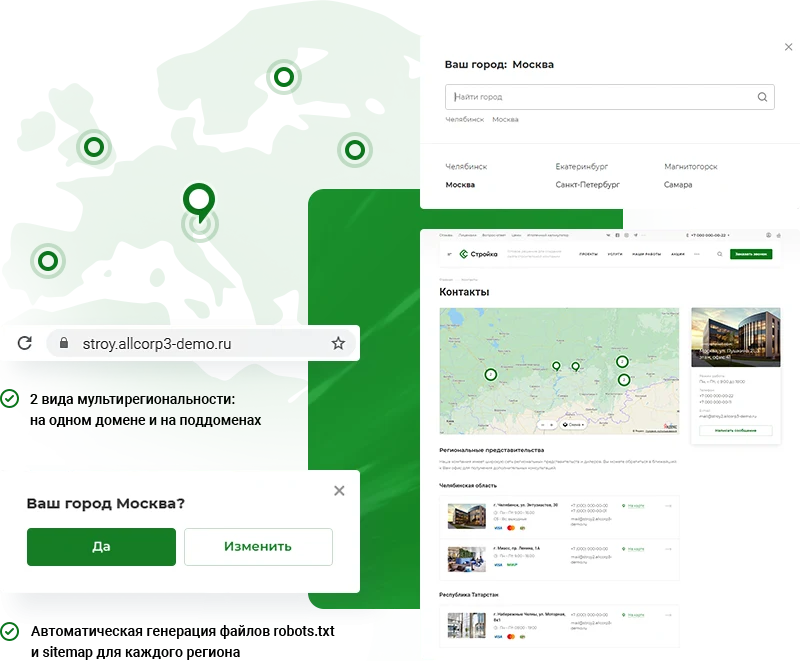
The multi-region feature enables scaling a project to new cities. You can configure unique prices, addresses, and contact details for each sales region.
The Aspro: Construction 2.0 template is fully adapted for display on screens of any size. This helps retain traffic, increase user engagement, and reduce the bounce rate.
Analytics of visitor behavior and customer service operations serves as the foundation for company development. Make business decisions based on facts.
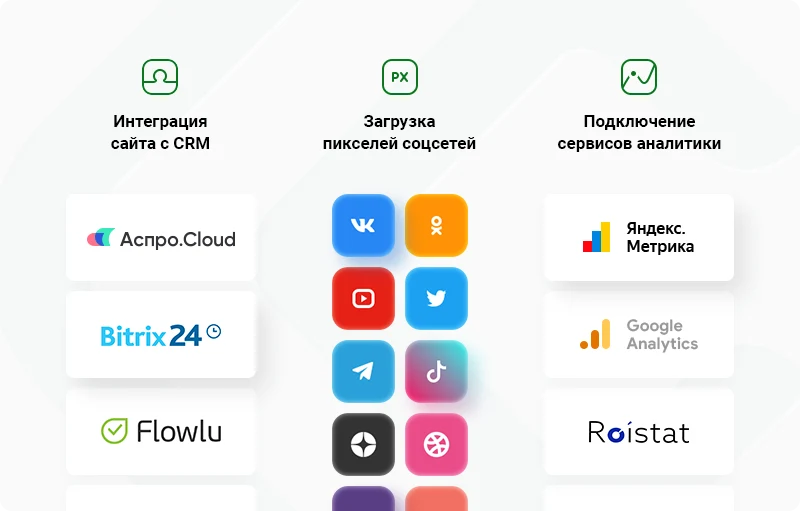
The template supports integration with Yandex.Metrica, the Aspro.Cloud business management system, and CRM platforms including Bitrix24, Flowlu, and AmoCRM. This enables tracking the number of requests, building audiences for retargeting, and analyzing user behavior within analytics services.
The Aspro: Construction 2.0 template enables you to launch a corporate website for a construction company faster than the time required for building or renovation. Detailed documentation and technical support specialists are available to assist with initial setup and rapid project launch.
Aspro: Stroyka 2.0 is a template for a corporate website of a construction company. The solution accounts for industry specifics and enables rapid launch of a resource with modern design and necessary functionality.
Aspro: Stroyka 2.0 is a ready-made template for a corporate website of a construction company. The solution is designed to create a professional online presence for construction businesses.
Demo version of the 'Aspro: Construction 2.0' template for corporate construction company websites.
For full information about features and compatibility, refer to the developer's official sources.
*Meta Platforms Inc. (Facebook, Instagram) activities are banned in the Russian Federation.
For a project based on “Aspro: Construction 2.0 - Corporate website for a construction company”, General iT can perform installation, initial configuration and subsequent adaptation.
UPDATE HISTORY
What’s new
20 releases
1.0.20 (18.06.2026)Latest update
Scheduled security update.
Attention!!! Before installing the update, you MUST perform a full backup of the site. If you have made changes to the solution template, additionally copy the entire template folder!
1.0.19 (07.04.2026)
New in version and improvements:
Added the ability to install the "Aspro: Smart SEO Optimization" module (STROY2-653)
Added the MAX messenger to social networks (STROY2-627)
Fixes:
Adjusted filter display in adaptive mode when properties are missing (STROY2-650)
Adjusted scroll display in the menu (STROY2-623)
404 status and page do not work for non-existent pages of the "About Company" subsection (STROY2-630)
Adjusted user permissions distribution when installing the solution (STROY2-606)
Adjusted navigation button styles (STROY2-620)
Scroll does not work on the main page when hovering over the banner content in Google Chrome (STROY2-651)
Attention!!! Before installing the update, you MUST perform a full backup of the site. If you have made changes to the solution template, additionally copy the entire template folder!
1.0.18 (15.01.2026)
New in the solution:
Yandex SmartCaptcha added (STROY2-614)
Ability to connect the Bitrix personal data processing agreement to forms and marketing windows added (STROY2-616)
jQuery version switch for the site added (STROY2-607)
jquery.mousewheel library added (STROY2-618)
Fixes:
Cross-linking of elements in information blocks of type content fixed (STROY2-629)
PHP error on the main page when using Google Fonts fixed (STROY2-628)
PHP error on the landing page when binding products by filter fixed (STROY2-626)
Values in the interest rates table in the credit programs information block were not saved (STROY2-622)
In all places interacting with VK, the domain has been changed from .com to .ru (STROY2-624)
Site installer patch (STROY2-605)
Image loading on the detailed product card in type 4 optimized (STROY2-625)
Attention!!! Before installing the update, you MUST perform a full backup of the site. If you have made changes to the solution template, additionally copy the entire template folder!
1.0.17 (28.05.2025)
New in the solution:
Blocks for VK Video and Rutube have been added to the main page (STROY2-595)
A setting to hide sections on the element filtering page has been added (STROY2-552)
Fixes:
Fixed the operation of interactive elements (buttons, sliders, drop-down lists, etc.) in the administrative part when installing the 1C-Bitrix platform version 25.100.300 (STROY2-604)
Updated the Swiper slider library to v11.0.4; fixed duplicate h1 headings (STROY2-583)
Fixed an error where two scrollbars were displayed in the quick product view (STROY2-589)
Fixed an issue where blocks from the contact information drop-down list were not being hidden (STROY2-561)
Fixed the display of "One per row" products in the mobile version (STROY2-579, STROY2-578)
Fixed a PHP error when installing on PHP 8.3 (STROY2-579)
Fixed an incorrect template description in component parameters (STROY2-558)
Extra values remained for filtering in the smart filter for properties when the "Apply regional filter" module option was enabled (STROY2-573)
When an incorrect URL was set for the /products/ section, the 404 status was not set (STROY2-553)
Attention!!! Before installing the update, you MUST perform a full backup of the site. If you have made changes to the solution template, additionally copy the entire template folder!
1.0.16 (03.12.2024)
Fixes:
Optimized the cache of catalog.section and catalog.element component templates by removing dependency on GET parameters (STROY2-581).
Fixed reCaptcha v2 and v3 errors (STROY2-570).
Replaced the #EMAIL_RAW# macro with #DEFAULT_EMAIL_FROM# in the solution's email templates (STROY2-572).
The detailed product image was not displayed in the 4th card type in adaptive view (STROY2-577).
The link output in the "About the Company" block was adjusted (STROY2-580).
Video playback in the banner failed when there was only one banner (STROY2-582).
The "Half" banner type was incorrectly displayed in the adaptive version of the site (STROY2-562).
Fixed an error where precise settings were applied to the "Share" tab when the widget was opened (STROY2-567).
Caching did not work if the user was a member of the "Administrators" group (STROY2-569).
Attention!!! Before installing the update, you MUST perform a full backup of the site. If you have made changes
1.0.15 (03.10.2024)
Fixes:
Fixed an error when installing the solution on 1C-Bitrix 24.100.0 (STROY2-574)
Attention!!! Before installing the update, you MUST perform a full backup of the site. If you have made changes to the solution template, additionally copy the entire template folder!
1.0.14 (31.07.2024)
Fixes:
Fixed an error in the credit calculator when calculating the monthly payment using the annuity method (STROY2-509)
Fixed a PHP error when opening the parameters of the catalog component (STROY2-549)
Fixed an error where phone numbers were not inserted into links in the "Contacts" section (STROY2-533)
Adjusted the display of properties for the "Finishing Options" section for new installations (STROY2-514)
Fixed an error for new installations where products set by filter were not displayed in the "Reviews" section (STROY2-500)
Attention!!! Before installing the update, you MUST perform a full backup of the site. If you have made changes to the solution template, additionally copy the entire template folder!
1.0.13 (20.06.2024)
Fixes:
Properties not corresponding to the solution's theme have been removed from the catalog item editing screen for new installations (STROY2-524)
Fixed an error on the contacts page in the popup window where the text "array" was displayed instead of branch phone numbers (STROY2-528)
Fixed an error where the rate was incorrectly rounded in the loan calculator component (STROY2-519)
Fixed the preview display for videos in the YouTube block on the main page (STROY2-534)
Fixed the layout in the projects section when using a filter on the main page (STROY2-523)
Fixed a PHP error in the product detail card when displaying sets (STROY2-536)
Fixed an error where the sitemap was not generated for subdomains (STROY2-537)
Fixed the slider layout in the mobile version (STROY2-538)
Adjusted the display of Drag-and-Drop block thumbnails in the solution settings (STROY2-539)
Fixed an error when calling component settings in the "Licenses" section (STROY2-540)
Fixed an error where the site did not work if no phone number was specified for the region in the information block (STROY2-544)
Attention!!! Before installing the update, you MUST perform a full backup of the site. If you have made changes to the solution template, additionally copy the entire template folder!
1.0.12 (09.11.2023)
New in version and improvements: (STROY2-521)
Added the ability to upload icons in the phone dropdown list.
Added a product gallery size of 520 px in the product card and on the website homepage in the second type of block "Catalog Elements".
Added the ability to display catalog section images if the product image is missing.
Added the display of the "Add to Cart" and "Order" buttons for services on the website homepage and in the services section.
Implemented the ability to rename the "Buy in 1 Click" button.
Added the ability to upload more than one image for an element in the "Licenses and Certificates" section.
Fixes:
Fixed an error where, during a new installation, the information block type "Credit Institutions" was set as "1C_Catalog" instead. (STROY2-525)
Corrected the property names in the "Credit Programs" information block for new installations (STROY2-510).
Fixed an error where catalog elements were not displayed on the homepage (STROY2-511).
Fixed an error where it was not possible to display elements on the homepage by sections (STROY2-518).
Other fixes: (STROY2-521)
Fixed an error where the background image was not displayed in the mega-menu.
Fixed an error with incorrect opening of reviews on the homepage.
Fixed an error where the online appointment form in the pricing section did not take into account the form type selected in the settings.
Fixed an error with incorrect formation of the "Specialists" field when sending an email to the mailbox if the "Specialist" property was not filled when completing the form.
Added the rel="alternate" attribute to link the desktop and mobile versions of the website according to Yandex.Webmaster recommendations.
Fixed microdata errors in the product card.
Fixed errors on PHP 8:
In the gallery block on the homepage if the photo property was missing.
In the contacts section.
In the product card.
In the blog if articles were in a parent section.
In the catalog root with deactivated sections.
When running cron.
In the blog, if related elements were not filled in
On the detailed project page, if the video was uploaded from a file
The Buy in 1 click button was not displayed in related products
The logic for darkening or brightening the main banner on mobile devices has been adjusted — it will now work only for the mobile banner type 'Without active image'
Excessive margins have been removed from the map block on the main page
The display of the related employees block on the detailed product page on small screens has been adjusted
The display of the employees block on the main page in 4K resolution has been adjusted
Obsolete technical warnings for videos in the product card have been removed from the source code
After filtering products and returning to the previous page, the filter values were not reset
The display of the 'Ask a question' form on iOS mobile devices has been adjusted
A duplicate H1 heading has been removed in the 3rd product card
Incorrect caching of the side menu has been fixed
The export of solution settings has been fixed
In dark mode, the text color in banners with the 'Without description' background type is not taken into account
The search block type did not work in the bottom icon panel on mobile devices
Links in multi-site mode for the topset header menu type have been adjusted
Attention!!! Before installing the update, you MUST perform a full backup of the site. If you have made changes
1.0.11 (05.07.2023)
New features and improvements in version:
Added automatic filling of the 'House Project' field in card 4 of the catalog (STROY2-497)
Fixes:
Adjusted the property code for displaying the 'Buy' button in tariffs (STROY2-505)
The value of the 'Affects interest rate' checkbox was not saved in the 'Loan Repayment Method' property type in
the 'Credit Programs' information block (STROY2-492)
The 'Show more' button was not displayed in the promotions block on the main page (STROY2-493)
Adjusted the spacing for service cards in the adaptive version (STROY2-501)
Attention!!! Before installing the update, you MUST perform a full backup of the site. If you have made
changes to the solution template, additionally copy the entire template folder!
1.0.10 (02.02.2023)
New features and improvements in version:
Improved PHP 8 support (STROY2-490)
Added display of 'Floor Plans', 'Interiors', and 'Facades' blocks to all detailed catalog page templates (STROY2-476)
Fixes:
Adjusted display of characteristics in detailed catalog page templates (STROY2-456)
The purchase block was not displayed in the mobile version on the 4th catalog card (STROY2-472)
Other fixes: (STROY2-488, STROY2-490)
Adjusted switching between dark and light logos depending on the site theme
Fixed conflict between the 'Aspro: Corporate Site 3.0' solution and its licenses when installing in multi-site mode
Adjusted appearance of the dropdown menu on hover on mobile devices in the header and footer of the site
For new installations, the import of solution settings via the settings widget has been adjusted
Web form generation and email notification creation have been adjusted
A bug in the comparison component call has been fixed
The display of the active image when uploading a video to the main banner has been fixed
The operation of the light and dark theme toggle switch in the site header within the settings widget has been adjusted
The display of the 3rd and 4th site footers has been adjusted
The display of the order checkout page on mobile devices has been adjusted
The color of the gray mobile header has been adjusted
Display of characteristics in tariffs has been adjusted
Display of characteristics in the detailed product card and on the service page has been adjusted
Links to registration confirmation in email templates have been fixed
Display of linked social network accounts in the personal cabinet has been adjusted
Attention!!! Before installing the update, you MUST perform a full backup of the site. If you have made changes to the solution template, additionally copy the entire template folder!
1.0.9 (15.11.2022)
Added the ability to specify a property of type "Directory" for trade offers to filter elements
Added a light-dark theme toggle in the header and mobile menu
Added support for a light logo in dark theme
Added a regional filter for related elements
Added a pop-up notification for authorization in the personal account
Optimized the YouTube block on the main page
Added the ability to set attributes for buttons in the main banner, menu items, and the header button
Added the ability to set different tab text additionally on the detailed product card
Added scrolling for date tabs in the news and articles section
Improved the settings widget behavior - the save button did not always appear
Added centering in the brands block on the main page when there are few elements
Fixes:
For clean installations, the symbolic code for the credit calculator information block type was corrected (STROY2-477)
An incorrect symbolic code for the "Request a call" form was specified in the phone dropdown in the site header (STROY2-478)
Fixed an error in the catalog section when the vertical smart filter was enabled (STROY2-458)
When specifying an SEO description in one of the sections on the main page, the main page's main description was overwritten (STROY2-485)
In the catalog and services information block, on clean installations, editing properties for the banner buttons were not added (STROY2-487)
Other fixes:
Fixed the image display on the detailed contacts page when lazyload is disabled
Adjusted scrolling for forms with a large number of fields
Adjusted the display of the video start button in the main banner when no other buttons are present
In the adaptive version, the block after the main banner was displayed incorrectly if types 3-5 and the "Narrow" option were used
Fixed menu offset under the dots on the first page load
Fixed an error stopping video in the main banner
Incorrect display of the active image in the banner element when lazyload was disabled
Regional filter behavior in search has been corrected
Arrow offset in the menu on a separate line for long names has been corrected
Horizontal scroll on the main page in the adaptive version when using the "Banners with text" block has been fixed
SEO title was not displayed in the third and fourth types of the product detail card
Detailed product image with a Russian filename was not displayed
Language switch icon was not displayed for multi-site setups on different domains
Tabs of type "Filter by years (links)" in the projects section did not switch
Attention!!! Before installing the update, you MUST perform a full backup of the site. If you have made changes to the solution template, additionally copy the entire template folder!
1.0.8 (14.10.2022)
Fixes:
The solution has been adapted for the 1C-Bitrix version 22.200.200 update - jQuery connection error (STROY2-479)
Fixed the error connecting the web form in the 4th variant of the catalog detail page (STROY2-481)
Attention!!! Before installing the update, you MUST perform a full backup of the site. If you have made changes to the solution template, additionally copy the entire template folder!
1.0.7 (29.09.2022)
Fixes:
The solution has been adapted for the 1C-Bitrix version 22.200.100 update: errors in tabs on the main page, errors when using regional settings, and authorization errors (STROY2-473).
Attention!!! Before installing the update, you MUST perform a full backup of the site. If you have made changes to the solution template, additionally copy the entire template folder!
1.0.6 (20.09.2022)
New features and improvements in version:
Added the ability to change the description of trade offers when switching (STROY2-460)
Added the rel="alternate" attribute to link the desktop and mobile versions of the site according to Yandex.Webmaster recommendations (STROY2-453)
Added the ability to ignore styles for the fill attribute of logos of the SVG type (STROY2-464)
Added settings for the phone dropdown list (STROY2-465)
Added the ability to create custom tariff offers. They will be displayed instead of tariff periods (STROY2-466, STROY2-467, STROY2-469)
Fixes:
Corrected saving settings from the widget (STROY2-459)
Other fixes (STROY2-462, STROY2-463):
In some cases, switching cities in the Contacts section caused an error
When clicking in the search bar, zooming occurred on iOS devices
In the adaptive version, the city switch did not work
When the cart was disabled and switching product offers in the list, a quick order button appeared
The 'Show only the city search bar' parameter did not work correctly
The ability to hide the popup in the header was disabled if only one phone number was filled in
The logo was stretched in the adaptive version
In the 'Licenses and Certificates' section, the alt and title attributes for uploaded elements were set incorrectly
When the 'Show contact information depending on the region' option was disabled, the point on the map was still shown from the region
Styles in the "VKontakte" block on the main page have been corrected
The list of fields was incorrectly passed to CRM deals in the Acloud integration
The active image in the main banner with text below and a link is displayed incorrectly in the mobile version
In the solution settings widget, the tooltip for the parameter that enables the quick order button has been corrected
The link to the personal cabinet was not changing in the solution module settings
The "show section full width" option was not functioning correctly
In the catalog component parameters, there was no block for sets to configure their display order.
The light logo in the banner on the product detail page in the catalog was not taken into account if a light header and text color were enabled.
Automatic video playback from a file in the banner did not work if the video banner was set as the first one.
Added the ability to insert the TP name into the product title.
Banner images on the main page did not accept settings from the widget after saving the component settings.
Fixed the transition to the detail page of a specific TP of type 2 and 3 for the detail page type.
Attention!!! Before installing the update, you MUST perform a full backup of the site. If you have made changes to the solution template, additionally copy the entire template folder!
1.0.5 (08.08.2022)
Fixes (STROY2-450), (STROY2-449):
Fixed display of product characteristics on the product detail page.
Arrows for menu items in the footer were not displayed on mobile devices.
The notification for adding a product to the comparison list on the catalog detail page was not working.
Images for banners were incorrectly stretched to half size, and images for banners with 'a field below the title and text' were incorrectly stretched on mobile devices.
Integration with VKontakte has been implemented: automatic publication of the latest posts from the VKontakte group to the website homepage.
The last menu item disappeared on mobile devices.
The slider in the 'Employees' block on the homepage has been fixed on mobile devices.
Pagination dots were incorrectly displayed when there were many elements in the main banner.
Display of teasers in the 'About the Company' block has been adjusted.
The YouTube block on the homepage did not always activate.
Extra zeros after the decimal point have been removed in the filter. Added the ability to specify the number of digits after the decimal point for each property.
Display of horizontal images in the 'Licenses and Certificates' section has been improved.
In headers 1, 2, 3, empty space remained on the right when nested blocks were disabled.
Related products were not displayed by filter in the Employees section.
Sorting of related employees in Services has been fixed.
When the ID of a web form matched the ID of an information block form, an incorrect message about successful form submission was displayed.
In the Services section, the ability to display text below the list of sub-sections has been added.
New and improvements in the version:
Display of dynamic pagination in the banner has been adjusted (STROY2-448).
Added the ability to set vertical or horizontal image type in products (STROY2-445).
Integration with Aspro.Cloud has been improved (STROY2-446).
Added a new product card with a separate tab for sets (STROY2-444).
Fixed an error in the security scanner (STROY2-455).
Attention!!! Before installing the update, you MUST perform a full backup of the site. If you have made changes to the solution template, additionally copy the entire template folder!
1.0.4 (04.05.2022)
New features and improvements in the version:
A version for visually impaired users has been implemented (STROY2-441)
Comparison functionality has been improved (STROY2-439)
The performance of the solution settings widget has been improved (STROY2-442)
The ability to display the "Download file" button for website sections has been added (STROY2-440)
Fixes:
In the marketing windows information block, incorrect types were specified for the "Type" and "User groups" properties (STROY2-436)
Some solution settings were missing in the admin panel (STROY2-443)
The "Order presentation" form ID parameter did not work (STROY2-433)
If a large available credit amount was set, the digits in the calculator merged (STROY2-413)
Other fixes (STROY2-438):
Trade offer links were removed when SKU 2 view is used in the product card
Redirect functionality in related services was corrected
Footer display was corrected
The mobile banner was not blocked from indexing
Service section images were shifted on mobile devices
Top menu spacing in header 12 was adjusted
In the product card, the warranty icon remained if the text was not filled in
In the personal cabinet, the subscription status text color in dark theme was corrected
Signature generation for payment via Invoicbox was fixed
Nested settings from the widget were not saved
Photos from inactive elements were displayed in the gallery section
When playing video, the "Play" button was not hidden in the video banner
Region selection from the bottom panel with icons on mobile devices did not work if the region display mode was a dropdown list
Regional filter functionality for the map block on the main page was fixed
Slider navigation for the main banner did not work
Attention!!! Before installing the update, you MUST perform a full backup of the website. If you have made changes to the solution template, additionally copy the entire template folder!
1.0.3 (15.04.2022)
Fixes:
Image centering has been implemented in the 'Facades', 'Interiors', and 'Floor plans' blocks (STROY2-414)
The library for the main slider on the homepage has been replaced with Swiper (STROY2-417)
The product comparison icon has been moved from the top menu to the bottom in the adaptive version (STROY2-425, STROY2-428)
Added the ability to display a custom sticker for a product, as well as to select a property for an additional sticker (STROY2-415, STROY2-427)
Fixed display of items in the top menu
Other fixes and new features in version (STROY2-423):
Comparison of the product list with mass purchase in tabular display has been implemented
Added the ability to view the entered password
Support for responsive tables has been implemented. For new installations, the table example is located in the solution's features section
The indentation for items in the site header dropdown menu has been corrected
The light logo for the mega menu was not working
The display of checkboxes in forms on information blocks has been adjusted
The dropdown list of phone numbers in the fixed header was displayed incorrectly
The display of the form example on the solution's features page for mobile devices has been adjusted
The display of properties on the comparison results page has been adjusted
Attention!!! Before installing the update, you MUST perform a full backup of the site. If you have made changes to the solution template, additionally copy the entire template folder!
1.0.2 (02.03.2022)
Fixes:
Fixed the banner layout on the project detail page for mobile devices (STROY2-411)
Fixed the layout of the quick view for catalog items (STROY2-404)
Fixed the layout on the mortgage calculator page when using the dark theme (STROY2-406)
Fixed the white background on images in the catalog item detail card when using the dark theme (STROY2-405)
Attention!!! Before installing the update, you MUST perform a full backup of the site. If you have made changes to the solution template, additionally copy the entire template folder!
1.0.1 (24.02.2022)
New in version and improvements:
Added the ability to pay via the "Invoicebox" system (STROY2-397)
Fixes:
Fixed the YouTube block on the main page (STROY2-407)
Other fixes (STROY2-401):
Nested settings from the widget were not saved
Notification about adding to the cart without a name
Horizontal scrolling due to a long phone number description in adaptive view
Fixed the layout of the news block on the main page on mobile devices
Attention!!! Before installing the update, you MUST perform a full backup of the site. If you have made changes to the solution template, additionally copy the entire template folder!
Aspro: Priority 2.0 is a ready-made solution for corporate websites, featuring pre-installed functionality and design. Launching an online project requires only adding your own content and selecting the appropriate visual style.
Aspro: Metal is a ready-made solution for companies selling metal products. It is a specialized edition of the 'Aspro: Corporate Site 3.0' platform, designed with industry specifics to enable rapid deployment.
The solution incorporates best practices identified through the analysis of hundreds of websites in the metal trading sector.
Aspro: Engineering is a ready-made corporate website template for companies operating in the field of engineering systems. The solution is built on the Aspro: Corporate Site 3.0 platform and is adapted to the specifics of projects involving the installation of water supply, heating, ventilation, and related areas.
ALPHA: B2B is a ready-made solution for creating a wholesale portal with a dealer personal account on a Russian platform. The system is designed to automate wholesale procurement for legal entities and functions as a B2B marketplace, wholesale online store, or supplier portal.
Focus is a ready-made solution for creating a corporate website with an integrated online store. The product is designed for businesses requiring a single platform to present their company and conduct online sales.
The displayed price covers the solution itself. Platform licensing, installation and customisation are checked separately. If the page offers bundles, select the required option before submitting a request.
How do I check compatibility?
Compare the supported editions and solution version in the technical details with your project. Before installing on a live website, we recommend making a backup and checking the solution in a test environment.
How much does this solution’s renewal cost?
The current renewal price is 44,950 ₽. Before you order, a manager will confirm the renewal period and whether it applies to your licence.
Can you help with implementation?
We can help launch a website using the selected template, agreeing on its structure, content migration and integrations. The schedule and cost depend on the project and are quoted separately.
Your cookie choices
Necessary cookies support sign-in, your cart and security. Optional analytics helps improve the website and starts only with your permission.
Our metrika.git.ru system: public pages, a random identifier, device and interaction events. Form contents, account and payment pages are excluded. Raw events: up to 90 days. Operator: General IT Rus LLC, INN 2310208877.
Your browser requests no tracking: analytics is off.