Payments are experiencing issues due to temporary restrictions in Russia. If your payment does not go through, please submit a support request.•Our support team is available 24/7 — we are always here to help with hosting and server issues.•We are now accepting requests for dedicated server rental and colocation services in our data center.•Reminder: we recommend enabling backups for additional data protection.•A new VPS/VDS lineup with NVMe storage and improved performance is now available.•Maintenance work on some servers has been completed. All services are operating normally.•
Payments are experiencing issues due to temporary restrictions in Russia. If your payment does not go through, please submit a support request.•Our support team is available 24/7 — we are always here to help with hosting and server issues.•We are now accepting requests for dedicated server rental and colocation services in our data center.•Reminder: we recommend enabling backups for additional data protection.•A new VPS/VDS lineup with NVMe storage and improved performance is now available.•Maintenance work on some servers has been completed. All services are operating normally.•
Аккаунт в General iT
Вход / Регистрация
Войдите или создайте аккаунт для управления услугами в панели.
Страны не найдены. Попробуйте другое название или код.
MODULE FOR 1C-BITRIX
Xlogic
Calculator builder with requests in Bitrix24
Calculator builder with lead submission to Bitrix24
Show the client the final price before they leave for a competitor, while the calculated lead is sent directly to Bitrix24. Build calculators in the admin panel without programming: calculate work costs by area, delivery, credit terms, volume-based pricing, and step-by-step estimates.
Calculator builder with lead submission to Bitrix24
Show the client the final price before they leave for a competitor, while the calculated lead is sent directly to Bitrix24. Build calculators in the admin panel without programming: calculate work costs by area, delivery, credit terms, volume-based pricing, and step-by-step estimates. Visitors immediately see the calculation and visual charts, while managers receive a lead or deal containing entered parameters, the total sum, and confirmation of consent for personal data processing.
Calculator Builder with Lead Integration to Bitrix24
Business Benefits
Increased lead volume. Customers are more willing to leave their contact details when they calculate the cost themselves compared to seeing a generic "price on request" label.
Automatic CRM submission. Leads or deals are created in Bitrix24 automatically without manual intervention. Customer contacts, calculation results, and consent records are populated directly into the card.
Pre-calculated leads. Managers immediately see the entered parameters and the final amount, allowing them to start the conversation with relevant details.
Clear data visualization. Price structure, loan payment growth dynamics, and overpayment amounts are displayed on charts rather than only in tables.
Reduced developer workload. Calculators are assembled using a visual editor, eliminating the need to write custom code for each client.
How it works
Select one of the ready-made templates or build a calculator from scratch.
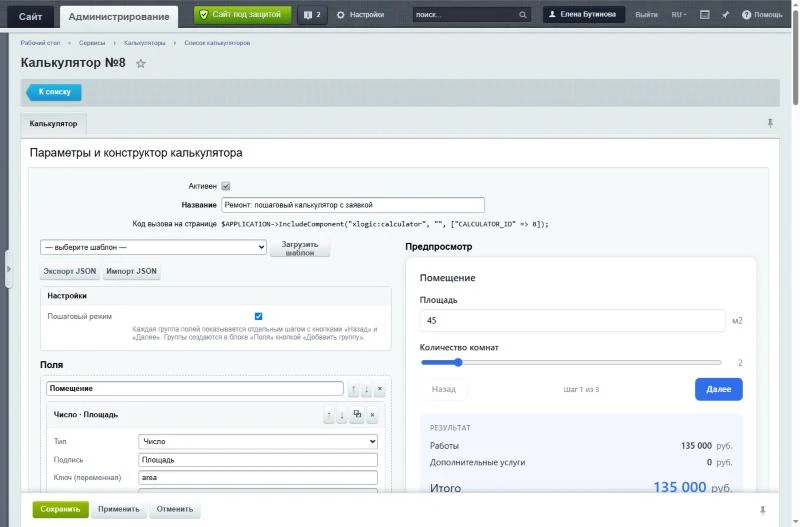
Add fields, formulas, and charts. A live preview is displayed in the right panel.
Place the calculator on the website page using a single component.
Configure integration: enter the incoming webhook address for Bitrix24 in the module settings to automatically send leads to the CRM. Email notifications to the administrator and the lead list in the admin panel function independently without webhook configuration.
The Xlogic module transfers calculator form submissions to Bitrix24, creating either a Lead or a Deal based on user selection. When creating a Deal, the module automatically searches for an existing client contact by phone number or email; if no contact is found, a new one is created. Users can specify a particular sales funnel and stage.
Calculations are performed directly within the calculator card. Entered values and the final result are saved in the comment section of the submission. The primary calculation result can be transmitted to Bitrix24 as the amount for a Lead or a Deal.
The module does not slow down the form. Data transmission occurs only after the visitor receives a response. If the Bitrix24 portal is unavailable, the submission is not lost; it is saved in the administration panel, and failed transmission attempts are retried automatically or manually.
All actions are transparent. In the submission list, each record includes a link to the created Lead or Deal, or displays the reason for any error. Connection verification and an error log are provided.
Setup takes approximately one minute. An incoming webhook with CRM permissions is required. The webhook address is stored in the module settings and is not displayed in the interface.
Submissions are managed under control. Available statuses include New, In Progress, and Closed, along with a manager comment field. Statuses can be updated on the individual submission page, directly in the list, or in bulk for multiple records.
Built-in filtering and search allow finding submissions by status, date, name, phone number, email, and calculator name.
Data export to CSV format for Excel is supported, respecting applied filters. The report includes contact details, calculation results, status, comments, consent status, and the Lead or Deal number.
The form includes a mandatory checkbox for consent to personal data processing. The consent text and the link to the privacy policy are configurable. The date and text of consent are saved in the lead and transferred to the Bitrix24 card.
An email notification is sent to the administrator immediately. The email template is edited via Bitrix email events.
Built-in email diagnostics include template and address validation, sending a test email, and viewing the email sending error log.
The module supports six types of data visualization: pie chart, bar chart, line graph, payment schedule, progress bar, and large summary cards.
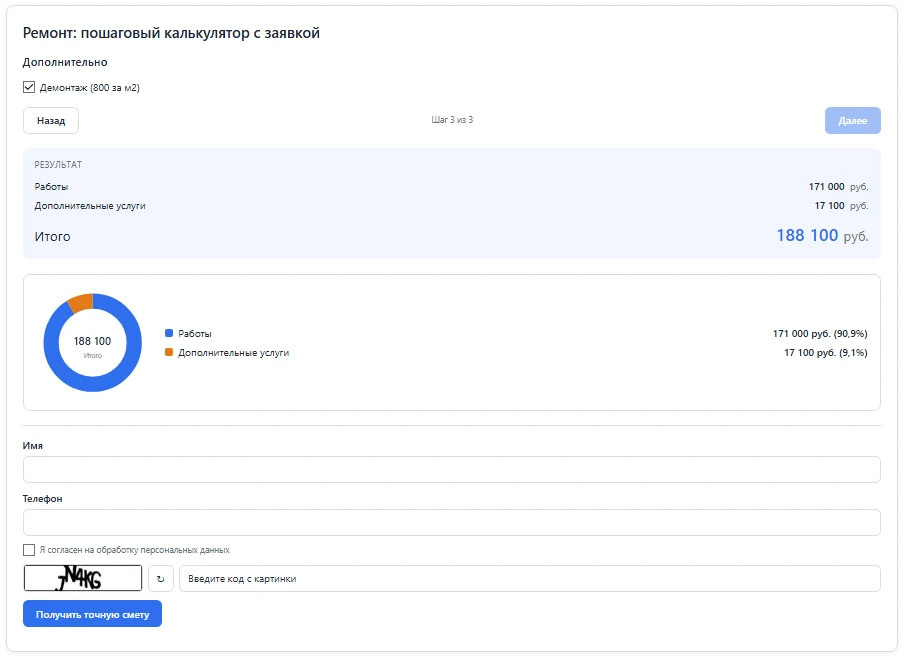
A pie chart can display cost structure by showing shares for materials, labor, and delivery.
Charts dynamically respond to field changes. For example, a payment amount recalculates based on the loan term, and a trip cost changes based on distance. The current value is marked on the axis, and the chart rebuilds with every input.
A dedicated payment schedule chart calculates the monthly balance and total overpayment for loans and deposits.
Charts are configured in a visual builder without writing code. Users select the chart type, title, results and fields to display, and colors. Changes are visible immediately in preview mode.
Charts are rendered using a built-in lightweight renderer. This eliminates the need for external libraries or loading resources from third-party servers, ensuring fast page performance.
The Xlogic module "Calculator Builder with Leads for Bitrix24" ensures interface accessibility: every chart includes text descriptions for screen readers, and animations are automatically disabled if the user has selected the system option "reduce motion."
The builder supports five field types: numeric input, slider, dropdown list, toggle switch, and checkbox. Each element allows configuration of a label, unit of measurement, minimum and maximum values, and step size.
Calculations utilize formulas with functions including if, round, floor, ceil, abs, sqrt, pow, min, max, and lookup. Computed results can be referenced in subsequent formulas. Formula errors are displayed directly below the formula.
Conditional display logic is implemented: fields appear only when specific conditions are met.
Range tables are supported for dynamic pricing, discount, or tariff calculation based on quantity, weight, or total amount. Data for these tables can be imported from Excel files.
A step-by-step mode is available: field groups are converted into sequential steps with "Back" and "Next" navigation buttons.
Export and import functions in JSON format enable configuration transfer between websites and the creation of backup copies.
The package includes 11 ready-made templates: area-based cost calculator, loan calculator, volume-based pricing, quantity-based discount, delivery calculator, custom window calculator, step-by-step repair calculator, fuel consumption calculator, paint consumption calculator, equipment rental calculator, and deposit calculator. The "Loan," "Deposit," "Discount," "Repair," and "Fuel Consumption" templates already contain pre-configured charts.
An "Instructions" page is available in the admin panel, providing a feature description and usage examples.
User Convenience
Calculations and charts update instantly as data is entered, without page reloads. Numbers are automatically formatted according to the interface language.
Responsive design ensures that the form, results, and charts are equally convenient to use on both mobile devices and desktop computers.
The application form includes fields for name, phone number, and email address. Visibility and mandatory status for each field are configurable. A checkbox is included to confirm consent for personal data processing.
Upon successful submission, a popup window displays the confirmation message "Application Sent".
Reliability and Security
The amount in the application is protected against tampering: calculations are re-executed on the server.
Spam protection is implemented using CAPTCHA, a hidden honeypot field, and rate limiting for request submissions.
Consent for personal data processing is validated on the server side, not only in the browser.
The Bitrix24 webhook address is stored exclusively in the module settings. Requests are sent only via the HTTPS protocol to the public portal address.
Formulas are processed by a custom parser without using the eval function. Chart settings undergo validation: only allowed chart types and a limited number of charts are permitted.
Data is stored and retrieved via the Bitrix API (ORM) without executing direct SQL queries.
Output is escaped, CSV exports are protected against Excel formula injection, forms are secured with session tokens, and administrative access is restricted to administrators only.
The module is implemented as the xlogic:calculator component, which can be dragged onto a page using the visual editor. The component result is automatically cached; the cache is cleared whenever the calculator settings are saved. The visual appearance is controlled by the component template located within the site template. When the module is removed, the system prompts to confirm whether to preserve or delete the accumulated data.
The system requires PHP version 8.2 or higher. To submit requests, a Bitrix24 portal (cloud or on-premise) is required with an address accessible via the HTTPS protocol and an incoming webhook configured with CRM access rights.
This component is designed for web studios creating websites with estimates and calculations, as well as for service and manufacturing companies (renovation, windows, finishing, delivery) that need automatic request submission to CRM. It is also suitable for banks, microfinance organizations, and insurance companies requiring calculators for loans and deposits with payment schedule generation.
General iT can install “Calculator builder with requests in Bitrix24”, configure its settings and verify its operation in the existing project.
UPDATE HISTORY
What’s new
3 releases
1.3.0 (10.10.2026)Latest update
Update 1.3.0: permissions for managers, request retention period, and events for developers
Managers can work with requests without administrator rights; requests are deleted after the retention period expires; and developers can verify, modify, or reject requests using their own code. Transmission to Bitrix24 has become more reliable, and the calculation on the page and in the request now matches exactly to the kopek.
New features
Permissions. A new "Access" tab in the module settings: the "Work with requests" level gives managers access to the request list, statuses, comments, export, and transmission to Bitrix24, while "Full access" also includes calculators, settings, and request deletion.
Request retention period. Setting "Keep requests, days": once daily, requests older than the retention period are deleted along with their status and comment; deletions are logged in the event log.
Module events. OnBeforeRequestAdd allows checking, modifying, or rejecting a request before saving; OnAfterRequestAdd allows transmitting it to your own system or messenger. Handler examples are on the "Instructions" page.
Step-by-step mode. The request form appears on the last step when the visitor has completed the entire calculation.
Request emails. In "Email for notifications," you can specify multiple addresses separated by commas. The email contains the request number and a link to it in the admin panel. Emails can be disabled via a flag in the calculator or by deactivating the email template.
Form protection. The pause between requests from the same visitor and the limit of requests per minute are configured on the "Requests" tab. The CAPTCHA image loads when the visitor starts filling out the form.
Bitrix24. Portals on .rf domains and boxed portals in a company's private network are supported (the "Portal in local network" flag, which is enabled by the site administrator). Re-transmitting a request does not create duplicate leads, deals, or contacts. The webhook address is now stored in the /bitrix/.settings.php file instead of the database and is not included in database backups; previously saved addresses are automatically migrated during the update.
Editor. Inserting tables from Excel recognizes thousands separators (1 000,5) and warns about unrecognized rows.
The instructions have been updated with sections "Charts", "Transferring requests to Bitrix24", "Access rights", and "For developers".
Fixes
A calculator can no longer be saved empty if settings fail to reach the server or are corrupted; saving with Cyrillic characters now works on sites using windows-1251 encoding.
In the requests list, "Delete" and "Transfer to Bitrix24" are available from the row menu, and the list no longer loads the entire table of requests, opening quickly regardless of the number of requests.
The request form works when the page is loaded from cache and when there are two identical calculators on the page.
The round function and logical operations are calculated identically on the page and on the server, so the sum in the request and email matches what the visitor saw.
List options with the same price (e.g., "Pickup" and "No delivery") are no longer confused in the request.
The Bitrix24 agent does not delay website pages if the portal is unresponsive.
The test email in mail diagnostics is sent from the name of the selected site.
A manager's comment when editing in the list preserves line breaks; the request no longer shows a double status line.
CSV export, requests, and comments to Bitrix24 correctly display Cyrillic on sites using windows-1251 encoding.
Important during update
Manager access rights must be granted: previously, this section was available only to administrators, and this does not change after the update until you configure the "Access" tab.
Retention period is disabled: requests are not deleted until you specify a number of days.
Existing email templates remain unchanged. To include the request number and link in the email, add the fields #REQUEST_ID# and #REQUEST_URL# to the "Request from calculator" event template.
In step-by-step calculators, the request form is now visible only on the final step.
In rare cases, the result with round may differ from the previous one in the last digit: it now matches the sum saved by the server.
The update clears the calculator component cache and creates an agent to clean up requests. Calculators, requests, and settings remain unchanged.
PHP 8.2 or later is required to install the module.
1.2.0 (09.10.2026)
The module is now called "Calculator Builder with Leads in Bitrix24". A lead from the calculator automatically goes to CRM, and managers work with leads directly in the admin panel.
## What's New
**Sending Leads to Bitrix24**
- A Lead or Deal (user's choice) is created via an incoming webhook immediately after the form is submitted. The visitor does not wait: the transfer occurs after the response.
- For a Deal, the module automatically finds the client's contact by phone or email, or creates a new one. You can specify a funnel and a stage.
- The calculation (entered values and result) and the consent mark are added to the comment. The main result can be sent as a sum.
- Failed transfers are automatically retried (up to 5 attempts) and can also be done manually via the group action "Send to Bitrix24" in the leads list. In the "Bitrix24" column, you can see the link to the Lead or Deal, or the reason for the error.
- The webhook address is stored only in the module settings and is not displayed anywhere.
**Consent for Personal Data Processing**
- An obligatory checkbox in the lead form; the text and link to the policy are configured in the builder.
- The server checks the consent and saves the date and text in the lead.
**Working with Leads**
- Statuses: "New", "In Progress", "Closed" and a manager's comment. These can be edited on the lead page ("Edit" item), in the list, or in bulk.
- Filter by status, date, and text (name, phone, email, calculator).
- Export to CSV for Excel, respecting the filter.
**Module Settings**
- New page "Settings — Product Settings — Module Settings — Calculator Builder with Leads in Bitrix24": webhook, Lead or Deal, funnel, stage, source, responsible person, connection check, counters, and transfer error log.
## Important During Update
- **Consent is enabled by default**, including for existing calculators: the lead form will start requiring a checkbox. To disable it, open the calculator, go to the "Lead" block, and uncheck "Consent for Personal Data Processing".
- The update creates the `xlogic_calculator_request_state` table and a retransmission agent, and clears the component cache. Existing calculators, requests, and settings remain unchanged.
- Transmission to Bitrix24 is disabled by default: enable it in the module settings and specify the webhook (requires the "CRM" permission).
- New requests receive the "New" status. Requests that arrived before the update are also considered new.
## For Developers
- New classes: `Bitrix24`, `RequestStateTable`, `RequestExport`, `Schema`. All are registered in `include.php`.
- Status, comments, consent, and transmission data are stored in a separate table; the requests table has not changed.
- The journal event `XLOGIC_CALCULATOR_B24` contains transmission errors (without the webhook address).
1.1.0 (06.10.2026)
New:
Result calculation graphs. They are built from the same values as the calculation itself and update with every field change.
Six graph types:
pie chart (cost structure);
bar chart (result comparison);
dependency graph of the result on the selected field with a marker for the current value;
credit payment graph: remaining debt by month, payment, overpayment, and a table of all months;
progress bar (share of the limit);
summary cards.
The constructor now includes a "Visualization" block: graph type, title, results, fields, and colors. Graphs are immediately visible in the preview.
Links in graphs update when field and result keys are renamed.
Default graphs in templates: "Credit Calculator" (payment graph and payment dependency on term), "Deposit", "Renovation" (cost structure), "Fuel Consumption", "Quantity Discount".
The pie chart does not sum results in different units (percentages and rubles) and does not include a total that itself consists of other selected results.
For accessibility, each graph has a text caption and a values table.
Update animation is disabled if "Reduce Motion" is enabled in the system.
Changed:
Result calculation in the calculator script has been moved to a separate function. Field and result behavior remains unchanged.
Language phrases for graphs have been added (ru/en).
Update compatibility:
Previously created calculators work without changes.
Graphs do not appear in them until you add them.
Security check passed; no new vulnerabilities found.
USER EXPERIENCE
Solution reviews
How does this solution work in a real project? Share your experience and help others choose.
Be the first to share your experience
There are no reviews of this solution on git.ru yet. Tell us what worked well and what could be improved.
✓
Verified purchaseAdd a key if you wish. A verified review gets a badge, priority placement and more rating weight.
↗
Open to every clientJust sign in to your account. A key is optional; all reviews are moderated.
The Smart Table of Contents module for 1C-Bitrix automatically generates a navigation menu based on H2–H6 headings in your content. This helps visitors quickly locate relevant sections and improves the user experience on pages with large amounts of text, such as articles, documentation, news, blogs, and instructions.
Ring Road Delivery: Kilometer-based Calculation
A delivery service module for the "Online Store" where the cost depends on the road distance from the city's ring road to the buyer's address. Addresses located inside the ring road contour are calculated as 0 km. For addresses outside the contour, the distance is calculated along the actual route rather than as a straight line.
Pre-orders
The module enables sales of out-of-stock items by processing them as standard orders through the shopping cart. The buyer joins the supply queue and receives the goods immediately upon their arrival at the warehouse. The store assesses demand in advance, collects prepayment, and distributes limited stock fairly based on the order of payment or order placement.
The Sotbit Smart Filter SEO module is designed to increase online store traffic. The tool operates by generating numerous unique pages for smart filters.
The module automates image compression on the website in accordance with Google PageSpeed Insights recommendations. It supports integration via CDN OptiPic, allowing optimization without modifying image URLs. The main advantage of CDN integration is the automatic conversion of images to the modern WebP format to minimize file size. Browsers that support WebP receive images in that format.
The module is designed for online stores running on the 1C-Bitrix platform to automate the integration of supplier product catalogs. It is also suitable for news and city portals to facilitate content population. The solution supports data import in Excel, XML, YML, CSV, and RSS formats.
The displayed price covers the solution itself. Platform licensing, installation and customisation are checked separately. If the page offers bundles, select the required option before submitting a request.
How do I check compatibility?
Compare the supported editions and solution version in the technical details with your project. Before installing on a live website, we recommend making a backup and checking the solution in a test environment.
How much does this solution’s renewal cost?
The current renewal price is 2,450 ₽. Before you order, a manager will confirm the renewal period and whether it applies to your licence.
Can you help with implementation?
We can help install the module, check its settings and verify how it works in your project. Compatibility with other customisations and the scope of work are assessed before we begin.
Statistics and interaction recording
Public pages use basic statistics. Our recording and Yandex Webvisor require your permission. You can keep basic statistics or disable all analytics.
Operator: General IT Rus LLC, INN 2310208877. Statistics and recording help improve the website.
Basic statistics: pageviews, a random daily ID, a public URL and time. The ID lasts until Moscow midnight. Original records: up to 48 hours; totals: up to 7 years.
Without Webvisor permission, Yandex receives server statistics without visitor IP, User-Agent or cookies. If selected, its browser code collects technical data, cookies, actions and masked page snapshots; recordings last 15 days. Inputs, chat and account areas are hidden.
Interaction recording requires permission: clicks, scrolling, technical information and filtered public-page snapshots. Events: up to 7 years; IP and snapshots: up to 90 days.
Permission is remembered for up to 365 days; full opt-out remains until changed. Basic statistics only disables recording; Disable all analytics stops new analytics. Previously sent data is not automatically deleted. Withdrawal and requests: support@git.ru. Full terms are linked below.
Your browser requests no tracking: analytics is off.