Payments are experiencing issues due to temporary restrictions in Russia. If your payment does not go through, please submit a support request.•Our support team is available 24/7 — we are always here to help with hosting and server issues.•We are now accepting requests for dedicated server rental and colocation services in our data center.•Reminder: we recommend enabling backups for additional data protection.•A new VPS/VDS lineup with NVMe storage and improved performance is now available.•Maintenance work on some servers has been completed. All services are operating normally.•
Payments are experiencing issues due to temporary restrictions in Russia. If your payment does not go through, please submit a support request.•Our support team is available 24/7 — we are always here to help with hosting and server issues.•We are now accepting requests for dedicated server rental and colocation services in our data center.•Reminder: we recommend enabling backups for additional data protection.•A new VPS/VDS lineup with NVMe storage and improved performance is now available.•Maintenance work on some servers has been completed. All services are operating normally.•
Аккаунт в General iT
Вход / Регистрация
Войдите или создайте аккаунт для управления услугами в личном кабинете.
Страны не найдены. Попробуйте другое название или код.
MODULE FOR 1C-BITRIX
VJ Studio
Financial Accounting
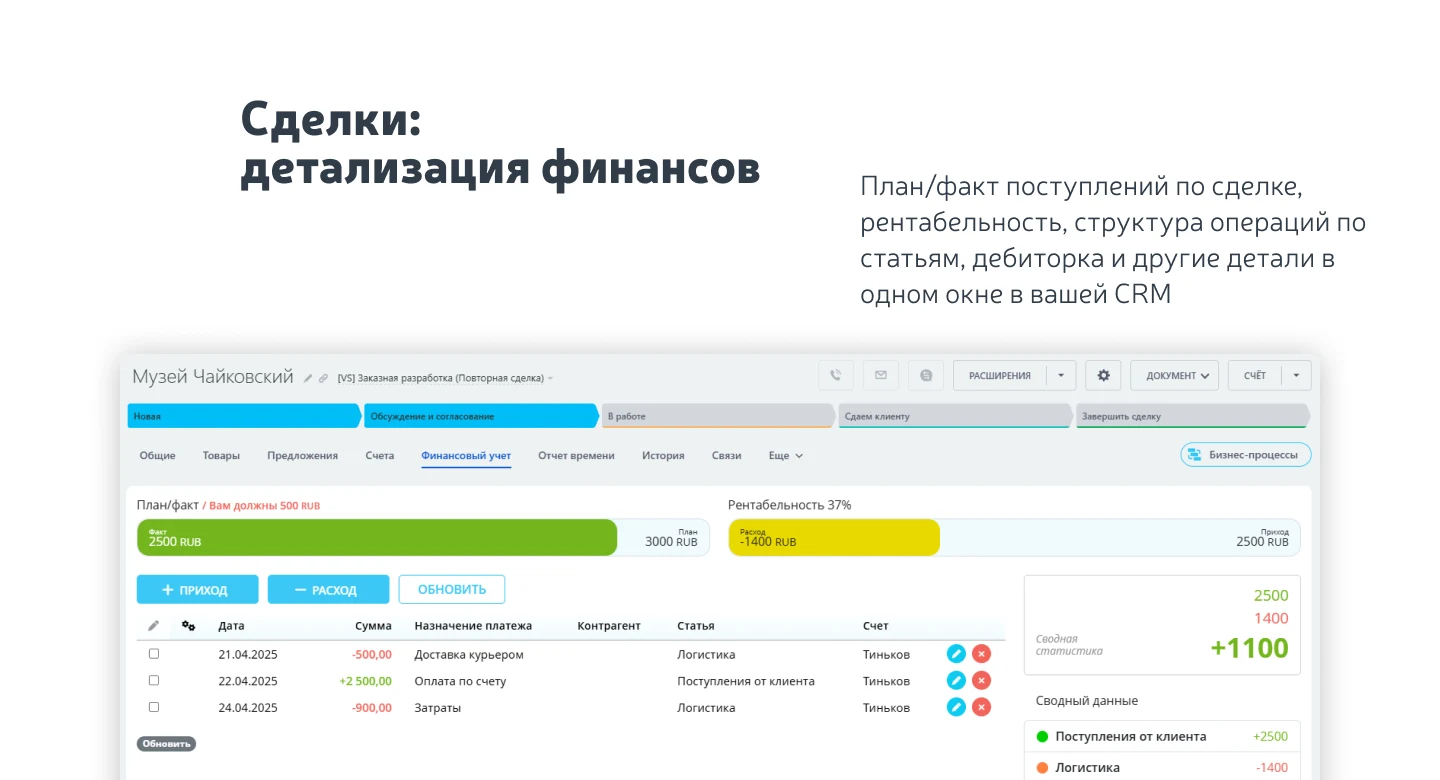
A full-featured financial accounting module for the on-premise version of Bitrix24. This application is not an external service but is built as an integral part of the platform ecosystem with deep integration. This approach leverages the benefits of local deployment and allows the functionality to be adapted to specific business requirements.
A full-featured financial accounting module for the on-premise version of Bitrix24. This application is not an external service but is built as an integral part of the platform ecosystem with deep integration. This approach leverages the benefits of local deployment and allows the functionality to be adapted to specific business requirements.
VJ Studio Financial Accounting module, version 13.
Financial Accounting
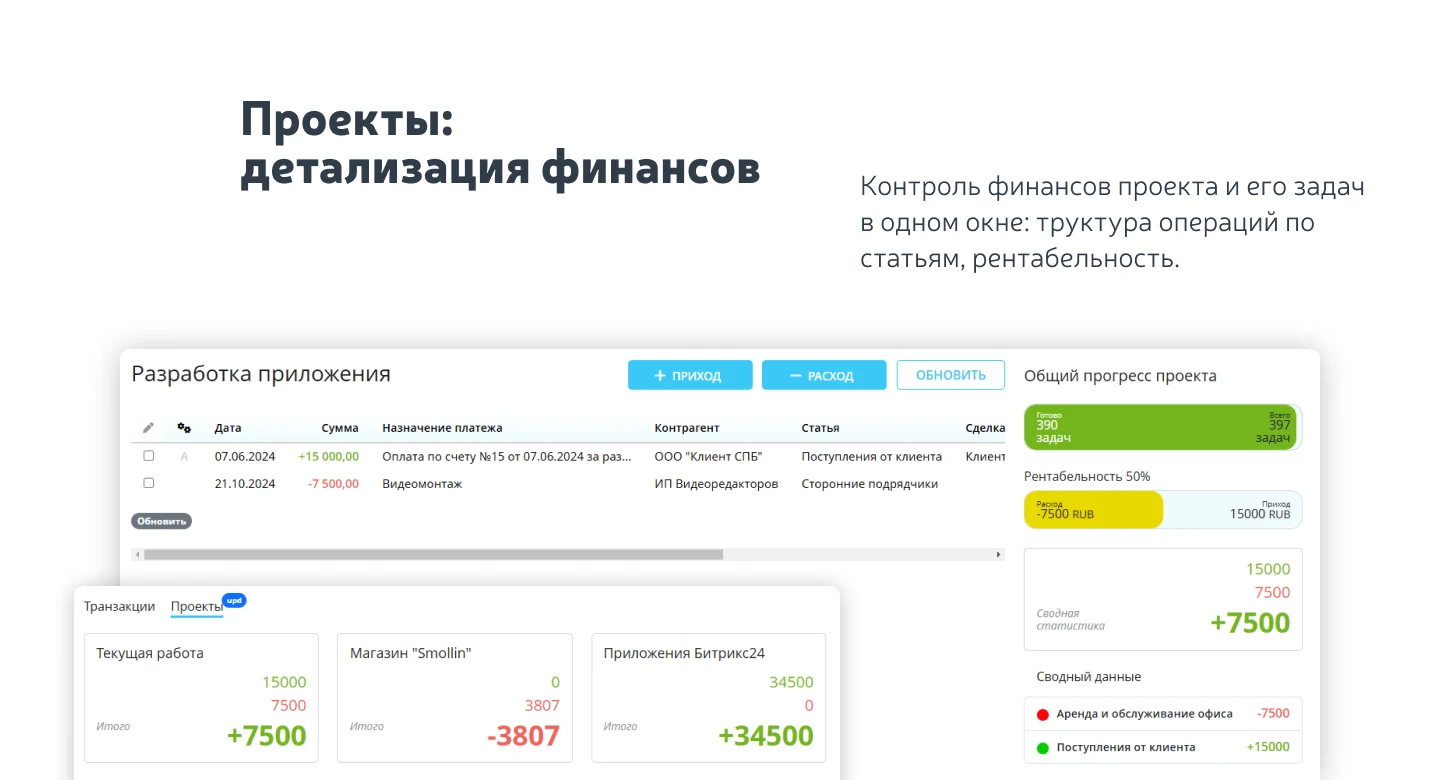
Financial management enables control over the company's status while remaining in a familiar work environment. The application provides a complete set of tools for managing cash flows immediately after installation.
Users can manage income, expense, and transfer transactions between accounts, as well as plan future receipts and payments. The system supports creating an unlimited number of transaction categories and accounts or cash registers with specified opening balances.
Team collaboration is supported through access rights configuration: employees can be granted permission to modify financial operations, restricted to view-only access, or completely blocked from viewing data.
Built-in reporting tools allow for the generation of a cash flow statement (CFS), an income statement (P&L), and an ABC analysis report by counterparty. Financial indicators are available both for individual projects and for the company as a whole.
The application supports automatic transaction import from banks and bulk editing of transactions. Data can be exported to Excel format for the current month, including details on deals and counterparties from Bitrix24 CRM, as well as on Bitrix24 projects and tasks. Financial operations can be performed via the Bitrix24 mobile application.
An intuitive interface enables rapid implementation of financial accounting, increasing the transparency and manageability of an organization's cash flows.
General iT can install and configure this module and check how it works on your website.
USER EXPERIENCE
Solution reviews
How does this solution work in a real project? Share your experience and help others choose.
Be the first to share your experience
There are no reviews of this solution on git.ru yet. Tell us what worked well and what could be improved.
✓
Verified purchaseAdd a key if you wish. A verified review gets a badge, priority placement and more rating weight.
↗
Open to every clientJust sign in to your account. A key is optional; all reviews are moderated.
The module allows you to quickly add a New Year atmosphere to your website. The package includes falling snow effects and interactive Christmas ornaments positioned at the top of the page.
The Help Desk ticketing system for Bitrix24 streamlines customer support operations. For businesses, it is crucial to resolve client issues quickly and efficiently to maintain trust and loyalty. However, tracking inquiries across multiple channels can be a complex and labor-intensive process.
Corporate Portal
This module is designed to centralize internal communications, services, and company workflows. The solution consolidates key information, employee requests, and corporate activities into a single space, simplifying interdepartmental interaction and reducing the volume of routine work.
Single entry point
The platform creates a familiar environment for resolving daily tasks.
At the last check, the supplier reported that this solution had been unpublished. Its description remains available for reference. Licence availability and support terms need to be confirmed before use.
How can I find an alternative?
Tell us what the module or template needs to do and which platform edition you use. We will check available options, compatibility and any data migration needs, then agree on the scope of work.
Statistics and interaction recording
Public pages use basic statistics. Our recording and Yandex Webvisor require your permission. You can keep basic statistics or disable all analytics.
Operator: General IT Rus LLC, INN 2310208877. Statistics and recording help improve the website.
Basic statistics: pageviews, a random daily ID, a public URL and time. The ID lasts until Moscow midnight. Original records: up to 48 hours; totals: up to 7 years.
Campaign tags and a technical identifier are sent by our server to the existing Yandex tag. Visitor IP, User-Agent and cookies are not included in this transfer. If selected, its browser code collects technical data, cookies, actions and masked page snapshots; recordings last 15 days. Inputs, chat and account areas are hidden.
Interaction recording requires permission: clicks, scrolling, technical information and filtered public-page snapshots. Events: up to 7 years; IP and snapshots: up to 90 days.
Permission is remembered for up to 365 days; full opt-out remains until changed. Basic statistics only disables recording; Disable all analytics stops new analytics. Previously sent data is not automatically deleted. Withdrawal and requests: support@git.ru. Full terms are linked below.
Your browser requests no tracking: analytics is off.