
Module
Sotbit: Smart SEO Filter – Meta Tags, Titles, Sitemap
The Sotbit Smart Filter SEO module is designed to increase online store traffic. The tool operates by generating numerous unique pages for smart filters.
24,990 ₽
↗Аккаунт в General iT
Войдите или создайте аккаунт для управления услугами в личном кабинете.
Страны не найдены. Попробуйте другое название или код.

MODULE FOR 1C-BITRIX
Bogus Dmitry
The cost calculation module determines the full production cost of a product and compares it with the price in Bitrix. The calculation includes expenses for materials, labor, equipment, electricity, and other costs. Users define the cost structure, and the results are displayed in the catalog and product cards. Costs extend beyond raw materials.

The cost calculation module determines the full production cost of a product and compares it with the price in Bitrix. The calculation includes expenses for materials, labor, equipment, electricity, and other costs. Users define the cost structure, and the results are displayed in the catalog and product cards.
Costs extend beyond raw materials. The calculation must account for packaging, fasteners, and assembly time. Omitting these elements results in an understated product cost.
Calculations require regular updates. When suppliers change prices or product composition changes, the calculations must be revised. For groups of similar products, the same adjustments often need to be applied en masse.
Monitoring profitability across a wide assortment is difficult manually. Without automated control, it is easy to miss items where the price no longer covers the costs.


Usually, the cost of main materials is already known. It is more difficult to gather all other expenses together: packaging, employee labor, and machine time. In this module, these costs are described jointly so that the origin of the final sum becomes clear.
This set of expenses is called a cost model. In it, you specify material consumption, production operations, and production volume—for a single item or a batch. The module calculates the unit cost of the product.
Materials and packaging
The reference book stores prices and units of measurement. The model specifies the quantity of material, fasteners, or packaging required for this specific product.
Employee labor
You can set rates for different types of work and specify the time spent in operations. Then assembly and processing are calculated based on the rate and duration.
Equipment and energy
Equipment operation is calculated by hourly cost. Electricity is calculated separately based on power, time, and the applicable tariff.



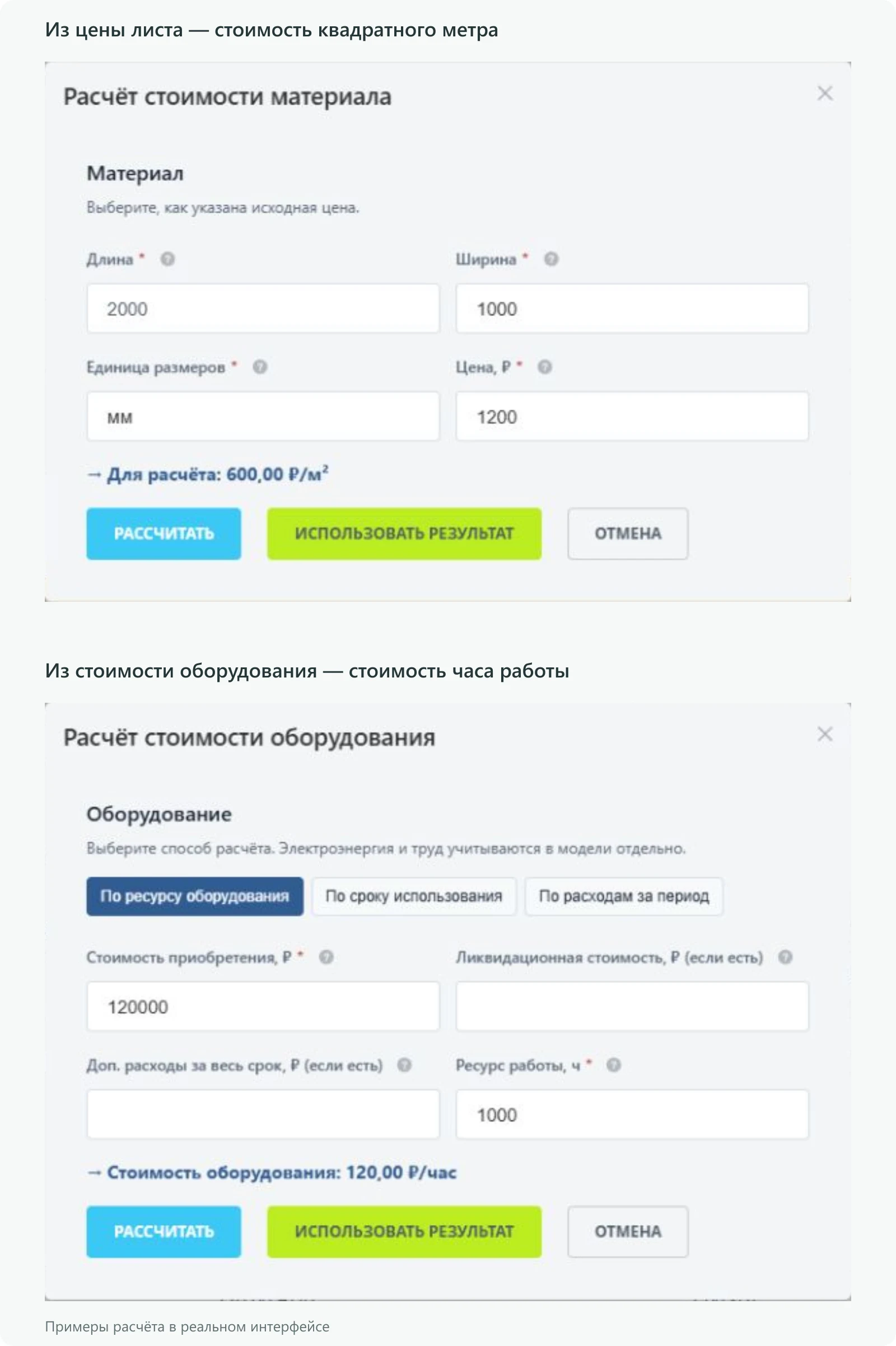
The cost calculation module accounts for the fact that suppliers sell sheets in full units, while only a portion of each sheet is consumed by a finished product. The built-in calculator allows users to input the sheet price and dimensions, automatically compute the cost per square meter, and transfer the result to the form. Equipment usage has a separate hourly rate calculation. In both scenarios, the original parameters are saved, enabling users to return to them during subsequent editing.


When a supplier updates their price list, manually opening each record in the directory is time-consuming. To streamline this, you can download a template containing current records, enter new prices in Excel, and upload the file back. The module first validates the rows and displays any errors found. Changes are applied only after user confirmation. This workflow supports materials, labor, equipment, and work operations.


If a new product differs from an existing one only by material or a single operation, it is more efficient to copy the current model. The copy retains the composition, list of operations, and basic parameters. The user needs to adjust only the changed values. However, products are selected anew: previous bindings are not transferred to the copy.

If the cost composition is identical, a separate copy is not required: a single model can be used for multiple products. However, the model is selected individually for each product and for each sales offer.


After model preparation, there is no need to transfer the total amount to a separate table for price comparison. Cost, gross profit, margin, and markup are available directly in the Bitrix catalog and product card. Here, gross profit is defined as the difference between the price and the specified cost. This helps evaluate pricing but does not replace profit calculation based on completed sales.
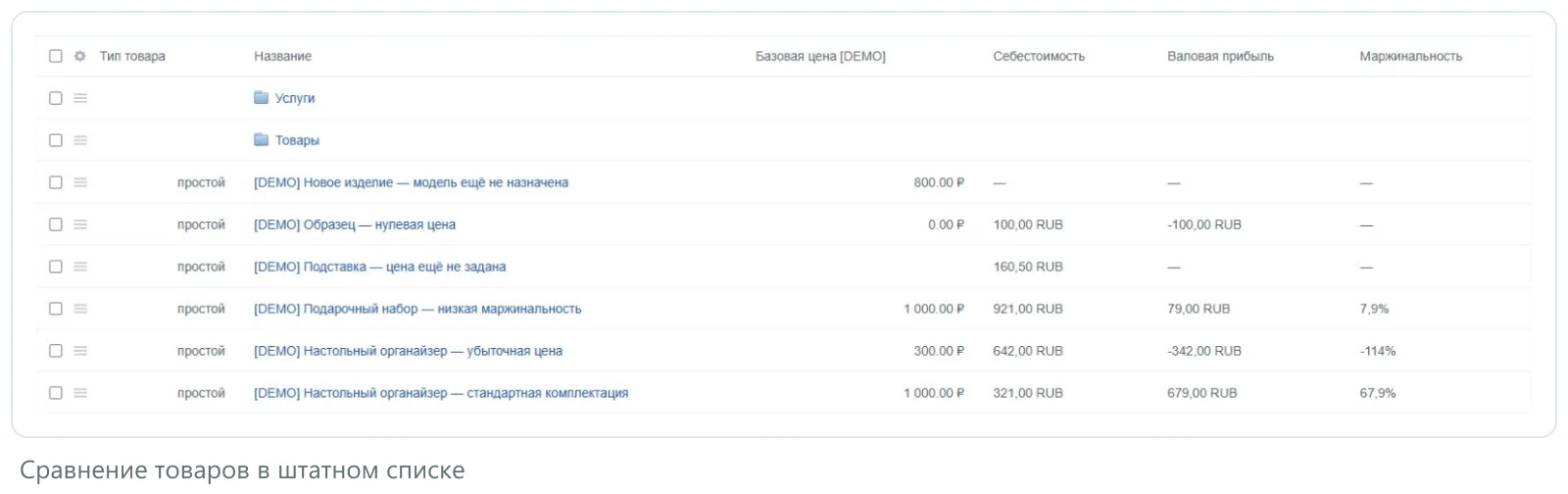

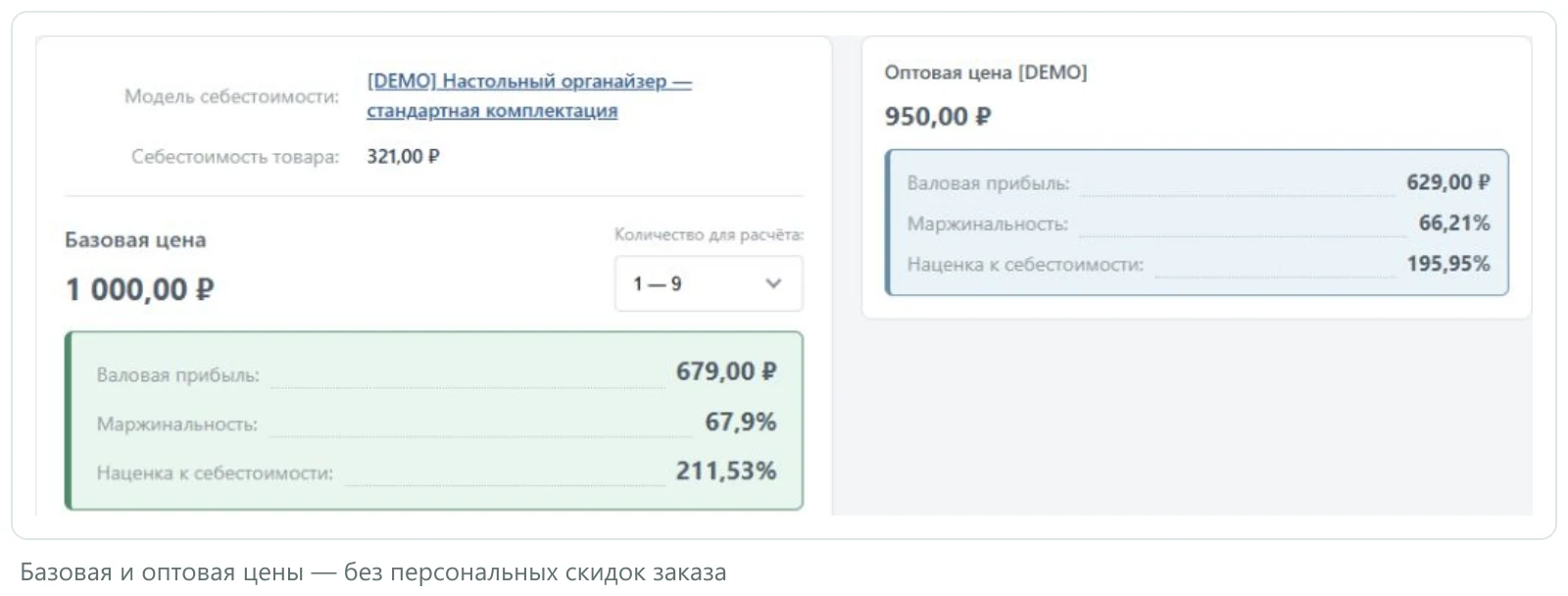
With retail pricing, the difference between the selling price and cost may be acceptable, while with wholesale pricing it can be too small. The item card displays calculations for all available price types. If the price depends on quantity, you can select the required range and view the result for it.

If margin changes, history allows comparing saved price and cost values from different dates. Records are maintained for the base price per single unit. The report displays only values that were explicitly saved; no data from the period before tracking began will appear in the chart.


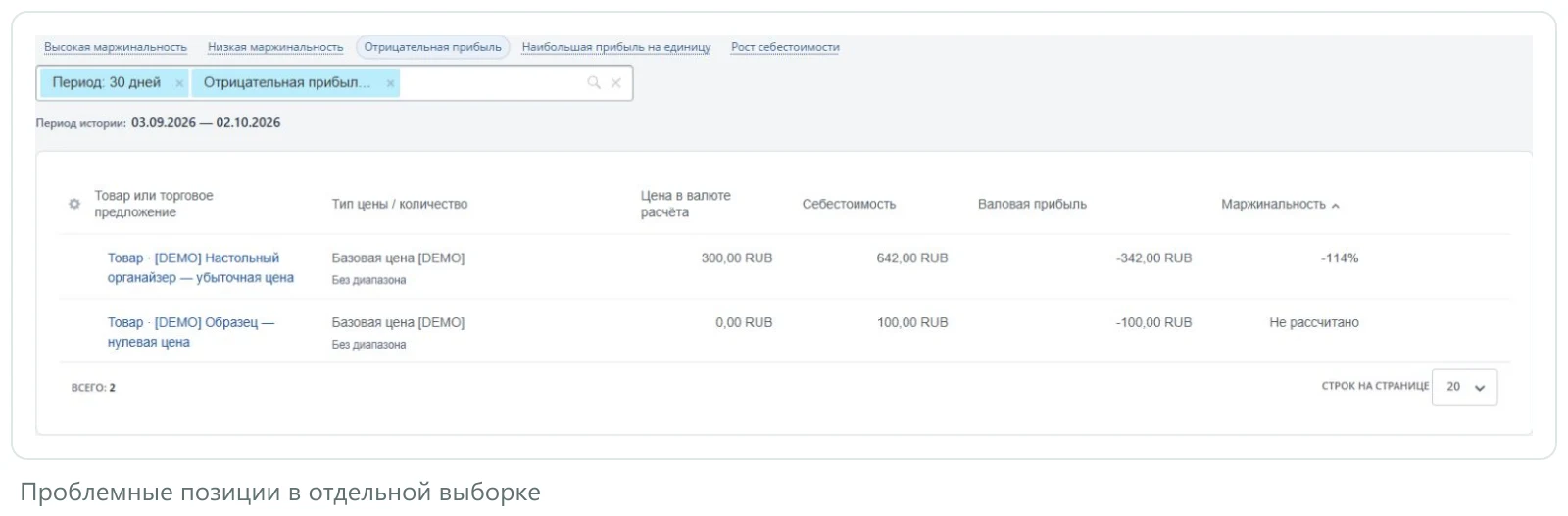
When there are many calculations, the overview helps determine analysis priorities. The report highlights positions where the selling price is below cost and items with low margin. From the report, you can navigate to a specific product or its model to verify the source data.

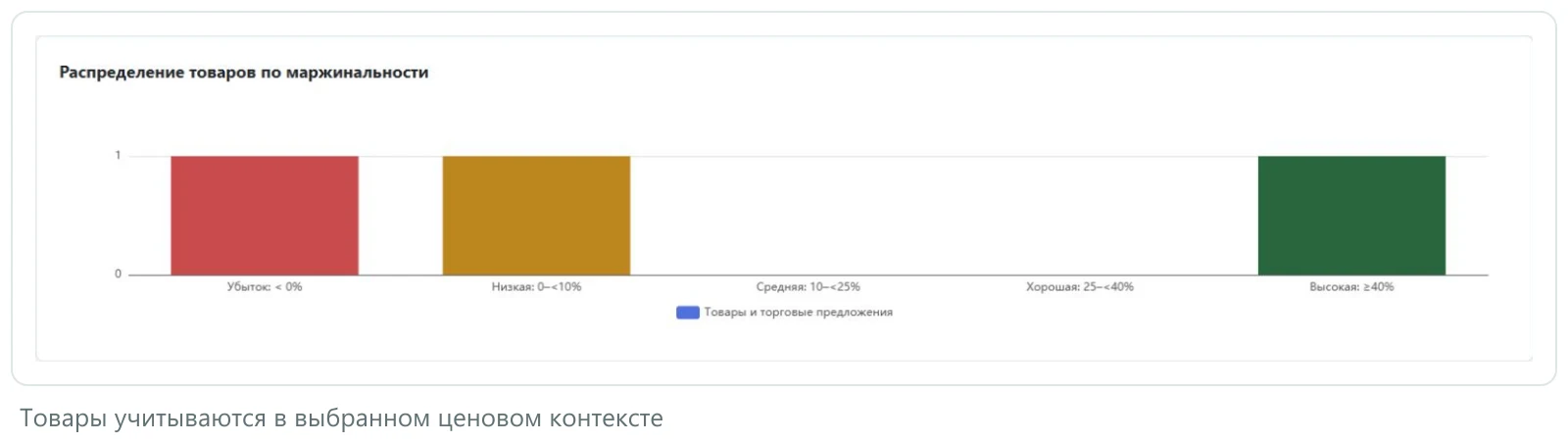
Products with low margins are displayed separately. The chart shows the number of products falling into each margin range. In the Profitability report, you can select the required product group, price type, and quantity—for example, to check for products with negative gross profit at wholesale prices.

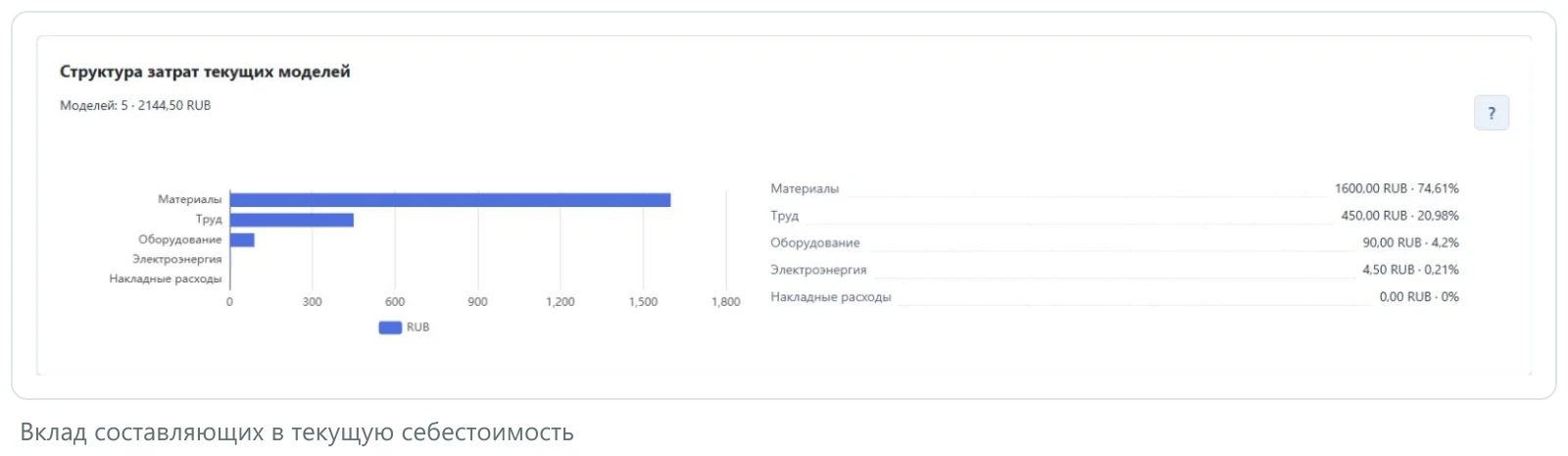
If the calculated cost of goods sold appears excessive, it is advisable to first examine its structure. The report categorizes expenses into groups: materials, labor, equipment usage, electricity, and other overheads. This allows for identifying priority areas for detailed verification, such as material consumption, operation duration, or tariff rates.
When calculation history is preserved, the system enables comparison of current data with previous figures. The cost structure is generated within calculation models and does not include sales volume data.

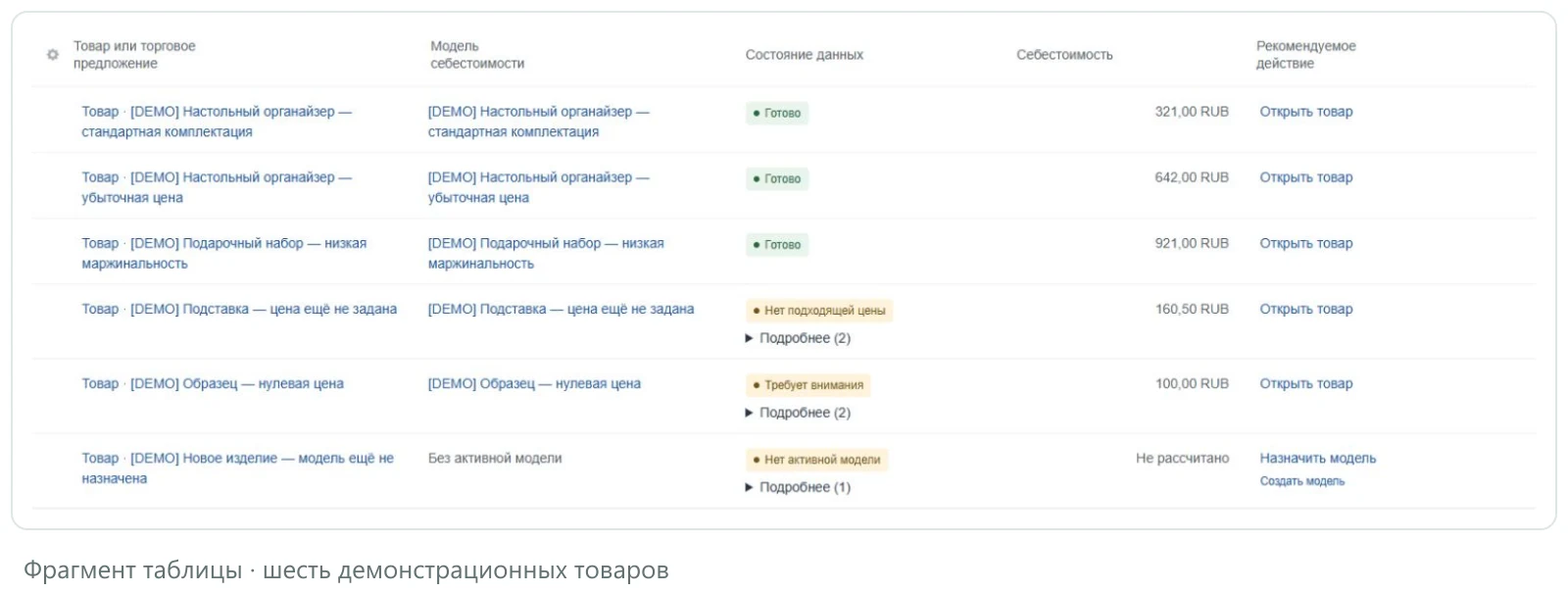
Not all products immediately contain complete data: some lack a selected model, an up-to-date cost calculation, or a suitable price. The Data Coverage section aggregates such items and specifies which information is missing. With appropriate access rights, users can open the relevant product or model from this section to continue configuration.

It is not necessary to fill in the entire assortment at once. Start with a product whose composition and production process you know well. Enter data on materials, labor time, and other expenses, then compare the result with your own calculation. Once the first product is understood, the prepared reference books and model can be used for subsequent items.
All profitability indicators are calculated and depend on the entered data. The solution does not replace accounting for actual sales, revenue, and business profit. When checking data coverage, connected catalogs are analyzed; the product and each trade offer are checked separately.
For the “6sec: Cost Calculation” module, General iT can perform installation, configuration and a functional check in your project.
UPDATE HISTORY
Costing Calculation 1.1.0
Added analytics: overview, profitability, cost price, and data coverage.
Added Excel import and export for materials, labor, equipment, and operations.
Added copying of models without associated products.
Calculators for materials and equipment preserve original parameters.
Product cards now support different price types and quantity ranges.
Improved editing, undo, filters, navigation, and localization.
Strengthened permission checks for viewing base price and profitability history.
Requires PHP 8.2 or newer, main module 26.0.0 or newer, and the bcmath, json, zip, dom, and mbstring extensions. Before updating, back up files and the database. Existing models, assignments, and history are preserved.
USER EXPERIENCE
How does this solution work in a real project? Share your experience and help others choose.
There are no reviews of this solution on git.ru yet. Tell us what worked well and what could be improved.
Verified purchaseAdd a key if you wish. A verified review gets a badge, priority placement and more rating weight.
Open to every clientJust sign in to your account. A key is optional; all reviews are moderated.
YOUR PROJECT INFRASTRUCTURE
MORE FOR YOUR WEBSITE
The Sotbit Smart Filter SEO module is designed to increase online store traffic. The tool operates by generating numerous unique pages for smart filters.

SDEK integration module for 1C-Bitrix. SDEK is one of Russia's largest logistics companies, providing courier delivery and operating a network of pickup points. The module connects the online store with the SDEK personal account, offering the following capabilities: Providing customers with delivery options: courier, pickup point, or postmat.

The module is designed for the «1C-Bitrix: Site Management» platform and enables importing infoblock elements, including products, from Excel files. It also supports data loading into Highload blocks.
BEFORE YOU ORDER