Payments are experiencing issues due to temporary restrictions in Russia. If your payment does not go through, please submit a support request.•Our support team is available 24/7 — we are always here to help with hosting and server issues.•We are now accepting requests for dedicated server rental and colocation services in our data center.•Reminder: we recommend enabling backups for additional data protection.•A new VPS/VDS lineup with NVMe storage and improved performance is now available.•Maintenance work on some servers has been completed. All services are operating normally.•
Payments are experiencing issues due to temporary restrictions in Russia. If your payment does not go through, please submit a support request.•Our support team is available 24/7 — we are always here to help with hosting and server issues.•We are now accepting requests for dedicated server rental and colocation services in our data center.•Reminder: we recommend enabling backups for additional data protection.•A new VPS/VDS lineup with NVMe storage and improved performance is now available.•Maintenance work on some servers has been completed. All services are operating normally.•
Аккаунт в General iT
Вход / Регистрация
Войдите или создайте аккаунт для управления услугами в панели.
Страны не найдены. Попробуйте другое название или код.
MODULE FOR 1C-BITRIX
SolverWeb
SolverWeb: SEO AI — meta tags and texts
SolverWeb: SEO AI — generating meta tags and texts using neural networks
Important: The subscription cost for third-party AI services is not included in the module price. The module acts as a technical connector, providing only the interface for interaction with the selected external service.
Automate SEO optimization and site content population on the 1C-Bitrix platform.
SolverWeb: SEO AI — generating meta tags and texts using neural networks
Important: The subscription cost for third-party AI services is not included in the module price. The module acts as a technical connector, providing only the interface for interaction with the selected external service.
Automate SEO optimization and site content population on the 1C-Bitrix platform. The tool allows creating Title, Description, Keywords, H1 headings, excerpts, and full HTML texts for infoblock elements and sections directly from the administrative panel.
Connect OpenAI, Claude, Gemini, Qwen, DeepSeek, MiMo, or any other service compatible with the OpenAI API. Select the required materials and receive ready-to-use content without manually transferring data between Bitrix and external systems.
The module handles the routine part of the work: the neural network generates a draft that you review and apply only after approval. This reduces manual effort, increases the number of populated pages, and maintains full control over the results.
SEO for dozens and hundreds of pages without routine operations
With a small number of pages on a site, manually filling in meta tags is not difficult. However, when the volume reaches hundreds or thousands of pages, this process becomes an endless and labor-intensive task.
Previously, creating a Title, optimizing the Description, checking the H1, and writing text required manually switching between elements. SolverWeb: SEO AI unifies this process within a single interface.
Select an information block, section, or specific materials, mark the required fields, and start generation. The module prepares:
Title
Description
Keywords
H1
Preview text — announcement
Detail text — detailed HTML text
section description
Processing is available for a single material, a group of marked elements, or the entire current list page.
The neural network operates directly inside 1C-Bitrix. You do not need to open external services, copy names, describe context, and manually transfer results to the administrative panel. All actions are performed within the Bitrix environment: you see the current page data, start generation, and receive a ready option next to the material. After review, you can make corrections or apply the result. If additional review is not required, an automatic save mode is available.
The module is not tied to a single artificial intelligence provider. You can choose the suitable neural network.
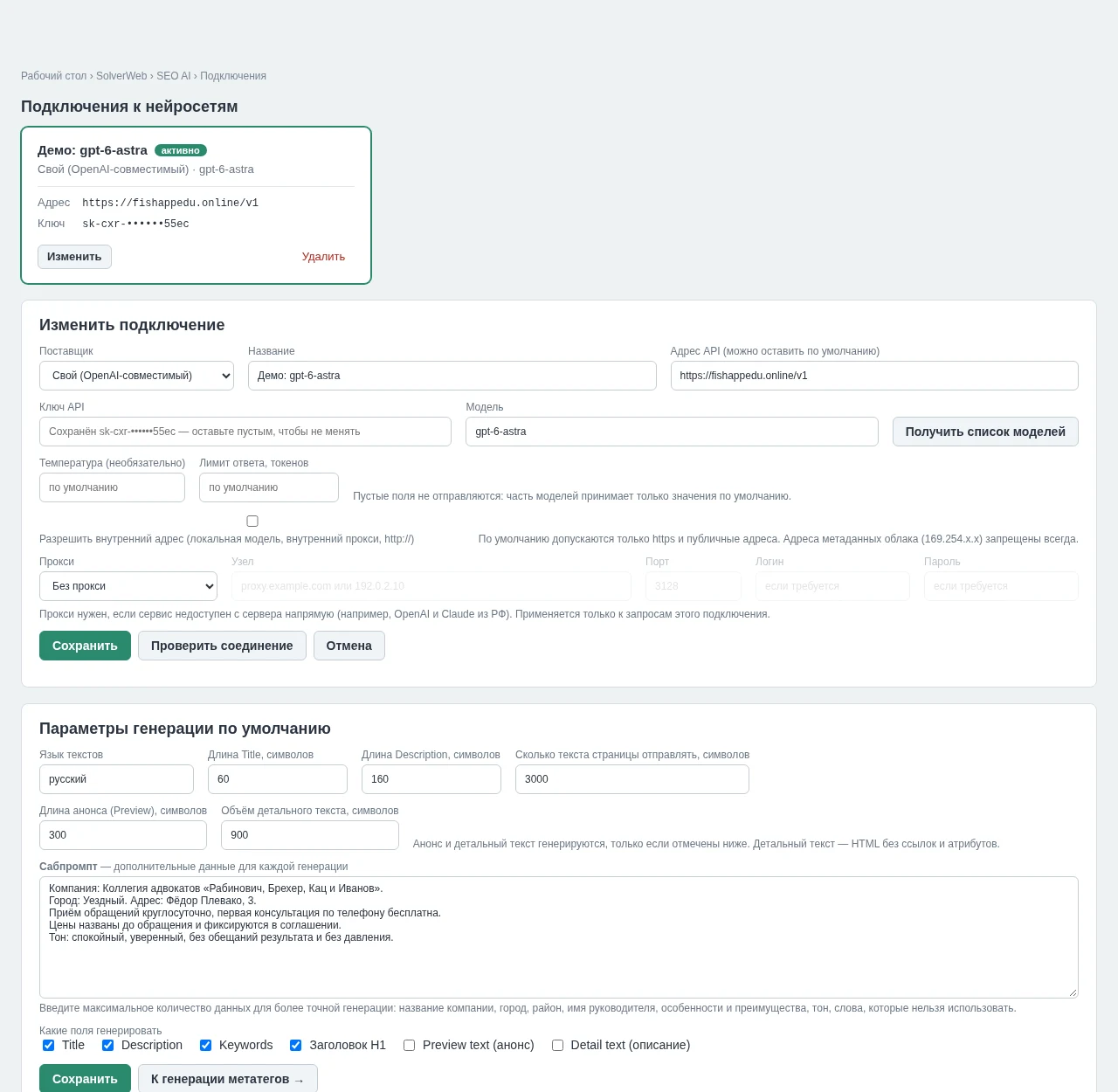
SolverWeb: SEO AI integrates with models from OpenAI, Claude, Gemini, Qwen, DeepSeek, and MiMo. The Custom mode enables connecting virtually any service that supports an API compatible with OpenAI. This flexibility is valuable when using corporate AI gateways, working through a private provider, selecting models based on cost, applying different neural networks for different projects, or maintaining a backup service in case the primary one becomes unavailable. Connection is established by manually specifying a model or automatically retrieving the list of available options via the API. Before starting work, the connection's functionality is verified using a dedicated button.
A single module can handle different tasks using different models. Generating a short Description often does not require the same model used for writing long texts. In SolverWeb: SEO AI, separate connections can be created, with specific settings for each: provider, API address, model, temperature, token limit, and proxy. The ability to create multiple configurations allows for flexible selection of the optimal option for the current task.
Content is generated with your specific business in mind. Standard neural networks know the page topic but lack information about your company. Therefore, SolverWeb: SEO AI includes a subprompt—a persistent project context. You should specify:
SolverWeb: SEO AI is a module for generating meta tags and text. The system allows setting context including company name, city and region of operation, service features, advantages, delivery terms, workflow, communication style, allowed facts, and prohibited formulations. For example, you can specify that the company operates in a specific town, the first consultation is free, and prices are agreed in advance. The tone is set as calm and professional, without pressure or result guarantees. These parameters are automatically passed to the neural network during generation, eliminating the need to repeatedly explain business details and text requirements to the model.
Fewer hallucinations, more fact control. A commercial website requires more than just beautiful text. The neural network must not independently invent discounts, guarantees, deadlines, prices, addresses, specifications, or company advantages that do not exist. SolverWeb: SEO AI uses only facts from the uploaded material and the provided context. The more detailed the subprompt, the more accurate the result and the less time required for subsequent editing.
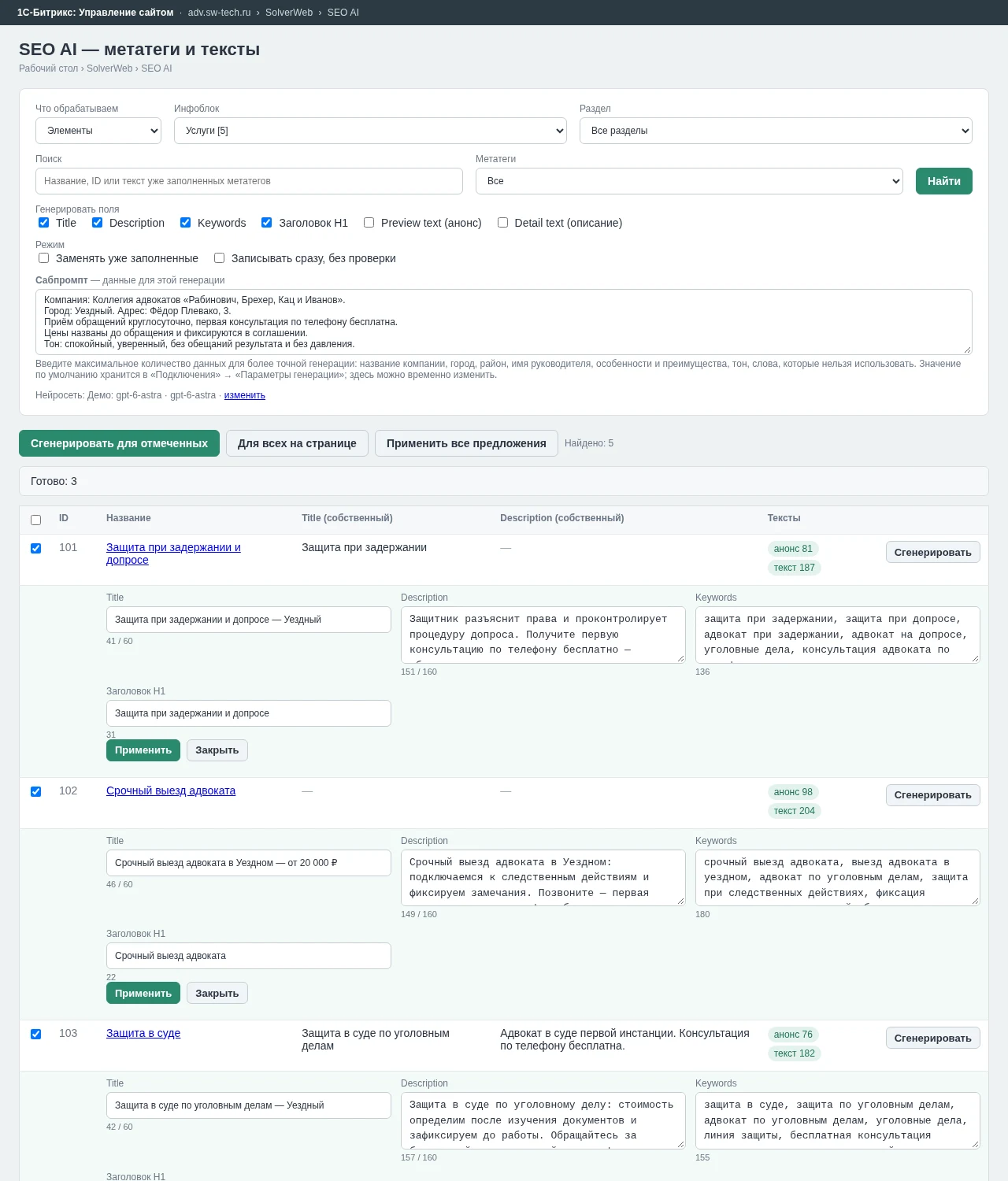
Generate only what is necessary. There is no need to create a full content set every time. You independently select the required fields. For example, you can ask the AI to generate only meta tags or only headings.
SolverWeb: SEO AI — Meta Tags and Texts
The module enables the creation of Title and Description, the addition of keywords and H1 headings, and the full preparation of pages including meta tags, summaries, and detailed HTML text. Generation settings are saved by default and applied to subsequent tasks.
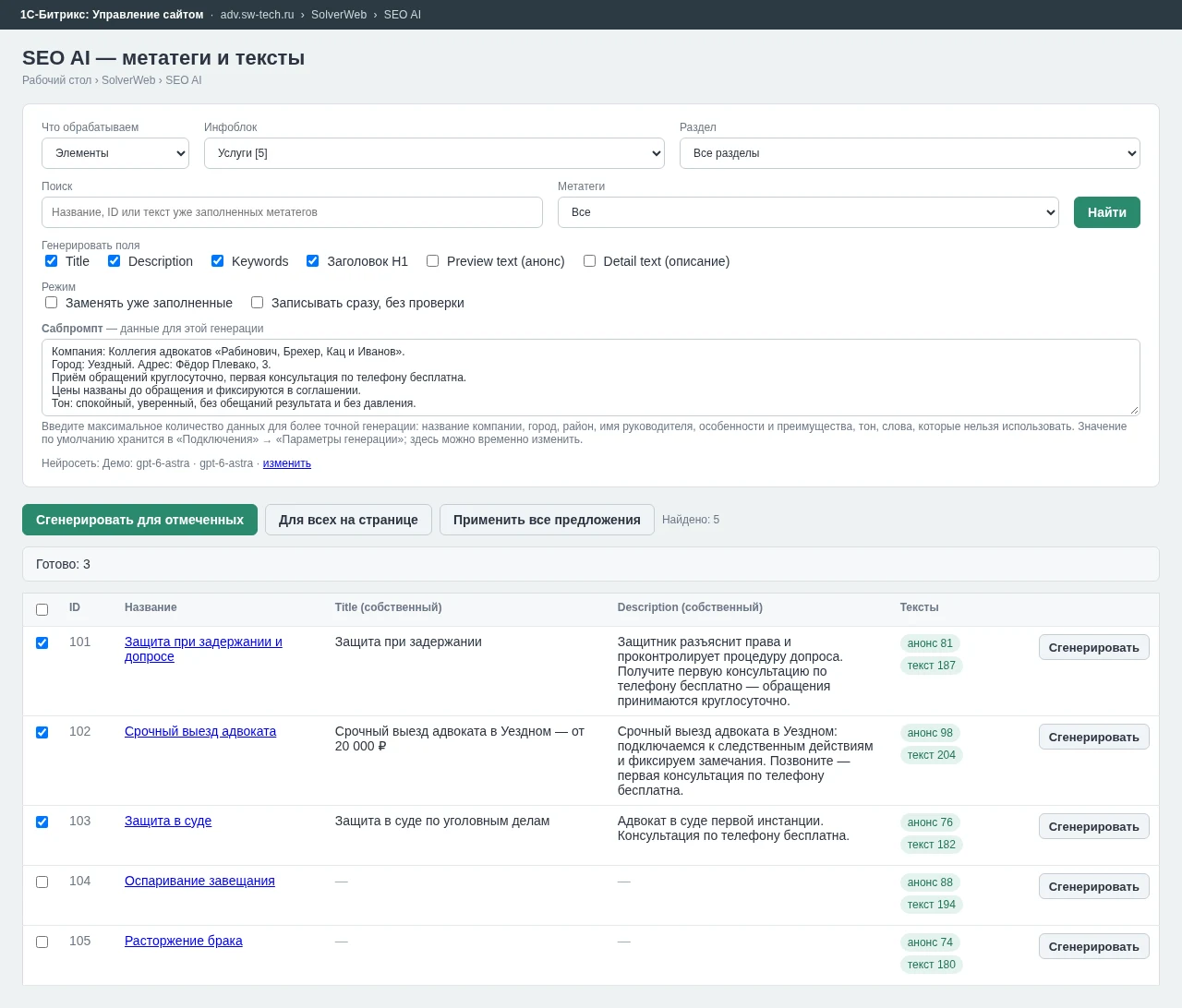
The tool helps identify pages requiring SEO optimization and facilitates efficient work with large content volumes. Filters are available for information blocks, sections, element name and ID, meta tag completeness, and material type. This allows for the rapid identification of pages lacking their own Title or Description, enabling targeted processing without the need to manually inspect each element.
Existing content is protected from accidental overwrites. By default, text is written only to empty fields. If a page already contains a summary or detailed description, the module will not replace it until the user manually enables the "Replace existing" option. This ensures safe mass generation even on long-running sites.
Changes are applied in stages: a proposal is generated first, then published. The standard workflow includes mandatory preview functionality to prevent uncontrolled site modifications by artificial intelligence.
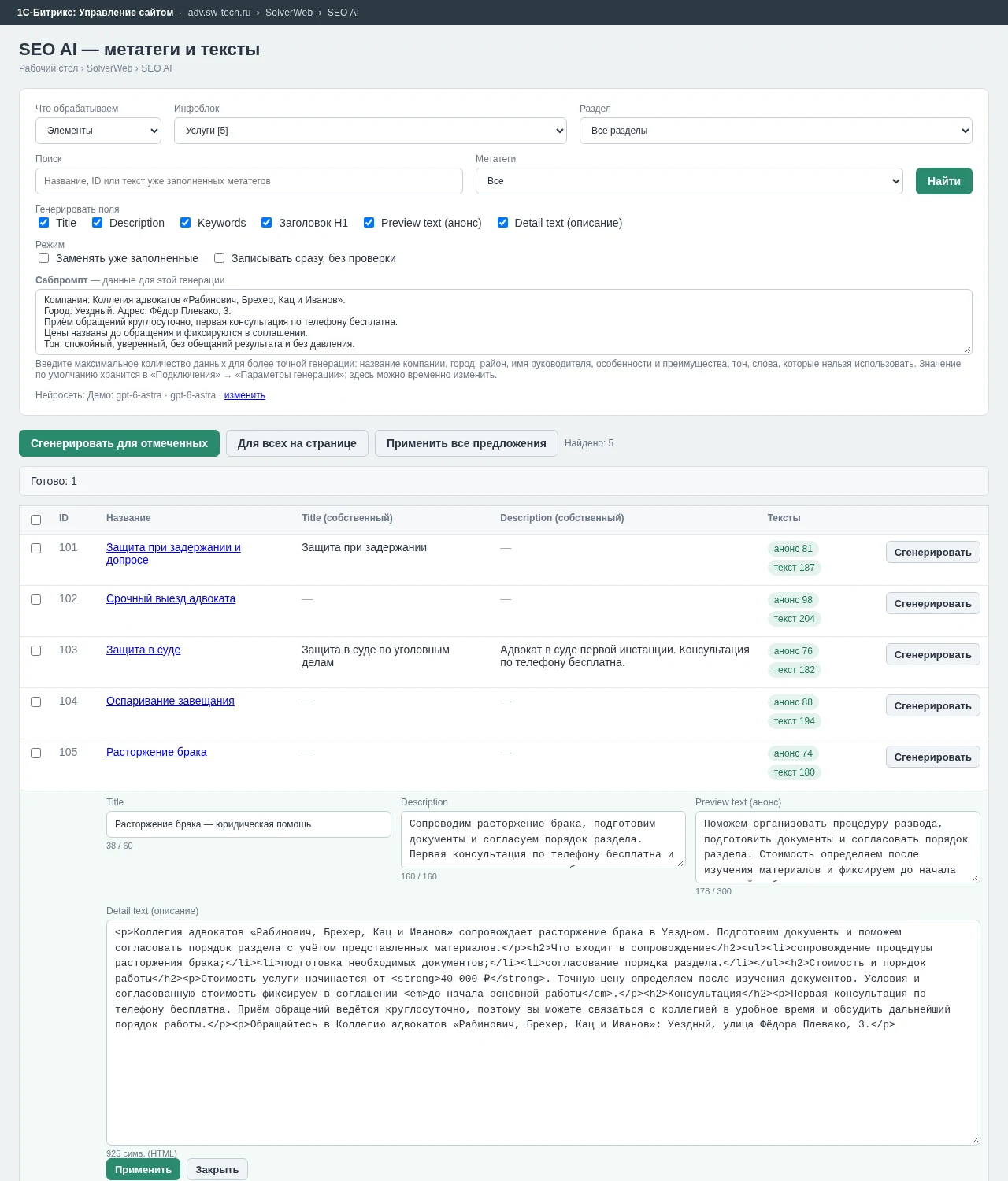
After generation, new values appear under each material: Title, Description, Keywords, H1, preview text, and detail text. You can check the result, edit the text manually, apply the suggested option, or close the window without saving. For mass processing, it is possible to apply several prepared variants simultaneously. If pre-save control is not required, enable the mode 'Write immediately without checking'.
Working with multiple materials
Prepare SEO for five services, twenty products, or an entire catalog page. Select the necessary elements and run the command 'Generate for selected' or use the option 'For all on page'. The module processes materials sequentially and displays ready-made suggestions. Routine work that previously required constant switching between pages is now performed from a single window.
HTML texts are ready for the site
SolverWeb: SEO AI creates not only meta tags but also structured content. In the detailed description, the neural network uses the following tags: p, h2, h3, h4, ul, ol, li, strong, b, em, i, br, blockquote. The generated HTML is automatically cleaned of external attributes, links, and unsupported tags.
The output is clean HTML code ready for immediate use in element descriptions.
The module saves meta tags to the specific SEO settings of an element or section without modifying global information block templates. This is critical for projects where general templates are already configured and used by other catalog elements. SolverWeb: SEO AI allows for targeted optimization of individual pages without disrupting the site's existing SEO logic.
You can control the content volume, as different tasks require different text lengths. Settings allow you to specify recommended lengths for Title, Description, Preview text, and Detail text. Additionally, the volume of the source page text to be sent to the neural network for context analysis is defined. The generation page displays the character count, making it convenient to verify the result before saving.
A separate proxy server is configured for each connection, as some AI services may not be directly accessible from your server. Proxy settings support HTTP, HTTPS, SOCKS5, and SOCKS5h protocols. The proxy is used exclusively for requests from the selected connection and does not affect other site requests.
Secure Key Storage
API keys require protection equivalent to passwords. In the SolverWeb: SEO AI module, API keys and proxy passwords are encrypted using the AES-256-GCM algorithm. After saving, the full key is no longer displayed in the interface; administrators see only a masked version. Keys are also excluded from the module's operation logs.
Protection Against Unsafe API Addresses
The module validates addresses of connected services. By default, only HTTPS connections to public addresses are allowed. Requests to local and internal network addresses are blocked. Connection to an internal AI gateway or corporate proxy is possible only after explicit configuration. Cloud metadata service addresses are always blocked, regardless of settings.
Change History
When AI processes content, it is essential to track not only the current state but also previous versions. All applied changes are recorded in the log. This enables control over mass generation and analysis of content processing results.
How It Works
The setup process involves several steps:
1. Add a connection to the neural network and enter the API key.
2. Select the required model or retrieve the list of available models automatically.
3. Enter the general company context to ensure correct algorithm operation.
Open the Meta Tags and Texts section, select the information block and required materials. Mark the fields for generation, receive AI suggestions, review the results, and apply them. The entire process occurs within the system without the need to copy content between tabs or use third-party services.
The SolverWeb: SEO AI module is particularly useful for online stores to generate meta tags and descriptions for large product catalogs. Corporate websites can use it to fill service pages, directions, and branch pages. SEO specialists can quickly find pages lacking individual meta tags and prepare Title and Description variants. Content managers create previews and detailed descriptions directly in the administrative panel. Agencies and developers can connect various AI services and use the module on projects with different requirements.
The solution does not tie you to a single AI provider. Since model needs may change, the module implements a full AI integration layer for 1C-Bitrix content rather than a specific chatbot integration. You can choose OpenAI, Claude, Gemini, Qwen, DeepSeek, MiMo, or your own OpenAI-compatible API based on your infrastructure, budget, and requirements. Payments to the AI provider are made directly.
SolverWeb: SEO AI does not resell neural network requests. The module operates using your own API keys from the services you select. The cost of requests and the availability of specific models are determined by the respective AI provider and are not included in the module's price. This approach ensures transparent cost control and freedom to choose a provider.
In a practical test on a set of five legal services, the module automatically generated individual meta tags. For the page 'Defense during detention and interrogation', the AI proposed the Title: 'Defense during detention and interrogation — Uezdny' and H1: 'Defense during detention and interrogation'. For the service 'Urgent lawyer dispatch', the Title 'Urgent lawyer dispatch in Uezdny — from 20,000 RUB' was prepared. During generation, the module took into account company details, city, working conditions, and communication style provided to it. This allows the AI to create content tailored to a specific project rather than abstract text on a general topic.
The module is also capable of generating detailed service descriptions with the following structure: introduction, advantages, work procedure, cost, consultation, and call to action.
The generated HTML code can be reviewed and edited directly before saving. This approach is particularly effective for standard catalog, service, and category pages where the structure is uniform but the content must be unique.
SolverWeb: SEO AI optimizes workflows when content volume is high and time is limited. Specialist oversight in SEO remains essential, yet users do not need to manually write every Title, Description, or text draft. The neural network performs the rough and routine work, while humans make the final decisions.
The module combines the capabilities of modern AI models with the familiar 1C-Bitrix administrative panel. The process includes generation, review, editing, and application of results, transforming the management of hundreds of pages from a routine task into a controlled process.
Short description for the card:
SolverWeb: SEO AI — neural networks for SEO and content directly within the 1C-Bitrix administrative panel.
The system generates Title, Description, Keywords, H1 headings, excerpts, and full HTML texts for InfoBlock elements and sections. Users can process individual materials or entire groups, review sentences before publication, and provide the neural network with a constant context of their business.
The module supports integration with OpenAI, Claude, Gemini, Qwen, DeepSeek, MiMo, and any API compatible with OpenAI. It features support for custom API keys, multiple connections, proxy usage, secure credential storage, and protection of existing content.
Automating routine SEO tasks accelerates the process of filling pages with ready-to-promote meta tags and text content.
Neural Network Connection
Users can select and connect the required neural network, including OpenAI, Claude, Gemini, Qwen, DeepSeek, MiMo, or a custom OpenAI-compatible API. The module provides built-in connection testing and displays the list of available models directly within the interface.
The SolverWeb: SEO AI — Meta Tags and Texts module enables simultaneous content generation for multiple pages. Users select source materials and required SEO fields. The system sequentially generates suggestions for each selected item.
The SolverWeb: SEO AI — meta tags and texts module enables the creation of not only meta tags but also full content. Artificial intelligence generates a preview and a detailed structured HTML text, taking into account company information and the actual page content.
Verify the result before publishing. Each generated variant can be reviewed, manually edited, and only then saved to the element.
SolverWeb: SEO AI — Meta Tags and Texts
This module automates the creation of SEO-optimized meta tags and text content, significantly reducing manual effort. It enables rapid generation of page descriptions, titles, and keywords tailored to search engine requirements.
The primary benefit lies in mass updating data for a large number of site pages. The tool supports integration with various AI services, providing flexibility in selecting neural network solution providers. Users can configure subprompts and supply business context to ensure generated results align with company specifics.
A preview feature is available before saving changes, allowing control over the quality of generated text. The module interface offers clear examples of operation and convenient management tools. The system is designed with security in mind, including protection against SSRF vulnerabilities and the use of modern encryption algorithms. The module is compatible with the D7 platform and requires adherence to standard system requirements for proper operation.
General iT can handle the implementation of “SolverWeb: SEO AI — meta tags and texts”, from installation to configuration and compatibility checks.
USER EXPERIENCE
Solution reviews
How does this solution work in a real project? Share your experience and help others choose.
Be the first to share your experience
There are no reviews of this solution on git.ru yet. Tell us what worked well and what could be improved.
✓
Verified purchaseAdd a key if you wish. A verified review gets a badge, priority placement and more rating weight.
↗
Open to every clientJust sign in to your account. A key is optional; all reviews are moderated.
Field multiplicity is supported.
The module extends standard content editing capabilities for sections within information blocks. Upon installation, a new HTML user property type becomes available, enabling the use of all visual editor features.
This module is a refactoring of the d2mg.ufhtml solution, which was abandoned by its original author and is incompatible with PHP8.
The module is compatible with PHP 8.2.
A professional tool for generating sitemap.xml files, based on years of experience in solving this task. The development accounts for limitations in existing solutions and includes provisions for future improvements.
Capabilities:
Sitemap generation via system agents.
SolverWeb: Advocate and Law Firm is a ready-made website template for the 1C-Bitrix platform. This solution is designed for advocate collegiums, law offices, law firms, and private practices. The template includes a pre-built site structure with sections for services, practice areas, specialists, price lists, contact forms, and reviews.
The module automates image compression on the website in accordance with Google PageSpeed Insights recommendations. It supports integration via CDN OptiPic, allowing optimization without modifying image URLs. The main advantage of CDN integration is the automatic conversion of images to the modern WebP format to minimize file size. Browsers that support WebP receive images in that format.
The module is designed for online stores running on the 1C-Bitrix platform to automate the integration of supplier product catalogs. It is also suitable for news and city portals to facilitate content population. The solution supports data import in Excel, XML, YML, CSV, and RSS formats.
The module is designed for the «1C-Bitrix: Site Management» platform and enables importing infoblock elements, including products, from Excel files. It also supports data loading into Highload blocks.
The displayed price covers the solution itself. Platform licensing, installation and customisation are checked separately. If the page offers bundles, select the required option before submitting a request.
How do I check compatibility?
Compare the supported editions and solution version in the technical details with your project. Before installing on a live website, we recommend making a backup and checking the solution in a test environment.
Is there a trial?
The developer lists a trial of 3 days. The trial button opens the installer in your website control panel. Check the required features and compatibility before purchasing.
How much does this solution’s renewal cost?
The current renewal price is 500 ₽. Before you order, a manager will confirm the renewal period and whether it applies to your licence.
Can you help with implementation?
We can help install the module, check its settings and verify how it works in your project. Compatibility with other customisations and the scope of work are assessed before we begin.
Statistics and interaction recording
Public pages use basic statistics. Our recording and Yandex Webvisor require your permission. You can keep basic statistics or disable all analytics.
Operator: General IT Rus LLC, INN 2310208877. Statistics and recording help improve the website.
Basic statistics: pageviews, a random daily ID, a public URL and time. The ID lasts until Moscow midnight. Original records: up to 48 hours; totals: up to 7 years.
Without Webvisor permission, Yandex receives server statistics without visitor IP, User-Agent or cookies. If selected, its browser code collects technical data, cookies, actions and masked page snapshots; recordings last 15 days. Inputs, chat and account areas are hidden.
Interaction recording requires permission: clicks, scrolling, technical information and filtered public-page snapshots. Events: up to 7 years; IP and snapshots: up to 90 days.
Permission is remembered for up to 365 days; full opt-out remains until changed. Basic statistics only disables recording; Disable all analytics stops new analytics. Previously sent data is not automatically deleted. Withdrawal and requests: support@git.ru. Full terms are linked below.
Your browser requests no tracking: analytics is off.