Payments are experiencing issues due to temporary restrictions in Russia. If your payment does not go through, please submit a support request.•Our support team is available 24/7 — we are always here to help with hosting and server issues.•We are now accepting requests for dedicated server rental and colocation services in our data center.•Reminder: we recommend enabling backups for additional data protection.•A new VPS/VDS lineup with NVMe storage and improved performance is now available.•Maintenance work on some servers has been completed. All services are operating normally.•
Payments are experiencing issues due to temporary restrictions in Russia. If your payment does not go through, please submit a support request.•Our support team is available 24/7 — we are always here to help with hosting and server issues.•We are now accepting requests for dedicated server rental and colocation services in our data center.•Reminder: we recommend enabling backups for additional data protection.•A new VPS/VDS lineup with NVMe storage and improved performance is now available.•Maintenance work on some servers has been completed. All services are operating normally.•
Аккаунт в General iT
Вход / Регистрация
Войдите или создайте аккаунт для управления услугами в панели.
Before purchasing the module, carefully review the 'Attention' section in the description and the accompanying video. When contacting technical support, you confirm that all conditions outlined in this section are understood and accepted.
The 'Buy More 2.0' module is an updated version featuring a completely revised logic engine.
Before purchasing the module, carefully review the 'Attention' section in the description and the accompanying video. When contacting technical support, you confirm that all conditions outlined in this section are understood and accepted.
The 'Buy More 2.0' module is an updated version featuring a completely revised logic engine. It is designed to implement non-standard yet highly popular promotional programs aimed at boosting sales.
The algorithm is built upon proven marketing strategies for customer acquisition and increasing average order value. For businesses of all sizes, competitive advantage relies on the attractiveness of the offer: the size of the discount or the value of the gift directly influences the likelihood of closing a deal. Well-configured promotions help an online store stand out from competitors and motivate visitors to complete a purchase.
The discount is applied automatically as soon as the specified promotional conditions are met. The module does not add items to the cart on its own; it calculates and applies discounts to products that the user has already selected.
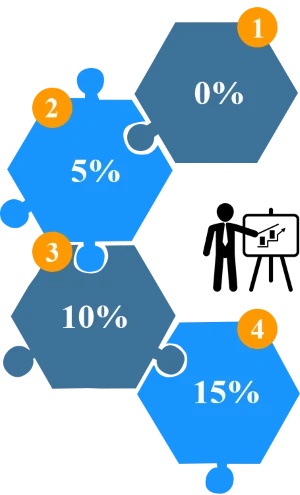
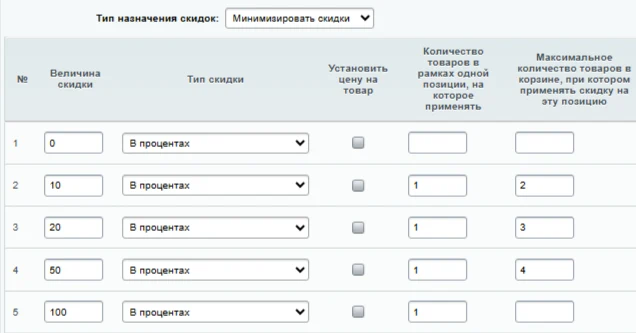
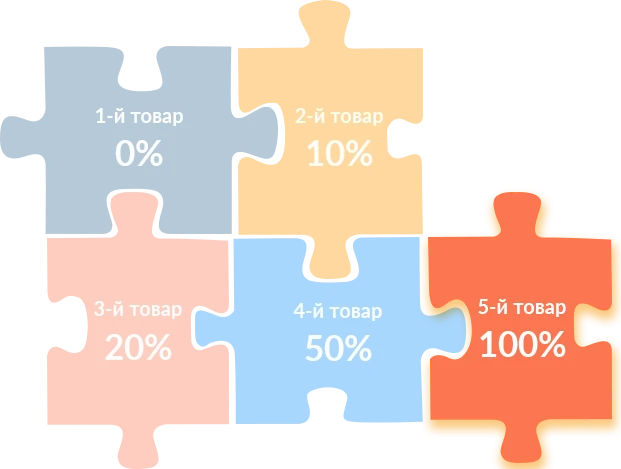
The module allows setting discounts based on the quantity of items in the cart. An extensive configuration set supports flexible implementation of marketing strategies, including tiered discounts where the discount amount for each product is determined by the number of items in the order.
The ARAMA module 'Buy More, Pay Less' helps optimize expenses when increasing purchase volumes. The functionality was developed by ARAMA and is designed to automate discount calculations based on the quantity of goods purchased.
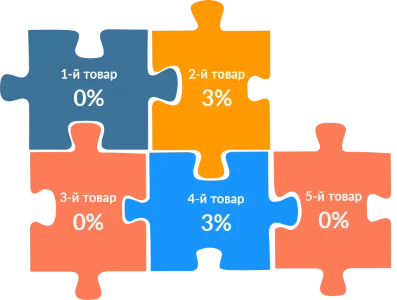
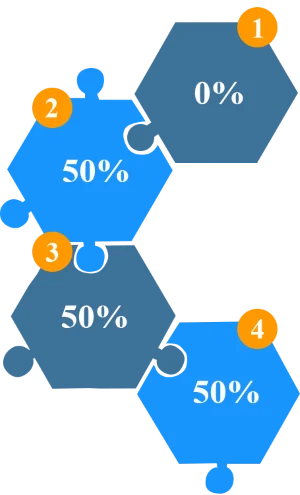
The module supports alternating discounts. You can configure a scheme where every second item is free (for example, 0-3%-0-3%-0-3%). A configuration is also available where every third item is a gift (for example, 0-0-5%-0-0-5%-0-0-5%).
The ARAMA module 'Buy More, Pay Less' helps optimize expenses when increasing purchase volumes. The functionality was developed by ARAMA and is designed to automate discount calculations based on the quantity of goods purchased.
III. Free Gift Item
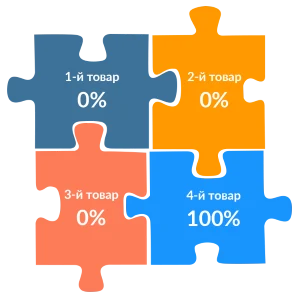
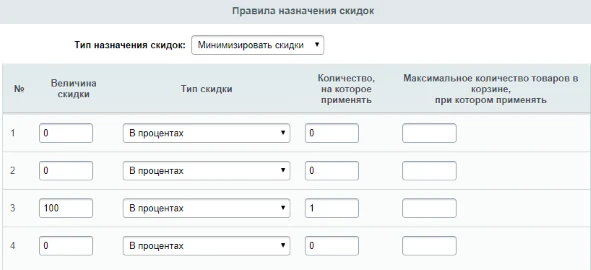
The module supports promotional schemes such as 'buy one get one free' or 'buy two get one free'. Examples include receiving a third mug for free when purchasing two (1+1=3), or getting a fourth portion of rolls as a gift when ordering three portions (1+1+1=4).
The ARAMA module 'Buy More, Pay Less' helps optimize expenses when increasing purchase volumes. The functionality was developed by ARAMA and is designed to automate discount calculations based on the quantity of goods purchased.
IV. Mega discount with a growing rate. The discount applies exclusively to the last added item and increases as more items are added. Consequently, any discount previously applied to earlier items is automatically cancelled.
The discount is applied to either the cheapest or the most expensive item in the order, depending on the module settings.
VI. FixPrice-style promotions
There are cases where products with different base prices need to be brought to a single selling price. Percentage discounts cannot achieve this, and creating a separate fixed discount for each product is inefficient. This module provides an elegant solution. See the 'Set product price' section for details.
Possible promotion scenarios:
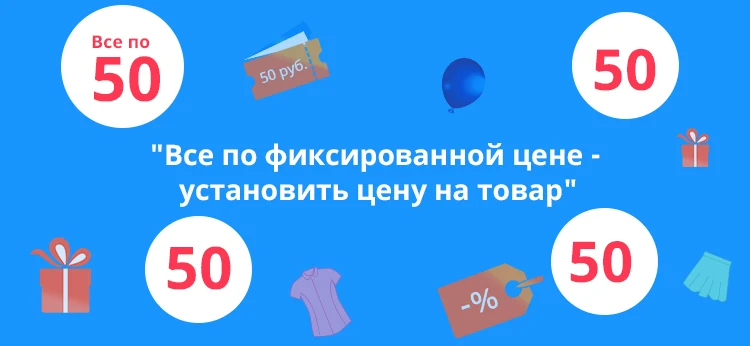
The module enables the implementation of fixed-price promotions in an online store, such as items priced at 50, 100, 200, or 500 rubles. This solution allows you to introduce a popular fixed-price sales format, similar to discount chains, directly on your e-commerce platform.
The ARAMA: Buy More, Pay Less module helps optimize procurement costs.
The ARAMA: Buy More, Pay Less module, developed by ARAMA, implements the 'Product as a Gift for 1 Ruble' promotion.
The module supports promotions with a fixed price for additional items. Example scenarios: buy three items and get any fourth item for 100 rubles; buy two items and get the third and fourth items for 500 rubles.
The 'Buy More, Pay Less' module enables flexible promotional scenarios with stepwise price reduction. A typical implementation is the 'Discount Week' campaign, where the first selected item costs 1000 rubles, the second 500 rubles, and the third 100 rubles. The functionality supports various promotional formats, including pricing models similar to fixed-price retail chains. The module documentation provides detailed descriptions of scenarios such as 'One Day for One Ruble', 'Discount Week', and 'Discounts like at Fix Price'.
The ARAMA: Buy More Pay Less module implements a principle that encourages increased purchase volume by reducing the final cost. The functionality automatically applies discount conditions when specific order thresholds are met.
The module counts the number of line items in the shopping cart, disregarding the quantity of individual units per item. For example, if the cart contains Item 1 (10 units), Item 2 (1 unit), and Item 3 (5 units), the system will register this as three line items.
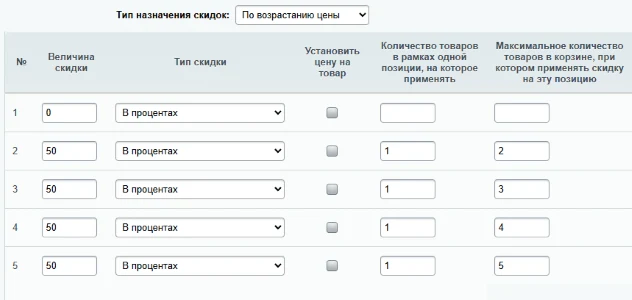
If the number of items in the cart exceeds the number of configured rules in the discount assignment table, the last specified condition applies to the remaining items. For example, with an offer defined as 0 100% 0 100% (covering four positions) and a customer adding six different items, the 100% discount will also apply to the fifth and sixth items. To prevent the last discount from automatically applying to all subsequent positions, add a row with zero at the end of the discount assignment table. For the example above, the correct table format is: 0 100% 0 100% 0.
The ARAMA: Buy More, Pay Less module does not automatically add items to the cart; the customer must select and add them manually. The module's function is to apply discounts to items already present in the cart.
Within the scope of this module, a 'gift' is defined as a cart item with a 100% discount applied. The module does not convert such items into the 'gift' entity as understood by 1C-Bitrix.
Module operation details
Discount assignment type determines the logic used to apply discounts to items in the shopping cart.
Sort by price descending. The mechanism determines the order of items in the cart from highest to lowest price and applies discounts according to this sequence.
Sort by price ascending. The mechanism determines the order of items in the cart from the cheapest to the most expensive and applies discounts according to this sequence.
The ARAMA: Buy More, Pay Less module optimizes discount structures by applying higher discount rates to lower-priced items and lower rates to higher-priced items. For the algorithm to function correctly, the discount type in the discount assignment table must be set consistently: either exclusively in percentages or exclusively as fixed amounts.
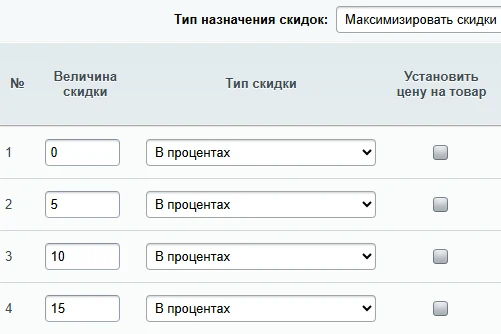
Maximize discounts. This mode operates on the principle opposite to discount minimization: the system automatically calculates and applies the maximum possible discounts for each order. It is designed for businesses prioritizing customer value.
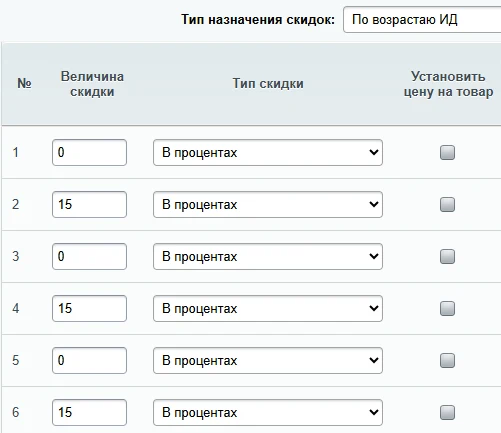
Sort by ID ascending. This parameter defines the order of items in the shopping cart based on the time of addition: the first item added is listed first, and the last item added is listed last.
Sorting by descending ID determines the order of items in the cart: the first item in the list is the most recently added, while the last item is the earliest added.
The Discount Assignment table contains the main settings for module operation.
Automatic sequential numbering of records.
Discount amount
The parameter specifies the discount value applied to a specific line item.
Discount type
Two options are available: a fixed amount or a percentage.
Set product price
When this option is enabled, the item price is set to the value specified in the discount amount field.
Limit for the number of items to which the discount applies within a single cart line. In the module's logic, a unit is defined as a distinct cart line (position), not the total quantity of a product. If multiple units of the same product are added, the module treats them as a single line. This field allows you to restrict the discount to a specific quantity rather than the entire amount purchased. For instance, if 10 units of a product are in the cart but the setting specifies 1, the discount will be calculated only for that single unit.
Maximum number of items in the cart for which the discount on this item applies. This option allows you to remove a discount from a specific item when the total number of items in the cart reaches a defined threshold. For instance, you can disable the discount on the second item if the cart contains three or more items. This setting is also useful for promotions such as a 100% discount on the most expensive item.
Minimum number of items in the cart required to apply a discount to a specific position. This setting activates the discount only when a specified quantity of items is reached in the cart.
For example, to offer a 100% discount on the second item only when the cart contains five or more items, enter the number 5. In this case, the second item becomes free exclusively if the customer purchases five or more different items.
Limitations
This option directly affects items participating in the promotion. If any items or offers do not meet the specified limitations, they are excluded from the count, and no discounts are applied to them.
Configure user groups eligible for discounts. During module testing, it is convenient to restrict discounts to administrators only. Separate promotions can also be set up for different user categories, such as VIP buyers, wholesalers, and others.
Info blocks to which discounts apply. If trade offers exist for products, both the main catalog and the info block containing trade offers must be specified.
Excluding price types from the promotion
Specify the price types that must not participate in the promotional offer. A common configuration error is selecting the price types that should participate instead of those to be excluded.
ARAMA Module: Buy More, Pay Less
Product Filtering
The module provides an extensive set of parameters for filtering: parent category, ID, name, symbolic code, tags, specific dates, availability, description, and properties.
Additional Conditions
The additional conditions mechanism mirrors cart operation rules. If criteria are set using fields available only in the order form (such as payment systems), the corresponding discounts will be visible only during order placement, not in the cart. Additional conditions do not restrict the list of products participating in a promotion; instead, they define specific requirements for applying a particular offer.
The documentation outlines key capabilities of the module, though its functionality extends beyond these examples.
Uniqueness
This is the only solution on the marketplace with this functionality.
ARAMA: Buy More, Pay Less
A sales optimization module. Includes comprehensive documentation with step-by-step setup instructions for the solution.
Settings
The application offers an extensive set of parameters for flexible configuration.
Discounts
The module supports configuring discounts either as a percentage of the total amount or as a fixed monetary value.
Articles
This section includes additional publications and examples of practical module usage.
Flexible settings
Ability to restrict product participation in promotions based on multiple parameters: categories, fields, and properties.
Technical support
Contact the module developers directly. No intermediaries.
Business hours support
Prompt responses to inquiries and resolution of technical issues during business hours.
ARAMA Module: Buy More, Pay Less
A universal solution with flexible configuration tailored to specific tasks. Functionality adapts to individual user requirements.
Attention
This module relies heavily on the 'Product Marketing' functionality of the 1C-Bitrix platform. When contacting technical support, it is assumed that the user is familiar with how this functionality works.
If rules with a higher application priority than the discounts generated by this module are configured on the website, and the 'Stop further rule application' option is enabled for them, then the rules of this module will not be applied.
The rules of the 'ARAMA: Buy More, Pay Less' module apply exclusively to the public section of the site—specifically within the shopping cart and the order form. These rules are not applied when creating orders through the administrative interface.
Some module features require additional configuration on your website.
When the 'Count quantity of the same item' option is enabled, increasing the quantity of a product creates a new separate line in the cart. The quantity within each line is fixed at one, while the total quantity is reflected by adding new lines.
If the cart is updated via AJAX, the template must correctly handle the appearance of new lines. The default bitrix:sale.basket.basket cart template does not support this logic out of the box.
This option was implemented based on user requests. When enabled, free technical support, configuration assistance, or cart customization are not provided. Consultations and fixes are available only on a paid basis, and we reserve the right to refuse service without explanation.
The Scoder: Order form template with managed cart does not have these limitations. It allows you to use an order form with a dynamic cart composition immediately, bypassing the standard cart viewing step.
For the module to function correctly, all latest updates for 1C-Bitrix components must be installed on the site. The System Check test in Settings — Tools must not report errors. This product was developed using the D7 API; refer to the requirements for the 1C-Bitrix D7 core.
In the module's logic, a unit is defined as a product variety, i.e., the number of line items in the cart. If a product is added in a quantity greater than one, the module counts it as a single unit.
Starting with version 2.0, service properties are automatically created for each cart item. These properties can be displayed in the cart or on the order form when using non-standard templates.
During the trial period, the module operates in a limited mode: discounts are applied only to site administrators.
ARAMA: Buy More, Pay Less. A module for automating processes and optimizing expenses. Designed for integration with existing accounting and analytics systems.
ARA: Buy More, Pay Less. The ARA module optimizes expenses when increasing purchase volumes. Its functionality automatically calculates savings from scaling purchases, eliminating the need for manual price analysis.
ARAMA: Buy more — pay less
The module supports Rutube. Free technical support is provided during the update period. Requests are handled directly by programmers without intermediaries, reducing resolution time. We assist with module installation and configuration, and provide consultation on its operation.
The ARAMA module 'Buy More, Pay Less' optimizes sales processes and stimulates an increase in average check size. The tool enables the creation of attractive offers for customers, enhancing the efficiency of trading operations.
ARAMA: Buy More, Pay Less. A module developed by ARAMA designed to optimize spending during purchases. The functionality enables users to increase purchase volumes while simultaneously reducing the total cost of transactions.
The ARAMA module 'Buy more, pay less' provides integration with VKontakte Max, including online chat and ticketing system. Functionality can be customized to meet specific project requirements for an additional fee. The developer reserves the right to refuse customization work without providing reasons.
If “ARAMA: Buy more - pay less” fits the task, General iT can install the module, configure it and verify the result in the project.
UPDATE HISTORY
What’s new
106 releases
2.0.6 (05.05.2026)Latest update
Removal of cart service properties in the checkout form
2.0.5 (04.05.2026)
Removal of cart service properties when sending order email messages
2.0.4 (05.03.2026)
Adjustments for demo mode.
2.0.3 (19.02.2026)
Fix for the issue of overwriting non-system product properties in the cart created by other similar event handlers
2.0.2 (18.02.2026)
Adjustments for legacy clients when upgrading to version 2.0
2.0.1 (08.02.2026)
Code service adjustments
2.0.0 (07.02.2026)
New default module operation mode. Correction of language files.
1.9.9 (07.02.2026)
Option "Activate outdated module operation mode"
1.9.8 (06.02.2026)
Code service adjustments
1.9.7 (06.02.2026)
Service corrections
1.9.6 (06.02.2026)
Unused event handlers removed
1.9.5 (05.02.2026)
The mandatory requirement for the Scoder module: Arbitrary PHP condition for cart operation rules [scoder.phpcondition] has been removed when the new module operation principle is enabled
1.9.4 (05.02.2026)
For the new logic operation mode, fixed discounts and the number of items within a single position to which they apply have been added. Adding custom actions to cart operation rules
1.9.3 (04.02.2026)
Corrections
1.9.2 (04.02.2026)
For the new logic operation mode, "Set product price" has been added without considering fixed discounts
1.9.1 (03.02.2026)
For the new logic mode, "Maximum and Minimum number of items in the cart at which a discount is applied to this item" has been added.
1.9.0 (03.02.2026)
For the new logic mode, "Duplicate item in the cart when changing its quantity" has been added. Changes in language files. Corrections.
1.8.9 (02.02.2026)
Indexing of rules when transitioning from the old logic to the new one. Clearing rules according to the new logic.
1.8.8 (02.02.2026)
For the new logic mode, "filters to limit items participating in the promotion" have been added.
1.8.7 (02.02.2026)
For the new logic mode, "Info blocks for items to which discounts apply" have been added.
1.8.6 (31.01.2026)
For the new logic mode, "Price types that do NOT participate in the promotion" have been added.
1.8.5 (30.01.2026)
For the new logic mode, "Item IDs to which the promotion applies" and "Item IDs that should NOT participate in the discount calculation" have been added.
Corrections to previous updates.
1.8.4 (30.01.2026)
For the new logic mode, "Do not count items for which item-specific discount coupons have been applied" and "Apply promotion only if item-specific discount coupons have been applied" have been added.
1.8.3 (30.01.2026)
For the new logic operation mode, "Discount Assignment Types" have been added: Maximize discounts and Minimize discounts. Added assignment of the last discount value from the table if there are more items in the cart.
1.8.2 (29.01.2026)
Corrections for the new logic operation mode
1.8.1 (29.01.2026)
Module operation in the new logic mode is available in a very limited variant (enabled in settings)
1.8.0 (27.01.2026)
Changed encoding of language files to UTF-8; WINDOWS-1251 encoding is no longer supported.
Changed module name.
Added "Activity Period" functionality.
Initial steps for module operation in the new logic mode.
1.7.9 (10.12.2025)
The info block type code for the profile database has been converted to lowercase
1.7.8 (24.09.2025)
jquery changed to jquery3
1.7.7 (02.09.2025)
Corrections for main.ui.filter
1.7.6 (21.11.2024)
Bug fix for sets: components of the set are excluded from the calculation
1.7.5 (23.08.2024)
Correction for the "filter interface" for properties of type "Link"
1.7.4 (04.08.2024)
Correction for the "filter interface" for properties of type "Link"
1.7.3 (11.10.2023)
Bug fix for an empty cart
1.7.2 (11.10.2023)
Corrections in the OnBeforeProlog handler
1.7.1 (17.08.2023)
Corrections in the query for trade offers to verify conditions
1.7.0 (11.08.2023)
Correction in the agent for PHP 8
1.6.9 (20.07.2023)
Tooltips added in profile settings
1.6.8 (05.07.2023)
Corrections
1.6.7 (14.04.2023)
Corrections in language files
1.6.6 (07.04.2023)
New functionality "Additional conditions" added
1.6.5 (30.03.2023)
Correction of the profile deletion mechanism.
1.6.4 (22.03.2023)
Corrections for the "Template for generated rule names" functionality.
1.6.3 (10.03.2023)
Corrections for PHP 8 when cleaning up service rules and module operation under certain configuration options.
1.6.2 (27.02.2023)
Change of the short tag to "
1.6.1 (31.01.2023)
Corrections for PHP 8
1.6.0 (16.01.2023)
Addition of a service option for profiles "Template for generated rule names"
1.5.9 (26.12.2022)
Corrections for PHP 8
1.5.8 (11.11.2022)
Corrections for the situation where there are more items in the cart than the number of configured discounts
1.5.7 (08.11.2022)
Developers have been added event handlers that allow modifying the profile filter: OnBeforeCheckFilter, OnBeforeCheckParentFilter, OnBeforeCheckIsDoubleFilter, OnBeforeCheckIsDoubleParentFilter with parameters &$filter, $item, $profile, where $filter is the filter array that can be modified, $item is the item in the cart, $profile is the module profile data array.
1.5.6 (09.08.2022)
Event handlers OnBeforeSaleDiscountGenerate and OnAfterSaleDiscountGenerate with parameters $discountID, &$ar_load, $arElement, $fuser have been added for developers
1.5.5 (07.07.2022)
Correction of language files
1.5.4 (01.06.2022)
Corrections for the "Discount on the cheapest (most expensive) item" setting type
1.5.3 (10.11.2021)
Option "Price types that do not participate in the promotion" has been added
1.5.2 (05.08.2021)
Option "Set item price" has been added to the discount assignment table
1.5.1 (27.07.2021)
Interface filter correction for properties of type "Link to items"
1.5.0 (26.03.2021)
Duplication of positions in the cart when the option "Consider quantity of the same item" is enabled has been implemented using a new principle
1.4.9 (17.03.2021)
Minor interface adjustments
1.4.8 (25.02.2021)
Variables "Profile ID" and "Buyer ID" (fuser) have been added to the OnBeforeCheckConditions event handler for developers
1.4.7 (12.02.2021)
Fixed an issue with the $USER object definition when running via cron
1.4.6 (22.01.2021)
Added the parameter "Minimum number of items in the cart at which to apply a discount to this item"
1.4.5 (28.12.2020)
Adjustments to functionality when "Consider parent element filter for trade offers (AND logic)" and "Consider quantity of the same item" are enabled
1.4.4 (28.12.2020)
Adjustments to functionality when "Consider parent element filter for trade offers (AND logic)" is enabled
1.4.3 (28.12.2020)
Added the parameter "Consider parent element filter for trade offers (AND logic)"
1.4.2 (10.11.2020)
Fixed an issue with duplicating items as many times as there are profiles marked "Consider quantity of the same item"
1.4.1 (21.10.2020)
The filter now includes the field Including sub-sections [INCLUDE_SUBSECTIONS]
1.4.0 (20.10.2020)
Code adjustment when the filter is enabled and the quantity of the same product is taken into account
1.3.9 (11.10.2020)
Filter accounting added when duplicating positions with the "Take into account the quantity of the same product" option enabled
1.3.8 (06.08.2020)
Defects fixed when the filter is enabled while using multiple programs
1.3.7 (27.07.2020)
Bug fix
1.3.6 (16.07.2020)
Defect in database installation fixed when installing the module
Added discount assignment types 'By ID ascending' and 'By ID descending'
1.2.9 (12.11.2019)
Fixed an issue with the 'Consider quantity of the same item' option
1.2.8 (05.11.2019)
Added filters to limit products participating in the promotion
1.2.7 (11.06.2019)
Added access rights management for module settings
1.2.6 (28.05.2019)
Fixed an issue in the latest update
1.2.5 (07.05.2019)
Added payment system selection to the restrictions
1.2.4 (15.02.2019)
Bug fix
1.2.3 (08.02.2019)
Added discount assignment type 'Maximize discounts'. Fixed issues when the 'Consider quantity of the same item' option is selected
1.2.2 (07.02.2019)
Added discount assignment type 'Minimize discounts'
1.2.1 (30.01.2019)
Added tracking of trade offers when specifying the options "Product IDs to which the promotion applies" OR "Product IDs that should not participate in the discount calculation"
1.2.0 (28.01.2019)
Added additional option "Product IDs that should not participate in the discount calculation"
1.1.9 (16.01.2019)
Added option "Apply promotion only if Discount coupons for the product are applied" in module settings
1.1.8 (15.01.2019)
Added a limitation in module settings - the ability to select information blocks for products to which discounts apply
1.1.7 (04.12.2018)
Fixed an issue with resetting product properties in the cart when enabling the option "Count quantity of the same product"
1.1.6 (29.11.2018)
Resolved a Warning in module operation
1.1.5 (14.11.2018)
Changes in language files
1.1.4 (13.11.2018)
Added the ability to deactivate the module.
Added the ability to manually clear generated rules.
1.1.3 (01.11.2018)
Added parameter "Maximum number of items in the cart at which to apply"
1.1.2 (01.11.2018)
Added parameter "Do not count items for which coupons have been applied"
1.1.1 (04.10.2018)
Performance improvement
1.1.0 (02.10.2018)
Interface change
1.0.9 (28.09.2018)
Added parameter "Item IDs to which the promotion applies"
1.0.8 (07.09.2018)
Bug fix
1.0.7 (05.09.2018)
Added option "Enable clearing of generated rules"
1.0.6 (30.07.2018)
Added option "Count quantity of the same item"
1.0.5 (17.07.2018)
Bug fix
1.0.4 (13.07.2018)
Added additional option "Quantity to apply" in module settings
1.0.3 (29.06.2018)
For developers: an OnBeforeCheckConditions event handler has been added, allowing the result of the function that checks the condition to be modified
1.0.2 (06.01.2018)
Added the ability to provide fixed discounts
1.0.1 (05.01.2018)
Added support for the English language (en)
USER EXPERIENCE
Solution reviews
How does this solution work in a real project? Share your experience and help others choose.
Be the first to share your experience
There are no reviews of this solution on git.ru yet. Tell us what worked well and what could be improved.
✓
Verified purchaseAdd a key if you wish. A verified review gets a badge, priority placement and more rating weight.
↗
Open to every clientJust sign in to your account. A key is optional; all reviews are moderated.
Registration discount is available in the 'Start' edition.
This module allows offering discounts to new users and increasing visitor engagement through a registration pop-up window. When an account is created, the system automatically generates a coupon based on a predefined shopping cart rule. The generated code is sent to the email address or phone number provided during registration.
Corporate website template for a company providing disinfection, refrigerator cleaning, ventilation, and air conditioning services. The solution demonstrates the structure based on a business specializing in pest control for premises and territories.
The module is designed to automatically send birthday greetings to website users, as well as contacts and leads in Bitrix24 CRM. Configuration options allow sending email notifications on the birthday itself, several days in advance, or after the date has passed.
The ipol.mailorder module extends email templates to include information about order properties, delivery options, and selected payment types. Standard platform tools do not allow transmitting critical details such as the user-specified delivery address or chosen payment system in notifications.
The module enables mass generation of symbolic codes for infoblock elements and sections, using standard parameters defined in the infoblock settings. Code generation utilizes the system API or a custom function.
The tool also supports clearing the symbolic code field for elements and sections within a selected infoblock.
The module enables exporting infoblock elements (products) to Excel format. It supports the creation of price lists and allows configuration of data filtering for the export. Automatic export execution via cron scheduler is supported.
The displayed price covers the solution itself. Platform licensing, installation and customisation are checked separately. If the page offers bundles, select the required option before submitting a request.
How do I check compatibility?
Compare the supported editions and solution version in the technical details with your project. Before installing on a live website, we recommend making a backup and checking the solution in a test environment.
Is there a trial?
The developer lists a trial of 7 days. The trial button opens the installer in your website control panel. Check the required features and compatibility before purchasing.
How much does this solution’s renewal cost?
The current renewal price is 7,500 ₽. Before you order, a manager will confirm the renewal period and whether it applies to your licence.
Can you help with implementation?
We can help install the module, check its settings and verify how it works in your project. Compatibility with other customisations and the scope of work are assessed before we begin.
Your cookie choices
Necessary cookies support sign-in, your cart and security. Optional analytics helps improve the website and starts only with your permission.
Our metrika.git.ru system: public pages, a random identifier, device and interaction events. Form contents, account and payment pages are excluded. Raw events: up to 90 days. Operator: General IT Rus LLC, INN 2310208877.
Your browser requests no tracking: analytics is off.