Payments are experiencing issues due to temporary restrictions in Russia. If your payment does not go through, please submit a support request.•Our support team is available 24/7 — we are always here to help with hosting and server issues.•We are now accepting requests for dedicated server rental and colocation services in our data center.•Reminder: we recommend enabling backups for additional data protection.•A new VPS/VDS lineup with NVMe storage and improved performance is now available.•Maintenance work on some servers has been completed. All services are operating normally.•
Payments are experiencing issues due to temporary restrictions in Russia. If your payment does not go through, please submit a support request.•Our support team is available 24/7 — we are always here to help with hosting and server issues.•We are now accepting requests for dedicated server rental and colocation services in our data center.•Reminder: we recommend enabling backups for additional data protection.•A new VPS/VDS lineup with NVMe storage and improved performance is now available.•Maintenance work on some servers has been completed. All services are operating normally.•
Аккаунт в General iT
Вход / Регистрация
Войдите или создайте аккаунт для управления услугами в панели.
SEO Shaman: unique pages for filters and search. With meta tags, SEO-friendly URLs, and breadcrumbs
The SEO Shaman module is designed to increase traffic to online stores, interactive catalogs, and other websites by creating optimized landing pages based on filters and search queries. The tool allows flexible customization of the layout and structure of results pages, distinguishing them from standard catalog section templates.
The SEO Shaman module is designed to increase traffic to online stores, interactive catalogs, and other websites by creating optimized landing pages based on filters and search queries. The tool allows flexible customization of the layout and structure of results pages, distinguishing them from standard catalog section templates. Functionality includes adding custom properties and displaying their values in any part of the template via components. This enables the creation of attractive pages with high conversion rates that support comprehensive search engine optimization.
The Profi SEO Shaman module enables rapid adaptation of filter and search result pages for search engines. It allows creating unique meta tags (title, description, keywords) and H1 headings in two clicks. The tool supports indexing configuration via the robots meta tag, management of canonical pages, and automatic 301 redirects when URLs change.
Features include generating human-readable URLs instead of long filter parameter strings, adding pages to the sitemap.xml file, and configuring ignore rules for GET parameters (such as utm tags) used in analytics. Custom properties like text or images can be inserted into templates via a component. The module also provides import and export of SEO settings in CSV format and flexible editing of the breadcrumb navigation chain.
The 'SEO Shaman' module automatically populates fields for a new SEO page using values from the last saved page. It supports copying existing pages. A separate module, 'Quick SEO Links', is used to display blocks of links to SEO pages (for example, above product listings).
The module provides programming events for integration. The OnBeforeSetPageProperties(&$arFields, $arParams) event is triggered before the module sets metadata and other page properties; it allows canceling the operation or modifying data before the properties are saved. The OnAfterSetPageProperties($arFields, $arParams) event fires after the module has set metadata and other properties, enabling additional actions to be performed.
While the module allows manual configuration for individual pages, an extended module named 'Smart Filter SEO Auto-generator: meta, sitemap, breadcrumbs, and internal linking' is available to automate the process for multiple smart filter pages.
The module supports importing and exporting SEO settings to CSV files, allowing part of the tasks to be automated using spreadsheet editors.
The core task of search engine optimization is to provide the user with the most accurate and complete answer to their query. To achieve this, the landing page must be relevant to the query and fully satisfy the visitor's needs. The more precisely a page answers a query, the higher its position in search results and the more organic traffic the site receives.
For example, in an online store selling women's clothing, the Dresses category may include filters for size, color, and style. The module generates unique pages for each filter combination, ensuring correct meta tags, clean URLs (SEO-friendly slugs), and breadcrumb navigation.
Every project relies on its own semantic core—a set of search queries and keywords that define its promotion strategy. When a catalog contains items with varying attributes, such as dresses in different sizes, users search for specific options via search engines. Ranking algorithms prioritize pages that most accurately match user intent.
If a general category page, such as 'Dresses,' appears in search results, visitors will see the entire inventory at once. They must manually filter for the desired size, which often leads to disengagement. Many users fail to locate or understand how to use built-in filters and simply leave the site. Search engines record these behaviors: if a user cannot find what they need and returns to the search results, the site's ranking drops due to low relevance.
SEO Shaman: generation of unique pages via filters and search with meta tags, SEO-friendly URLs, and breadcrumbs.
The primary task of an SEO specialist is to select relevant query groups from the semantic core and create highly targeted landing pages for them.
Alternative approach: subcategories.
For instance, within the 'Dresses' category, one could create a subcategory like 'Size 42 Dresses'. However, this method has drawbacks: overlapping items across categories lead to content duplication, which negatively impacts search rankings. Additionally, with a large volume of diverse queries (e.g., 'plus size dresses'), the catalog hierarchy becomes overly complex.
Solution: SEO Shaman.
This module is essential for projects requiring comprehensive search engine optimization. With filters based on specific properties, it enables the creation of unique pages that precisely match user queries without overloading the system. The appearance of these pages can be distinguished from standard catalog sections by utilizing custom properties and rendering their values via the component.
Advantages of SEO Shaman:
Generation of unique pages.
Search engines can identify pages generated by filters, but without the SEO Shaman module, such pages lack unique meta tags (title, description, keywords, canonical), headings, and detailed descriptions. The absence of this data makes it difficult for search mechanisms to determine the specific content of a page, which otherwise differs from its parent category only by a complex URL with parameters and a list of filtered products. The module enables the creation of unique pages for any filter-based output, driving traffic growth through the formation of high-quality landing pages.
This functionality also applies to internal search results. The system generates unique pages for search queries, such as a collection of products containing the word 'for children' in their names.
The module supports the display of arbitrary data on generated pages. Users can add custom properties of various types, including additional text, images, and video.
The 'SEO Shaman' module generates unique pages for filters and search queries, automatically creating meta tags, SEO-friendly URLs, and breadcrumb navigation. Quality use of the module can significantly increase traffic to online stores, interactive catalogs, and showrooms.
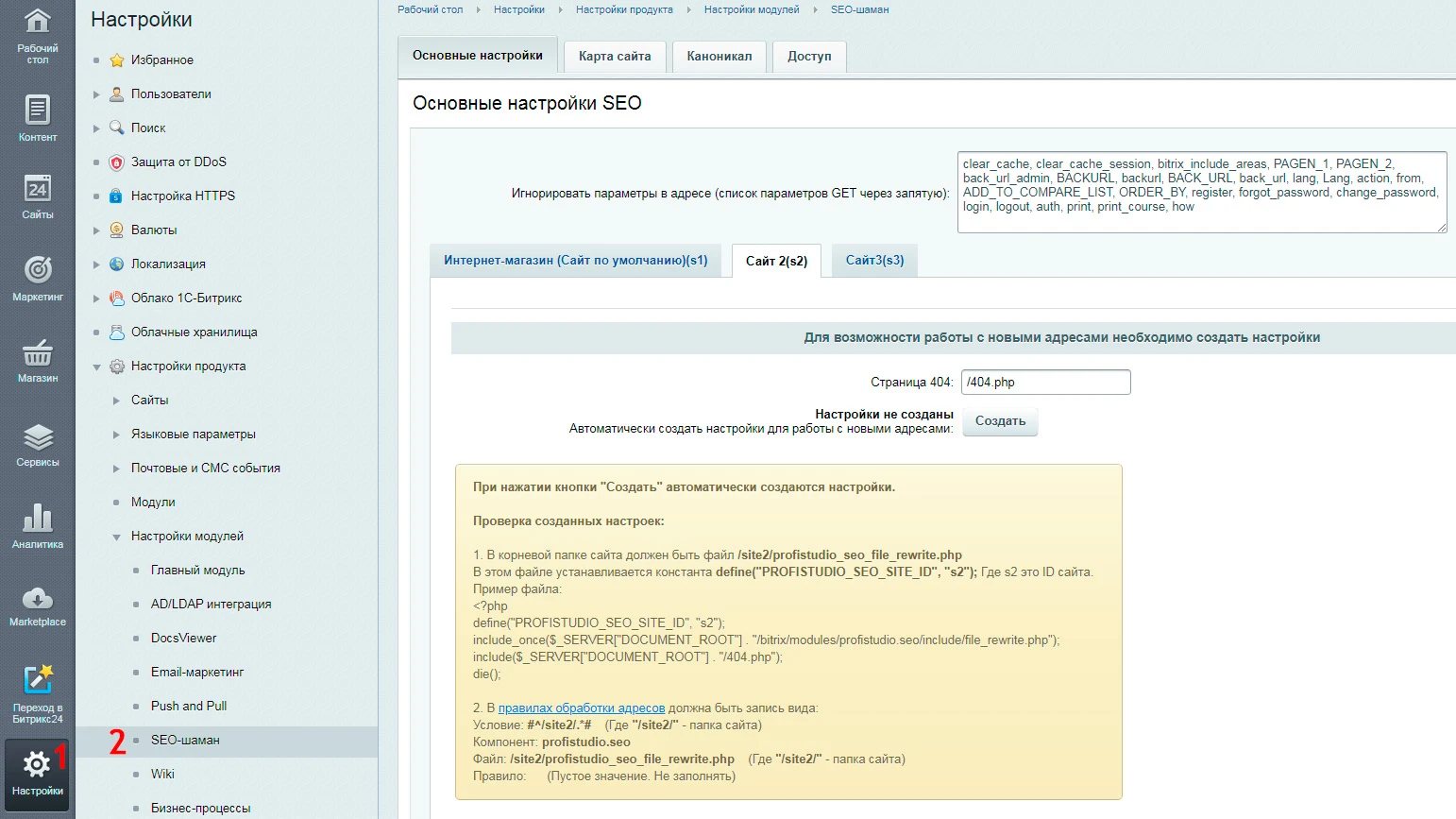
Configuration is performed in the site's administrative panel. After installation, navigate to the 'Settings' tab, expand the 'Product Settings' item in the list, then select 'Module Settings'. In the opened list, activate the 'SEO Shaman' component.
SEO Shaman module settings
The first configuration tab handles URL parameter ignoring. Several parameters are pre-filled by default. You can add custom parameters, such as UTM tags, or remove unnecessary ones.
When saving a page, any parameters listed in the "Ignore parameters in address" field are stripped from the final URL. If a page is accessed with these parameters, the system treats it as the version without them. For instance, if the module is configured to ignore the PAGEN_1 parameter and an SEO page is created at /catalog/test1/, accessing /catalog/test1/, /catalog/test1/?PAGEN_1=1, or /catalog/test1/?PAGEN_1=2 will all resolve to the same SEO page /catalog/test1/. This setting is useful for pages with pagination.
To work with new page addresses, create the required settings. Specify the URL of a page returning a 404 error and click the «Create» button. The generated parameters will automatically appear below.
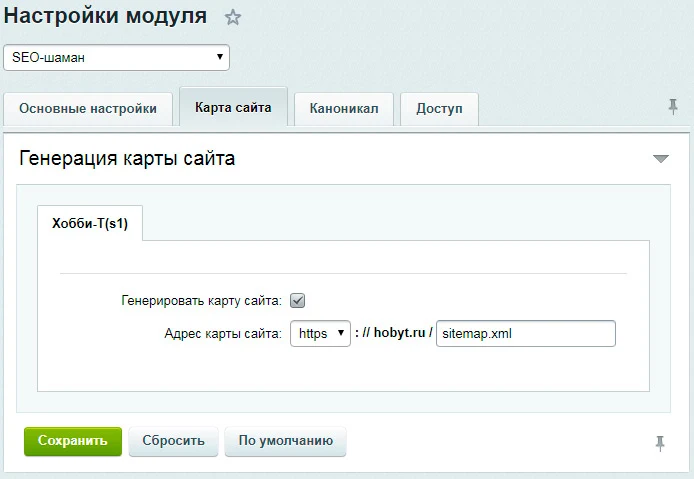
The second tab handles sitemap generation. Here you can enable sitemap creation and set the name for the resulting XML file. The main sitemap structure will include an entry named «sitemap_profiseo.xml» containing links to all pages where the module settings have been applied.
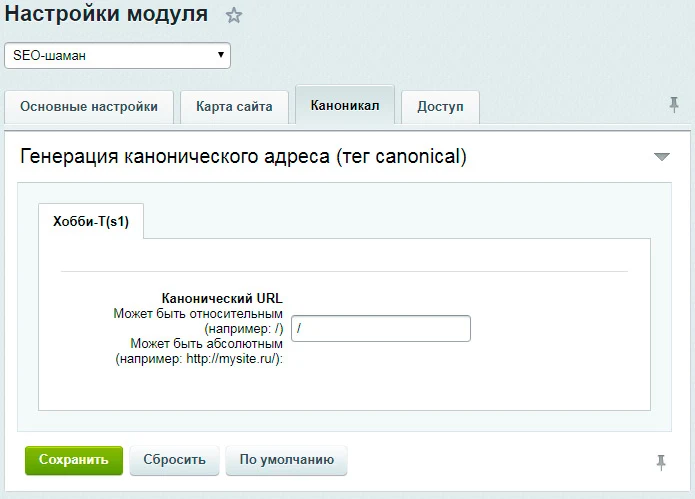
The SEO Shaman module by Profi enables the creation of unique pages based on filters and search queries. Its capabilities include automatic meta tag generation, clean URLs (SEO-friendly slugs), and breadcrumb navigation. The module settings feature a dedicated tab for configuring the path used to generate canonical addresses.
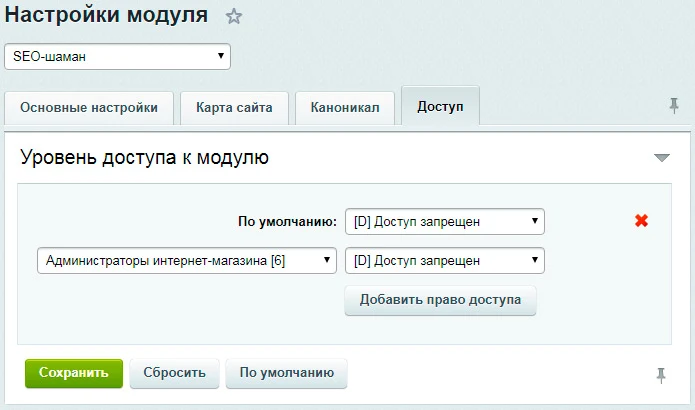
The fourth settings tab allows distributing access rights to the module among user groups.
After configuration, the module is ready for use. Operations are more efficient and convenient in the public section of the site, though identical actions can be performed in the administrative panel, as shown below.
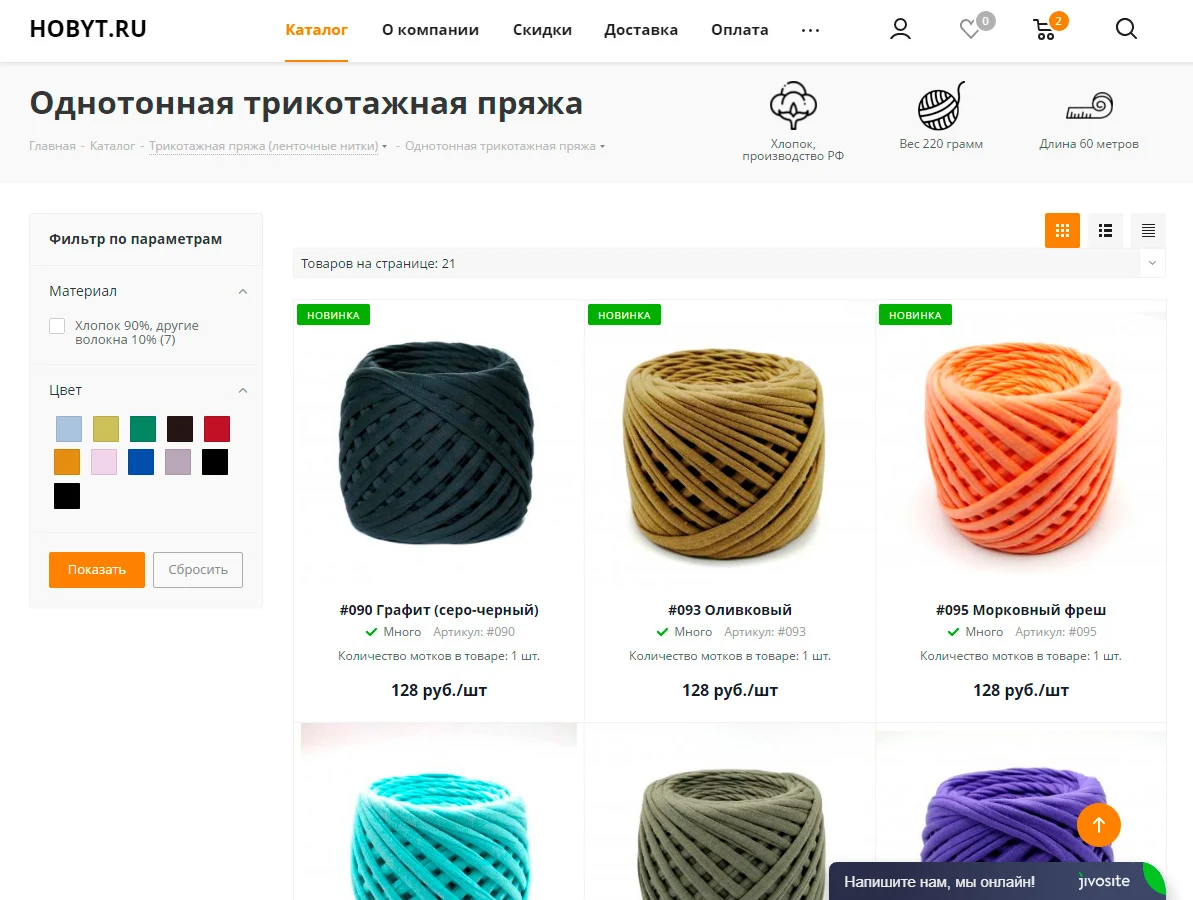
3. Example workflow: An SEO specialist begins optimizing the product group 'Knitted Yarn - Solid Color' (see Fig. 5).
Fig. 5. Product category without applying a filter.
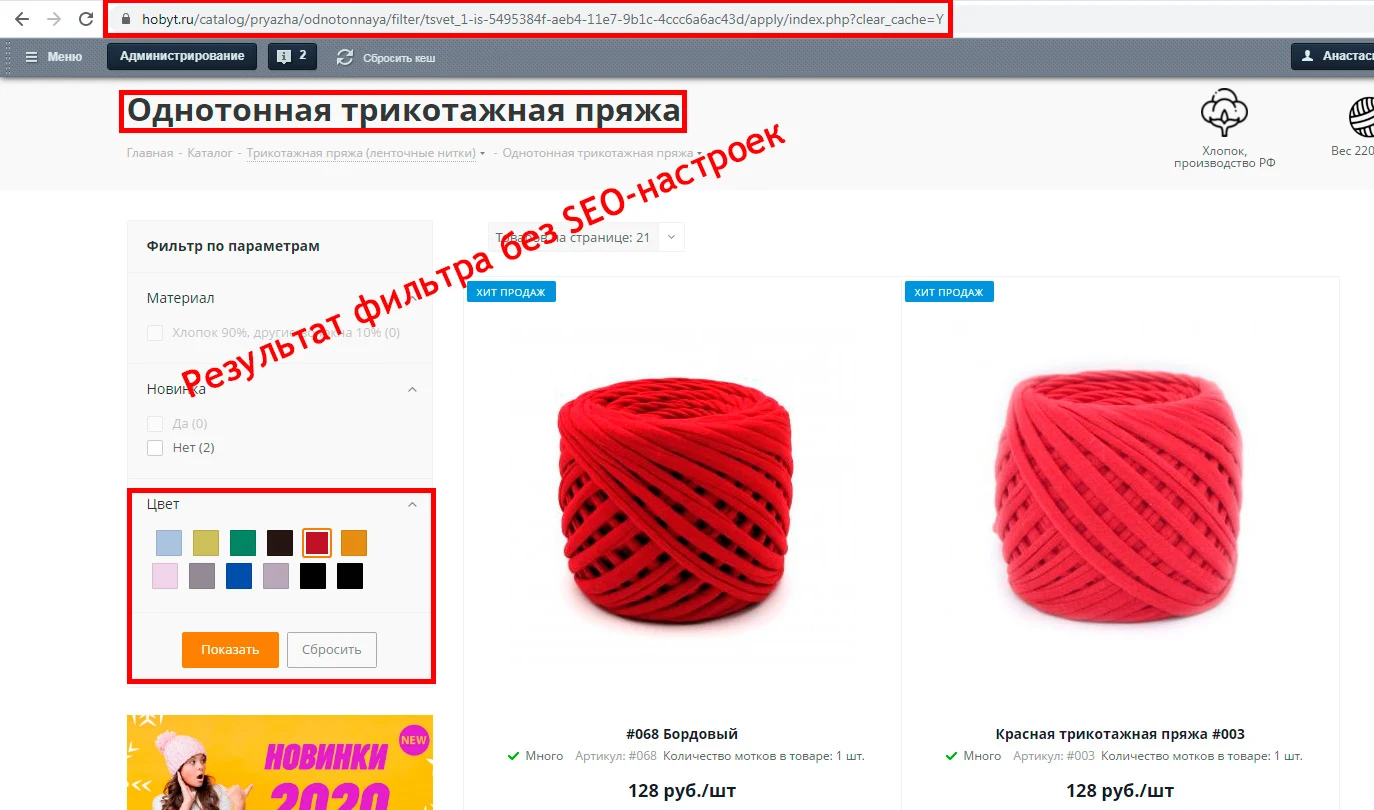
This example illustrates the formation of a search query group to create a unique landing page for solid-colored red knit yarn. The color filter includes the 'red' property.
Selecting this property and applying the filter generates a page whose URL consists solely of filter parameters. As shown in Fig. 6, the following issues are observed:
No human-readable URL (SEO-friendly URL) is present.
Page titles and meta data duplicate the content of the category where the filter was applied.
Fig. 6. Product category with an active filter.
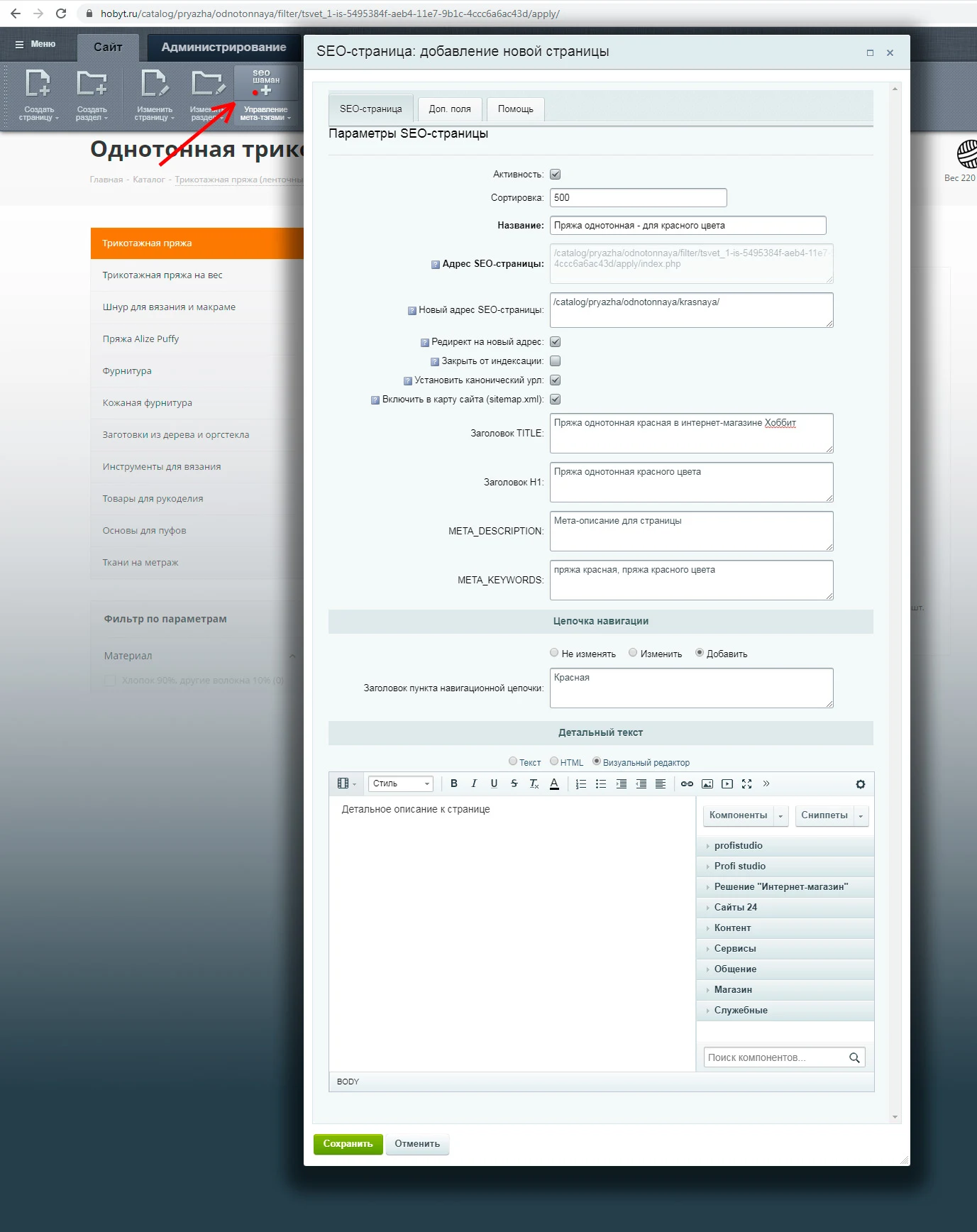
4. To convert the page into a landing page with unique data, click the control button for the 'SEO Shaman' module in the top panel. A red indicator on the button means the module settings have not yet been applied to this page. A green indicator signifies that the page is already configured (see Fig. 7).
Fig. 7. Module modal window with SEO page settings
The opened window allows a specialist to configure parameters for a specific page. Available options include:
Enabling or disabling the application of settings for the current page.
Setting the sorting index.
Entering a page name for quick search within the administrative panel.
Specifying a new relative page address to replace the current one.
Configuring automatic 301 redirect from the old address to the new one.
Blocking the page from search engine indexing via the robots meta tag.
Setting a canonical address by adding a link rel canonical tag with the specified URL.
Including the new page address in the sitemap.
Filling in values for the title, description, keywords meta tags, and the H1 heading.
Configuring the navigation breadcrumb title: leave unchanged, replace the current title, or append a new title to the chain.
Additionally, detailed text or values for any custom properties can be added to each page via the Additional Fields tab. To display this content on the page, the module component must be placed in the template or directly on the page.
SEO page properties can be rendered using the visual editor or via code. Select the component «SEO Shaman: page properties output» from the snippet panel and configure the required parameters. For more flexible implementation, use code, such as the example for rendering detailed page text.
When handling complex custom property values, it is recommended to engage qualified developers. To modify the output of property values, use the $arResult array, which contains data from the fields and properties of the SEO page.
Developers have access to a function that checks whether the current URL is an SEO page. Some instructions for working with the module are available on the «Help» tab within the page management window.
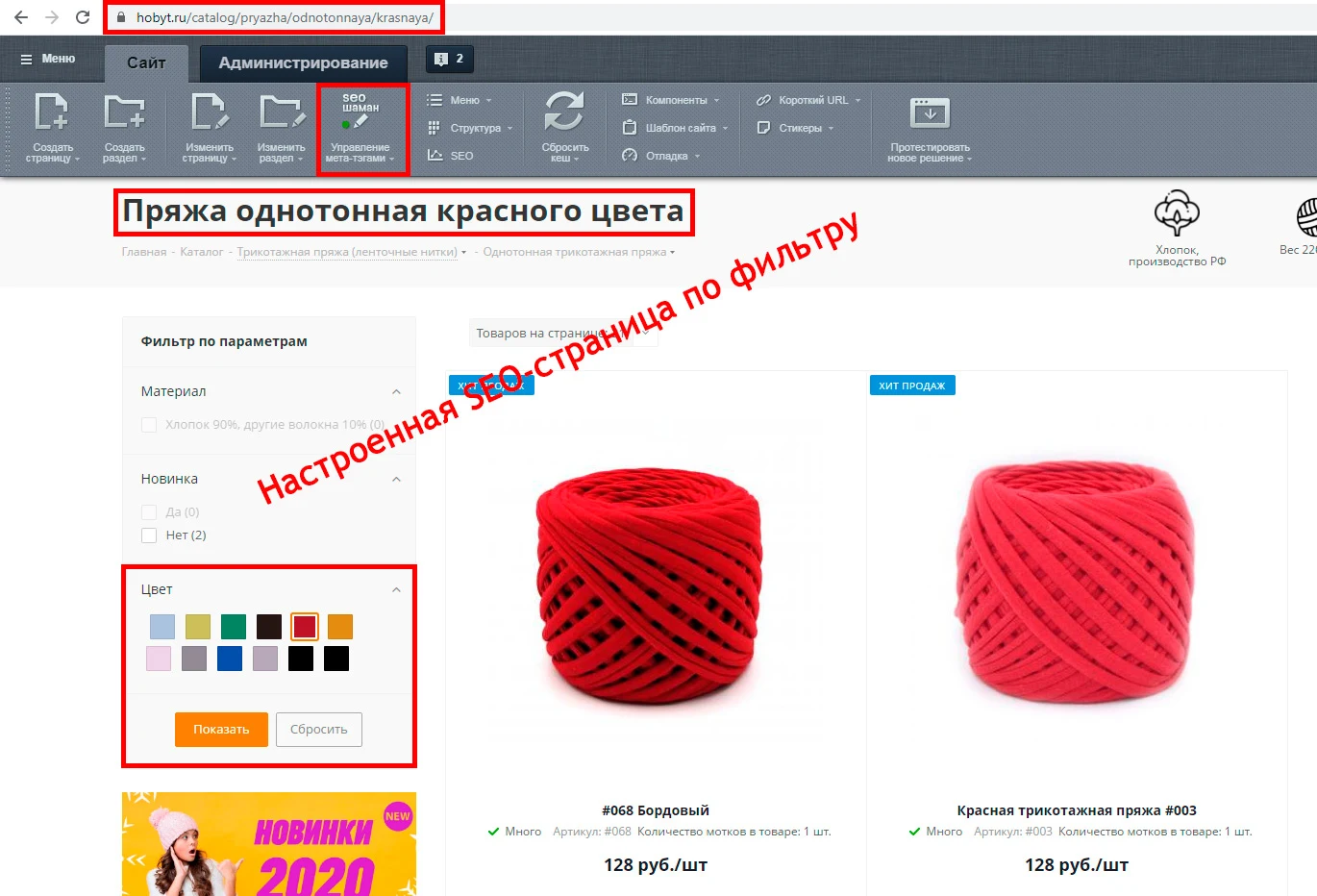
After filling in all settings fields, click the «Save» button. Changes take effect immediately, and the «SEO Shaman» module control indicator turns green.
Fig. 8. SEO pages with applied settings.
If needed, you can quickly remove specified settings via the 'SEO Shaman' module button in the 'Meta Tags Management' section by selecting 'Delete Meta Tags'.
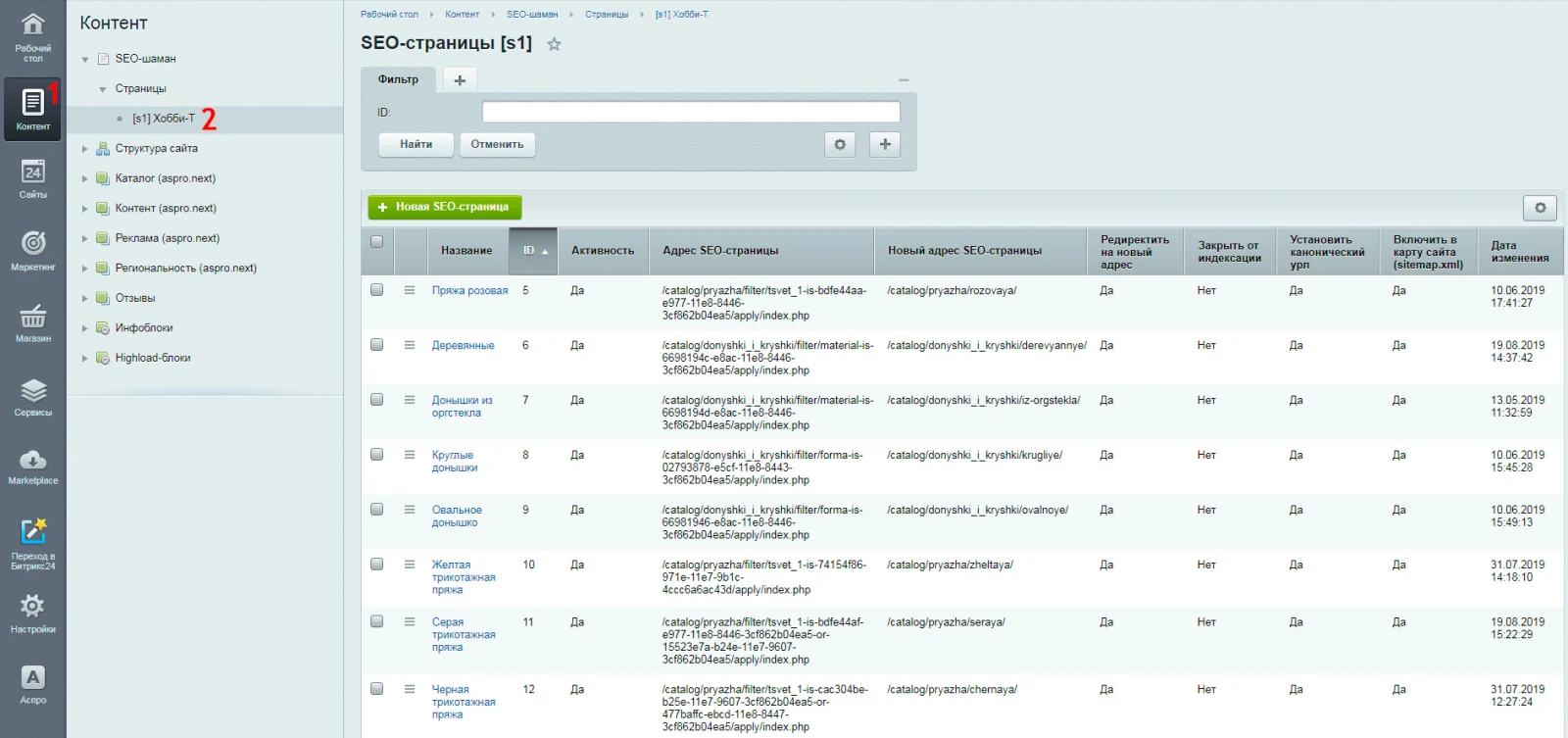
The described operations are also available in the site's administrative section: go to the 'Content' tab, then to 'SEO Shaman', and select the current working site from the list (see Fig. 9).
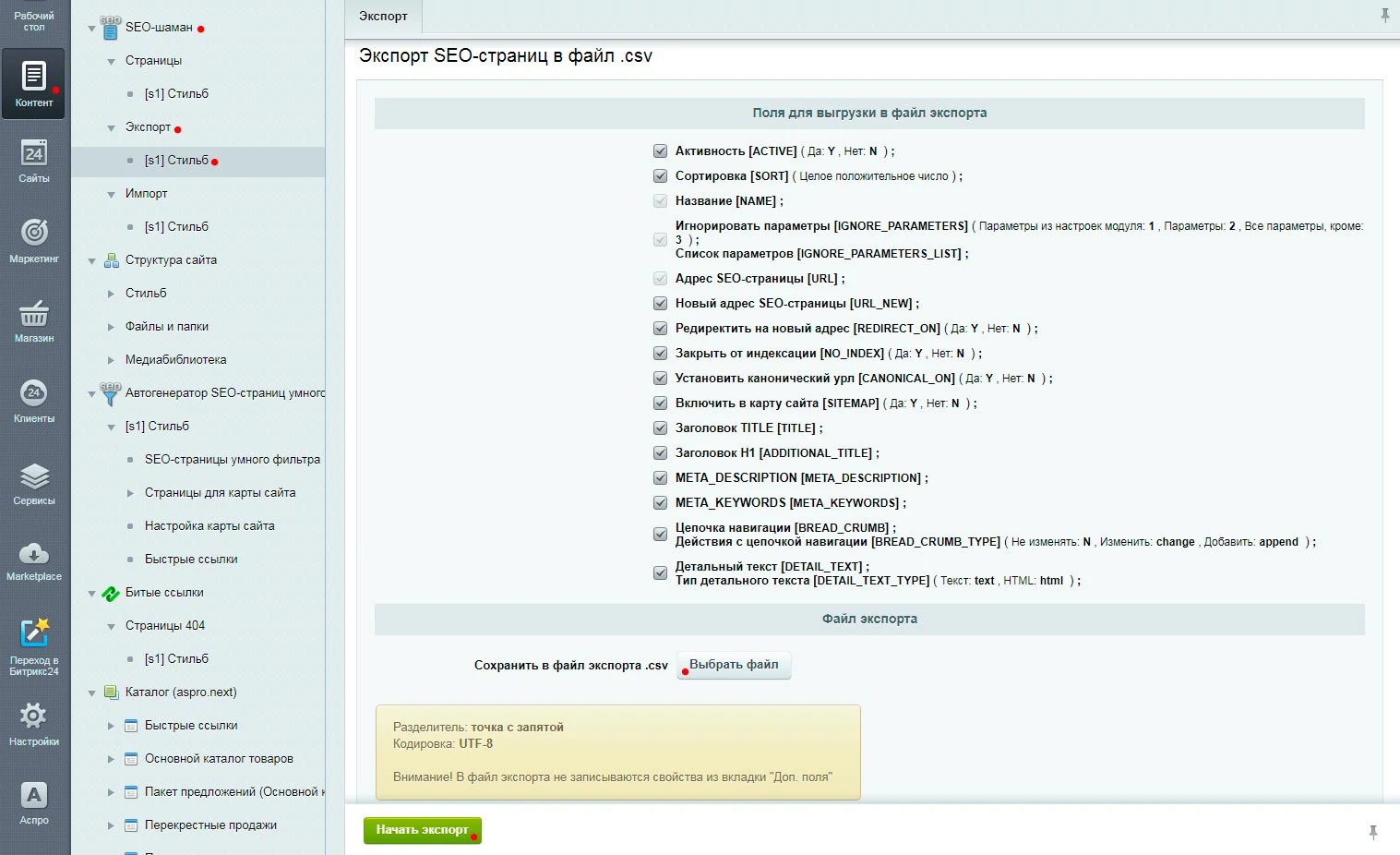
The table displays a list of SEO pages with their names and applied settings. Creating or editing any page opens a window with fields similar to the previously described interface. Working with a large number of pages is more convenient using spreadsheet editors like Excel, thanks to import and export functionality via CSV files. To export existing pages, navigate in the admin panel to: Content -> SEO Shaman -> Export -> Site.
Fig. 10. Export page for the SEO Shaman module.
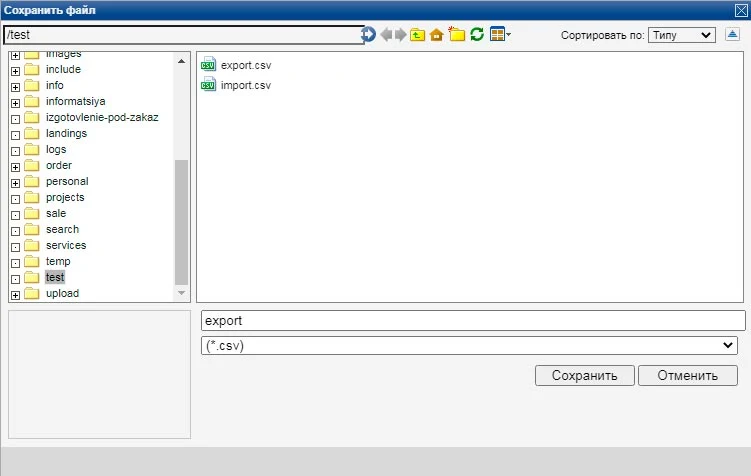
On this page, users select fields for export; all available fields are selected by default. The 'Ignore parameters' field automatically inserts the default value of 1 (based on module settings) if the specified parameter is missing from the data. The 'Choose file' button allows specifying the name and location of the file where export data will be saved (see Fig. 11).
Fig. 11. Exported data file window
Upon completion of the export, a link to download the generated file will be displayed.
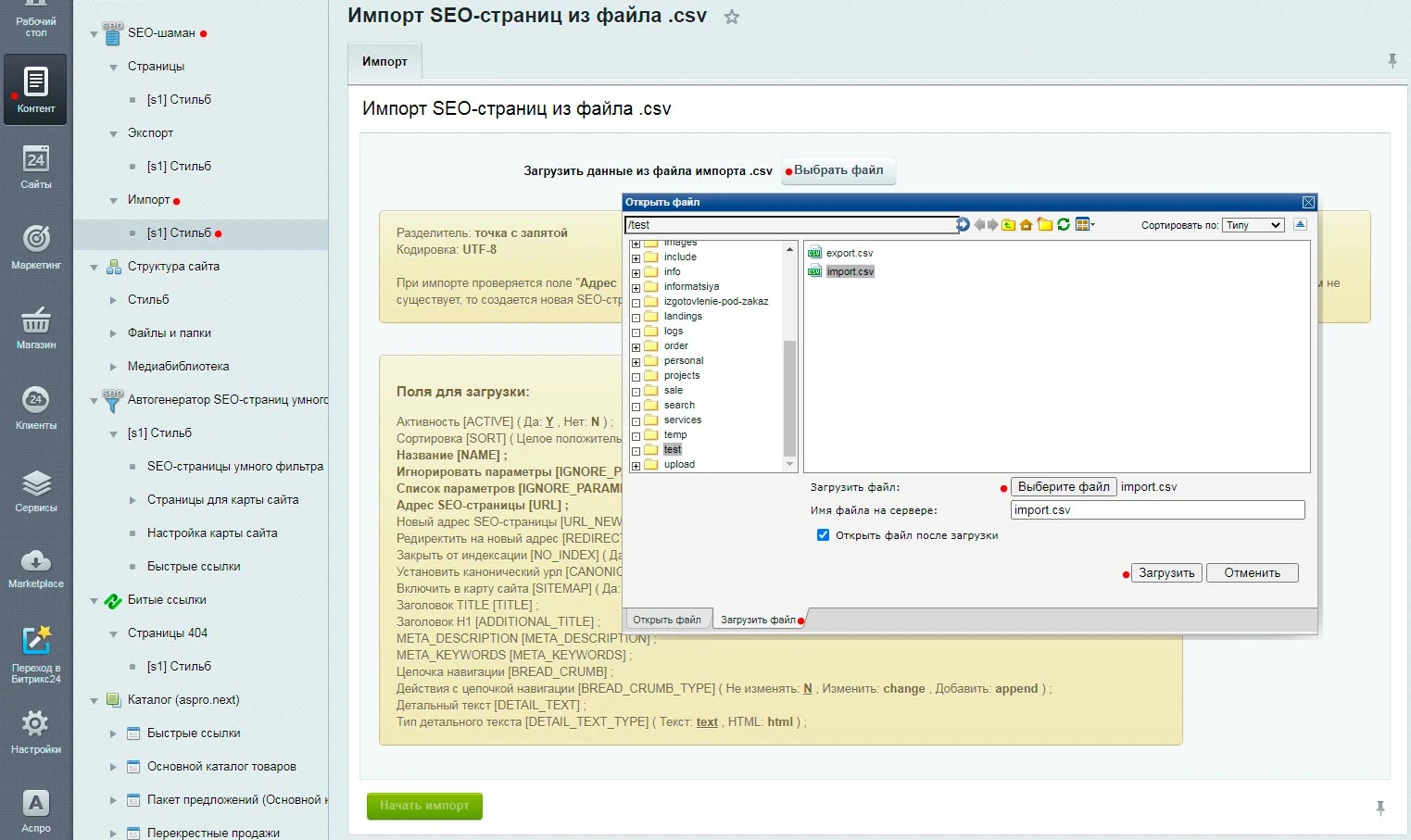
Data import follows the same procedure (see Fig. 12). Please note that the semicolon (;) is used as the field delimiter.
Using this symbol in your data will not cause conflicts. During import, the module analyzes the 'SEO Page Address' field. If a matching value is found, the record is updated. If no match exists, a new SEO page is created.
On the import page of the SEO Shaman module, a table displaying data from the file appears before the import procedure begins. It shows the data structure used for reading from the file and writing to the database.
A separate module for monitoring and finding broken links, Xenu, is available for SEO specialists. It operates based on hit analysis for pages returning a 404 error. The tool is reliable and works on a plug-and-play basis without requiring special configuration. It provides up-to-date information on broken links, their sources, hit dates, and the ability to set redirects.
General iT can handle the implementation of “SEO Shaman: unique pages for filters and search. With meta tags, SEO-friendly URLs, and breadcrumbs”, from installation to configuration and compatibility checks.
UPDATE HISTORY
What’s new
25 releases
2.5.1 (22.09.2026)Latest update
Bug fixes.
2.5.0 (09.06.2025)
1. The module has added a setting: Do not redirect to the new address of the SEO page for POST requests (this may be useful if forms are located on SEO pages).
2. For SEO pages with a new address, initialization of Request from variables $_GET, $_POST, $_FILES has been added for the class \Bitrix\Main\Context.
3. If the module setting "Ignore parameters in address (list of GET parameters separated by commas)" was not filled in, then in some cases the ignored parameters did not work: clear_cache, bitrix_include_areas, PAGEN_1, PAGEN_2. Fixed.
4. Sitemap: Sitemap generation settings and scripts have been improved. For the Sitemap index file, a restriction has been added - it can only have the .xml extension.
5. Minor improvements and enhancements.
Attention!!! Before installing the update, it is recommended to perform a full backup of the site. After installing the update, be sure to check the previously created SEO pages of the module for correct operation, as the functionality for working with addresses has been improved. Also check the module settings for the sitemap and sitemap generation.
2.4.0 (11.12.2024)
Minor updates and improvements:
1) Settings: Update the sitemap if it was modified or generated by the "Search Optimization (seo)" module. The setting was not working in newer versions of 1C-Bitrix. Fixed.
2) Agents for automatic sitemap generation
3) sitemap.xml
2.3.8 (28.10.2024)
In the site administration section, the SEO pages list now includes:
1. Detailed text
2. Detailed text type
2.3.6 (12.04.2023)
Fixes for sites using Windows-1251 encoding
2.3.4 (02.02.2023)
Fixes for module operation on PHP 8.1
On the SEO page creation or editing page, the "Navigation chain" block has been modified (if "Do not change" is selected, the "Navigation chain item title" field is not displayed).
2.3.3 (23.09.2022)
Fixed module errors that started appearing in newer versions of 1C-Bitrix
Called after the module sets metadata and other properties of the SEO page.
Can be used to perform certain actions after the module sets metadata and other properties of the SEO page.
2.2.0 (21.10.2021)
The module includes a setting to update the sitemap if it was modified or generated by the "Search Optimization (seo)" module.
The module includes a setting to create an agent for automatic sitemap generation.
Improvements to module settings and changes to default module settings.
2.1.0 (08.10.2021)
The module has added a setting: Output the address from the "SEO Page Address" field without index.php.
Improvements in working with old URLs (pages opened via the address from the "SEO Page Address" field) that do not end with "/" or "/index.php" (e.g., "/test.php").
Attention! Before installing the update, it is recommended to perform a full backup of the site. After installing the update, be sure to check the previously created SEO pages of the module for correct operation, as the functionality for working with addresses has been improved.
2.0.0 (20.01.2021)
Added functionality for exporting and importing SEO pages.
Improvements and optimization of address handling.
Added SEO page settings functionality for ignoring parameters: 1) ignore parameters from module settings; 2) ignore parameters; 3) ignore all parameters except.
Improvements to the pop-up window for editing SEO pages in the public part of the site.
Optimization of the profistudio:seo.page component code.
Performance optimization.
Attention! Before installing the update, it is recommended to perform a full backup of the site. After installing the update, be sure to check the previously created SEO pages of the module for correct operation, as the functionality for working with addresses has been improved.
1.2.4 (25.09.2020)
When creating a new SEO page, the ability to fill fields with values from the last saved SEO page has been added.
The ability to copy an SEO page has been added.
In the site administration panel, the filter functionality on the SEO pages list page has been improved.
In the site administration panel, the SEO pages list functionality has been improved.
User properties handling has been improved.
1.2.2 (21.07.2020)
For the module's demonstration mode, a limitation has been added: the maximum number of SEO pages is three.
1.2.0 (18.02.2020)
Attention! The functionality for working with new addresses has been changed!
To work with new addresses, you must first create settings. Path: Settings -> Product Settings -> Module Settings -> SEO Shaman
Page address handling has been improved.
Sitemap handling has been improved.
Attention! Before installing the update, it is recommended to perform a full site backup. After installing the update, be sure to verify the correct operation of previously created SEO pages of the module, as the functionality for working with addresses has been changed.
1.0.22 (21.10.2019)
Improvements for working with page addresses
1.0.21 (02.07.2019)
Improvements for working with page addresses
1.0.18 (04.04.2019)
Improvements and fixes when auto-composite is enabled.
1.0.17 (22.01.2019)
Increased maximum field sizes: "SEO Page Address", "New SEO Page Address", "TITLE Header", "H1 Header", "META_DESCRIPTION", "META_KEYWORDS".
Added ability to change or add the last item in the navigation chain.
1.0.12 (24.10.2018)
Fixed issue with duplicate canonical address on the page
1.0.11 (30.08.2018)
Fixed handling of short addresses. Now, when redirecting from the main address to a new address, parameters excluded in the module settings are added.
The 'Sitemap with Auto-Generation and Filters' module for '1C-Bitrix: Site Management' provides automatic creation and updating of the sitemap.xml file. It allows filtering URL elements and sections of information blocks for inclusion in the sitemap based on specified rules, parameters, and properties.
The module automatically applies individual SEO settings to smart filter pages generated based on specified conditions. It supports various templates that can include product and offer property names and values, as well as section names, section properties, and descriptions.
BoostReviews is a module for 1C-Bitrix online stores designed to increase the number of product reviews without additional costs. The solution is built on the user experience of major Russian marketplaces, making the review process simple and familiar for buyers. It helps improve brand reputation, service quality, and drive sales.
The Rant SEO Filter module transforms standard results from the 1C-Bitrix smart filter into managed SEO pages. The solution provides short URLs, unique H1 tags and meta tags, along with a flexible template system for sections, tags, and sitemaps. SEO data updates dynamically without page reloads.
Key capabilities:
Support for clean URLs instead of long addresses like /filter/.../apply/.
The picsel.schema module generates Schema.org microdata for products and navigation breadcrumbs within the 1C-Bitrix environment. Built using D7 ORM, strict typing, and secure output practices, it meets current search engine standards.
The module automatically creates Product markup by extracting the item name, detailed description, image, SKU, and brand from element properties.
The SeoAreas module allows placing Yandex.Metrica, Google, and other scripts in required site areas, specifically the head or body sections. Installation and management are performed via the administrative interface without modifying page source code or templates.
The displayed price covers the solution itself. Platform licensing, installation and customisation are checked separately. If the page offers bundles, select the required option before submitting a request.
How do I check compatibility?
Compare the supported editions and solution version in the technical details with your project. Before installing on a live website, we recommend making a backup and checking the solution in a test environment.
Is there a trial?
The developer lists a trial of 7 days. The trial button opens the installer in your website control panel. Check the required features and compatibility before purchasing.
How much does this solution’s renewal cost?
The current renewal price is 6,450 ₽. Before you order, a manager will confirm the renewal period and whether it applies to your licence.
Can you help with implementation?
We can help install the module, check its settings and verify how it works in your project. Compatibility with other customisations and the scope of work are assessed before we begin.
Your cookie choices
Necessary cookies support sign-in, your cart and security. Optional analytics helps improve the website and starts only with your permission.
Our metrika.git.ru system: public pages, a random identifier, device and interaction events. Form contents, account and payment pages are excluded. Raw events: up to 90 days. Operator: General IT Rus LLC, INN 2310208877.
Your browser requests no tracking: analytics is off.