
Module
Sotbit: Smart SEO Filter – Meta Tags, Titles, Sitemap
The Sotbit Smart Filter SEO module is designed to increase online store traffic. The tool operates by generating numerous unique pages for smart filters.
24,990 ₽
↗Аккаунт в General iT
Войдите или создайте аккаунт для управления услугами в личном кабинете.
Страны не найдены. Попробуйте другое название или код.

MODULE FOR 1C-BITRIX
Pantheon: website management via an AI agent. MCP server
The MCP server for 1C-Bitrix connects AI agents, including Claude, Grok, Cursor, and other neural networks, to the website. Immediately after installation, the agent has access to 191 ready-made tools: catalog management, prices and stock, orders and customers, content, SEO, and analytics.
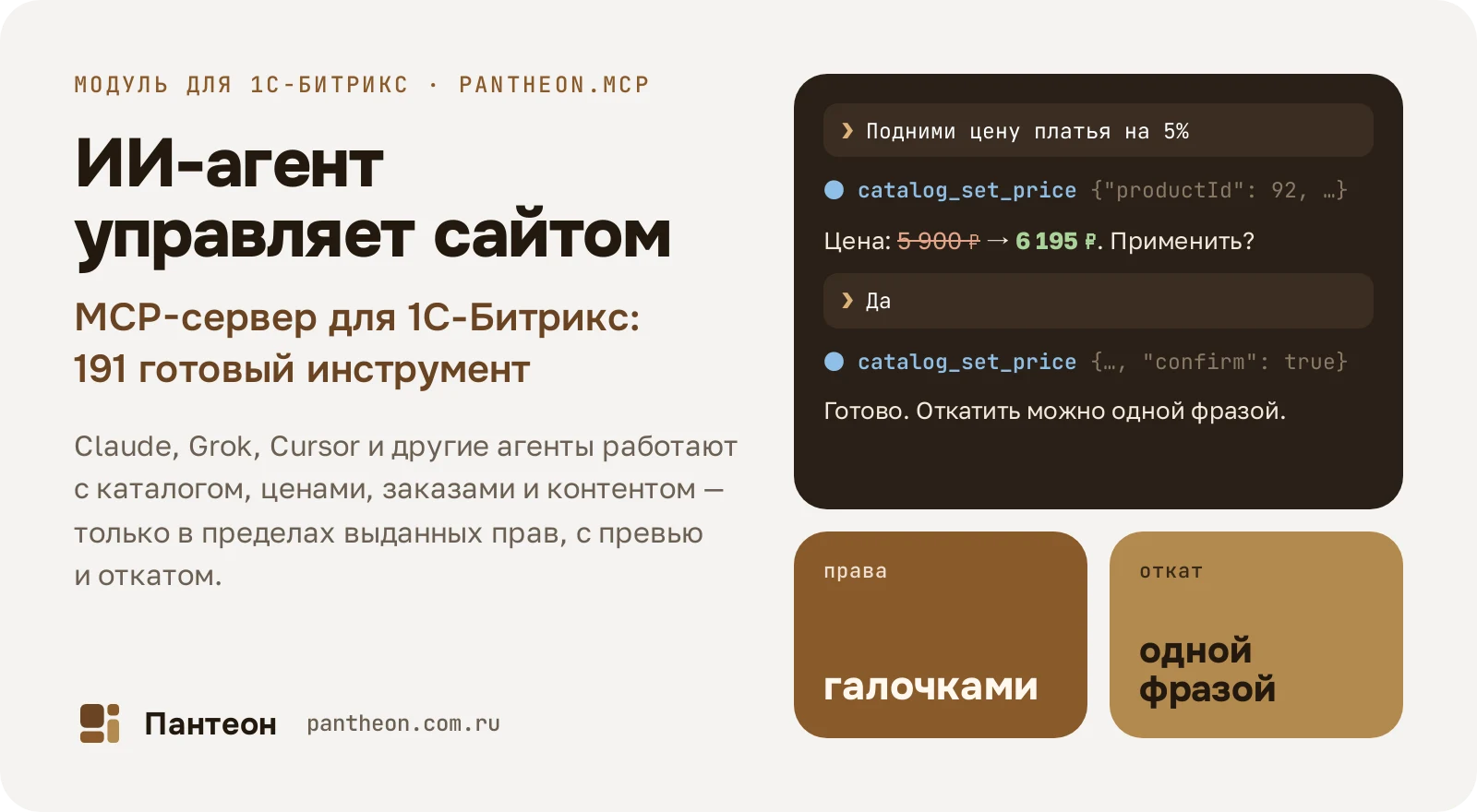
The MCP server for 1C-Bitrix connects AI agents, including Claude, Grok, Cursor, and other neural networks, to the website. Immediately after installation, the agent has access to 191 ready-made tools: catalog management, prices and stock, orders and customers, content, SEO, and analytics. No programming is required: access rights are granted in the admin panel by checking boxes for specific site sections. The agent first displays proposed changes and executes them only after confirmation. Every call is logged. Changes made by 48 tools can be rolled back with a single phrase.


AI agents can independently perform tasks such as finding products without images, updating catalog prices, or processing orders within a week. However, they require access to the website, and sharing an administrator password with a neural network poses security risks.
The Pantheon module addresses both issues. It connects the agent to the website via the MCP (Model Context Protocol), granting only the specific permissions you authorize. Tasks are defined in natural language. The agent autonomously selects the necessary tools, displays the planned changes, and executes actions only after your confirmation.
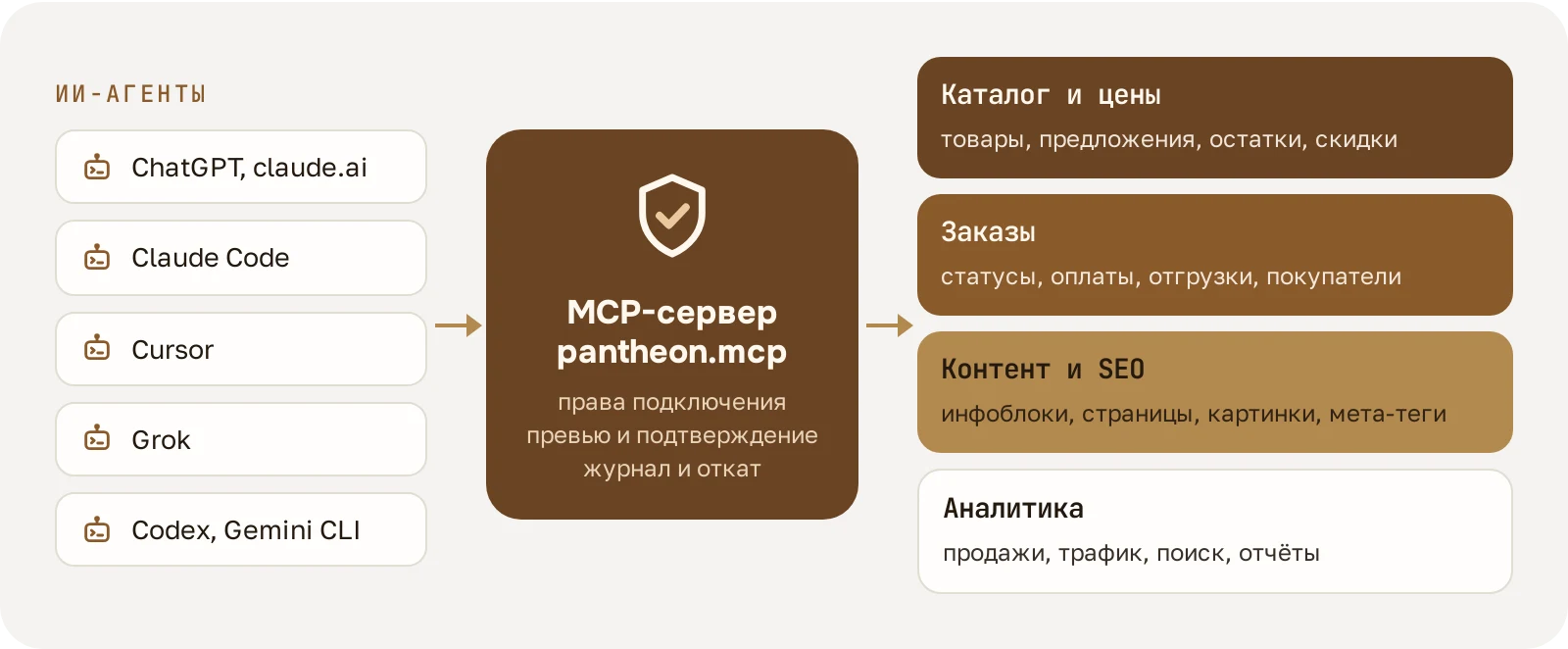

Pantheon: website management via an AI agent. MCP server.
A manager requests adding a dress in three sizes. The agent generates a preview, creates a product listing with trade offers, and independently verifies the result.
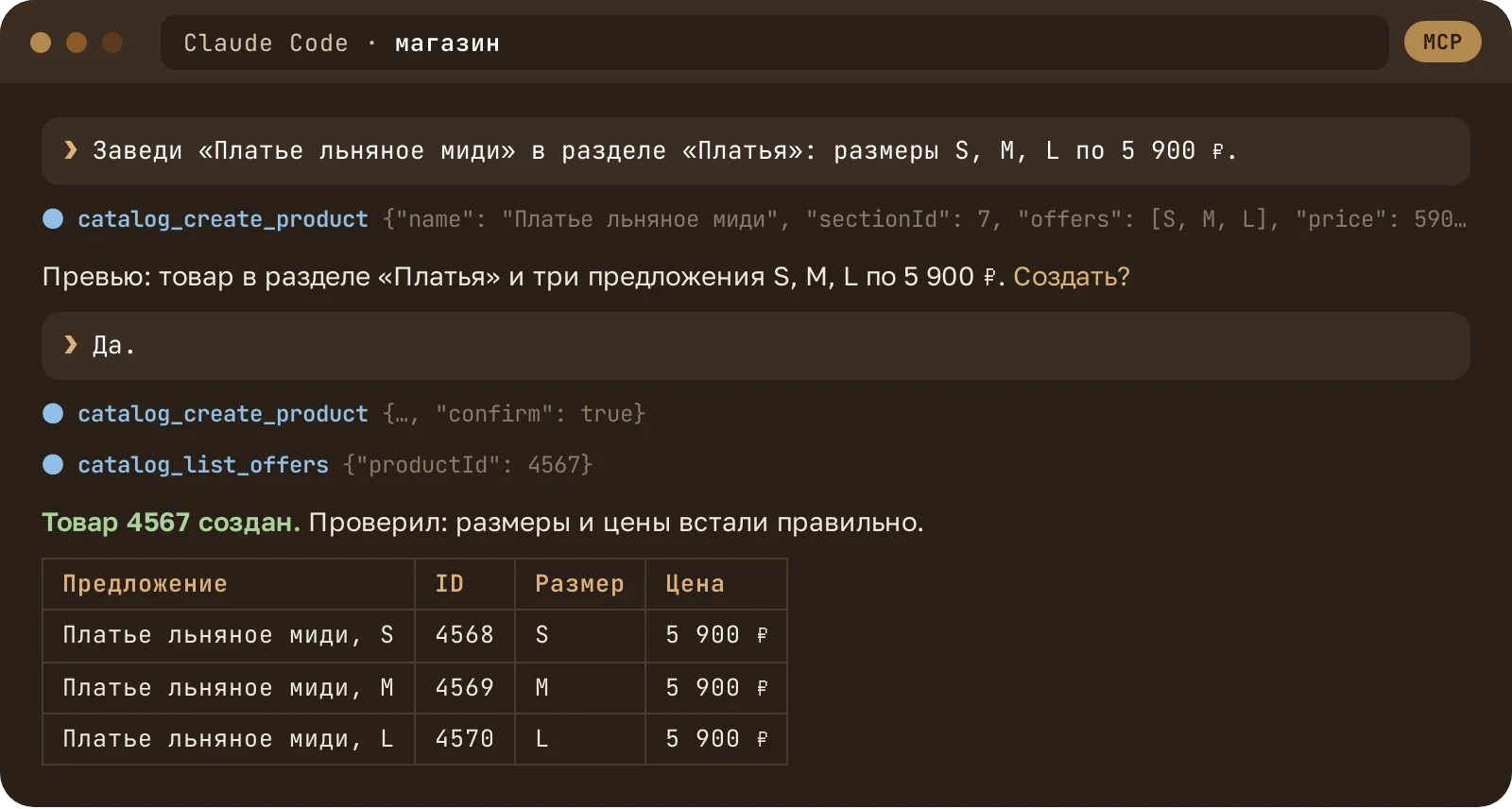
Pantheon: a module for website management using an AI agent. MCP server.
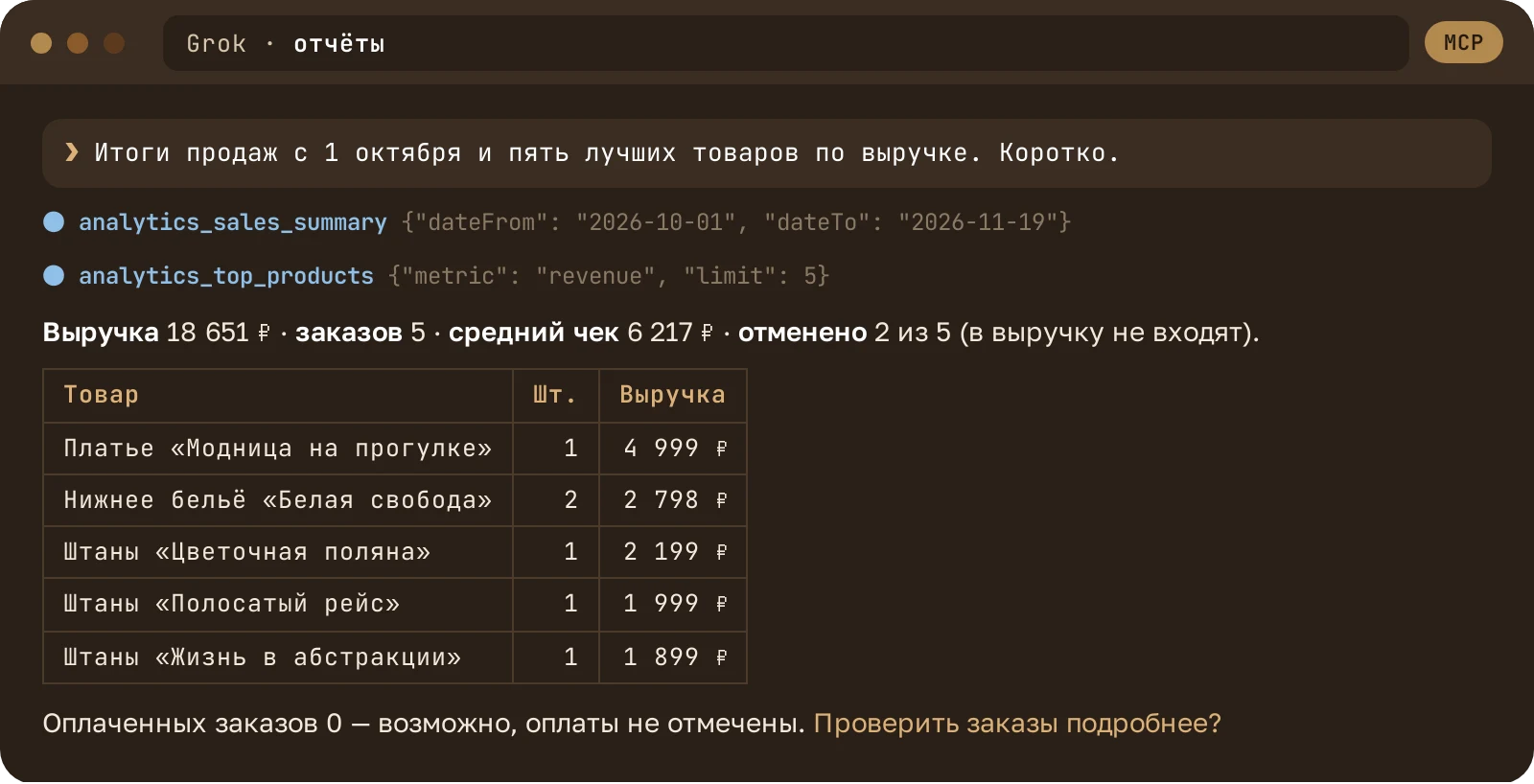
The agent also checks product cards in the section, excluding verification of price, images, and text descriptions. It identifies abandoned carts, responds to "where is my order" inquiries, populates SEO fields, and edits pages. Ready-made dialogue examples are available in the documentation.

The Pantheon agent operates strictly within the permissions granted by its connection. If permissions are insufficient, the agent makes no changes to the system and informs the user about available capabilities and steps that can be taken.
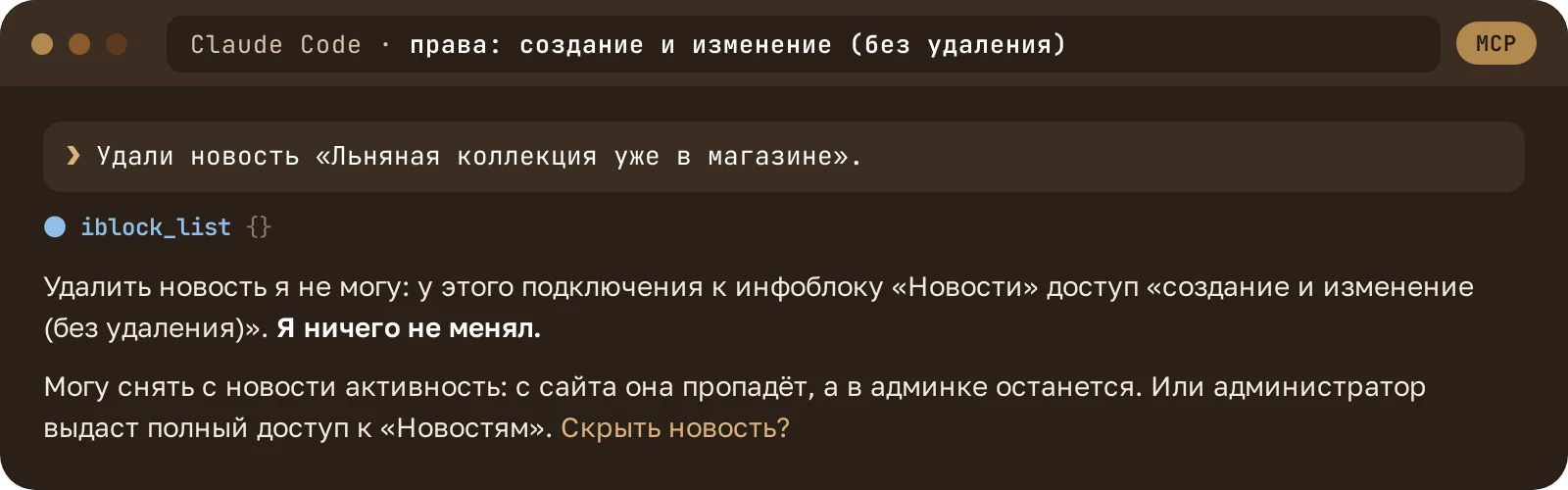

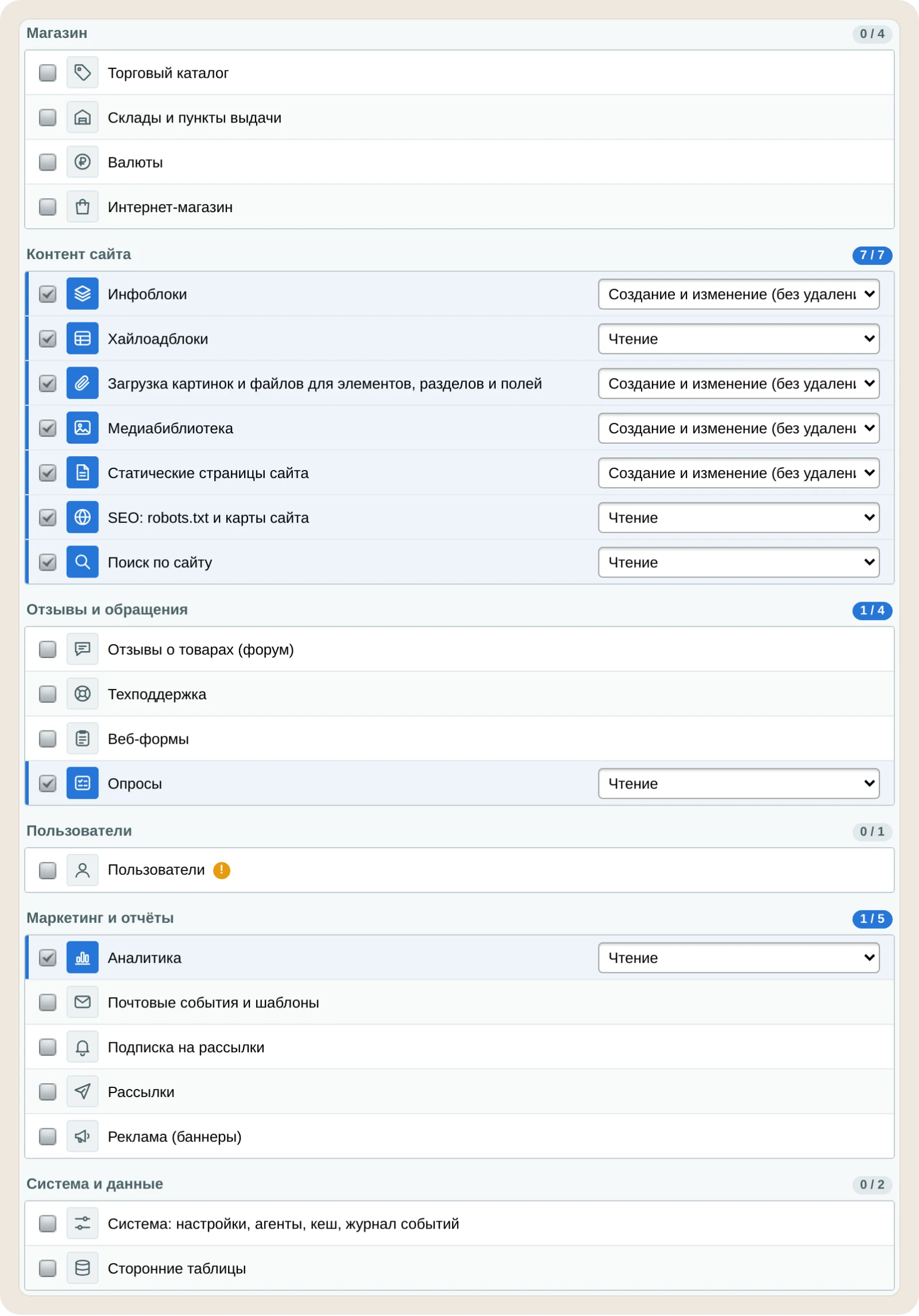
Access rights are configured separately for each connection. Selection is made from 23 site sections: information blocks, high-load blocks, trade catalog, orders, pages, media library, web forms, and others. For each section, an access level is set: read, change, create, or full access. In the Detailed settings mode, only specific selected information blocks and properties hidden from the agent are available. The granted rights cannot exceed the privileges of the administrator who created the connection.


Read-only mode
The agent views product data, orders, and reports without making any changes. Starting with this mode is recommended.

Pantheon: website management via an AI agent. MCP server
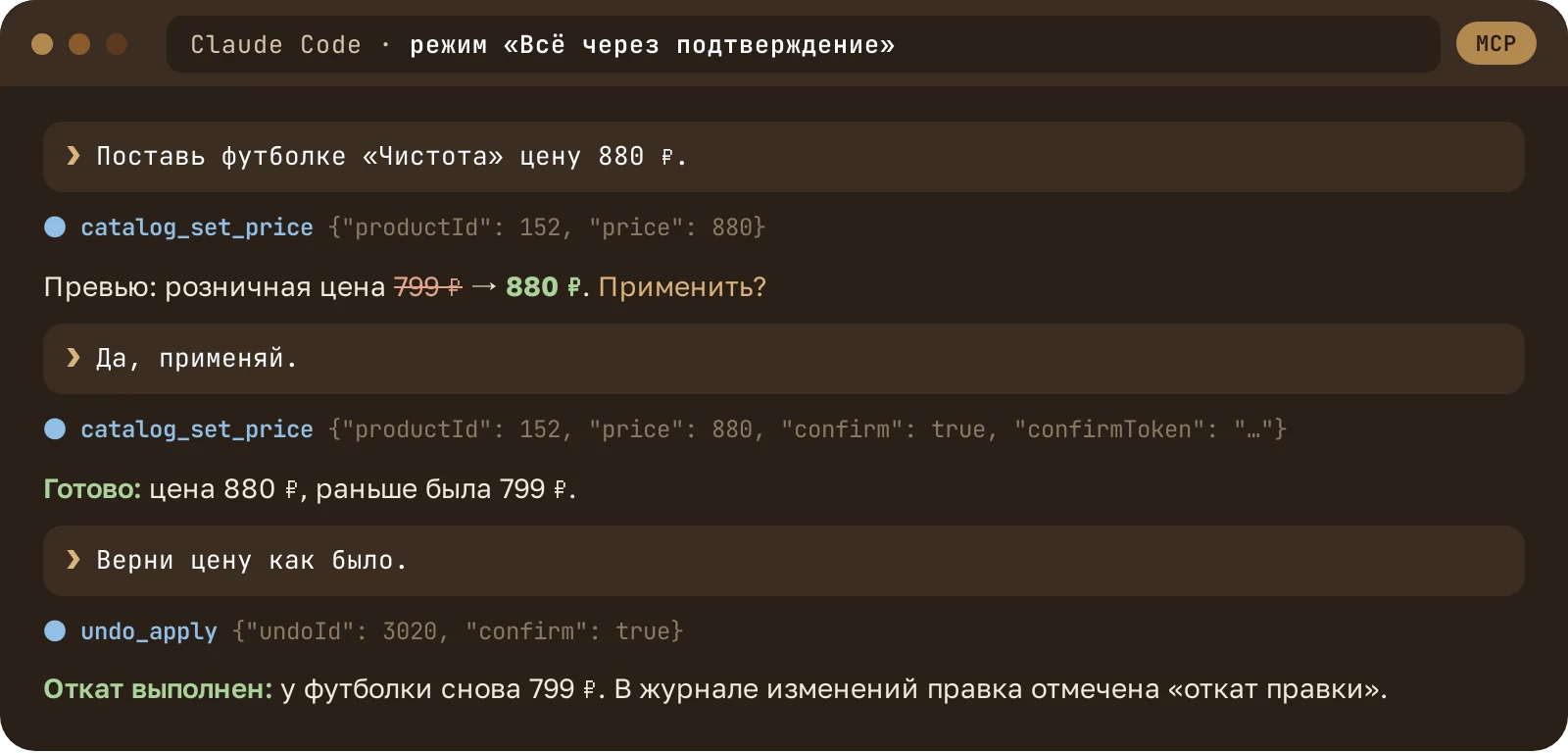
The "Everything via confirmation" principle ensures change safety. Any edit first generates a preview showing the "before → after" state. Changes are applied only after a subsequent call using a one-time token. If the system determines in advance that an edit is invalid, it rejects the request before generating a preview.

Pantheon: website management via an AI agent. MCP server
Human confirmation
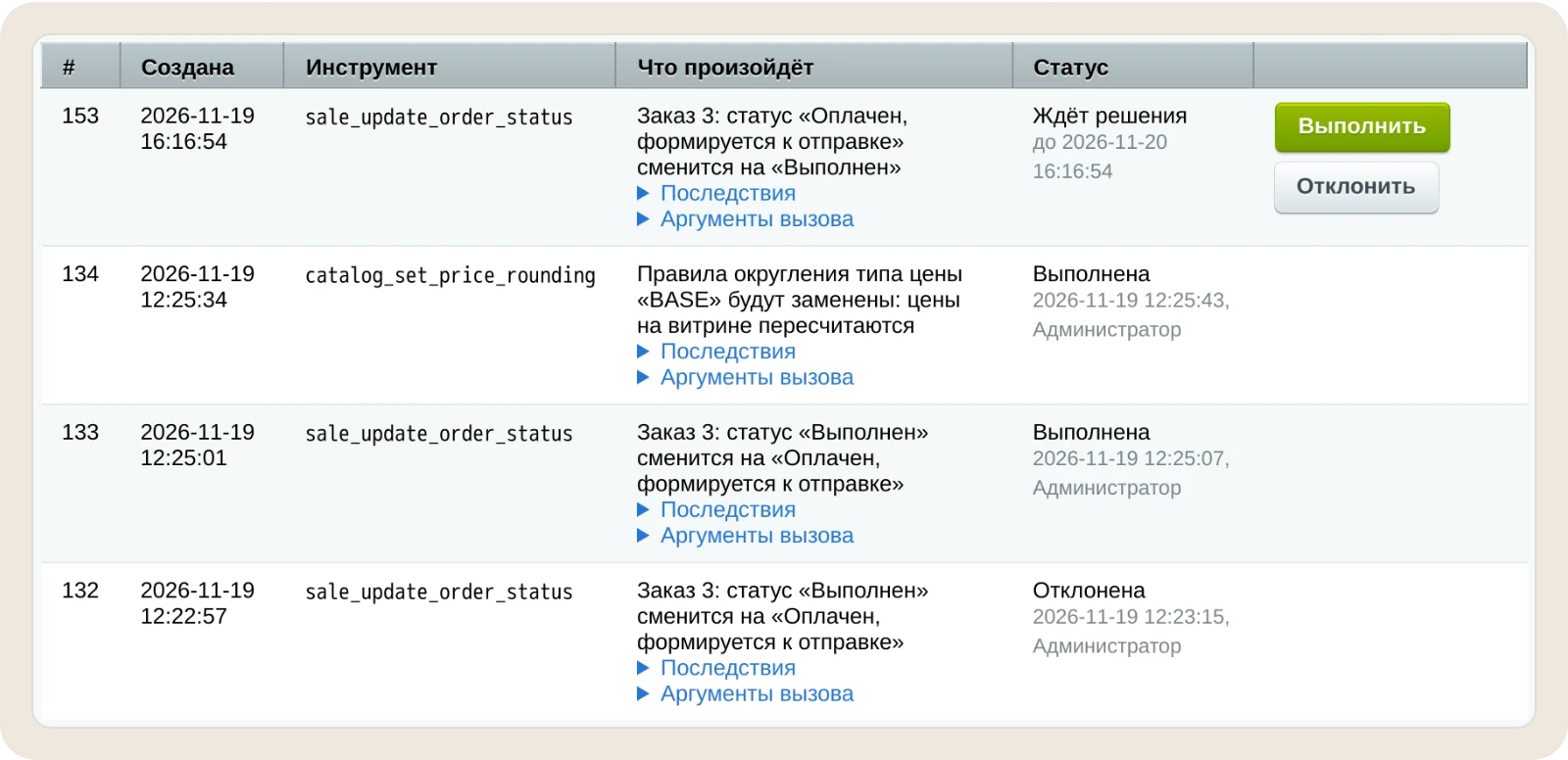
Critically important changes, such as order status updates, are not applied automatically. They are held pending a decision by an administrator in the control panel. Actions for these items are available via the 'Execute' and 'Reject' buttons.

Logs record site changes in the format "was → became" alongside the connection name. Each individual agent invocation via the MCP protocol is logged separately.

Pantheon: website management via AI agent. MCP server
Reverting changes
The agent reverts edits for 48 tools using the command phrase "return as it was". If a specific edit cannot be reverted, the agent warns the user about this limitation before confirming the action.

Pantheon: website management via an AI agent. MCP server
Personal data
Customer names, phone numbers, and email addresses remain hidden until the connection is granted the 'Users' permission. Access to this information can be blocked at any time.

Pantheon: website management via an AI agent. MCP server
Security and access restrictions are implemented using time-limited tokens. Authorization relies on an IP address whitelist, and request frequency limits are configurable. The system automatically blocks requests originating from external web pages.

Red zone
The agent modifies Bitrix settings, background processes, cache, and website pages exclusively within the bounds of white lists approved by the administrator.
Price adjustments and subsequent rollbacks in the "Everything via confirmation" mode are executed only after mandatory approval.

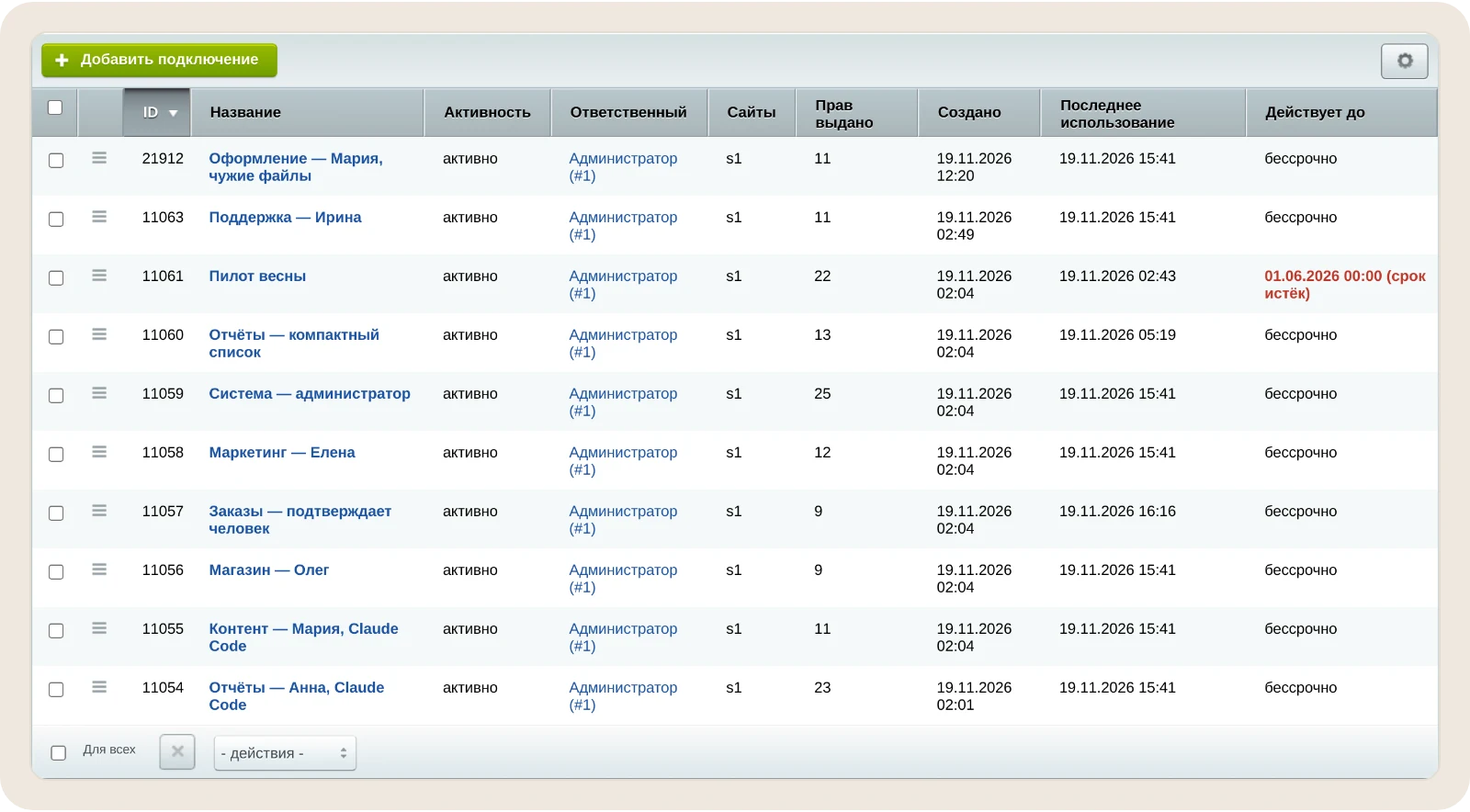
The Pantheon module provides centralized website management using an AI agent via the MCP protocol. The system allows configuring individual connections for each agent and employee, specifying unique access rights, validity periods, and assigning responsible persons.
Access rights are configured separately for each site section. For every section, the access level is specified and the corresponding option is enabled.
Pantheon: website management via an AI agent. MCP server
Connection modes are activated by setting checkboxes in the interface.
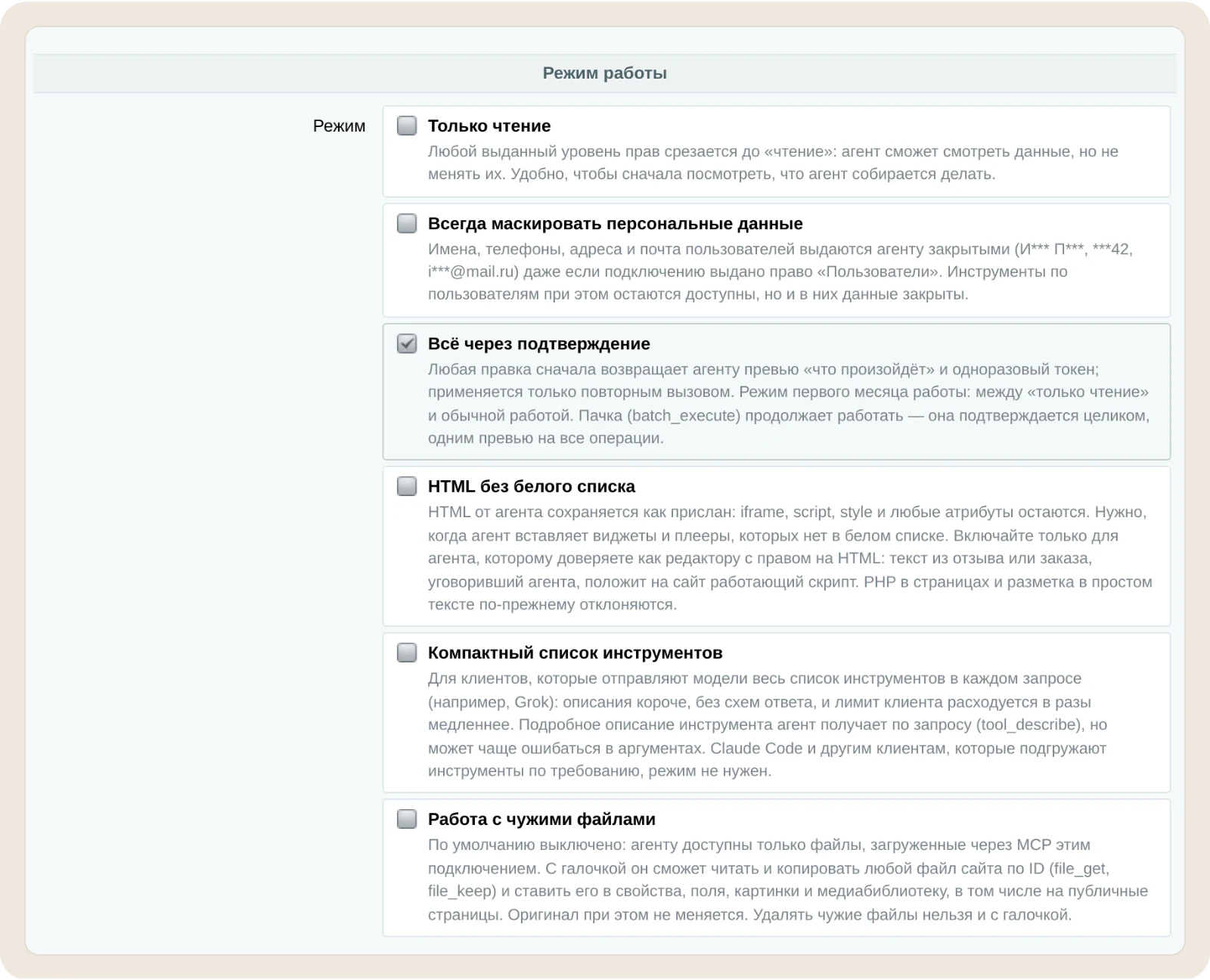
Pantheon: website management via an AI agent. MCP server.
The change log records the author, date, and content of changes, along with markers for "revert change" and "approved".
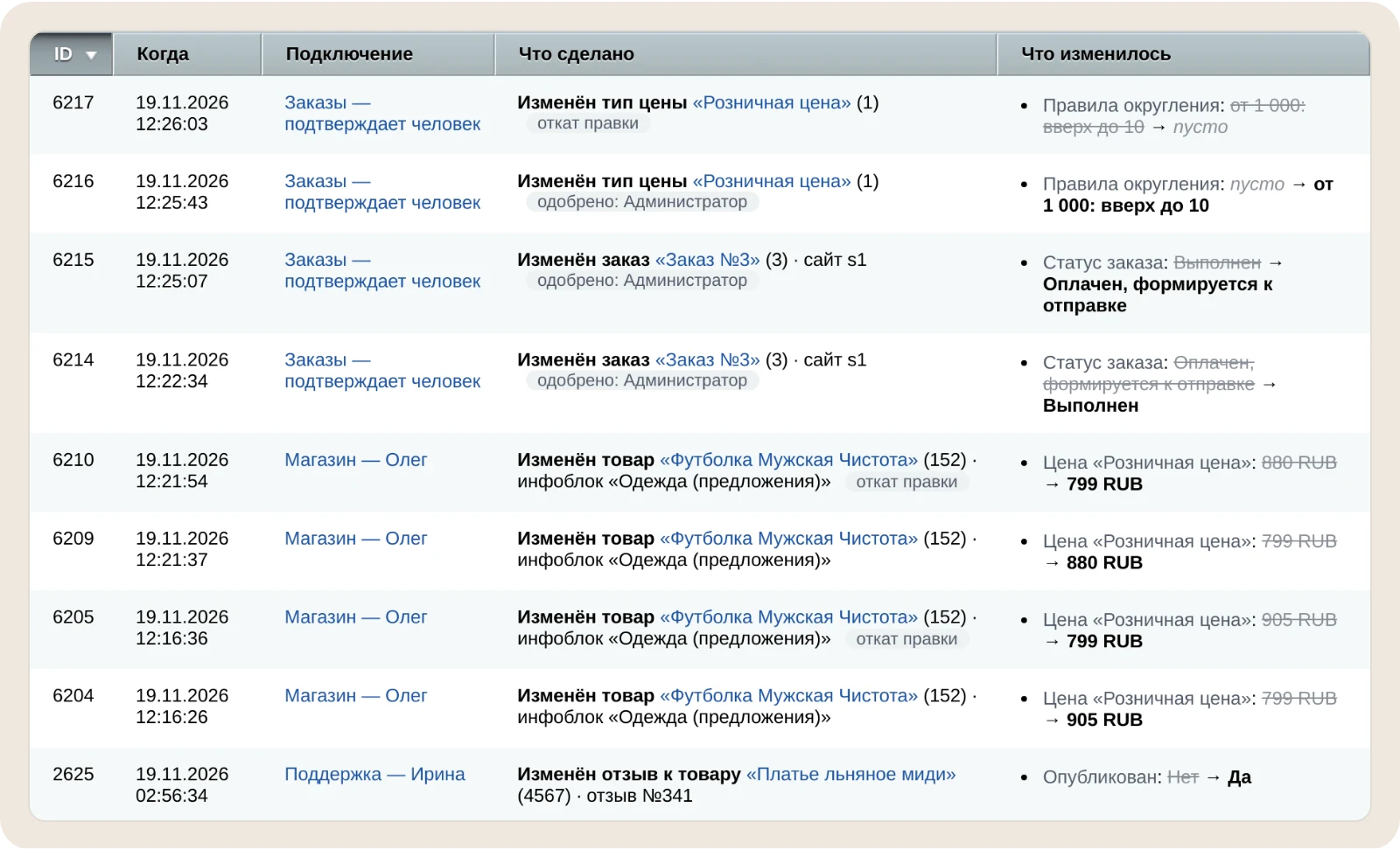
Pantheon: website management via an AI agent. MCP server
Queue of edits awaiting human resolution.
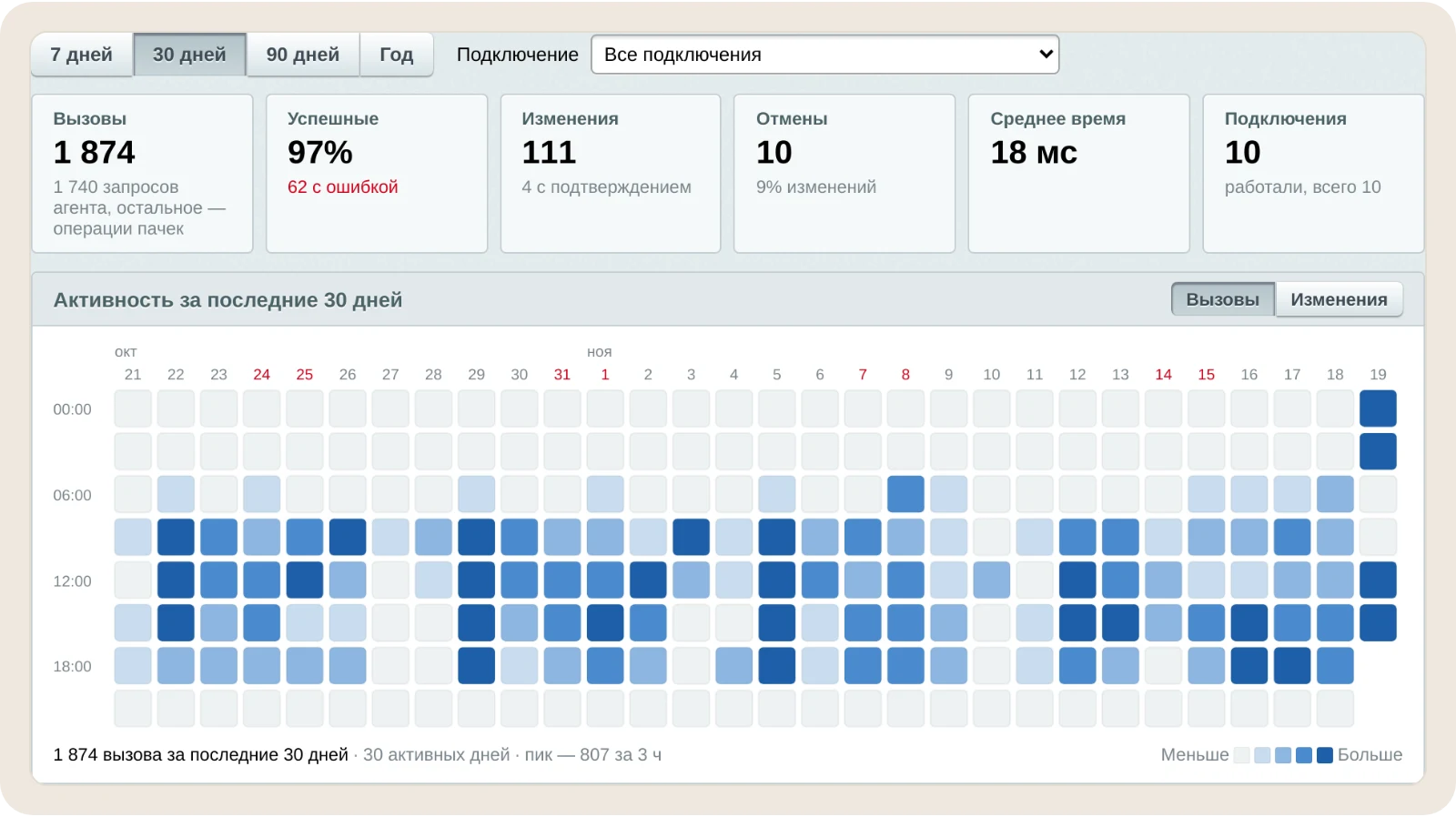
Pantheon is an MCP server module for website management via AI agents. It provides detailed statistics including the number of executed calls and edits, the error rate, and data on agent uptime.

An MCP server can be assembled independently, but then a programmer must write code separately for each tool, handle permission checks, implement action confirmation, and maintain an operation log. This Pantheon module includes all these components ready to use.
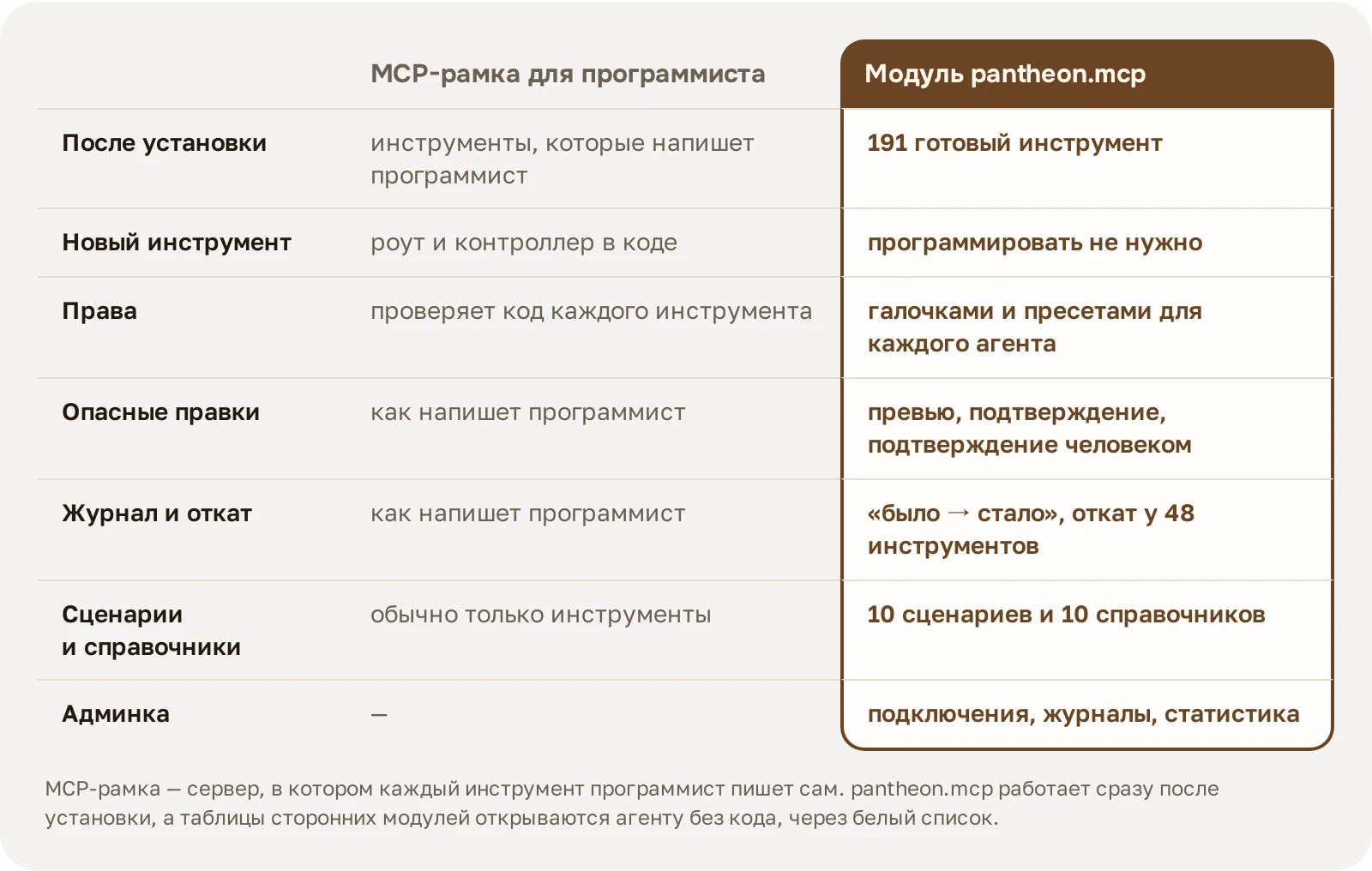


Pantheon: website management via AI agent. MCP server
Catalog
The module processes products with trade offers, including prices, stock levels, barcodes, discounts, price types, and VAT. The system performs automated validation of product card completeness.

Pantheon: website management via AI agent. MCP server
Content and SEO
The module handles infoblock elements and sections, their properties, high-load blocks, SEO fields, static pages, robots.txt files, and sitemaps. It also supports management of images, files, and the media library.

Pantheon: website management via an AI agent. MCP server
The module processes orders, including status management, cancellation operations, payment control, and shipment handling, as well as work with tracking numbers and item composition. Phone order creation is supported. Settings for cart rules and a coupon system are implemented.

Pantheon: website management via an AI agent. MCP server
The Buyers module provides tools for working with the customer base. Functionality includes customer search, segmentation based on purchase history, viewing detailed cards, and creating user groups.

Pantheon: website management via an AI agent. MCP server
Marketing and inquiries
The module processes email draft copies, subscription categories, banners, product reviews, web form submissions, and technical support requests.

Pantheon: website management via an AI agent. MCP server
Analytics
The module provides data on sales, sales funnel structure, popular product rankings, traffic flow, search queries yielding no results, and system performance.

Pantheon: website management via an AI agent. MCP server
The module provides control over warehouse logistics and sales geography. It includes functionality for managing warehouses and pickup points, automatic currency rate updates, and delivery location configuration.

Working with third-party module tables requires no programming. An administrator adds a table to the whitelist, after which the agent processes it using standard rules. If a specific Bitrix module is not installed on the site, such as 'Online Store', 'Web Forms', or 'Technical Support', the corresponding tools for it are simply not created, while all other functions continue to operate normally. The agent sees only the tools for which the connection has confirmed rights and does not expend context on unnecessary data.

The Pantheon module does not include its own neural network; it serves as a bridge between the website and an external AI agent. Any MCP client supporting the Streamable HTTP transport and capable of sending a persistent authorization header is compatible. Supported tools include Claude Code, Cursor, Grok CLI and xAI API, OpenAI Codex CLI, Gemini CLI, Kimi Code, DeepSeek Harness, VS Code with GitHub Copilot, Windsurf, Claude Desktop, and other AI agents. The agent operates under your separate subscription with its developer; the module does not require a dedicated chat in the admin panel or token payments. ChatGPT is currently not supported because it cannot transmit a persistent token.

Pantheon: website management via an AI agent. MCP server.
Store owners can delegate routine tasks to the AI agent, such as filling sections, revaluing collections, and identifying abandoned carts.
Managers gain tools for processing phone orders, tracking statuses, handling payments and shipments, and responding to inquiries about order location.
Content managers can perform bulk edits on product cards, manage photos, update SEO fields, and modify pages.
Marketers utilize the system to create discounts and coupons, organize email campaigns, and generate reports.
Integrators receive a ready-to-use MCP server for deployment on client websites, along with the ability to work with third-party spreadsheets without writing code.


The Pantheon module enables website management via an AI agent through an MCP server. Operation requires a PHP server version 8.2 or newer, the main module version 23.0.0 or newer, a MySQL or MariaDB database, and a website using UTF-8 encoding. The installation process automatically verifies system compliance with these requirements and reports any missing components.

Pantheon: website management via an AI agent. MCP server
The AI agent is provided separately. Subscription and access to the agent must be obtained directly from its developer. Cloud MCP clients, such as xAI API or claude.ai connectors, connect to the website from their own servers. For this mechanism to function, the website must be accessible from the internet.
Pantheon: website management via AI agent. MCP server
Not all changes can be reverted. Actions such as data deletion, sending emails, editing orders, and several other operations are marked as non-revertible. The agent warns the user about this before confirming execution.
Pantheon: website management via an AI agent. MCP server
Proceed with caution. Always create data backups before starting. Initialize the process in Read-only mode or Everything via confirmation mode to minimize risks.

Pantheon: Website Management via AI Agent. MCP Server
Trial Period
All module features are available during the trial period. Upon expiration, agents lose the ability to perform actions until a license is purchased. Historical data, including connection settings, access rights, and event logs, remain preserved. After the module is purchased, the trial version and its associated data are removed.


Pantheon: website management via an AI agent. MCP server. Detailed documentation with examples of agent operation, configuration of each MCP client, and a quick start in 10 minutes is available on the developer's website.




General iT can connect “Pantheon: website management via an AI agent. MCP server”, install and configure the module, and make sure the integration works correctly.
USER EXPERIENCE
How does this solution work in a real project? Share your experience and help others choose.
There are no reviews of this solution on git.ru yet. Tell us what worked well and what could be improved.
Verified purchaseAdd a key if you wish. A verified review gets a badge, priority placement and more rating weight.
Open to every clientJust sign in to your account. A key is optional; all reviews are moderated.
YOUR PROJECT INFRASTRUCTURE
MORE FOR YOUR WEBSITE
The Sotbit Smart Filter SEO module is designed to increase online store traffic. The tool operates by generating numerous unique pages for smart filters.

SDEK integration module for 1C-Bitrix. SDEK is one of Russia's largest logistics companies, providing courier delivery and operating a network of pickup points. The module connects the online store with the SDEK personal account, offering the following capabilities: Providing customers with delivery options: courier, pickup point, or postmat.

The module is designed for the «1C-Bitrix: Site Management» platform and enables importing infoblock elements, including products, from Excel files. It also supports data loading into Highload blocks.
BEFORE YOU ORDER