Payments are experiencing issues due to temporary restrictions in Russia. If your payment does not go through, please submit a support request.•Our support team is available 24/7 — we are always here to help with hosting and server issues.•We are now accepting requests for dedicated server rental and colocation services in our data center.•Reminder: we recommend enabling backups for additional data protection.•A new VPS/VDS lineup with NVMe storage and improved performance is now available.•Maintenance work on some servers has been completed. All services are operating normally.•
Payments are experiencing issues due to temporary restrictions in Russia. If your payment does not go through, please submit a support request.•Our support team is available 24/7 — we are always here to help with hosting and server issues.•We are now accepting requests for dedicated server rental and colocation services in our data center.•Reminder: we recommend enabling backups for additional data protection.•A new VPS/VDS lineup with NVMe storage and improved performance is now available.•Maintenance work on some servers has been completed. All services are operating normally.•
Аккаунт в General iT
Вход / Регистрация
Войдите или создайте аккаунт для управления услугами в личном кабинете.
Страны не найдены. Попробуйте другое название или код.
MODULE FOR 1C-BITRIX
Bquadro
Bquadro: Website Monitoring with AI (useful gadgets)
The Bquadro: Website Monitoring (useful gadgets) module enhances the efficiency of the 1C-Bitrix administrative panel dashboard. A set of informative widgets allows administrators to quickly identify critical errors and receive timely data on actions required for stable site operation.
The Bquadro: Website Monitoring (useful gadgets) module enhances the efficiency of the 1C-Bitrix administrative panel dashboard. A set of informative widgets allows administrators to quickly identify critical errors and receive timely data on actions required for stable site operation.
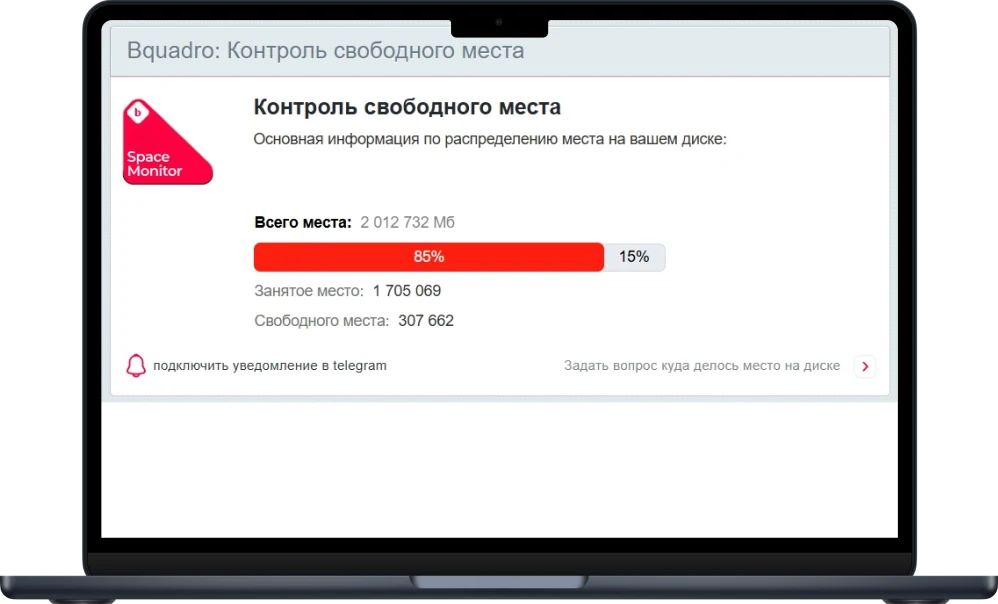
The current module version includes widgets addressing key questions: where logs are located in the Bitrix system and whether they contain errors; whether the SSL certificate has expired; how much free disk space remains; and how to clear the cache in Bitrix.
All this information can be consolidated on a single dashboard and checked every time the administrator logs into the control panel. Although this data is available in the standard Bitrix admin panel, it is often buried deep within the menu structure. For rapid response to issues, it is advisable to display such information prominently.
The module functionality can be expanded by purchasing a notification subscription. Data from the gadgets will be sent regularly to your Telegram account. This allows you to monitor all significant technical aspects of your website without accessing the admin panel. You will always stay informed about the information that matters to you.
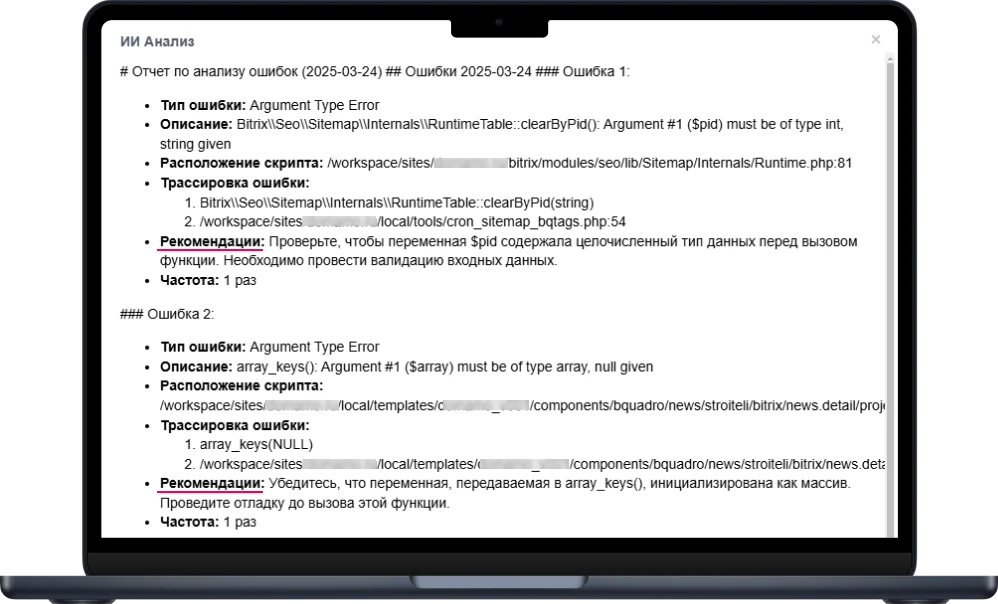
The subscription includes AI-powered tools. For the Log-based Error Control gadget, there is now an option to decode logs using the built-in AI. This tool makes the table more understandable for non-technical specialists, provides recommendations on how to fix each error, and presents the table as formatted text. This text is convenient to copy and paste into a task or send to a programmer in a private message for the fastest reaction to the issue.
Bquadro Module: Website Monitoring with AI
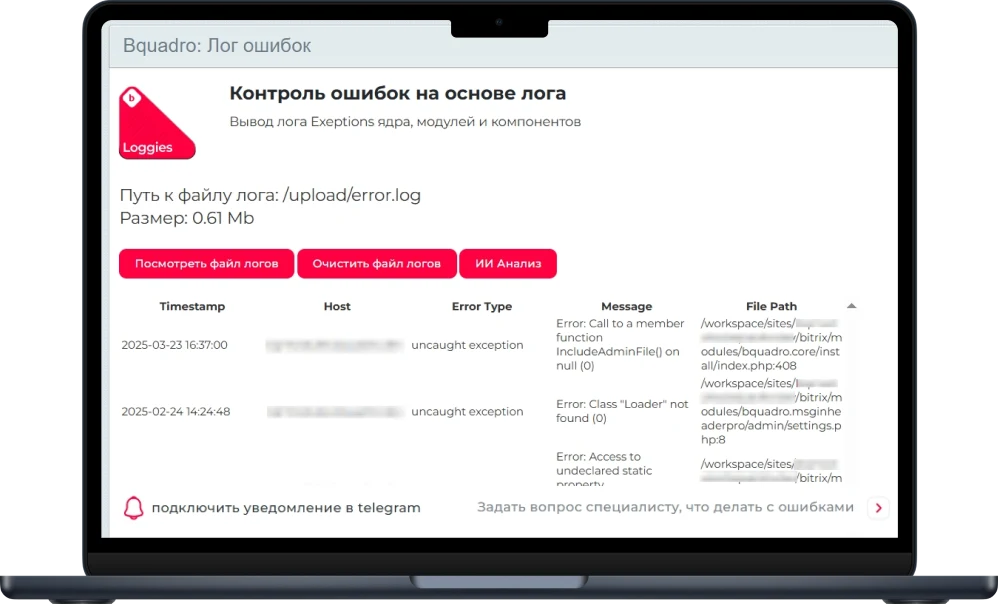
Gadget "AI-based Error Log Control"
The table displays error logs color-coded by severity. By default, only a portion of the file is shown; the full list opens via a button.
The log file can be cleared of error records that have already been resolved. With an active subscription, logs can be analyzed using artificial intelligence.
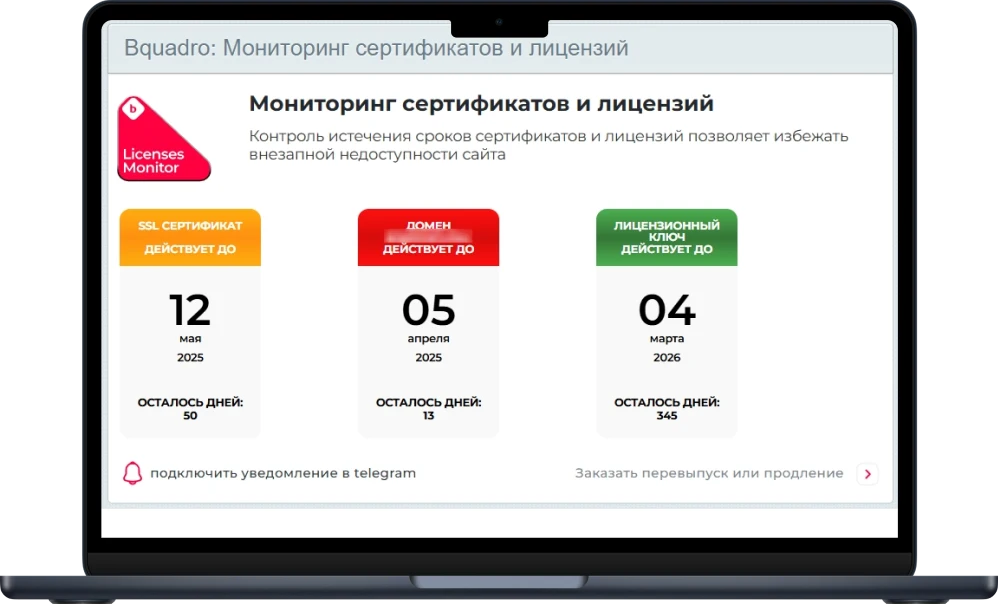
2. Resource Availability Control Widget
Compact informational tiles display expiration dates for SSL certificates, domain names, and license keys. The system automatically warns when the time remaining for renewal is insufficient.
3. Free Space Control Widget
A visual diagram clearly displays the volume of used memory, the remaining free space, and the total disk capacity.
4. Cache Clearing Gadget
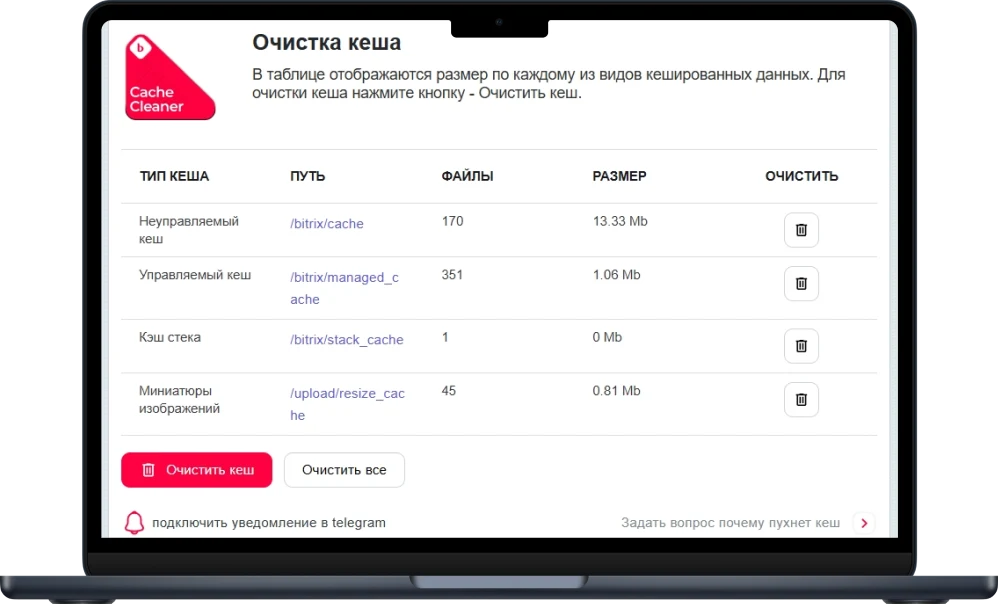
This tool manages four types of website cache. Users can clear all data types at once or select specific categories for removal.
The available categories for clearing are:
- Unmanaged cache
- Managed cache
- Stack cache
- Image thumbnails
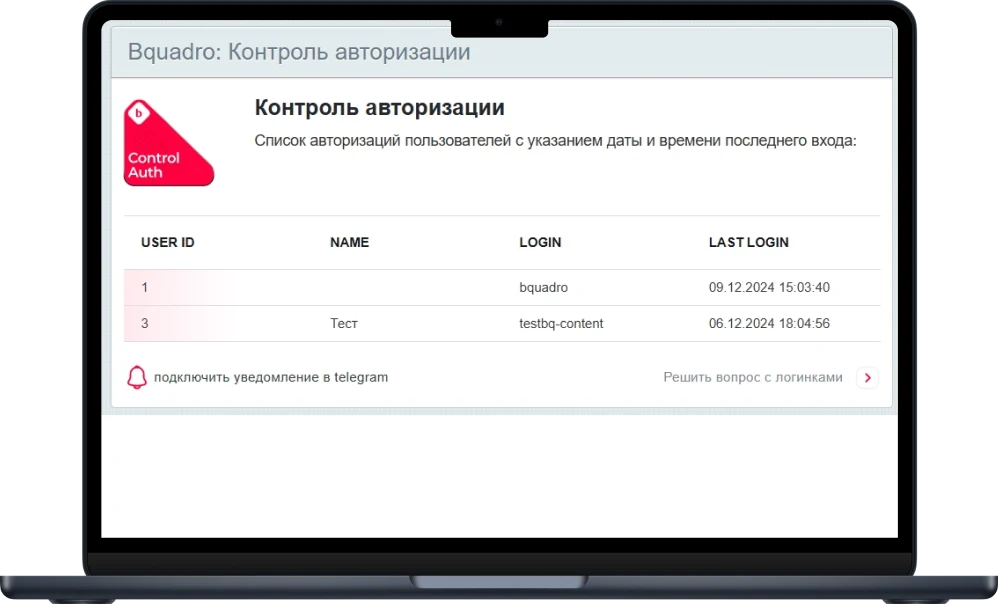
The Authorization Control gadget enables quick tracking of all users who accessed the site, including administrators and individuals with other access levels. The interface displays a clear list of authorizations with precise dates and times of the last login for each account.
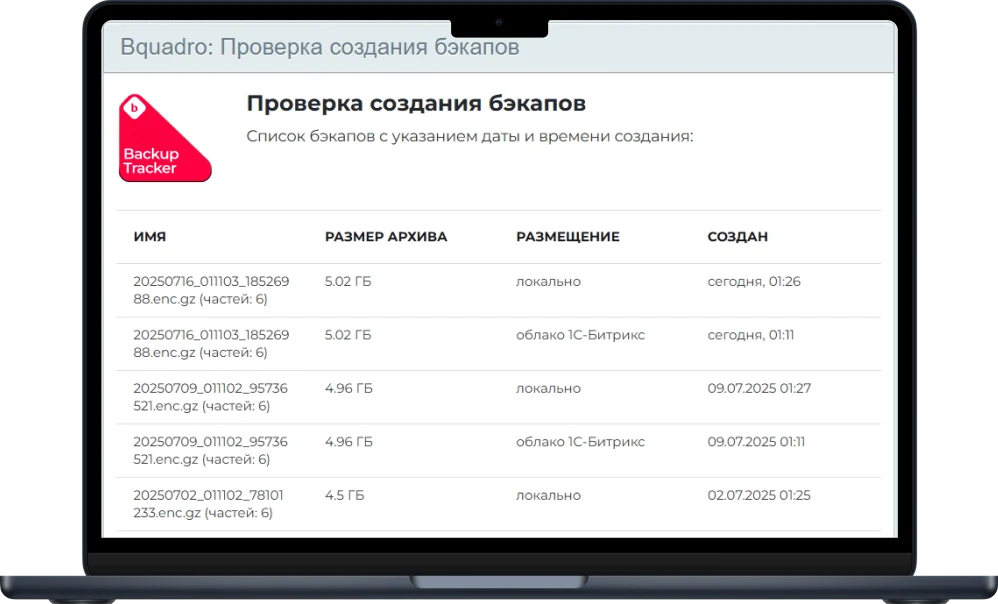
The Backup Check gadget allows you to quickly track the date of the last site backup creation. The table displays information about the most recent archives, including local files and copies saved to the Bitrix cloud storage. Each record shows the file name, size, storage type (local or cloud), and creation date.
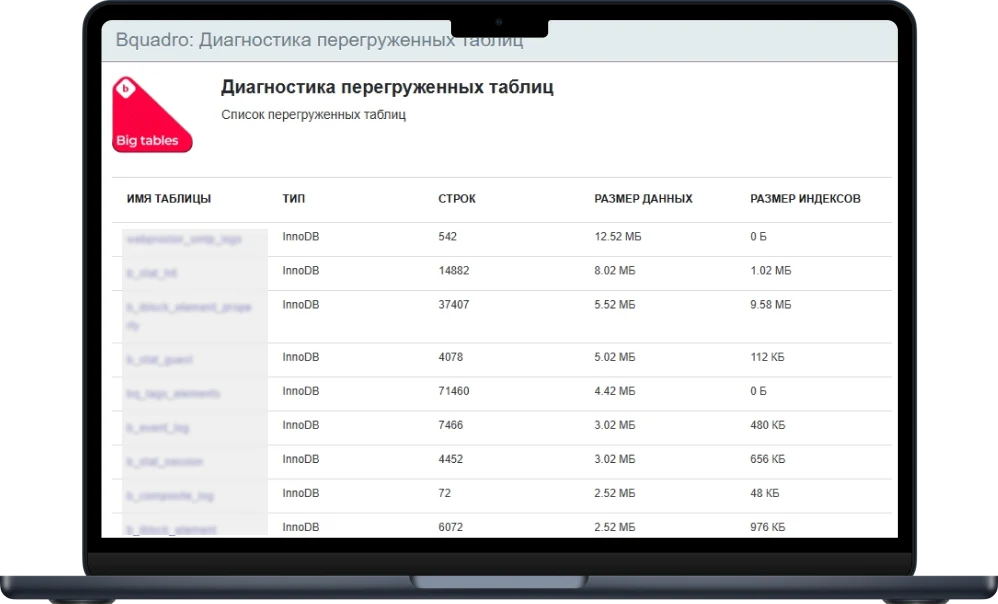
The Big Tables Diagnostics gadget enables quick identification of database tables with excessive volume on the site. The tool generates a list of overloaded tables, allowing the administrator to promptly address database bloat and clean up unnecessary data, such as outdated statistics or abandoned shopping carts. For each table, the name, type, row count, data size, and index size are displayed.
Adding gadgets
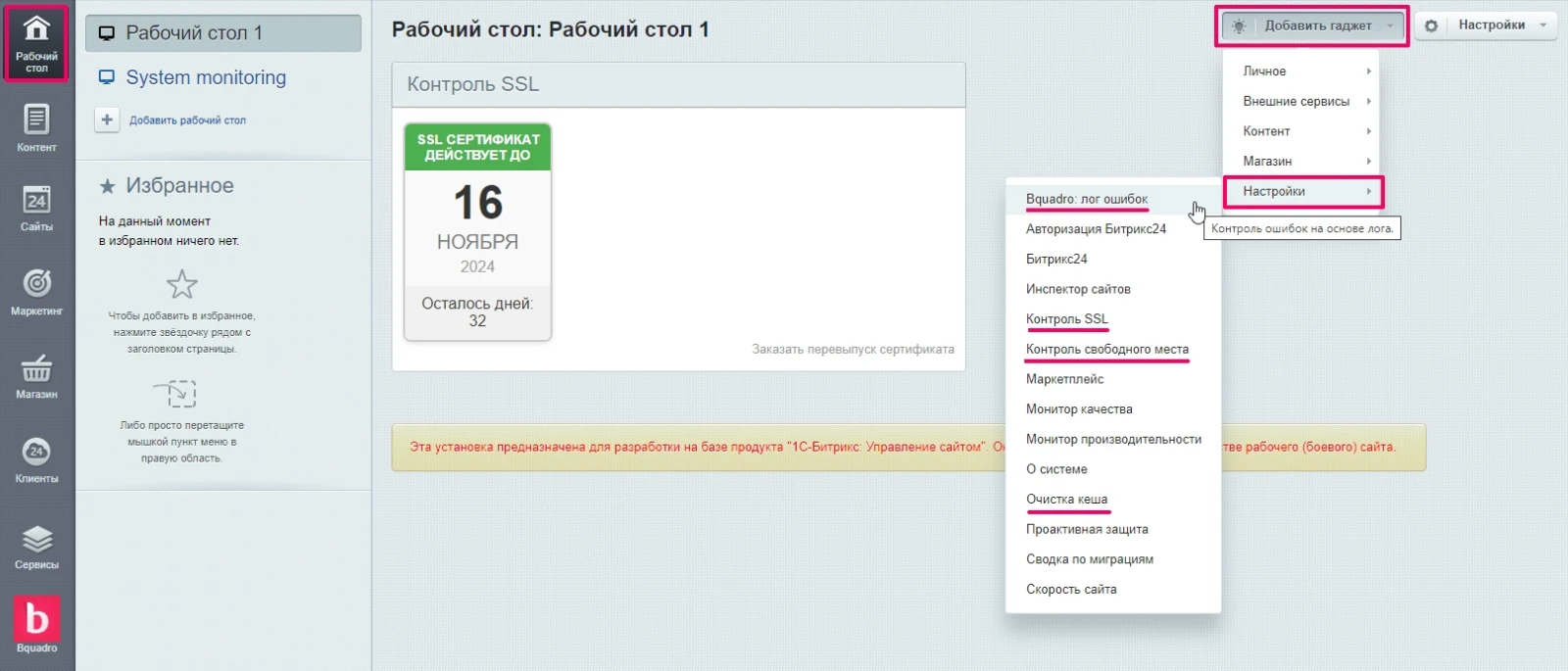
To install a gadget, use the standard Bitrix platform tools to display it on the administrative panel's desktop. Click the Add gadget button located in the top right corner of the interface. In the dropdown menu, select the Settings item and then choose the required gadget by its name.
You can install any number of required gadgets and adjust their display order by simple drag-and-drop.
Bquadro Technical Support
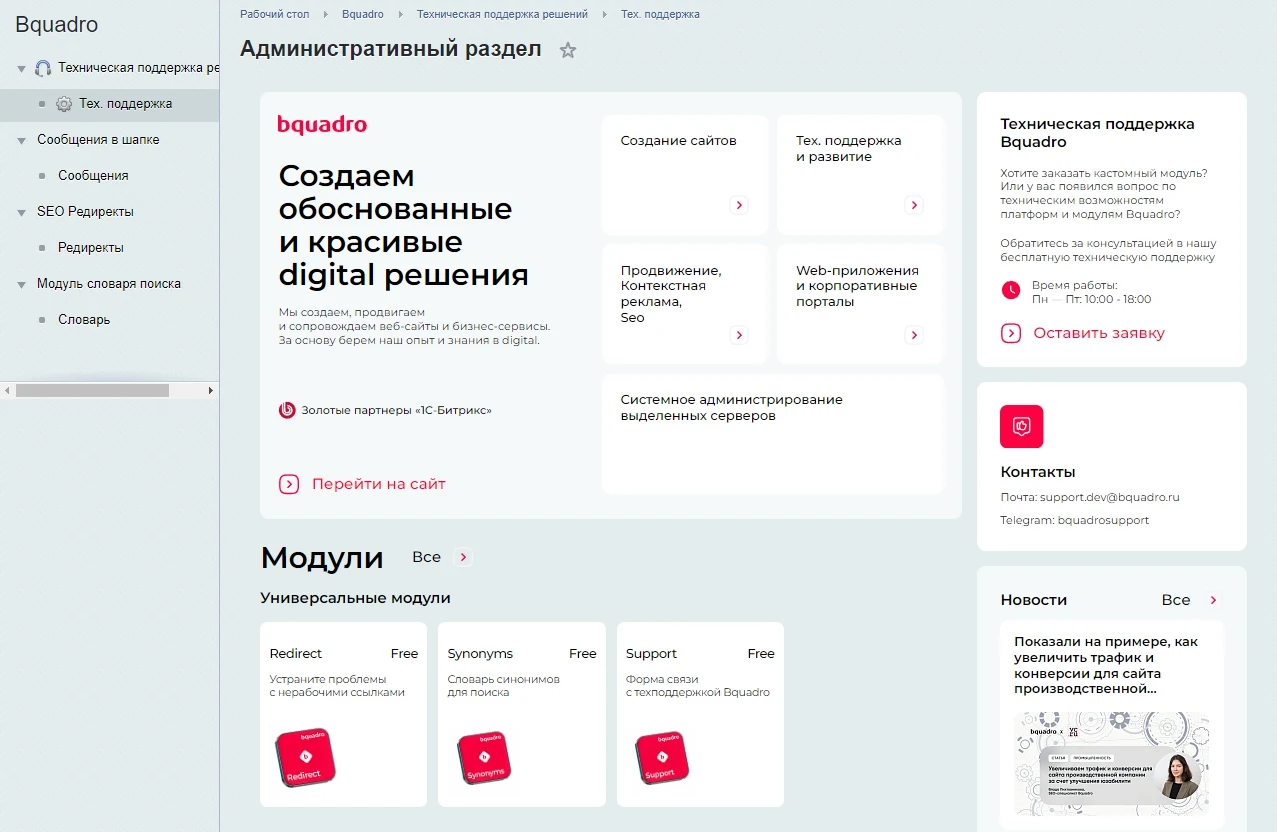
The Bquadro: Website Monitoring module was originally developed as a solution for user technical support. This functionality is available on the module page within the admin panel. The tool allows sending requests to the Bquadro technical support department for prompt resolution of issues.
Bquadro Module: Website Monitoring with AI
An intuitive feedback form interface simplifies problem description and submission of requests to technical support. All inquiries are automatically forwarded to the Bquadro ticket management system, ensuring rapid response from support specialists.
Users receive notifications regarding the status of their tickets and can track the progress of issue resolution. The user account provides full access to the history of all previously submitted requests.
A single dashboard consolidates all critical information for monitoring. The module offers a set of useful gadgets for maintaining website health.
General iT can install “Bquadro: Website Monitoring with AI (useful gadgets)”, configure its settings and verify its operation in the existing project.
UPDATE HISTORY
What’s new
7 releases
2.5.6 (18.08.2026)Latest update
Access to monitoring settings for non-administrators is restricted.
Escaping of user values in settings templates has been fixed.
The list of PageSpeed pages is now processed more securely when reading settings.
Certificate validation dependency on the HTTP Host header has been removed, and TLS verification has been enabled.
An XSS vulnerability in the output of saved monitoring settings has been fixed.
2.5.4 (25.05.2026)
Autoload fix
2.5.3 (04.05.2026)
Module installation fix
2.5.2 (27.04.2026)
Temporary fix for admin panel login issues related to the monitoring alert functionality
2.5.1 (20.04.2026)
Fixed the project size gadget calculation for very large folders
2.5.0 (20.04.2026)
Added the "Storage stats" gadget with a UI/JS/Chart.js interface, metric collection, and updated services/ORM for logging and agents.
Existing gadgets (log, cache, backups) have been enhanced, and additional language strings and loading chains for new services have been translated.
2.4.2 (12.03.2026)
Module installation improvement
USER EXPERIENCE
Solution reviews
How does this solution work in a real project? Share your experience and help others choose.
Be the first to share your experience
There are no reviews of this solution on git.ru yet. Tell us what worked well and what could be improved.
✓
Verified purchaseAdd a key if you wish. A verified review gets a badge, priority placement and more rating weight.
↗
Open to every clientJust sign in to your account. A key is optional; all reviews are moderated.
The Bquadro Redirects module resolves broken link issues and enhances user experience. It allows creating and editing redirect rules directly within the admin panel without developer involvement.
Installation and initial setup are performed via console commands. Creating a rule requires specifying the source and target URLs.
Bquadro: AI Assistant is a module that enables an intelligent online consultant chat on your website. The system loads a specialized database, which the artificial intelligence uses to generate responses and maintain conversations with visitors.
The 'Cookie Usage Notification' module for 1C-Bitrix is designed for quick configuration of cookie usage notifications. The collection and processing of such data are regulated by Federal Law No. 152-FZ 'On Personal Data', which requires obtaining user consent.
The module is designed for online stores running on the 1C-Bitrix platform to automate the integration of supplier product catalogs. It is also suitable for news and city portals to facilitate content population. The solution supports data import in Excel, XML, YML, CSV, and RSS formats.
The module is designed for the «1C-Bitrix: Site Management» platform and enables importing infoblock elements, including products, from Excel files. It also supports data loading into Highload blocks.
The module is designed for importing products and sections from XML, YML, and JSON files. It supports loading any product fields and properties, as well as updating stock levels and prices. Product-to-section binding is supported, along with importing section structures from a file into an arbitrary site structure.
The solution itself is free. Installation, configuration and customisation services are agreed separately. A compatible platform and an appropriate platform licence are required.
How do I check compatibility?
Compare the supported editions and solution version in the technical details with your project. Before installing on a live website, we recommend making a backup and checking the solution in a test environment.
Can you help with implementation?
We can help install the module, check its settings and verify how it works in your project. Compatibility with other customisations and the scope of work are assessed before we begin.
Statistics and interaction recording
Public pages use basic statistics. Our recording and Yandex Webvisor require your permission. You can keep basic statistics or disable all analytics.
Operator: General IT Rus LLC, INN 2310208877. Statistics and recording help improve the website.
Basic statistics: pageviews, a random daily ID, a public URL and time. The ID lasts until Moscow midnight. Original records: up to 48 hours; totals: up to 7 years.
Campaign tags and a technical identifier are sent by our server to the existing Yandex tag. Visitor IP, User-Agent and cookies are not included in this transfer. If selected, its browser code collects technical data, cookies, actions and masked page snapshots; recordings last 15 days. Inputs, chat and account areas are hidden.
Interaction recording requires permission: clicks, scrolling, technical information and filtered public-page snapshots. Events: up to 7 years; IP and snapshots: up to 90 days.
Permission is remembered for up to 365 days; full opt-out remains until changed. Basic statistics only disables recording; Disable all analytics stops new analytics. Previously sent data is not automatically deleted. Withdrawal and requests: support@git.ru. Full terms are linked below.
Your browser requests no tracking: analytics is off.