Payments are experiencing issues due to temporary restrictions in Russia. If your payment does not go through, please submit a support request.•Our support team is available 24/7 — we are always here to help with hosting and server issues.•We are now accepting requests for dedicated server rental and colocation services in our data center.•Reminder: we recommend enabling backups for additional data protection.•A new VPS/VDS lineup with NVMe storage and improved performance is now available.•Maintenance work on some servers has been completed. All services are operating normally.•
Payments are experiencing issues due to temporary restrictions in Russia. If your payment does not go through, please submit a support request.•Our support team is available 24/7 — we are always here to help with hosting and server issues.•We are now accepting requests for dedicated server rental and colocation services in our data center.•Reminder: we recommend enabling backups for additional data protection.•A new VPS/VDS lineup with NVMe storage and improved performance is now available.•Maintenance work on some servers has been completed. All services are operating normally.•
Аккаунт в General iT
Вход / Регистрация
Войдите или создайте аккаунт для управления услугами в личном кабинете.
Страны не найдены. Попробуйте другое название или код.
MODULE FOR 1C-BITRIX
BBcoding
Ozon Delivery - Integration with 1C-Bitrix
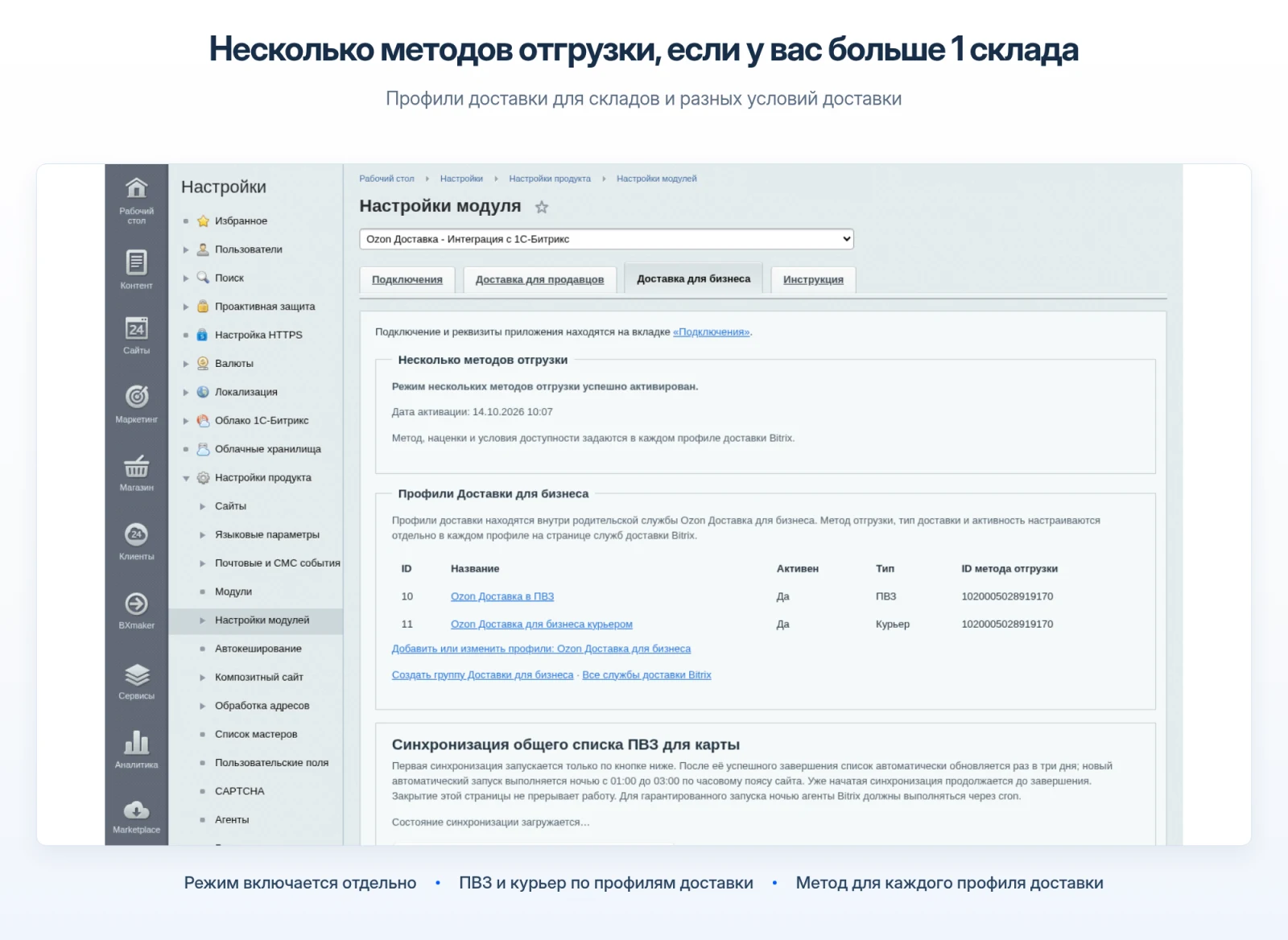
Starting with version 3.0.1, the module supports automatic order shipment from multiple warehouses, including locations in different cities or the combination of a main warehouse with a warehouse for oversized goods.
Since module version 2.0.1, the Ozon Delivery for Business model is available without mandatory linking and stock verification in the Ozon seller personal account.
Starting with version 3.0.1, the module supports automatic order shipment from multiple warehouses, including locations in different cities or the combination of a main warehouse with a warehouse for oversized goods.
Since module version 2.0.1, the Ozon Delivery for Business model is available without mandatory linking and stock verification in the Ozon seller personal account.
The module provides two independent workflows: Ozon Delivery for Sellers and Ozon Delivery for Business.
In the Business workflow, the mode for multiple shipping methods is configured separately; the shipping method and delivery conditions are set within each delivery profile.
The system allows linking a shipment created manually in the Ozon account to an existing 1C-Bitrix order. This enables the recovery of problematic orders in the Business workflow with verification of the complete set of items and confirmation of discrepancies.
Each workflow offers separate delivery services to pickup points and via courier.
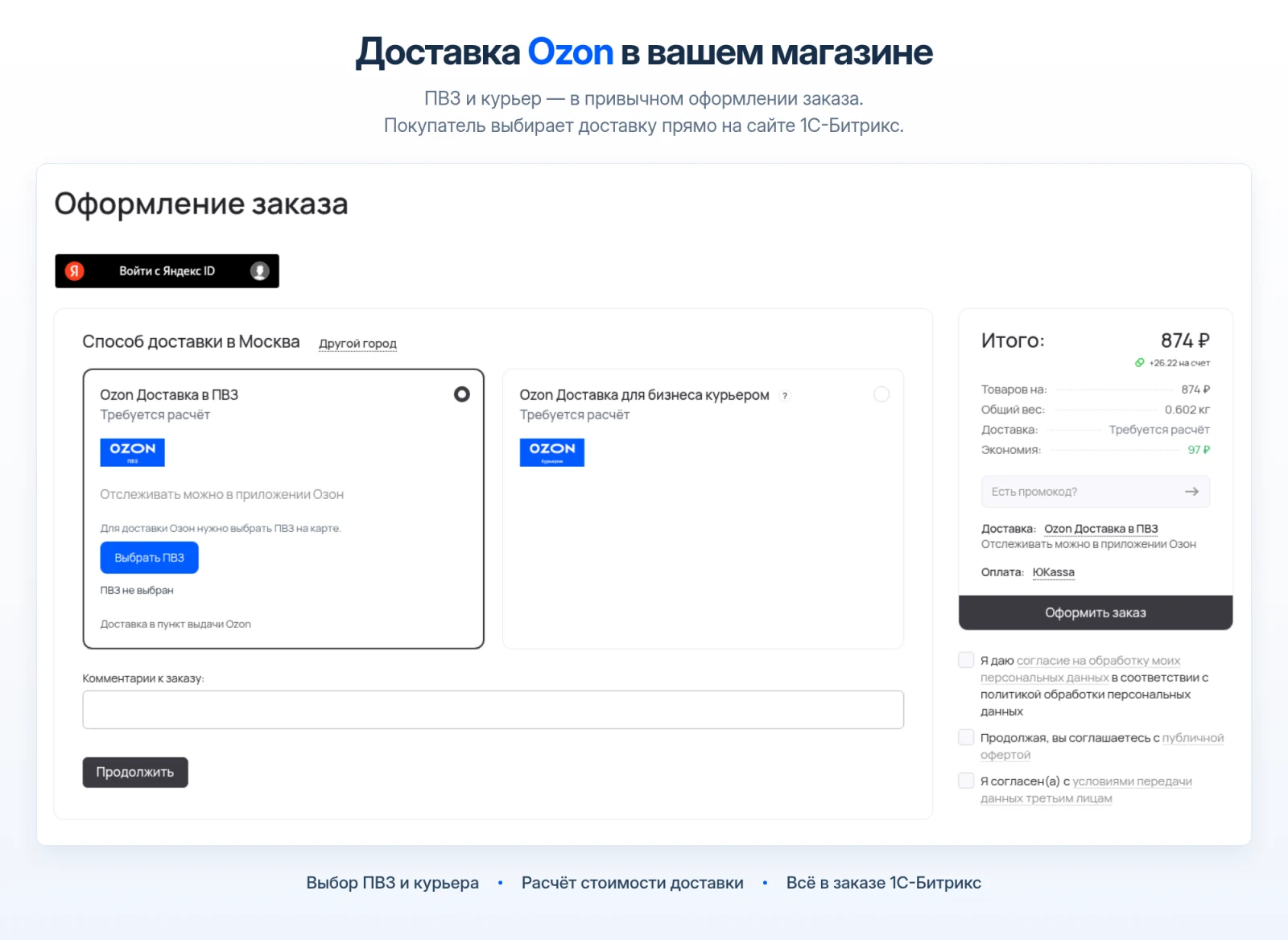
For online store orders, the module calculates delivery cost and terms directly during the checkout process.
Paid orders are automatically transmitted to Ozon when the corresponding setting is enabled, or can be sent manually from the order page.
A separate manual shipping option for business allows creating a shipment without first generating an order in 1C-Bitrix.
The PDF shipping label for Ozon Delivery can be opened and printed directly from the 1C-Bitrix order interface.
The module records shipment details, updates status information, and supports all Ozon-defined actions for shipments.
The module supports two independent delivery circuits. Each circuit uses separate connections, settings, delivery services, and shipment data. Connecting or disconnecting one circuit does not affect the operation of the other.
The Ozon Delivery module for 1C-Bitrix by BBcoding is designed for working with products listed in the seller's cabinet on Ozon. Product matching is performed using the seller's article number specified in the product card on the website.
The store connects to Ozon via the OAuth protocol. Access to the Seller API is granted to the private Ozon application.
In the module settings, you can select the working scheme: FBS, FBO, or both schemes simultaneously.
During order placement, the system checks article numbers, product availability, the buyer's phone number, and the selected pickup point or courier delivery address.
After calculation, the module saves the cost, delivery terms, and selected delivery method in the 1C-Bitrix order.
After payment, the order is transmitted to Ozon automatically. If automatic sending is disabled, transmission is performed manually from the order page.
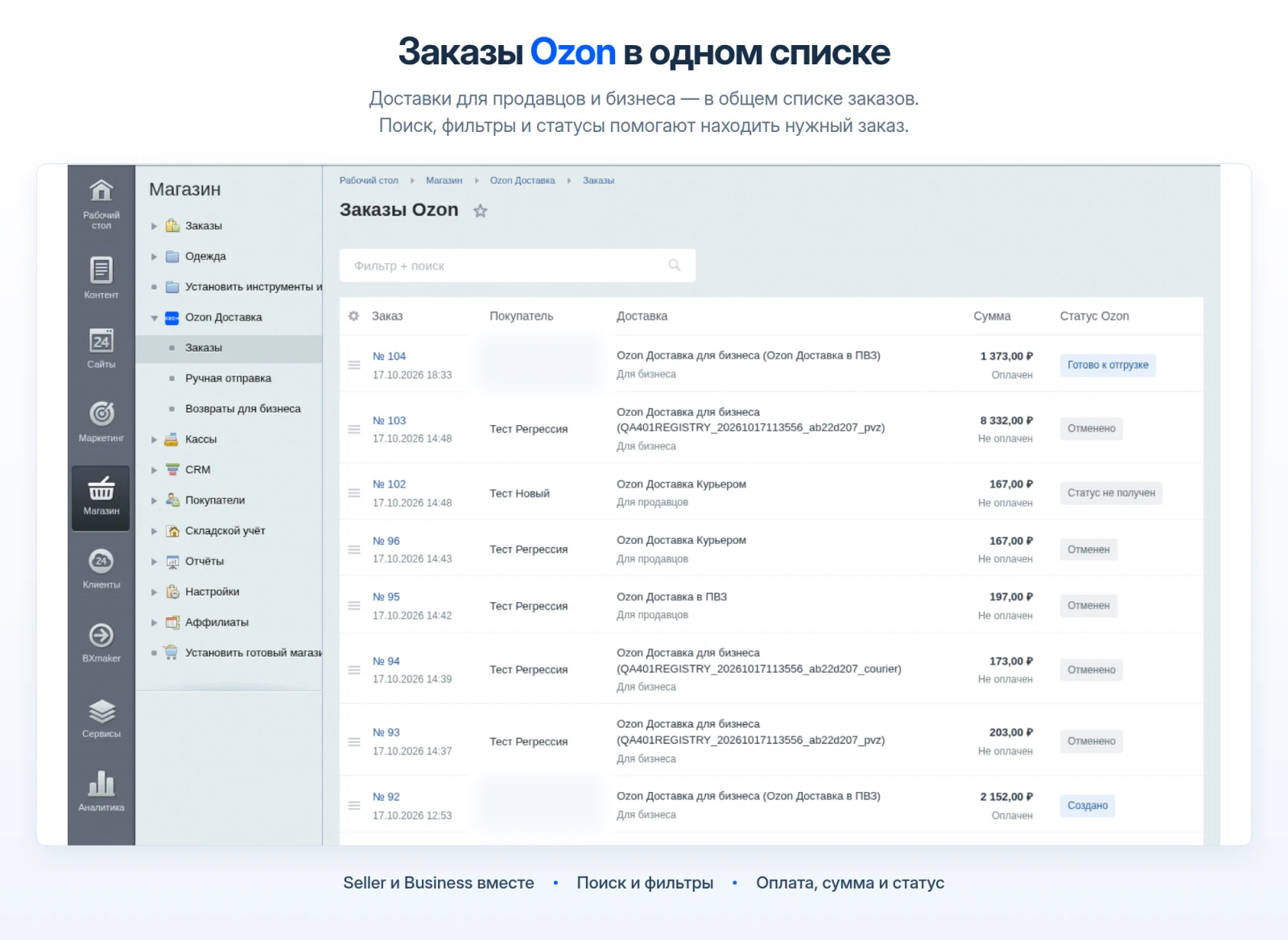
The order page displays shipment details, allows status updates, and enables order cancellation when permitted by Ozon rules.
Product availability is verified exclusively using the 'Seller SKU' property. The Ozon SKU value is not involved in this check. Ensure that the product cards in 1C-Bitrix contain an SKU matching the one in Ozon. If the SKU is stored in a different property, specify it in the 'Delivery for Sellers' tab.
Delivery time for FBS orders is calculated based on warehouse settings configured in the seller's Ozon personal account.
The module supports the following methods for calculating delivery costs:
- Using the cost returned by Ozon with an additional markup in percentage or rubles.
- Setting a fixed cost.
- Adding a supplementary markup (for example, for item pickup at a pickup point, where Ozon tariffs often change).
- Calculation based on shipment volume using standard product fields: length, width, and height.
- Calculation as a percentage of the product cost.
- Calculation of courier delivery costs.
The module supports two independent delivery cost calculation modes: the Ozon tariff and a custom calculation. In the custom calculation mode, users can select a fixed price or a calculation based on volume. Additional markups, a percentage of the product price, and courier delivery costs may be added to the base price. If the final delivery cost is zero, it is displayed to the customer as free.
The Ozon Delivery for Business contour is designed for shipping items that do not require product cards in the Ozon seller cabinet or matching by the seller's article number. This contour connects via a separate private Delivery API application, with its credentials stored on the site separately from those used for standard sellers.
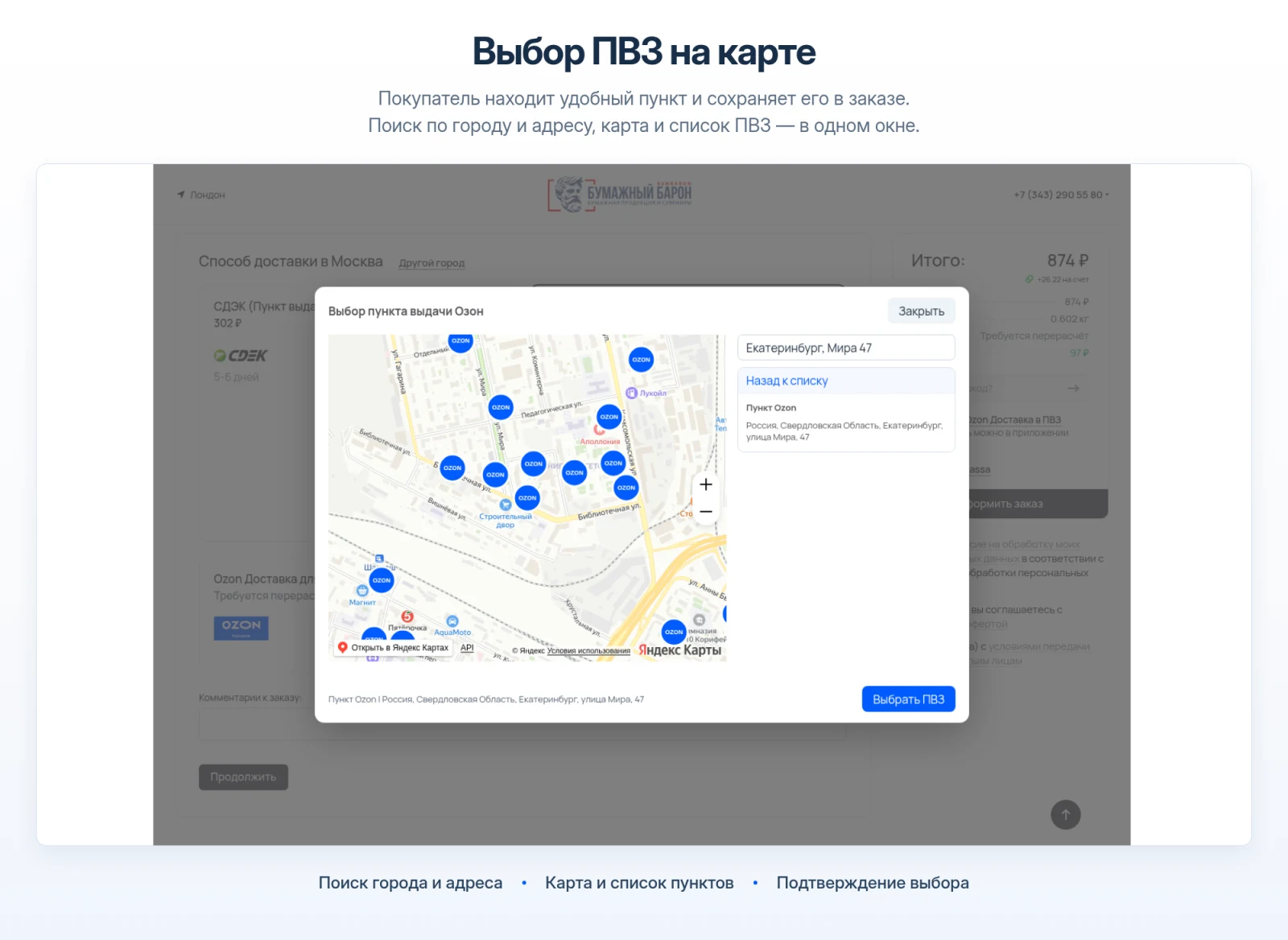
The module creates separate delivery services for pickup points (PVP) and courier delivery. During order checkout, the customer selects a pickup point on the map or specifies a courier delivery address using the map or the standard 'Delivery Address' field in 1C-Bitrix. The calculation uses the cart contents, product weight, and dimensions. The courier address is validated and converted into the format required by Ozon. The confirmed calculation is stored separately from the calculations for the seller contour.
When the corresponding setting is enabled, a business shipment is created automatically immediately after the order is paid. If the setting is disabled, the shipment can be created manually directly from the order page. The shipment status, shipping label, and list of available actions are displayed on a separate order page.
Manual shipment
The manual shipment feature allows you to send a package to Ozon without creating an order in the online store. To do this, open the manual shipment for business section.
Enter the recipient's details and phone number. Then select a pickup point on the map or enter the courier delivery address.
Select items from the 1C-Bitrix catalog. Verify the quantity, cost, total weight, and package dimensions.
Calculate the shipping cost and compare it with the price received from Ozon.
Create the shipment. The history table provides the following actions: status update, confirmation, download of the PDF label, or cancellation.
Manual shipment for business does not create an order in 1C-Bitrix, does not use the Seller API, and does not require the product to be present in the Ozon seller cabinet.
On personal data
The module does not transmit personal data of your customers to the developer's server. Data entered by the customer during order placement is stored on your site and sent directly to Ozon via its official API. When using a map, address data is also processed by Yandex services.
In the seller environment, the developer's server handles site registration, OAuth authorization, connection verification, and token management. Operational requests for the Seller API are executed directly between the site and Ozon.
In the business environment, credentials for the private application are stored on the site in encrypted form, while requests for the Delivery API are executed directly between the site and Ozon.
When updating the site's privacy policy, account for the collection, storage, processing, and transfer of customer personal data to Ozon.
Developer Configuration of the Private Application
Granting access to the private application to the developer does not provide them with access to your store.
The configuration procedure involves only a secure technical binding of your site to the Ozon API using the official OAuth authorization method.
Final connection occurs strictly between your site and the Ozon personal account via OAuth authorization. When connecting to Ozon within the settings of the installed module, you are redirected to your personal account, where you authorize and grant your site access to data from your Ozon personal account.
When needed, General iT can implement “Ozon Delivery - Integration with 1C-Bitrix”, configure the module and verify it against the current website setup.
UPDATE HISTORY
What’s new
43 releases
4.1.1 (20.10.2026)Latest update
Fixed phone number detection when additional phone fields are present in the order checkout.
4.1.0 (20.10.2026)
The "Calculate Delivery" button was removed from the start of the order checkout. Delivery is calculated upon selecting a pickup point or address, provided the phone number is filled in. When delivery data is changed after calculation, the "Calculate Delivery" button becomes active.
4.0.1 (17.10.2026)
Added order lists, shipment cards, product diagnostics, and courier address selection on the map. The settings interface has been updated.
3.1.1 (17.10.2026)
Optimization of module operation
3.1.0 (15.10.2026)
Optimized the mechanics for changing the delivery service in an order and for calculating/creating delivery in a manually created order
3.0.1 (14.10.2026)
- Added support for multiple Ozon shipping methods while preserving existing services, orders, and pickup points.
Now, if you ship from different warehouses or warehouses in different regions, you can configure profiles within the delivery service with restrictions based on the found methods and separate shipments for each of your warehouses.
- Other technical improvements and updated instructions.
2.3.4 (09.10.2026)
Fixed packaging of regular shipments considering Ozon method limitations, manual linking of multiple shipments for a single order, and display of Ozon rejection reasons. Updated the application access rights instruction.
2.3.3 (08.10.2026)
Technical fix
2.3.2 (08.10.2026)
The Ozon Delivery for Business queue has been fixed: a retry of the original request now completes within the allotted window even after a prolonged API response. The queue agent runs every 30 seconds, and tasks are captured one at a time before processing. The binding of existing shipments by their numbers has been restored for modern blocked attempts, with verification of the complete set of locations and the saved request, without creating a new shipment. Reasons for mismatches during comparison are displayed by field and are preserved after page reload. The absence of binding is no longer indicated as the absence of a shipment in Ozon. Manual binding of shipments with discrepancies is performed only after separate confirmation of verified parameters; automatic comparison maintains strict matching verification. Decoding of new API failures preserves documented Ozon codes, request element keys, and rejected fields. Full safe reasons and the Trace ID, if provided by Ozon, are available in the order card after reload. For unknown responses, the lack of a precise reason is explicitly indicated.
2.3.1 (04.10.2026)
Fixed the display of Ozon Delivery cost in the Seller interface before calculation: 'Calculation required' instead of 'Free' in product cards and during checkout. Confirmed free delivery is preserved.
2.3.0 (04.10.2026)
Fixed the definition of the initial city and the search for the Ozon Delivery pickup point address on the map for business. Fixed the repeated opening of the map, resizing it, and reloading after an error.
2.2.0 (04.10.2026)
Added optional default weight and dimensions for goods for Ozon Delivery for business. The actual product data takes priority; settings are used only for empty parameters.
2.1.0 (02.10.2026)
Fixed display of "Calculation Required" instead of "Free" before delivery calculation.
Fixed reading and normalization of the recipient's phone number.
Fixed an error occurring when changing the payment system in an order.
2.0.20 (01.10.2026)
Version 2.0.20 fixes the transmission of courier address details to Ozon Delivery for Business: apartment or office, entrance, floor, and intercom are recognized from the standard "Address" field, saved in the structured order address, and transmitted when creating the shipment. The full recognized address is displayed in the calculation result.
2.0.19 (01.10.2026)
Version 2.0.19 fixes the confirmation of the selected pickup point during checkout: if the point differs from the saved calculation, the order is not created and the buyer is prompted to recalculate. An idempotent retry of the business message send has been added in case of a lost response.
2.0.18 (30.09.2026)
Version 2.0.18, before creating a Business shipment, repacks the current items of the saved paid order, including items added after the order was placed (such as gifts), and performs a new Ozon calculation. The original cart composition remains as calculation history and no longer blocks shipment when the composition changes. Checks for weight, dimensions, pickup point restrictions, recipient, and Ozon response, as well as protection against duplicate creation, are preserved. The delivery cost paid by the buyer and the previously displayed delivery term are not overwritten.
2.0.17 (23.09.2026)
Version 2.0.17 no longer blocks the creation of a business shipment if a fresh confirmed Ozon checkout returns a different relative delivery time. The time shown to the buyer during checkout remains the historical order value; the change is recorded only in technical diagnostics. Current checks for recipient, pickup point, composition, weight, dimensions, restrictions, protected plan, and Ozon response are preserved.
2.0.16 (22.09.2026)
Version 2.0.16 fixes the plan_bound_missing error after applying bonuses, discounts, or final rounding: the price is no longer treated as a physical packaging identifier, and the cost of each package is recalculated before shipment without losing kopecks from the final prices of the saved order.
2.0.15 (22.09.2026)
Version 2.0.15 fixes the plan_bound_missing error on non-standard checkout templates: the protected cart identity no longer depends on internal row IDs that Bitrix may replace when saving the order, and the short-lived Business calculation is stored in an encrypted server registry and restored via a one-time token upon PHP session loss.
2.0.14 (18.09.2026)
In version 2.0.14, the saving of Ozon Delivery calculations for Business has been fixed on installations where Bitrix by default creates inactive order properties: internal Business properties are now forcibly activated but remain hidden in the public checkout. Inactive Business properties created previously are corrected during the update.
2.0.13 (18.09.2026)
Technical fixes
2.0.12 (18.09.2026)
Technical fixes
2.0.11 (18.09.2026)
In Ozon Delivery for Business, the erroneous mandatory requirement for the recipient's first and last name has been removed: for calculation and shipment creation, the module requires only the phone number, while the name saved in the order is sent to Ozon as an optional field. This eliminates false warnings and checkout interception on custom Bitrix templates.
2.0.10 (17.09.2026)
Instability in Ozon Delivery for Business has been fixed: the protected Ozon cookie is now saved in encrypted form and used in subsequent requests; OAuth token renewal is performed in a single process; temporary and permanent connection errors are displayed separately. Pickup point (PVP) calculation and synchronization return safe error codes without buyer details or personal data. Error handling for Yandex Maps search has been fixed without affecting the Seller environment.
2.0.9 (16.09.2026)
Compatibility of the general order property ADDRESS with all delivery services has been fixed. If the field was global or had only erroneous Ozon connections, it remains global. If the store intentionally restricted ADDRESS to active services, those connections are preserved, and for the physical payer type, Ozon courier services are additionally added; payment connections remain unchanged. For Ozon Delivery for Business courier service, the address is conditionally mandatory and re-validated by the server. All Seller and Business settings are now unified for the entire Bitrix installation: the update migrates previous per-site values without affecting checkout, pickup points, orders, or SITE_ID diagnostics.
2.0.8 (09.09.2026)
Updated the design of all module settings tabs: connection and Delivery parameters for sellers, Delivery for Business, manual shipment, returns, and instructions have been unified into a single block style. Fixed calculation and creation of manual shipments without binding to the Bitrix cart, determination of the selected payer type after AJAX update of a non-standard checkout template, clear error messages for Ozon failures, launch of background synchronization for Business orders, and waiting for Ozon response during shipment creation, confirmation, and cancellation. In case of a network failure, confirmation or cancellation of an existing shipment is safely retried once; creation of a new shipment is not automatically retried. Regular Business orders continue to use the protected packing plan and are not mixed with manual shipments.
2.0.7 (09.09.2026)
Fixed buyer type determination when calculating Ozon Delivery for Business in non-standard checkout templates. If the template does not pass the service identifier, the module safely determines the individual type on the 1C-Bitrix side and displays a clear reason for rejection.
2.0.6 (08.09.2026)
Fixed final data validation in Ozon Delivery for sellers when using non-standard checkout templates. The module now considers the current phone number, places the order on the first click after page refresh via 1C-Bitrix, and pre-notifies about invalid characters in the recipient's name.
2.0.5 (07.09.2026)
Fixed order number display in Ozon: for a single item, the site order number is used; for multiple items, the order number with the item sequence number is used. The pickup point list update now continues even if Ozon returns individual points whose information is no longer available. Messages about loading progress and temporary errors have been clarified.
2.0.4 (01.09.2026)
Added three order packaging modes for Ozon Delivery for Business: separate shipment for each item, consolidated shipments based on specified limits, and consolidated shipments based on limits of the selected pickup point. For courier delivery, only Ozon-confirmed limits are applied. The calculated Ozon cost now fully includes the insurance cost returned by Ozon; the separate insurance setting has been removed. Calculation error messages have been made clearer. The update preserves the delivery service state selected by the administrator for sellers.
2.0.3 (01.09.2026)
Fixed saving of the access key validity period when checking the connection to Ozon Delivery for Business.
2.0.2 (31.08.2026)
Fixed opening of Ozon Delivery for Business labels containing compressed data. Added safe error details for connection checks. Fixed pickup point synchronization: the first run is manual only, while subsequent downloads continue in the background without five-minute pauses.
2.0.1 (21.08.2026)
Added a separate Ozon Delivery for Business integration: connection to a private Delivery API application, delivery calculation, and creation and tracking of shipments. Added a separate secure Returns section for Business: list, details, and status history.
1.1.8 (11.08.2026)
Ozon now returns the delivery cost. This feature has been implemented in the module. Now, in the module settings, you can select the delivery cost calculation option for the shopping cart.
1.1.7 (06.08.2026)
Map improvements
1.1.6 (04.08.2026)
Fixed installation and connection to the backend on sites where no global server name is set. The module determines the domain from the current site settings; if a reliable domain is missing, installation completes without error, and connection to Ozon becomes available after domain configuration.
1.1.5 (14.07.2026)
Technical fixes
1.1.4 (10.06.2026)
Technical fixes
1.1.3 (09.06.2026)
Technical fixes
1.1.2 (08.06.2026)
Technical fixes
1.1.1 (06.06.2026)
Technical fixes
1.1.0 (04.06.2026)
Technical fixes
1.0.69 (02.06.2026)
Added Ozon courier delivery, a separate instructions tab, new delivery cost calculation settings, and a manual shipment page for Ozon Delivery.
USER EXPERIENCE
Solution reviews
How does this solution work in a real project? Share your experience and help others choose.
Be the first to share your experience
There are no reviews of this solution on git.ru yet. Tell us what worked well and what could be improved.
✓
Verified purchaseAdd a key if you wish. A verified review gets a badge, priority placement and more rating weight.
↗
Open to every clientJust sign in to your account. A key is optional; all reviews are moderated.
The BBcoding Passkey module enables fast login to 1C-Bitrix sites using biometrics: face recognition, fingerprint, or device passcode. Biometric data is processed exclusively on the user's device and is never transmitted to the server. Standard password entry remains available as a fallback authentication method.
The Sotbit Smart Filter SEO module is designed to increase online store traffic. The tool operates by generating numerous unique pages for smart filters.
SDEK integration module for 1C-Bitrix.
SDEK is one of Russia's largest logistics companies, providing courier delivery and operating a network of pickup points.
The module connects the online store with the SDEK personal account, offering the following capabilities:
Providing customers with delivery options: courier, pickup point, or postmat.
The module is designed for the «1C-Bitrix: Site Management» platform and enables importing infoblock elements, including products, from Excel files. It also supports data loading into Highload blocks.
The displayed price covers the solution itself. Platform licensing, installation and customisation are checked separately. If the page offers bundles, select the required option before submitting a request.
How do I check compatibility?
Compare the supported editions and solution version in the technical details with your project. Before installing on a live website, we recommend making a backup and checking the solution in a test environment.
Is there a trial?
The developer lists a trial of 7 days. The trial button opens the installer in your website control panel. Check the required features and compatibility before purchasing.
How much does this solution’s renewal cost?
The current renewal price is 9,950 ₽. Before you order, a manager will confirm the renewal period and whether it applies to your licence.
Can you help with implementation?
We can help install the module, check its settings and verify how it works in your project. Compatibility with other customisations and the scope of work are assessed before we begin.
Statistics and interaction recording
Public pages use basic statistics. Our recording and Yandex Webvisor require your permission. You can keep basic statistics or disable all analytics.
Operator: General IT Rus LLC, INN 2310208877. Statistics and recording help improve the website.
Basic statistics: pageviews, a random daily ID, a public URL and time. The ID lasts until Moscow midnight. Original records: up to 48 hours; totals: up to 7 years.
Campaign tags and a technical identifier are sent by our server to the existing Yandex tag. Visitor IP, User-Agent and cookies are not included in this transfer. If selected, its browser code collects technical data, cookies, actions and masked page snapshots; recordings last 15 days. Inputs, chat and account areas are hidden.
Interaction recording requires permission: clicks, scrolling, technical information and filtered public-page snapshots. Events: up to 7 years; IP and snapshots: up to 90 days.
Permission is remembered for up to 365 days; full opt-out remains until changed. Basic statistics only disables recording; Disable all analytics stops new analytics. Previously sent data is not automatically deleted. Withdrawal and requests: support@git.ru. Full terms are linked below.
Your browser requests no tracking: analytics is off.