
Clearing Bitrix24 Chats
The module allows configuring a chat clearing button for selected employees. The function removes all messages and attachments, including correspondence with former staff members. Clicking the button restores the chat to its original empty state. The tool supports personal, group, and project chats.

Search in chats (personal, group, open lines, collabs, tasks)
This module is designed for Bitrix24 users and administrators (cloud and on-premise versions) who need to locate specific messages across numerous chats, including personal, group, open lines, channels, and task chats. It is particularly valuable for companies with high internal communication volume where the built-in message search is missing or limited.

Email Preview in Mail
The 'Email Preview in Mail' module extends the functionality of the built-in 'Mail' application in Bitrix24 (cloud and on-premise versions). It is designed for employees who process large volumes of correspondence daily. The standard interface displays only the subject and sender, forcing users to open each message to read its content.

Delete messages from the Bitrix24 general chat
The module allows administrators and authorized employees to delete messages in the Bitrix24 general chat. A 'Delete' button appears in the chat interface, removing the message from the history for all users. The functionality operates within the 'General Chat' and 'Messages' sections.

Allow independent exit from observers in Bitrix24
The module allows employees to leave the observers list independently, even without rights to edit the entity item. A leave button appears on the object card if the current user lacks edit rights for that item. Clicking the button removes the employee from the observers list and refreshes the page data.

Hide task parameters
In the updated Bitrix24 interface, the task parameters panel has a fixed width. On screens with low resolution, such as laptops, it occupies nearly half of the workspace, significantly reducing the area available for communication, which is displayed as a chat. Often, task parameters do not require constant visual monitoring, yet they consume valuable screen space.
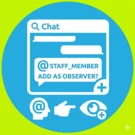
Adding an Observer to a task by tagging an employee in a comment
The module allows adding an Observer to a task by mentioning an employee in the task chat. This feature is available only in the updated Bitrix24 interface version.

Vacancies for the website
The 'Vacancies' module is designed for publishing and managing a company's open positions within a marketplace platform. It provides functionality for displaying current job listings, filtering by region, specialization, and experience level, and allows candidates to submit resumes or apply for specific roles.

ImgChanger — AI image replacement on the website
The module locates images on a website and replaces them with AI-generated alternatives. This solution is suitable for handling copyright claims or removing third-party photographs left over from a previous site version. Image search covers information blocks, including element preview and detail images, images embedded in text content, as well as file-type properties and HTML attributes.