Payments are experiencing issues due to temporary restrictions in Russia. If your payment does not go through, please submit a support request.•Our support team is available 24/7 — we are always here to help with hosting and server issues.•We are now accepting requests for dedicated server rental and colocation services in our data center.•Reminder: we recommend enabling backups for additional data protection.•A new VPS/VDS lineup with NVMe storage and improved performance is now available.•Maintenance work on some servers has been completed. All services are operating normally.•
Payments are experiencing issues due to temporary restrictions in Russia. If your payment does not go through, please submit a support request.•Our support team is available 24/7 — we are always here to help with hosting and server issues.•We are now accepting requests for dedicated server rental and colocation services in our data center.•Reminder: we recommend enabling backups for additional data protection.•A new VPS/VDS lineup with NVMe storage and improved performance is now available.•Maintenance work on some servers has been completed. All services are operating normally.•
Аккаунт в General iT
Вход / Регистрация
Войдите или создайте аккаунт для управления услугами в панели.
The module allows placing content tied to a specific site URL anywhere on a page.
When the module is invoked in multiple locations on a page, the data source for each location can be configured separately by specifying an information block section in the connected component settings. All data is retrieved from the designated section.
The module allows placing content tied to a specific site URL anywhere on a page.
When the module is invoked in multiple locations on a page, the data source for each location can be configured separately by specifying an information block section in the connected component settings. All data is retrieved from the designated section.
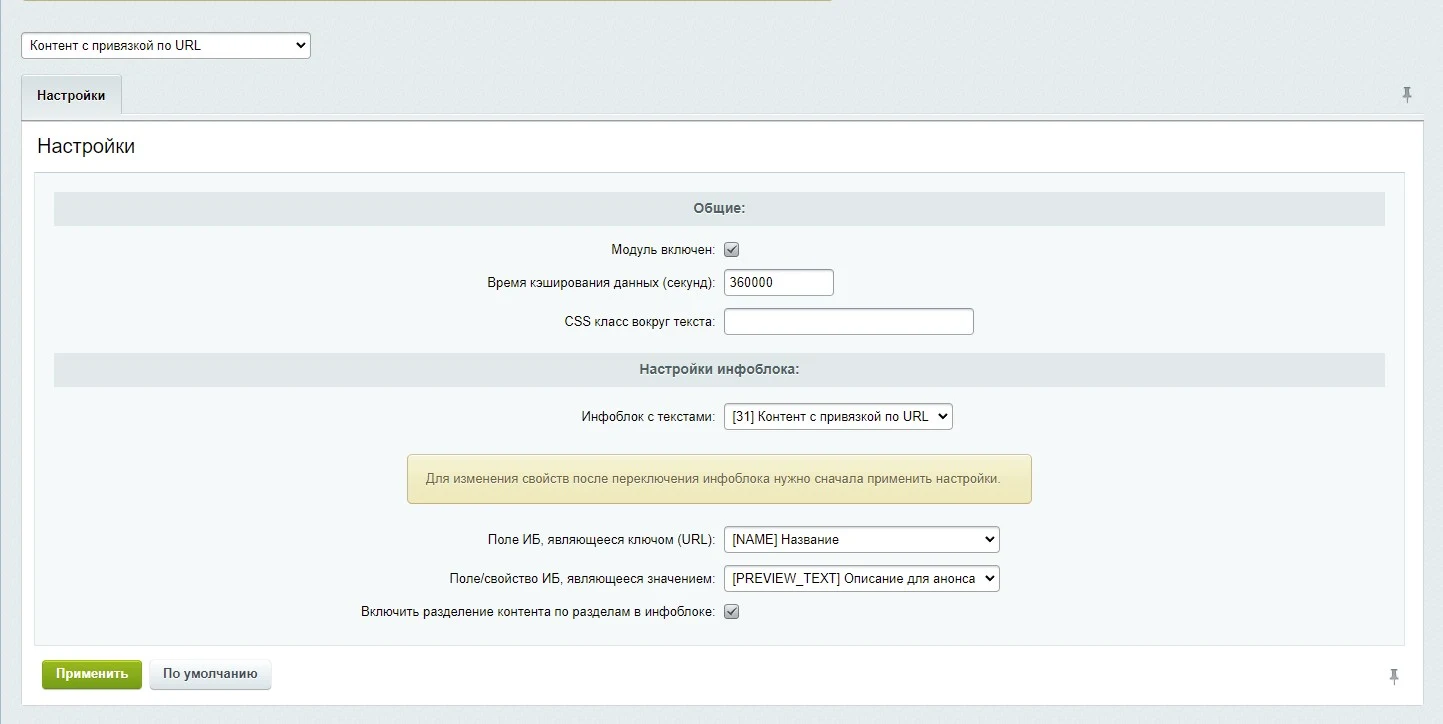
Active: toggle to enable or disable the module functionality.
Cache duration: number of seconds passed to the component cache settings.
CSS class: name of the class used to wrap the content retrieved from the information block.
Information block with texts: selection of the information block containing the data. By default, the block created during module installation is used.
Information block field for key: the information block field whose value is matched against the relative URL of the current page (without the domain, e.g., /catalog/ or /company/about/). By default, the "Name" field of the information block element is used.
Information block field or property for value: the field or property of the information block containing the content to be displayed. By default, the "Description for announcement" property is used.
The 'Content separation by InfoBlock sections' option determines whether InfoBlock sections are used to restrict the data source for the current component invocation. This setting is relevant when the component is placed in multiple locations on a single page, allowing each invocation to specify its required section.
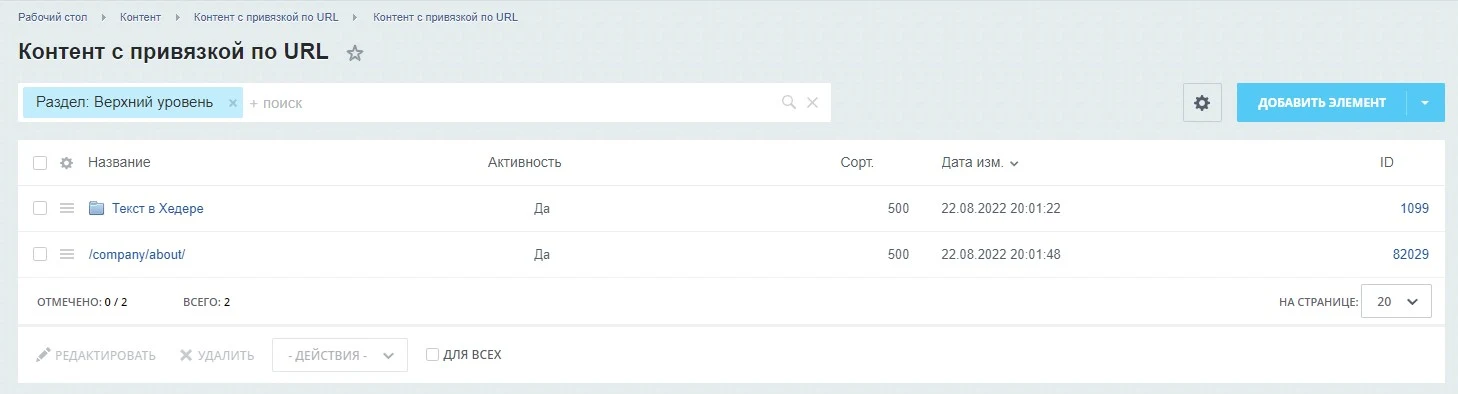
When this option is enabled, element searches by URL are restricted to the selected section. Elements from other sections are ignored, even if their key field contains a matching URL. This enables displaying different text blocks at various locations on the same page by associating each block with a specific InfoBlock section.
The sl3w:content.by.url component displays InfoBlock elements located in both the root and sections. Basic usage requires calling the component without parameters: $APPLICATION->IncludeComponent("sl3w:content.by.url", "");
If “Content linked by URL” is required, General iT can help with installation, configuration and a technical check after integration.
UPDATE HISTORY
What’s new
3 releases
1.0.3 (28.01.2023)Latest update
Module code refactoring.
Improved compatibility with PHP 8.
1.0.2 (10.09.2022)
Added a quick link button to the module settings after installation.
Minor fixes.
1.0.1 (06.09.2022)
Fixed an error with the module version specification.
The module automatically applies watermarks to images in fields and properties of information block elements. It supports image-based, text-based, or combined watermarking. Settings can be configured individually for each information block. Image processing can be triggered in the background via an agent.
The module redirects the sending of selected email events to the SendPulse email delivery service. Operation requires an active SendPulse account with a subscribed plan and valid API credentials. The server must also have the PHP cURL library installed, which is typically pre-installed by hosting providers. Detailed setup instructions are available in the 'Installation' tab.
The module adds section names to the search index for each element during the indexing process.
It supports indexing either the immediate parent section or the entire hierarchical chain of sections.
This enables searching for products or infoblock items by section names within standard search components.
The module locates images on a website and replaces them with AI-generated alternatives. This solution is suitable for handling copyright claims or removing third-party photographs left over from a previous site version.
Image search covers information blocks, including element preview and detail images, images embedded in text content, as well as file-type properties and HTML attributes.
The Structura module for 1C-Bitrix extends standard infoblock capabilities by enabling the creation of complex composite properties instead of flat fields. It allows defining hierarchical structures, such as banners containing text, images, and background color settings, storing these values in JSON format while providing an intuitive editing form within the administrative panel.
The module allows viewing the history of sent emails. Detailed information for each message is available, including the rendered content and used templates in the #NAME# format. If needed, an email can be marked as unsent for resending. The module also supports testing email delivery via standard Bitrix mechanisms and the PHP mail function.
The solution itself is free. Installation, configuration and customisation services are agreed separately. A compatible platform and an appropriate platform licence are required.
How do I check compatibility?
Compare the supported editions and solution version in the technical details with your project. Before installing on a live website, we recommend making a backup and checking the solution in a test environment.
Can you help with implementation?
We can help install the module, check its settings and verify how it works in your project. Compatibility with other customisations and the scope of work are assessed before we begin.
Your cookie choices
Necessary cookies support sign-in, your cart and security. Optional analytics helps improve the website and starts only with your permission.
Our metrika.git.ru system: public pages, a random identifier, device and interaction events. Form contents, account and payment pages are excluded. Raw events: up to 90 days. Operator: General IT Rus LLC, INN 2310208877.
Your browser requests no tracking: analytics is off.