Payments are experiencing issues due to temporary restrictions in Russia. If your payment does not go through, please submit a support request.•Our support team is available 24/7 — we are always here to help with hosting and server issues.•We are now accepting requests for dedicated server rental and colocation services in our data center.•Reminder: we recommend enabling backups for additional data protection.•A new VPS/VDS lineup with NVMe storage and improved performance is now available.•Maintenance work on some servers has been completed. All services are operating normally.•
Payments are experiencing issues due to temporary restrictions in Russia. If your payment does not go through, please submit a support request.•Our support team is available 24/7 — we are always here to help with hosting and server issues.•We are now accepting requests for dedicated server rental and colocation services in our data center.•Reminder: we recommend enabling backups for additional data protection.•A new VPS/VDS lineup with NVMe storage and improved performance is now available.•Maintenance work on some servers has been completed. All services are operating normally.•
Аккаунт в General iT
Вход / Регистрация
Войдите или создайте аккаунт для управления услугами в личном кабинете.
Страны не найдены. Попробуйте другое название или код.
MODULE FOR 1C-BITRIX
SenDev
SenDev: 152-FZ Personal Data
SenDev: 152-FZ Personal Data is a professional module for automating compliance with personal data legislation on websites managed by 1C-Bitrix. The solution fully addresses the technical requirements of Federal Law No. 152-FZ "On Personal Data" and Roskomnadzor regulations, converting complex regulatory processes into clear settings.
SenDev: 152-FZ Personal Data is a professional module for automating compliance with personal data legislation on websites managed by 1C-Bitrix. The solution fully addresses the technical requirements of Federal Law No. 152-FZ "On Personal Data" and Roskomnadzor regulations, converting complex regulatory processes into clear settings.
The module replaces manual consent collection and policy drafting by providing a unified management center. Its functionality includes gathering consents within forms, automatic cleanup of outdated data, and generation of a complete document package for Roskomnadzor. An integrated compliance assessment system allows you to verify your website's readiness for regulatory inspection.
The SenDev: 152-FZ Personal Data module provides flexible consent configuration in forms. You can use a single general checkbox or two separate ones: one for consent to personal data processing and another for acknowledging the privacy policy. Additional consents can be set as mandatory or optional.
Automatic insertion of consents supports exclusions based on page URLs, form CSS selectors, and text markers. This prevents consent blocks from being added to service, search, authentication, payment, and other unsuitable forms.
The styling of the automatically inserted consent block is configured separately: it supports inheriting the site design, switching between light and dark themes, and customizing colors for text, background, links, borders, and checkboxes.
The SenDev '152-FZ Personal Data' module unifies consent management, Cookie banners, policy generation, data cleanup processes, and incident logging into a single solution, eliminating the need to install separate components.
The policy generator ensures secure page publication with protection against PHP injections and directory traversal attacks.
Routine tasks are automated by agents that monitor data retention periods and deadlines for notifying state authorities.
The module supports flexible form configuration, including customizable consent checkbox modes, separation into mandatory and additional consents, server-side validation, styling customization, and the ability to exclude specific pages or forms from auto-substitution.
Cookie and analytics control includes managing the loading of marketing and analytics scripts after consent is obtained, ready-made integrations with popular services, and tools for diagnosing uncontrolled connections.
A personal account for data subjects allows users to manage their own data independently.
Preparation for inspections is supported by exporting registries to DOC and CSV formats and generating a document package for Roskomnadzor.
Data integrity control is implemented through hashing of consent records, audit logs, and external entities, with support for manual and automated verification of data immutability.
SenDev Consent Builder module ensures compliance with 152-FZ. A visual editor allows creating and versioning legal consent texts.
The system automatically adds a consent checkbox to all website forms using JavaScript injection and server-side validation. It supports configuring a single general checkbox or two separate ones: one for consent to personal data processing and another for acknowledging the privacy policy. Additional mandatory and optional consents can be created, such as for email newsletters or special processing conditions.
Styling options include inheriting site styles, switching between light and dark themes, and customizing colors for the consent block, text, links, borders, and checkboxes. Exclusions for automatic insertion are configured via URL masks, CSS selectors, and text markers within forms.
Consent blocks are designed for accessibility, supporting keyboard navigation, utilizing ARIA attributes, and displaying error messages directly next to the relevant form elements. A complete consent registry logs IP address, User-Agent, timestamp, and text version, with export capabilities in CSV, DOC, and XLS formats.
The module supports importing consent records for personal data processing from CSV files, the standard Bitrix module, or from web form results.
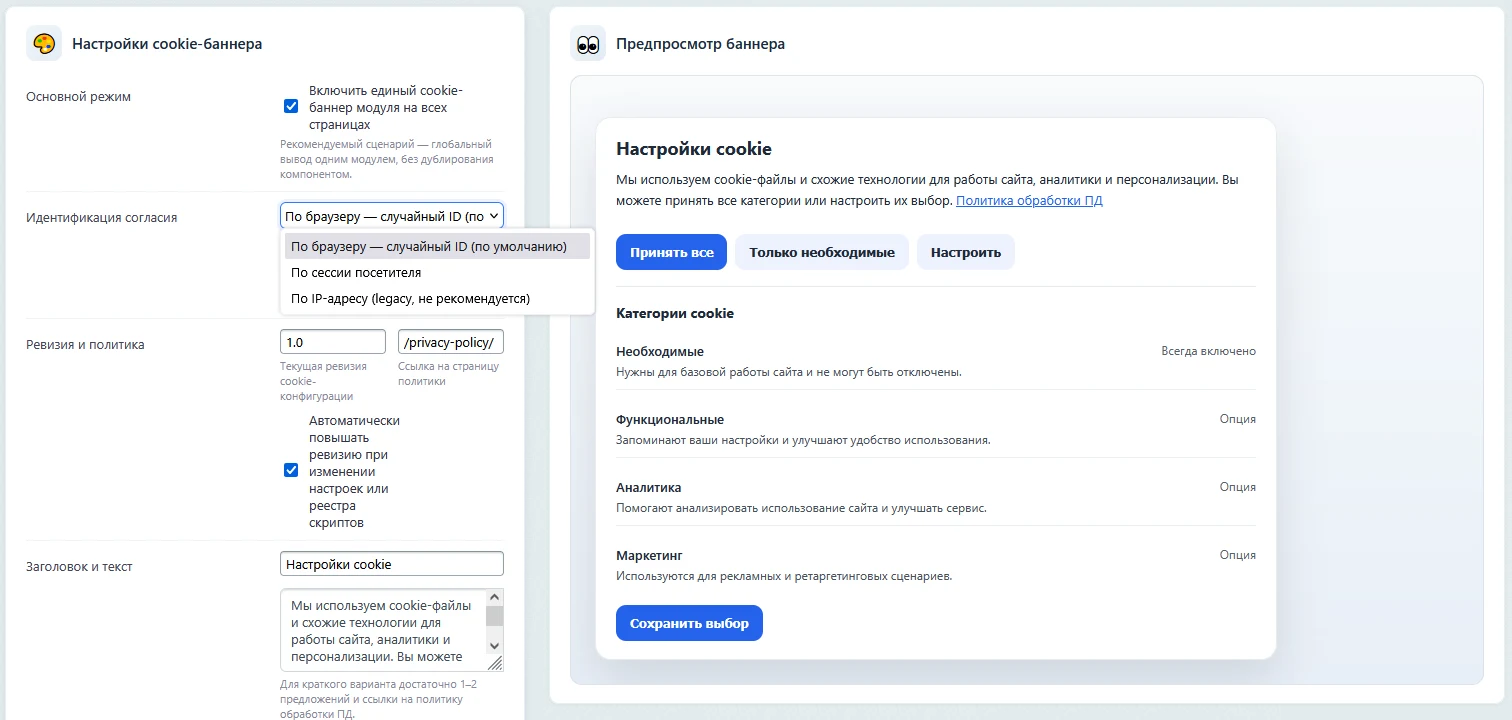
Flexible banner builder: configure design, positioning, text, and animations without a developer.
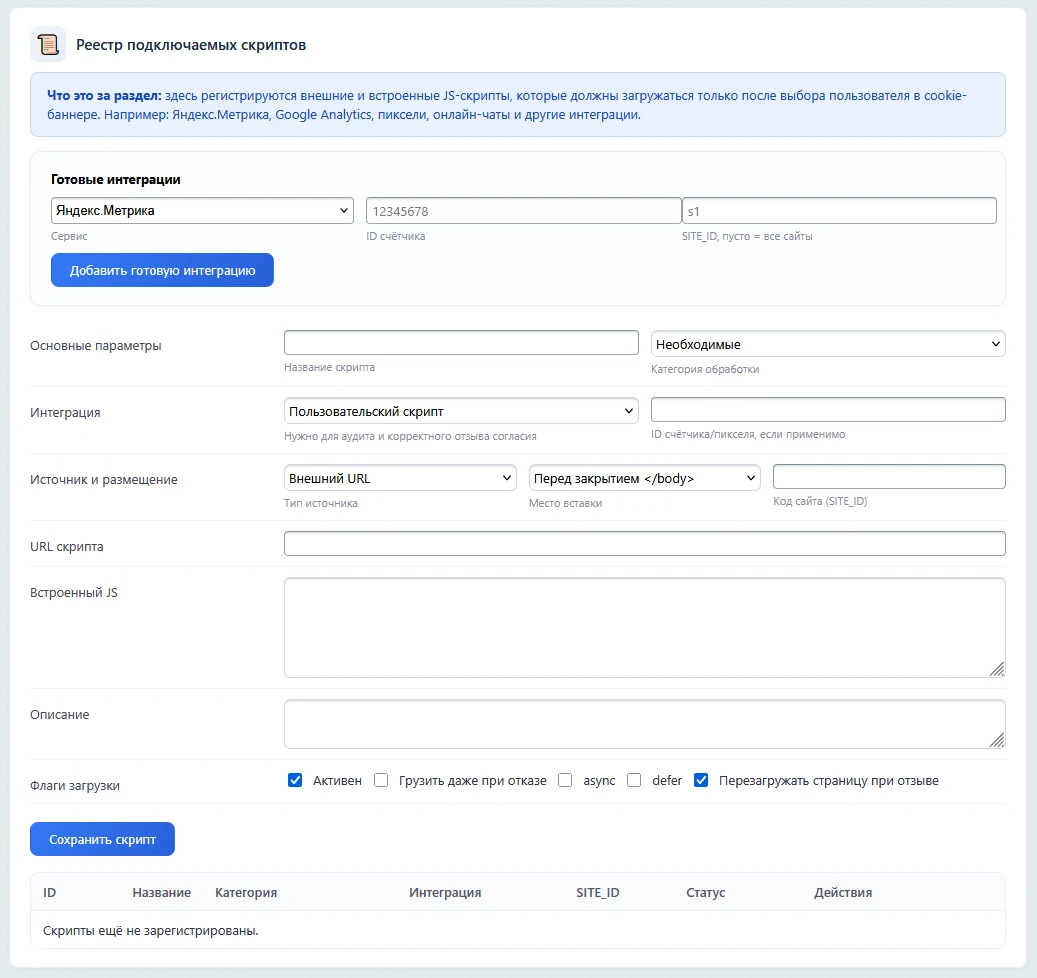
Script manager: register third-party scripts and assign them to categories (necessary, functional, analytics, marketing).
Ready integrations: preconfigured templates for Yandex.Metrica, Google Analytics 4, Google Tag Manager, VK Pixel, Meta Pixel, Top.Mail.Ru, JivoSite, and reCAPTCHA.
Blocking until consent: scripts of non-essential categories registered in the module load only after the user makes the corresponding selection.
Developer integration: support for the data-sendev-consent attribute to control the loading of script, iframe, img, and source elements directly within site templates.
Withdrawal of consent: users can change their previous choice. For known analytics services, the module performs actions to withdraw consent, clear relevant cookies, and, if necessary, reload the page.
Reopening settings: cookie settings can be accessed at any time via the standard button, a link with the data-sendev-cookie-settings attribute, or the JavaScript API.
Consent identification: by default, a unique browser identifier is used, preventing the transfer of settings between different visitors sharing a common external IP address.
Automatic revision: upon significant changes to the Cookie configuration, the module updates the settings revision. This ensures that previously saved preferences are not incorrectly applied to the new configuration.
Inventory: an integrated page scanner automatically detects third-party scripts and suggests categories for their classification.
Runtime audit: a tool for checking actually loaded resources helps identify analytics services and other connections that were activated before user consent was obtained.
Duplicate control: the module detects analytics counters that are simultaneously registered in the module's registry and present directly in the page's HTML source code.
Important: arbitrary third-party scripts already embedded directly by the developer into the site template are not rewritten automatically. To manage them, the script must be registered in the module's registry or the data-sendev-consent attribute must be used.
Data retention policies and automated cleanup
The system allows setting data lifetime limits for users, orders, forms, and Highload blocks. Specialized agents automatically anonymize or delete expired records. A safe mode with a dry-run preview is available before actual deletion. All operations are logged in detail with error reports.
Tools for working with personal data subjects
Includes a ready-made user dashboard component for viewing, revoking consents, and submitting deletion requests. The process for handling deletion requests (right to be forgotten) includes automatic deadline calculation (30 days) and generation of a Deletion Act. A REST API is provided for managing consents and submitting deletion requests.
Security, integrity, and reporting
The system maintains an incident registry with automatic calculation of notification deadlines for GosSOCPKA (24 hours) and Roskomnadzor in case of data breaches. An integrated document generator allows creating draft notifications, processing maps, and checklists for Roskomnadzor in one click. The personal data registry scanner automatically analyzes tables (users, orders, CRM, info blocks) for fields containing personal data.
The SenDev: 152-FZ Personal Data module ensures compliance with legal requirements through a website readiness assessment system. The dashboard displays the current status in points, allowing for the rapid identification of risks.
The audit system maintains a complete log of module and administrator actions. To guarantee record immutability, the hash-chain technology is employed. The module calculates HMAC-SHA256 hashes for consent records, audit logs, and external entities, supports manual integrity verification, and stores a history of check results.
The solution architecture includes 12 database tables: consents, templates, policy, cookie scripts, deletion requests, incidents, retention policies, deletion log, deletion log details, audit, import, and documents.
Functionality is extended by 7 event handlers that respond to user registration, update, and deletion, web form interactions, order processing, and cookie banner engagement. Seven background agents ensure automatic data cleanup, tracking of consent expiration, form scanning, reminder dispatch, compliance assessment, and deadline notifications.
The administrative interface comprises 17 pages: dashboard, setup wizard, general settings, consent management, builder, additional consents, cookie banner, policy generator, RKN documents, scanner, request processing, incident management, retention policies, deletion log, import, audit, and integrity control. The public component includes a consent widget and a personal account for the personal data subject.
A setup wizard is provided for rapid initialization. Access to the module's functionality is available via a REST API controller.
The module does not replace a lawyer. It provides technical tools to comply with 152-FZ requirements, including data collection, storage, deletion, and logging. Policy and consent texts are generated from templates, but final legal review tailored to your specific business model is recommended to be performed by a specialist.
The module does not slow down website performance. Core processes such as cleanup, scanning, and notifications are handled by background agents (cron). In the public interface, the Cookie banner and checkboxes are loaded via separate JS and CSS resources, avoiding heavy server-side operations on every page view.
The module is compatible with standard 1C-Bitrix forms. It automatically detects standard web forms (form.result), subscription forms, online store checkout forms, and CRM forms, adding a consent checkbox to them. Users can configure single or dual checkbox modes, add mandatory or optional additional consents, style the block, and exclude specific pages or forms from auto-insertion based on URL, CSS selectors, or text markers.
If a user does not accept Cookies, access to functionality requiring consent will be restricted according to the module's settings.
Scripts of optional categories registered in the module's script manager or connected via the data-sendev-consent attribute are not loaded. Only necessary resources are loaded. Scripts that the developer connected directly in the site template outside the module's mechanisms must be transferred to the module's management beforehand.
Configuring Yandex.Metrica and other popular services is possible without manually writing JavaScript. The script manager provides ready-made integrations. It is sufficient to specify the service parameters and select the Cookie category. The code connects only after obtaining the corresponding consent.
Users can change their Cookie decision after the first choice. Settings can be reopened via the module's standard button or a link in the site template. Upon revoking permission, the module updates the saved choice, removes known cookies of the corresponding integrations, and performs consent revocation actions supported by the services.
The module's data deletion mechanism is based on the user's revocation of consent.
Depending on the configured data retention policy, records are either completely removed from tables or anonymized by replacing values with specific markers (such as *** or deleted_user_ID). This approach preserves the integrity of related records, such as orders, without breaking database links.
The module allows customization of tables for scanning. Administrators can define a JSON configuration in the advanced settings to specify custom table names and fields that must be included in the personal data registry scan.
The subject's personal account is protected against unauthorized access. Revoking consents or submitting deletion requests requires authentication. API methods are secured with CSRF tokens and access control checks, ensuring users can manage only their own data.
Integrity control is implemented by calculating hashes for consent records, audit logs, and associated external entities. This mechanism helps detect unauthorized data modifications. Verification can be triggered manually via the 'Integrity Control' administrative section or performed automatically by a scheduled agent.
The SenDev: 152-FZ Personal Data module updates via the standard Marketplace method. The database table structure remains compatible with previous versions, ensuring data integrity. A backup is recommended before applying the update. After updating, verify consent settings, confirm the active consent template, review the layout of blocks in key public site forms, and check Cookie and analytics integration settings. Finally, run the integrity check within the module's administrative section.
The module is compatible with 1C-Bitrix: Site Management in any edition that includes the Web Forms or Online Store modules for full functionality.
Environment requirements:
- PHP version 7.4 or higher.
- Database: MySQL or PostgreSQL.
- Permissions: Write access to /bitrix/modules/, /bitrix/admin/, /upload/.
A bundle named "SenDev: Federal Laws Complex" is available in the marketplace, combining this module with the "SenDev: Foreign Prohibited 168-FZ" module.
If you have previously purchased a SenDev module, you may request a personalized offer for an additional solution. Discount terms are calculated individually based on the previously acquired module, the current price of the second solution, and any active promotions. To obtain the offer, contact the developer directly and provide your purchase details.
General iT can take care of implementing “SenDev: 152-FZ Personal Data”, including installation, configuration and result verification.
UPDATE HISTORY
What’s new
9 releases
1.3.31 (06.10.2026)Latest update
SenDev: 152-FZ Personal Data 1.3.31
Compatibility with PHP 7.4 restored while maintaining support for PHP 8.2+.
Calls to str_starts_with(), which are unavailable in PHP 7.4, have been removed.
The user guide has been clarified: the minimum PHP version is 7.4, and compatibility with PHP 8.2+ is confirmed.
There are no functional changes to the module's operation.
1.3.30 (06.10.2026)
SenDev: 152-FZ Personal Data 1.3.30
Enhancements to the built-in user guide.
The "User Guide" item has been added to the module's administrative menu.
An administrative page has been added to view the current docs/USER_GUIDE.md without leaving the administrative section.
The guide has been updated to version 1.3.30 and supplemented with information about access via the module menu.
1.3.26 (02.10.2026)
SenDev: 152-FZ Personal Data 1.3.26
Major technical update for compatibility, security, and administrative interface.
Support for PHP 8.2 and above has been confirmed.
Runtime changes to the database schema and hidden Options records during normal page opening have been eliminated.
A unified administrative bootstrap and D/R/W access rights have been added.
URL validation, table readiness checks, and security layers in the administrative section have been strengthened.
The cookie editor has been redesigned: visual settings are now located next to the live preview.
By default, uninstallation preserves data; complete removal requires an explicit selection.
Administrative wrappers and public components have been updated; AdminUi and namespaced event layers have been added to further move away from legacy code.
An up-to-date user guide has been added inside the module.
1.2.06 (02.10.2026)
SenDev: 152-FZ Personal Data 1.2.06
Fix for compatibility of client-side script insertion with HTML/JavaScript Bitrix.
The module's script insertion before the closing BODY tag has been corrected: only the main HTML document of the page is modified.
JavaScript strings containing the text of the closing BODY tag are no longer modified; incompatibility with the outdated Bitrix function ImgShw has been resolved.
Similar protection has been added to the legacy/fallback buffer handler for updated installations with old event registrations.
1.1.16 (25.08.2026)
SenDev: 152-FZ — version 1.1.16
Configurable consent block styling: inheritance of site styles, light, dark, and custom themes.
New recommended cookie consent mode based on a random browser ID; IP retained as legacy mode.
Correct handling of category changes/revocation, re-opening of cookie settings, and removal of known first-party cookies upon revocation.
Ready-made integrations: Yandex.Metrica, Google Analytics 4, Google Tag Manager, VK Pixel, Meta Pixel, Top.Mail.Ru, JivoSite, reCAPTCHA.
Inventory of direct/duplicate counters and runtime audit of actually loaded third-party resources prior to consent.
Automatic revision of cookie configuration and deferred data-sendev-consent markup.
Main public JS/CSS logic moved to separate assets.
Fixed server-side validation for Bitrix WebForm onBeforeResultAdd and compatibility with the old handler registration.
Fixed administrative navigation, integrity control messages, and UI for ready-made integrations.
No database structure migration required.
0.9.97 (07.08.2026)
SenDev: 152-FZ Personal Data — 0.9.97
Functional Changes
The duplicate settings page has been removed from the standard "Module Settings" section; the working settings remain on sendev_personaldata_settings.php.
Added the ability to define cookie consent based on IP address (default) or the visitor's server session.
Added a separate "Additional Consents" page for arbitrary checkboxes under forms: text + link.
Additional consents are included in client-side and server-side validation and are saved in the PAYLOAD of the main consent.
Fixed the passing of mode, revision, URL, and SITE_ID during cookie consent registration.
Documentation and testing recommendations have been updated.
Security and Reliability
Explicit verification of administrative rights has been added to all module pages and in the installed wrappers /bitrix/admin.
CSRF protection for public registration of consents and cookie consents has been added, including the D7 controller action.
The session CSRF token for public forms is taken from the current Bitrix session and works correctly with the dynamic JS context.
The scanner's service cache, temporary import files, and diagnostic Sale log have been moved from the public /upload directory to /bitrix/cache/sendev.personaldata.
The Sale debug log is disabled by default and is created only when debug_logging=Y.
The updater cleans only known obsolete service files and updates external admin/tools files idempotently.
Documentation and security checklist have been updated.
0.9.95 (30.05.2026)
Version 0.9.95
Added a mechanism for controlling the integrity of consent records, audit logs, and external entities.
For the consent registry, HMAC-SHA256 hashes have been added: CONSENT_HASH, HASH_ALGO, HASHED_AT.
For the audit log, a hash-chain model has been added: PREV_HASH, ROW_HASH, HASH_ALGO, HASHED_AT.
Tables sendev_pd_integrity_hash and sendev_pd_integrity_check have been added to store external hashes and integrity check reports.
IntegrityService has been added for calculating hashes, backfilling old records, and verifying integrity.
A periodic integrity check agent has been added.
An administrative page "Integrity Control" has been added, allowing manual initiation of integrity checks and hash backfilling.
The consent registry now displays the hash, algorithm, and hash date.
The audit log now displays the record hash and the previous hash in the hash-chain.
A block showing the latest integrity check status has been added to the dashboard.
0.9.90 (11.05.2026)
Update 0.9.90
This update improves consent handling, automatic checkbox insertion into forms, and module settings.
A separate checkbox mode has been added: one checkbox for consent to process personal data and a separate confirmation for acknowledging the personal data processing policy.
Automatic insertion of consents into public site forms has been improved: WebForm, CRM forms, subscription forms, feedback forms, and callback/contact/request forms.
Settings for exceptions to automatic consent insertion have been added: by URL masks, CSS form selectors, and text markers within the form.
Checkbox insertion has been excluded from service, search, filter, authorization, forum, payment, and system forms.
Order form processing has been improved: the consent checkbox is displayed in the order form, and consent is recorded without duplicating entries.
Protection against duplicate registration of the same consent has been added when server-side handlers and JS endpoints operate simultaneously.
Synchronization of old and new consent option keys has been improved for compatibility with previous module versions.
Normalization and validation of setting values have been added: policy URL, IDs of active documents, email addresses, numeric intervals, and default consent texts.
The consent builder has been improved: preview and HTML snippets now account for one or two checkbox modes.
Security of error output and HTML snippets in the administrative section has been strengthened.
The module settings page has been updated: parameters for managing checkbox mode and automatic insertion exceptions have been added.
After installing the update, it is recommended to check the settings in the "Consents" section, the active consent template, and the functionality of the main public site forms.
0.9.70 (09.04.2026)
Update 0.9.70
Pagination added to the consent registry.
Filters added for consent type and component/source.
Server-side data retrieval for the consent registry has been optimized.
Database indexes added to accelerate filtering and loading of the registry.
Automatic database structure migration added for previously installed module versions.
MySQL and PostgreSQL schemas updated to match the current module ORM and service structure.
USER EXPERIENCE
Solution reviews
How does this solution work in a real project? Share your experience and help others choose.
Be the first to share your experience
There are no reviews of this solution on git.ru yet. Tell us what worked well and what could be improved.
✓
Verified purchaseAdd a key if you wish. A verified review gets a badge, priority placement and more rating weight.
↗
Open to every clientJust sign in to your account. A key is optional; all reviews are moderated.
SenDev: Protect is a spam protection module for 1C-Bitrix. The solution blocks spam bot activity using a set of proven methods without complicating the experience for real users.
Automatic form detection
The module scans the site and identifies all available forms:
Web forms (form module) — all active forms on the site.
SenDev module for 1C-Bitrix enables the placement of interactive Before/After image comparison blocks. The solution is suitable for demonstrating results in renovation, interior design, automotive, beauty services, retouching, medicine, cleaning, and manufacturing sectors.
SenDev: File Inspector is a tool for auditing and managing the file system of 1C-Bitrix projects. The solution provides not only file viewing but also full version control with change analysis.
The module interface is built on Bitrix Vue 3, ensuring deep integration with the admin panel, high performance, and compliance with modern development standards.
The module automates image compression on the website in accordance with Google PageSpeed Insights recommendations. It supports integration via CDN OptiPic, allowing optimization without modifying image URLs. The main advantage of CDN integration is the automatic conversion of images to the modern WebP format to minimize file size. Browsers that support WebP receive images in that format.
The module is designed for online stores running on the 1C-Bitrix platform to automate the integration of supplier product catalogs. It is also suitable for news and city portals to facilitate content population. The solution supports data import in Excel, XML, YML, CSV, and RSS formats.
The module is designed for the «1C-Bitrix: Site Management» platform and enables importing infoblock elements, including products, from Excel files. It also supports data loading into Highload blocks.
The displayed price covers the solution itself. Platform licensing, installation and customisation are checked separately. If the page offers bundles, select the required option before submitting a request.
How do I check compatibility?
Compare the supported editions and solution version in the technical details with your project. Before installing on a live website, we recommend making a backup and checking the solution in a test environment.
Is there a trial?
The developer lists a trial of 2 days. The trial button opens the installer in your website control panel. Check the required features and compatibility before purchasing.
How much does this solution’s renewal cost?
The current renewal price is 12,000 ₽. Before you order, a manager will confirm the renewal period and whether it applies to your licence.
Can you help with implementation?
We can help install the module, check its settings and verify how it works in your project. Compatibility with other customisations and the scope of work are assessed before we begin.
Statistics and interaction recording
Public pages use basic statistics. Our recording and Yandex Webvisor require your permission. You can keep basic statistics or disable all analytics.
Operator: General IT Rus LLC, INN 2310208877. Statistics and recording help improve the website.
Basic statistics: pageviews, a random daily ID, a public URL and time. The ID lasts until Moscow midnight. Original records: up to 48 hours; totals: up to 7 years.
Campaign tags and a technical identifier are sent by our server to the existing Yandex tag. Visitor IP, User-Agent and cookies are not included in this transfer. If selected, its browser code collects technical data, cookies, actions and masked page snapshots; recordings last 15 days. Inputs, chat and account areas are hidden.
Interaction recording requires permission: clicks, scrolling, technical information and filtered public-page snapshots. Events: up to 7 years; IP and snapshots: up to 90 days.
Permission is remembered for up to 365 days; full opt-out remains until changed. Basic statistics only disables recording; Disable all analytics stops new analytics. Previously sent data is not automatically deleted. Withdrawal and requests: support@git.ru. Full terms are linked below.
Your browser requests no tracking: analytics is off.