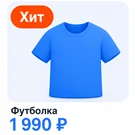
What this solution does
Product image stickers: labels for 'Bestseller', 'Sale', '-20%', and custom text.
The module overlays labels on product images in catalog lists and on individual product pages. Display conditions are defined by rules based on category, properties, price, stock levels, and creation date. The system automatically updates the selection of matching items without manual intervention.
The website template remains unchanged. Stickers are applied over the existing layout, ensuring that template updates or theme migrations do not break functionality.
Benefits for the store
Promotional and priority items often get lost in general lists due to uniform card appearance. A label on the image draws customer attention to these key products.
The module automates product photo infographics, eliminating the need for manual editing in graphic software. Discounts, brands, volumes, expiration dates, and other attributes can be automatically overlaid on images across the entire catalog and removed automatically after the promotion ends.
Capabilities
Condition builder supporting nested AND/OR rule groups. Filters are available for system product fields, infoblock properties, catalog data (price, stock, availability), and sections with nesting. The builder interface displays the count of products matching the criteria and allows viewing their list without leaving the form.
Conditions operate automatically. The 'last N days' operator creates 'New' stickers: they appear when a product is added and disappear after the specified period. The 'older than N days' operator highlights stale items. Each condition has its own active period with start and end dates to automatically enable and disable promotions. Recalculation is performed by a background agent with a configurable frequency ranging from 15 minutes to 24 hours.
Sticker content can be configured in one of the following ways:
- custom text;
- value of any product property;
- discount percentage or amount calculated based on active catalog discounts, displayed as seen by a standard visitor;
- composite template (e.g., 'Hit {BRAND}' or '-{DISCOUNT_PERCENT}'): empty values and unnecessary separators are automatically removed; if the resulting string is empty, the sticker is not rendered;
- icon: eight SVG icons included plus the option to upload a custom one with automatic recoloring to the required color.
Sticker styling offers four shapes: rectangle, capsule, circle, and corner ribbon. Settings include background and text color, transparent background, border, overall opacity, size, font weight, and text wrapping. Up to nine elements can be placed on a single image with precise X and Y offset adjustments. The preview updates in real time as you adjust settings.
Multiple stickers can be applied simultaneously. A single condition can have several layouts, and there is no limit on the number of conditions. Examples include a "Hit" badge in the corner, a discount at the bottom, or a brand icon on the side. Display order and priority are controlled by sorting.
Display settings for product lists and product cards are configured separately. For each condition, you can independently enable display on the product detail page and on mobile devices. The screen width threshold for mobile mode is set manually.
The module supports multi-site deployment. Store settings can be shared across all sites, while individual sites can override these with custom layouts and selectors.
The module does not burden the storefront. It executes no SQL queries per page; the sticker map is calculated by a background agent and stored in the cache. It is compatible with the Composite system.
General iT can install and configure this module and check how it works on your website.